Introducing G2.ai, the future of software buying.Try now

Best Digital Adoption Platforms for Small Business

Nana Serwah Nkrahene
NSN
Researched and written by Nana Serwah Nkrahene

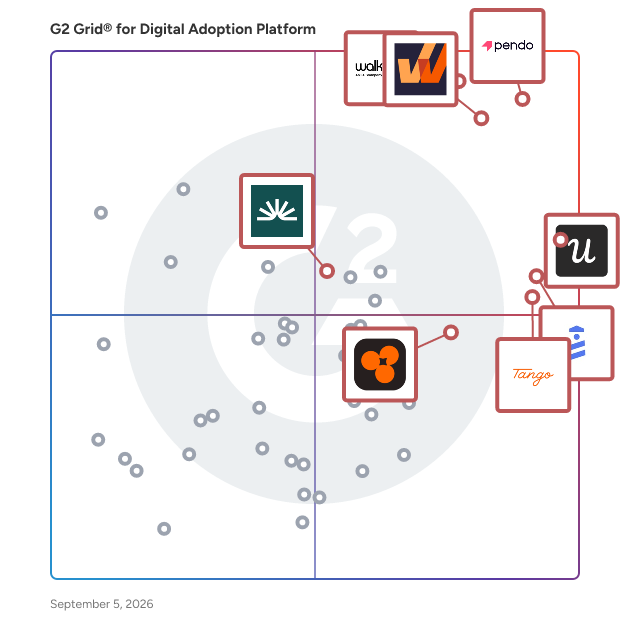
Products classified in the overall Digital Adoption Platform category are similar in many regards and help companies of all sizes solve their business problems. However, small business features, pricing, setup, and installation differ from businesses of other sizes, which is why we match buyers to the right Small Business Digital Adoption Platform to fit their needs. Compare product ratings based on reviews from enterprise users or connect with one of G2's buying advisors to find the right solutions within the Small Business Digital Adoption Platform category.

In addition to qualifying for inclusion in the Digital Adoption Platforms category, to qualify for inclusion in the Small Business Digital Adoption Platforms category, a product must have at least 10 reviews left by a reviewer from a small business.

Show More
Show Less

G2 takes pride in showing unbiased reviews on user satisfaction in our ratings and reports. We do not allow paid placements in any of our ratings, rankings, or reports. Learn about our scoring methodologies.

1 filter applied
Clear All

31 Listings in Small Business Digital Adoption Platform Available

(753)4.7 out of 5
Optimized for quick response
2nd Easiest To Use in Digital Adoption Platform software
Save to My Lists
  • Overview
    Expand/Collapse Overview
  • Product Description
    How are these determined?Information
    This description is provided by the seller.

    UserGuiding empowers product teams to boost user activation and drive revenue growth through its all-in-one, no-code platform. Quickly implement superior self-service experiences that enhance user ado

    Users
    • Product Manager
    • Product Designer
    Industries
    • Computer Software
    • Information Technology and Services
    Market Segment
    • 55% Small-Business
    • 36% Mid-Market
  • Pros and Cons
    Expand/Collapse Pros and Cons
  • UserGuiding Pros and Cons
    How are these determined?Information
    Pros and Cons are compiled from review feedback and grouped into themes to provide an easy-to-understand summary of user reviews.
    Pros
    Ease of Use
    238
    Customer Support
    137
    Intuitive
    102
    Easy Setup
    100
    Features
    96
    Cons
    Limited Customization
    53
    Learning Curve
    33
    Limited Options
    22
    Expensive
    21
    Missing Features
    20
  • User Satisfaction
    Expand/Collapse User Satisfaction
  • UserGuiding features and usability ratings that predict user satisfaction
    8.7
    User Segmentation
    Average: 8.7
    9.1
    Ease of Use
    Average: 9.0
    9.1
    Text Bubble Walkthroughs
    Average: 9.0
    8.6
    Audio-visual Walkthroughs
    Average: 8.8
  • Seller Details
    Expand/Collapse Seller Details
  • Seller Details
    Company Website
    Year Founded
    2017
    HQ Location
    Istanbul, TR
    Twitter
    @UserGuiding
    1,826 Twitter followers
    LinkedIn® Page
    www.linkedin.com
    32 employees on LinkedIn®
Product Description
How are these determined?Information
This description is provided by the seller.

UserGuiding empowers product teams to boost user activation and drive revenue growth through its all-in-one, no-code platform. Quickly implement superior self-service experiences that enhance user ado

Users
  • Product Manager
  • Product Designer
Industries
  • Computer Software
  • Information Technology and Services
Market Segment
  • 55% Small-Business
  • 36% Mid-Market
UserGuiding Pros and Cons
How are these determined?Information
Pros and Cons are compiled from review feedback and grouped into themes to provide an easy-to-understand summary of user reviews.
Pros
Ease of Use
238
Customer Support
137
Intuitive
102
Easy Setup
100
Features
96
Cons
Limited Customization
53
Learning Curve
33
Limited Options
22
Expensive
21
Missing Features
20
UserGuiding features and usability ratings that predict user satisfaction
8.7
User Segmentation
Average: 8.7
9.1
Ease of Use
Average: 9.0
9.1
Text Bubble Walkthroughs
Average: 9.0
8.6
Audio-visual Walkthroughs
Average: 8.8
Seller Details
Company Website
Year Founded
2017
HQ Location
Istanbul, TR
Twitter
@UserGuiding
1,826 Twitter followers
LinkedIn® Page
www.linkedin.com
32 employees on LinkedIn®
(899)4.6 out of 5
Optimized for quick response
8th Easiest To Use in Digital Adoption Platform software
Save to My Lists
Entry Level Price:Starting at $249.00
  • Overview
    Expand/Collapse Overview
  • Product Description
    How are these determined?Information
    This description is provided by the seller.

    Userpilot is an all-in-one platform for Product, UX, and Marketing teams. It combines Product Analytics, Session Replay, In-app Engagement and In-app Surveys to help you increase product adoption.

    Users
    • Product Manager
    • Customer Success Manager
    Industries
    • Computer Software
    • Information Technology and Services
    Market Segment
    • 55% Mid-Market
    • 39% Small-Business
  • Pros and Cons
    Expand/Collapse Pros and Cons
  • Userpilot Pros and Cons
    How are these determined?Information
    Pros and Cons are compiled from review feedback and grouped into themes to provide an easy-to-understand summary of user reviews.
    Pros
    Ease of Use
    364
    Customer Support
    208
    Intuitive
    199
    Helpful
    191
    Easy Setup
    163
    Cons
    Learning Curve
    114
    Steep Learning Curve
    85
    Limited Customization
    58
    Limitations
    44
    Missing Features
    40
  • User Satisfaction
    Expand/Collapse User Satisfaction
  • Userpilot features and usability ratings that predict user satisfaction
    8.7
    User Segmentation
    Average: 8.7
    8.6
    Ease of Use
    Average: 9.0
    8.9
    Text Bubble Walkthroughs
    Average: 9.0
    8.2
    Audio-visual Walkthroughs
    Average: 8.8
  • Seller Details
    Expand/Collapse Seller Details
  • Seller Details
    Seller
    Userpilot
    Company Website
    Year Founded
    2019
    HQ Location
    Austin, US
    Twitter
    @teamuserpilot
    812 Twitter followers
    LinkedIn® Page
    www.linkedin.com
    81 employees on LinkedIn®
Product Description
How are these determined?Information
This description is provided by the seller.

Userpilot is an all-in-one platform for Product, UX, and Marketing teams. It combines Product Analytics, Session Replay, In-app Engagement and In-app Surveys to help you increase product adoption.

Users
  • Product Manager
  • Customer Success Manager
Industries
  • Computer Software
  • Information Technology and Services
Market Segment
  • 55% Mid-Market
  • 39% Small-Business
Userpilot Pros and Cons
How are these determined?Information
Pros and Cons are compiled from review feedback and grouped into themes to provide an easy-to-understand summary of user reviews.
Pros
Ease of Use
364
Customer Support
208
Intuitive
199
Helpful
191
Easy Setup
163
Cons
Learning Curve
114
Steep Learning Curve
85
Limited Customization
58
Limitations
44
Missing Features
40
Userpilot features and usability ratings that predict user satisfaction
8.7
User Segmentation
Average: 8.7
8.6
Ease of Use
Average: 9.0
8.9
Text Bubble Walkthroughs
Average: 9.0
8.2
Audio-visual Walkthroughs
Average: 8.8
Seller Details
Seller
Userpilot
Company Website
Year Founded
2019
HQ Location
Austin, US
Twitter
@teamuserpilot
812 Twitter followers
LinkedIn® Page
www.linkedin.com
81 employees on LinkedIn®

This is how G2 Deals can help you:

  • Easily shop for curated – and trusted – software
  • Own your own software buying journey
  • Discover exclusive deals on software
(413)4.8 out of 5
Optimized for quick response
1st Easiest To Use in Digital Adoption Platform software
Save to My Lists
Entry Level Price:Free
  • Overview
    Expand/Collapse Overview
  • Product Description
    How are these determined?Information
    This description is provided by the seller.

    Tango is a browser extension that makes knowledge sharing and enablement simple and reliable. By simply clicking through a process once, anyone can generate a polished, step-by-step guide in seconds,

    Users
    No information available
    Industries
    • Computer Software
    • Marketing and Advertising
    Market Segment
    • 55% Small-Business
    • 32% Mid-Market
    User Sentiment
    How are these determined?Information
    These insights, currently in beta, are compiled from user reviews and grouped to display a high-level overview of the software.
    • Tango is a tool designed for creating step-by-step guides and tutorials, capturing screenshots, and sharing these guides with others.
    • Reviewers appreciate Tango's user-friendly interface, its ability to seamlessly integrate into their workflow, and its efficiency in creating clear, visual guides that save them significant time.
    • Users mentioned limitations such as the inability to use Tango with desktop applications, occasional issues with capturing exact details, and a desire for more customization options in the final guides.
  • Pros and Cons
    Expand/Collapse Pros and Cons
  • Tango Pros and Cons
    How are these determined?Information
    Pros and Cons are compiled from review feedback and grouped into themes to provide an easy-to-understand summary of user reviews.
    Pros
    Ease of Use
    189
    Easy Creation
    92
    Time-saving
    80
    Easy Editing
    61
    Easy Sharing
    59
    Cons
    Limitations
    18
    Screenshot Issues
    16
    Editing Difficulties
    15
    Limited Functionality
    14
    Missing Functionality
    14
  • User Satisfaction
    Expand/Collapse User Satisfaction
  • Tango features and usability ratings that predict user satisfaction
    7.8
    User Segmentation
    Average: 8.7
    9.5
    Ease of Use
    Average: 9.0
    9.0
    Text Bubble Walkthroughs
    Average: 9.0
    8.4
    Audio-visual Walkthroughs
    Average: 8.8
  • Seller Details
    Expand/Collapse Seller Details
  • Seller Details
    Seller
    Tango
    Company Website
    Year Founded
    2020
    HQ Location
    Los Angeles, CA
    LinkedIn® Page
    www.linkedin.com
    67 employees on LinkedIn®
Product Description
How are these determined?Information
This description is provided by the seller.

Tango is a browser extension that makes knowledge sharing and enablement simple and reliable. By simply clicking through a process once, anyone can generate a polished, step-by-step guide in seconds,

Users
No information available
Industries
  • Computer Software
  • Marketing and Advertising
Market Segment
  • 55% Small-Business
  • 32% Mid-Market
User Sentiment
How are these determined?Information
These insights, currently in beta, are compiled from user reviews and grouped to display a high-level overview of the software.
  • Tango is a tool designed for creating step-by-step guides and tutorials, capturing screenshots, and sharing these guides with others.
  • Reviewers appreciate Tango's user-friendly interface, its ability to seamlessly integrate into their workflow, and its efficiency in creating clear, visual guides that save them significant time.
  • Users mentioned limitations such as the inability to use Tango with desktop applications, occasional issues with capturing exact details, and a desire for more customization options in the final guides.
Tango Pros and Cons
How are these determined?Information
Pros and Cons are compiled from review feedback and grouped into themes to provide an easy-to-understand summary of user reviews.
Pros
Ease of Use
189
Easy Creation
92
Time-saving
80
Easy Editing
61
Easy Sharing
59
Cons
Limitations
18
Screenshot Issues
16
Editing Difficulties
15
Limited Functionality
14
Missing Functionality
14
Tango features and usability ratings that predict user satisfaction
7.8
User Segmentation
Average: 8.7
9.5
Ease of Use
Average: 9.0
9.0
Text Bubble Walkthroughs
Average: 9.0
8.4
Audio-visual Walkthroughs
Average: 8.8
Seller Details
Seller
Tango
Company Website
Year Founded
2020
HQ Location
Los Angeles, CA
LinkedIn® Page
www.linkedin.com
67 employees on LinkedIn®
(535)4.5 out of 5
Optimized for quick response
6th Easiest To Use in Digital Adoption Platform software
Save to My Lists
  • Overview
    Expand/Collapse Overview
  • Product Description
    How are these determined?Information
    This description is provided by the seller.

    WalkMe, an SAP company, pioneered the world’s leading Digital Adoption Platform, helping organizations navigate the change brought on by technology across any application or system. Leveraging over a

    Users
    • Instructional Designer
    • Digital Adoption Specialist
    Industries
    • Computer Software
    • Information Technology and Services
    Market Segment
    • 59% Enterprise
    • 28% Mid-Market
  • Pros and Cons
    Expand/Collapse Pros and Cons
  • WalkMe Pros and Cons
    How are these determined?Information
    Pros and Cons are compiled from review feedback and grouped into themes to provide an easy-to-understand summary of user reviews.
    Pros
    Ease of Use
    98
    Helpful
    68
    Customer Support
    65
    Features
    50
    Training
    47
    Cons
    Learning Curve
    34
    Complexity
    26
    Delays
    18
    Limitations
    17
    Steep Learning Curve
    17
  • User Satisfaction
    Expand/Collapse User Satisfaction
  • WalkMe features and usability ratings that predict user satisfaction
    8.6
    User Segmentation
    Average: 8.7
    8.3
    Ease of Use
    Average: 9.0
    9.0
    Text Bubble Walkthroughs
    Average: 9.0
    8.0
    Audio-visual Walkthroughs
    Average: 8.8
  • Seller Details
    Expand/Collapse Seller Details
  • Seller Details
    Seller
    SAP
    Company Website
    Year Founded
    1972
    HQ Location
    Walldorf
    Twitter
    @SAP
    297,344 Twitter followers
    LinkedIn® Page
    www.linkedin.com
    138,451 employees on LinkedIn®
Product Description
How are these determined?Information
This description is provided by the seller.

WalkMe, an SAP company, pioneered the world’s leading Digital Adoption Platform, helping organizations navigate the change brought on by technology across any application or system. Leveraging over a

Users
  • Instructional Designer
  • Digital Adoption Specialist
Industries
  • Computer Software
  • Information Technology and Services
Market Segment
  • 59% Enterprise
  • 28% Mid-Market
WalkMe Pros and Cons
How are these determined?Information
Pros and Cons are compiled from review feedback and grouped into themes to provide an easy-to-understand summary of user reviews.
Pros
Ease of Use
98
Helpful
68
Customer Support
65
Features
50
Training
47
Cons
Learning Curve
34
Complexity
26
Delays
18
Limitations
17
Steep Learning Curve
17
WalkMe features and usability ratings that predict user satisfaction
8.6
User Segmentation
Average: 8.7
8.3
Ease of Use
Average: 9.0
9.0
Text Bubble Walkthroughs
Average: 9.0
8.0
Audio-visual Walkthroughs
Average: 8.8
Seller Details
Seller
SAP
Company Website
Year Founded
1972
HQ Location
Walldorf
Twitter
@SAP
297,344 Twitter followers
LinkedIn® Page
www.linkedin.com
138,451 employees on LinkedIn®
(178)4.7 out of 5
5th Easiest To Use in Digital Adoption Platform software
View top Consulting Services for Product Fruits
Save to My Lists
  • Overview
    Expand/Collapse Overview
  • Product Description
    How are these determined?Information
    This description is provided by the seller.

    Adaptive onboarding and user enablement powered by AI Product Fruits helps product teams create onboarding experiences that guide users to value faster with AI-driven personalization and in-app sup

    Users
    • Product Manager
    • CTO
    Industries
    • Computer Software
    • Information Technology and Services
    Market Segment
    • 69% Small-Business
    • 24% Mid-Market
  • Pros and Cons
    Expand/Collapse Pros and Cons
  • Product Fruits Pros and Cons
    How are these determined?Information
    Pros and Cons are compiled from review feedback and grouped into themes to provide an easy-to-understand summary of user reviews.
    Pros
    Customer Support
    52
    Ease of Use
    52
    Easy Setup
    39
    Intuitive
    27
    Easy Implementation
    21
    Cons
    Learning Curve
    14
    Limited Customization
    11
    Difficult Customization
    5
    Editor Issues
    5
    Expensive
    5
  • User Satisfaction
    Expand/Collapse User Satisfaction
  • Product Fruits features and usability ratings that predict user satisfaction
    8.5
    User Segmentation
    Average: 8.7
    8.8
    Ease of Use
    Average: 9.0
    9.0
    Text Bubble Walkthroughs
    Average: 9.0
    8.6
    Audio-visual Walkthroughs
    Average: 8.8
  • Seller Details
    Expand/Collapse Seller Details
  • Seller Details
    Company Website
    Year Founded
    2019
    HQ Location
    Prague, CZ
    Twitter
    @productfruits
    20 Twitter followers
    LinkedIn® Page
    www.linkedin.com
    21 employees on LinkedIn®
Product Description
How are these determined?Information
This description is provided by the seller.

Adaptive onboarding and user enablement powered by AI Product Fruits helps product teams create onboarding experiences that guide users to value faster with AI-driven personalization and in-app sup

Users
  • Product Manager
  • CTO
Industries
  • Computer Software
  • Information Technology and Services
Market Segment
  • 69% Small-Business
  • 24% Mid-Market
Product Fruits Pros and Cons
How are these determined?Information
Pros and Cons are compiled from review feedback and grouped into themes to provide an easy-to-understand summary of user reviews.
Pros
Customer Support
52
Ease of Use
52
Easy Setup
39
Intuitive
27
Easy Implementation
21
Cons
Learning Curve
14
Limited Customization
11
Difficult Customization
5
Editor Issues
5
Expensive
5
Product Fruits features and usability ratings that predict user satisfaction
8.5
User Segmentation
Average: 8.7
8.8
Ease of Use
Average: 9.0
9.0
Text Bubble Walkthroughs
Average: 9.0
8.6
Audio-visual Walkthroughs
Average: 8.8
Seller Details
Company Website
Year Founded
2019
HQ Location
Prague, CZ
Twitter
@productfruits
20 Twitter followers
LinkedIn® Page
www.linkedin.com
21 employees on LinkedIn®
(3,721)4.5 out of 5
Optimized for quick response
12th Easiest To Use in Digital Adoption Platform software
View top Consulting Services for Fin by Intercom
Save to My Lists
Entry Level Price:$0.99
  • Overview
    Expand/Collapse Overview
  • Product Description
    How are these determined?Information
    This description is provided by the seller.

    Fin by Intercom is the best performing AI Agent for customer service. It automates complex queries, improves resolution times, and delivers consistently high-quality support at scale. Key benefits

    Users
    • Customer Success Manager
    • CEO
    Industries
    • Computer Software
    • Information Technology and Services
    Market Segment
    • 57% Small-Business
    • 37% Mid-Market
    User Sentiment
    How are these determined?Information
    These insights, currently in beta, are compiled from user reviews and grouped to display a high-level overview of the software.
    • Fin by Intercom is a tool that organizes customer conversations and integrates with Intercom's knowledge base function to provide answers.
    • Reviewers like the tool's ability to save time, its user-friendly functionality, and its ability to integrate with their existing knowledge bases to provide accurate responses.
    • Users reported difficulties in understanding where to make changes for better responses, issues with email delegation, and challenges in setting up the tool.
  • Pros and Cons
    Expand/Collapse Pros and Cons
  • Fin by Intercom Pros and Cons
    How are these determined?Information
    Pros and Cons are compiled from review feedback and grouped into themes to provide an easy-to-understand summary of user reviews.
    Pros
    Ease of Use
    409
    Helpful
    390
    Features
    314
    Customer Support
    250
    Efficiency
    240
    Cons
    Missing Features
    144
    Limited Features
    119
    Learning Curve
    99
    AI Limitations
    95
    Expensive
    86
  • User Satisfaction
    Expand/Collapse User Satisfaction
  • Fin by Intercom features and usability ratings that predict user satisfaction
    9.1
    User Segmentation
    Average: 8.7
    8.9
    Ease of Use
    Average: 9.0
    9.0
    Text Bubble Walkthroughs
    Average: 9.0
    8.9
    Audio-visual Walkthroughs
    Average: 8.8
  • Seller Details
    Expand/Collapse Seller Details
  • Seller Details
    Company Website
    Year Founded
    2011
    HQ Location
    San Francisco, CA
    Twitter
    @intercom
    43,887 Twitter followers
    LinkedIn® Page
    www.linkedin.com
    1,820 employees on LinkedIn®
Product Description
How are these determined?Information
This description is provided by the seller.

Fin by Intercom is the best performing AI Agent for customer service. It automates complex queries, improves resolution times, and delivers consistently high-quality support at scale. Key benefits

Users
  • Customer Success Manager
  • CEO
Industries
  • Computer Software
  • Information Technology and Services
Market Segment
  • 57% Small-Business
  • 37% Mid-Market
User Sentiment
How are these determined?Information
These insights, currently in beta, are compiled from user reviews and grouped to display a high-level overview of the software.
  • Fin by Intercom is a tool that organizes customer conversations and integrates with Intercom's knowledge base function to provide answers.
  • Reviewers like the tool's ability to save time, its user-friendly functionality, and its ability to integrate with their existing knowledge bases to provide accurate responses.
  • Users reported difficulties in understanding where to make changes for better responses, issues with email delegation, and challenges in setting up the tool.
Fin by Intercom Pros and Cons
How are these determined?Information
Pros and Cons are compiled from review feedback and grouped into themes to provide an easy-to-understand summary of user reviews.
Pros
Ease of Use
409
Helpful
390
Features
314
Customer Support
250
Efficiency
240
Cons
Missing Features
144
Limited Features
119
Learning Curve
99
AI Limitations
95
Expensive
86
Fin by Intercom features and usability ratings that predict user satisfaction
9.1
User Segmentation
Average: 8.7
8.9
Ease of Use
Average: 9.0
9.0
Text Bubble Walkthroughs
Average: 9.0
8.9
Audio-visual Walkthroughs
Average: 8.8
Seller Details
Company Website
Year Founded
2011
HQ Location
San Francisco, CA
Twitter
@intercom
43,887 Twitter followers
LinkedIn® Page
www.linkedin.com
1,820 employees on LinkedIn®
(505)4.6 out of 5
Optimized for quick response
11th Easiest To Use in Digital Adoption Platform software
Save to My Lists
  • Overview
    Expand/Collapse Overview
  • Product Description
    How are these determined?Information
    This description is provided by the seller.

    Whatfix is an enterprise digital adoption platform (DAP) that accelerates workflows, unlocks user productivity, and maximizes value realization of digital investments across the application lifecycle.

    Users
    • Product Manager
    • Technical Writer
    Industries
    • Computer Software
    • Information Technology and Services
    Market Segment
    • 44% Enterprise
    • 37% Mid-Market
  • Pros and Cons
    Expand/Collapse Pros and Cons
  • Whatfix Pros and Cons
    How are these determined?Information
    Pros and Cons are compiled from review feedback and grouped into themes to provide an easy-to-understand summary of user reviews.
    Pros
    Ease of Use
    66
    Customer Support
    57
    Helpful
    44
    Positive Experience
    39
    Features
    35
    Cons
    Learning Curve
    18
    Limitations
    14
    Lack of Guidance
    13
    Steep Learning Curve
    13
    Complexity
    11
  • User Satisfaction
    Expand/Collapse User Satisfaction
  • Whatfix features and usability ratings that predict user satisfaction
    8.2
    User Segmentation
    Average: 8.7
    8.6
    Ease of Use
    Average: 9.0
    8.9
    Text Bubble Walkthroughs
    Average: 9.0
    8.5
    Audio-visual Walkthroughs
    Average: 8.8
  • Seller Details
    Expand/Collapse Seller Details
  • Seller Details
    Seller
    Whatfix
    Company Website
    Year Founded
    2013
    HQ Location
    San Jose, CA
    Twitter
    @whatfix
    3,103 Twitter followers
    LinkedIn® Page
    www.linkedin.com
    1,195 employees on LinkedIn®
Product Description
How are these determined?Information
This description is provided by the seller.

Whatfix is an enterprise digital adoption platform (DAP) that accelerates workflows, unlocks user productivity, and maximizes value realization of digital investments across the application lifecycle.

Users
  • Product Manager
  • Technical Writer
Industries
  • Computer Software
  • Information Technology and Services
Market Segment
  • 44% Enterprise
  • 37% Mid-Market
Whatfix Pros and Cons
How are these determined?Information
Pros and Cons are compiled from review feedback and grouped into themes to provide an easy-to-understand summary of user reviews.
Pros
Ease of Use
66
Customer Support
57
Helpful
44
Positive Experience
39
Features
35
Cons
Learning Curve
18
Limitations
14
Lack of Guidance
13
Steep Learning Curve
13
Complexity
11
Whatfix features and usability ratings that predict user satisfaction
8.2
User Segmentation
Average: 8.7
8.6
Ease of Use
Average: 9.0
8.9
Text Bubble Walkthroughs
Average: 9.0
8.5
Audio-visual Walkthroughs
Average: 8.8
Seller Details
Seller
Whatfix
Company Website
Year Founded
2013
HQ Location
San Jose, CA
Twitter
@whatfix
3,103 Twitter followers
LinkedIn® Page
www.linkedin.com
1,195 employees on LinkedIn®
(166)4.8 out of 5
Optimized for quick response
Save to My Lists
Entry Level Price:Contact Us
  • Overview
    Expand/Collapse Overview
  • Product Description
    How are these determined?Information
    This description is provided by the seller.

    Amplitude Guides & Surveys is a comprehensive in-app engagement tool designed to help teams deliver tailored user experiences through interactive guides and insightful surveys. This product empowe

    Users
    • CTO
    • Product Manager
    Industries
    • Computer Software
    • Information Technology and Services
    Market Segment
    • 62% Small-Business
    • 34% Mid-Market
    User Sentiment
    How are these determined?Information
    These insights, currently in beta, are compiled from user reviews and grouped to display a high-level overview of the software.
    • Amplitude is a tool that collects user feedback, understands behavioral and customer data, measures customer sentiments and loyalty, and enhances onboarding and digital adoption.
    • Users like how Amplitude Guides & Surveys integrates seamlessly into the user journey, triggering contextual guides or surveys at the right moment, and how it helps in gathering meaningful feedback, driving engagement, onboarding new users, testing new features, and making data-driven decisions faster.
    • Reviewers experienced limitations in the tool's learning curve when it comes to advanced targeting and customization, setting up complex surveys or highly tailored guides can take extra time and sometimes requires additional documentation or support, and reporting can feel a bit limited if deep visualization or segmentation beyond what’s built-in is needed.
  • Pros and Cons
    Expand/Collapse Pros and Cons
  • Amplitude Guides & Surveys Pros and Cons
    How are these determined?Information
    Pros and Cons are compiled from review feedback and grouped into themes to provide an easy-to-understand summary of user reviews.
    Pros
    Ease of Use
    25
    Helpful
    14
    Customer Support
    13
    Features
    13
    Chatbots
    8
    Cons
    Learning Curve
    7
    Limited Customization
    6
    Missing Features
    6
    Lack of Guidance
    4
    Limited Features
    4
  • User Satisfaction
    Expand/Collapse User Satisfaction
  • Amplitude Guides & Surveys features and usability ratings that predict user satisfaction
    8.7
    User Segmentation
    Average: 8.7
    9.2
    Ease of Use
    Average: 9.0
    9.1
    Text Bubble Walkthroughs
    Average: 9.0
    8.9
    Audio-visual Walkthroughs
    Average: 8.8
  • Seller Details
    Expand/Collapse Seller Details
  • Seller Details
    Seller
    Amplitude
    Company Website
    Year Founded
    2012
    HQ Location
    San Francisco, CA
    Twitter
    @Amplitude_HQ
    21,867 Twitter followers
    LinkedIn® Page
    www.linkedin.com
    961 employees on LinkedIn®
Product Description
How are these determined?Information
This description is provided by the seller.

Amplitude Guides & Surveys is a comprehensive in-app engagement tool designed to help teams deliver tailored user experiences through interactive guides and insightful surveys. This product empowe

Users
  • CTO
  • Product Manager
Industries
  • Computer Software
  • Information Technology and Services
Market Segment
  • 62% Small-Business
  • 34% Mid-Market
User Sentiment
How are these determined?Information
These insights, currently in beta, are compiled from user reviews and grouped to display a high-level overview of the software.
  • Amplitude is a tool that collects user feedback, understands behavioral and customer data, measures customer sentiments and loyalty, and enhances onboarding and digital adoption.
  • Users like how Amplitude Guides & Surveys integrates seamlessly into the user journey, triggering contextual guides or surveys at the right moment, and how it helps in gathering meaningful feedback, driving engagement, onboarding new users, testing new features, and making data-driven decisions faster.
  • Reviewers experienced limitations in the tool's learning curve when it comes to advanced targeting and customization, setting up complex surveys or highly tailored guides can take extra time and sometimes requires additional documentation or support, and reporting can feel a bit limited if deep visualization or segmentation beyond what’s built-in is needed.
Amplitude Guides & Surveys Pros and Cons
How are these determined?Information
Pros and Cons are compiled from review feedback and grouped into themes to provide an easy-to-understand summary of user reviews.
Pros
Ease of Use
25
Helpful
14
Customer Support
13
Features
13
Chatbots
8
Cons
Learning Curve
7
Limited Customization
6
Missing Features
6
Lack of Guidance
4
Limited Features
4
Amplitude Guides & Surveys features and usability ratings that predict user satisfaction
8.7
User Segmentation
Average: 8.7
9.2
Ease of Use
Average: 9.0
9.1
Text Bubble Walkthroughs
Average: 9.0
8.9
Audio-visual Walkthroughs
Average: 8.8
Seller Details
Seller
Amplitude
Company Website
Year Founded
2012
HQ Location
San Francisco, CA
Twitter
@Amplitude_HQ
21,867 Twitter followers
LinkedIn® Page
www.linkedin.com
961 employees on LinkedIn®
(1,547)4.7 out of 5
Optimized for quick response
3rd Easiest To Use in Digital Adoption Platform software
View top Consulting Services for ChurnZero
Save to My Lists
  • Overview
    Expand/Collapse Overview
  • Product Description
    How are these determined?Information
    This description is provided by the seller.

    ChurnZero is the AI platform and partner for customer growth. Customer teams use ChurnZero to drive revenue and retention, work more efficiently, and deliver the best possible customer experience.

    Users
    • Customer Success Manager
    • Director of Customer Success
    Industries
    • Computer Software
    • Information Technology and Services
    Market Segment
    • 62% Mid-Market
    • 27% Small-Business
  • Pros and Cons
    Expand/Collapse Pros and Cons
  • ChurnZero Pros and Cons
    How are these determined?Information
    Pros and Cons are compiled from review feedback and grouped into themes to provide an easy-to-understand summary of user reviews.
    Pros
    Ease of Use
    134
    Customer Support
    97
    Helpful
    94
    Automation
    90
    Efficiency
    80
    Cons
    Learning Curve
    51
    Not Intuitive
    38
    Missing Features
    37
    Complexity
    36
    Steep Learning Curve
    31
  • User Satisfaction
    Expand/Collapse User Satisfaction
  • ChurnZero features and usability ratings that predict user satisfaction
    9.2
    User Segmentation
    Average: 8.7
    8.5
    Ease of Use
    Average: 9.0
    8.3
    Text Bubble Walkthroughs
    Average: 9.0
    8.1
    Audio-visual Walkthroughs
    Average: 8.8
  • Seller Details
    Expand/Collapse Seller Details
  • Seller Details
    Seller
    ChurnZero
    Company Website
    Year Founded
    2015
    HQ Location
    Washington, District of Columbia
    Twitter
    @churnzero
    1,839 Twitter followers
    LinkedIn® Page
    www.linkedin.com
    136 employees on LinkedIn®
Product Description
How are these determined?Information
This description is provided by the seller.

ChurnZero is the AI platform and partner for customer growth. Customer teams use ChurnZero to drive revenue and retention, work more efficiently, and deliver the best possible customer experience.

Users
  • Customer Success Manager
  • Director of Customer Success
Industries
  • Computer Software
  • Information Technology and Services
Market Segment
  • 62% Mid-Market
  • 27% Small-Business
ChurnZero Pros and Cons
How are these determined?Information
Pros and Cons are compiled from review feedback and grouped into themes to provide an easy-to-understand summary of user reviews.
Pros
Ease of Use
134
Customer Support
97
Helpful
94
Automation
90
Efficiency
80
Cons
Learning Curve
51
Not Intuitive
38
Missing Features
37
Complexity
36
Steep Learning Curve
31
ChurnZero features and usability ratings that predict user satisfaction
9.2
User Segmentation
Average: 8.7
8.5
Ease of Use
Average: 9.0
8.3
Text Bubble Walkthroughs
Average: 9.0
8.1
Audio-visual Walkthroughs
Average: 8.8
Seller Details
Seller
ChurnZero
Company Website
Year Founded
2015
HQ Location
Washington, District of Columbia
Twitter
@churnzero
1,839 Twitter followers
LinkedIn® Page
www.linkedin.com
136 employees on LinkedIn®
(555)4.5 out of 5
Optimized for quick response
10th Easiest To Use in Digital Adoption Platform software
Save to My Lists
Entry Level Price:Free
  • Overview
    Expand/Collapse Overview
  • Product Description
    How are these determined?Information
    This description is provided by the seller.

    With over 25+ years of experience and a global presence across Asia, Europe, and the USA, Netcore is an AI-powered platform designed to transform customer experience and personalization in the world o

    Users
    • Marketing Manager
    • Digital Marketing Manager
    Industries
    • Financial Services
    • Insurance
    Market Segment
    • 49% Mid-Market
    • 34% Enterprise
  • Pros and Cons
    Expand/Collapse Pros and Cons
  • Netcore Customer Engagement Platform Pros and Cons
    How are these determined?Information
    Pros and Cons are compiled from review feedback and grouped into themes to provide an easy-to-understand summary of user reviews.
    Pros
    Ease of Use
    166
    Helpful
    126
    Customer Support
    125
    Customer Engagement
    119
    Engagement
    117
    Cons
    Missing Features
    50
    Slow Performance
    41
    Learning Curve
    37
    Slow Loading
    37
    Limited Features
    32
  • User Satisfaction
    Expand/Collapse User Satisfaction
  • Netcore Customer Engagement Platform features and usability ratings that predict user satisfaction
    8.9
    User Segmentation
    Average: 8.7
    8.9
    Ease of Use
    Average: 9.0
    8.2
    Text Bubble Walkthroughs
    Average: 9.0
    8.4
    Audio-visual Walkthroughs
    Average: 8.8
  • Seller Details
    Expand/Collapse Seller Details
  • Seller Details
    Company Website
    Year Founded
    1998
    HQ Location
    Mumbai, Maharashtra
    Twitter
    @netcore_cloud
    1,837 Twitter followers
    LinkedIn® Page
    www.linkedin.com
    1,248 employees on LinkedIn®
Product Description
How are these determined?Information
This description is provided by the seller.

With over 25+ years of experience and a global presence across Asia, Europe, and the USA, Netcore is an AI-powered platform designed to transform customer experience and personalization in the world o

Users
  • Marketing Manager
  • Digital Marketing Manager
Industries
  • Financial Services
  • Insurance
Market Segment
  • 49% Mid-Market
  • 34% Enterprise
Netcore Customer Engagement Platform Pros and Cons
How are these determined?Information
Pros and Cons are compiled from review feedback and grouped into themes to provide an easy-to-understand summary of user reviews.
Pros
Ease of Use
166
Helpful
126
Customer Support
125
Customer Engagement
119
Engagement
117
Cons
Missing Features
50
Slow Performance
41
Learning Curve
37
Slow Loading
37
Limited Features
32
Netcore Customer Engagement Platform features and usability ratings that predict user satisfaction
8.9
User Segmentation
Average: 8.7
8.9
Ease of Use
Average: 9.0
8.2
Text Bubble Walkthroughs
Average: 9.0
8.4
Audio-visual Walkthroughs
Average: 8.8
Seller Details
Company Website
Year Founded
1998
HQ Location
Mumbai, Maharashtra
Twitter
@netcore_cloud
1,837 Twitter followers
LinkedIn® Page
www.linkedin.com
1,248 employees on LinkedIn®
(341)4.6 out of 5
Optimized for quick response
Save to My Lists
  • Overview
    Expand/Collapse Overview
  • Product Description
    How are these determined?Information
    This description is provided by the seller.

    Appcues is the experience orchestration engine that transforms how customers engage with products—and how businesses drive outcomes. The platform helps you turn real-time customer behavior into aut

    Users
    • Product Manager
    • Customer Success Manager
    Industries
    • Computer Software
    • Information Technology and Services
    Market Segment
    • 57% Mid-Market
    • 33% Small-Business
  • Pros and Cons
    Expand/Collapse Pros and Cons
  • Appcues Pros and Cons
    How are these determined?Information
    Pros and Cons are compiled from review feedback and grouped into themes to provide an easy-to-understand summary of user reviews.
    Pros
    Ease of Use
    39
    Customer Support
    18
    Easy Creation
    16
    Easy Setup
    15
    Intuitive
    15
    Cons
    Limitations
    6
    Missing Features
    6
    Need for Improvement
    6
    Poor UX
    5
    Expensive
    4
  • User Satisfaction
    Expand/Collapse User Satisfaction
  • Appcues features and usability ratings that predict user satisfaction
    8.5
    User Segmentation
    Average: 8.7
    8.6
    Ease of Use
    Average: 9.0
    8.9
    Text Bubble Walkthroughs
    Average: 9.0
    8.1
    Audio-visual Walkthroughs
    Average: 8.8
  • Seller Details
    Expand/Collapse Seller Details
  • Seller Details
    Seller
    Appcues
    Company Website
    Year Founded
    2013
    HQ Location
    Boston, MA
    Twitter
    @appcues
    5,160 Twitter followers
    LinkedIn® Page
    www.linkedin.com
    75 employees on LinkedIn®
Product Description
How are these determined?Information
This description is provided by the seller.

Appcues is the experience orchestration engine that transforms how customers engage with products—and how businesses drive outcomes. The platform helps you turn real-time customer behavior into aut

Users
  • Product Manager
  • Customer Success Manager
Industries
  • Computer Software
  • Information Technology and Services
Market Segment
  • 57% Mid-Market
  • 33% Small-Business
Appcues Pros and Cons
How are these determined?Information
Pros and Cons are compiled from review feedback and grouped into themes to provide an easy-to-understand summary of user reviews.
Pros
Ease of Use
39
Customer Support
18
Easy Creation
16
Easy Setup
15
Intuitive
15
Cons
Limitations
6
Missing Features
6
Need for Improvement
6
Poor UX
5
Expensive
4
Appcues features and usability ratings that predict user satisfaction
8.5
User Segmentation
Average: 8.7
8.6
Ease of Use
Average: 9.0
8.9
Text Bubble Walkthroughs
Average: 9.0
8.1
Audio-visual Walkthroughs
Average: 8.8
Seller Details
Seller
Appcues
Company Website
Year Founded
2013
HQ Location
Boston, MA
Twitter
@appcues
5,160 Twitter followers
LinkedIn® Page
www.linkedin.com
75 employees on LinkedIn®
  • Overview
    Expand/Collapse Overview
  • Product Description
    How are these determined?Information
    This description is provided by the seller.

    Userflow is a powerful no-code user onboarding software that enables teams to build product tours, onboarding checklists, resource centers, surveys, and feature announcements without requiring develop

    Users
    • CEO
    Industries
    • Computer Software
    • Information Technology and Services
    Market Segment
    • 61% Small-Business
    • 34% Mid-Market
  • Pros and Cons
    Expand/Collapse Pros and Cons
  • Userflow Pros and Cons
    How are these determined?Information
    Pros and Cons are compiled from review feedback and grouped into themes to provide an easy-to-understand summary of user reviews.
    Pros
    Customer Support
    2
    Ease of Use
    2
    Customization
    1
    Easy Implementation
    1
    Flexibility
    1
    Cons
    Expensive
    1
    Missing Functionality
    1
    Poor Reporting
    1
  • User Satisfaction
    Expand/Collapse User Satisfaction
  • Userflow features and usability ratings that predict user satisfaction
    8.6
    User Segmentation
    Average: 8.7
    9.3
    Ease of Use
    Average: 9.0
    9.8
    Text Bubble Walkthroughs
    Average: 9.0
    9.3
    Audio-visual Walkthroughs
    Average: 8.8
  • Seller Details
    Expand/Collapse Seller Details
  • Seller Details
    Seller
    Userflow
    Company Website
    HQ Location
    San Francisco
    Twitter
    @userflow
    1 Twitter followers
    LinkedIn® Page
    www.linkedin.com
    34 employees on LinkedIn®
Product Description
How are these determined?Information
This description is provided by the seller.

Userflow is a powerful no-code user onboarding software that enables teams to build product tours, onboarding checklists, resource centers, surveys, and feature announcements without requiring develop

Users
  • CEO
Industries
  • Computer Software
  • Information Technology and Services
Market Segment
  • 61% Small-Business
  • 34% Mid-Market
Userflow Pros and Cons
How are these determined?Information
Pros and Cons are compiled from review feedback and grouped into themes to provide an easy-to-understand summary of user reviews.
Pros
Customer Support
2
Ease of Use
2
Customization
1
Easy Implementation
1
Flexibility
1
Cons
Expensive
1
Missing Functionality
1
Poor Reporting
1
Userflow features and usability ratings that predict user satisfaction
8.6
User Segmentation
Average: 8.7
9.3
Ease of Use
Average: 9.0
9.8
Text Bubble Walkthroughs
Average: 9.0
9.3
Audio-visual Walkthroughs
Average: 8.8
Seller Details
Seller
Userflow
Company Website
HQ Location
San Francisco
Twitter
@userflow
1 Twitter followers
LinkedIn® Page
www.linkedin.com
34 employees on LinkedIn®
(1,558)4.4 out of 5
Optimized for quick response
13th Easiest To Use in Digital Adoption Platform software
Save to My Lists
Entry Level Price:Free
  • Overview
    Expand/Collapse Overview
  • Product Description
    How are these determined?Information
    This description is provided by the seller.

    Pendo helps you deliver better software experiences for happier and more productive users and employees. Pendo helps product teams ask and answer questions like: What features are customers or employe

    Users
    • Product Manager
    • Customer Success Manager
    Industries
    • Computer Software
    • Information Technology and Services
    Market Segment
    • 62% Mid-Market
    • 19% Enterprise
  • Pros and Cons
    Expand/Collapse Pros and Cons
  • Pendo Pros and Cons
    How are these determined?Information
    Pros and Cons are compiled from review feedback and grouped into themes to provide an easy-to-understand summary of user reviews.
    Pros
    Ease of Use
    84
    Insights
    76
    Features
    58
    Analytics
    57
    Helpful
    49
    Cons
    Missing Features
    28
    Learning Curve
    26
    Limitations
    26
    Learning Difficulty
    23
    Expensive
    19
  • User Satisfaction
    Expand/Collapse User Satisfaction
  • Pendo features and usability ratings that predict user satisfaction
    8.5
    User Segmentation
    Average: 8.7
    8.2
    Ease of Use
    Average: 9.0
    8.6
    Text Bubble Walkthroughs
    Average: 9.0
    8.1
    Audio-visual Walkthroughs
    Average: 8.8
  • Seller Details
    Expand/Collapse Seller Details
  • Seller Details
    Seller
    Pendo.io
    Company Website
    Year Founded
    2013
    HQ Location
    Raleigh, North Carolina
    Twitter
    @pendoio
    20,060 Twitter followers
    LinkedIn® Page
    www.linkedin.com
    1,049 employees on LinkedIn®
Product Description
How are these determined?Information
This description is provided by the seller.

Pendo helps you deliver better software experiences for happier and more productive users and employees. Pendo helps product teams ask and answer questions like: What features are customers or employe

Users
  • Product Manager
  • Customer Success Manager
Industries
  • Computer Software
  • Information Technology and Services
Market Segment
  • 62% Mid-Market
  • 19% Enterprise
Pendo Pros and Cons
How are these determined?Information
Pros and Cons are compiled from review feedback and grouped into themes to provide an easy-to-understand summary of user reviews.
Pros
Ease of Use
84
Insights
76
Features
58
Analytics
57
Helpful
49
Cons
Missing Features
28
Learning Curve
26
Limitations
26
Learning Difficulty
23
Expensive
19
Pendo features and usability ratings that predict user satisfaction
8.5
User Segmentation
Average: 8.7
8.2
Ease of Use
Average: 9.0
8.6
Text Bubble Walkthroughs
Average: 9.0
8.1
Audio-visual Walkthroughs
Average: 8.8
Seller Details
Seller
Pendo.io
Company Website
Year Founded
2013
HQ Location
Raleigh, North Carolina
Twitter
@pendoio
20,060 Twitter followers
LinkedIn® Page
www.linkedin.com
1,049 employees on LinkedIn®
(178)4.7 out of 5
14th Easiest To Use in Digital Adoption Platform software
Save to My Lists
  • Overview
    Expand/Collapse Overview
  • Product Description
    How are these determined?Information
    This description is provided by the seller.

    Fight churn with great user onboarding! Usetiful is a Digital Adoption Platform focused on user onboarding, feature adoption, and customer self-service. It is flexible and powerful while remaining si

    Users
    • CEO
    • Founder
    Industries
    • Computer Software
    • Information Technology and Services
    Market Segment
    • 85% Small-Business
    • 10% Mid-Market
  • Pros and Cons
    Expand/Collapse Pros and Cons
  • Usetiful Pros and Cons
    How are these determined?Information
    Pros and Cons are compiled from review feedback and grouped into themes to provide an easy-to-understand summary of user reviews.
    Pros
    Ease of Use
    13
    Customization
    9
    Easy Setup
    6
    Intuitive
    6
    Customer Support
    5
    Cons
    Learning Curve
    3
    Compatibility Issues
    2
    Lack of Integration
    2
    Limited Functionality
    2
    Missing Functionality
    2
  • User Satisfaction
    Expand/Collapse User Satisfaction
  • Usetiful features and usability ratings that predict user satisfaction
    8.4
    User Segmentation
    Average: 8.7
    9.1
    Ease of Use
    Average: 9.0
    9.1
    Text Bubble Walkthroughs
    Average: 9.0
    8.9
    Audio-visual Walkthroughs
    Average: 8.8
  • Seller Details
    Expand/Collapse Seller Details
  • Seller Details
    Year Founded
    2019
    HQ Location
    Talinn
    Twitter
    @usetiful_tours
    72 Twitter followers
    LinkedIn® Page
    www.linkedin.com
    13 employees on LinkedIn®
Product Description
How are these determined?Information
This description is provided by the seller.

Fight churn with great user onboarding! Usetiful is a Digital Adoption Platform focused on user onboarding, feature adoption, and customer self-service. It is flexible and powerful while remaining si

Users
  • CEO
  • Founder
Industries
  • Computer Software
  • Information Technology and Services
Market Segment
  • 85% Small-Business
  • 10% Mid-Market
Usetiful Pros and Cons
How are these determined?Information
Pros and Cons are compiled from review feedback and grouped into themes to provide an easy-to-understand summary of user reviews.
Pros
Ease of Use
13
Customization
9
Easy Setup
6
Intuitive
6
Customer Support
5
Cons
Learning Curve
3
Compatibility Issues
2
Lack of Integration
2
Limited Functionality
2
Missing Functionality
2
Usetiful features and usability ratings that predict user satisfaction
8.4
User Segmentation
Average: 8.7
9.1
Ease of Use
Average: 9.0
9.1
Text Bubble Walkthroughs
Average: 9.0
8.9
Audio-visual Walkthroughs
Average: 8.8
Seller Details
Year Founded
2019
HQ Location
Talinn
Twitter
@usetiful_tours
72 Twitter followers
LinkedIn® Page
www.linkedin.com
13 employees on LinkedIn®
(331)4.4 out of 5
Optimized for quick response
9th Easiest To Use in Digital Adoption Platform software
Save to My Lists
Entry Level Price:Free
  • Overview
    Expand/Collapse Overview
  • Product Description
    How are these determined?Information
    This description is provided by the seller.

    Chameleon is an advanced product adoption platform focused exclusively on helping you improve your users’ experience at every step of their journey—from onboarding and adoption to revenue and expansio

    Users
    • Product Manager
    • Senior Product Manager
    Industries
    • Computer Software
    • Information Technology and Services
    Market Segment
    • 56% Mid-Market
    • 31% Small-Business
  • Pros and Cons
    Expand/Collapse Pros and Cons
  • Chameleon Pros and Cons
    How are these determined?Information
    Pros and Cons are compiled from review feedback and grouped into themes to provide an easy-to-understand summary of user reviews.
    Pros
    Ease of Use
    59
    Features
    39
    Customer Support
    37
    Customization
    34
    Intuitive
    32
    Cons
    Learning Curve
    22
    Software Bugs
    18
    Limited Features
    9
    Lack of Integration
    8
    Not Intuitive
    8
  • User Satisfaction
    Expand/Collapse User Satisfaction
  • Chameleon features and usability ratings that predict user satisfaction
    7.9
    User Segmentation
    Average: 8.7
    8.2
    Ease of Use
    Average: 9.0
    8.6
    Text Bubble Walkthroughs
    Average: 9.0
    7.9
    Audio-visual Walkthroughs
    Average: 8.8
  • Seller Details
    Expand/Collapse Seller Details
  • Seller Details
    Company Website
    Year Founded
    2015
    HQ Location
    San Francisco, CA
    Twitter
    @trychameleon
    628 Twitter followers
    LinkedIn® Page
    www.linkedin.com
    110 employees on LinkedIn®
Product Description
How are these determined?Information
This description is provided by the seller.

Chameleon is an advanced product adoption platform focused exclusively on helping you improve your users’ experience at every step of their journey—from onboarding and adoption to revenue and expansio

Users
  • Product Manager
  • Senior Product Manager
Industries
  • Computer Software
  • Information Technology and Services
Market Segment
  • 56% Mid-Market
  • 31% Small-Business
Chameleon Pros and Cons
How are these determined?Information
Pros and Cons are compiled from review feedback and grouped into themes to provide an easy-to-understand summary of user reviews.
Pros
Ease of Use
59
Features
39
Customer Support
37
Customization
34
Intuitive
32
Cons
Learning Curve
22
Software Bugs
18
Limited Features
9
Lack of Integration
8
Not Intuitive
8
Chameleon features and usability ratings that predict user satisfaction
7.9
User Segmentation
Average: 8.7
8.2
Ease of Use
Average: 9.0
8.6
Text Bubble Walkthroughs
Average: 9.0
7.9
Audio-visual Walkthroughs
Average: 8.8
Seller Details
Company Website
Year Founded
2015
HQ Location
San Francisco, CA
Twitter
@trychameleon
628 Twitter followers
LinkedIn® Page
www.linkedin.com
110 employees on LinkedIn®