Compare this with other toolsSave it to your board and evaluate your options side by side.
Save to board

Buffer Reviews & Product Details

Profile Status

This profile is currently managed by Buffer but has limited features.

Are you part of the Buffer team? Upgrade your plan to enhance your branding and engage with visitors to your profile!

Pricing

Pricing provided by Buffer.

Free

Free

Essentials

Starting at $6.00
Per Month

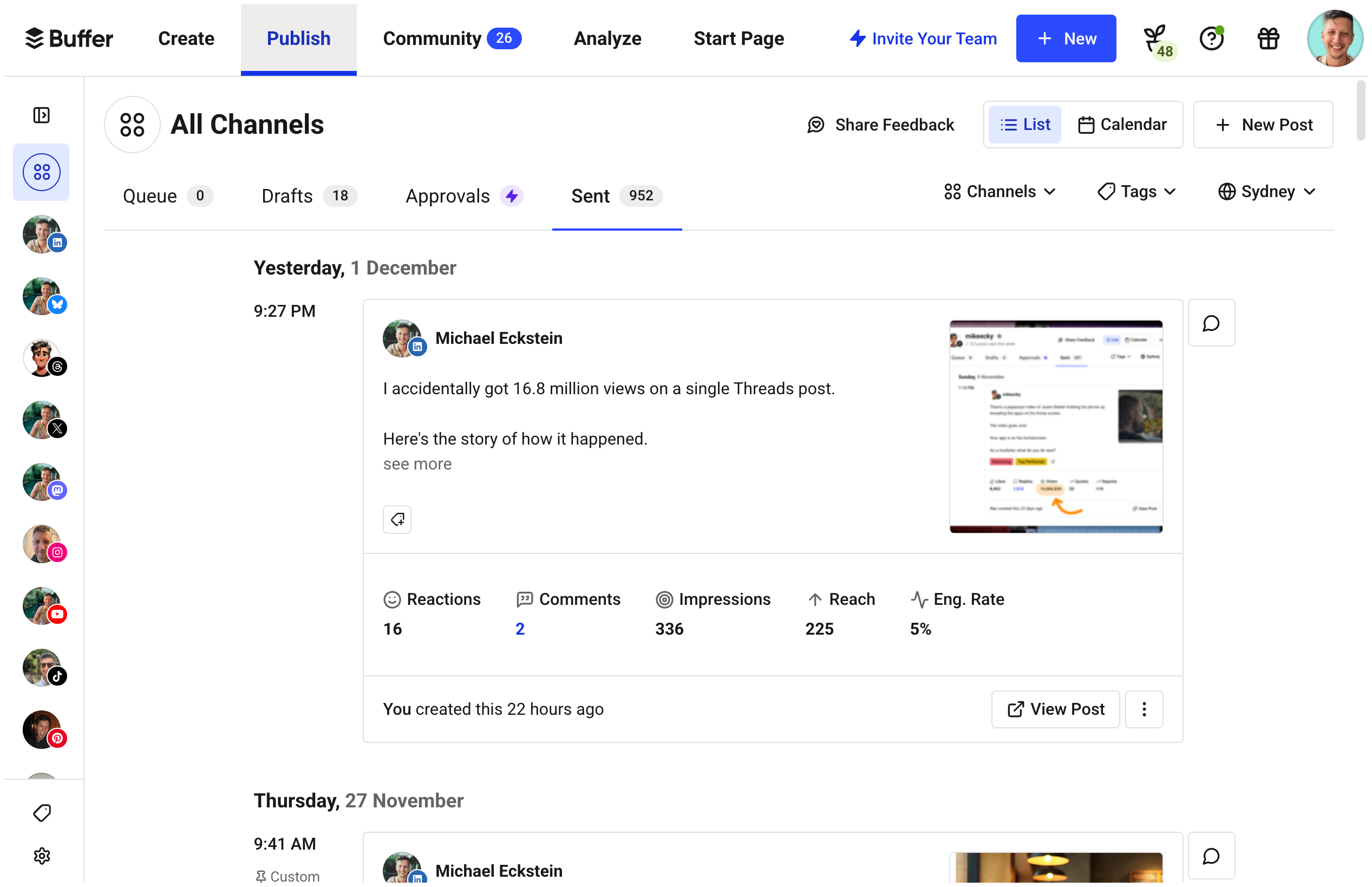
Buffer Media

Buffer Demo - Publishing
Schedule content to any social platform
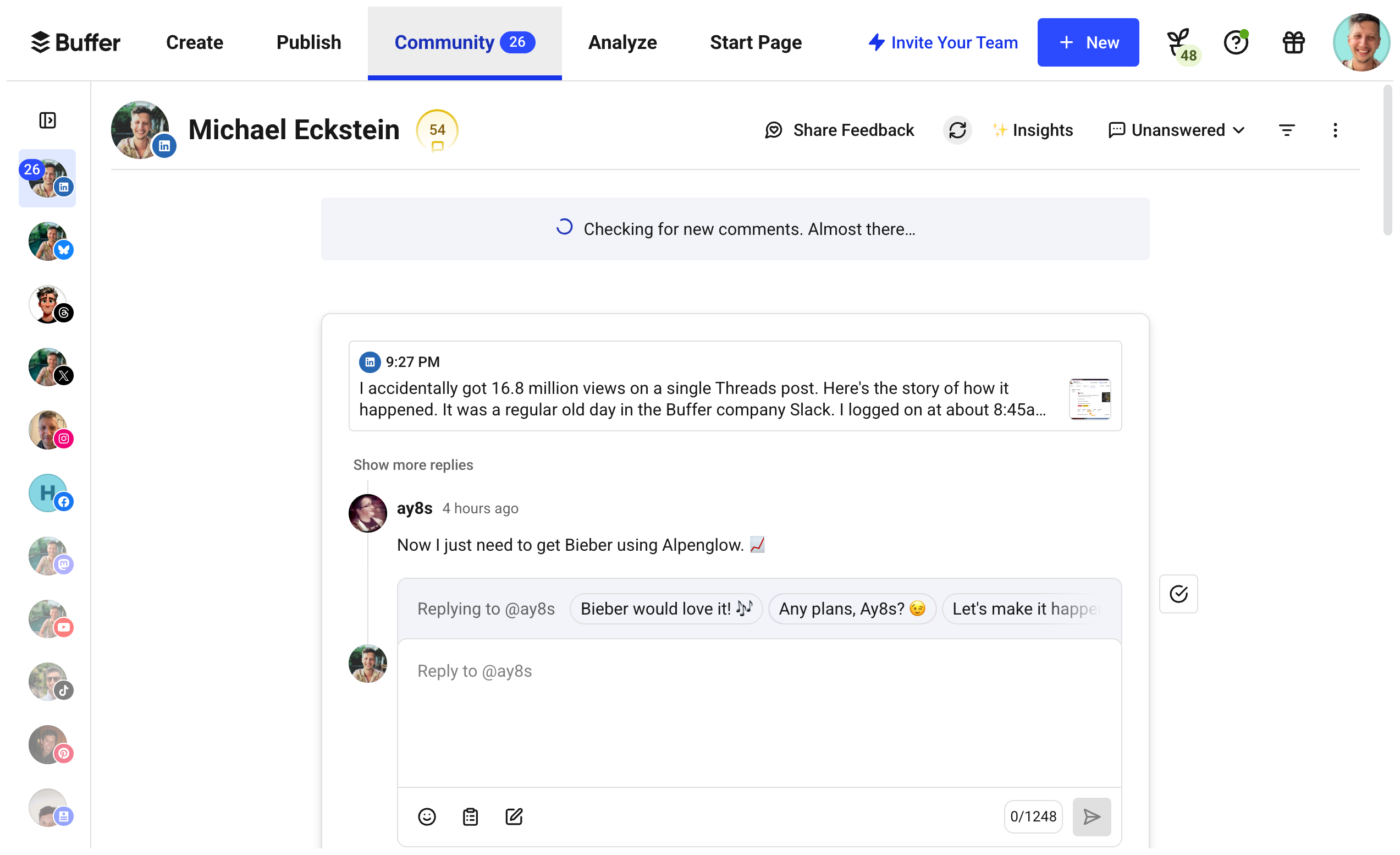
Buffer Demo - Community
Reply to comments
Buffer Demo - Start Page
Build a link in bio page in minutes.
Buffer Demo - Analytics
Get insights and answers to help you optimize your content.
Product Avatar Image

Have you used Buffer before?

Answer a few questions to help the Buffer community

Buffer Reviews (1,030)

View 5 Video Reviews
Reviews

Buffer Reviews (1,030)

View 5 Video Reviews
4.3
1,030 reviews

Review Summary

Generated using AI from real user reviews
Users consistently praise Buffer for its ease of use and intuitive scheduling capabilities, making it a reliable tool for managing multiple social media accounts. The platform's ability to streamline posting and provide a clear content calendar helps users save time and stay organized. However, some users note that its analytics features could be more comprehensive.

Pros & Cons

Generated from real user reviews
View All Pros and Cons
Search reviews
Filter Reviews
Clear Results
G2 reviews are authentic and verified.
Gian Pietro D.
GD
Specialista in marketing digitale
Small-Business (50 or fewer emp.)
"easy way to scheduling contents on social netowrks"
What do you like best about Buffer?

It is one of those web utility very useful in a social media strategy as it allows you to optimize the flow of posts on Facebook, Twitter, LinkedIn and a host of other social networks But the main thing that i liked when i start to use buffer on 2014, is that it was the only good tool for planning post on Google plus. Review collected by and hosted on G2.com.

What do you dislike about Buffer?

If you want to make more post or adding more social networks to your scheduling plan: you have to pay for it.

To schedule on Pinterest you must be a paid member.

The cool thing is that you can schedule on a Google + page but You can’t integrate your Google+ profile. Review collected by and hosted on G2.com.

Verified User in Education Management
UE
Enterprise (> 1000 emp.)
"Great free social tool"
What do you like best about Buffer?

Very easy to use and schedule. The basic stats are decent too. Nice that it allows automation for multiple platforms. Review collected by and hosted on G2.com.

What do you dislike about Buffer?

The analytics could be more in depth, although I realize the free version doesn't come with in depth analytics. Review collected by and hosted on G2.com.

Aaron M.
AM
CMO
Legal Services
Enterprise (> 1000 emp.)
"Solid platform for social media scheduling and management"
What do you like best about Buffer?

This platform was really easy to adopt and start using in a small business environment. With only a few minutes of setup, you can start measuring and scheduling publishing to your social media pages. The optimization algorithm automatically recommends and helps you make sure that your posting times are at their optimal level for maximizing engagement, which is a very nice feature. The price point for the Awesome plan is very reasonable and accessible for a very small business. Review collected by and hosted on G2.com.

What do you dislike about Buffer?

The lack of Instagram support is very disappointing. It's something I'd expect from a platform like Buffer. Instagram is a very popular social media tool, yet Buffer has no support for it. Beyond that, for the Awesome plan, it is maybe a little disappointing that a portion of the higher-end features are not available to these customers. Review collected by and hosted on G2.com.

Benjamin B.
BB
Web Developer
Internet
Small-Business (50 or fewer emp.)
"Easy way to manage multiple social feeds at once."
What do you like best about Buffer?

- Integration with multiple social media accounts including (but not limited to) Facebook and Twitter, providing the ability to post to many social media services at the same time. Saves time (and money!)

- Chrome extension available that allows quick 'Buffering' of web articles from anywhere on the web.

- Automatic URL shortening provides click-tracking and analytics for posted articles.

- Very simple to set-up and configure. Clean user interface.

- Intelligent queuing allows posts to be sent at optimal times for the highest interactions.

- Free to use for basic needs.

- API available for developers along with iOS and Android apps for sharing on the go. Review collected by and hosted on G2.com.

What do you dislike about Buffer?

- Can sometimes be unreliable at sending posts, having to wait for it to attempt posting later on in the day. Review collected by and hosted on G2.com.

Sharon A. D.
SD
Social Media Manager and Assistant Webmaster
Information Technology and Services
Small-Business (50 or fewer emp.)
"A must for scheduling social media!"
What do you like best about Buffer?

Buffer is the only tool that allows you to schedule posts on Google Plus, so it's a must for me as a social media marketing gal. I also like how easy it is to schedule items on LinkedIn, Facebook, and Twitter on there. It's very easy when I want to share the same news for a client or my own personal accounts over a few different days - a one stop shop for having a consistent social media presence. Review collected by and hosted on G2.com.

What do you dislike about Buffer?

I don't like when you setup a brand new account that it wants you to hook up Facebook or Twitter first - sometimes I just want to use it for Google Plus. Review collected by and hosted on G2.com.

Lindsay N.
LN
Adjunct Faculty Member
Higher Education
Mid-Market (51-1000 emp.)
"A powerful and affordable social media tool"
What do you like best about Buffer?

Buffer is an amazing tool that I use both in my own social media work and recommend to others in my work as a social media consultant. It allows you to schedule content, including links and photos, to a variety of platforms, including Facebook, Twitter, G+, and LinkedIn company pages. It has a simple interface and drag-and-drop functionality and utilizes both a queue and custom scheduling. It includes a custom link shortener as well. Review collected by and hosted on G2.com.

What do you dislike about Buffer?

I wish it could post to certain other platforms (Instagram, LinkedIn education pages, etc.) but have no complaints otherwise. Review collected by and hosted on G2.com.

Verified User in Internet
UI
Mid-Market (51-1000 emp.)
"Smooth and easy to use."
What do you like best about Buffer?

It is easy to use and has a simple interface. Also, their content suggestions are interesting and helpful when in need of fresh content. Chrome plug in is fantastic and really helps with posting. Review collected by and hosted on G2.com.

What do you dislike about Buffer?

It doesn't have as many account options as others. For example, many brands are getting into Instagram so it would be nice to have that option. Review collected by and hosted on G2.com.

Verified User in Non-Profit Organization Management
UN
Mid-Market (51-1000 emp.)
"Great for scheduling posts if you have lots of pages."
What do you like best about Buffer?

Ease of bulk posting on multiple owned channels Review collected by and hosted on G2.com.

What do you dislike about Buffer?

Analytics aren't useful if you're trying to report on an enterprise-wide level. Not much other utility beyond just posting, so really need other tools to use in conjunction Review collected by and hosted on G2.com.

Stepheny S.
SS
Teacher
Financial Services
Small-Business (50 or fewer emp.)
"Wonderful Tool!"
What do you like best about Buffer?

The ability to schedule posts on multiple platforms, and the ability to do a few for free. Review collected by and hosted on G2.com.

What do you dislike about Buffer?

The limit to the number of free posts you can schedule. I already pay enough for my business. Review collected by and hosted on G2.com.

Verified User in Internet
UI
Mid-Market (51-1000 emp.)
"Scheduling future tweets are a breeze"
What do you like best about Buffer?

I like that I can schedule up to 10 tweets with a free Buffer account Review collected by and hosted on G2.com.

What do you dislike about Buffer?

I dislike that Buffer automatically sets up to post on my Twitter and Facebook feeds. I didn't realize that and was inadvertently posting twice on my Facebook feed. It took a bit of clicking to make sure that I only pre-schedule and post on Twitter. Review collected by and hosted on G2.com.

Questions about Buffer? Ask real users or explore answers from the community

Get practical answers, real workflows, and honest pros and cons from the G2 community or share your insights.

GU
Guest User
Last activity 4 months ago

What is Buffer used for?

Verified User
G2
Verified User
Last activity over 4 years ago

Will you ever add an approval process to Buffer?

Pricing Options

Pricing provided by Buffer.

Free

Free

Essentials

Starting at $6.00
Per Month

Team

Starting at $12.00
Per Month
Buffer Comparisons
Product Avatar Image
Hootsuite
Compare Now
Product Avatar Image
Sprout Social
Compare Now
Product Avatar Image
Agorapulse
Compare Now
Buffer Features
Social Analytics
Social Publishing
Campaign Optimization
Content Calendar
Content Library
Shared Inbox
Multi-step Planning
Proactive Assistance
Decision Making
Product Avatar Image
Buffer