Compare this with other toolsSave it to your board and evaluate your options side by side.
Save to board

Cal.com Reviews & Product Details

Pricing

Pricing provided by Cal.com.

Enterprise

Contact Us
Per Year

Cal.com Media

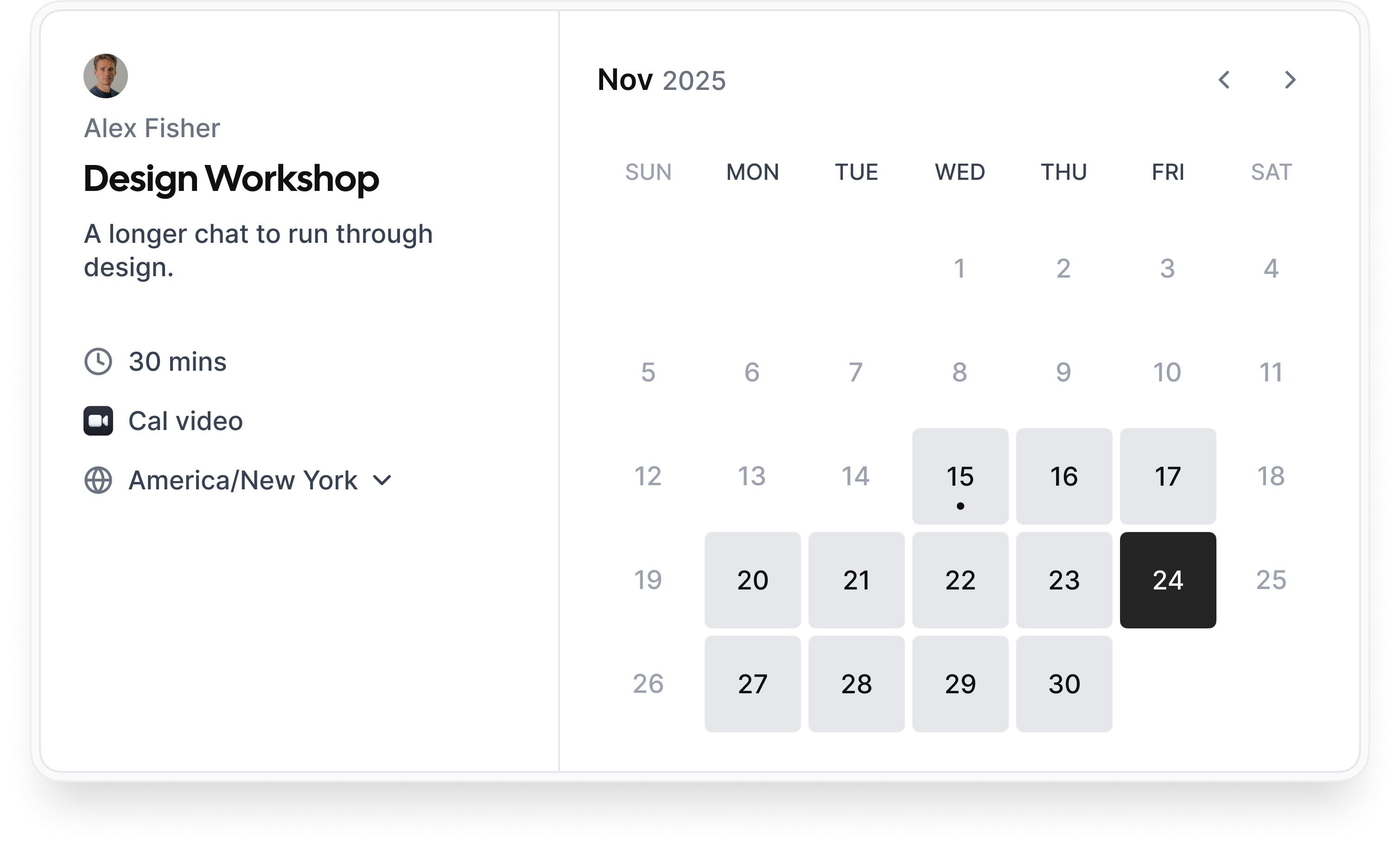
Cal.com Demo - Booking flow
Simple booking flow to schedule calls with customers, businesses, partners, and friends. Easily integrated into modern websites and application.
Cal.com Demo - Secure bookings protect your data
Your scheduling system shouldn’t be the weakest link in your compliance stack. Cal.com’s privacy-by-design architecture gives you the confidence of HIPAA, SOC 2 Type II, ISO 27001, CCPA, and GDPR compliance, without sacrificing usability.
Cal.com Demo - Slack Connect for support
We offer Slack Connect support, allowing direct and rapid communication with our team for quicker resolutions and personalized assistance.
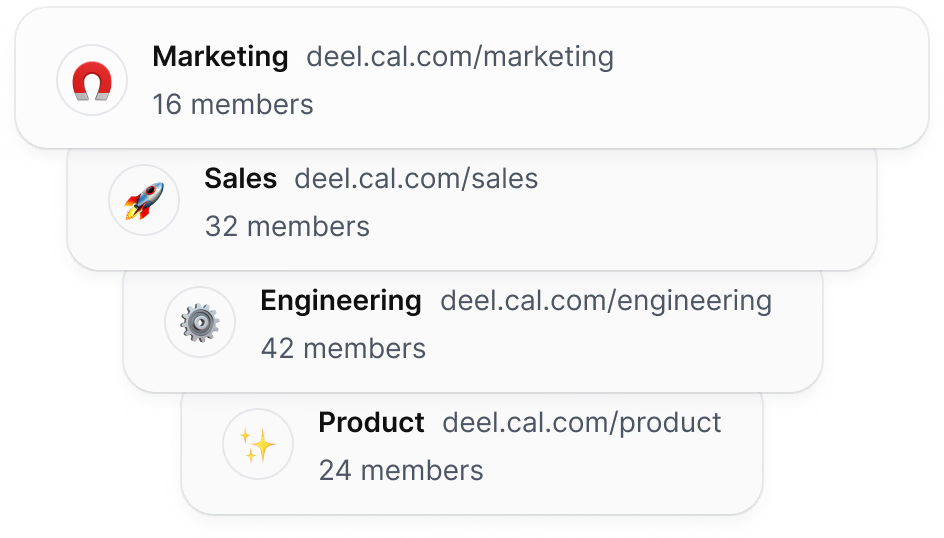
Cal.com Demo - Unlimited sub-teams
Easily organize your teams by creating a parent team and adding unlimited sub-teams, ensuring seamless management and collaboration across your organization.
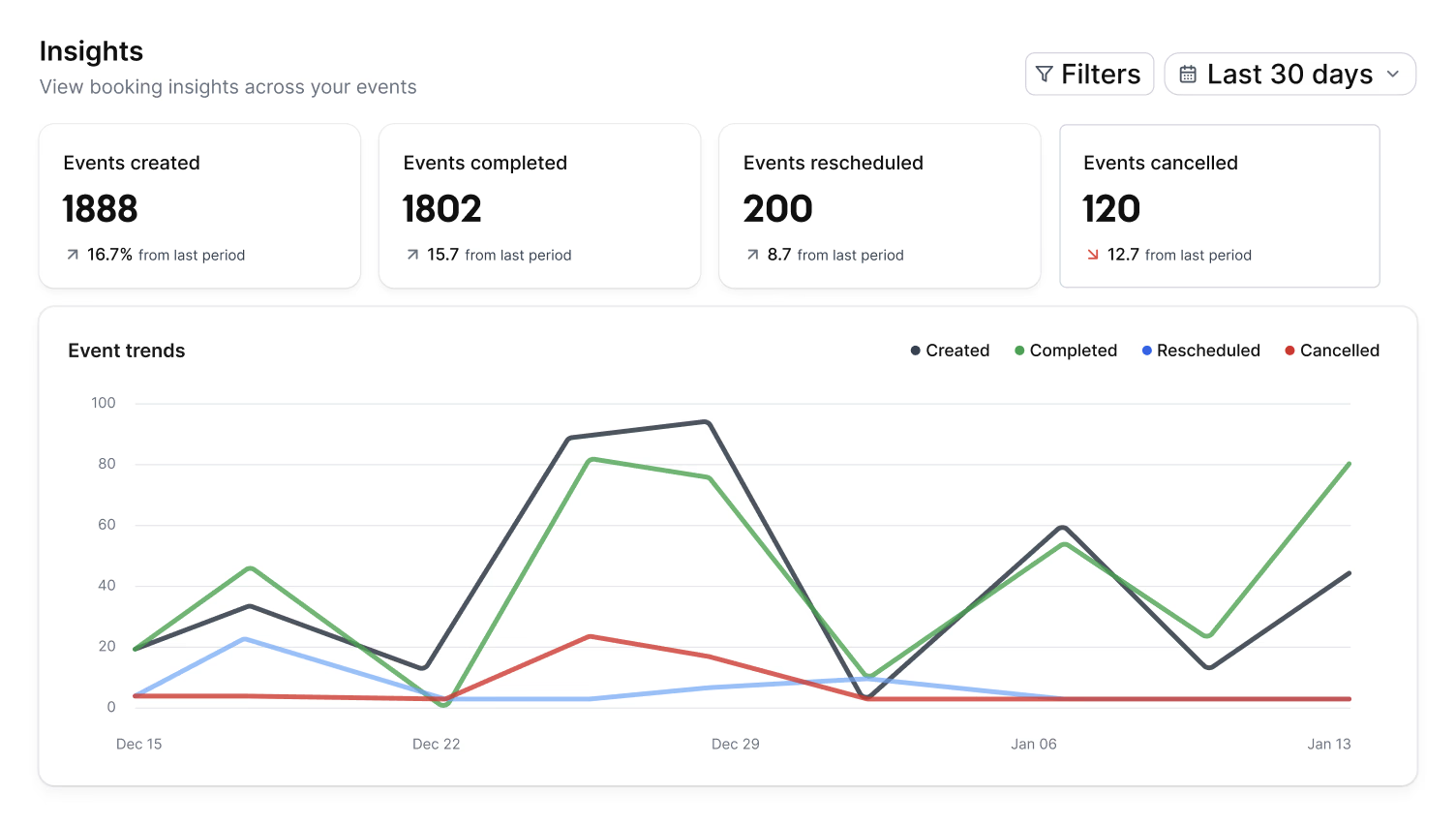
Cal.com Demo - Organization wide insights
The Insights dashboard provides a clear overview of booking data, helping you spot opportunities and top performers with ease.
Cal.com Demo - Domain-wide delegation
Simplify setup and ensure compliance across your organization. Cal.com gives administrators centralized control over calendars, bookings, and access.
How does cal.com compare to other schedulers? Watch this review to find out.
Play Cal.com Video
How does cal.com compare to other schedulers? Watch this review to find out.
Take control of your schedule with
Play Cal.com Video
Take control of your schedule with "Requires confirmation" feature
Instant meetings! Connect with clients instantly
Play Cal.com Video
Instant meetings! Connect with clients instantly
Phone based bookings
Play Cal.com Video
Phone based bookings
Introducing: Cal.com Routing – Cal.com v5.0:
Play Cal.com Video
Introducing: Cal.com Routing – Cal.com v5.0:
Product Avatar Image

Have you used Cal.com before?

Answer a few questions to help the Cal.com community

Cal.com Reviews (151)

Reviews

Cal.com Reviews (151)

4.6
151 reviews

Review Summary

Generated using AI from real user reviews
Users consistently praise Cal.com for its flexibility and customization, allowing them to tailor scheduling processes to their specific needs. The platform's seamless integrations with tools like Google Calendar and Zoom enhance efficiency by automating bookings and reducing manual work. However, many note that the initial setup can be complex, which may pose a challenge for new users.

Pros & Cons

Generated from real user reviews
View All Pros and Cons
Search reviews
Filter Reviews
Clear Results
G2 reviews are authentic and verified.
Logan B.
LB
Community Development Manager & Dealflow Coordinator
Small-Business (50 or fewer emp.)
"Customizable, Easy-to-Integrate Scheduling with a Better UI Than Calendly"
What do you like best about Cal.com?

I feel that the user interface, the customizability, and ease of integration are better than Calendly. Review collected by and hosted on G2.com.

What do you dislike about Cal.com?

There are some features that are behind a paywall that seem like they would be standard issue. Review collected by and hosted on G2.com.

Tanya V.
TV
Founder and CEO
"Effortless Scheduling, Saves Time"
What do you like best about Cal.com?

I love using Cal.com for my scheduling because it avoids any kind of back and forth between people I need to meet, and it just makes things so easy. With Cal.com, I save a bunch of time since I don't need to ask people for their time availabilities. My team can see all of my availability and when I'm not available through my Cal.com scheduler. It's super easy to set up and took no time. I love how beautiful it looks, making everything appear really sleek. This aesthetic aspect helps because it makes the person more likely to actually go and pick a time, especially clients for my business. Review collected by and hosted on G2.com.

What do you dislike about Cal.com?

/ Review collected by and hosted on G2.com.

Response from Susan Moeller of Cal.com

Thanks so much Tanya! Great point about the aesthetic aspect! Thanks for sharing that.

Verified User in Design
AD
Small-Business (50 or fewer emp.)
"Highly Customizable, Streamlines Scheduling"
What do you like best about Cal.com?

I love Cal.com's high level of customization. It allows me to control almost every part of the booking experience, including meeting types, availability logic, integrations, reminders, and branding. I use it along with several other tools to streamline my workflow. It connects smoothly with Google Calendar to sync my availability in real time, and I also use Zoom for automatically generating meeting links. The integration helps reduce manual work and makes scheduling more reliable. I would rate it a 9 out of 10 as it is a powerful and flexible scheduling tool with great customization and solid integrations. Review collected by and hosted on G2.com.

What do you dislike about Cal.com?

While Cal.com works well overall, there are a few areas where I feel it could improve. The platform offers a lot of customization but this also means the initial setup can feel slightly technical, especially for users who are not familiar with workflow automation or advanced scheduling logic. A more guided onboarding or simpler setup wizard would help new users get started faster. Review collected by and hosted on G2.com.

Rana B.
RB
"Flexible Scheduling with Open-Source Control"
What do you like best about Cal.com?

I love how flexible Cal.com is, allowing me to create different booking flows and customize questions, routing logic, and availability rules for each event type. It's great that it doesn't force a rigid structure and adapts to my workflow. The open-source nature gives me control and trust, knowing I can self-host if needed. The booking pages are clean and professional, reflecting well on my brand. Cal.com handles complex scheduling tasks gracefully, like round-robin and multi-person availability checks, making these effortless. The integrations work smoothly without needing constant monitoring. The time savings are incredible, giving me more focus time, and it beautifully scales with my needs. Review collected by and hosted on G2.com.

What do you dislike about Cal.com?

The initial setup of Cal.com can be overwhelming due to its high customizability, requiring users to dig through menus and documentation. The platform could improve with more guided workflows or an onboarding wizard. There are some limitations in workflow and automation, such as the desire for more built-in automation rules and deeper CRM integrations without relying on external tools. The plugin ecosystem can feel inconsistent, with some plugins not meeting quality standards or having compatibility issues. Teams with complex setups might experience slower loading times or sync delays. The UI/UX could use more visual clarity and modern styling, and the admin-side mobile experience can feel cramped, making some settings hard to manage. Notifications and reminders are functional but could benefit from more customization and branding control. Finally, documentation could be improved, as users have noted missing examples and incomplete plugin docs. Review collected by and hosted on G2.com.

Sai koushik N.
SN
"Highly Customizable, Reliable Scheduling Solution"
What do you like best about Cal.com?

I use Cal.com as my main scheduling platform because it streamlines all my meetings and appointments. I'm impressed by its flexibility and customization, which surpasses many other scheduling tools that stick to rigid templates. I can tailor everything from booking pages and event types to workflows and integrations. I appreciate its open-source nature, ensuring transparency and long-term reliability. The clean, intuitive interface is easy to use for both me and my clients. It integrates seamlessly with my existing tools like calendars, video conferencing apps, CRMs, and more, creating a unified workflow. The performance is solid without any significant glitches. The multi-calendar sync, timezone intelligence, team scheduling, and embedding scheduling widgets directly into websites make booking effortless. All in all, Cal.com stands out as a powerful yet user-friendly scheduling tool that I can control according to my needs. Review collected by and hosted on G2.com.

What do you dislike about Cal.com?

While Cal.com is powerful, there are a few areas that could be improved to make the experience even smoother. Some of the advanced customization options can feel a bit overwhelming at first, especially for new users who aren’t familiar with configuration-heavy tools. Certain integrations also require manual setup or extra steps that could be more streamlined. I’ve noticed that occasionally the interface feels slightly cluttered when managing multiple event types, and cleaner organization would help. Additionally, while the platform is highly flexible, some users might appreciate more built-in templates or simplified presets to speed up setup. Review collected by and hosted on G2.com.

Srivalli K.
SK
Research Intern - Parallel Computing and CUDA
"Streamlined Scheduling with Highly Customizable Features"
What do you like best about Cal.com?

I use Cal.com to manage all my client bookings and automate my meeting schedule efficiently. I love how customizable and flexible it is, allowing me to tailor almost every aspect of the booking experience, from the look and feel of the booking page to setting complex availability rules. It integrates smoothly with my calendars and meeting tools, meaning everything syncs automatically. The open-source approach gives me confidence in its transparency, security, and constant improvements. I also appreciate that I can embed booking links anywhere, making the scheduling process feel effortless. The ability to handle payments through Stripe during booking is seamless, reducing no-shows and saving me a lot of administrative time. Cal.com also adapts to different types of meetings with separate event types, each with its own settings and automations. The integrations with calendar, video meeting tools, and payment platforms drastically reduce scheduling errors. Overall, Cal.com feels more like a flexible scheduling framework that grows with my needs and is extremely valuable for my day-to-day work. Review collected by and hosted on G2.com.

What do you dislike about Cal.com?

While I really like using Cal.com, there are a few areas that could be improved. The first is the learning curve, because the platform is so customizable, it can take some time to figure out the more advanced settings. For simple use cases it's easy, but if you want to build complex workflows or automations, you may have to experiment quite a bit. Another area that could be better is customer support. While the documentation is helpful, sometimes I’ve had questions where I wished the support responses were faster or more detailed, especially when dealing with technical setups or integrations. Lastly, because the platform is powerful and evolving quickly, there are occasional small bugs or UI inconsistencies. Nothing major, but sometimes features feel like they’re still being polished, especially in more advanced modules or team-based scheduling. Review collected by and hosted on G2.com.

Akash P.
AP
Trader
Small-Business (50 or fewer emp.)
"Streamlined Scheduling with Minor Setup Hiccups"
What do you like best about Cal.com?

Using the Cal.com Teams/Organization plan has been a major upgrade for our scheduling and workflow management. Cal.com’s team scheduling features have made scheduling extremely simple and efficient. Another feature that really stands out is the meeting routing system, which automatically directs incoming bookings to the right team member based on availability, skill set, or priority, helping streamline our client onboarding process and reducing missed appointments. It automates scheduling, removes human error, and ensures every meeting goes to the right team member at the right time. Cal.com syncs perfectly with our calendars, preventing double-booking and ensuring accurate schedules are visible across the team. Cal.com was our first full-featured scheduling system, and it immediately improved our process by centralizing team availability, automating meeting assignments, and reducing back-and-forth communication. Review collected by and hosted on G2.com.

What do you dislike about Cal.com?

Cal.com is extremely powerful, but the setup, integrations, and dashboard customization could be smoother, especially for new team members. New users sometimes feel overwhelmed by all the options. A more structured onboarding flow would help new team members get comfortable faster. More pre-built templates would reduce the time spent configuring everything manually. Some settings are very technical, and a short explanation or example beside each option would make onboarding smoother. Review collected by and hosted on G2.com.

Parmeswar B.
PB
"Customizable Scheduling Tool with Open Source Flexibility"
What do you like best about Cal.com?

I like Cal.com because you can customize it, modify it, and even self-host it. Its open-source nature and no vendor lock-in are huge advantages. The user interface is clean, intuitive, and easy to navigate, which makes setting up meeting types, availability, and automation flows require minimal effort. Cal.com also impresses with advanced capabilities like round-robin scheduling and team availability. I appreciate its rich ecosystem of integrations with popular calendars, conferencing platforms, CRMs, and payment systems. The embedded scheduling widget is robust, allowing full customization of branding and behavior when integrating booking functionality into websites or applications. Cal.com generally performs strongly, with an API-first design that scales well from individuals to enterprise-level users. Review collected by and hosted on G2.com.

What do you dislike about Cal.com?

Because it’s highly customizable, new users sometimes find the initial setup confusing. You need to understand workflows, event types, integrations, etc. Review collected by and hosted on G2.com.

avisek B.
AB
"Effortless Scheduling with Robust Customization"
What do you like best about Cal.com?

What I like best about Cal.com is how simple yet powerful it feels. It removes all the back-and-forth from scheduling and lets me share my availability easily, book meetings with clients or teammates, and manage everything in one place. The time zone handling is especially valuable since I work with people in different locations—it automatically shows the right time for everyone, which avoids confusion and missed meetings. I also really like the calendar and video call integrations because everything stays in sync and links are generated automatically. The interface is clean, setup is straightforward, and once it’s configured, everything runs smoothly. Overall, Cal.com saves me time, feels professional, and makes scheduling stress-free and reliable. Review collected by and hosted on G2.com.

What do you dislike about Cal.com?

There isn’t much to dislike, but some of the more advanced settings can take a little time to understand at first, especially for new users. I also feel the onboarding could be a bit more guided to help people get fully set up faster. That said, once everything is configured, the platform works very smoothly. Review collected by and hosted on G2.com.

Garv A.
GA
Student
Small-Business (50 or fewer emp.)
"Adaptable and powerful solution for better scheduling"
What do you like best about Cal.com?

I primarily use Cal.com for scheduling meetings, setting up client calls, and creating web booking pages. It has direct integration with Google Calendar, Outlook Calendar, Zoom, Teams, and many other tools, eliminating issues like double-booking. Its interface is very clean, modern, and easy to use. The best part is that you can set your availability, breaks, off-days, event types—everything according to your preference. Round-robin scheduling is also available for team work. Being open-source, you can self-host and fully customize it. Its privacy features are excellent. I like it because it is a powerful, privacy-friendly, and professional scheduling tool. Its customization capability is very useful, allowing me to design my booking page according to my branding. You can customize almost everything—layout, event flow, branding, integration, embed style. For developers, it is a Dream Platform because it provides full API access—webhooks, custom apps, integrations, etc., are all available. Cal.com's smooth and intuitive user experience makes it even better. Review collected by and hosted on G2.com.

What do you dislike about Cal.com?

Cal.com's interface is clean and modern, but for first-time users, some things might seem a bit technical. Advanced settings can sometimes appear too complex, making the setup a bit confusing for non-technical users. Review collected by and hosted on G2.com.

Questions about Cal.com? Ask real users or explore answers from the community

Get practical answers, real workflows, and honest pros and cons from the G2 community or share your insights.

GU
Guest User
Last activity 4 months ago

What is Cal.com used for?

GU
Guest User

What is Cal.com used for?

Pricing Options

Pricing provided by Cal.com.

Enterprise

Contact Us
Per Year

Teams

Starting at $12.00
1 user Per Month

Organizations

Starting at $28.00
1 user Per Month
Cal.com Comparisons
Product Avatar Image
Calendly Sales
Compare Now
Product Avatar Image
TidyCal
Compare Now
Product Avatar Image
zcal
Compare Now
Cal.com Features
Confirmations & Reminders
Appointment Follow-Up
Scheduling Notifications
Time Zone Detection
Availability Settings
Blocked Time Settings
Branding
Links
Multi- Calendar Integration
Website Integration
Payment Acceptance
Product Avatar Image
Cal.com