Compare this with other toolsSave it to your board and evaluate your options side by side.
Save to board

Cal.com Reviews & Product Details

Pricing

Pricing provided by Cal.com.

Enterprise

Contact Us
Per Year

Cal.com Media

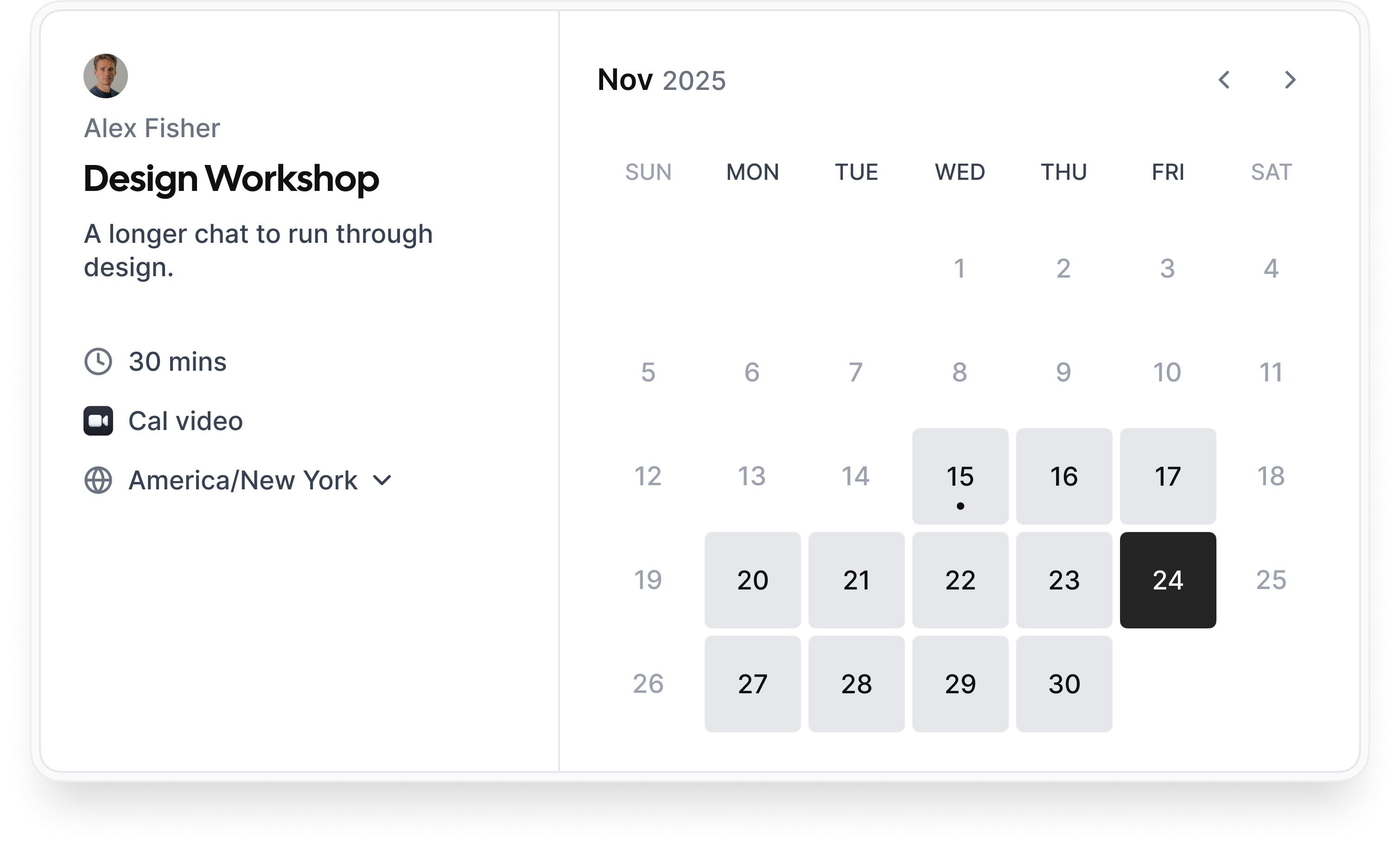
Cal.com Demo - Booking flow
Simple booking flow to schedule calls with customers, businesses, partners, and friends. Easily integrated into modern websites and application.
Cal.com Demo - Secure bookings protect your data
Your scheduling system shouldn’t be the weakest link in your compliance stack. Cal.com’s privacy-by-design architecture gives you the confidence of HIPAA, SOC 2 Type II, ISO 27001, CCPA, and GDPR compliance, without sacrificing usability.
Cal.com Demo - Slack Connect for support
We offer Slack Connect support, allowing direct and rapid communication with our team for quicker resolutions and personalized assistance.
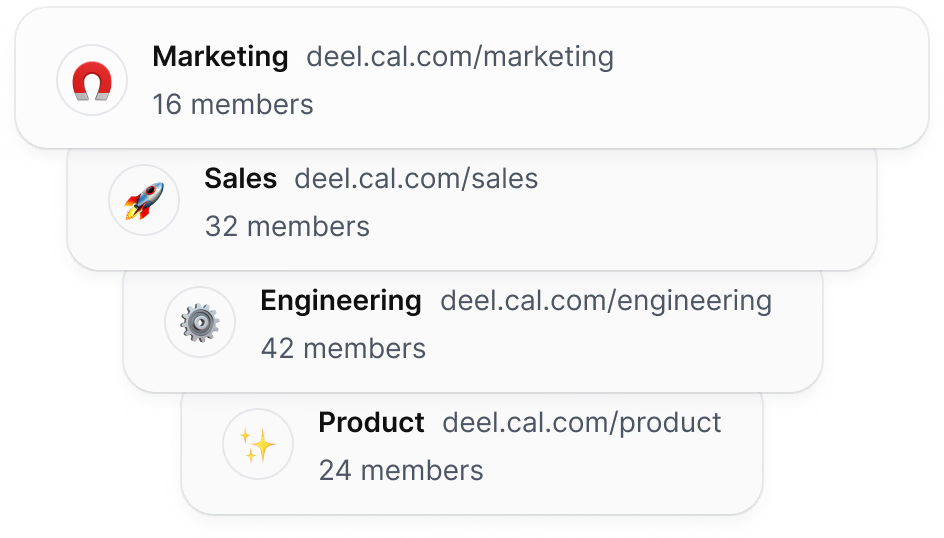
Cal.com Demo - Unlimited sub-teams
Easily organize your teams by creating a parent team and adding unlimited sub-teams, ensuring seamless management and collaboration across your organization.
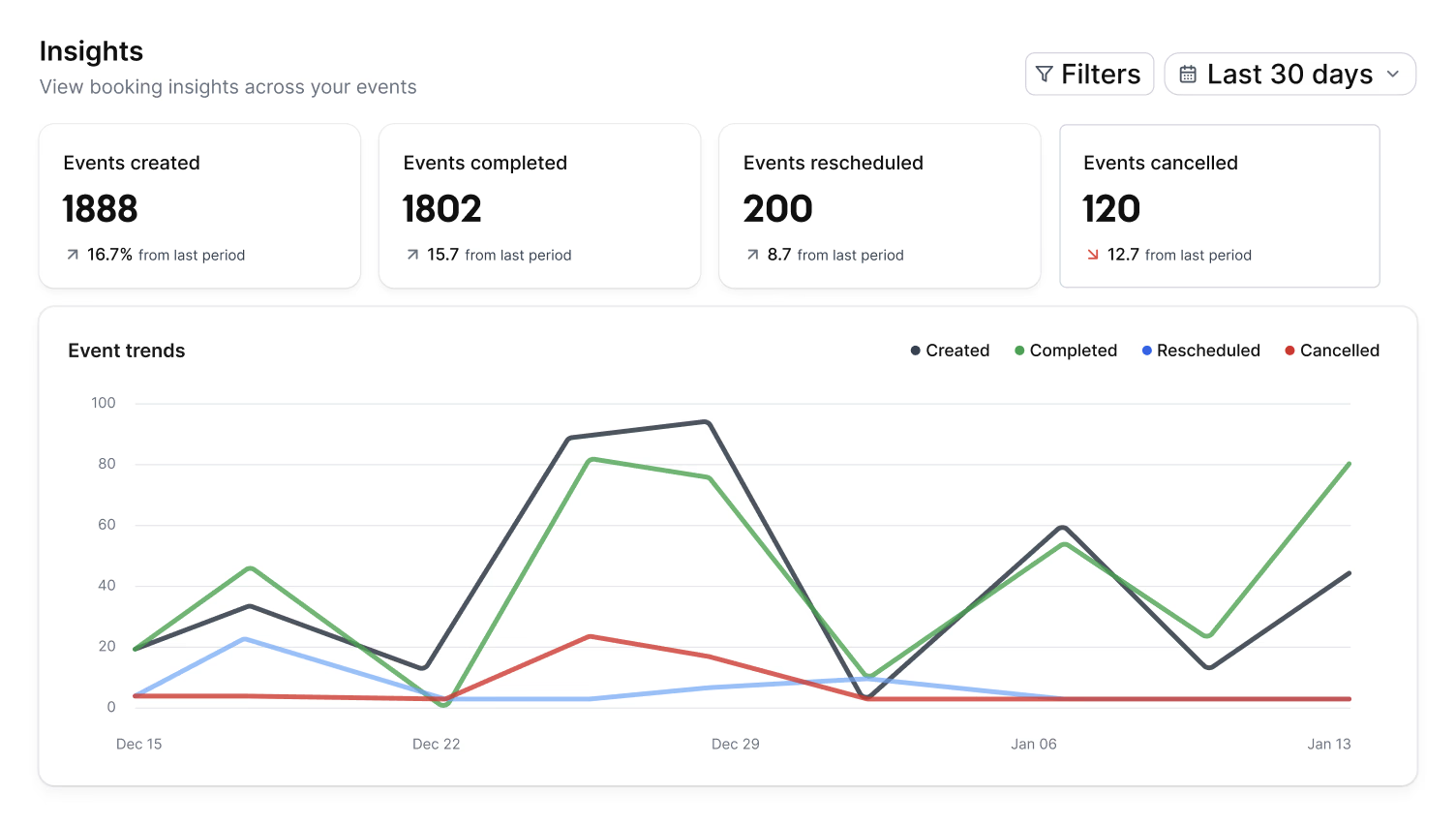
Cal.com Demo - Organization wide insights
The Insights dashboard provides a clear overview of booking data, helping you spot opportunities and top performers with ease.
Cal.com Demo - Domain-wide delegation
Simplify setup and ensure compliance across your organization. Cal.com gives administrators centralized control over calendars, bookings, and access.
How does cal.com compare to other schedulers? Watch this review to find out.
Play Cal.com Video
How does cal.com compare to other schedulers? Watch this review to find out.
Take control of your schedule with
Play Cal.com Video
Take control of your schedule with "Requires confirmation" feature
Instant meetings! Connect with clients instantly
Play Cal.com Video
Instant meetings! Connect with clients instantly
Phone based bookings
Play Cal.com Video
Phone based bookings
Introducing: Cal.com Routing – Cal.com v5.0:
Play Cal.com Video
Introducing: Cal.com Routing – Cal.com v5.0:
Product Avatar Image

Have you used Cal.com before?

Answer a few questions to help the Cal.com community

Cal.com Reviews (149)

Reviews

Cal.com Reviews (149)

4.6
150 reviews

Review Summary

Generated using AI from real user reviews
Users consistently praise Cal.com for its flexibility and customization, allowing them to tailor scheduling processes to their specific needs. The platform's seamless integrations with tools like Google Calendar and Zoom enhance efficiency by automating bookings and reducing manual work. However, many note that the initial setup can be complex, which may pose a challenge for new users.

Pros & Cons

Generated from real user reviews
View All Pros and Cons
Search reviews
Filter Reviews
Clear Results
G2 reviews are authentic and verified.
Kunal W.
KW
Software Engineer
Computer Software
Small-Business (50 or fewer emp.)
"Effortless Onboarding and Intuitive Scheduling Experience"
What do you like best about Cal.com?

I found it very straightforward to get started with Cal.com as a new user. The interface is clean and intuitive, which made setting up an event type and a booking page effortless. I also appreciated how quickly I could link my calendar and experiment with different scheduling options, all without any confusion. Review collected by and hosted on G2.com.

What do you dislike about Cal.com?

As a newcomer, I found that some of the advanced features, such as workflows and team settings, required a bit of time to grasp. It would be beneficial if there were more guided explanations or tips available for beginners within certain settings. Review collected by and hosted on G2.com.

RP
Product manager
Small-Business (50 or fewer emp.)
"Cal.com’s Teams Plan Has Streamlined Scheduling Across Our Entire Organization"
What do you like best about Cal.com?

I like how Cal.com’s Teams and Organizations plan gives us centralized control over scheduling across the entire company. The ability to manage team availability, create shared event types, enable round-robin routing, and use detailed team analytics has made a huge difference in how efficiently our teams operate. The platform is flexible enough for sales, support, and internal operations to customize their own workflows while staying aligned under one organization dashboard. Review collected by and hosted on G2.com.

What do you dislike about Cal.com?

There are very few downsides, but one area that could improve is providing more granular admin-level reporting templates so managers can generate insights even faster. Sometimes new team members need a short learning curve to understand all the organizational features, simply because there are many powerful options. However, once familiar, everything works smoothly. Review collected by and hosted on G2.com.

Filip S.
FS
CEO
Small-Business (50 or fewer emp.)
"Open-Source Scheduling: Powerful, Customizable, and Great Value"
What do you like best about Cal.com?

The open-source, API-first approach and deep customization are Cal.com's biggest strengths, offering a level of control unparalleled by competitors. Unlimited event types and seamless integration with payment tools like Stripe and all major calendars. For teams, the round-robin and collective event features are highly effective for automating lead distribution and eliminating internal scheduling chaos. Review collected by and hosted on G2.com.

What do you dislike about Cal.com?

A significant drawback is the lack of a dedicated, native mobile application, which limits the ability to manage bookings easily on the go. While functional customization is strong, the visual branding options for the public booking page are basic. Review collected by and hosted on G2.com.

Response from Susan Moeller of Cal.com

Thanks Filip! The pre-meeting admin decrease is really great. I'm happy that you are finding it useful!

Rehan R.
RR
Product Designer & Developer
Design
Small-Business (50 or fewer emp.)
"Effortless Setup and Seamless Client Booking with Cal.com"
What do you like best about Cal.com?

What I like best about Cal.com is how easy it is to set up and integrate into my workflow without any unnecessary friction. Review collected by and hosted on G2.com.

What do you dislike about Cal.com?

Honestly, there isn’t much I dislike about Cal.com, but if I had to mention one thing, it would be that some of the more advanced customization options can take a little time to figure out at first. For example, setting up certain integrations or tweaking very specific booking rules isn’t as immediately obvious as the basic setup. Once you get the hang of it, it’s smooth, but there’s a small learning curve if you want to unlock all the advanced features. Review collected by and hosted on G2.com.

Response from Susan Moeller of Cal.com

Hey Rehan! Glad you are enjoying Cal.com. Thanks for the review, and I'm glad you like the embed function!

Rajesh  M.
RM
Founder
Computer Software
Small-Business (50 or fewer emp.)
"A powerful scheduling platform that simplifies team coordination"
What do you like best about Cal.com?

I appreciate how well the Teams and Organizations features are structured. Being able to manage team availability, shared booking links, roles, and permissions in one place makes coordination much smoother. The collective and round-robin booking options are especially useful because they allow our clients to meet with the right team member automatically. The integrations with calendars, automation tools, and video platforms also work reliably, which reduces a lot of manual work on our end. Review collected by and hosted on G2.com.

What do you dislike about Cal.com?

Some of the deeper configuration settings feel a bit technical for non-developers, especially when setting up advanced routing rules or custom workflows. A few areas in the dashboard could be more user-friendly, particularly for new team members who are not familiar with these tools. The initial setup takes time because there are many features to configure. Once everything is running, it is stable, but the onboarding experience could be made simpler. Review collected by and hosted on G2.com.

Response from Susan Moeller of Cal.com

Really glad that Cal is streamlining your communications and helping your clients have a great experience! thanks for the review.

WILLIAM DAVID G.
WG
Mining Engineering Student
Mining & Metals
Small-Business (50 or fewer emp.)
"Optimize Academic Meetings Without Complications"
What do you like best about Cal.com?

Cal.com has become an indispensable tool for me as a mining engineering student. I love how the platform simplifies the organization and management of my academic meetings and personal projects. The integration with Google Calendar is especially useful, as it allows me to receive automatic reminders and manage multiple activities from a clear and easy-to-use interface. Thanks to this, I can optimize my time and increase my productivity, focusing on my studies and projects without wasting time on long email chains. The ability to easily check the availability of professors and classmates reduces confusion and avoids delays in scheduling. Additionally, the platform is very intuitive, which makes it easy for me to schedule meetings quickly and without complications. I also appreciate that it offers affordable plans, perfect for projects that require agile and simple coordination, something fundamental in my training as a future mining engineer. Finally, I value that the initial setup was simple, especially for basic tasks like creating events and connecting my calendar, which allowed me to start using Cal.com efficiently from the very first moment. Review collected by and hosted on G2.com.

What do you dislike about Cal.com?

Some aspects would be the management for new users, as scheduling meetings can be confusing for them. It would be useful to implement an interactive tutorial on the first accesses that explains the basic functions step by step. Review collected by and hosted on G2.com.

Response from Susan Moeller of Cal.com

Thanks so much! Really happy that Cal is helping you with your academic work!

ARPITA D.
AD
Student partner
Enterprise (> 1000 emp.)
Guest users or non-business users of the software, not included in G2 scores.
"Cal.com simplifies scheduling and boosts productivity for our team."
What do you like best about Cal.com?

I'm Arpita, and as a Google Student Ambassador, I've been using Cal.com within my organization. It has been incredibly useful for simplifying the scheduling process. The platform is intuitive, making it easy to coordinate meetings. I would definitely recommend it to teams aiming to streamline their workflow. Review collected by and hosted on G2.com.

What do you dislike about Cal.com?

I'd say there's not much I dislike about Cal.com based on my usage. As a Google Student Ambassador using it in my organisation, I find it pretty smooth for scheduling meetings. If I had to pick something, maybe the only thing could be the learning curve for someone who's super new to scheduling tools like this. But overall, it's been a useful tool for us. Review collected by and hosted on G2.com.

Response from Susan Moeller of Cal.com

Thanks so much for taking time to review Cal!

I'm glad you are finding it helpful in managing your appointments!

Arpit S.
AS
Student Coordinator
Small-Business (50 or fewer emp.)
"Effortless Scheduling and Seamless Integrations"
What do you like best about Cal.com?

I really appreciate how easy it is to set up multiple meeting types and integrate them directly with my existing tools and calendars. The open-source nature is a huge plus, offering flexibility and control that proprietary solutions lack. It makes scheduling across time zones seamless. Review collected by and hosted on G2.com.

What do you dislike about Cal.com?

While the core functionality is excellent, the user interface can occasionally feel a little cluttered or counter-intuitive on the administrative side. Also, the mobile experience sometimes feels less polished than the desktop version, requiring minor improvements for on-the-go management. Review collected by and hosted on G2.com.

May L.
ML
Marketing Specialist
Mid-Market (51-1000 emp.)
"Intuitive Interface, But Setup Can Be Overwhelming"
What do you like best about Cal.com?

Modern, intuitive interface. The routing feature is such a game-changer. Review collected by and hosted on G2.com.

What do you dislike about Cal.com?

The setup can be a bit overwhelming at first, especially with all the options and integrations. Some features feel slightly “developer-first,” so it can take time to find where to change certain settings or texts. Review collected by and hosted on G2.com.

Hriday B.
HB
"Streamlined Scheduling for Dynamic Teams"
What do you like best about Cal.com?

I like Cal.com for the balance between its flexibility and simplicity. It provides strong control over scheduling rules and workflows but remains user-friendly for clients and teammates. The open-source approach, reliable calendar syncing, and automatic time-zone handling make it particularly effective for distributed teams. Its smooth integration with existing tools allows us to maintain our workflow efficiently. I really appreciate the team-based scheduling support, with features like shared availability, round-robin booking, and role-based access that streamline managing meetings across team members. Moreover, its reliability in calendar syncing and notifications ensures meetings run smoothly, saving us time and reducing confusion. Review collected by and hosted on G2.com.

What do you dislike about Cal.com?

While Cal.com works well overall, some aspects could be improved. A few advanced features and settings aren’t immediately intuitive, which can make the learning curve slightly steep for new users. Clearer in-app guidance, better onboarding flows, and more concise documentation would help teams unlock its full potential faster. Small UI refinements in certain areas could also improve overall usability. One area where Cal.com could enhance usability is in-app guidance. Step-by-step walkthroughs or tooltips during initial setup—especially for team scheduling, permissions, and advanced booking rules—would make onboarding smoother for new users. A centralized setup checklist could also help teams ensure nothing important is missed. From a UI perspective, clearer labeling for advanced settings and more consistent visual hierarchy would reduce confusion when configuring complex workflows. Improving search or filtering within settings, along with better contextual help links, would make navigation faster and more intuitive. Review collected by and hosted on G2.com.

Questions about Cal.com? Ask real users or explore answers from the community

Get practical answers, real workflows, and honest pros and cons from the G2 community or share your insights.

GU
Guest User
Last activity 3 months ago

What is Cal.com used for?

GU
Guest User

What is Cal.com used for?

Pricing Options

Pricing provided by Cal.com.

Enterprise

Contact Us
Per Year

Teams

Starting at $12.00
1 user Per Month

Organizations

Starting at $28.00
1 user Per Month
Cal.com Comparisons
Product Avatar Image
Calendly Sales
Compare Now
Product Avatar Image
TidyCal
Compare Now
Product Avatar Image
zcal
Compare Now
Cal.com Features
Confirmations & Reminders
Appointment Follow-Up
Scheduling Notifications
Time Zone Detection
Availability Settings
Blocked Time Settings
Branding
Links
Multi- Calendar Integration
Website Integration
Payment Acceptance
Product Avatar Image
Cal.com