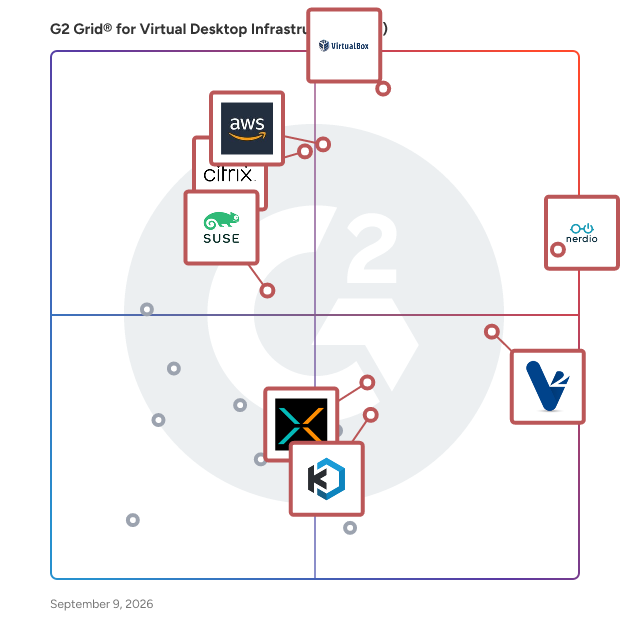
# Best Virtual Desktop Infrastructure (VDI) Solutions

  *By [Shalaka Joshi](https://research.g2.com/insights/author/shalaka-joshi)*

   Virtual desktop infrastructure (VDI) software provides and manages virtual desktops hosted on-premises or in the cloud. These desktops run on virtual machines located on servers in a data center instead of the actual desktop hardware. VDI software allows users to run and manage operating systems in a data center and helps to host desktops remotely. A “virtual image&quot; of the user&#39;s desktop is sent over the network to the remote user, allowing the user to access the desktop image as if it was being accessed locally. Once users gain access to the virtual desktops, they can continue their work and run applications.

Businesses use VDI software to leverage existing computer resources without increasing costs, update enterprise software tools, and allow employees to access desktop images using their own or company devices while maintaining data security. VDI tools are often the key component in [infrastructure as a service (IaaS) providers](https://www.g2.com/categories/infrastructure-as-a-service-iaas), in which host servers provide virtual tools (most commonly desktop infrastructures). VDI tools can also integrate with or launch any additional business software a team or company requires.

To qualify for inclusion in the Virtual Desktop Infrastructure category, a product must:

- Provide users with a virtual desktop they can remotely access anywhere, anytime
- Support device portability. Users should be able to access their desktop from multiple devices such as mobiles, laptops, and tablets
- Ensure end-to-end security and regulatory compliance


## Category Overview

**Total Products under this Category:** 70


## Trust & Credibility Stats

**Why You Can Trust G2's Software Rankings:**

- 30 Analysts and Data Experts
- 1,900+ Authentic Reviews
- 70+ Products
- Unbiased Rankings

G2's software rankings are built on verified user reviews, rigorous moderation, and a consistent research methodology maintained by a team of analysts and data experts. Each product is measured using the same transparent criteria, with no paid placement or vendor influence. While reviews reflect real user experiences, which can be subjective, they offer valuable insight into how software performs in the hands of professionals. Together, these inputs power the G2 Score, a standardized way to compare tools within every category.


## Best Virtual Desktop Infrastructure (VDI) Software At A Glance

- **Leader:** [Nerdio Manager](https://www.g2.com/products/nerdio-manager/reviews)
- **Highest Performer:** [V2 Cloud](https://www.g2.com/products/v2-cloud/reviews)
- **Easiest to Use:** [Nerdio Manager](https://www.g2.com/products/nerdio-manager/reviews)
- **Top Trending:** [Nerdio Manager](https://www.g2.com/products/nerdio-manager/reviews)
- **Best Free Software:** [Nerdio Manager](https://www.g2.com/products/nerdio-manager/reviews)


---

**Sponsored**

### Inuvika OVD Enterprise

Migrating from Citrix or VMware Horizon (Omnissa) could not be easier. Inuvika OVD Enterprise is a secure and cost-effective alternative that reduces your TCO by over 60%. More users on a server, fewer Windows server licenses, no SQL server license, built in secure gateway and 2FA will all lower your costs substantially. Inuvika OVD Enterprise is an efficient, desktop virtualization solution that delivers Windows and Linux virtual apps and virtual desktops to any device. It deploys on any hypervisor (KVM, vSphere, ProxmoxVE, Nutanix AHV, VergeOS, etc) and can be installed on-premise, on public or private clouds, and can also be purchased as a Desktop as a Service (DaaS) from our hosting partners around the world. The on-premises version of the product is available starting with 20 concurrent users. DaaS is available starting at 10 concurrent users. Inuvika OVD Enterprise offers an easy-to-use admin console, a fast user experience, and requires less infrastructure overhead compared to traditional virtual desktop solutions. OVD Enterprise serves enterprise, financial, healthcare, education and government organizations and we are happy to work with SMEs who are struggling with price increases at Citrix and vendor lock-in at VMware/Omnissa. Inuvika also has its own thin client software called ResoluteOS that allows you to repurpose existing hardware to extend the life of it and securely access Inuvika OVD Enterprise. Available in over 60 countries.


[Visit company website](https://www.g2.com/external_clickthroughs/record?secure%5Bad_program%5D=ppc&amp;secure%5Bad_slot%5D=category_product_list&amp;secure%5Bcategory_id%5D=189&amp;secure%5Bdisplayable_resource_id%5D=189&amp;secure%5Bdisplayable_resource_type%5D=Category&amp;secure%5Bmedium%5D=sponsored&amp;secure%5Bplacement_reason%5D=page_category&amp;secure%5Bplacement_resource_ids%5D%5B%5D=189&amp;secure%5Bprioritized%5D=false&amp;secure%5Bproduct_id%5D=92059&amp;secure%5Bresource_id%5D=189&amp;secure%5Bresource_type%5D=Category&amp;secure%5Bsource_type%5D=category_page&amp;secure%5Bsource_url%5D=https%3A%2F%2Fwww.g2.com%2Fcategories%2Fvirtual-desktop-infrastructure-vdi&amp;secure%5Btoken%5D=1fc29587f0d8f9487dc713a02f53c958ed35bfdea718427ed5933af9095e599f&amp;secure%5Burl%5D=https%3A%2F%2Fwww.inuvika.com&amp;secure%5Burl_type%5D=company_website)

---

## Top-Rated Products (Ranked by G2 Score)
  ### 1. [Nerdio Manager](https://www.g2.com/products/nerdio-manager/reviews)
  Nerdio Manager is an Azure-native management platform designed to help IT teams deploy, manage, and optimize Microsoft cloud desktops and endpoints at scale. This solution operates entirely within a customer’s Azure tenant, adhering to Microsoft best practices, and enhances the native capabilities of Azure Virtual Desktop (AVD), Windows 365 Cloud PCs, Microsoft 365, and Microsoft Intune. With built-in automation, cost optimization, security controls, and migration tooling, Nerdio Manager addresses the complexities of managing cloud environments. As organizations increasingly adopt hybrid and remote work models, the responsibility of IT teams has expanded to ensure secure and high-performance access to corporate resources across both cloud and physical environments. While Microsoft technologies like AVD, Windows 365, and Intune provide essential building blocks for modern endpoint strategies, managing these platforms through native tools can lead to operational challenges. Nerdio Manager fills this gap by offering a unified management layer that simplifies administration and centralizes control across these services, thereby reducing the manual effort and cost challenges often encountered at scale. Key features of Nerdio Manager include intelligent automation and autoscaling capabilities, which help decrease infrastructure and operational costs while ensuring users have timely access to necessary resources. The platform offers centralized policy management and role-based controls, allowing IT teams to enforce consistent security and compliance standards across diverse environments. Additionally, built-in monitoring and insights provide near real-time visibility into endpoint performance, usage, and capacity, empowering IT teams to make informed decisions. Moreover, Nerdio Manager includes migration tools that facilitate the transition from legacy Virtual Desktop Infrastructure (VDI) platforms and on-premises environments to Microsoft cloud desktops with minimal disruption. This capability is particularly beneficial for organizations looking to modernize their digital workspace without incurring significant downtime or operational hiccups. In essence, Nerdio Manager serves as the operational control plane for Microsoft cloud desktops and endpoint management. It enables organizations to modernize their digital workspace environments while effectively managing costs, simplifying daily operations, and retaining full ownership and control over their infrastructure. By transforming powerful but fragmented tools into a cohesive and manageable platform, Nerdio Manager maximizes the value of Microsoft Cloud investments, making it a vital asset for IT teams navigating the complexities of modern endpoint management.


  **Average Rating:** 4.7/5.0
  **Total Reviews:** 229

**User Satisfaction Scores:**

- **Desktop Virtualization:** 9.4/10 (Category avg: 9.0/10)
- **Access Controls and Permissions:** 8.8/10 (Category avg: 8.9/10)
- **Has the product been a good partner in doing business?:** 9.4/10 (Category avg: 9.0/10)
- **Application Virtualization:** 8.7/10 (Category avg: 8.8/10)


**Seller Details:**

- **Seller:** [Nerdio](https://www.g2.com/sellers/nerdio)
- **Company Website:** https://getnerdio.com
- **Year Founded:** 2016
- **HQ Location:** Chicago, IL
- **Twitter:** @GetNerdio (2,107 Twitter followers)
- **LinkedIn® Page:** https://www.linkedin.com/company/2130120/ (402 employees on LinkedIn®)

**Reviewer Demographics:**
  - **Who Uses This:** President
  - **Top Industries:** Information Technology and Services, Computer &amp; Network Security
  - **Company Size:** 46% Small-Business, 30% Mid-Market


#### Pros & Cons

**Pros:**

- Ease of Use (24 reviews)
- Automation (9 reviews)
- Cost Efficiency (9 reviews)
- Time-saving (9 reviews)
- Automation Efficiency (8 reviews)

**Cons:**

- Learning Curve (4 reviews)
- Missing Features (4 reviews)
- Complex Setup (3 reviews)
- Difficult Setup (3 reviews)
- Expensive (3 reviews)

  ### 2. [VirtualBox](https://www.g2.com/products/virtualbox/reviews)
  Oracle VM VirtualBox is a free, open-source, cross-platform virtualization software that enables users to run multiple operating systems simultaneously on a single device. Designed for IT professionals and developers, VirtualBox supports Windows, macOS, Linux, and Oracle Solaris as host operating systems, making it ideal for testing, development, demonstration, and deployment across diverse platforms. Key Features and Functionality: - Cross-Platform Compatibility: VirtualBox runs on various host operating systems, including Windows, macOS, Linux, and Oracle Solaris, and supports a wide range of guest operating systems. - High Performance: The software leverages the latest in chip-level support for virtualization, including support for AMD, Intel, and Apple silicon processors, to provide faster execution times for guest operating systems. - 3D Graphics Support: VirtualBox includes VBoxSVGA and VMSVGA interfaces to improve 3D graphics performance. - USB Device Support: It implements a virtual USB controller, allowing users to connect arbitrary USB devices to virtual machines without installing device-specific drivers on the host. - Disk Image Encryption: VirtualBox supports 128 or 256-bit data encryption keys, enabling transparent encryption of data stored in hard disk images using the AES algorithm. - Remote Machine Display: The VirtualBox Remote Desktop Extension (VRDE) enables high-performance remote access to running virtual machines, supporting the Remote Desktop Protocol (RDP) with additional features like full client USB support. Primary Value and Solutions Provided: VirtualBox addresses several key challenges for its users: - Cost Reduction: By allowing multiple operating systems to run on a single device, VirtualBox reduces the need for multiple physical machines, thereby lowering hardware and operational costs. - Development Efficiency: Developers can test applications across different operating systems and versions using the same desktop environment, accelerating the development and testing process. - Simplified Software Distribution: Solution providers can distribute applications within a VirtualBox virtual machine, ensuring compatibility across various operating systems and versions without additional configuration. - Legacy Application Support: IT teams can extend the lifespan of legacy applications by running them on modern hardware through VirtualBox, avoiding the need for costly application rewrites or hardware replacements. - Secure Remote Access: VirtualBox facilitates secure access to restricted applications for remote workers by providing encrypted and isolated environments, ensuring data security and compliance without extensive rearchitecting of applications. In summary, Oracle VM VirtualBox offers a versatile and efficient solution for running multiple operating systems on a single device, enhancing development workflows, reducing costs, and providing secure, cross-platform compatibility for various IT needs.


  **Average Rating:** 4.5/5.0
  **Total Reviews:** 287

**User Satisfaction Scores:**

- **Desktop Virtualization:** 9.1/10 (Category avg: 9.0/10)
- **Access Controls and Permissions:** 8.7/10 (Category avg: 8.9/10)
- **Has the product been a good partner in doing business?:** 8.3/10 (Category avg: 9.0/10)
- **Application Virtualization:** 8.3/10 (Category avg: 8.8/10)


**Seller Details:**

- **Seller:** [Oracle](https://www.g2.com/sellers/oracle)
- **Year Founded:** 1977
- **HQ Location:** Austin, TX
- **Twitter:** @Oracle (827,310 Twitter followers)
- **LinkedIn® Page:** https://www.linkedin.com/company/1028/ (199,301 employees on LinkedIn®)
- **Ownership:** NYSE:ORCL

**Reviewer Demographics:**
  - **Who Uses This:** Software Engineer, Software Developer
  - **Top Industries:** Information Technology and Services, Computer Software
  - **Company Size:** 47% Small-Business, 37% Mid-Market


#### Pros & Cons

**Pros:**

- Virtualization Management (4 reviews)
- Ease of Use (3 reviews)
- Integrations (2 reviews)
- Security (2 reviews)
- Customer Support (1 reviews)

**Cons:**

- Performance Issues (3 reviews)
- Communication Clarity (1 reviews)
- Compatibility Issues (1 reviews)
- Limited Resources (1 reviews)
- Network Issues (1 reviews)

  ### 3. [Citrix DaaS](https://www.g2.com/products/citrix-citrix-daas/reviews)
  Citrix Virtual Apps and Desktops provides the most comprehensive desktop as a service (DaaS) and VDI options, optimized to provide today’s flexible workforce with secure, high-performance experiences. IT can deliver Windows, Linux, and web business applications, or full virtual desktops, to scale their environments quickly and easily. Deploy from any cloud or datacenter to meet global business needs.


  **Average Rating:** 4.1/5.0
  **Total Reviews:** 519

**User Satisfaction Scores:**

- **Desktop Virtualization:** 9.3/10 (Category avg: 9.0/10)
- **Access Controls and Permissions:** 9.0/10 (Category avg: 8.9/10)
- **Has the product been a good partner in doing business?:** 8.6/10 (Category avg: 9.0/10)
- **Application Virtualization:** 9.2/10 (Category avg: 8.8/10)


**Seller Details:**

- **Seller:** [Citrix](https://www.g2.com/sellers/citrix)
- **Year Founded:** 1989
- **HQ Location:** Fort Lauderdale, FL
- **Twitter:** @citrix (198,430 Twitter followers)
- **LinkedIn® Page:** https://www.linkedin.com/company/2641/ (4,262 employees on LinkedIn®)
- **Ownership:** NASDAQ:CTXS

**Reviewer Demographics:**
  - **Who Uses This:** Analyst, Software Engineer
  - **Top Industries:** Information Technology and Services, Hospital &amp; Health Care
  - **Company Size:** 59% Enterprise, 29% Mid-Market


#### Pros & Cons

**Pros:**

- Performance (4 reviews)
- Ease of Use (2 reviews)
- User-Friendly (2 reviews)
- Cross-Platform (1 reviews)
- Integrations (1 reviews)

**Cons:**

- Limited Compatibility (2 reviews)
- Audio Issues (1 reviews)
- Connection Issues (1 reviews)
- Connectivity Issues (1 reviews)
- Expensive Premiums (1 reviews)

  ### 4. [V2 Cloud](https://www.g2.com/products/v2-cloud/reviews)
  Desktop virtualization doesn&#39;t have to be complicated. V2 Cloud is the all-in-one and fully managed virtual desktop you need. We work closely with Independent Software Vendors, Business owners, Managed Service Providers, IT managers, and many others to grow their businesses with the Cloud. As a fully integrated Desktop-as-a-Service solution (DaaS), we focus on speed and simplicity, so you can work faster from anywhere. You can also use V2 Cloud to publish any Windows applications and use them as a Software as a Service (SaaS). Benefit also from the GPU-enhanced VDI to run demanding applications. Delegate your IT resilience and cybersecurity tasks to the V2 Cloud team and enjoy business continuity. Let our support team get rid of your worries—use your cloud computer safely, quickly, and economically. We support you by email, live chat, and phone. Try V2 Cloud and say hello to the all-in-one cloud desktop!


  **Average Rating:** 4.7/5.0
  **Total Reviews:** 235

**User Satisfaction Scores:**

- **Desktop Virtualization:** 9.5/10 (Category avg: 9.0/10)
- **Access Controls and Permissions:** 9.1/10 (Category avg: 8.9/10)
- **Has the product been a good partner in doing business?:** 9.5/10 (Category avg: 9.0/10)
- **Application Virtualization:** 9.2/10 (Category avg: 8.8/10)


**Seller Details:**

- **Seller:** [V2 Cloud Solutions](https://www.g2.com/sellers/v2-cloud-solutions)
- **Company Website:** https://v2cloud.com
- **Year Founded:** 2012
- **HQ Location:** Montreal, CA
- **Twitter:** @v2cloudWaas (615 Twitter followers)
- **LinkedIn® Page:** https://www.linkedin.com/company/9428521/ (59 employees on LinkedIn®)

**Reviewer Demographics:**
  - **Who Uses This:** CEO, Owner
  - **Top Industries:** Accounting, Information Technology and Services
  - **Company Size:** 83% Small-Business, 12% Mid-Market


#### Pros & Cons

**Pros:**

- Ease of Use (17 reviews)
- Easy Setup (14 reviews)
- Customer Support (9 reviews)
- Affordable (5 reviews)
- Easy Deployment (5 reviews)

**Cons:**

- Slow Performance (5 reviews)
- Pricing Issues (3 reviews)
- Expensive (2 reviews)
- Remote Access Issues (2 reviews)
- Admin (1 reviews)

  ### 5. [Amazon WorkSpaces](https://www.g2.com/products/amazon-workspaces/reviews)
  Amazon WorkSpaces is a fully managed, secure cloud desktop service that enables organizations to provision virtual desktops for their users. These desktops can run on various operating systems, including Microsoft Windows, Amazon Linux 2, Ubuntu Linux, Rocky Linux, and Red Hat Enterprise Linux. By leveraging Amazon WorkSpaces, businesses can eliminate the need to procure and deploy hardware or install complex software, allowing for quick scalability to add or remove users as needed. Users can access their virtual desktops from multiple devices or web browsers, ensuring flexibility and continuity in their work environment. Key Features and Functionality: - Flexible Deployment Options: Choose between WorkSpaces Personal for persistent, personalized desktops tailored for individual users, or WorkSpaces Pools for non-persistent desktops suitable for users needing access to curated environments on ephemeral infrastructure. - Customizable Configurations: Select from a range of hardware and software configurations, including various instance types and storage options, to meet specific organizational needs. - Operating System Support: Supports multiple operating systems, including Microsoft Windows, Amazon Linux 2, Ubuntu Linux, Rocky Linux, and Red Hat Enterprise Linux, providing flexibility in deployment. - Security and Compliance: Integrates with existing Active Directory environments, supports multi-factor authentication, and offers encryption options to protect data both in transit and at rest. - Cost Efficiency: Operates on a pay-as-you-go pricing model, allowing organizations to pay only for the resources they use without the need for long-term contracts. Primary Value and Solutions Provided: Amazon WorkSpaces addresses the challenges of managing traditional desktop infrastructures by offering a scalable, secure, and cost-effective virtual desktop solution. It enables organizations to support remote and hybrid workforces, ensuring employees can securely access their desktops and applications from anywhere, at any time. By eliminating the complexities associated with hardware procurement, software installation, and capacity planning, Amazon WorkSpaces allows IT departments to focus on strategic initiatives rather than routine maintenance tasks. Additionally, its integration capabilities with existing IT environments and support for various operating systems make it a versatile solution for diverse business needs.


  **Average Rating:** 4.1/5.0
  **Total Reviews:** 94

**User Satisfaction Scores:**

- **Desktop Virtualization:** 8.5/10 (Category avg: 9.0/10)
- **Access Controls and Permissions:** 8.6/10 (Category avg: 8.9/10)
- **Has the product been a good partner in doing business?:** 8.1/10 (Category avg: 9.0/10)
- **Application Virtualization:** 8.6/10 (Category avg: 8.8/10)


**Seller Details:**

- **Seller:** [Amazon Web Services (AWS)](https://www.g2.com/sellers/amazon-web-services-aws-3e93cc28-2e9b-4961-b258-c6ce0feec7dd)
- **Year Founded:** 2006
- **HQ Location:** Seattle, WA
- **Twitter:** @awscloud (2,223,984 Twitter followers)
- **LinkedIn® Page:** https://www.linkedin.com/company/amazon-web-services/ (156,424 employees on LinkedIn®)
- **Ownership:** NASDAQ: AMZN

**Reviewer Demographics:**
  - **Top Industries:** Information Technology and Services, Computer Software
  - **Company Size:** 40% Enterprise, 37% Mid-Market


  ### 6. [XTIUM Desktop as a Service](https://www.g2.com/products/xtium-desktop-as-a-service/reviews)
  XTIUM&#39;s Desktop as a Service (DaaS) provides secure, cloud-based virtual desktops, enabling employees to access company applications and data from any device, anywhere. This solution enhances security by ensuring data remains in the cloud, reducing risks associated with device loss or theft. DaaS simplifies IT management by centralizing updates and support, offering predictable per-user costs, and allowing rapid scaling to accommodate business growth. By extending the lifespan of existing hardware and minimizing the need for frequent device refreshes, XTIUM&#39;s DaaS optimizes both performance and cost-efficiency.


  **Average Rating:** 4.5/5.0
  **Total Reviews:** 29

**User Satisfaction Scores:**

- **Desktop Virtualization:** 10.0/10 (Category avg: 9.0/10)
- **Access Controls and Permissions:** 8.3/10 (Category avg: 8.9/10)
- **Has the product been a good partner in doing business?:** 9.0/10 (Category avg: 9.0/10)
- **Application Virtualization:** 8.3/10 (Category avg: 8.8/10)


**Seller Details:**

- **Seller:** [Xtium](https://www.g2.com/sellers/xtium-367414e0-0979-4601-8508-a216e2b31350)
- **Year Founded:** 2007
- **HQ Location:** New York, NY
- **LinkedIn® Page:** https://www.linkedin.com/company/xtium/ (457 employees on LinkedIn®)

**Reviewer Demographics:**
  - **Top Industries:** Information Technology and Services
  - **Company Size:** 39% Mid-Market, 35% Small-Business


#### Pros & Cons

**Pros:**

- Ease of Use (2 reviews)
- Easy Management (2 reviews)
- Management (2 reviews)
- Management Ease (2 reviews)
- Reliability (2 reviews)

**Cons:**

- High Resource Usage (2 reviews)
- Limited Resources (2 reviews)
- Feature Issues (1 reviews)
- Inefficient Processes (1 reviews)
- Laggy Performance (1 reviews)

  ### 7. [SUSE Linux Enterprise Desktop](https://www.g2.com/products/suse-linux-enterprise-desktop/reviews)
  Designed for mixed environments and includes a complete suite of required business applications to support employees’ productivity. SLE Desktop shares the core of SUSE Linux Enterprise Server and is equipped with enhanced security providing unparalleled protection of valuable enterprise data. A flexible and highly secure desktop operating system suitable for environments where reliability, ease of maintenance and updates are key. Designed for maximum productivity Includes dozens of leading applications, including web browser, email client, collaboration tools – all required to enable employees’ productivity. Enterprise-grade support and secure Security features, such as application security system, integrated VPN and antivirus tools, deliver bullet-proof security and protection against virus and malware attacks. Comes with enterprise-grade support and maintenance services from SUSE. Adaptable and cost-efficient Provides users a high degree of customization to meet their business requirements. A suitable platform for general purpose desktop, developer workstation, or for specific industry use-cases in manufacturing and healthcare.


  **Average Rating:** 4.6/5.0
  **Total Reviews:** 47

**User Satisfaction Scores:**

- **Desktop Virtualization:** 10.0/10 (Category avg: 9.0/10)
- **Access Controls and Permissions:** 10.0/10 (Category avg: 8.9/10)
- **Has the product been a good partner in doing business?:** 8.9/10 (Category avg: 9.0/10)
- **Application Virtualization:** 10.0/10 (Category avg: 8.8/10)


**Seller Details:**

- **Seller:** [SUSE](https://www.g2.com/sellers/suse)
- **Year Founded:** 1992
- **HQ Location:** Nürnberg, DE
- **Twitter:** @SUSE (64,658 Twitter followers)
- **LinkedIn® Page:** https://www.linkedin.com/company/1455/ (2,712 employees on LinkedIn®)

**Reviewer Demographics:**
  - **Top Industries:** Information Technology and Services, Computer Software
  - **Company Size:** 48% Small-Business, 29% Mid-Market


#### Pros & Cons

**Pros:**

- Linux/Ubuntu OS (8 reviews)
- Easy Management (7 reviews)
- Hardware Support (4 reviews)
- Regular Updates (4 reviews)
- Ease of Use (3 reviews)

**Cons:**

- Limited Software (3 reviews)
- Usage Difficulty (3 reviews)
- Compatibility Issues (2 reviews)
- Hardware Limitations (2 reviews)
- High Cost (2 reviews)

  ### 8. [Kasm Workspaces](https://www.g2.com/products/kasm-workspaces/reviews)
  The Next-Generation Workspace: Web-Native. Zero-Trust. Hyperconverged. Kasm provides capabilities not possible with your legacy workspace provider: a modern foundation for integrations, devops-enabled automation for deployment speed, data-loss-prevention controls for cybersecurity, and freedom of choice across cloud/hypervisor/infrastructure to escape vendor-lock. Kasm is changing the way that businesses deliver digital workspaces using our open-source web-native container streaming technology to establish a modern devops delivery of Desktop as a Service (DaaS), application streaming, and browser isolation. Provide your workforce on-demand, high-performance, and automatically updated desktop workspaces, with secure DLP-controlled access to their data, regardless of location or device. Kasm is the future of digital workplaces, offering secure, efficient and scalable Windows, Linux and MacOS desktops...along with secure remote access, application streaming and open-source intelligence (OSINT) research environments. Trusted to run the most critical enterprise workloads, aligned with your business/mission needs, at a price you can afford. There is a better way...and Kasm is your partner for getting there.


  **Average Rating:** 4.7/5.0
  **Total Reviews:** 49

**User Satisfaction Scores:**

- **Desktop Virtualization:** 9.8/10 (Category avg: 9.0/10)
- **Access Controls and Permissions:** 9.5/10 (Category avg: 8.9/10)
- **Has the product been a good partner in doing business?:** 9.6/10 (Category avg: 9.0/10)
- **Application Virtualization:** 10.0/10 (Category avg: 8.8/10)


**Seller Details:**

- **Seller:** [Kasm Technologies Inc](https://www.g2.com/sellers/kasm-technologies-inc)
- **Company Website:** https://kasm.com/
- **Year Founded:** 2017
- **HQ Location:** McLean, Virginia
- **Twitter:** @kasmweb (607 Twitter followers)
- **LinkedIn® Page:** https://www.linkedin.com/company/kasm-technologies (43 employees on LinkedIn®)

**Reviewer Demographics:**
  - **Top Industries:** Information Technology and Services, Computer &amp; Network Security
  - **Company Size:** 112% Small-Business, 14% Mid-Market


#### Pros & Cons

**Pros:**

- Affordable (4 reviews)
- Customer Support (4 reviews)
- Ease of Use (4 reviews)
- User-Friendly (4 reviews)
- Easy Deployment (3 reviews)

**Cons:**

- System Instability (2 reviews)
- Connection Issues (1 reviews)
- Feature Limitations (1 reviews)
- Slow Performance (1 reviews)
- Technical Issues (1 reviews)

  ### 9. [Workspot - Enterprise Desktop Cloud](https://www.g2.com/products/workspot-enterprise-desktop-cloud/reviews)
  Workspot is a SaaS platform that delivers enterprise-proven, cloud PCs, cloud workstations and virtualized applications from the public cloud. Workspot&#39;s ground-breaking, cloud-native architecture for desktop-as-a-service (DaaS) is completely transforming end user computing. This innovative service lets IT easily and quickly provision cloud PCs - and securely deliver exactly the right compute capabilities for every end user, on any device. The Workspot Enterprise Desktop Cloud platform also gives IT the ability to scale their cloud PC footprint across multiple cloud regions globally - in minutes - to accommodate dynamic business demands. Workspot&#39;s flexible cloud PC pricing options make it possible to fine-tune computing costs by use case. Included in your Workspot cloud PC subscription pricing is our Go- Live Services Program, which is led by our customer success team working side-by-side with your IT organization to optimize the platform for your specific needs. Ongoing support, training, service optimization, and new features all add up to your success. Workspot differentiators include: GLOBAL Workspot’s groundbreaking Desktop Control Fabric Architecture makes it possible to deploy cloud PCs in any Azure and Google Cloud region from a single console and place them close to each end user for unparalleled performance. OPERATIONAL SIMPLICITY Workspot’s SaaS platform wraps the complex network of tools and services needed to deploy cloud PCs and workstations into an easy-to-manage SaaS solution. Flat rate pricing includes the cost of cloud, networking and other services, so customers gain budget predictability. ENTERPRISE-PROVEN Enterprises need choices in order to support complex requirements. Workspot is the cloud PC of choice; you can deliver fully custom enterprise images, and our solution integrates with your choice of management tools, your MFA, your security stack, and your existing IT processes. ZERO-TRUST SECURITY Users gain Zero-trust access from any device. Compliance is streamlined since Workspot never has visibility into your corporate data. INDUSTRY-LEADING 99.95% AVAILABILITY Workspot Watch is our big data collection and correlation engine that powers our Network Operations Center 24x7x365. Powerful monitoring, analysis and trending capabilities that span public cloud regions provide the big picture that can help you stay in front of potential risks that could impact uptime for your end users. The business benefits organizations experience with Workspot include: GREATER BUSINESS AGILITY Flexibility to grow/shrink end user computing quickly to support business needs and today&#39;s work-from-anywhere requirements. BETTER END USER PRODUCTIVITY Workspot places cloud PCs and workstations at the cloud edge nearest each user for extraordinary performance. REDUCED IT COMPLEXITY Simplify hardware refresh, free up IT resources, reduce end user computing costs. STRONGER SECURITY Workspot helps reduce the overall attack surface by keeping all desktop data and apps secure in the cloud. Enforce your Zero-Trust Security policy with Workspot cloud PCs. IMPROVED BUSINESS CONTINUITY End users simply select their device of choice for the task at hand and connect to their Workspot cloud PCs from wherever they happen to be working. Unique, multi-region resiliency allows cloud PCs to failover to another cloud region in the event of a cloud outage, protecting your business from disruption.


  **Average Rating:** 4.8/5.0
  **Total Reviews:** 17

**User Satisfaction Scores:**

- **Desktop Virtualization:** 10.0/10 (Category avg: 9.0/10)
- **Access Controls and Permissions:** 10.0/10 (Category avg: 8.9/10)
- **Has the product been a good partner in doing business?:** 9.7/10 (Category avg: 9.0/10)
- **Application Virtualization:** 10.0/10 (Category avg: 8.8/10)


**Seller Details:**

- **Seller:** [Workspot](https://www.g2.com/sellers/workspot)
- **Year Founded:** 2012
- **HQ Location:** Campbell, CA
- **Twitter:** @Workspot (1,756 Twitter followers)
- **LinkedIn® Page:** https://www.linkedin.com/company/3058566/ (125 employees on LinkedIn®)

**Reviewer Demographics:**
  - **Top Industries:** Civil Engineering
  - **Company Size:** 79% Mid-Market, 16% Enterprise


  ### 10. [10ZiG Manager Thin &amp; Zero Client Management Software](https://www.g2.com/products/10zig-manager-thin-zero-client-management-software/reviews)
  10ZiG Technology is a world-market leader in VDI endpoint device software and hardware. The 10ZiG Manager™ endpoint management software remotely controls any endpoint running on a 10ZiG OS via one centrally-managed and easy-to-use platform. IT Administrators can easily configure, deploy and manage large volumes of VDI endpoints located in multiple cities across the world – regardless of where that Admin is located. Equipped with features including Cloud enablement, power management, task-scheduling, automatic configuration, distributed firmware versioning, role-based access, reporting, shadowing, and more, The 10ZiG Manager is always FREE – with an unlimited number of users or licenses.


  **Average Rating:** 4.7/5.0
  **Total Reviews:** 15

**User Satisfaction Scores:**

- **Desktop Virtualization:** 9.2/10 (Category avg: 9.0/10)
- **Access Controls and Permissions:** 9.2/10 (Category avg: 8.9/10)
- **Has the product been a good partner in doing business?:** 9.7/10 (Category avg: 9.0/10)
- **Application Virtualization:** 10.0/10 (Category avg: 8.8/10)


**Seller Details:**

- **Seller:** [10ZiG Technology](https://www.g2.com/sellers/10zig-technology)
- **Year Founded:** 2003
- **HQ Location:** Phoenix, Arizona
- **Twitter:** @10ZiGTechnology (1,863 Twitter followers)
- **LinkedIn® Page:** https://www.linkedin.com/company/286667/ (58 employees on LinkedIn®)

**Reviewer Demographics:**
  - **Company Size:** 73% Mid-Market, 20% Small-Business


  ### 11. [Ivanti User Workspace Manager](https://www.g2.com/products/ivanti-user-workspace-manager/reviews)
  Ivanti User Workspace Manager is software designed to enhance desktop and application experiences through user environment management across physical, virtual, and cloud-based Windows environments. The software provides features such as policy control, privilege management, and application control to streamline user access and maintain security standards. It enables IT teams to centrally manage user settings, personalize application configurations, and enforce compliance requirements, while also supporting dynamic privilege elevation and targeted policy delivery. Ivanti User Workspace Manager addresses the business problem of balancing end user productivity with security and compliance needs by allowing organizations to efficiently administer and safeguard user workspaces without compromising performance or user satisfaction.


  **Average Rating:** 4.6/5.0
  **Total Reviews:** 17

**User Satisfaction Scores:**

- **Desktop Virtualization:** 9.2/10 (Category avg: 9.0/10)
- **Access Controls and Permissions:** 9.3/10 (Category avg: 8.9/10)
- **Has the product been a good partner in doing business?:** 8.8/10 (Category avg: 9.0/10)
- **Application Virtualization:** 9.0/10 (Category avg: 8.8/10)


**Seller Details:**

- **Seller:** [Ivanti](https://www.g2.com/sellers/ivanti)
- **Year Founded:** 1985
- **HQ Location:** South Jordan, UT
- **Twitter:** @GoIvanti (6,772 Twitter followers)
- **LinkedIn® Page:** https://www.linkedin.com/company/15224185/ (2,968 employees on LinkedIn®)

**Reviewer Demographics:**
  - **Top Industries:** Information Technology and Services
  - **Company Size:** 100% Enterprise


  ### 12. [HP Anyware](https://www.g2.com/products/hp-anyware/reviews)
  HP Anyware is a high-performance software solution to transform PCs and workstations into digital workspaces and provide users with secured access to their remote or virtual desktops without a VPN.


  **Average Rating:** 4.2/5.0
  **Total Reviews:** 21

**User Satisfaction Scores:**

- **Desktop Virtualization:** 9.1/10 (Category avg: 9.0/10)
- **Access Controls and Permissions:** 9.2/10 (Category avg: 8.9/10)
- **Has the product been a good partner in doing business?:** 9.5/10 (Category avg: 9.0/10)
- **Application Virtualization:** 8.9/10 (Category avg: 8.8/10)


**Seller Details:**

- **Seller:** [HP](https://www.g2.com/sellers/hp)
- **HQ Location:** Palo Alto, CA
- **Twitter:** @HP (1,094,790 Twitter followers)
- **LinkedIn® Page:** https://www.linkedin.com/company/5390798/ (138,959 employees on LinkedIn®)
- **Ownership:** HPQ
- **Total Revenue (USD mm):** $56,639

**Reviewer Demographics:**
  - **Top Industries:** Information Technology and Services
  - **Company Size:** 38% Mid-Market, 33% Small-Business


#### Pros & Cons

**Pros:**

- Ease of Use (1 reviews)
- Time Efficiency (1 reviews)

**Cons:**

- Login Issues (1 reviews)
- Slow Performance (1 reviews)

  ### 13. [Horizon Cloud](https://www.g2.com/products/horizon-cloud/reviews)
  VMware Horizon Cloud enables the delivery of cloud-hosted or on-premises virtual desktops and apps to any device, anywhere, from a single cloud control plane.


  **Average Rating:** 4.3/5.0
  **Total Reviews:** 14

**User Satisfaction Scores:**

- **Desktop Virtualization:** 8.3/10 (Category avg: 9.0/10)
- **Access Controls and Permissions:** 8.3/10 (Category avg: 8.9/10)
- **Has the product been a good partner in doing business?:** 10.0/10 (Category avg: 9.0/10)
- **Application Virtualization:** 10.0/10 (Category avg: 8.8/10)


**Seller Details:**

- **Seller:** [Broadcom](https://www.g2.com/sellers/broadcom-ab3091cd-4724-46a8-ac89-219d6bc8e166)
- **Year Founded:** 1991
- **HQ Location:** San Jose, CA
- **Twitter:** @broadcom (63,117 Twitter followers)
- **LinkedIn® Page:** https://www.linkedin.com/company/broadcom/ (55,707 employees on LinkedIn®)
- **Ownership:** NASDAQ: CA

**Reviewer Demographics:**
  - **Company Size:** 43% Enterprise, 43% Mid-Market


  ### 14. [Inuvika OVD Enterprise](https://www.g2.com/products/inuvika-ovd-enterprise/reviews)
  Migrating from Citrix or VMware Horizon (Omnissa) could not be easier. Inuvika OVD Enterprise is a secure and cost-effective alternative that reduces your TCO by over 60%. More users on a server, fewer Windows server licenses, no SQL server license, built in secure gateway and 2FA will all lower your costs substantially. Inuvika OVD Enterprise is an efficient, desktop virtualization solution that delivers Windows and Linux virtual apps and virtual desktops to any device. It deploys on any hypervisor (KVM, vSphere, ProxmoxVE, Nutanix AHV, VergeOS, etc) and can be installed on-premise, on public or private clouds, and can also be purchased as a Desktop as a Service (DaaS) from our hosting partners around the world. The on-premises version of the product is available starting with 20 concurrent users. DaaS is available starting at 10 concurrent users. Inuvika OVD Enterprise offers an easy-to-use admin console, a fast user experience, and requires less infrastructure overhead compared to traditional virtual desktop solutions. OVD Enterprise serves enterprise, financial, healthcare, education and government organizations and we are happy to work with SMEs who are struggling with price increases at Citrix and vendor lock-in at VMware/Omnissa. Inuvika also has its own thin client software called ResoluteOS that allows you to repurpose existing hardware to extend the life of it and securely access Inuvika OVD Enterprise. Available in over 60 countries.


  **Average Rating:** 4.7/5.0
  **Total Reviews:** 19

**User Satisfaction Scores:**

- **Desktop Virtualization:** 9.7/10 (Category avg: 9.0/10)
- **Access Controls and Permissions:** 9.7/10 (Category avg: 8.9/10)
- **Has the product been a good partner in doing business?:** 9.8/10 (Category avg: 9.0/10)
- **Application Virtualization:** 9.3/10 (Category avg: 8.8/10)


**Seller Details:**

- **Seller:** [Inuvika](https://www.g2.com/sellers/inuvika)
- **Year Founded:** 2014
- **HQ Location:** Toronto, Canada
- **Twitter:** @InuvikaInc (311 Twitter followers)
- **LinkedIn® Page:** https://www.linkedin.com/company/inuvika-inc-/ (15 employees on LinkedIn®)

**Reviewer Demographics:**
  - **Top Industries:** Information Technology and Services
  - **Company Size:** 53% Small-Business, 47% Mid-Market


  ### 15. [Deepin](https://www.g2.com/products/deepin/reviews)
  Deepin Desktop Environment (DDE) is a sophisticated and user-friendly desktop environment developed by Deepin Technology Co., Ltd. Designed to provide an elegant and reliable computing experience, DDE integrates seamlessly with the Deepin operating system, offering a cohesive and intuitive interface. Its modern aesthetics and efficient functionality cater to both personal and professional users, enhancing productivity and enjoyment. Key Features and Functionality: - Unified Design Language: DDE employs a consistent visual style across all components, ensuring a harmonious and aesthetically pleasing user interface. - Customizable Dock: The bottom dock provides quick access to frequently used applications and system functions, with options to personalize its appearance and behavior. - Control Center: A centralized hub for system settings, the Control Center allows users to easily configure display, sound, network, and other preferences through an intuitive sidebar and content area layout. - Notification Center: DDE includes a refined notification system that supports multi-line text and images, keeping users informed without disrupting workflow. - High-Resolution Support: The environment is optimized for high-resolution displays, ensuring crisp visuals and a smooth user experience. Primary Value and User Solutions: DDE addresses the need for a visually appealing and efficient desktop environment that enhances user productivity and satisfaction. By offering a unified and customizable interface, it simplifies system navigation and management, reducing the learning curve for new users while providing advanced features for experienced ones. Its integration with the Deepin operating system ensures stability and reliability, making it a compelling choice for those seeking a polished and cohesive Linux desktop experience.


  **Average Rating:** 4.2/5.0
  **Total Reviews:** 15

**User Satisfaction Scores:**

- **Desktop Virtualization:** 10.0/10 (Category avg: 9.0/10)
- **Access Controls and Permissions:** 10.0/10 (Category avg: 8.9/10)
- **Has the product been a good partner in doing business?:** 7.5/10 (Category avg: 9.0/10)
- **Application Virtualization:** 10.0/10 (Category avg: 8.8/10)


**Seller Details:**

- **Seller:** [Deepin Technology](https://www.g2.com/sellers/deepin-technology)
- **HQ Location:** China
- **Twitter:** @linux_deepin (30,632 Twitter followers)
- **LinkedIn® Page:** https://www.linkedin.com/company/12949537/ (26 employees on LinkedIn®)

**Reviewer Demographics:**
  - **Top Industries:** Computer Software
  - **Company Size:** 73% Small-Business, 27% Mid-Market


#### Pros & Cons

**Pros:**

- Design Aesthetics (1 reviews)
- Ease of Use (1 reviews)
- Linux/Ubuntu OS (1 reviews)
- User-Friendly (1 reviews)

**Cons:**

- App/Game Issues (1 reviews)
- Slow Updates (1 reviews)
- Update Issues (1 reviews)

  ### 16. [Cameyo](https://www.g2.com/products/cameyo/reviews)
  Cameyo’s Virtual App Delivery (VAD) platform provides an ultra-secure, simple, and cost-effective cloud desktop solution for enabling you to deliver all your apps – legacy Windows, internal web, and SaaS – to any device without the need for legacy virtual desktops or VPNs. Unlike traditional VDI and DaaS solutions, Cameyo is the only cloud-native virtualization solution that delivers any application to any device without delivering the Windows OS. Cameyo’s cloud desktop solution dramatically reduces cost &amp; complexity while increasing security and providing a more seamless user experience. Cameyo is one of three Chrome Enterprise Recommended virtualization solutions globally, and hundreds of enterprises and organizations across all industries utilize Cameyo to deliver business-critical applications to hundreds of thousands of users worldwide. As of August 2022, Cameyo has a Net Promoter Score (NPS) of +83 with zero detractors – 100% of responding customers would recommend Cameyo to their peers. To learn more, visit cameyo.com.


  **Average Rating:** 4.7/5.0
  **Total Reviews:** 31

**User Satisfaction Scores:**

- **Desktop Virtualization:** 8.5/10 (Category avg: 9.0/10)
- **Access Controls and Permissions:** 9.2/10 (Category avg: 8.9/10)
- **Has the product been a good partner in doing business?:** 9.8/10 (Category avg: 9.0/10)
- **Application Virtualization:** 9.3/10 (Category avg: 8.8/10)


**Seller Details:**

- **Seller:** [Cameyo](https://www.g2.com/sellers/cameyo)
- **Year Founded:** 2018
- **HQ Location:** Cary, NC
- **Twitter:** @cameyoco (618 Twitter followers)
- **LinkedIn® Page:** https://www.linkedin.com/company/cameyo/ (5 employees on LinkedIn®)

**Reviewer Demographics:**
  - **Top Industries:** Computer Software
  - **Company Size:** 45% Small-Business, 32% Enterprise


#### Pros & Cons

**Pros:**

- Customer Support (1 reviews)
- Ease of Use (1 reviews)
- Seamless Integration (1 reviews)

**Cons:**

- Feature Limitations (1 reviews)
- Poor Customer Support (1 reviews)

  ### 17. [NComputing vSpace](https://www.g2.com/products/ncomputing-vspace/reviews)
  NComputing&#39;s vSpace Pro is a desktop virtualization platform that enables multiple users to share a single operating system instance, providing each with an independent and rich PC experience. Designed for scalability, vSpace Pro supports up to 100 simultaneous user sessions per server, making it an ideal solution for educational institutions, small to medium-sized businesses, and other organizations seeking cost-effective computing solutions. Key Features and Functionality: - Multi-User Access: Allows multiple users to access a single operating system simultaneously, optimizing resource utilization. - Broad Compatibility: Supports various Windows operating systems, including Windows Server 2019, 2022, and 2025, as well as Windows 10 and 11. - Endpoint Support: Compatible with a range of NComputing devices, such as RX300+, L400, RX420(RDP), RX440(RDP), RX540, RX580, LEAF OS, and EX500W, providing flexibility in deployment options. - Centralized Management: Features vSpace Management Center, a web-based console that enables IT administrators to manage client devices and vSpace Server instances remotely, facilitating tasks like firmware updates and configuration changes. - Enhanced Multimedia Performance: Utilizes NComputing&#39;s User eXperience Protocol (UXP) to deliver responsive and interactive multimedia experiences, including streaming video and 3D graphics. Primary Value and User Solutions: vSpace Pro addresses the challenges of high computing costs and complex IT management by enabling multiple users to share a single operating system instance. This approach reduces hardware expenses, lowers energy consumption, and simplifies maintenance. The platform&#39;s scalability and compatibility with various devices make it suitable for organizations aiming to provide secure, manageable, and cost-effective computing environments. By centralizing desktop management, vSpace Pro enhances operational efficiency and supports mobility and remote access initiatives, allowing users to work from any location while maintaining a consistent desktop experience.


  **Average Rating:** 4.5/5.0
  **Total Reviews:** 15

**User Satisfaction Scores:**

- **Desktop Virtualization:** 9.3/10 (Category avg: 9.0/10)
- **Access Controls and Permissions:** 8.6/10 (Category avg: 8.9/10)
- **Has the product been a good partner in doing business?:** 10.0/10 (Category avg: 9.0/10)
- **Application Virtualization:** 9.0/10 (Category avg: 8.8/10)


**Seller Details:**

- **Seller:** [NComputing Co. LTD](https://www.g2.com/sellers/ncomputing-co-ltd)
- **Year Founded:** 2003
- **HQ Location:** San Mateo, California
- **Twitter:** @NComputing (2,726 Twitter followers)
- **LinkedIn® Page:** https://www.linkedin.com/company/40854 (117 employees on LinkedIn®)

**Reviewer Demographics:**
  - **Top Industries:** Computer Software
  - **Company Size:** 65% Small-Business, 18% Enterprise


  ### 18. [AppsAnywhere](https://www.g2.com/products/appsanywhere/reviews)
  Academic Software Delivery Made Simple AppsAnywhere is the ultimate cloud-based solution for simplified academic software delivery. With a single click, students and faculty can access a vast digital ecosystem of applications tailored to their educational needs. Partnered with institutions globally, our centralized solution streamlines application deployment, ensuring a seamless and effortless experience worldwide. On and off campus, AppsAnywhere is a scalable solution that provides equitable access to cutting-edge technology, changing the way education is delivered. Discover the power of simplicity with AppsAnywhere at your fingertips. A world of apps, just for you!


  **Average Rating:** 4.0/5.0
  **Total Reviews:** 10

**User Satisfaction Scores:**

- **Desktop Virtualization:** 9.3/10 (Category avg: 9.0/10)
- **Access Controls and Permissions:** 7.5/10 (Category avg: 8.9/10)
- **Has the product been a good partner in doing business?:** 8.9/10 (Category avg: 9.0/10)
- **Application Virtualization:** 9.2/10 (Category avg: 8.8/10)


**Seller Details:**

- **Seller:** [AppsAnywhere](https://www.g2.com/sellers/appsanywhere)
- **Year Founded:** 2009
- **HQ Location:** Charlotte, North Carolina
- **Twitter:** @appsanywhere (1,370 Twitter followers)
- **LinkedIn® Page:** https://www.linkedin.com/company/622799 (44 employees on LinkedIn®)

**Reviewer Demographics:**
  - **Company Size:** 50% Small-Business, 30% Mid-Market


  ### 19. [Neverinstall](https://www.g2.com/products/neverinstall-neverinstall/reviews)
  We built Neverinstall to be your modern VDI Platform, eliminating the problems associated with traditional virtualization. Neverinstall is browser first. Stream desktop applications, development environments and heavy applications like AutoCAD, Rhino and Revit directly from the cloud. Our streaming protocols have been written grounds-up to optimize for low bandwidth (think 3G) networks. Teams now have access to powerful computing resources from any device without installing software or being constrained by local hardware performance. Neverinstall is - -Fast. Automated deployment in hours and days, not weeks. -Flexible. Deploy on any Cloud. -Secure. ISO27001, SOC2, GDPR. -Scalable. From small teams to thousands of users. -Multi-Platform. Natively supports Windows &amp; Linux. -Affordable. Flexible pay-as-you-go pricing &amp; lower TCO.


  **Average Rating:** 4.4/5.0
  **Total Reviews:** 37

**User Satisfaction Scores:**

- **Has the product been a good partner in doing business?:** 8.5/10 (Category avg: 9.0/10)


**Seller Details:**

- **Seller:** [Neverinstall](https://www.g2.com/sellers/neverinstall)
- **Year Founded:** 2019
- **HQ Location:** Bengaluru, IN
- **Twitter:** @neverinstall (899 Twitter followers)
- **LinkedIn® Page:** https://www.linkedin.com/company/neverinstall/?originalSubdomain=in (19 employees on LinkedIn®)

**Reviewer Demographics:**
  - **Who Uses This:** Student
  - **Top Industries:** Computer Software, Information Technology and Services
  - **Company Size:** 74% Small-Business, 24% Mid-Market


  ### 20. [Workspace ONE](https://www.g2.com/products/workspace-one/reviews)
  Workspace ONE is a digital workspace platform that simply and securely delivers and manages any app on any device by integrating access control, application management and multi-platform endpoint management. It is available as a cloud service or for on-premises deployment.


  **Average Rating:** 4.0/5.0
  **Total Reviews:** 37

**User Satisfaction Scores:**

- **Desktop Virtualization:** 7.8/10 (Category avg: 9.0/10)
- **Access Controls and Permissions:** 7.2/10 (Category avg: 8.9/10)
- **Has the product been a good partner in doing business?:** 7.4/10 (Category avg: 9.0/10)
- **Application Virtualization:** 8.3/10 (Category avg: 8.8/10)


**Seller Details:**

- **Seller:** [Broadcom](https://www.g2.com/sellers/broadcom-ab3091cd-4724-46a8-ac89-219d6bc8e166)
- **Year Founded:** 1991
- **HQ Location:** San Jose, CA
- **Twitter:** @broadcom (63,117 Twitter followers)
- **LinkedIn® Page:** https://www.linkedin.com/company/broadcom/ (55,707 employees on LinkedIn®)
- **Ownership:** NASDAQ: CA

**Reviewer Demographics:**
  - **Top Industries:** Information Technology and Services
  - **Company Size:** 41% Mid-Market, 36% Enterprise


  ### 21. [Omnissa Horizon](https://www.g2.com/products/omnissa-horizon/reviews)
  Omnissa Horizon is a comprehensive desktop and application virtualization solution designed to deliver secure, high-performance virtual desktops and applications across various environments, including on-premises, hybrid, and multi-cloud infrastructures. By leveraging advanced virtualization technologies, Horizon enables organizations to provide employees with consistent and seamless access to their work resources from any device, anywhere, at any time. This flexibility supports the modern workforce&#39;s need for mobility and remote access while maintaining robust security and centralized management. Key Features and Functionality: - Flexible Deployment Options: Horizon supports deployment across private, hybrid, and public clouds, including platforms like Amazon WorkSpaces Core, Microsoft Azure, and Google Cloud, allowing organizations to choose the best environment for their needs. - Modern Management: Utilizing technologies such as Instant Clone and Dynamic Environment Manager, Horizon facilitates the rapid deployment of personalized virtual desktops and applications, streamlining management processes and reducing operational overhead. - Optimal User Experience: Horizon delivers a high-quality remote experience with workstation-class performance, rich graphics, and optimized voice and video capabilities, ensuring users remain productive regardless of location. - Application Management: With tools like App Volumes and ThinApp, Horizon enables efficient delivery and management of applications at login or on-demand across various environments, enhancing operational efficiency. - End-to-End Visibility: Omnissa Intelligence provides comprehensive monitoring and actionable insights through customizable dashboards, allowing IT teams to proactively manage and troubleshoot environments. Primary Value and Solutions Provided: Omnissa Horizon addresses several critical challenges faced by organizations: - Empowering a Hybrid Workforce: By delivering a consistent desktop and application experience across devices and locations, Horizon ensures employees remain connected and productive, supporting the shift towards remote and hybrid work models. - Managing Fluctuating Capacity: Horizon’s scalability allows organizations to adjust access levels as end-user requirements change, providing secure access for contractors, seasonal workers, mergers and acquisitions, and educational institutions. - Enabling Cloud-Optimized Use Cases: By extending virtual desktops and applications to the public cloud, Horizon supports business continuity, expansion, and application co-location, leveraging hybrid cloud flexibility to optimize costs and scalability. - Ensuring Security and Compliance: Centralized data storage, granular access policies, and comprehensive monitoring tools help protect sensitive information and meet compliance requirements, providing peace of mind for organizations handling critical data. In summary, Omnissa Horizon offers a robust and flexible solution for delivering virtual desktops and applications, enabling organizations to support a dynamic workforce, adapt to changing demands, and maintain high levels of security and compliance.


  **Average Rating:** 4.6/5.0
  **Total Reviews:** 6

**User Satisfaction Scores:**

- **Desktop Virtualization:** 8.8/10 (Category avg: 9.0/10)
- **Access Controls and Permissions:** 8.8/10 (Category avg: 8.9/10)
- **Has the product been a good partner in doing business?:** 6.7/10 (Category avg: 9.0/10)
- **Application Virtualization:** 8.3/10 (Category avg: 8.8/10)


**Seller Details:**

- **Seller:** [Omnissa, LLC](https://www.g2.com/sellers/omnissa-llc)
- **HQ Location:** Mountain View, California
- **LinkedIn® Page:** https://www.linkedin.com/company/omnissa/ (2,455 employees on LinkedIn®)

**Reviewer Demographics:**
  - **Company Size:** 67% Mid-Market, 33% Enterprise


  ### 22. [Dizzion DaaS](https://www.g2.com/products/dizzion-daas/reviews)
  Dizzion DaaS is a flexible, enterprise-ready Desktop as a Service (DaaS) platform that gives IT teams full control over how virtual desktops and applications are delivered, managed, and secured across public, private, or hybrid cloud environments. It supports both persistent and non-persistent desktop models and enables organizations to scale desktop infrastructure globally without the cost or complexity of traditional VDI. Designed for a myriad of use cases, Dizzion DaaS allows organizations to bring their own cloud, extend to multi-region deployments, and integrate with existing identity, security, and infrastructure tools. The platform supports deployments across AWS, Azure, Google Cloud, IBM Cloud VPC, and Nutanix on-prem. Dizzion DaaS enables organizations to: - Deploy persistent or non-persistent virtual desktops based on user roles and use cases - Deliver secure application access alongside full desktop environments - Maintain infrastructure flexibility through true cloud choice - Scale quickly across geographies without hardware bottlenecks - Support secure access for contractors, call centers, offshore teams, and mobile workforces - Reduce management overhead compared to legacy VDI solutions Key features include: - Centralized control for desktop and app delivery - Role-based access policies and identity integration - Built-in telemetry for performance, session health, and user experience - Compatibility with regulated environments (HIPAA, SOC 2, PCI, GDPR) - Integration with tools like Dizzion Overwatch (monitoring) and Security Pulse (risk detection) Whether you&#39;re replacing legacy VDI, expanding to a new region, or enabling temporary workers, Dizzion DaaS helps you deliver desktops at scale: securely, consistently, and on your terms. Your Desktop. Your Cloud. Your Way.


  **Average Rating:** 4.4/5.0
  **Total Reviews:** 15

**User Satisfaction Scores:**

- **Desktop Virtualization:** 7.5/10 (Category avg: 9.0/10)
- **Access Controls and Permissions:** 8.3/10 (Category avg: 8.9/10)
- **Has the product been a good partner in doing business?:** 9.4/10 (Category avg: 9.0/10)
- **Application Virtualization:** 9.2/10 (Category avg: 8.8/10)


**Seller Details:**

- **Seller:** [Dizzion](https://www.g2.com/sellers/dizzion)
- **Company Website:** https://www.dizzion.com/
- **Year Founded:** 2011
- **HQ Location:** San Antonio, TX
- **Twitter:** @Dizzion (900 Twitter followers)
- **LinkedIn® Page:** https://www.linkedin.com/company/dizzion-inc- (81 employees on LinkedIn®)

**Reviewer Demographics:**
  - **Company Size:** 65% Mid-Market, 18% Enterprise


  ### 23. [itopia Cloud Automation Stack (CAS)](https://www.g2.com/products/itopia-cloud-automation-stack-cas/reviews)
  itopia was founded in 2013, with the knowledge that the public cloud would revolutionize our daily lives and how we do business. From day one, our core mission has been to help enterprises and IT service providers overcome the challenges of deploying and managing critical business workloads on the cloud. The result is itopia Cloud Automation Stack (CAS) — our proprietary, end-to-end automation and orchestration SaaS solution to make it easier and more cost-effective to leverage the economies of scale and security the cloud offers. Purpose-built for Google Cloud Platform (GCP), our team has developed an automation and orchestration tool that eliminates the need for manual configuration of GCP resources for all kinds of workloads, while reducing costs and time.


  **Average Rating:** 3.6/5.0
  **Total Reviews:** 5

**User Satisfaction Scores:**

- **Desktop Virtualization:** 6.7/10 (Category avg: 9.0/10)
- **Access Controls and Permissions:** 6.3/10 (Category avg: 8.9/10)
- **Has the product been a good partner in doing business?:** 0.0/10 (Category avg: 9.0/10)
- **Application Virtualization:** 6.7/10 (Category avg: 8.8/10)


**Seller Details:**

- **Seller:** [itopia](https://www.g2.com/sellers/itopia)
- **Year Founded:** 2013
- **HQ Location:** Miami, US
- **Twitter:** @itopia_GCP (458 Twitter followers)
- **LinkedIn® Page:** https://www.linkedin.com/company/itopia-gcp/ (46 employees on LinkedIn®)

**Reviewer Demographics:**
  - **Company Size:** 80% Mid-Market, 20% Small-Business


#### Pros & Cons

**Pros:**

- Automation (1 reviews)
- Ease of Use (1 reviews)
- Easy Integrations (1 reviews)
- Implementation Ease (1 reviews)
- Scalability (1 reviews)

**Cons:**

- Expensive (1 reviews)
- Inefficient Processes (1 reviews)
- Lack of Information (1 reviews)
- Needs Improvement (1 reviews)

  ### 24. [ASTER](https://www.g2.com/products/ibiksoft-aster/reviews)
  ASTER is a multiseat software for Windows 7/8/10/11, Windows Server 2016/2019/2022 and Linux. ASTER allows several users to work simultaneously on the same PC, thus significantly reducing hardware and power costs. ASTER is a zero-client software - it creates virtual desktop clients without thin client hardware. To create multiple workplaces - simply connect multiple monitors, keyboards and mice to one computer. ASTER is ideal solution for cost-effective computerization in homes, schools, companies, factories, and government organizations - more than 100,000 customers in 140 countries can attest to this.


  **Average Rating:** 4.8/5.0
  **Total Reviews:** 11

**User Satisfaction Scores:**

- **Desktop Virtualization:** 10.0/10 (Category avg: 9.0/10)
- **Access Controls and Permissions:** 10.0/10 (Category avg: 8.9/10)
- **Has the product been a good partner in doing business?:** 10.0/10 (Category avg: 9.0/10)
- **Application Virtualization:** 8.3/10 (Category avg: 8.8/10)


**Seller Details:**

- **Seller:** [IBIKSoft](https://www.g2.com/sellers/ibiksoft)
- **HQ Location:** N/A
- **LinkedIn® Page:** https://www.linkedin.com/company/No-Linkedin-Presence-Added-Intentionally-By-DataOps (1 employees on LinkedIn®)

**Reviewer Demographics:**
  - **Company Size:** 73% Small-Business


  ### 25. [deskMate](https://www.g2.com/products/deskmate/reviews)
  tocario offers Cloud Workspace Software for data centers. The pay-as-you-grow license enables Private and Public Cloud Service Providers to deliver virtual Workspaces as a Cloud Service from their own data center.


  **Average Rating:** 4.2/5.0
  **Total Reviews:** 5

**User Satisfaction Scores:**

- **Desktop Virtualization:** 9.2/10 (Category avg: 9.0/10)
- **Access Controls and Permissions:** 10.0/10 (Category avg: 8.9/10)
- **Has the product been a good partner in doing business?:** 8.3/10 (Category avg: 9.0/10)
- **Application Virtualization:** 9.2/10 (Category avg: 8.8/10)


**Seller Details:**

- **Seller:** [Kivito](https://www.g2.com/sellers/kivito)
- **Year Founded:** 2019
- **HQ Location:** Stuttgart, DE
- **Twitter:** @tocario (508 Twitter followers)
- **LinkedIn® Page:** https://www.linkedin.com/company/deskmate---cloud-workspaces/ (2 employees on LinkedIn®)

**Reviewer Demographics:**
  - **Company Size:** 80% Small-Business, 20% Mid-Market


## Parent Category

[IT Infrastructure Software](https://www.g2.com/categories/it-infrastructure)


## Related Categories

- [Remote Desktop Software](https://www.g2.com/categories/remote-desktop)
- [Desktop as a Service (DaaS) Providers](https://www.g2.com/categories/desktop-as-a-service-daas)


---

## Buyer Guide

### What You Should Know About Virtual Desktop Infrastructure Software

### What is Virtual Desktop Infrastructure (VDI) Software?

Virtual desktop infrastructure (VDI) software is based on desktop virtualization technology which allows end users to run virtual desktops within their native desktops which could be any device like laptops and tablets to mobile devices and thin clients. This is facilitated by a virtual machine that lives on a centralized host server of a data center.&amp;nbsp;

Administrators can consolidate hardware resources into more flexible appliances through VDI solutions. End users are able to access multiple desktop variants in just about any location on a device connected to the VDI’s server. VDI solutions are implemented with the help of two major components: a hypervisor and connection broker. A hypervisor is a software program that can be installed over the host server in the data center. Through virtualization, a hypervisor creates multiple virtual machines that run on the host server which is deployed on premises. Each virtual machine can deploy a virtual desktop instance over it and is capable of running separate unique operating systems as well. Connection broker is also a software-based gateway that connects the end-user device to the virtual desktop instance.

VDIs help businesses eliminate the need to operate and maintain multiple PCs in a workspace. Some use cases of VDI solutions include remote access for remote workers, bring your own device (BYOD) programs, rotational shift workers, etc. VDI is being used by organizations that require to comply with regulatory standards like healthcare firms. VDI provides easy access to data stored in a data center as it provides centralized management.

**What Does VDI Stand For?**

VDI stands for virtual desktop infrastructure. VDI is a technology that provides desktop virtualization by hosting desktop environments on a centralized server. It also offers features that can help a business work from anywhere using any device. It lets businesses enhance their digital workspace experiences, and at the same time ensure secure remote access.&amp;nbsp;

#### What Types of Virtual Desktop Infrastructure (VDI) Software Exist?

There are two versions of VDI platforms:

**Persistent VDI:** This type of solution lets a user connect to a similar desktop each time and allows them to personalize their desktops as per their requirements. This personalization set by end users is saved and does not need a reset every time a new connection is initiated. Thus, persistent VDI is similar to personal physical desktops.

**Non-persistent VDI:** This type of solution lets a user connect to generic desktops. The&amp;nbsp;personalization made to these desktops is not saved, therefore there is no requirement to maintain any custom set desktop. Organizations that need not perform too many repetitive tasks utilize non-persistent VDI.&amp;nbsp;

### What are the Common Features of Virtual Desktop Infrastructure (VDI) Software?

The following are some core features within VDI that can help users remotely access their virtual desktops from anywhere, anytime:&amp;nbsp;

**Desktop virtualization:** This feature enables desktop environment simulations and runs applications on the cloud using virtual desktop images that can be accessed remotely.

**Application virtualization:** This feature creates a virtualized image of the applications and copies them to all the virtual machines.

**Desktop provisioning:** Desktop provisioning allows virtual desktops to be provisioned almost instantaneously as the settings have to be mirrored from a desktop image.

**Image management:** These solutions provide a central image management feature for multiple physical and virtual machines.&amp;nbsp;

**Multidevice portability:** Multidevice portability enables access to a desktop from various devices like mobiles, laptops, tablets, or thin clients. These platforms also enable a wide variety of hypervisors as well.&amp;nbsp;

**Two-factor authentication:** VDI supports two-factor authentication that provides multifactor security identification while connecting to VDI environments.

**Single sign-on (SSO):** SSO lets users access VDI environments with one set of sign-in credentials.

**Encryption:** VDI solutions provide encryption while files are in transit and storage or when files are being accessed through unsecured WiFi.

**Access controls and permissions:** VDI allows companies to control user access to applications or any other hosted resource.

**Centralized management:** This feature enables IT teams to update and configure all their virtual desktops very easily because VDI hosts desktop environments on a centralized server and makes them accessible to end users.&amp;nbsp;

**Scalability** : Software options within VDI range from allowing a single user to run two operating systems on one machine to an entire enterprise having access to virtualized machines. The software buying decision will depend largely on the number of users accessing the virtualized desktops. Furthermore, buyers must consider whether scaling the virtualized desktops to more users will be necessary in the future. Standalone software tools may not support the same scalability as software suites.

**Mobile virtualization** : It’s worth noting that not every VDI software tool comes with a mobile application. While virtual desktops set up through these options may still be accessed through a mobile browser, not having a native application may make it more difficult to navigate the virtual environment.&amp;nbsp;

### What are the Benefits of Virtual Desktop Infrastructure (VDI) Software?

VDI’s desktop virtualization technology helps boost the performance of businesses. This helps companies with cost savings, improved response time, and higher employee productivity by managing and securing their&amp;nbsp;IT infrastructure. All of the usual upgrades can be taken care of without user intervention.&amp;nbsp;

**Better technology and cost savings**** :** Instead of supplying standardized devices across the company or paying for other costly IT infrastructure components, VDI puts a ton of control in the hands of administrators. They can update devices, provide new applications, and ensure security, all at a fraction of the cost of the manual and infrastructural expense.&amp;nbsp;

The BYOD world makes it much more necessary to provide virtual tools since each device&#39;s capabilities are different. As long as a device is reasonably up to date, it can run any program the administrator delegates. This means more operating systems, business applications, and virtual machines regardless of the type of device an employee is using. The tools allow for increased monitoring and improved security.&amp;nbsp;

As all the processing is handled by the host servers, infrastructure requirements for the end user are minimal. End users can handle their virtual desktops built on the virtual machines of the host server from any device like traditional PC’s thin clients, mobile devices, tablets, etc, thus reducing hardware expenses.&amp;nbsp;

**Reducing infrastructural burden:** Some investment in server and storage hardware may still be necessary, but VDI solutions typically connect devices to hosted networks and cloud storage environments. This makes it easier for the end user to navigate databases and prevents large files from bogging down devices and slowing performance. Hosted databases can be as large as needed and typically scale with costs. Administrators are at an advantage since they get a single navigation point for network access and managing endpoints and storage. These systems also isolate and centralize resources to make the remote devices run more smoothly and securely.

**Remote access:** VDI allows end users to connect to their virtual desktops from anywhere around the world using any device. This provides employees with remote working options and in turn, improves their productivity.

**User experience** : VDI solutions provide a consistent experience across devices including PCs, tablets, smartphones, and thin clients, thus providing employees with an experience of working on their workspace desktop in real time.

**Extensive options and customization**** :** In addition to customizing the setup to meet storage needs, businesses can customize applications, user access requirements, and bespoke virtual machines. From the administrator end, users can customize security protocols, network monitoring dashboards, and document historical records. Combining the two ends can help develop a remote IT setup that is both cost- and resource-efficient.&amp;nbsp;

Businesses are enabled to give Mac users access to Windows-native applications or vice versa; virtually every application becomes OS agnostic since the organization is choosing the operating system, regardless of the end user’s device. These standardized environments can often be deployed to users across the globe, with limited effects on functionality.

**Enhanced employee productivity** : With VDI platforms, employees can access their company systems remotely from any device at any time through an internet connection. One can gain access to all the data and applications present on their remote PCs or devices. This provides employees with the flexibility of working from anywhere in the world on their own schedule.

**Security:** Security is probably the largest additional solution. Properly implemented VDI solutions can improve security by adding further firewall layers, malware scanning applications, and vulnerability management solutions.

All the data and applications reside on a centralized server in the data centers rather than endpoint devices. In case an employee loses their laptop or device, there is no chance the data can be accessed because there is no data stored on the device. Thus, VDI solutions provide high-level security by storing and managing all the sensitive data on remote servers across data centers.&amp;nbsp;

### Who Uses Virtual Desktop Infrastructure (VDI) Software?

**End users:** Employees, task workers, field workers, medical experts, regularly depend on VDI solutions to access a reliable virtual desktop from multiple devices and locations. VDI also provides employees the flexibility to work remotely.

### **What are the Alternatives to Virtual Desktop Infrastructure (VDI) Software?**

Alternatives to VDI can replace this type of software, either partially or completely:

[Desktop as a service (DaaS)](https://www.g2.com/categories/desktop-as-a-service-daas): DaaS solutions provide a virtualized desktop experience to users, entirely from the cloud. Unlike VDI software, which utilizes on-premises hosting for desktop virtualization, DaaS solutions center around cloud hosting the desktop admin console and virtual desktops.

[Remote desktop software](https://www.g2.com/categories/remote-desktop): Remote desktop software allows a user to seamlessly connect to and interact with a computer in another location via an internal network or the internet.&amp;nbsp;

Remote desktop software enables the user to see and control a connected PC or laptop as though they were sitting directly in front of it. Remote desktop software is helpful for collaborative work, technical support, and demonstrations.

#### Software Related to Virtual Desktop Infrastructure (VDI) Software

Related solutions that can be used together with VDI&amp;nbsp;include:

**VDI software vs.** [infrastructure as a service (IaaS)](https://www.g2.com/categories/infrastructure-as-a-service-iaas) **:** IaaS solutions typically provide VDI capabilities, but only as a component of their overall infrastructure offerings. In addition to VDI, IaaS products provide virtual hardware, server space, and network connections. They can also help users host applications, backup data, and automate system maintenance. They can be a lot more all-encompassing infrastructure solutions, but do not provide the same level of end-user control.

**VDI software vs. remote desktop software:** These two software solutions are quite different, despite their similar names. Remote desktop users are not provided with dedicated, independent virtual machines. Instead, multiple users are operating on the same virtual machine and server operating system. Remote desktop software limits administrative access between users since they are sharing the same virtual machine. Remote desktops can be cheaper and less complex, while also hosting more users. However, they do not provide the same level of freedom for the end user.

### Challenges with Virtual Desktop Infrastructure (VDI) Software

Software solutions can come with their own set of challenges.&amp;nbsp;

**IT requirements:** Deploying a VDI solution on premises within an organization leads to a lot of infrastructure management costs. The company will need to maintain and manage the VDI infrastructure which will, in turn, require a workforce of IT experts to look into the implementation and setup, and later the maintenance and regular upgrades too.

### How to Buy Virtual Desktop Infrastructure (VDI) Software

#### Requirements Gathering (RFI/RFP) for Virtual Desktop Infrastructure (VDI) Software

If a company is just starting out and looking to purchase the first VDI solution, or maybe an organization needs to update a legacy system--wherever a business is in its buying process, g2.com can help select the best data warehouse software for the business.

The particular business pain points might be related to connecting to virtual desktops from any location and device while ensuring security. If the company wants to provide flexibility in workspace environments by enabling remote access for their employees, the need is to look for a solution that can provide access to virtual desktops easily at the same time ensure security. Users should think about the pain points and jot them down; these should be used to help create a checklist of criteria. Additionally, the buyer must determine the number of employees who will need to use this software, as this drives the number of licenses they are likely to buy.

Taking a holistic overview of the business and identifying pain points can help the team springboard into creating a checklist of criteria. The checklist serves as a detailed guide that includes both necessary and nice-to-have features including a budget, features, number of users, integrations, security requirements, cloud or on-premises solutions, and more.

Depending on the scope of the deployment, it might be helpful to produce an RFI, a one-page list with a few bullet points describing what is needed from a VDI software.

#### Compare&amp;nbsp;Virtual Desktop Infrastructure (VDI) Software Products

**Create a long list**

From meeting the business functionality needs to implementation, vendor evaluations are an essential part of the software buying process. For ease of comparison after all demos are complete, it helps to prepare a consistent list of questions regarding specific needs and concerns to ask each vendor.

**Create a shortlist**

From the long list of vendors, it is helpful to narrow down the list of vendors and come up with a shorter list of contenders, preferably no more than three to five. With this list in hand, businesses can produce a matrix to compare the features and pricing of the various solutions.

**Conduct demos**

To ensure the comparison is thoroughgoing, the user should demo each solution on the shortlist with the same use case and datasets. This will allow the business to evaluate like for like and see how each vendor stacks up against the competition.&amp;nbsp;

#### Selection of&amp;nbsp;Virtual Desktop Infrastructure (VDI) Software Products

**Choose a selection team**

Before getting started, it&#39;s crucial to create a winning team that will work together throughout the entire process, from identifying pain points to implementation. The software selection team should consist of members of the organization who have the right interest, skills, and time to participate in this process. A good starting point is to aim for three to five people who fill roles such as the main decision maker, project manager, process owner, system owner, or staffing subject matter expert, as well as a technical lead, IT administrator, or security administrator. In smaller companies, the vendor selection team may be smaller, with fewer participants multitasking and taking on more responsibilities.

**Negotiation**

Just because something is written on a company’s pricing page, does not mean it is the hard and fast rule (although some companies will not budge). It is imperative to open up a conversation regarding pricing and licensing. For example, the vendor may be willing to give a discount for multi-year contracts or for recommending the product to others.

**Final decision**

After this stage, and before going all in, it is recommended to roll out a test run or pilot program to test adoption with a small sample size of users. If the tool is well used and well received, the buyer can be confident that the selection was correct. If not, it might be time to go back to the drawing board.

### What Does Virtual Desktop Infrastructure (VDI) Software Cost?

The pricing of VDI solutions typically depends on per named user or the number of concurrent users of virtual desktops.&amp;nbsp;

### Virtual Desktop Infrastructure (VDI) Software Trends

VDI has been an emerging trend in the technology industry. It has helped businesses enhance their digital workspaces by providing greater flexibility, lower operating costs, and improved employee productivity. Some of the trends driving VDI solutions include:

**BYOD**

BYOD programs align closely with VDI implementation. VDI lets users access their desktops from any personal device such as laptops, mobile phones, PCs, etc. This makes BYOD simpler and achievable. While letting employees use their personal devices, companies can deal with security issues. VDI also solves issues related to securing all the data and applications accessed by the employee.&amp;nbsp;

**Flexible workspaces**

With the increase in organizations adopting remote work culture, VDI solutions providing secure remote access to desktops for their employees. This lets employees work from home or anywhere efficiently and effectively.