Compare this with other toolsSave it to your board and evaluate your options side by side.
Save to board

Grammarly Reviews & Product Details

Value at a Glance

Averages based on real user reviews.

Time to Implement

1 month

Grammarly Integrations

(154)
Verified by Grammarly

Grammarly Media

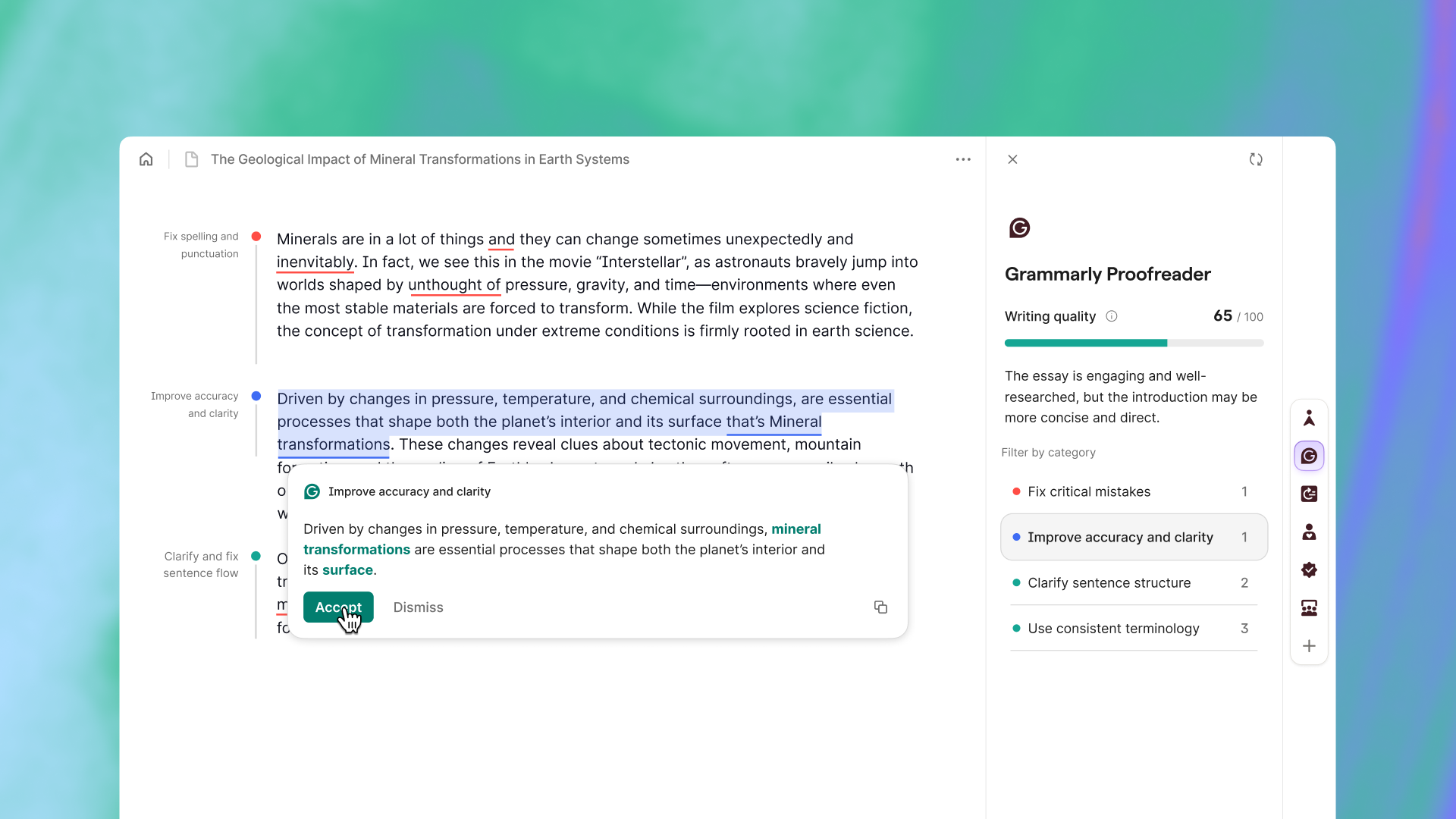
Grammarly Demo - Grammarly Proofreader
Get fast, accurate proofreading from the industry-leading AI proofreader.
Product Avatar Image

Have you used Grammarly before?

Answer a few questions to help the Grammarly community

Grammarly Reviews (13,403)

View 3 Video Reviews
Reviews

Grammarly Reviews (13,403)

View 3 Video Reviews
4.7
13,404 reviews

Review Summary

Generated using AI from real user reviews
Users consistently praise the real-time feedback and ease of use of this product, highlighting how it helps catch grammar and spelling errors instantly, which enhances their writing quality. Many appreciate its ability to improve tone and clarity, making communication more effective. However, some users note that it can occasionally suggest changes that don't fit their intended style.

Pros & Cons

Generated from real user reviews
View All Pros and Cons
Search reviews
Filter Reviews
Clear Results
G2 reviews are authentic and verified.
Kunal H.
KH
Business Analyst
Mid-Market (51-1000 emp.)
"My Daily Go-To for Catching Grammar Mistakes in User Stories"
What do you like best about Grammarly?

Grammarly is my daily solution for the grammar mistakes I make while writing user stories for my developers. The floating widget shows how many mistakes are in the story and helps me correct them. Review collected by and hosted on G2.com.

What do you dislike about Grammarly?

When I’m writing long paragraphs, it sometimes takes a while for the suggestions to appear, and I think this could be improved. Review collected by and hosted on G2.com.

Megan K.
MK
Project Manager
Higher Education
Small-Business (50 or fewer emp.)
"Real-Time Tone Adaptation That Makes Technical Writing Clear and Effortless"
What do you like best about Grammarly?

What stands out most to me about Grammarly is how it adapts tone in real time, especially in Gmail threads with researchers and external partners. I can take a dense, technical update (for example, on mariculture permitting or hatchery outputs) and quickly shift it into a more accessible version for non-technical stakeholders without having to rewrite everything from scratch; the suggestions refresh almost instantly as I edit. I’ve been using it daily for about eight months, mainly in Chrome and Edge, and the interface felt intuitive from day one. In regular use, it does a good job picking up context, catching things like subject–verb agreement in long sentences and flagging vague phrasing in project summaries. The AI rewrite tool is practical, I’ll highlight a paragraph in a proposal draft and cycle through a few alternatives until one matches the tone I need. I also use the similarity checker before sharing external-facing documents. Overall, it feels like an always-on editor that stays out of the way. Review collected by and hosted on G2.com.

What do you dislike about Grammarly?

With very long documents—like 40-page grant proposals or technical reports—I do notice CPU spikes that lead to lag. This is especially noticeable when I have multiple tabs open alongside Excel models and email, since it can slow down scrolling and make editing feel less responsive. Also, when I’ve reached out to support, the replies have sometimes felt generic rather than tailored to the specific issue I was dealing with. Review collected by and hosted on G2.com.

Rakesh J.
RJ
Consultant Gynecologist and Medical Educator
Hospital & Health Care
Small-Business (50 or fewer emp.)
Guest users or non-business users of the software, not included in G2 scores.
"Helpful Tool for Doctors and Content Creators"
What do you like best about Grammarly?

What I like best about Grammarly is that it’s very simple to use and fits perfectly into my daily work. I work as a gynecologist and also write health related blogs and articles, so I do a lot of writing every day. Grammarly helps me make my reports, patient messages, and online content clear, professional, and easy to read. It quickly corrects grammar, spelling, and tone mistakes, which saves me time when I’m busy with patients or writing articles.

I also like how easy it was to set up. I didn’t need any help or training , it worked right away with my browser, email, and Word documents. That made the implementation part very smooth and stress free. Now I use it several times a day without even thinking about it.

The tone suggestions are also very helpful. They make my writing sound polite and empathetic, which is important when I’m communicating with patients or writing about sensitive health topics.

Overall, Grammarly is a very reliable tool for my work. It saves time, improves the quality of my writing, and helps me communicate clearly both in my clinic and online work. Review collected by and hosted on G2.com.

What do you dislike about Grammarly?

What I dislike about Grammarly is that it sometimes doesn’t recognize medical terms or abbreviations correctly, which can slow me down when I’m writing reports or patient notes. A few of the suggestions can also make the writing sound too formal, especially when I want a simple and friendly tone for patients. I stay careful not to include any patient details because of privacy concerns. Sometimes it also takes a little longer to load when working on big documents, but that’s rare. Overall, these are small issues compared to the help it provides every day. Review collected by and hosted on G2.com.

Farman K.
FK
Senior Website Specialist
Computer Software
Mid-Market (51-1000 emp.)
"Effortless Content Perfection with Stellar Usability"
What do you like best about Grammarly?

I use Grammarly to write our website content, customer stories, and social media posts, which helps us fix grammatical and spelling mistakes. Grammarly makes our content better and optimized according to different tones. I like the simple use of it. It also works great with our communication software Slack and HubSpot emails, along with WordPress edit mode. The initial setup was very easy, I'd rate it 10 out of 10. Overall, I think it is pretty good for me, and I would recommend it to a friend or colleague with a score of 10 out of 10. Review collected by and hosted on G2.com.

What do you dislike about Grammarly?

Grammerly is awesome what i disclike is the small icon of grammerly popping up when i write something on the copy Review collected by and hosted on G2.com.

Windy O.
WO
Teacher
Mid-Market (51-1000 emp.)
Guest users or non-business users of the software, not included in G2 scores.
"Effortless Grammar Perfection with Top Accuracy"
What do you like best about Grammarly?

I use Grammarly for several tasks as an English major, mainly for checking grammar and sometimes for AI similarity checks on my work. Grammarly is really helpful in correcting my mistakes when I write long essays and make revisions for my thesis. I find it very convenient because it quickly suggests the correct words to use, making things faster. I definitely like their grammar checker and believe it's the best among online grammar checkers. Grammarly's grammar checker works well with Turnitin's similarity checker, which is often used by university students here in the Philippines. For me, the initial setup was very easy as the instructions are clear. Review collected by and hosted on G2.com.

What do you dislike about Grammarly?

I think it would be really nice if Grammarly could improve their AI checker so that I won't have to switch between Grammarly and Turnitin whenever I write something that needs to be published. Review collected by and hosted on G2.com.

Yogesh Babu  D.
YD
Senior Security Research Analyst
Computer Software
Mid-Market (51-1000 emp.)
"Effortless Writing with Real-Time Feedback"
What do you like best about Grammarly?

I use Grammarly for work, and it keeps me correct, whether I'm writing a long paragraph, an email to a client, or producing a report. From small punctuation errors like missing a comma to getting it right when choosing between American and British English, Grammarly is an amazing tool. I love the real-time feedback, like restructuring sentences so they sound more natural. The icon of the tool hovers around my workspace without being overly intrusive, and I actually get joy out of using this tool without having to fight the tool. The initial setup was as easy as plug and play. Review collected by and hosted on G2.com.

What do you dislike about Grammarly?

Sometimes while accepting the edits suggested by Grammarly, it tends to merge two successive words together, which at times is a bit irritating. Review collected by and hosted on G2.com.

Akriti S.
AS
Co-Founder
Information Technology and Services
Small-Business (50 or fewer emp.)
"Effortlessly Improves Writing, Annoying Upgrade Prompts"
What do you like best about Grammarly?

I find Grammarly really easy to use, especially with the underlined, bold text that helps me quickly identify errors. I appreciate that I can simply hover over the text, click, and receive a new word suggestion, which saves a lot of time and headaches. The initial setup was extremely easy—just one sign-in and I was able to use it without any hassle. It's been a great tool for improving my writing skills and solving the problematic errors I make while typing. Review collected by and hosted on G2.com.

What do you dislike about Grammarly?

I guess it gives me a lot of prompts, like now you're supposed to use this and upgrade. Those nudges and prompts to upgrade to the pro version are extremely annoying. Review collected by and hosted on G2.com.

AS
Research Assistant
Higher Education
Small-Business (50 or fewer emp.)
"Grammarly Sharpened My Writing Workflow with Clear Explanations and Reliable Tone Checks"
What do you like best about Grammarly?

I’ve used Grammarly for about two years across reports, literature reviews, and internal comms, and it genuinely sharpens my writing workflow. It’s not just about fixing mistakes; Grammarly explains them, so each edit turns into a quick learning moment. I also like the color-coded highlights that keep everything in one place—no tab-hopping—which is especially helpful when I’m juggling multiple sources. For a final pass, the clarity and tone scoring feels very reliable, and the AI assistant nudges me with references while flagging how readers might interpret trickier sections. Review collected by and hosted on G2.com.

What do you dislike about Grammarly?

The mobile keyboard tends to lag when I’m editing quick notes or comments in Docs, and it feels noticeably less smooth than native keyboards. I also really wish there were an offline mode—I’d feel safer editing unpublished drafts and participant notes locally. I understand the cloud-based model, but I’d still prefer having more local and offline control when I’m working. Review collected by and hosted on G2.com.

Weronika J.
WJ
Graduate and Postgraduate Student Services Specialist
Small-Business (50 or fewer emp.)
Guest users or non-business users of the software, not included in G2 scores.
"Real-Time Writing Pro Tips in Your Browser—Grammarly Just Works"
What do you like best about Grammarly?

The most helpful aspect of using Grammarly is that it helps me be aware of the language I use and the errors I may make. I feel quite comfortable in using English, but sometimes I need some pro-tips to be consistent and clean in my English writing.

I like the idea of the Google Chrome extension that keeps Gramamrly active on the websites I browse. I do not have to remember to visit Grammarly website - it is by my side. All I have to do is stay logged in on the website.

It performs pretty well - it reacts in real time with the text I create, so that I can review the things I have just written. Also, the notion of 3 plans - one basic and two paid is sufficient to my needs. When I have English copywriting projects, I can switch to the Pro plan, whereas in everyday use, I can stay with Basic. I have never had to use the support, because I never encountered any problems, but I am pretty sure I can reach support via many channels when necessary.

I think that Grammarly has great potential in using AI tools. It may contain more pro tips or suggestions on how to improve the content. It may be extra paid if necessary, but I can imagine it can work as an AI agent: remembering my writing style or helping with choosing the best way of communication, adjusted to the person I am writing to. Review collected by and hosted on G2.com.

What do you dislike about Grammarly?

I do not think some things are the least helpful. I did not have that kind of experience. I like the simplicity of Grammarly just the way it is. Review collected by and hosted on G2.com.

Sahril H.
SH
Founder
Retail
Small-Business (50 or fewer emp.)
Guest users or non-business users of the software, not included in G2 scores.
"Essential Tool for Polished, Professional Writing"
What do you like best about Grammarly?

I mainly use Grammarly to improve the quality and clarity of my everyday writing. The real-time grammar and spelling corrections are very helpful because they immediately highlight mistakes while I’m typing, which saves time and makes the editing process much easier. I also appreciate the clarity and style suggestions. Grammarly doesn’t just fix errors; it also recommends better wording, shorter sentences, and improvements that make the text easier to read, which is especially useful when writing emails, reports, or any professional communication. I really like the tone detection feature, which analyzes whether a message sounds friendly, confident, or too formal, helping ensure that my writing matches the context. I find Grammarly very convenient because of the browser extension, which works directly in platforms like email services, online documents, and messaging tools. It makes it easy to get grammar and clarity suggestions without switching between different apps. Using Grammarly in tools like Google Docs and Microsoft Word helps catch mistakes and improve sentence structure while drafting or editing longer pieces. The initial setup of Grammarly was very straightforward and quick. After installing the browser extension and logging in, Grammarly started working automatically across many websites without needing to configure many settings. It provides more advanced suggestions such as clarity improvements, tone analysis, and style recommendations, making writing more polished and professional. Review collected by and hosted on G2.com.

What do you dislike about Grammarly?

While Grammarly is very helpful overall, there are a few areas that could be improved. One issue is that some of the advanced features like the plagiarism checker, deeper writing insights, and certain AI rewriting tools are only available in the premium version. The free version is still useful, but it can feel a bit limited if you want access to the full set of features. Another thing I’ve noticed is that some suggestions don’t always perfectly match the context of what I’m trying to write. Occasionally, Grammarly recommends changes that make a sentence sound more formal or slightly unnatural, especially if I’m writing in a casual or conversational tone. Review collected by and hosted on G2.com.

Questions about Grammarly? Ask real users or explore answers from the community

Get practical answers, real workflows, and honest pros and cons from the G2 community or share your insights.

GU
Guest User
Last activity about 9 hours ago

What is Grammarly Business used for?

Hayata N.
HN
Hayata Nakamura
Last activity about 9 hours ago

Is Grammarly Premium Worth It? A Look at G2 User Reviews

Pricing Insights

Averages based on real user reviews.

Time to Implement

1 month

Return on Investment

11 months

Average Discount

26%

Perceived Cost

$$$$$

How much does Grammarly cost?

Data powered by BetterCloud.

Estimated Price

$$k - $$k

Per Year

Based on data from 48 purchases.

Grammarly Comparisons
Product Avatar Image
Jasper
Compare Now
Product Avatar Image
Apple Mail
Compare Now
Product Avatar Image
Education Copilot
Compare Now
Grammarly Features
Grammar Check
Tone Check
Sentence Formatting
Vocabulary Recommendations
Sentence Rephrasing
Dictionary
Text Reader
Machine Translation
Custom Style Guides
Word Processor
Integrations
Browser Plug-In
Product Avatar Image
Grammarly