

2026 Best Software Awards are here!See the list

Grammarly Reviews & Product Details

Value at a Glance

Averages based on real user reviews.

Time to Implement

1 month

Grammarly Integrations

(142)
Verified by Grammarly

Grammarly Media

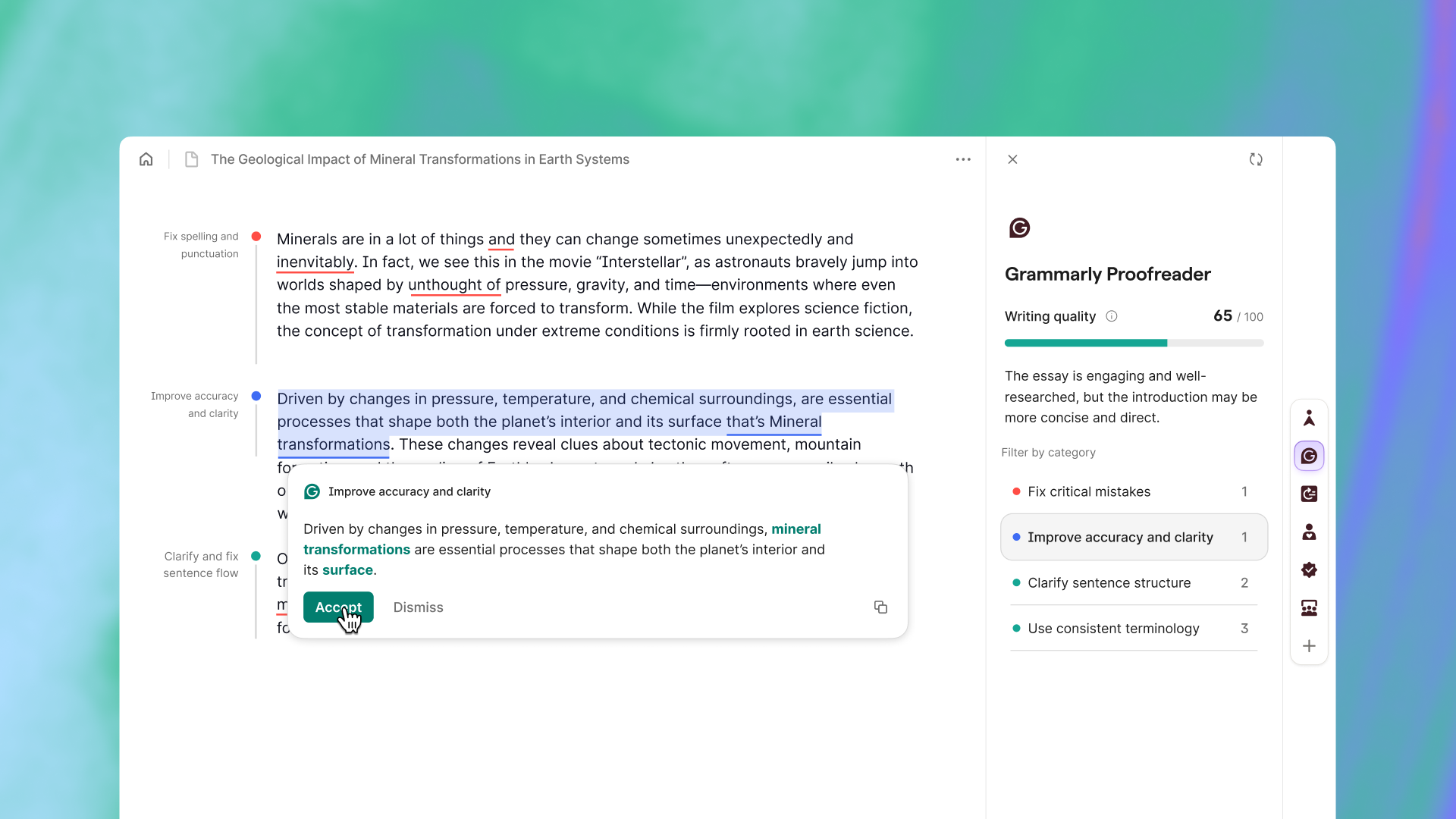
Grammarly Demo - Grammarly Proofreader
Get fast, accurate proofreading from the industry-leading AI proofreader.
Product Avatar Image

Have you used Grammarly before?

Answer a few questions to help the Grammarly community

Grammarly Reviews (13,192)

View 3 Video Reviews
Reviews

Grammarly Reviews (13,192)

View 3 Video Reviews
4.7
13,192 reviews

Review Summary

Generated using AI from real user reviews
Users consistently praise Grammarly for its real-time grammar checks and ease of use, which help improve writing clarity and professionalism across various platforms. Many appreciate how it enhances their writing by providing instant feedback and suggestions, making it a valuable tool for both casual and professional communication. However, some users note that it can occasionally alter the original context of sentences.

Pros & Cons

Generated from real user reviews
View All Pros and Cons
Search reviews
Filter Reviews
Clear Results
G2 reviews are authentic and verified.
Haider A.
HA
SDET
Small-Business (50 or fewer emp.)
Guest users or non-business users of the software, not included in G2 scores.
"Great tool for fixing grammar mistakes and creating error-free content"
What do you like best about Grammarly?

I have been using Grammarly since my college days. Back then, it helped me while making notes and documents by highlighting grammatical mistakes, which allowed me to correct my work easily. Even today, I continue to use Grammarly, mainly through the Chrome extension. The best part is that it automatically integrates with Word, emails, and almost any document file. In my job, it helps me the most when writing professional emails. Even while writing this Grammarly review, it helped me improve my content and correct mistakes. I will definitely recommend it to others. Review collected by and hosted on G2.com.

What do you dislike about Grammarly?

The subscription is a bit expensive and could be more affordable, otherwise all good. Review collected by and hosted on G2.com.

Gabriela R.
GR
Interpreter
Translation and Localization
Small-Business (50 or fewer emp.)
Guest users or non-business users of the software, not included in G2 scores.
"Seamless Writing Enhancement for Every Style"
What do you like best about Grammarly?

What I like most about Grammarly is how easy it is to use and implement. It feels intuitive from the moment I start using it. The platform also integrates smoothly across apps and browsers, so I can use it often without interrupting my workflow. I appreciate the broad range of features it offers as well, from basic grammar checks to suggestions that improve tone and clarity. Overall, it’s a reliable tool that’s quick to adopt, easy to integrate, and practical for everyday use, and its customer support feels accessible whenever I need it. Review collected by and hosted on G2.com.

What do you dislike about Grammarly?

One thing I find frustrating about Grammarly is that its suggestions can feel overly rigid or repetitive, especially when I’m working on creative or emotionally driven writing. At times, it flags stylistic choices as mistakes and pushes revisions that don’t match the intended context or my personal voice. On top of that, many of the more advanced features are locked behind a paid subscription, which limits how useful the free version can be. Review collected by and hosted on G2.com.
Amar P.
AP
Service Provider
Small-Business (50 or fewer emp.)
Guest users or non-business users of the software, not included in G2 scores.
"Real-Time Corrections and Clarity Suggestions That Keep Writing Professional"
What do you like best about Grammarly?

I like Grammarly because it checks my grammar and spelling while I am typing emails or updating customer details. In my previous customer service and withdrawal-related work, I had to send replies to customers daily. Grammarly helps me avoid small mistakes and improves sentence clarity before sending emails.

It also suggests better words which makes my communication more clear and professional. Earlier I had to read emails again and again before sending, but now the mistakes are highlighted instantly which saves time. I mostly use it while replying to customer queries and preparing basic reports or documentation. The interface is simple and it works well with browser which makes it easy to use in day-to-day tasks. Review collected by and hosted on G2.com.

What do you dislike about Grammarly?

One thing I don’t like about Grammarly is that many useful suggestions like tone improvement or better word choice are available only in the paid version. In the free version, some important corrections are locked which can be frustrating sometimes.

Also, while replying to customer emails or updating withdrawal-related documentation, Grammarly keeps showing suggestions continuously which sometimes breaks my writing flow. In some cases, it changes the sentence in a way that the original meaning feels slightly different. Another issue is that it does not work properly without internet, so it becomes difficult to use when the connection is slow. Review collected by and hosted on G2.com.

Brent H.
BH
Audio / Video Engineer
Small-Business (50 or fewer emp.)
"A Powerful Editing Tool That Respects the Author’s Voice"
What do you like best about Grammarly?

I rely on Grammarly for both professional and personal projects. It was instrumental during the final editing stages of a book I wrote for my son last year, and I am currently using it again for a second book I’m preparing for his upcoming birthday.

Beyond creative projects, I use Grammarly to vet my online product reviews. Running my content through the platform ensures that my feedback is coherent, accurate, and professional before I hit "submit."

One of its standout features is the ability to customize style and tone settings to match a specific audience. Furthermore, the tool’s ability to enforce adherence to formal style guides, such as APA or MLA, is invaluable for maintaining academic or professional standards. I appreciate that while Grammarly offers a wealth of suggestions, the final creative control remains with the author; it allows me to refine my work without losing my unique voice. I even used Grammarly to polish this review! Review collected by and hosted on G2.com.

What do you dislike about Grammarly?

Occasionally, Grammarly’s suggestions can feel a bit clinical. I often choose specific vocabulary to evoke a certain "dynamic" or "mood," and the AI’s alternatives don't always capture that intended nuance.

Additionally, I find the newer interface less intuitive than the original layout. I frequently revert to the "classic doc" feature because the user experience feels more streamlined and focused. Regarding the newer AI Writing Assistant: while it is a helpful tool for overcoming writer's block, I use it sparingly. My goal is for my writing to sound authentic and human, rather than artificially generated. Review collected by and hosted on G2.com.

Brent H.
BH
Audio / Video Engineer
E-Learning
Mid-Market (51-1000 emp.)
"A Sophisticated Writing Assistant that Coaches Rather Than Just Corrects"
What do you like best about Grammarly?

The most impressive feature of Grammarly, in my view, is that you can set specific goals before you even start writing. This makes it easy to tailor its suggestions to your target audience and the domain you’re working in. For instance, if you’re writing a school assignment, selecting the Academic domain encourages a more structured, formal approach. On the other hand, if you’re drafting a casual email to a friend, you can choose a less rigid option that better fits that tone.

I also like the Intent setting, which allows you to clarify what you’re trying to do—whether that’s simply relaying facts, painting a vivid picture, or persuading the reader. For anyone in academia, the ability to follow standardized guidelines such as APA, MLA, and Chicago is especially useful.

As a writing assistant, Grammarly’s suggestions feel non-intrusive. It offers recommendations to strengthen a sentence, but you still have full creative control and can keep your original phrasing when you want to. It’s also helpful in those moments when you realize your draft isn’t conveying the emotional or intellectual context you intended; the “re-write” suggestions can help bring the tone back in line with the rest of your text. Review collected by and hosted on G2.com.

What do you dislike about Grammarly?

While the tool is powerful, it does have its limitations. Since it’s an AI-based assistant, it sometimes struggles to fully grasp the nuance and context of more complex communication, and some of the finer points of the English language can still get “lost in translation.”

I’m also not a fan of the real-time grammar function when writing directly in a Grammarly document, because I find it distracting. I prefer to draft most of my work in Microsoft Word and then paste it into Grammarly afterward for a final polish. Along the same lines, the browser extension can feel intrusive during simple tasks that don’t require in-depth editing, so I usually keep it disabled.

Lastly, the subscription price feels quite steep for the advanced features. The annual cost is $144, although I’ve been able to cut that in half over the last two years by watching for their email promotional offers. Review collected by and hosted on G2.com.

HP
RFX Sourcer
Mid-Market (51-1000 emp.)
"Grammarly: A Smart Writing Partner for Clearer, More Confident Communication"
What do you like best about Grammarly?

Grammarly is like having a smart writing partner by our side. It doesn't just fix grammar and spelling mistakes it helps in expressing ideas more clearly and confidently. Whether a user writing an email, a report, or even a simple message, it suggest better wording, improve sentence flow, and adjust the tone to match the purpose, whether professional or casual. Review collected by and hosted on G2.com.

What do you dislike about Grammarly?

Grammarly is helpful, but it isn't always accurate. Sometimes it suggests changes that aren't necessary and can make simple writing sound too formal. Also, many useful features are available only in paid version. Review collected by and hosted on G2.com.

YASWANTH REDDY S.
YS
Associate Software Engineer
Enterprise (> 1000 emp.)
Guest users or non-business users of the software, not included in G2 scores.
"Instant Grammar Checks and Clearer Writing with Powerful AI Assistance"
What do you like best about Grammarly?

- Real-time grammar and spelling checks: It spots errors instantly, from missing punctuation to commonly confused words.

- Clarity improvements: Suggestions help make writing concise and easy to follow, reducing unnecessary back-and-forth.

- Tone adjustments: It can shift your writing style from formal to friendly, ensuring your message lands the way you intend.

- Plagiarism detection: Useful for students and professionals to ensure originality.

- Generative AI features: Recently, Grammarly added AI-powered writing assistance, helping with drafting, rewriting, and brainstorming. Review collected by and hosted on G2.com.

What do you dislike about Grammarly?

Limitations of Grammarly

• Over-standardization of writing: It sometimes pushes text toward a “neutral corporate style,” which can strip away personality or creative flair.

• AI hallucinations: The newer generative AI features occasionally produce inaccurate or misleading suggestions.

• Context blind spots: Grammarly doesn’t always understand nuanced meaning, cultural references, or specialized jargon, which can lead to incorrect corrections.

• Subscription cost: The free version is limited, and the premium plan can feel expensive compared to alternatives.

• Dependence risk: Heavy reliance on Grammarly can reduce a writer’s own editing skills over time. Review collected by and hosted on G2.com.

Khushee S.
KS
Special Educator
Small-Business (50 or fewer emp.)
Guest users or non-business users of the software, not included in G2 scores.
"Polished, ProfessioUseful App for Everyday Writing Needsnal Writing Made Easy with Grammarly"
What do you like best about Grammarly?

What I like most about Grammarly is how it makes writing easier and more polished. It quickly catches grammar, spelling, and punctuation mistakes while also suggesting better word choices and clearer sentence structures. I especially appreciate the tone and clarity suggestions, which help make my writing sound more professional and confident. It’s simple to use across different platforms and has really improved my overall writing quality. Review collected by and hosted on G2.com.

What do you dislike about Grammarly?

One thing I dislike about Grammarly is that sometimes its suggestions can feel overly strict or not fully match the intended tone or context. Occasionally, it flags sentences that are actually correct, which means I still need to review suggestions carefully. Also, some advanced features are locked behind the premium version, which can limit the full experience in the free plan. Review collected by and hosted on G2.com.

Hany A.
HA
Virtual Assistant
Information Services
Small-Business (50 or fewer emp.)
"My daily companion for professional client communication"
What do you like best about Grammarly?

I have been relying on Grammarly for many years, starting from my university days until now in my professional career. As a Virtual Assistant, it is an essential tool for me to double check my emails and reports before sending them. It has significantly helped me communicate more professionally with different clients by catching errors in real-time. Review collected by and hosted on G2.com.

What do you dislike about Grammarly?

The free version is quite limited compared to the premium one. Even though I find the free desktop version sufficient for my needs, the experience on mobile is not as satisfying. I feel that the mobile assistant is a bit too intrusive and interferes more than necessary while I am typing on my phone. Review collected by and hosted on G2.com.

Satyam V.
SV
Graduate Apprentice Engineer
Small-Business (50 or fewer emp.)
"Effective Real-Time Writing Help with Smooth Integrations Across Your Workflow"
What do you like best about Grammarly?

Grammarly is very effective for improving everyday writing, catching grammar, spelling, and punctuation mistakes in real time. Its suggestions around clarity, tone, and conciseness are particularly helpful when I’m drafting professional emails, reports, or documentation. It also integrates smoothly with browsers, MS Word, Google Docs, and email platforms, so it’s easy to use across different workflows without disrupting productivity. Review collected by and hosted on G2.com.

What do you dislike about Grammarly?

Some of the more advanced suggestions are locked behind the premium version, which can feel a bit restrictive for individual users. At times, Grammarly can be overly aggressive with its recommendations and may slightly shift the intended meaning, so a manual review is still necessary. Also, technical or domain-specific writing isn’t always interpreted perfectly, which means I sometimes need to double-check those sections more carefully. Review collected by and hosted on G2.com.

Pricing Insights

Averages based on real user reviews.

Time to Implement

1 month

Return on Investment

11 months

Average Discount

27%

Perceived Cost

$$$$$

How much does Grammarly cost?

Data powered by BetterCloud.

Estimated Price

$$k - $$k

Per Year

Based on data from 48 purchases.

Grammarly Comparisons
Product Avatar Image
Jasper
Compare Now
Product Avatar Image
Apple Mail
Compare Now
Product Avatar Image
Education Copilot
Compare Now
Grammarly Features
Grammar Check
Tone Check
Sentence Formatting
Vocabulary Recommendations
Sentence Rephrasing
Dictionary
Text Reader
Machine Translation
Custom Style Guides
Word Processor
Integrations
Browser Plug-In
Product Avatar Image
Grammarly