Compare this with other toolsSave it to your board and evaluate your options side by side.
Save to board

Backlog Reviews & Product Details

Pricing

Pricing provided by Backlog.

Free

Free
Per Month

Backlog Media

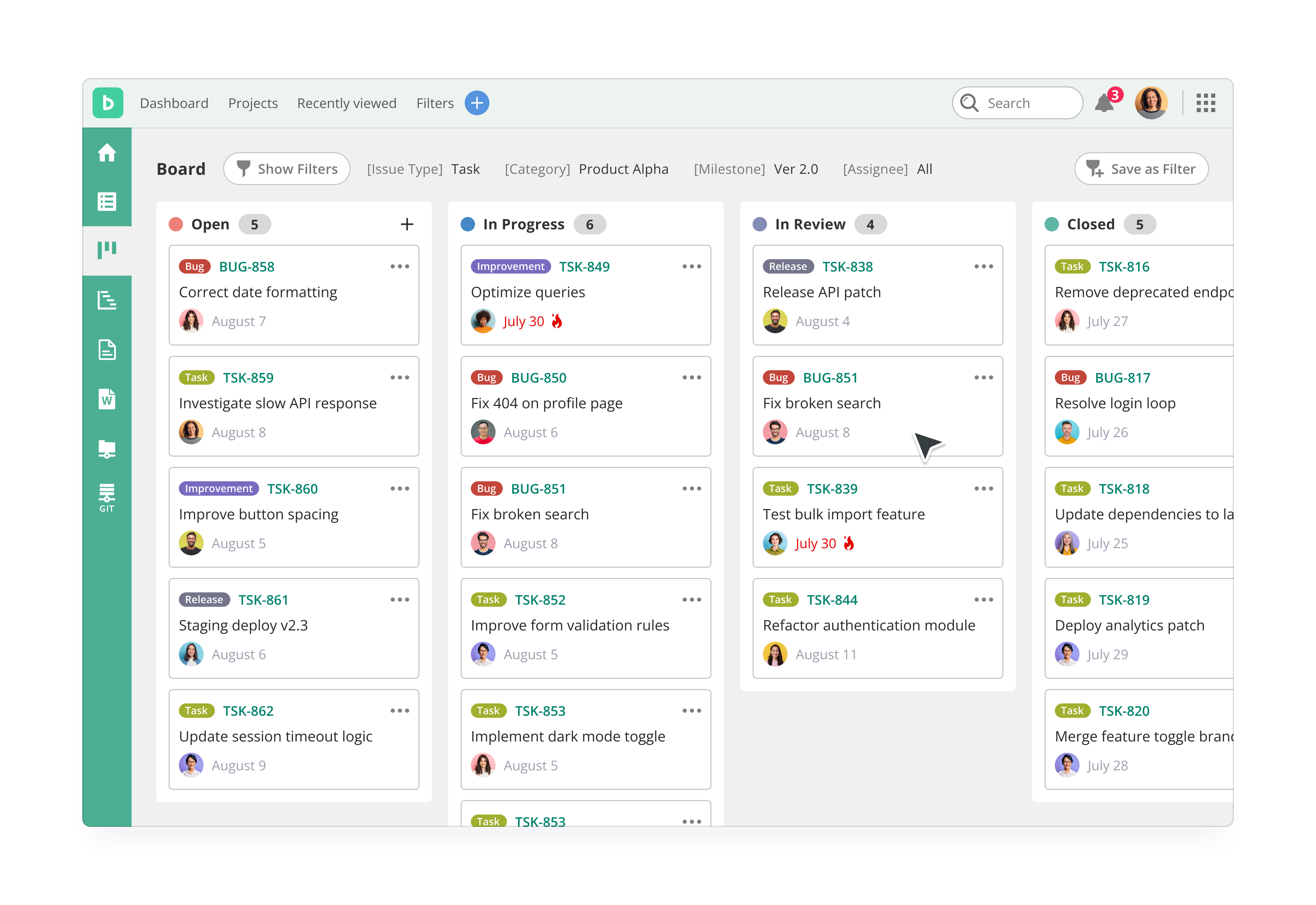
Backlog Demo - Kanban Board
Kanban-style boards let you understand where every task is at a glance, edit with a click, and estimate delivery in seconds. Each project has its own board for easy, drag-and-drop updating of issues.
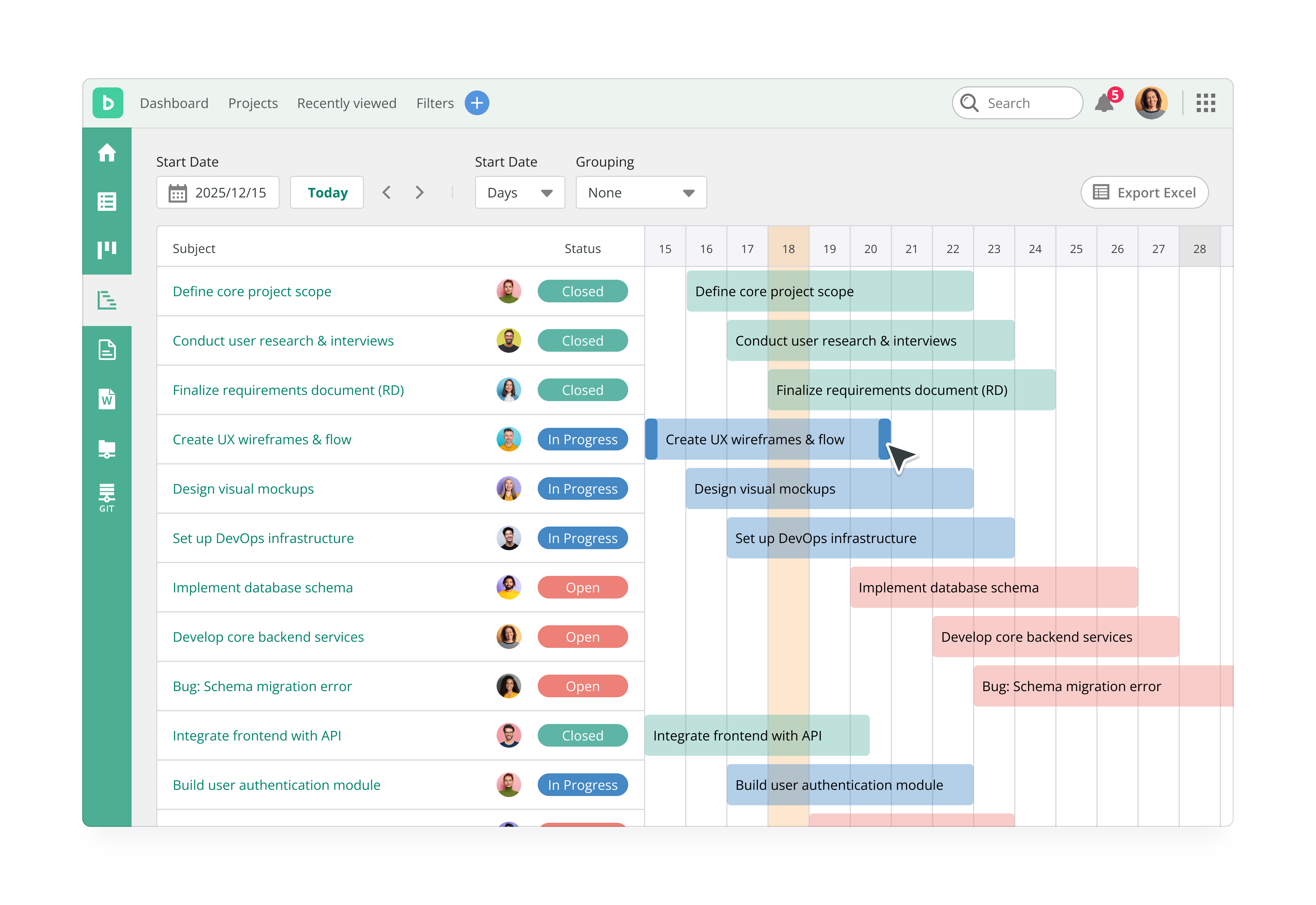
Backlog Demo - Gantt Chart
Gantt charts allow you to quickly visualize and edit the timeline of your entire project.
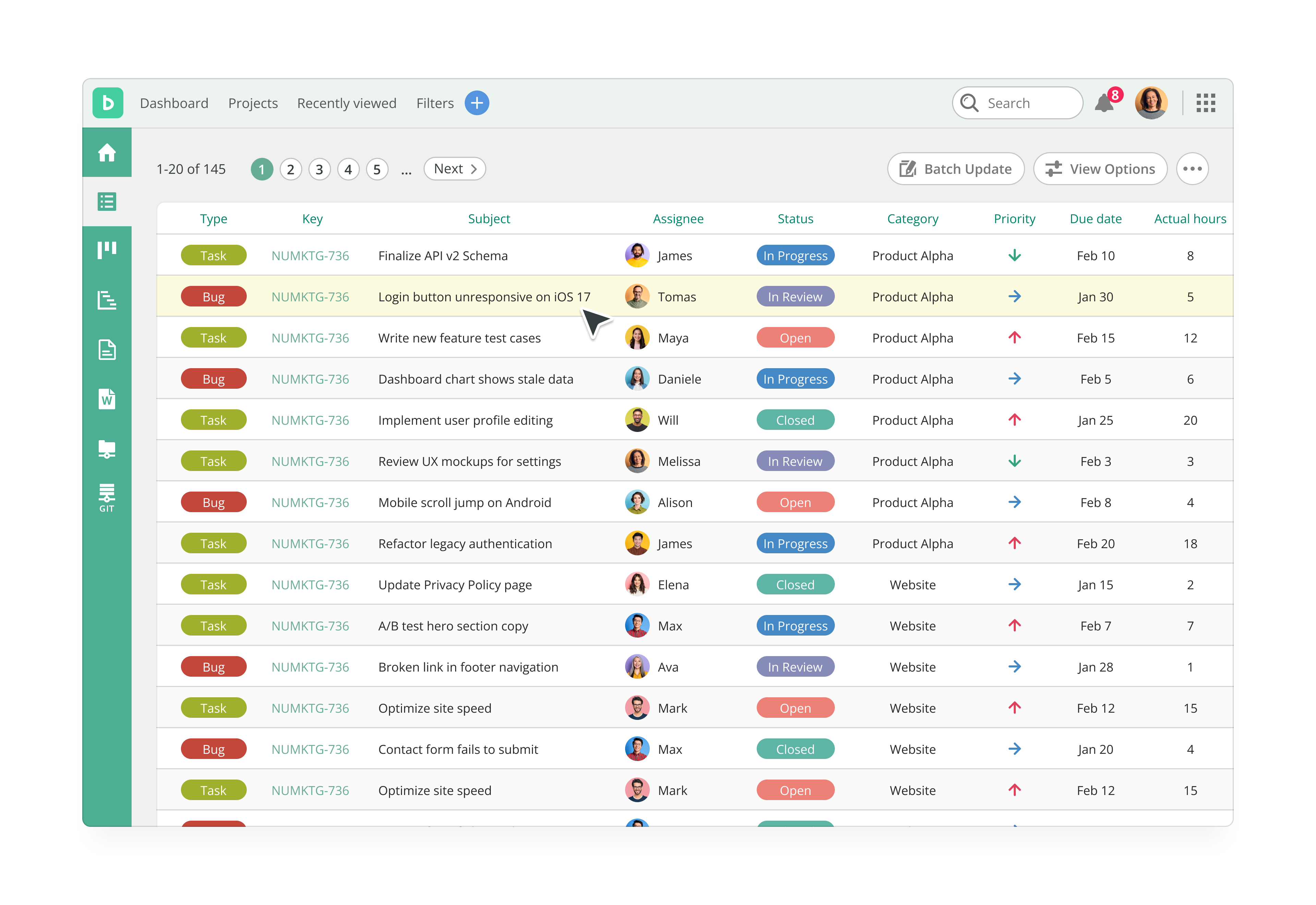
Backlog Demo - Issues - List View
In Backlog, a piece of work or a ticket within a project, such as a task is represented as an issue. Issues help you stay organized and keep track of tasks in the project and their timelines. Standardize issue creation by creating templates, or set up automatic issue creation via an email add...
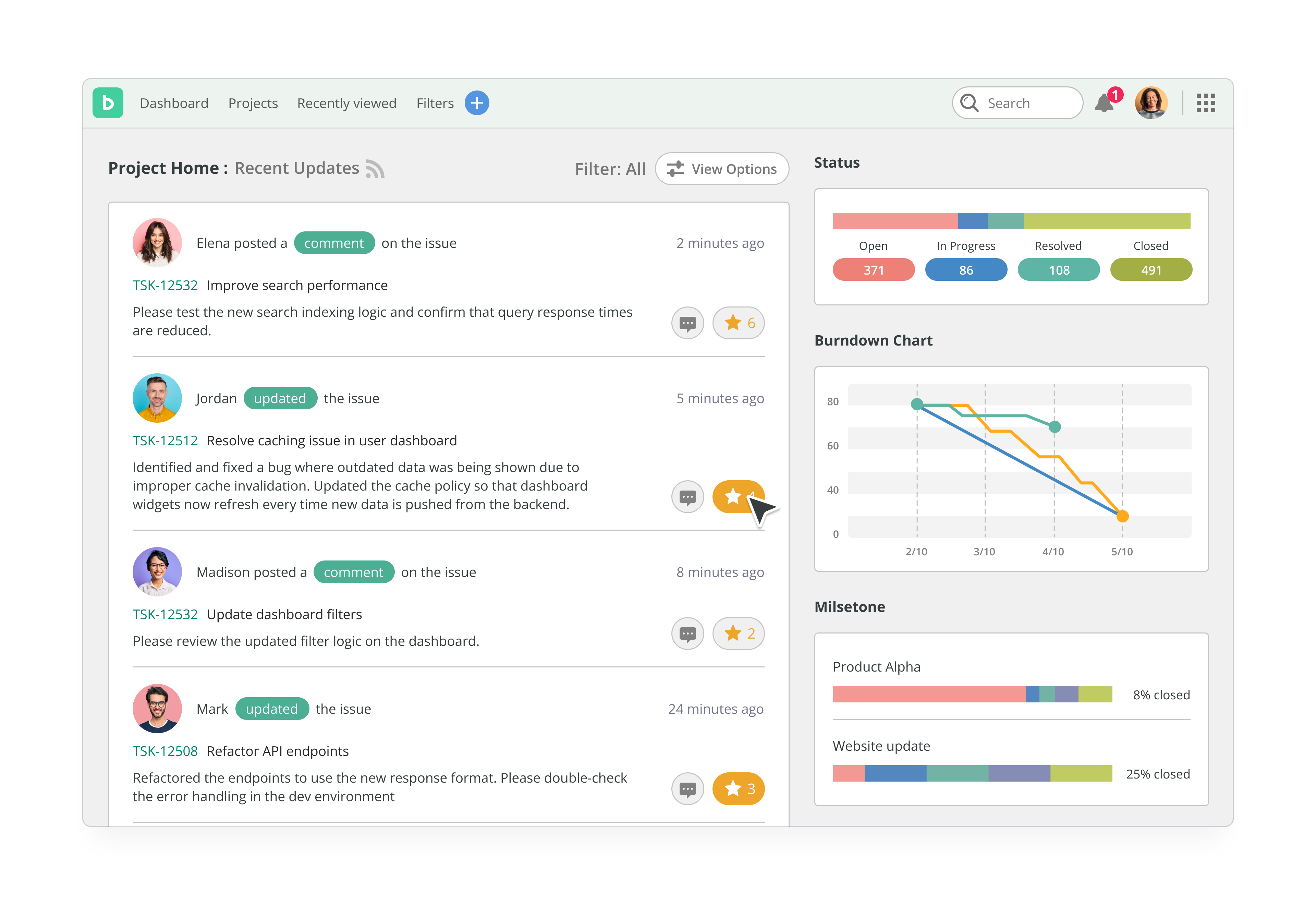
Backlog Demo - Backlog Dashboard
This is a home page for a project, various information about the project is displayed here. This includes the 50 latest activities, such as new and updated issues, Wiki, comments, uploaded files and Subversion commit log.
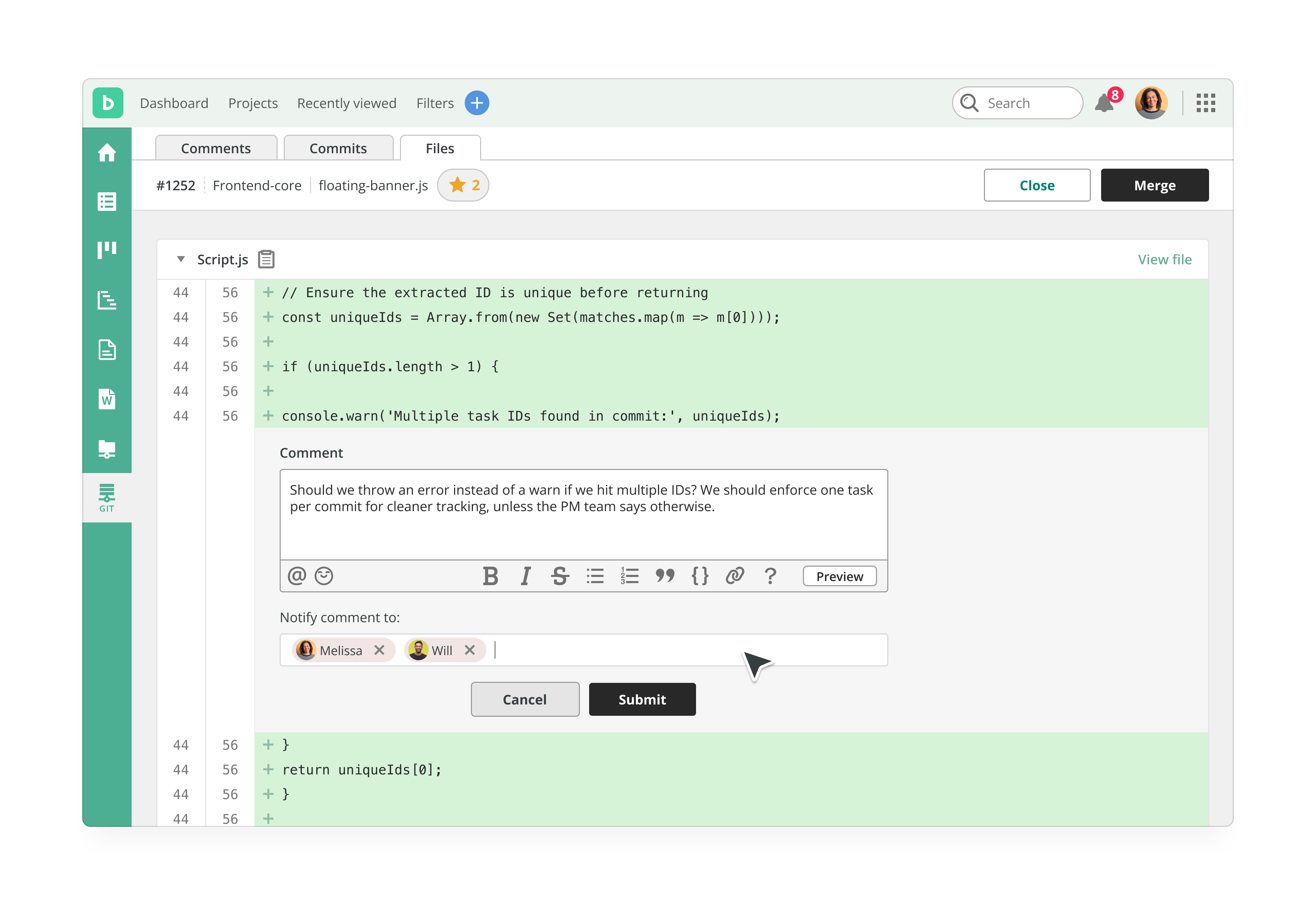
Backlog Demo - Code Review
Backlog has Git & SVN code review built in, so no additional integrations are needed to use it. Version control helps the team keep track of the change history of files and work concurrently on code using the branching and merging functions. What’s more, they can link code updates to issues i...
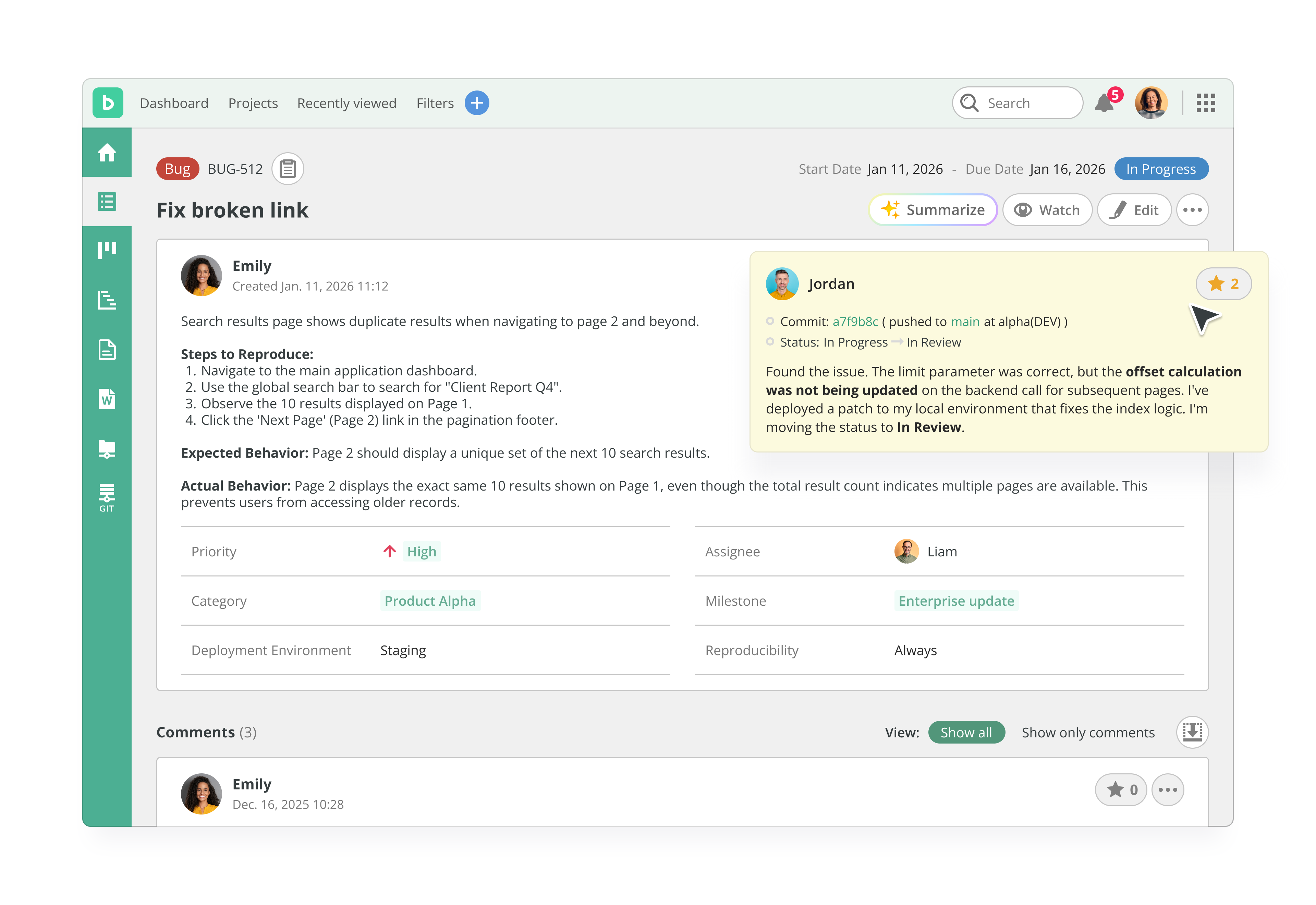
Backlog Demo - Bug Tracking
Backlog’s clean, intuitive interface lets any team member log bugs clearly and quickly. With fields for descriptions, screenshots, priorities, and more, anyone can report issues—no technical background needed.
Play Backlog Video
Play Backlog Video
Play Backlog Video
Play Backlog Video
Play Backlog Video
Product Avatar Image

Have you used Backlog before?

Answer a few questions to help the Backlog community

Backlog Reviews (425)

View 1 Video Reviews
Reviews

Backlog Reviews (425)

View 1 Video Reviews
4.6
425 reviews

Review Summary

Generated using AI from real user reviews
Users consistently praise Backlog for its user-friendly interface and effective task management, which streamline project workflows and enhance team collaboration. The integration of features like Git and visual tools such as Gantt charts helps teams stay organized and aligned. However, some users note that the mobile app experience could be improved, as it lacks some functionalities found on the desktop version.

Pros & Cons

Generated from real user reviews
View All Pros and Cons
Search reviews
Filter Reviews
Clear Results
G2 reviews are authentic and verified.
Michael C.
MC
Small-Business (50 or fewer emp.)
"Streamlined Ticket Tracking with Effective Wiki Integration"
What do you like best about Backlog?

I appreciate that Backlog was able to easily configure and handle sending information to both the Git repository and Bitbucket, which was really handy for us. I also really like the little checkboxes in the edit menu when writing up a ticket and keeping track of things. The ease of setting it up and configuring team permissions was a big plus, as I don't remember any major hassles. Review collected by and hosted on G2.com.

What do you dislike about Backlog?

There's plenty of features we don't really use. We only use a stripped-down set of it. Maybe that's the biggest negative, but like I said, no real complaints. Review collected by and hosted on G2.com.

Response from Ruth Aparicio of Backlog

Dear Michael,

Thanks for your review!

We're glad Backlog is working well for you, especially the easy Git and Bitbucket integration, the handy checkboxes when editing tickets, and the straightforward setup with team permissions.

Thanks for mentioning that you only use a stripped-down set of features. We know not every tool is needed by every team, and that's perfectly okay. We're happy it's serving your core needs for ticket tracking, bug fixes, R&D, and using the Wiki as your knowledge base.

Appreciate you sharing!

Fiona T.
FT
Mid-Market (51-1000 emp.)
"Effortless Task Management with Backlog, Needs Multi-Assign Functionality"
What do you like best about Backlog?

I find Backlog very easy to use and clear, which helps me satisfy the clients I work with. I like adding tickets and keeping track of progress, which makes reporting software and hardware issues to our support team efficient. The initial setup was very easy, and I appreciate how straightforward it is to get started. Review collected by and hosted on G2.com.

What do you dislike about Backlog?

I wish we could assign 2 people/accounts to tickets. We have to assign them to our software team so that they can keep track of open tickets, but because I am not assigned I can't easily view a list of all of mine. Review collected by and hosted on G2.com.

Response from Ruth Aparicio of Backlog

Dear Fiona,

Thank you for the 5-star review!

We're glad Backlog feels easy and straightforward to use. It's great to hear that adding tickets, tracking progress, and reporting issues to your support team is helping you satisfy client needs efficiently.

We appreciate your suggestion about multi-assign. We understand how useful it would be to assign multiple people to a ticket while still keeping a clear personal task list. We’ve shared your feedback with our product team.

Thanks again for taking the time to share your thoughts!

Sandeep Kumar M.
SM
Student
Small-Business (50 or fewer emp.)
Guest users or non-business users of the software, not included in G2 scores.
"All-in-One Project Management with Seamless Collaboration"
What do you like best about Backlog?

What I like best about Backlog is its all‑in‑one project management and collaboration platform that keeps tasks, timelines, and communication organized in one place. It offers visual tools like Kanban boards and Gantt charts that make tracking progress and planning work easy and clear. It also combines task/issue tracking with built‑in version control (Git/SVN) so developers and teams can manage code and bugs alongside project tasks without switching tools Review collected by and hosted on G2.com.

What do you dislike about Backlog?

• The interface can feel outdated or cluttered, especially compared to newer project tools.

• It offers limited customization and reporting, making it harder for complex workflows.

• The mobile app has fewer features and may not be as smooth as the desktop version.

• Some users find integration options and deep analytics lacking compared to competitors.

These are the main areas where Backlog could improve for more advanced or larger teams. Review collected by and hosted on G2.com.

Response from Joanna Latarska of Backlog

Dear Sandeep Kumar,

Thank you for your review, we love to hear our customers feedback! We are happy to hear that you find Backlog to be a great all‑in‑one project management and collaboration tool, and that you and your teams find its features such as Git and Subversion very useful.

Thank you for your feedback on Backlog's interface, customization and reporting, mobile app features, and integration options as well, our team will review it. Please also see the link to the Custom fields feature for your reference below.

See how Backlog improved
Vard L.
VL
Partner
Small-Business (50 or fewer emp.)
"Simple Interface, Powerful Features"
What do you like best about Backlog?

Simplicity of the user interface compared to the power of the features, price has been good until recently Review collected by and hosted on G2.com.

What do you dislike about Backlog?

Some of configurability of statuses/filters/ etc. Some difficulty in using milestones versus versions. Force to set them both the same for one use case. Price point increases dramatically after hitting a modest storage threshold. Review collected by and hosted on G2.com.

Response from Ruth Aparicio of Backlog

Dear Vard,

Thanks for your review!

We’re glad Backlog’s simple interface and powerful features are working well for your geographically diverse team, especially for issue tracking, clean workflows, and release integration.

We appreciate your honest feedback on configurability (statuses and filters), the distinction between milestones and versions, and recent pricing changes. We’ve shared your comments with our product and pricing teams.

Thanks again for taking the time to share your thoughts!

JB
"Effective Team Alerts, Minor Closing Glitch"
What do you like best about Backlog?

I use Backlog for keeping on top of team needs like member transfers, repairs, and requests. I appreciate that with Backlog, issues never slip through the cracks, even when we're busy. Detailed notes can be left quickly for everyone to see, making it a reliable platform for team communication. I like that anything big or small can be posted here to ensure it gets the attention it deserves. It's particularly useful for connecting with team members whose schedules don't often overlap. Review collected by and hosted on G2.com.

What do you dislike about Backlog?

On occasion, a step gets missed when going back and forth handling an issue. I think it would be great if 'Resolved' issues would also then close as well. Review collected by and hosted on G2.com.

Response from Joanna Latarska of Backlog

Dear Jennifer,

Thank you for your review! We are delighted to hear that you find Backlog to be an effective and reliable platform for team communication, and that it helps you to keep track of issues and activities.

Thank you for your feedback on the Backlog issue statuses as well, our team will review it.

thang p.
TP
Mid-Market (51-1000 emp.)
"Efficient Project Management with Room for Mobile Improvement"
What do you like best about Backlog?

I like Backlog for its clear task organization and visual workflow tools. These features help reduce overwhelm, improve accountability, quickly spot bottlenecks, and enable better planning. Additionally, the initial setup was quick and simple. Review collected by and hosted on G2.com.

What do you dislike about Backlog?

I find the limited mobile experience and reporting limitations a bit of a downside. There should be full feature parity between mobile and other platforms, as well as an offline mode. Also, custom reports, export options, and history tracking could really enhance the product's usefulness. Review collected by and hosted on G2.com.

Response from Ruth Aparicio of Backlog

Thank you for the detailed review, we really appreciate it!

We're glad Backlog's clear task organization and visual workflow tools are reducing overwhelm, boosting accountability, helping you spot bottlenecks quickly, and improving planning. The fast initial setup is always nice to hear too!

Thanks for the honest feedback on the mobile experience and reporting. We've made big strides recently: The iOS app was completely redesigned in late 2025 (version 3.0) with a cleaner interface, faster navigation, and quick-edit features. The Android app also received a major redesign (version 3.0.1).

We don't have full offline mode or deep custom reporting yet, but we do support CSV/Excel exports from the Issues page and have various built-in progress visuals (Gantt, burndown, etc.).

Your suggestions on feature parity, offline support, and enhanced reporting are very valuable though!

Thanks again for using Backlog and helping us improve!

See how Backlog improved
JB
Founding Partner
Small-Business (50 or fewer emp.)
"A Must-Have Project Management Tool for Client Collaboration"
What do you like best about Backlog?

It’s one of the most useful project management tools I use in my business. It allows my clients to add tasks, bugs, and other items without having to rely on email. Review collected by and hosted on G2.com.

What do you dislike about Backlog?

So far I haven’t found anything I dislike Review collected by and hosted on G2.com.

Nat S.
NS
Software testing manager
Small-Business (50 or fewer emp.)
"Pros and cons about backlog software"
What do you like best about Backlog?

Being able to prioritize issues and assigning them to different categories. Also creating different categories to assign issues to. Review collected by and hosted on G2.com.

What do you dislike about Backlog?

There is really nothing that I have found that I can say I dislike about. Review collected by and hosted on G2.com.

Response from Ruth Aparicio of Backlog

Dear Nat,

Thank you for the positive review, we appreciate it!

We're thrilled that Backlog's prioritization, issue assignment, and category features are helping sync software testers/users with developers, making it easy to post bugs, categorize them, prioritize fixes, and keep everyone aligned on what needs attention next. That's a key strength for bridging those teams!

Glad there's nothing you dislike, reviews like this keep us going strong.

Thanks again for using Backlog!

Nguyen Nhat Q.
NQ
Aerospace IoT
Mid-Market (51-1000 emp.)
"User-Friendly Task Management with Backlog"
What do you like best about Backlog?

I use Backlog mainly to create and report tasks in my projects. It helps me see which tasks need to be done first and the progress of the project, as well as monitor my teammates' progress and state of work. I really like the friendly UI and how easy it is to use. The task tracking feature is valuable because it helps my team and me know what tasks to focus on to complete projects. Review collected by and hosted on G2.com.

What do you dislike about Backlog?

no, it a ok tool Review collected by and hosted on G2.com.

Response from Ruth Aparicio of Backlog

Dear Nguyen,

Thank you for the positive review, we really appreciate it!

We're thrilled that Backlog's friendly UI and task tracking features are helping you create/report tasks, prioritize what needs attention first, monitor progress (yours and your teammates'), and keep projects on track. That's core to what we built: making it easy to focus on the right work and stay organized as a team.

Glad to hear there's nothing major to dislike, reviews like this keep us motivated!

Thanks again for using Backlog and sharing your experience.

Vân L.
VL
Freelance Designer
Small-Business (50 or fewer emp.)
"Organized Workflow with Some Clutter"
What do you like best about Backlog?

I like how Backlog keeps everything in one place. Tasks, deadlines, comments, and code stay organized so the team doesn't lose track of anything. Review collected by and hosted on G2.com.

What do you dislike about Backlog?

A few things could be better with Backlog. Sometimes the interface feels a bit cluttered. And for very small projects, it can feel like overkill. Also, notifications can get overwhelming if there are a lot of tasks and comments at once. Review collected by and hosted on G2.com.

Questions about Backlog? Ask real users or explore answers from the community

Get practical answers, real workflows, and honest pros and cons from the G2 community or share your insights.

Janani N.
JN
Janani Nayanathara
Last activity almost 2 years ago

Hi all, I do not seem to find a way to track actual time spent for subtasks in Backlog. Is there any workaround you all have figured out?

AA
Ankit Agrawal
Last activity almost 2 years ago

What is the quick way to change the assignee of the issue

Pricing Options

Pricing provided by Backlog.

Free

Free
Per Month

Starter

$35.00
Per Month

Standard

$100.00
Per Month
Backlog Comparisons
Product Avatar Image
Jira
Compare Now
Product Avatar Image
Redmine
Compare Now
Product Avatar Image
MantisBT
Compare Now
Backlog Features
Creation & Assignment
Due Dates
Task Prioritization
GANTT
Issue Tracking
User Reports & Feedback
Tester Reports & Feedback
Team Reports & Comments
Bug History
Data Retention
Product Avatar Image
Backlog