Docusign

By Docusign

4.5 out of 5 stars

How would you rate your experience with Docusign?

Compare this with other toolsSave it to your board and evaluate your options side by side.
Save to board

Docusign Reviews & Product Details

Pricing

Pricing provided by Docusign.

Personal

$10.00
1 User Per Month

Docusign Media

Docusign Demo - Mobile Signing
Easily sign on mobile.
Docusign Demo - Mobile App Document Storage
Access all of your signed forms straight from the DocuSign app from anywhere in the world.
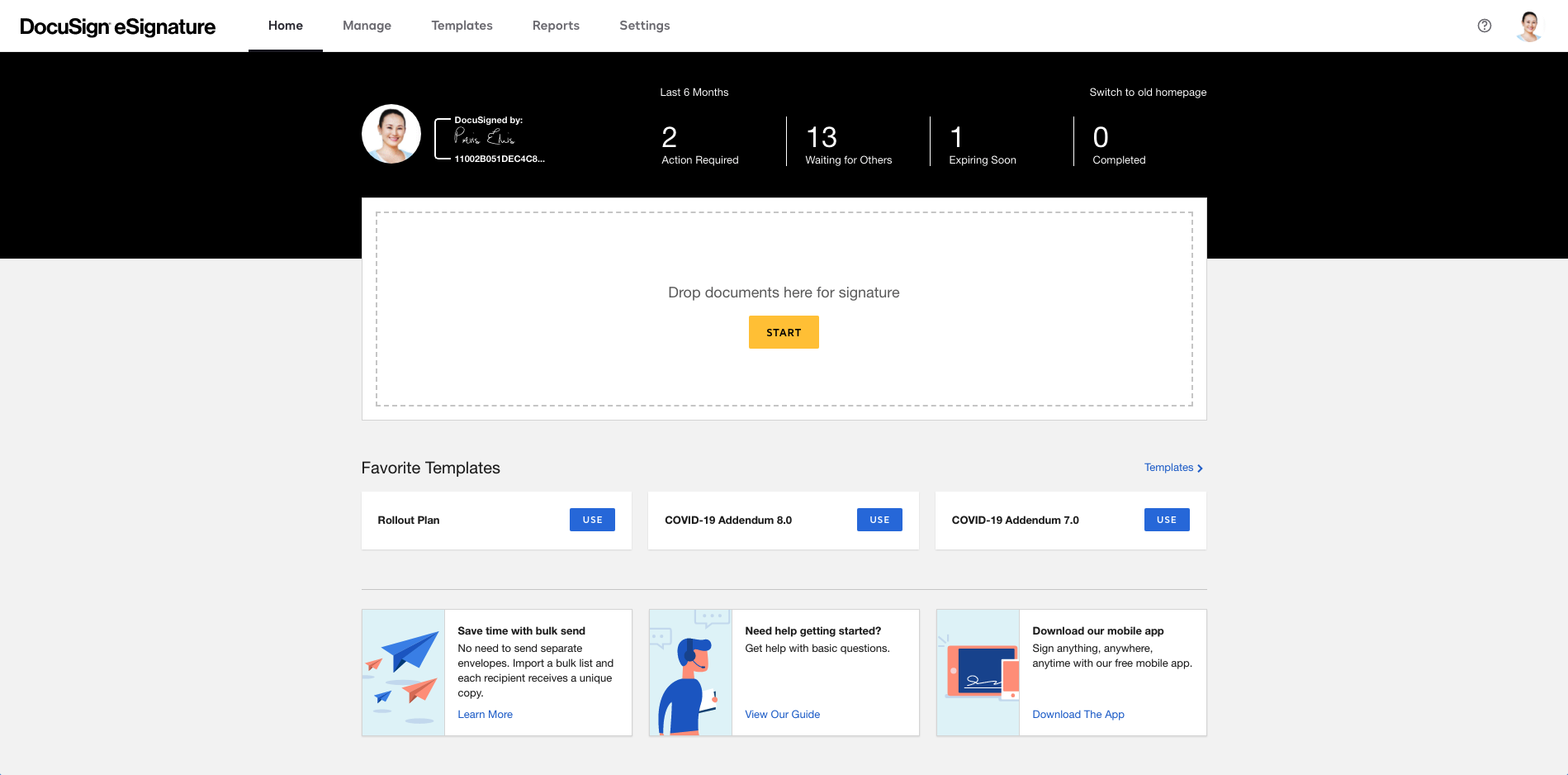
Docusign Demo - Harmonized Homepage
Create and send documents easily from your browser.
Docusign Demo - Manage Screenshots 1
Manage Screenshots
Docusign Demo - Manage Screenshots 2
Manage Screenshots
Docusign Demo - Manage Screenshots Templates
Manage Screenshots
Play Docusign Video
Play Docusign Video
Play Docusign Video
Play Docusign Video
Product Avatar Image

Have you used Docusign before?

Answer a few questions to help the Docusign community

Docusign Reviews (2,572)

View 4 Video Reviews
Reviews

Docusign Reviews (2,572)

View 4 Video Reviews
4.5
2,572 reviews

Review Summary

Generated using AI from real user reviews
Users consistently praise the product for its ease of use and efficiency in managing document signing. Many appreciate how it simplifies the signing process, allowing for quick and secure transactions without the need for printing or scanning. However, some users note that the pricing can be steep for smaller teams or occasional users.

Pros & Cons

Generated from real user reviews
View All Pros and Cons
Search reviews
Filter Reviews
Clear Results
G2 reviews are authentic and verified.
Giovanni R.
GR
Customer Success Manager
Small-Business (50 or fewer emp.)
Guest users or non-business users of the software, not included in G2 scores.
"Effortless Document Signing and Easy Download of Completed Files"
What do you like best about Docusign?

I like how easy it is to send documents to the other party for signature, and then download the signed file afterward. Review collected by and hosted on G2.com.

What do you dislike about Docusign?

I would like a folder-type structure where we can store and organize our documents. Review collected by and hosted on G2.com.

Verified User in Non-Profit Organization Management
UN
Small-Business (50 or fewer emp.)
"DocuSign Makes Document Prep and Signing Simple"
What do you like best about Docusign?

It’s easy to use. Where previously important documents were lost in long email chains, docusign makes it really simple for me to prepare documents for higher-ups, allowing them to just open, review, and sign. Review collected by and hosted on G2.com.

What do you dislike about Docusign?

The terminology can be confusing—for example, when to use an envelope versus “sign a document.” Also, not having the option to rename a document before sending it for signature makes it harder to differentiate between documents at first glance. Review collected by and hosted on G2.com.

TS
Chief Executive Officer
Accounting
Small-Business (50 or fewer emp.)
"Flexible Signature Requests, But the Capped Envelope Pricing Feels Restrictive"
What do you like best about Docusign?

Flexible. I could make it as simple or complicated as I wanted to when requesting signatures. Review collected by and hosted on G2.com.

What do you dislike about Docusign?

The price. They operate on a capped number of envelopes system. So I was paying a significant amount more to only be able to send 5 signatures a month. If I'm paying money for a solution, it should be unlimited. The features should change with the price, not the capacity. Review collected by and hosted on G2.com.

Jay R D.
JD
General Virtual Assistant / Executive Assistant
Small-Business (50 or fewer emp.)
"Efficient and Reliable Document Signing"
What do you like best about Docusign?

I love how DocuSign simplifies the entire signature process. It allows us to send documents securely, track progress in real time, and get signatures quickly without printing or scanning. The platform is intuitive and reliable, which has improved workflow efficiency across our team and made client interactions much smoother. Review collected by and hosted on G2.com.

What do you dislike about Docusign?

Some advanced features can be a little tricky to navigate at first, and occasional delays in notifications can happen. It would be helpful if certain templates and integrations were more customizable. Review collected by and hosted on G2.com.

Jasmine T.
JT
Talent Acquisition
Mid-Market (51-1000 emp.)
"Convenient, Customizable, and Easy to Use"
What do you like best about Docusign?

I find Docusign to be very convenient and easy to use. It's also highly customizable, which I really appreciate. The integration with Greenhouse, our recruiting system, is incredibly convenient and allows for flexible, changeable fields. The initial setup was easy, which made the transition smooth for us. Review collected by and hosted on G2.com.

What do you dislike about Docusign?

There isn't much on my end that I dislike about the software Review collected by and hosted on G2.com.

Hiruni N.
HN
Salesforce Administrator
Enterprise (> 1000 emp.)
"I love using Docusign!"
What do you like best about Docusign?

Very easy to use UI. I've been using it for about 8 months now and it is great. I am excited to try the IAM feature that was recently launched as well. It notifies users on email when a new docusign is received which makes it super easy to sign it.

I visited their stall at the TDX Bengaluru event and learned alot of the platform capabilities for integration and especially the features related to contract management is a game changer Review collected by and hosted on G2.com.

What do you dislike about Docusign?

I can't think of anything. I like it so much Review collected by and hosted on G2.com.

Alessandro N.
AN
Salesforce Administrator
Mid-Market (51-1000 emp.)
"Docusign has revolutionized how my company signs contracts"
What do you like best about Docusign?

Docusign's greatest strength undoubtedly lies in its outstanding ease of use. The intuitive interface allows anyone to send and sign documents with just a few clicks, drastically reducing time and errors. I particularly appreciated the ease of implementation, which enabled rapid and seamless adoption within our organization. The high frequency of use for managing all our contracts testifies to its effectiveness and centrality in our processes. Furthermore, the ease of integration with our Salesforce CRM has greatly simplified our workflows, making the sales cycle more agile Review collected by and hosted on G2.com.

What do you dislike about Docusign?

While Docusign is exceptional, there are a few areas for improvement. At times, the cost for certain advanced features or high transaction volumes can be a bit prohibitive, especially for small and medium-sized businesses. Although the overall ease of use is high, the administration interface for complex configurations could be made more straightforward. Additionally, while acknowledging the importance of customer support, on some occasions, response times for non-standard issues could be optimized. Finally, despite its high ease of integration, customizing certain integrations requires specific technical skills that are not always immediately available internally Review collected by and hosted on G2.com.

Timothy M.
TM
Regional Sales Director, Northeast
Marketing and Advertising
Small-Business (50 or fewer emp.)
"The original standard for document signing, but now there are viable alternatives."
What do you like best about Docusign?

Docusign has all the basic features one may want, as part of their standard offering. The tool is easy to use, and offers a clean workflow if frequently using for a large number of documents. Customer support is average as compared to other SaaS offerings; nothing better / nothing worse. For context, we are a 501(C)3 nonprofit who sends between 300 and 400 contracts per year, and do not use any significant custom integrations. Review collected by and hosted on G2.com.

What do you dislike about Docusign?

Docusign ended their nonprofit special pricing support, so we were inclined to take an objective look at the tool. Since we are paying full price, we have found at least one or two viable alternatives that are less expensive, and actually offer more in terms of standard features than Docusign. Please note, I am not commenting on custom integration capabilities as we do not have any in our current state. Review collected by and hosted on G2.com.

Martha C.
MC
Jefe de Transformación de Procesos
Entertainment
Enterprise (> 1000 emp.)
Guest users or non-business users of the software, not included in G2 scores.
"Electronic Signatures"
What do you like best about Docusign?

I find it very easy to obtain signatures, no matter where the people are located. Additionally, the fact that it is legally accepted in Mexico gives me greater confidence in using it. Review collected by and hosted on G2.com.

What do you dislike about Docusign?

It is not possible to make updates, such as changing the name of the person who must sign; only the email address can be changed. Review collected by and hosted on G2.com.

Angela P.
AP
Staffing Specialist - Remote Recruiter
Staffing and Recruiting
Small-Business (50 or fewer emp.)
"Effortless File Sharing and User-Friendly Experience"
What do you like best about Docusign?

I can send files and docs via cell phone on the go and it is very user friendly and clear instructions Review collected by and hosted on G2.com.

What do you dislike about Docusign?

I dislike how apple and android have different glitches and the functionality varied between different phones making ease of use a struggle for some Review collected by and hosted on G2.com.

Questions about Docusign? Ask real users or explore answers from the community

Get practical answers, real workflows, and honest pros and cons from the G2 community or share your insights.

Verified User
G2
Verified User
Last activity almost 3 years ago

What is the difference between an electronic signature and a digital signature?

Verified User
G2
Verified User
Last activity almost 5 years ago

How DocuSign generates questions at the authentication part.

Pricing Options

Pricing provided by Docusign.

Personal

$10.00
1 User Per Month

Business Pro

$40.00
1 User Per Month

Standard

$25.00
1 User Per Month
Docusign Comparisons
Product Avatar Image
Adobe Acrobat Sign
Compare Now
Product Avatar Image
PandaDoc
Compare Now
Product Avatar Image
OneSpan Sign
Compare Now
Docusign Features
Custom Branding
User, Role, and Access Management
Performance and Reliability
Document Signing
Reminders and Expirations
Sign-In Process
Regulatory Compliance
Signature History and Audit
Enterprise Scalability
Product Avatar Image
Docusign