

Docusign

By Docusign

4.5 out of 5 stars

How would you rate your experience with Docusign?

Compare this with other toolsSave it to your board and evaluate your options side by side.
Save to board

Docusign Reviews & Product Details

Pricing

Pricing provided by Docusign.

Personal

$10.00
1 User Per Month

Docusign Media

Docusign Demo - Mobile Signing
Easily sign on mobile.
Docusign Demo - Mobile App Document Storage
Access all of your signed forms straight from the DocuSign app from anywhere in the world.
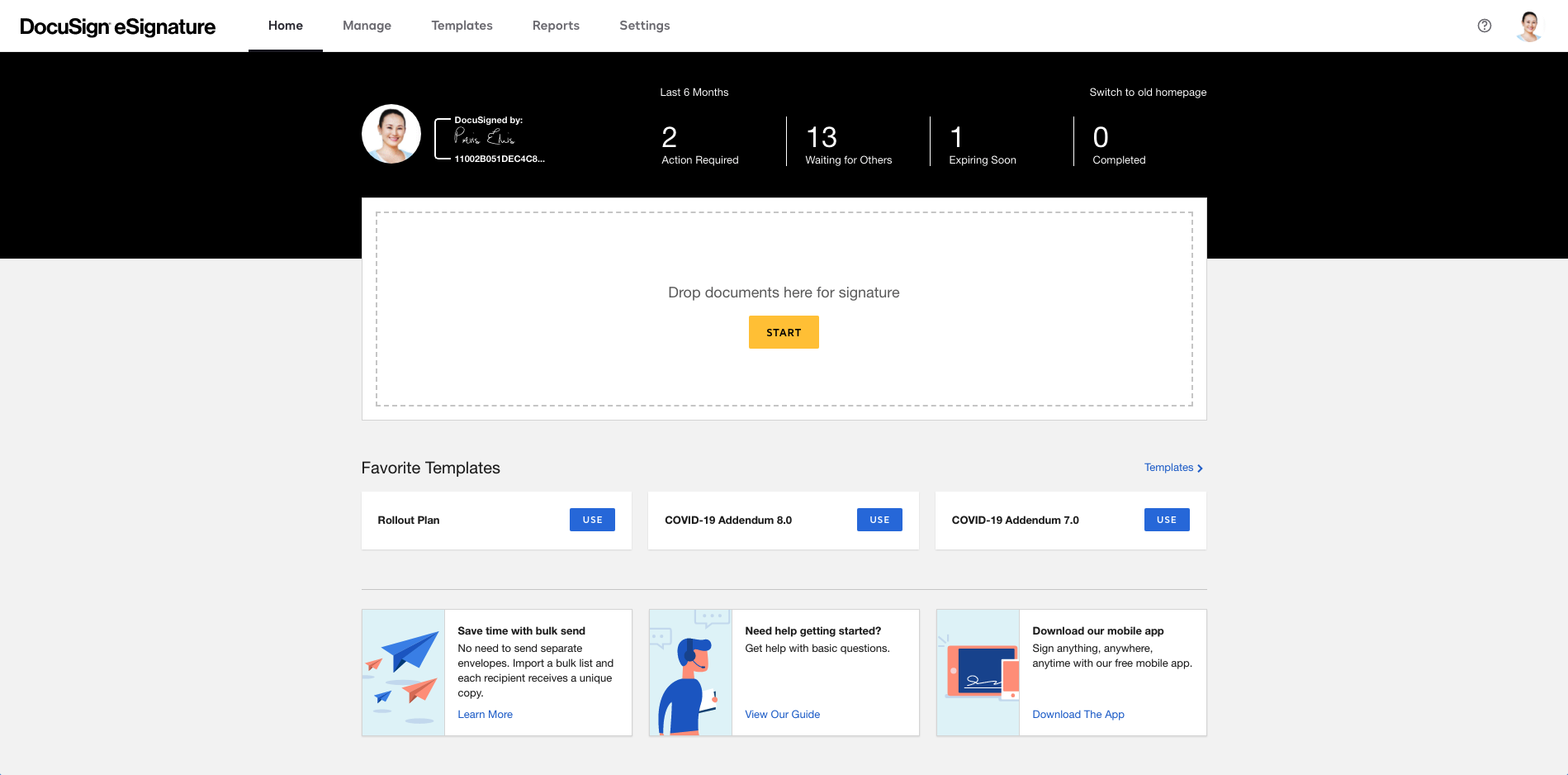
Docusign Demo - Harmonized Homepage
Create and send documents easily from your browser.
Docusign Demo - Manage Screenshots 1
Manage Screenshots
Docusign Demo - Manage Screenshots 2
Manage Screenshots
Docusign Demo - Manage Screenshots Templates
Manage Screenshots
Play Docusign Video
Play Docusign Video
Play Docusign Video
Play Docusign Video
Product Avatar Image

Have you used Docusign before?

Answer a few questions to help the Docusign community

Docusign Reviews (2,581)

View 4 Video Reviews
Reviews

Docusign Reviews (2,581)

View 4 Video Reviews
4.5
2,581 reviews

Review Summary

Generated using AI from real user reviews
Users consistently praise the product for its ease of use and convenience, making document signing quick and efficient from anywhere. The intuitive interface and seamless integration with other tools enhance user experience, allowing for smooth workflows. However, some users note that the pricing can be high, especially for smaller teams.

Pros & Cons

Generated from real user reviews
View All Pros and Cons
Search reviews
Filter Reviews
Clear Results
G2 reviews are authentic and verified.
Ankit P.
AP
Solution Architect
Mid-Market (51-1000 emp.)
"DocuSign: Click. Sign. Move On.”"
What do you like best about Docusign?

What I like best about DocuSign is how effortless it makes the entire document signing process, from start to finish. Implementation is very straightforward and doesn’t require much technical effort, so teams can start using it quickly without long onboarding or setup time. We use it very frequently for contracts, approvals, and official documentation, and it consistently works without issues.

It also has a strong set of features like reusable templates, automated reminders, real-time tracking, audit trails, and secure signing, w

hich makes it suitable for both simple and complex workflows. Integrations with common tools like email, cloud storage, and CRM platforms are smooth and reliable, so it fits easily into existing processes. Overall, it saves a lot of time, improves turnaround, and removes the usual delays that come with manual signing and follow-ups. Review collected by and hosted on G2.com.

What do you dislike about Docusign?

There’s honestly not much to dislike in terms of usability or performance, because it works really well end-to-end. If I had to point out something, pricing can feel slightly on the higher side for small teams or occasional users. But considering the security, ease of use, and how much effort it saves, it still feels worth it. Review collected by and hosted on G2.com.

Om J.
OJ
Software Engineer
Mid-Market (51-1000 emp.)
"DocuSign Makes Document Signing Fast, Secure, and Effortless"
What do you like best about Docusign?

What I like best about DocuSign is how it simplifies and speeds up the entire document signing process. It eliminates the need for printing and scanning, making it very convenient to send and sign documents from anywhere. The interface is easy to use, even for first-time users, and features like real-time status tracking and secure digital signatures make it reliable for handling important agreements. Overall, it helps streamline workflows and saves a lot of time. Review collected by and hosted on G2.com.

What do you dislike about Docusign?

One thing I dislike about DocuSign is that some of the advanced features and integrations are only available in higher-tier plans, which can make it a bit costly for smaller teams. At times, the interface can feel slightly cluttered when managing multiple documents or templates, especially for new users. Additionally, there can be occasional delays in loading or syncing documents, particularly when working with larger files. Review collected by and hosted on G2.com.

CL
Small-Business (50 or fewer emp.)
"Effortless Signing but Needs Enhanced Document Management"
What do you like best about Docusign?

I like that DocuSign is easy to use and it shows me the blanks where I need to sign. I also appreciate that it saves my signature, so I don't have to write it out every time. The initial setup was simple—just upload a document, and it’s scanned effortlessly for me to sign. I would rate it a 10 when recommending it to others because I don’t know many others like it. Review collected by and hosted on G2.com.

What do you dislike about Docusign?

I don’t like the save function. It’s hard to find documents already used and needs better security. It needs to be easily accessed in folders and more transparency with my important data. Review collected by and hosted on G2.com.

VL
IT Manager
Architecture & Planning
Small-Business (50 or fewer emp.)
"DocuSign Streamlines Online Signing with Trusted E-Signatures and Audit Trails"
What do you like best about Docusign?

Docusign has streamlined the entire process of document signing, ensuring that everything is done online

The tool creates the required legality of every transaction through e-signature

Docusign operates almost everywhere, ensuring that even on a mobile app, one can use the software

The audit trail for every transaction done in a Document is well known and easily monitored Review collected by and hosted on G2.com.

What do you dislike about Docusign?

Docusign requires extra cash for advanced support or features

Occasionally, some loading delays are experienced Review collected by and hosted on G2.com.

Darian K.
DK
King
Mid-Market (51-1000 emp.)
"Fast, Easy, and Reliable Document Management"
What do you like best about Docusign?

I mostly use DocuSign for sending contracts and paperwork to customers who are out of town or unable to come to the office. It saves me from having to travel or courier documents, which saves time and money. I like that it's fast, easy to use, and has lots of tools to make the process simple. Even people who are not tech-savvy can use DocuSign. The ability to type into the document before sending it is a favorite of mine; sometimes you need to add an 'x' to the PDF and this allows you to do so. For what I use DocuSign for, there isn't anything that I've ever had an issue with. I send envelopes and sign, and it gets the job done with no hassle. The initial setup was very easy. Review collected by and hosted on G2.com.

What do you dislike about Docusign?

If there’s one thing I don’t like, it’s that it isn’t cheaper. Review collected by and hosted on G2.com.

SM
Head of IT
Real Estate
Mid-Market (51-1000 emp.)
"Easy, Reliable, and Secure E-Signatures You Can Trust"
What do you like best about Docusign?

It’s easy to use, reliable, and secure, which makes it a trusted standard for electronic signatures and provides a better, more user-friendly experience. Review collected by and hosted on G2.com.

What do you dislike about Docusign?

It’s often more expensive than competing options, and some “essential” features are locked behind higher-tier plans. On top of that, customer support can be difficult to reach, or it may be limited to higher-paid accounts. Review collected by and hosted on G2.com.

Verified User in Telecommunications
UT
Enterprise (> 1000 emp.)
"Effortless Document Signing From Anywhere"
What do you like best about Docusign?

It just makes signing documents super easy. No printing or scanning (so no hardware, sign anything from anywhere). I also like that you can edit and customize fields pretty easily, which makes sending docs out way faster. Review collected by and hosted on G2.com.

What do you dislike about Docusign?

Sometimes it can feel a bit clunky, especially when trying to edit or place fields exactly where you want them. Also a little pricey for what it is, and occasionally things load slower than I'd like Review collected by and hosted on G2.com.

Pratik kadam K.
PK
Clinical Data Associate
Mid-Market (51-1000 emp.)
Guest users or non-business users of the software, not included in G2 scores.
"Effortless, Secure Document Signing Every Time"
What do you like best about Docusign?

Docusign is very easy and user friendly platform and app for signing documents like contracts , appointment letters or any document, and also it is very secure and reliable and easy sharing options and very easy to use it is well integrated with adobe pdf's also , i use it everytime when i needed to sign any document. Review collected by and hosted on G2.com.

What do you dislike about Docusign?

The only aspect I didn't like about DocuSign is that it feels a bit expensive. Additionally, I have occasionally noticed an alignment issue with the date after signing. Review collected by and hosted on G2.com.

Jamial B.
JB
Analyst
Public Policy
Small-Business (50 or fewer emp.)
"Streamlined Negotiations with Easy Document Signing and Requests"
What do you like best about Docusign?

Being able to sign and request documents helps streamline negotiations and other business-related activities, without wasting unnecessary time driving. It lets me stay focused on the client instead. Review collected by and hosted on G2.com.

What do you dislike about Docusign?

The only two things I find problematic about this program are the editing capabilities and the cost. Review collected by and hosted on G2.com.

Augie L.
AL
CEO
Small-Business (50 or fewer emp.)
"Great for signing, but risky for long-term document retention"
What do you like best about Docusign?

DocuSign is easy to use for getting documents signed quickly, and recipients are already familiar with it. For basic, transactional e-signature workflows, it works reliably and reduces friction compared to paper contracts. Review collected by and hosted on G2.com.

What do you dislike about Docusign?

DocuSign works well for getting documents signed, but it creates serious long-term risks that are not obvious upfront. There is no practical way for small or mid-size businesses to bulk-export their signed contracts or even see a total count on standard plans, making backups, migrations, or business wind-downs extremely difficult without paying for expensive enterprise tools or downloading documents one by one. Even more concerning, contract templates cannot be downloaded as usable PDFs—only as JSON configuration files—so if you didn’t separately archive your original blank contracts when they were first uploaded, they may be effectively trapped inside DocuSign years later. DocuSign is an execution tool, not a true system of record, and businesses should understand these limitations before relying on it long term. Review collected by and hosted on G2.com.

Questions about Docusign? Ask real users or explore answers from the community

Get practical answers, real workflows, and honest pros and cons from the G2 community or share your insights.

Verified User
G2
Verified User
Last activity almost 3 years ago

What is the difference between an electronic signature and a digital signature?

GU
Guest User

What is DocuSign Contract Analytics used for?

Pricing Options

Pricing provided by Docusign.

Personal

$10.00
1 User Per Month

Business Pro

$40.00
1 User Per Month

Standard

$25.00
1 User Per Month
Docusign Comparisons
Product Avatar Image
Adobe Acrobat Sign
Compare Now
Product Avatar Image
PandaDoc
Compare Now
Product Avatar Image
OneSpan Sign
Compare Now
Docusign Features
Custom Branding
User, Role, and Access Management
Performance and Reliability
Document Signing
Reminders and Expirations
Sign-In Process
Regulatory Compliance
Signature History and Audit
Enterprise Scalability
Product Avatar Image
Docusign