2026 Best Software Awards are here!See the list

Best Enterprise Workforce Planning Software

Jeffrey Lin
JL
Researched and written by Jeffrey Lin

Products classified in the overall Workforce Planning category are similar in many regards and help companies of all sizes solve their business problems. However, enterprise business features, pricing, setup, and installation differ from businesses of other sizes, which is why we match buyers to the right Enterprise Business Workforce Planning to fit their needs. Compare product ratings based on reviews from enterprise users or connect with one of G2's buying advisors to find the right solutions within the Enterprise Business Workforce Planning category.

In addition to qualifying for inclusion in the Workforce Planning Software category, to qualify for inclusion in the Enterprise Business Workforce Planning Software category, a product must have at least 10 reviews left by a reviewer from an enterprise business.

Show More
Show Less

G2 takes pride in showing unbiased reviews on user satisfaction in our ratings and reports. We do not allow paid placements in any of our ratings, rankings, or reports. Learn about our scoring methodologies.

1 filter applied
Clear All

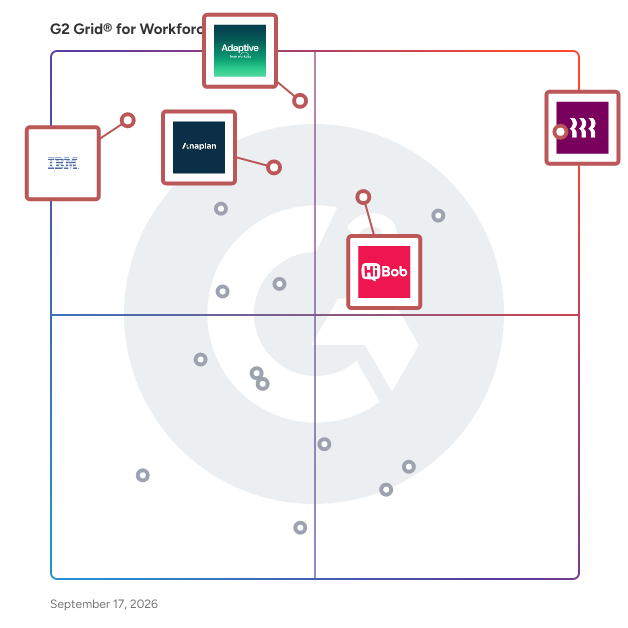
5 Listings in Enterprise Workforce Planning Software Available

(451)4.6 out of 5
Optimized for quick response
5th Easiest To Use in Workforce Planning software
View top Consulting Services for Anaplan
Save to My Lists
Entry Level Price:Contact Us
  • Overview
    Expand/Collapse Overview
  • Product Description
    How are these determined?Information
    This description is provided by the seller.

    Anaplan is the only scenario planning and analysis platform designed to optimize decision-making in today’s complex business environment so that enterprises can outpace their competition and the marke

    Users
    • Manager
    • Senior Consultant
    Industries
    • Information Technology and Services
    • Financial Services
    Market Segment
    • 51% Enterprise
    • 34% Mid-Market
    User Sentiment
    How are these determined?Information
    These insights, currently in beta, are compiled from user reviews and grouped to display a high-level overview of the software.
    • Anaplan is a cloud-based platform used for enterprise-wide planning across finance, sales, HR, and supply chain, aiming to unify disconnected planning and align strategic planning with operational planning.
    • Users like Anaplan's user-friendly interface, its ability to handle large and complex datasets, its flexibility and customizability, and its real-time data updates that make planning smooth and efficient.
    • Reviewers noted that Anaplan's interface can be complex and not very intuitive for new users, its initial setup can be challenging, and its reporting capabilities are weaker compared to other tools.
  • Pros and Cons
    Expand/Collapse Pros and Cons
  • Anaplan Pros and Cons
    How are these determined?Information
    Pros and Cons are compiled from review feedback and grouped into themes to provide an easy-to-understand summary of user reviews.
    Pros
    Flexibility
    89
    Ease of Use
    88
    Features
    80
    Efficiency
    55
    Planning
    54
    Cons
    Limitations
    41
    Missing Features
    38
    Lack of Features
    28
    Expensive
    26
    Learning Curve
    26
  • User Satisfaction
    Expand/Collapse User Satisfaction
  • Anaplan features and usability ratings that predict user satisfaction
    8.1
    Ease of Setup
    Average: 8.5
    8.4
    Ease of Admin
    Average: 8.6
    8.1
    Quality of Support
    Average: 8.7
    8.3
    How long did it take to go live?
    Average: 2.4
  • Seller Details
    Expand/Collapse Seller Details
  • Seller Details
    Seller
    Anaplan
    Company Website
    Year Founded
    2006
    HQ Location
    Miami, FL
    Twitter
    @anaplan
    21,849 Twitter followers
    LinkedIn® Page
    www.linkedin.com
    2,737 employees on LinkedIn®
Product Description
How are these determined?Information
This description is provided by the seller.

Anaplan is the only scenario planning and analysis platform designed to optimize decision-making in today’s complex business environment so that enterprises can outpace their competition and the marke

Users
  • Manager
  • Senior Consultant
Industries
  • Information Technology and Services
  • Financial Services
Market Segment
  • 51% Enterprise
  • 34% Mid-Market
User Sentiment
How are these determined?Information
These insights, currently in beta, are compiled from user reviews and grouped to display a high-level overview of the software.
  • Anaplan is a cloud-based platform used for enterprise-wide planning across finance, sales, HR, and supply chain, aiming to unify disconnected planning and align strategic planning with operational planning.
  • Users like Anaplan's user-friendly interface, its ability to handle large and complex datasets, its flexibility and customizability, and its real-time data updates that make planning smooth and efficient.
  • Reviewers noted that Anaplan's interface can be complex and not very intuitive for new users, its initial setup can be challenging, and its reporting capabilities are weaker compared to other tools.
Anaplan Pros and Cons
How are these determined?Information
Pros and Cons are compiled from review feedback and grouped into themes to provide an easy-to-understand summary of user reviews.
Pros
Flexibility
89
Ease of Use
88
Features
80
Efficiency
55
Planning
54
Cons
Limitations
41
Missing Features
38
Lack of Features
28
Expensive
26
Learning Curve
26
Anaplan features and usability ratings that predict user satisfaction
8.1
Ease of Setup
Average: 8.5
8.4
Ease of Admin
Average: 8.6
8.1
Quality of Support
Average: 8.7
8.3
How long did it take to go live?
Average: 2.4
Seller Details
Seller
Anaplan
Company Website
Year Founded
2006
HQ Location
Miami, FL
Twitter
@anaplan
21,849 Twitter followers
LinkedIn® Page
www.linkedin.com
2,737 employees on LinkedIn®
(10,483)4.8 out of 5
Optimized for quick response
1st Easiest To Use in Workforce Planning software
View top Consulting Services for Rippling
Save to My Lists
  • Overview
    Expand/Collapse Overview
  • Product Description
    How are these determined?Information
    This description is provided by the seller.

    Streamline your business with Rippling’s all-in-one platform for HR, IT, payroll, and spend management. Simplify IT with device management, software access, and compliance monitoring, all from one das

    Users
    • Software Engineer
    • Account Executive
    Industries
    • Computer Software
    • Information Technology and Services
    Market Segment
    • 55% Mid-Market
    • 29% Small-Business
    User Sentiment
    How are these determined?Information
    These insights, currently in beta, are compiled from user reviews and grouped to display a high-level overview of the software.
    • Rippling is a platform that consolidates various HR functions such as payroll, benefits, and onboarding into one system.
    • Reviewers appreciate Rippling's user-friendly interface, efficient automation, and the convenience of having all HR-related tasks in one place, which simplifies navigation and increases productivity.
    • Reviewers mentioned some challenges with the implementation process, occasional difficulties with specific features, and a desire for improvements in certain areas such as reporting and the visibility of certain information.
  • Pros and Cons
    Expand/Collapse Pros and Cons
  • Rippling Pros and Cons
    How are these determined?Information
    Pros and Cons are compiled from review feedback and grouped into themes to provide an easy-to-understand summary of user reviews.
    Pros
    Ease of Use
    5,970
    Intuitive
    4,491
    Simple
    3,856
    User Interface
    3,305
    Easy Access
    3,168
    Cons
    Missing Features
    1,011
    Not User-Friendly
    726
    Navigation Difficulty
    683
    Learning Curve
    674
    Limited Features
    635
  • User Satisfaction
    Expand/Collapse User Satisfaction
  • Rippling features and usability ratings that predict user satisfaction
    9.3
    Ease of Setup
    Average: 8.5
    9.0
    Ease of Admin
    Average: 8.6
    9.3
    Quality of Support
    Average: 8.7
    0.6
    How long did it take to go live?
    Average: 2.4
  • Seller Details
    Expand/Collapse Seller Details
  • Seller Details
    Seller
    Rippling
    Company Website
    Year Founded
    2016
    HQ Location
    San Francisco, CA
    Twitter
    @Rippling
    11,810 Twitter followers
    LinkedIn® Page
    www.linkedin.com
    6,473 employees on LinkedIn®
Product Description
How are these determined?Information
This description is provided by the seller.

Streamline your business with Rippling’s all-in-one platform for HR, IT, payroll, and spend management. Simplify IT with device management, software access, and compliance monitoring, all from one das

Users
  • Software Engineer
  • Account Executive
Industries
  • Computer Software
  • Information Technology and Services
Market Segment
  • 55% Mid-Market
  • 29% Small-Business
User Sentiment
How are these determined?Information
These insights, currently in beta, are compiled from user reviews and grouped to display a high-level overview of the software.
  • Rippling is a platform that consolidates various HR functions such as payroll, benefits, and onboarding into one system.
  • Reviewers appreciate Rippling's user-friendly interface, efficient automation, and the convenience of having all HR-related tasks in one place, which simplifies navigation and increases productivity.
  • Reviewers mentioned some challenges with the implementation process, occasional difficulties with specific features, and a desire for improvements in certain areas such as reporting and the visibility of certain information.
Rippling Pros and Cons
How are these determined?Information
Pros and Cons are compiled from review feedback and grouped into themes to provide an easy-to-understand summary of user reviews.
Pros
Ease of Use
5,970
Intuitive
4,491
Simple
3,856
User Interface
3,305
Easy Access
3,168
Cons
Missing Features
1,011
Not User-Friendly
726
Navigation Difficulty
683
Learning Curve
674
Limited Features
635
Rippling features and usability ratings that predict user satisfaction
9.3
Ease of Setup
Average: 8.5
9.0
Ease of Admin
Average: 8.6
9.3
Quality of Support
Average: 8.7
0.6
How long did it take to go live?
Average: 2.4
Seller Details
Seller
Rippling
Company Website
Year Founded
2016
HQ Location
San Francisco, CA
Twitter
@Rippling
11,810 Twitter followers
LinkedIn® Page
www.linkedin.com
6,473 employees on LinkedIn®
G2 Advertising
Sponsored
G2 Advertising
Get 2x conversion than Google Ads with G2 Advertising!
G2 Advertising places your product in premium positions on high-traffic pages and on targeted competitor pages to reach buyers at key comparison moments.
(243)4.4 out of 5
Optimized for quick response
15th Easiest To Use in Workforce Planning software
Save to My Lists
  • Overview
    Expand/Collapse Overview
  • Product Description
    How are these determined?Information
    This description is provided by the seller.

    IBM Planning Analytics is an AI-powered integrated planning solution that automates your planning, budgeting, and forecasting processes enabling real-time analysis and seamless collaboration. Eliminat

    Users
    • Financial Analyst
    Industries
    • Information Technology and Services
    • Financial Services
    Market Segment
    • 53% Enterprise
    • 35% Mid-Market
    User Sentiment
    How are these determined?Information
    These insights, currently in beta, are compiled from user reviews and grouped to display a high-level overview of the software.
    • IBM Planning Analytics is a business intelligence tool that combines AI-driven insights with powerful performance for real-time analysis and modeling.
    • Users like the tool's ability to handle massive, multi-dimensional datasets with zero latency, its integration with Excel, and its automation features that save time and improve efficiency.
    • Users reported that the tool's flexibility comes with complexity, often requiring technical expertise or consultants, and that the web interfaces can feel technical despite modernisation efforts, and the licensing cost is considered high.
  • Pros and Cons
    Expand/Collapse Pros and Cons
  • IBM Planning Analytics Pros and Cons
    How are these determined?Information
    Pros and Cons are compiled from review feedback and grouped into themes to provide an easy-to-understand summary of user reviews.
    Pros
    Planning Efficiency
    34
    Efficiency
    33
    Analytics
    30
    Ease of Use
    27
    Forecasting Accuracy
    27
    Cons
    Learning Curve
    27
    Learning Difficulty
    18
    User Difficulty
    17
    Difficult Learning
    15
    Complexity
    13
  • User Satisfaction
    Expand/Collapse User Satisfaction
  • IBM Planning Analytics features and usability ratings that predict user satisfaction
    7.4
    Ease of Setup
    Average: 8.5
    7.9
    Ease of Admin
    Average: 8.6
    8.0
    Quality of Support
    Average: 8.7
    7.7
    How long did it take to go live?
    Average: 2.4
  • Seller Details
    Expand/Collapse Seller Details
  • Seller Details
    Seller
    IBM
    Company Website
    Year Founded
    1911
    HQ Location
    Armonk, NY
    Twitter
    @IBM
    708,670 Twitter followers
    LinkedIn® Page
    www.linkedin.com
    339,241 employees on LinkedIn®
Product Description
How are these determined?Information
This description is provided by the seller.

IBM Planning Analytics is an AI-powered integrated planning solution that automates your planning, budgeting, and forecasting processes enabling real-time analysis and seamless collaboration. Eliminat

Users
  • Financial Analyst
Industries
  • Information Technology and Services
  • Financial Services
Market Segment
  • 53% Enterprise
  • 35% Mid-Market
User Sentiment
How are these determined?Information
These insights, currently in beta, are compiled from user reviews and grouped to display a high-level overview of the software.
  • IBM Planning Analytics is a business intelligence tool that combines AI-driven insights with powerful performance for real-time analysis and modeling.
  • Users like the tool's ability to handle massive, multi-dimensional datasets with zero latency, its integration with Excel, and its automation features that save time and improve efficiency.
  • Users reported that the tool's flexibility comes with complexity, often requiring technical expertise or consultants, and that the web interfaces can feel technical despite modernisation efforts, and the licensing cost is considered high.
IBM Planning Analytics Pros and Cons
How are these determined?Information
Pros and Cons are compiled from review feedback and grouped into themes to provide an easy-to-understand summary of user reviews.
Pros
Planning Efficiency
34
Efficiency
33
Analytics
30
Ease of Use
27
Forecasting Accuracy
27
Cons
Learning Curve
27
Learning Difficulty
18
User Difficulty
17
Difficult Learning
15
Complexity
13
IBM Planning Analytics features and usability ratings that predict user satisfaction
7.4
Ease of Setup
Average: 8.5
7.9
Ease of Admin
Average: 8.6
8.0
Quality of Support
Average: 8.7
7.7
How long did it take to go live?
Average: 2.4
Seller Details
Seller
IBM
Company Website
Year Founded
1911
HQ Location
Armonk, NY
Twitter
@IBM
708,670 Twitter followers
LinkedIn® Page
www.linkedin.com
339,241 employees on LinkedIn®
(303)4.3 out of 5
Optimized for quick response
13th Easiest To Use in Workforce Planning software
View top Consulting Services for Workday Adaptive Planning
Save to My Lists
  • Overview
    Expand/Collapse Overview
  • Product Description
    How are these determined?Information
    This description is provided by the seller.

    At Workday, we’re powering a new generation of intelligent planning. Driving business agility in an uncertain world, Workday Adaptive Planning’s AI-powered platform helps people gain insights, collabo

    Users
    • Financial Analyst
    • Senior Financial Analyst
    Industries
    • Computer Software
    • Information Technology and Services
    Market Segment
    • 58% Mid-Market
    • 33% Enterprise
  • Pros and Cons
    Expand/Collapse Pros and Cons
  • Workday Adaptive Planning Pros and Cons
    How are these determined?Information
    Pros and Cons are compiled from review feedback and grouped into themes to provide an easy-to-understand summary of user reviews.
    Pros
    Ease of Use
    12
    Efficiency
    9
    Features
    7
    Forecasting
    7
    Planning
    7
    Cons
    Learning Difficulty
    6
    Steep Learning Curve
    6
    Complex Setup
    5
    Learning Curve
    5
    Limited Customization
    5
  • User Satisfaction
    Expand/Collapse User Satisfaction
  • Workday Adaptive Planning features and usability ratings that predict user satisfaction
    7.4
    Ease of Setup
    Average: 8.5
    8.0
    Ease of Admin
    Average: 8.6
    8.1
    Quality of Support
    Average: 8.7
    6.7
    How long did it take to go live?
    Average: 2.4
  • Seller Details
    Expand/Collapse Seller Details
  • Seller Details
    Seller
    Workday
    Company Website
    Year Founded
    2005
    HQ Location
    Pleasanton, CA
    Twitter
    @Workday
    52,217 Twitter followers
    LinkedIn® Page
    www.linkedin.com
    26,836 employees on LinkedIn®
Product Description
How are these determined?Information
This description is provided by the seller.

At Workday, we’re powering a new generation of intelligent planning. Driving business agility in an uncertain world, Workday Adaptive Planning’s AI-powered platform helps people gain insights, collabo

Users
  • Financial Analyst
  • Senior Financial Analyst
Industries
  • Computer Software
  • Information Technology and Services
Market Segment
  • 58% Mid-Market
  • 33% Enterprise
Workday Adaptive Planning Pros and Cons
How are these determined?Information
Pros and Cons are compiled from review feedback and grouped into themes to provide an easy-to-understand summary of user reviews.
Pros
Ease of Use
12
Efficiency
9
Features
7
Forecasting
7
Planning
7
Cons
Learning Difficulty
6
Steep Learning Curve
6
Complex Setup
5
Learning Curve
5
Limited Customization
5
Workday Adaptive Planning features and usability ratings that predict user satisfaction
7.4
Ease of Setup
Average: 8.5
8.0
Ease of Admin
Average: 8.6
8.1
Quality of Support
Average: 8.7
6.7
How long did it take to go live?
Average: 2.4
Seller Details
Seller
Workday
Company Website
Year Founded
2005
HQ Location
Pleasanton, CA
Twitter
@Workday
52,217 Twitter followers
LinkedIn® Page
www.linkedin.com
26,836 employees on LinkedIn®
(2,282)4.5 out of 5
Optimized for quick response
3rd Easiest To Use in Workforce Planning software
Save to My Lists
Entry Level Price:Contact Us
  • Overview
    Expand/Collapse Overview
  • Product Description
    How are these determined?Information
    This description is provided by the seller.

    Bob is the HR platform that simplifies people management and modernizes the work experience for every employee—driving engagement, culture, and productivity. Bob is configurable for the way you operat

    Users
    • HR Manager
    • Head of People
    Industries
    • Information Technology and Services
    • Computer Software
    Market Segment
    • 77% Mid-Market
    • 14% Small-Business
    User Sentiment
    How are these determined?Information
    These insights, currently in beta, are compiled from user reviews and grouped to display a high-level overview of the software.
    • HiBob HRIS is a human resources information system designed to centralize employee data, manage HR processes, and facilitate tasks such as time tracking, performance management, and document distribution.
    • Reviewers frequently mention the user-friendly interface, the ease of navigation, the convenience of integration with other platforms like Slack, and the helpfulness of features such as the organizational chart and customizable reports.
    • Users reported issues with inflexibility in system customization, difficulty in navigation at times, a lack of certain features, and challenges with the initial setup and implementation process.
  • Pros and Cons
    Expand/Collapse Pros and Cons
  • HiBob HRIS Pros and Cons
    How are these determined?Information
    Pros and Cons are compiled from review feedback and grouped into themes to provide an easy-to-understand summary of user reviews.
    Pros
    Ease of Use
    920
    Intuitive
    539
    User Interface
    537
    Helpful
    510
    Features
    491
    Cons
    Missing Features
    440
    Limited Features
    327
    Limited Customization
    293
    Integration Issues
    194
    Not User-Friendly
    165
  • User Satisfaction
    Expand/Collapse User Satisfaction
  • HiBob HRIS features and usability ratings that predict user satisfaction
    8.3
    Ease of Setup
    Average: 8.5
    8.6
    Ease of Admin
    Average: 8.6
    8.6
    Quality of Support
    Average: 8.7
    2.1
    How long did it take to go live?
    Average: 2.4
  • Seller Details
    Expand/Collapse Seller Details
  • Seller Details
    Seller
    HiBob
    Company Website
    Year Founded
    2015
    HQ Location
    New York
    Twitter
    @HiBob_HR
    4,208 Twitter followers
    LinkedIn® Page
    www.linkedin.com
    1,998 employees on LinkedIn®
Product Description
How are these determined?Information
This description is provided by the seller.

Bob is the HR platform that simplifies people management and modernizes the work experience for every employee—driving engagement, culture, and productivity. Bob is configurable for the way you operat

Users
  • HR Manager
  • Head of People
Industries
  • Information Technology and Services
  • Computer Software
Market Segment
  • 77% Mid-Market
  • 14% Small-Business
User Sentiment
How are these determined?Information
These insights, currently in beta, are compiled from user reviews and grouped to display a high-level overview of the software.
  • HiBob HRIS is a human resources information system designed to centralize employee data, manage HR processes, and facilitate tasks such as time tracking, performance management, and document distribution.
  • Reviewers frequently mention the user-friendly interface, the ease of navigation, the convenience of integration with other platforms like Slack, and the helpfulness of features such as the organizational chart and customizable reports.
  • Users reported issues with inflexibility in system customization, difficulty in navigation at times, a lack of certain features, and challenges with the initial setup and implementation process.
HiBob HRIS Pros and Cons
How are these determined?Information
Pros and Cons are compiled from review feedback and grouped into themes to provide an easy-to-understand summary of user reviews.
Pros
Ease of Use
920
Intuitive
539
User Interface
537
Helpful
510
Features
491
Cons
Missing Features
440
Limited Features
327
Limited Customization
293
Integration Issues
194
Not User-Friendly
165
HiBob HRIS features and usability ratings that predict user satisfaction
8.3
Ease of Setup
Average: 8.5
8.6
Ease of Admin
Average: 8.6
8.6
Quality of Support
Average: 8.7
2.1
How long did it take to go live?
Average: 2.4
Seller Details
Seller
HiBob
Company Website
Year Founded
2015
HQ Location
New York
Twitter
@HiBob_HR
4,208 Twitter followers
LinkedIn® Page
www.linkedin.com
1,998 employees on LinkedIn®