Best Log Monitoring Software for Small Business

How Many Log Monitoring Software Products Does G2 Track?

Total Products under this Category: 109

Category Stats (Nov 2026)

  • Average Rating: 4.42/5 (↓0.01 vs Oct 2026) The average rating of products in this category, based on all submitted ratings
  • Top Trending Product: Falcon Next-Gen SIEM (+0.51%) - Among all products in this category, Falcon Next-Gen SIEM recorded the largest rating increase compared to last month

Last updated: November 12, 2026

How Does G2 Rank Log Monitoring Software Products?

Why You Can Trust G2's Software Rankings:

  • 30 Analysts and Data Experts
  • 10,200+ Authentic Reviews
  • 109+ Products
  • Unbiased Rankings

G2's software rankings are built on verified user reviews, rigorous moderation, and a consistent research methodology maintained by a team of analysts and data experts. Each product is measured using the same transparent criteria, with no paid placement or vendor influence. While reviews reflect real user experiences, which can be subjective, they offer valuable insight into how software performs in the hands of professionals. Together, these inputs power the G2 Score, a standardized way to compare tools within every category.

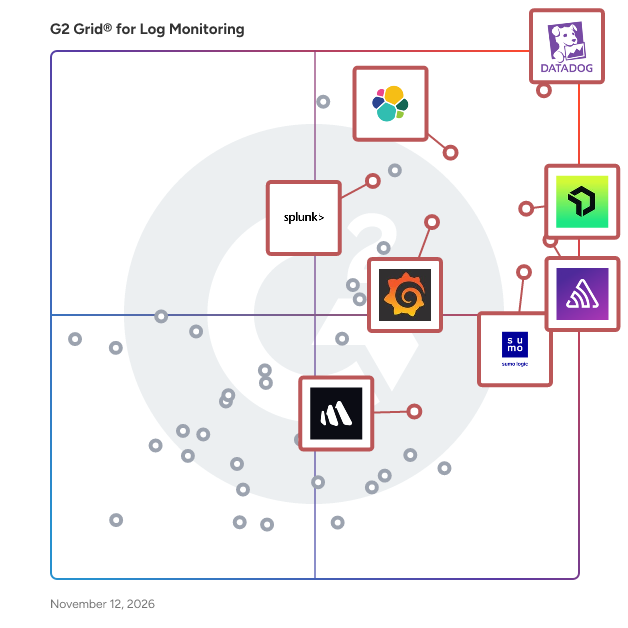
G2 Grid® for Log Monitoring Software

G2 Grid® for Log Monitoring Software plotting products by satisfaction and market presence

Highlighted products: Sentry, Datadog, Elastic Observability, Splunk Enterprise, New Relic, Better Stack, Grafana Labs, and Sumo Logic.

Underlying data: [Grid® JSON](https://www.g2.com/categories/log-monitoring/grids.json?focus%5B%5D=sentry&focus%5B%5D=datadog&focus%5B%5D=elastic-observability&focus%5B%5D=splunk-enterprise&focus%5B%5D=new-relic&focus%5B%5D=better-stack&focus%5B%5D=grafana-labs&focus%5B%5D=sumo-logic&segment=small-business)

Sentry

Sentry is an application monitoring and error tracking platform that helps developers identify, debug, and resolve software issues in production environments across web, mobile, desktop, game, and AI-powered applications. The platform captures errors, crashes, and performance problems in real time, providing developers with stack traces, user context, and diagnostic data needed to reproduce and fix bugs. Sentry supports over 100 programming languages and frameworks, including JavaScript, Python, Java, Ruby, PHP, Go, React, Django, and mobile platforms like iOS and Android. Core monitoring capabilities: - Error tracking groups similar errors into issues, showing frequency, affected users, and the exact code location where problems occur - Performance monitoring traces requests through distributed systems to identify slow database queries, API bottlenecks, and code-level performance problems - Session Replay records user interactions leading up to errors, capturing clicks, network activity, and console logs for easier reproduction - Logs captures structured log data from your applications alongside errors and traces, enabling search and filtering by message content, severity level, and custom attributes - AI observability provides visibility into LLM applications, AI agents, and Model Context Protocol servers, tracking prompts, model calls, tool usage, and token consumption Developers integrate Sentry by installing an SDK and adding a few lines of code to their application. The platform automatically captures unhandled exceptions, while developers can manually track custom errors and performance metrics. Sentry processes events in real time, sending alerts through Slack, email, PagerDuty, or other notification channels when issues occur. Additional features and capabilities: - AI-powered debugging through Seer, which analyzes errors to identify root causes and suggest code fixes with high accuracy - Distributed tracing that follows requests across microservices, serverless functions, and third-party APIs to pinpoint failure points - Custom dashboards and alerts for monitoring specific metrics, error rates, or performance thresholds important to each team - Profiling tools that provide code-level visibility into where time is being spent in production, identifying slow functions, call stacks, and performance regressions across backend services and frontend/mobile user flows - Workflow integrations with GitHub, Jira, GitLab, Azure DevOps, and other development tools to create tickets or link errors to commits automatically The platform serves development teams at organizations ranging from individual developers to large enterprises. More than 100,000 organizations use Sentry, processing billions of error events daily. Sentry offers both cloud-hosted and self-hosted deployment options, with pricing tiers based on event volume. A free tier supports small projects and individual developers.

Average Rating: 4.5/5.0

Total Reviews: 246

How Do G2 Users Rate Sentry?

  • Dashboards and Visualizations: 8.1/10 (Category avg: 8.6/10)
  • Has the product been a good partner in doing business?: 9.1/10 (Category avg: 8.9/10)
  • Performance Baseline: 8.7/10 (Category avg: 8.4/10)
  • Reporting: 8.9/10 (Category avg: 8.5/10)

Who Is the Company Behind Sentry?

  • Seller: Sentry
  • Company Website:
  • Year Founded: 2011
  • HQ Location: San Francisco, CA
  • LinkedIn® Page: www.linkedin.com
    448 employees on LinkedIn®

Who Uses This Product?

  • Who Uses This: Software Engineer, Senior Software Engineer
  • Top Industries: Computer Software, Information Technology and Services
  • Company Size: 58% Small, 31% Medium

What Do G2 Reviewers Say About Sentry?

AI-generated summary from verified user reviews

Pros
  • Users appreciate Sentry's ease of use, enjoying its intuitive interface and efficient log filtering capabilities.
  • Users love Sentry's error tracking capabilities, facilitating easy debugging and efficient team communication through tailored alerts.
  • Users value Sentry's efficient debugging capabilities, making it easy to track errors and filter log data effectively.
  • Users value the real-time error monitoring of Sentry, enhancing efficiency and collaboration across teams effortlessly.
  • Users appreciate the powerful monitoring features of Sentry, enhancing error tracking and team collaboration effectively.
Cons
  • Users are frustrated by high pricing and limitations that hinder monitoring capabilities despite having a subscription plan.
  • Users face challenges with manual error tracking processes, leading to issues like budget constraints and monitoring interruptions.
  • Users find Sentry's pricing to be expensive and feel that it limits accessibility for smaller projects.
  • Users face complex configuration challenges, needing manual setups and adjustments that can hinder efficient usage of Sentry.
  • Users find the poor UI of Sentry complicated, making it challenging to navigate and utilize effectively.

What Are Recent G2 Reviews of Sentry?

What Are G2 Users Discussing About Sentry?

Datadog

Datadog is the monitoring, security and analytics platform for developers, IT operations teams, security engineers and business users in the cloud age. The SaaS platform integrates and automates infrastructure monitoring, application performance monitoring and log management to provide unified, real-time observability of our customers' entire technology stack. Datadog is used by organizations of all sizes and across a wide range of industries to enable digital transformation and cloud migration, drive collaboration among development, operations, security and business teams, accelerate time to market for applications, reduce time to problem resolution, secure applications and infrastructure, understand user behavior and track key business metrics.

Average Rating: 4.4/5.0

Total Reviews: 737

How Do G2 Users Rate Datadog?

  • Dashboards and Visualizations: 8.9/10 (Category avg: 8.6/10)
  • Has the product been a good partner in doing business?: 8.5/10 (Category avg: 8.9/10)
  • Performance Baseline: 8.7/10 (Category avg: 8.4/10)
  • Reporting: 8.8/10 (Category avg: 8.5/10)

Who Is the Company Behind Datadog?

  • Seller: Datadog
  • Company Website:
  • Year Founded: 2010
  • HQ Location: New York
  • LinkedIn® Page: www.linkedin.com
    10,780 employees on LinkedIn®
  • Ownership: NASDAQ: DDOG

Who Uses This Product?

  • Who Uses This: Software Engineer, DevOps Engineer
  • Top Industries: Information Technology and Services, Computer Software
  • Company Size: 46% Medium, 33% Large

What Do G2 Reviewers Say About Datadog?

AI-generated summary from verified user reviews

Pros
  • Users value a unified observability view that brings logs, metrics, and traces together for easier monitoring and insights.
  • Users value clear, customizable dashboards that make relevant data easy to visualize and understand.
  • Users value unified visibility across applications, infrastructure, and services, helping them understand overall system health.
  • Users find the interface intuitive and easy to use, helping them navigate monitoring and streamline everyday operations.
  • Users value its broad integrations across cloud services and existing systems, with straightforward setup that connects their tools.
Cons
  • Users say costs are high and can rise quickly as infrastructure, data volume, and monitored services scale.
  • Users find the learning curve steep, with advanced features, queries, and dashboards taking time to master.
  • Users find the interface crowded with information and controls, making it feel overwhelming, especially at first.
  • Users find costs difficult to predict, track, and control, especially as usage and monitored environments scale.
  • Users find navigation confusing, with features and information difficult to locate across screens and dashboards.

What Are Recent G2 Reviews of Datadog?

What Are G2 Users Discussing About Datadog?

Elastic Observability

OpenTelemetry-native observability for fast, AI-driven root cause analysis Search, analyze, and act with logs, metrics, and traces. SRE leaders aim to proactively prevent downtime, simplify tool stacks, and reduce toil, but multi-cloud complexity and fragmented toolsets create visibility gaps that make it hard to stay ahead. OTel-native and AI-powered, Elastic Observability ingests and correlates petabytes of telemetry across your applications, services, and infrastructure, in real-time. Accelerate troubleshooting with built-in agentic workflows and an AI Assistant that goes well beyond chat to bolster team expertise and guide investigations, grounded with context from your organizational knowledge-bases. More data, more problems? Not anymore. Most observability and logging solutions weren’t built for today’s scale. Elastic is. Our architecture is designed to handle petabytes of logs with indexing, compression, and efficient searchable storage so you can keep all the telemetry you need, without breaking the bank. Store more, spend less, and resolve issues faster with a scalable, open, and extensible platform that unifies visibility across your entire environment.

Average Rating: 4.3/5.0

Total Reviews: 133

How Do G2 Users Rate Elastic Observability?

  • Dashboards and Visualizations: 8.7/10 (Category avg: 8.6/10)
  • Has the product been a good partner in doing business?: 8.3/10 (Category avg: 8.9/10)
  • Performance Baseline: 7.8/10 (Category avg: 8.4/10)
  • Reporting: 8.1/10 (Category avg: 8.5/10)

Who Is the Company Behind Elastic Observability?

  • Seller: Elastic
  • Company Website:
  • Year Founded: 2012
  • HQ Location: San Francisco, CA
  • LinkedIn® Page: www.linkedin.com
    10,457 employees on LinkedIn®
  • Ownership: NYSE: ESTC

Who Uses This Product?

  • Who Uses This: Software Engineer, Senior Software Engineer
  • Top Industries: Information Technology and Services, Computer Software
  • Company Size: 45% Large, 43% Medium

What Do G2 Reviewers Say About Elastic Observability?

AI-generated summary from verified user reviews

Pros
  • Users find Elastic Observability to be intuitive and easy to navigate, enhancing their overall experience with its features.
  • Users value the holistic monitoring capabilities of Elastic Observability, enhancing real-time responsiveness and operational insights.
  • Users love the real-time log management of Elastic Observability, enhancing operational visibility and troubleshooting efficiency.
  • Users appreciate the holistic monitoring experience of Elastic Observability, streamlining logs and metrics for efficient troubleshooting.
  • Users praise the intuitive features and customization of Elastic Observability, enhancing their operational efficiency and user experience.
Cons
  • Users find the learning curve steep, especially with log management and advanced features for beginners.
  • Users find the difficult learning curve challenging, especially when navigating logs and advanced features for the first time.
  • Users find it challenging with log management complexities due to overwhelming data and a steep learning curve.
  • Users find the learning difficulty daunting due to overwhelming logs and the need for training to utilize advanced features.
  • Users struggle with log management issues, facing difficulties in log generation and lack of integration with existing log files.

What Are Recent G2 Reviews of Elastic Observability?

What Are G2 Users Discussing About Elastic Observability?

AI can help you find the answers. G2 helps you trust them.

Connect G2 to Claude or ChatGPT for answers grounded in G2's trusted reviews, comparisons, and pricing from real user insights.

How it works

Splunk Enterprise

Find out what is happening in your business and take meaningful action quickly with Splunk Enterprise. Automate the collection, indexing and alerting of machine data that's critical to your operations. Uncover the actionable insights from all your data — no matter the source or format. Leverage artificial intelligence and machine learning for predictive and proactive business decisions.

Average Rating: 4.3/5.0

Total Reviews: 415

How Do G2 Users Rate Splunk Enterprise?

  • Dashboards and Visualizations: 10.0/10 (Category avg: 8.6/10)
  • Has the product been a good partner in doing business?: 8.7/10 (Category avg: 8.9/10)
  • Reporting: 10.0/10 (Category avg: 8.5/10)

Who Is the Company Behind Splunk Enterprise?

  • Seller: Cisco
  • Year Founded: 1984
  • HQ Location: San Jose, CA
  • LinkedIn® Page: www.linkedin.com
    95,294 employees on LinkedIn®
  • Ownership: NASDAQ:CSCO
  • Phone: 847-678-6600

Who Uses This Product?

  • Who Uses This: Software Engineer, Senior Software Engineer
  • Top Industries: Information Technology and Services, Computer Software
  • Company Size: 64% Large, 28% Medium

What Do G2 Reviewers Say About Splunk Enterprise?

AI-generated summary from verified user reviews

Pros
  • Users value the innovation in data handling that Splunk Enterprise offers, enhancing insights and integration capabilities.
  • Users value the highly customizable dashboards in Splunk Enterprise, enhancing data visualization and insights significantly.
  • Users find Splunk Enterprise to be easy to use, with intuitive dashboards and simple setup for configurations.
  • Users find Splunk Enterprise's end-to-end log management essential for effective observability and IT infrastructure management.
  • Users appreciate the robust reporting features of Splunk Enterprise, allowing for customizable log insights and dynamic dashboards.
Cons
  • Users find Splunk Enterprise expensive, especially with growing data volumes and high renewal costs affecting affordability.
  • Users find the learning curve steep for Splunk Enterprise, requiring formal training to navigate its complexities effectively.
  • Users find the licensing costs and model of Splunk Enterprise challenging and complicated, impacting sales and usability.
  • Users find integration issues with Splunk Enterprise, noting limitations and delays in data display and onboarding options.
  • Users find the limited integration capabilities of Splunk Enterprise frustrating, especially after the recent version update.

What Are Recent G2 Reviews of Splunk Enterprise?

What Are G2 Users Discussing About Splunk Enterprise?

Better Stack

Better Stack is an eBPF-based, AI SRE observability tool. It helps engineers ship high-quality software faster and be the hero of their engineering teams.

Average Rating: 4.8/5.0

Total Reviews: 342

How Do G2 Users Rate Better Stack?

  • Dashboards and Visualizations: 9.2/10 (Category avg: 8.6/10)
  • Has the product been a good partner in doing business?: 9.5/10 (Category avg: 8.9/10)
  • Performance Baseline: 9.1/10 (Category avg: 8.4/10)
  • Reporting: 9.1/10 (Category avg: 8.5/10)

Who Is the Company Behind Better Stack?

Who Uses This Product?

  • Who Uses This: CEO, Founder
  • Top Industries: Computer Software, Information Technology and Services
  • Company Size: 88% Small, 8% Medium

What Do G2 Reviewers Say About Better Stack?

AI-generated summary from verified user reviews

Pros
  • Users highlight the ease of setup with Better Stack, enabling quick and efficient implementation of services.
  • Users love the easy setup of Better Stack, enabling quick integration and effective monitoring in no time.
  • Users love the clean and intuitive user interface of Better Stack, making setup and configuration effortless.
  • Users love the easy setup of Better Stack, finding it quick and straightforward to get started with.
  • Users appreciate the instant notifications from Better Stack's alerting system, allowing quick responses to downtime incidents.
Cons
  • Users find the high pricing of Better Stack challenging for non-commercial and hobbyist projects.
  • Users find Better Stack's missing features like 2FA limitations and log monitoring flexibility hinder overall user experience.
  • Users are concerned about the limited features in Better Stack, particularly with advanced options restricted to the paid tier.
  • Users express concerns about pricing issues, wishing for more flexible options and lower tiers for small projects.
  • Users find the advanced logging features and documentation lacking, making it challenging for new users to navigate effectively.

What Are Recent G2 Reviews of Better Stack?

What Are G2 Users Discussing About Better Stack?

New Relic

New Relic is the all-in-one Intelligent Observability platform built to help engineering and IT teams plan, build, deploy, and run software with confidence. By unifying metrics, events, logs, and traces into a single, secure telemetry cloud, New Relic gives over 25 million engineers real time visibility and AI-powered insights across their entire digital estate, from code to cloud. Designed to replace fragmented point solutions, New Relic consolidates full-stack observability into a single source of truth. The platform brings together Application Performance Monitoring (APM), infrastructure monitoring, log management, digital experience monitoring (DEM), container monitoring, and AIOps into one cohesive interface. Powered by an advanced AI engine, New Relic automatically pairs telemetry data to shift problem solving from reactive debugging to proactive and predictive resolution, helping teams reduce mean time to resolution (MTTR) and eliminate digital disruptions before they impact end users. Equipped with over 500 open source integrations, New Relic seamlessly connects with your existing stack. Coupled with transparent, consumption and user-based pricing, organizations gain full predictability over their costs without sacrificing telemetry depth.

Average Rating: 4.4/5.0

Total Reviews: 576

How Do G2 Users Rate New Relic?

  • Dashboards and Visualizations: 9.2/10 (Category avg: 8.6/10)
  • Has the product been a good partner in doing business?: 8.5/10 (Category avg: 8.9/10)
  • Performance Baseline: 9.0/10 (Category avg: 8.4/10)
  • Reporting: 9.0/10 (Category avg: 8.5/10)

Who Is the Company Behind New Relic?

  • Seller: New Relic
  • Company Website:
  • Year Founded: 2008
  • HQ Location: San Francisco, CA
  • LinkedIn® Page: www.linkedin.com
    3,093 employees on LinkedIn®
  • Ownership: NYSE: NEWR

Who Uses This Product?

  • Who Uses This: Software Engineer, Senior Software Engineer
  • Top Industries: Information Technology and Services, Computer Software
  • Company Size: 44% Medium, 29% Large

What Do G2 Reviewers Say About New Relic?

AI-generated summary from verified user reviews

Pros
  • Users value the ease of use of New Relic, enjoying its intuitive interface and swift setup process.
  • Users enjoy the real-time monitoring of New Relic, enabling immediate issue detection and streamlined troubleshooting.
  • Users value real-time monitoring with New Relic, which enhances visibility and quickly identifies performance issues.
  • Users value the end-to-end monitoring of New Relic, enabling quick identification of issues affecting conversions.
  • Users value the real-time monitoring of New Relic, enhancing performance insights and troubleshooting efficiency effectively.
Cons
  • Users find New Relic's pricing to be expensive, particularly as usage and data ingestion increase significantly.
  • Users find pricing issues with New Relic, especially as costs rise unpredictably with increased data usage.
  • Users find New Relic's complexity challenging, especially during onboarding and navigating its multitude of features.
  • Users find the steep learning curve challenging, as mastering New Relic's features takes significant time and effort.
  • Users find New Relic's complex setup daunting, requiring substantial time for onboarding and configuration.

What Are Recent G2 Reviews of New Relic?

What Are G2 Users Discussing About New Relic?

Grafana Labs

Grafana Labs provides an open and composable monitoring and observability stack built around Grafana, the leading open source technology for dashboards and visualization. There are more than 3,000 Grafana Labs customers, including Bloomberg, Citigroup, Dell Technologies, Salesforce, and TomTom, and more than 1 million active instances of Grafana around the world. Grafana Labs helps companies manage their observability strategies with the LGTM Stack, which can be run fully managed with Grafana Cloud or self-managed with the Grafana Enterprise offerings, both featuring scalable metrics (Grafana Mimir), logs (Grafana Loki), and traces (Grafana Tempo) as well as extensive enterprise data source plugins, dashboard management, alerting, reporting, and security. Grafana Labs is backed by leading investors Lightspeed Venture Partners, Lead Edge Capital, GIC, Sequoia Capital, Coatue, and J.P. Morgan. Follow Grafana Labs on LinkedIn and Twitter or visit https://grafana.com.

Average Rating: 4.5/5.0

Total Reviews: 215

How Do G2 Users Rate Grafana Labs?

  • Dashboards and Visualizations: 9.5/10 (Category avg: 8.6/10)
  • Has the product been a good partner in doing business?: 8.2/10 (Category avg: 8.9/10)
  • Performance Baseline: 8.4/10 (Category avg: 8.4/10)
  • Reporting: 8.4/10 (Category avg: 8.5/10)

Who Is the Company Behind Grafana Labs?

Who Uses This Product?

  • Who Uses This: Software Engineer, Senior Software Engineer
  • Top Industries: Information Technology and Services, Computer Software
  • Company Size: 46% Medium, 29% Small

What Do G2 Reviewers Say About Grafana Labs?

AI-generated summary from verified user reviews

Pros
  • Users value the beautiful dashboards in Grafana Labs, enhancing clarity and insight into complex metrics.
  • Users value the ease of use of Grafana Labs, which simplifies complex data visualization and management effortlessly.
  • Users appreciate the beautiful and customizable dashboards of Grafana Labs, enhancing clarity in monitoring metrics.
  • Users value the real-time monitoring capabilities of Grafana Labs, enabling clear visibility into critical metrics across systems.
  • Users value the flexibility and clarity of Grafana Labs for visualizing and monitoring diverse metrics effectively.
Cons
  • Users often find the steep learning curve of Grafana Labs challenging, making setup and configuration time-consuming for newcomers.
  • Users find the complex setup of Grafana Labs challenging, especially newcomers struggling with configuration and queries.
  • Users find the learning difficulty in Grafana Labs challenging, especially for beginners navigating complex setups and configurations.
  • Users find the difficult learning curve of Grafana Labs challenging, particularly in setup and query writing for dashboards.
  • Users find Grafana Labs complex to set up and configure, creating challenges for new users in managing dashboards.

What Are Recent G2 Reviews of Grafana Labs?

What Are G2 Users Discussing About Grafana Labs?

Sumo Logic

Sumo Logic, Inc. unifies and analyzes enterprise data, translating it into actionable insights through one AI-powered cloud-native log analytics platform. This single source of truth enables Dev, Sec and Ops teams to simplify complexity, collaborate efficiently and accelerate data-driven decisions that drive business value. Customers around the world rely on the Sumo Logic SaaS Log Analytics Platform for trusted insights to ensure application reliability, secure and protect against modern security threats, and gain insights into their cloud infrastructures. For more information, visit: SUMOLOGIC.COM

Average Rating: 4.4/5.0

Total Reviews: 413

How Do G2 Users Rate Sumo Logic?

  • Dashboards and Visualizations: 8.3/10 (Category avg: 8.6/10)
  • Has the product been a good partner in doing business?: 8.8/10 (Category avg: 8.9/10)
  • Performance Baseline: 7.7/10 (Category avg: 8.4/10)
  • Reporting: 8.3/10 (Category avg: 8.5/10)

Who Is the Company Behind Sumo Logic?

  • Seller: Sumo Logic
  • Company Website:
  • Year Founded: 2010
  • HQ Location: Redwood City, CA
  • LinkedIn® Page: www.linkedin.com
    824 employees on LinkedIn®
  • Ownership: NASDAQ: SUMO

Who Uses This Product?

  • Who Uses This: Software Engineer, Senior Software Engineer
  • Top Industries: Information Technology and Services, Computer Software
  • Company Size: 48% Medium, 38% Large

What Do G2 Reviewers Say About Sumo Logic?

AI-generated summary from verified user reviews

Pros
  • Users appreciate the ease of use in Sumo Logic, enabling quick insights from data without complexity.
  • Users commend the powerful and accessible log management features of Sumo Logic, enhancing efficiency and visualization capabilities.
  • Users value the flexible analytics and powerful real-time features of Sumo Logic, enhancing collaboration and operational visibility.
  • Users value the real-time monitoring capabilities of Sumo Logic, enabling quick insights and effective data visualization.
  • Users value the powerful and accessible analytics of Sumo Logic, enhancing their data visualization and decision-making capabilities.
Cons
  • Users find the difficult learning curve of Sumo Logic challenging, especially transitioning from simpler tools.
  • Users face a steeper learning curve with Sumo Logic, especially when transitioning from tools like Splunk or Elastic.
  • Users note a steep learning curve with Sumo Logic that may challenge teams transitioning from other tools.
  • Users find Sumo Logic expensive, especially if data tiers are misconfigured, leading to unexpected high bills.
  • Users experience slow performance with Sumo Logic, facing delays and lag during queries, especially with large datasets.

What Are Recent G2 Reviews of Sumo Logic?

What Are G2 Users Discussing About Sumo Logic?

Progress WhatsUp Gold

WhatsUp Gold is an IT infrastructure monitoring software designed to help users identify and resolve network issues swiftly, often before they impact end users. This solution provides comprehensive visibility into network performance and availability, enabling IT professionals to maintain optimal operations across their infrastructure. With its interactive mapping interface, WhatsUp Gold allows users to visualize the status of all devices connected to their network, making it easier to monitor both on-premise and cloud-based resources. Targeted primarily at IT administrators and network engineers, WhatsUp Gold is particularly beneficial for organizations that rely heavily on network performance for their daily operations. Its user-friendly design caters to both seasoned professionals and those new to network management, offering a range of features that streamline the monitoring process. The software is designed to support various use cases, from small businesses needing basic monitoring capabilities to large enterprises requiring advanced network management solutions. One of the standout features of WhatsUp Gold is its customizable drag-and-drop dashboards, which provide users with the flexibility to tailor their monitoring experience according to specific needs. These dashboards present real-time data on device status and performance, allowing users to quickly assess the health of their network. Additionally, the software’s automatic discovery and mapping capabilities enable users to visualize their entire network topology, ensuring that no device goes unnoticed during monitoring. WhatsUp Gold also emphasizes optimization, helping users manage network traffic and bandwidth utilization effectively. By providing actionable insights and unified views of network performance, the software empowers IT teams to troubleshoot issues efficiently. The ability to identify and resolve network and server problems proactively not only enhances operational efficiency but also improves overall user satisfaction by minimizing downtime. In summary, WhatsUp Gold offers a robust and interactive solution for IT infrastructure monitoring, combining ease of use with powerful features. Its focus on real-time visibility, customization, and proactive troubleshooting makes it a valuable tool for organizations looking to enhance their network management capabilities.

Average Rating: 4.4/5.0

Total Reviews: 388

How Do G2 Users Rate Progress WhatsUp Gold?

  • Dashboards and Visualizations: 8.8/10 (Category avg: 8.6/10)
  • Has the product been a good partner in doing business?: 8.8/10 (Category avg: 8.9/10)
  • Performance Baseline: 8.5/10 (Category avg: 8.4/10)
  • Reporting: 8.5/10 (Category avg: 8.5/10)

Who Is the Company Behind Progress WhatsUp Gold?

  • Seller: Progress Software
  • Company Website:
  • Year Founded: 1981
  • HQ Location: Burlington, MA.
  • LinkedIn® Page: www.linkedin.com
    4,242 employees on LinkedIn®
  • Ownership: NASDAQ:PRGS

Who Uses This Product?

  • Who Uses This: Network Engineer, Network Administrator
  • Top Industries: Information Technology and Services, Hospital & Health Care
  • Company Size: 58% Medium, 27% Large

What Do G2 Reviewers Say About Progress WhatsUp Gold?

AI-generated summary from verified user reviews

Pros
  • Users value the ease of use of Progress WhatsUp Gold, noting its quick setup and intuitive interface.
  • Users value the insightful monitoring capabilities of WhatsUp Gold, appreciating its efficient alert management and device coverage.
  • Users value the insightful performance monitoring of Progress WhatsUp Gold, facilitating effective device management and uptime optimization.
  • Users appreciate the easy-to-configure alerts of Progress WhatsUp Gold, enhancing their monitoring experience and trust in the system.
  • Users value the intuitive user interface of Progress WhatsUp Gold, finding it easy to navigate and set up.
Cons
  • Users find the pricing could get high for Progress WhatsUp Gold, especially with advanced features and add-ons.
  • Users find the poor interface design of Progress WhatsUp Gold confusing and outdated, especially in complex settings.
  • Users often face a complex setup process with WhatsUp Gold, particularly during initial configurations and advanced feature tuning.
  • Users note the steep learning curve of Progress WhatsUp Gold, making initial setup and configuration complex and time-consuming.
  • Users find the interface outdated, particularly in deeper settings, detracting from an otherwise functional experience.

What Are Recent G2 Reviews of Progress WhatsUp Gold?

What Are G2 Users Discussing About Progress WhatsUp Gold?

CubeAPM

CubeAPM is an OpenTelemetry-native observability and application performance monitoring (APM) platform that helps engineering and DevOps teams monitor applications, infrastructure, logs, and metrics from a single unified dashboard. Built for modern cloud and on-prem environments, CubeAPM offers full-stack visibility without sacrificing data control. It can be self-hosted inside your own cloud or data center, making it ideal for teams that need enterprise-grade observability while maintaining compliance with ISO 27001 standards. Most teams face a trade-off in observability — cloud SaaS tools are easy to run but send sensitive data outside your cloud, while open-source stacks demand heavy operations. CubeAPM removes this compromise by combining the control of self-hosting with the simplicity of SaaS. With flat usage-based pricing at $0.15 per GB, smart sampling, and unlimited retention, CubeAPM delivers predictable, affordable observability for organizations of any scale. Dashboards load instantly, data queries run fast, and teams can monitor microservices, Kubernetes clusters, APIs, and distributed systems in real time. Key Highlights OpenTelemetry-native: Ingest data from any stack with full compatibility. Self-hosted but managed: Runs in your environment while upgrades and maintenance are handled by CubeAPM. Unlimited retention: Store logs, traces, and metrics as long as you need. Transparent pricing: $0.15 / GB with no host-based fees or hidden charges. ISO 27001 compliant: Ensures quality, reliability, and operational excellence. CubeAPM is the ideal observability solution for teams seeking performance insights, compliance readiness, and total control — without the high costs or operational complexity of traditional APM tools.

Average Rating: 4.9/5.0

Total Reviews: 26

How Do G2 Users Rate CubeAPM?

  • Dashboards and Visualizations: 10.0/10 (Category avg: 8.6/10)
  • Has the product been a good partner in doing business?: 10.0/10 (Category avg: 8.9/10)
  • Performance Baseline: 10.0/10 (Category avg: 8.4/10)
  • Reporting: 10.0/10 (Category avg: 8.5/10)

Who Is the Company Behind CubeAPM?

Who Uses This Product?

  • Top Industries: Information Technology and Services
  • Company Size: 54% Small, 46% Medium

What Do G2 Reviewers Say About CubeAPM?

AI-generated summary from verified user reviews

Pros
  • Users highlight the responsive customer support of CubeAPM, appreciating quick assistance and availability on Slack.
  • Users value the cost optimization of CubeAPM, appreciating its affordability compared to other observability tools.
  • Users value the effective monitoring capabilities of CubeAPM, noting quick data integration and responsive support.
  • Users appreciate the affordable and predictable pricing of CubeAPM, making it a cost-effective observability solution.
  • Users commend the real-time monitoring capabilities of CubeAPM, enhancing visibility into performance and reducing downtime.
Cons
  • Users find CubeAPM has inadequate monitoring capabilities, particularly for mobile apps and advanced AI observability.
  • Users find the absence of mobile and security monitoring features in CubeAPM limits its overall capabilities.
  • Users note the limited mobile app monitoring capabilities of CubeAPM, particularly for iOS, affecting overall effectiveness.
  • Users note the limited features of CubeAPM, especially in AI-driven observability and mobile app monitoring.
  • Users highlight the feature limitations of CubeAPM, particularly in mobile app monitoring and dashboard effectiveness.

What Are Recent G2 Reviews of CubeAPM?

Dynatrace

Dynatrace is advancing observability for today’s digital businesses, helping to transform the complexity of modern digital ecosystems into powerful business assets. By leveraging AI-powered insights, Dynatrace enables organizations to analyze, automate, and innovate faster to drive their business forward. To learn more about how Dynatrace can help your business, visit www.dynatrace.com, visit our blog and follow us on LinkedIn and X @dynatrace.

Average Rating: 4.5/5.0

Total Reviews: 1,242

How Do G2 Users Rate Dynatrace?

  • Dashboards and Visualizations: 9.0/10 (Category avg: 8.6/10)
  • Has the product been a good partner in doing business?: 8.7/10 (Category avg: 8.9/10)
  • Performance Baseline: 8.8/10 (Category avg: 8.4/10)
  • Reporting: 8.5/10 (Category avg: 8.5/10)

Who Is the Company Behind Dynatrace?

  • Seller: Dynatrace
  • Year Founded: 2005
  • HQ Location: Boston, MA
  • LinkedIn® Page: www.linkedin.com
    6,181 employees on LinkedIn®
  • Ownership: NYSE: DT

Who Uses This Product?

  • Who Uses This: Software Engineer, Senior Software Engineer
  • Top Industries: Information Technology and Services, Financial Services
  • Company Size: 69% Large, 23% Medium

What Do G2 Reviewers Say About Dynatrace?

AI-generated summary from verified user reviews

Pros
  • Users value the ease of use of Dynatrace, as it simplifies monitoring and enhances data visibility for IT teams.
  • Users value the AI-powered debugging capabilities of Dynatrace, which enhance monitoring and root-cause analysis effectively.
  • Users value the powerful data organization of Dynatrace Grail, enhancing monitoring and issue identification through integrated insights.
  • Users value the versatile information organization in Dynatrace, enhancing accessibility across the entire organization.
  • Users appreciate the early downtime detection and unified monitoring capabilities of Dynatrace for improved IT support.
Cons
  • Users find the learning curve steep, noting that configuration and certification experiences need significant improvement.
  • Users criticize Dynatrace for its missing features, particularly in documentation accuracy and dashboard customization options.
  • Users find the complexity of Dynatrace challenging, noting difficulties in configuration and a need for better documentation.
  • Users find the UX improvement challenging due to a steep learning curve and complex dashboard navigation.
  • Users find the learning difficulty of Dynatrace challenging, leading to decreased usage and confusion with the tool.

What Are Recent G2 Reviews of Dynatrace?

What Are G2 Users Discussing About Dynatrace?

Checkmk

Checkmk is a full-stack monitoring and observability platform designed to provide unified visibility into hybrid IT infrastructures. With more than 2,000 built-in integrations, it offers broad coverage across networks, servers, cloud workloads, Kubernetes and applications. The platform is highly automated, featuring auto-discovery of hosts and services and rule-based configuration to reduce manual setup. It is highly scalable, capable of efficiently monitoring thousands of hosts and millions of services. A central web-based interface allows users to manage configuration, visualize data with customizable dashboards, and track system performance over time. Checkmk is available as packages for all common Linux distributions, as a virtual or physical appliance, through AWS and Azure Marketplace images, or as SaaS. Checkmk is available in four editions: Checkmk Community offers free and open source monitoring for small infrastructures. Checkmk Pro allows for monitoring at speed and scale for data center infrastructures. Checkmk Ultimate offers full-stack observability for hybrid and cloud-native infrastructures which is also available with multi-tenancy and data segregation to support security and compliance. And Checkmk Cloud for full-stack observability for hybrid and cloud-native infrastructures in a SaaS platform. Available extensions include synthetic monitoring and OpenTelemetry for application monitoring. The Checkmk Relay enables secure data collection for segmented networks using outbound-only communication, supporting fully air-gapped and zero-inbound monitoring deployments. Checkmk supports integration with ITSM tools and third-party platforms, enabling automatic ticket creation and consistent alerting. Features such as forecasting, capacity planning, and asset inventory as well as lifecycle management and auto-registration help teams manage dynamic IT environments. Monitoring capabilities: - Monitoring of hybrid infrastructures: cloud, on-premises, virtual, and container environments. - 2000+ built-in integrations networks, servers, cloud workloads, Kubernetes and applications out-of-the-box dashboards provide key metrics for AWS and Azure environments, Linux and Windows servers, and Kubernetes clusters. - Automated discovery and configuration. - Alerting with native ITSM integrations. Operational benefits: - Provides insights into system health, capacity trends, and future resource needs through built-in assessments and forecasting tools. - Reduces manual effort with auto-discovery, rule-based configuration, and centralized agent management as well as auto-registration and host lifecycle management. - Accelerates incident response time by using custom self-healing workflows via the ‘Alert Handler’. - Allows creation of tailored dashboards and views to focus on the most relevant metrics for each team. - Maintains an up-to-date inventory of hardware and software assets, enriched with live monitoring data. - Supports distributed monitoring and can handle massive amounts of data. Why choose Checkmk? - Cost Efficiency: Transparent pricing model with a strong price-performance ratio - Security: Meets stringent security requirements, including fully air-gapped deployments and zero-inbound monitoring. - Visibility: Delivers broad and deep visibility with flexible deployment options. - Scalability: Scales efficiently to support large, distributed environments with high host and service counts. - Extensibility: Supports custom plug-ins, integrations, synthetic monitoring to monitor you applications from the user’s perspective and OpenTelemetry for application monitoring. Customers include: Adobe, Cloudera, Fujitsu, Siemens, Orange, VW, HP, Zalando, Fitbit, NEC, Continental, NHL, Capgemini, Sixt, Intesa SanPaolo

Average Rating: 4.7/5.0

Total Reviews: 295

How Do G2 Users Rate Checkmk?

  • Dashboards and Visualizations: 8.1/10 (Category avg: 8.6/10)
  • Has the product been a good partner in doing business?: 9.0/10 (Category avg: 8.9/10)
  • Performance Baseline: 8.1/10 (Category avg: 8.4/10)
  • Reporting: 7.6/10 (Category avg: 8.5/10)

Who Is the Company Behind Checkmk?

  • Seller: Checkmk
  • Company Website:
  • Year Founded: 2007
  • HQ Location: Munich, DE
  • LinkedIn® Page: www.linkedin.com
    232 employees on LinkedIn®

Who Uses This Product?

  • Who Uses This: IT Engineer, Systemadministrator
  • Top Industries: Information Technology and Services, Computer & Network Security
  • Company Size: 42% Medium, 40% Large

What Do G2 Reviewers Say About Checkmk?

AI-generated summary from verified user reviews

Pros
  • Users find Checkmk's ease of use and comprehensive documentation enhance their experience and integration capabilities.
  • Users value the extensive monitoring capabilities of Checkmk, benefiting from customizable options and real-time alerts.
  • Users value the comprehensive monitoring capabilities of Checkmk, appreciating its customization and ease of use.
  • Users value the flexibility of Checkmk, allowing extensive customization and monitoring options tailored to their needs.
  • Users value the real-time monitoring capabilities of Checkmk, enabling quick alerts across various systems and functions.
Cons
  • Users find the learning curve steep, needing advanced skills for effective customization and data insights within Checkmk.
  • Users find the difficult learning curve for advanced configurations and custom checks a challenge when using Checkmk.
  • Users find the learning difficulty to be steep, especially with advanced configurations and niche troubleshooting.
  • Users find the complex configuration challenging, as the learning curve can be steep for new users.
  • Users find the complex setup challenging, particularly for those less technically inclined during onboarding.

What Are Recent G2 Reviews of Checkmk?

What Are G2 Users Discussing About Checkmk?

SolarWinds Observability

SolarWinds® Observability is a comprehensive full-stack observability solution designed to meet the diverse needs of modern organizations, regardless of their size. This solution provides deep visibility into hybrid ecosystems, enabling users to monitor and manage both on-premises and cloud environments effectively. By optimizing performance and ensuring availability across distributed hybrid IT infrastructures, SolarWinds Observability supports organizations in navigating the complexities of their IT environments. Targeted at IT professionals and organizations that require robust monitoring capabilities, SolarWinds Observability caters to a wide range of use cases. It is particularly beneficial for businesses operating in hybrid environments, where the integration of on-premises and cloud resources is essential. The solution allows users to gain a holistic view of their networks, applications, databases, and user experiences, thereby facilitating better decision-making and operational efficiency. This is especially crucial in today’s fast-paced digital landscape, where downtime can significantly impact service reliability and customer satisfaction. One of the standout features of SolarWinds Observability is its built-in intelligence powered by AIOps capabilities. This functionality accelerates issue remediation by enabling users to detect, troubleshoot, and resolve problems more efficiently. The advanced predictive analysis and anomaly-based alerts help organizations proactively address potential issues before they escalate, ultimately reducing downtime and enhancing service reliability. Additionally, the solution's log pattern analysis further streamlines the troubleshooting process, allowing IT teams to focus on strategic initiatives rather than being bogged down by operational challenges. SolarWinds Observability offers flexibility in deployment, providing users with the option to choose between self-hosted and SaaS models. The self-hosted option integrates seamlessly with other SolarWinds services, such as security and storage monitoring, while the SaaS option is tailored for deeper monitoring of custom and cloud-based applications. This adaptability ensures that organizations can select the deployment method that best aligns with their operational needs and infrastructure. Moreover, SolarWinds Observability stands out by consolidating multiple monitoring tools into a single, integrated solution. This not only simplifies the monitoring process but also helps organizations reduce costs associated with managing disparate systems. By offering comprehensive visibility across hybrid IT environments, SolarWinds Observability empowers organizations to optimize their operations and enhance overall performance.

Average Rating: 4.3/5.0

Total Reviews: 849

How Do G2 Users Rate SolarWinds Observability?

  • Dashboards and Visualizations: 8.6/10 (Category avg: 8.6/10)
  • Has the product been a good partner in doing business?: 8.3/10 (Category avg: 8.9/10)
  • Performance Baseline: 7.8/10 (Category avg: 8.4/10)
  • Reporting: 8.5/10 (Category avg: 8.5/10)

Who Is the Company Behind SolarWinds Observability?

Who Uses This Product?

  • Who Uses This: Network Engineer, Network Administrator
  • Top Industries: Information Technology and Services, Hospital & Health Care
  • Company Size: 44% Large, 35% Medium

What Do G2 Reviewers Say About SolarWinds Observability?

AI-generated summary from verified user reviews

Pros
  • Users find the ease of use of SolarWinds Observability beneficial for quick and stress-free monitoring.
  • Users appreciate the clear and practical monitoring that simplifies performance tracking across various databases and environments.
  • Users appreciate the clear monitoring performance of SolarWinds Observability, making troubleshooting less stressful and more efficient.
  • Users appreciate the clear monitoring capabilities of SolarWinds Observability, simplifying performance diagnostics across various databases.
  • Users appreciate the intuitive user interface of SolarWinds Observability, enabling easy navigation and clear data visualization.
Cons
  • Users find the pricing of SolarWinds Observability to be expensive, especially for smaller teams or companies.
  • Users find the learning curve steep, especially for configuring advanced features and tuning alerts effectively.
  • Users struggle with integration issues due to limited out-of-the-box support and challenging customizations with SolarWinds Observability.
  • Users find the complex setup daunting and time-consuming, particularly for larger environments and new users.
  • Users find the configuration difficulty challenging, especially for large environments, making initial setup overwhelming and complex.

What Are Recent G2 Reviews of SolarWinds Observability?

What Are G2 Users Discussing About SolarWinds Observability?

Pandora FMS

Pandora FMS is a unified monitoring and observability platform designed to consolidate visibility, alerting, reporting, and automation across heterogeneous IT environments. Instead of combining multiple point tools for networks, servers, applications, and cloud services, Pandora FMS centralizes data collection and operational workflows in a single console, reducing integration effort and operational complexity in on-premise, hybrid, and multi-cloud architectures. The platform collects telemetry using multiple methods, including agents, remote checks, standard protocols (e.g., SNMP/WMI), APIs, and log/event ingestion. This enables teams to monitor infrastructure and services end-to-end, correlate signals, and maintain consistent alerting policies and dashboards across distributed estates. Pandora FMS also supports capacity and trend analysis to anticipate resource constraints and identify recurring patterns, and includes AI-assisted capabilities for anomaly detection and automated thresholds to surface hard-to-spot operational signals. Pandora FMS is extensible through a large plugin ecosystem (500+ plugins and integrations), covering a wide range of enterprise and infrastructure technologies such as SAP, Oracle, Citrix, JBoss, VMware, AWS, SQL Server, Red Hat, and WebSphere. This extensibility helps organizations standardize monitoring across legacy and modern stacks without redesigning their monitoring approach per technology. Core capabilities: -Unified monitoring for networks, servers, applications, cloud services, endpoints, and logs -Centralized alerting, event correlation, dashboards, and scheduled reporting -Flexible data collection via agents, remote checks, APIs, and plugins -Scalability for distributed environments and large numbers of monitored elements -Analytics for trend/capacity planning plus AI-assisted anomaly detection and dynamic thresholds -A key differentiator is direct vendor support, which simplifies escalation and ensures continuity of expertise for deployment, tuning, and ongoing operations.

Average Rating: 4.6/5.0

Total Reviews: 225

How Do G2 Users Rate Pandora FMS?

  • Dashboards and Visualizations: 9.2/10 (Category avg: 8.6/10)
  • Has the product been a good partner in doing business?: 8.9/10 (Category avg: 8.9/10)
  • Performance Baseline: 9.1/10 (Category avg: 8.4/10)
  • Reporting: 9.1/10 (Category avg: 8.5/10)

Who Is the Company Behind Pandora FMS?

  • Seller: Pandora FMS
  • Company Website:
  • Year Founded: 2004
  • HQ Location: Madrid, Spain
  • LinkedIn® Page: www.linkedin.com
    56 employees on LinkedIn®

Who Uses This Product?

  • Who Uses This: Data Analyst
  • Top Industries: Information Technology and Services, Telecommunications
  • Company Size: 50% Medium, 37% Small

What Do G2 Reviewers Say About Pandora FMS?

AI-generated summary from verified user reviews

Pros
  • Users appreciate the flexibility of monitoring with Pandora FMS, enabling customized alerts, dashboards, and comprehensive data visibility.
  • Users appreciate the ease of use of Pandora FMS, enabling straightforward monitoring and quick issue resolution.
  • Users value the real-time monitoring capabilities of Pandora FMS, ensuring timely alerts and efficient data management.
  • Users value the flexibility of Pandora FMS, enabling customizable monitoring and adaptable solutions for diverse needs.
  • Users value the real-time network monitoring of Pandora FMS, enhancing control and improving incident response across multiple locations.
Cons
  • Users find the learning curve steep due to a lack of template support and unclear documentation.
  • Users struggle with the complex setup of Pandora FMS, requiring time and expertise for proper configuration.
  • Users find learning difficulty in mastering all features, especially with Grafana integration and advanced monitoring setups.
  • Users find difficult learning curves due to unclear documentation and extensive features of Pandora FMS.
  • Users find the complex configuration of Pandora FMS time-consuming, especially when setting up advanced monitoring features.

What Are Recent G2 Reviews of Pandora FMS?

What Are G2 Users Discussing About Pandora FMS?

Logmanager

Logmanager is a log management platform enhanced with SIEM capabilities that radically simplifies response to cyberthreats, legal compliance, and troubleshooting. By transforming diverse logs, events, metrics, and traces into actionable insights, it helps security and operations teams respond swiftly to any incident. With unmatched ease of use, peerless functionality, and flexibility, Logmanager ensures control over the entire technology stack. Visit logmanager.com.

Average Rating: 4.7/5.0

Total Reviews: 36

How Do G2 Users Rate Logmanager?

  • Dashboards and Visualizations: 9.1/10 (Category avg: 8.6/10)
  • Has the product been a good partner in doing business?: 9.8/10 (Category avg: 8.9/10)
  • Reporting: 8.3/10 (Category avg: 8.5/10)

Who Is the Company Behind Logmanager?

Who Uses This Product?

  • Top Industries: Computer & Network Security, Information Technology and Services
  • Company Size: 53% Small, 39% Medium

What Do G2 Reviewers Say About Logmanager?

AI-generated summary from verified user reviews

Pros
  • Users appreciate the ease of use of Logmanager, enjoying seamless deployment and reliable log management.
  • Users appreciate the seamless log management capabilities of Logmanager, enabling efficient and centralized operations without hassle.
  • Users value the clean and intuitive dashboard of Logmanager, enabling easy customization and quick insights.
  • Users appreciate the responsive customer support of Logmanager, enhancing their experience with reliable assistance whenever needed.
  • Users value the flexible customization options in Logmanager, enhancing their monitoring experience effortlessly.
Cons
  • Users find the difficult customization of Logmanager limits its usability and complicates specific configurations.
  • Users face a difficult setup process initially, although support helps resolve issues quickly.
  • Users find the limitations in automation and advanced features to be a hurdle for efficient log management.
  • Users feel the missing features in Logmanager hinder automation and advanced security analysis capabilities.
  • Users experience slow performance when exporting large reports, impacting efficiency with extensive datasets.

What Are Recent G2 Reviews of Logmanager?

Tian Lin
TL
Researched and written by Tian Lin
Updated