


Compare this with other toolsSave it to your board and evaluate your options side by side.
Save to board

Salesforce Backup & Recover Reviews & Product Details

Value at a Glance

Averages based on real user reviews.

Time to Implement

1 month

Salesforce Backup & Recover Integrations

(1)
Verified by Salesforce Backup & Recover

Salesforce Backup & Recover Media

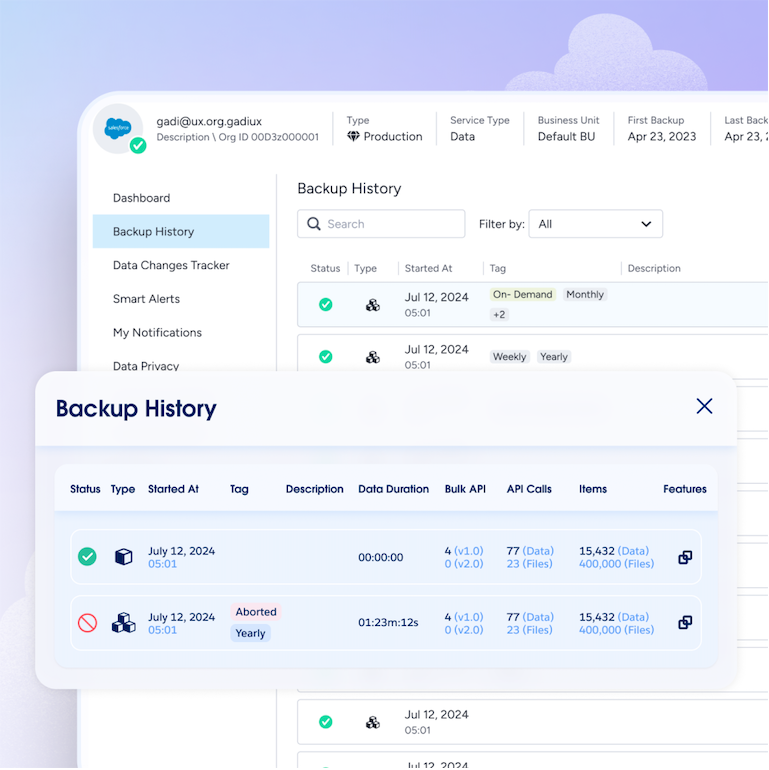
Salesforce Backup & Recover Demo - Backup Dashboard
Drill into the details of any org's backup activities. Access your latest backup, adjust API usage, monitor backup history, and manage alerts and notifications.
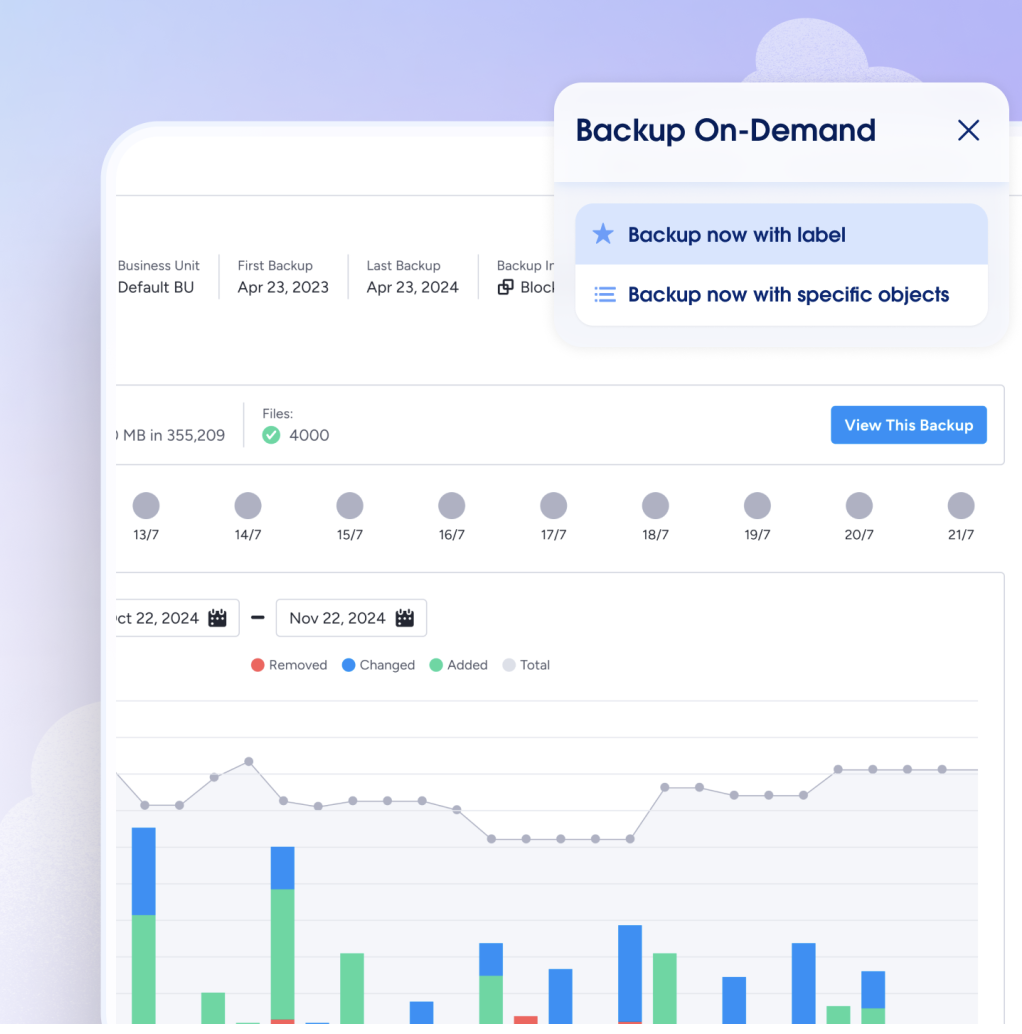
Salesforce Backup & Recover Demo - Backup On Demand
Instantly back up an entire org or specific objects in your Salesforce environment. Capture data immediately before and after projects like deployments or mass record updates, then compare changes to identify accidental deletions or corruptions that may have occurred. Automated daily backups mean...
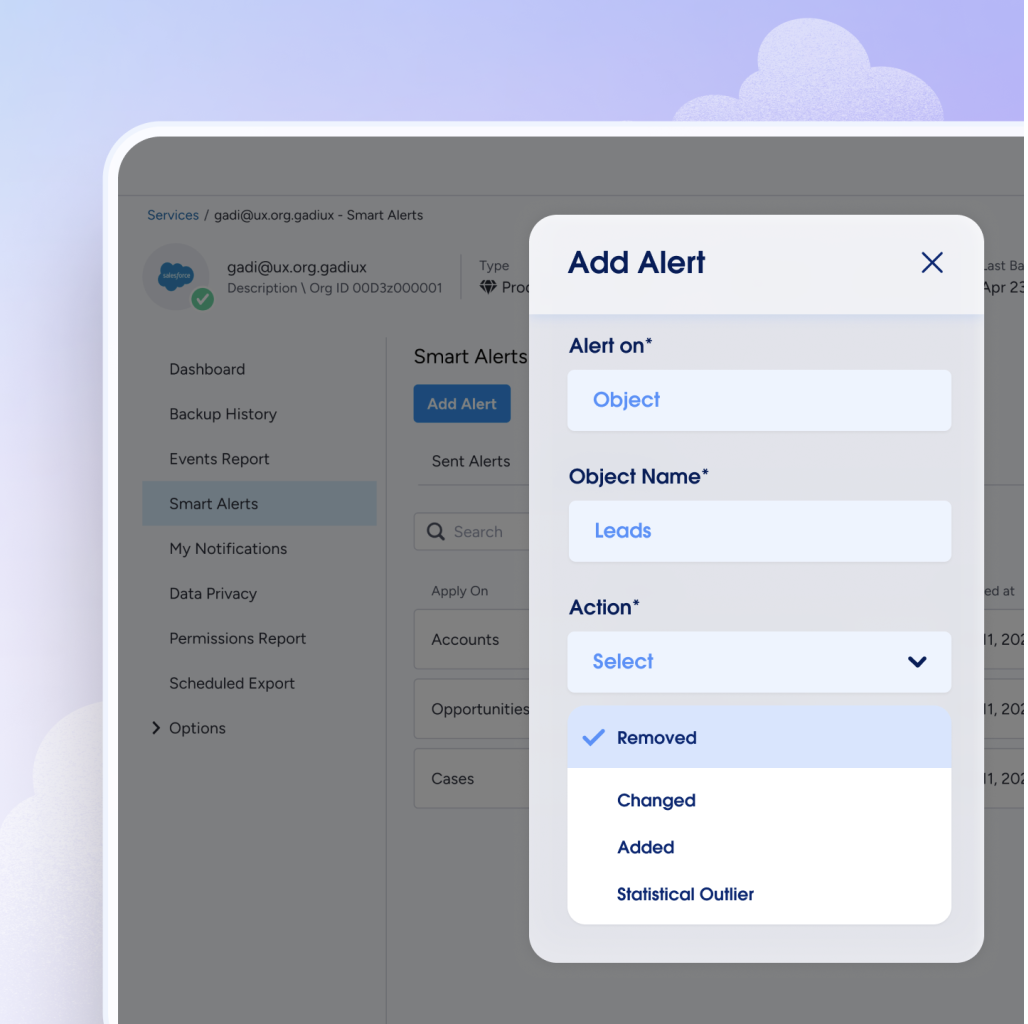
Salesforce Backup & Recover Demo - Configurable Smart Alerts
Configure thresholds to identify statistical outliers from normal business activities. Customize alerts to uncover significant changes to specific objects and the number of records added, removed, or modified.
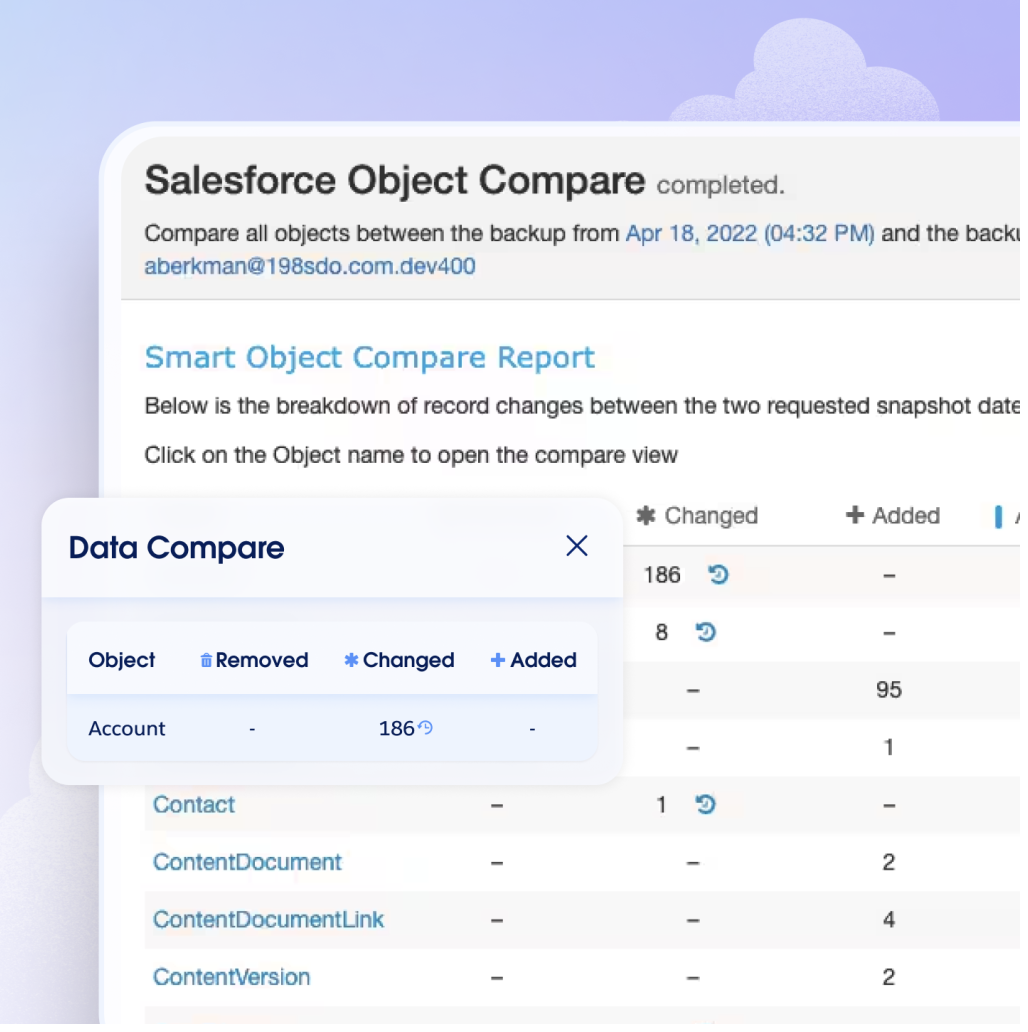
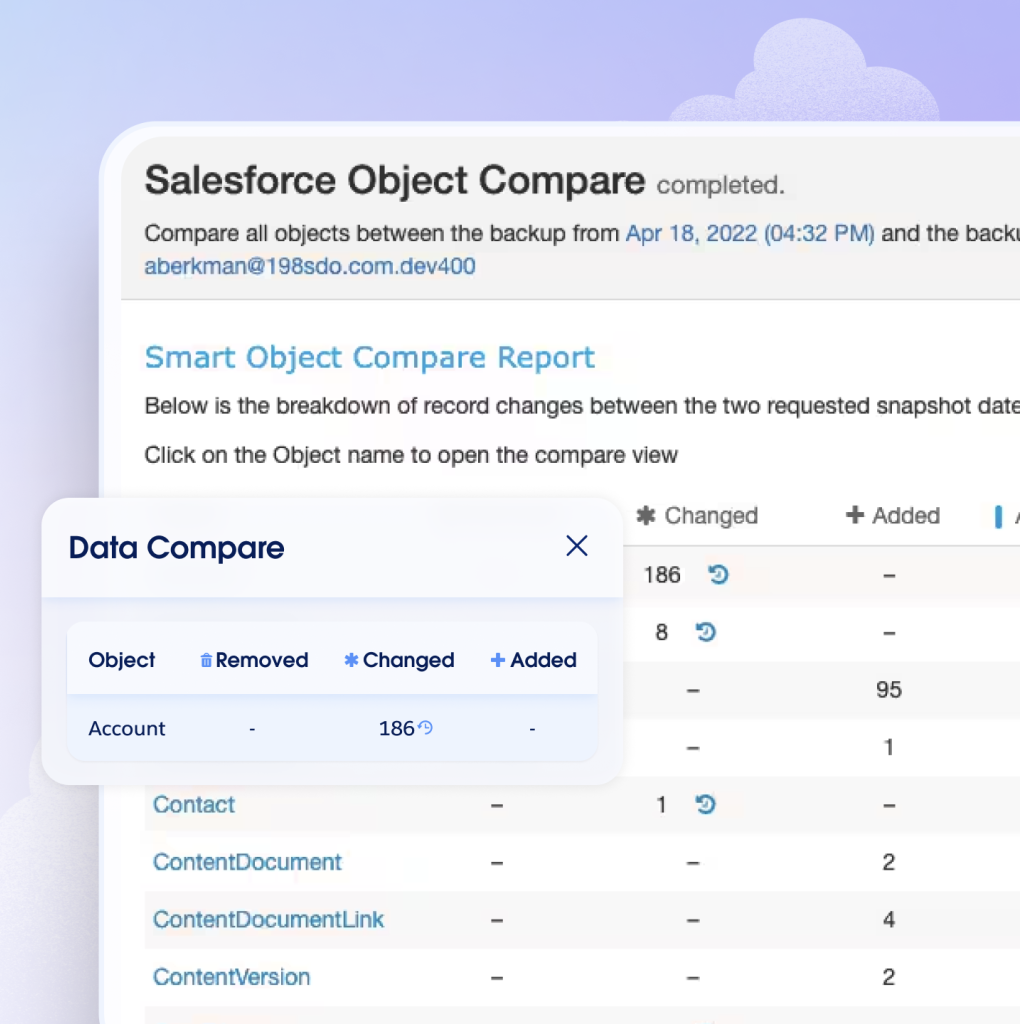
Salesforce Backup & Recover Demo - Data and Metadata Compare
Compare two backups to identify changes to records, fields and/or metadata. Select any two snapshots from your history to locate data that was added, deleted, or changed between the backups. Isolate precise metadata changes between backups.
Salesforce Backup & Recover Demo - Continuous Data Protection
Generate on-demand backups at specific points of time in the past, immediately before and after incidents, to avoid the potential of unrecoverable data.
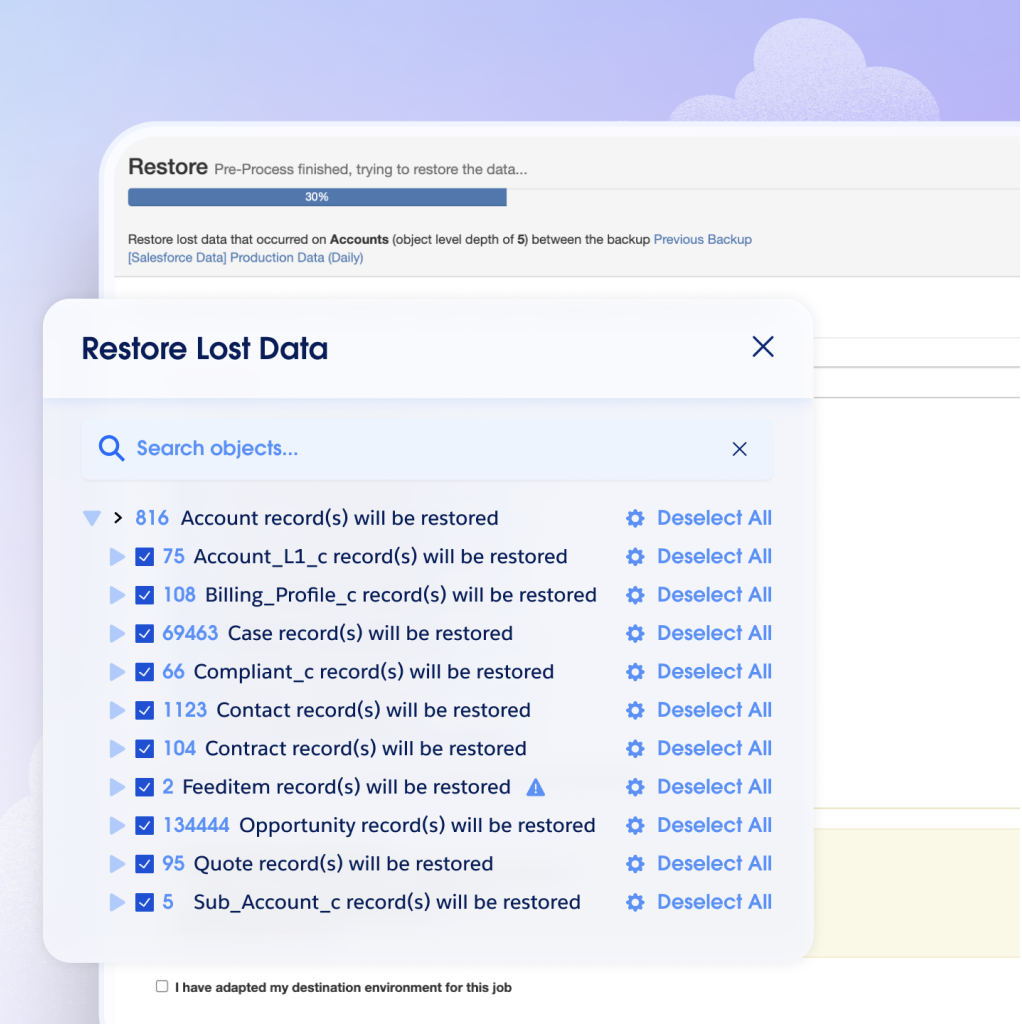
Salesforce Backup & Recover Demo - Precision Repair
Recover the exact data you need from any backup in your history without affecting valid data added since the backup occurred. Data relationships remain intact regardless of how many levels deep they go. In no time, your org will look like the problem never happened. We make the restore process ea...
Interactive Demo
Try an interactive demo created by the software seller (right here on G2).
Product Avatar Image

Have you used Salesforce Backup & Recover before?

Answer a few questions to help the Salesforce Backup & Recover community

Salesforce Backup & Recover Reviews (405)

View 1 Video Reviews
Reviews

Salesforce Backup & Recover Reviews (405)

View 1 Video Reviews
4.6
405 reviews

Review Summary

Generated using AI from real user reviews
Users consistently praise the product for its reliable data protection and ease of use, highlighting how it simplifies backup and recovery processes while providing peace of mind. Many appreciate the intuitive interface and effective automation features, although some note that the initial setup can be complex and the pricing may be high for larger organizations.

Pros & Cons

Generated from real user reviews
View All Pros and Cons
Search reviews
Filter Reviews
Clear Results
G2 reviews are authentic and verified.
AJ
Sr software developer
Mid-Market (51-1000 emp.)
"Intuitive UI with Reliable Backup Security"
What do you like best about Salesforce Backup & Recover?

I like the ease of use and how the UI is really great. It's really good because it shows what's in progress or if something has failed. It lets me see how often we're doing the recovery or the backup and offers different processes or ways to do it. The UI is definitely a game changer. I appreciate that it shows a place where we can actually see all the backups that have been scheduled with nice green colors and lots of text indicating if there is an error. If you dive deeper into it, you can also see what the actual error is. Additionally, I found the basic setup easy and good, and understanding user permissions was easier. Review collected by and hosted on G2.com.

What do you dislike about Salesforce Backup & Recover?

Probably the way of how we see the differences in data or how it can optimize it with more help text. Review collected by and hosted on G2.com.

Ben C.
BC
Director of Special Projects
Construction
Mid-Market (51-1000 emp.)
"Effortless Setup and Reliable Data Protection"
What do you like best about Salesforce Backup & Recover?

I like the simplicity of the setup with Salesforce Backup & Recover. It's been easy to work with as a team and to configure the policies, set the schedules, and determine where to implement. The initial setup was quite easy with help from our development team, admins, and the backup and recovery teams, who provided guidance and feedback. They were very easy to work with. Overall, the GitHub tool itself is generally quite nice, and the UI is quite nice. I would definitely recommend it, as it's very easy to work with. Review collected by and hosted on G2.com.

What do you dislike about Salesforce Backup & Recover?

I think it would be nice if there were some additional policies or schedules that could be added that have differentiating factors such as if this happens, then trigger this thing. If that happens, trigger this thing. Otherwise, the UI itself is quite nice. Review collected by and hosted on G2.com.

Renato M.
RM
CX and Salesforce Senior Analyst
Mid-Market (51-1000 emp.)
"Reliable and Time-Saving Solution Worth Every Penny"
What do you like best about Salesforce Backup & Recover?

It’s a very reliable, low-maintenance solution that gives real peace of mind once it’s up and running. Restoring specific data or metadata is straightforward and saves a lot of time compared to manual backups. I also loved the onboarding project I had with Ashraf — he was amazing, explained everything in great detail, and made sure we fully understood all the features of the tool. That made a huge difference in our adoption. Review collected by and hosted on G2.com.

What do you dislike about Salesforce Backup & Recover?

There’s a bit of a learning curve during the initial setup, and restores on very large data volumes can sometimes feel slow. It’s also not the cheapest option, but the reliability and time savings easily justify the cost. Review collected by and hosted on G2.com.

daniel a.
DA
Principal architect
Mid-Market (51-1000 emp.)
"Seamless Native Salesforce Backups with Granular Restores and Strong Compliance Confidence"
What do you like best about Salesforce Backup & Recover?

its native integration with Salesforce, which makes setup and management much simpler compared to third-party tools. The ability to automate backups, track data changes over time, and perform granular restores (at record or field level) is extremely helpful in real-world scenarios. It also provides confidence from a compliance and governance perspective, since data is securely stored within the Salesforce ecosystem. Review collected by and hosted on G2.com.

What do you dislike about Salesforce Backup & Recover?

One downside is that the restore process can still be somewhat complex, especially when dealing with large datasets or highly related records. It may require careful planning to avoid data inconsistencies. Additionally, compared to some third-party solutions, it can feel limited in terms of advanced customization, reporting, or cross-system recovery capabilities. Review collected by and hosted on G2.com.

Praveen .
P
Enterprise (> 1000 emp.)
"Effortless Setup, Reliable Backup Solution"
What do you like best about Salesforce Backup & Recover?

I really enjoy and love Salesforce Backup & Recover. It is easy to use, and you can back up, edit, and recover all data at any stage. This helps us restore any metadata and address data corruption. The ability to archive data for a certain number of months and give business people access to review the archive is a big plus. Additionally, the initial setup was very easy. Review collected by and hosted on G2.com.

What do you dislike about Salesforce Backup & Recover?

Point of time recovery Review collected by and hosted on G2.com.

Anirudh P.
AP
Director, GTM Apps
Mid-Market (51-1000 emp.)
"Best Backupp"
What do you like best about Salesforce Backup & Recover?

Once you set it up, you don't have to worry about it again. What I appreciate most is the ability to compare backups and easily identify what might be missing. As a developer, I find this tool especially valuable when working with several organizations and collaborating with multiple team members. Review collected by and hosted on G2.com.

What do you dislike about Salesforce Backup & Recover?

The time it takes to complete the same backup seems to change each time, and I wish it were more consistent. Occasionally, the process is much too slow, which can be quite frustrating. Review collected by and hosted on G2.com.

Verified User in Manufacturing
AM
Enterprise (> 1000 emp.)
"Exceptional onboarding that sets the gold standard."
What do you like best about Salesforce Backup & Recover?

This is exactly how the onboarding process should be handled. Instead of receiving a generic automated email with a link, I was paired with an expert who provided immediate value by summarizing best practices and productivity tips tailored to our needs. I’ve only been an admin for an hour, but this level of support makes me incredibly confident in the tool and excited to manage our backups with this team.

About the tool: easy to use, logical, scalable, ability to store with 2nd storage place - no surprise, it's Salesforce the world most loved CRM module. Review collected by and hosted on G2.com.

What do you dislike about Salesforce Backup & Recover?

There are some areas that could be improved. For example, it's currently not possible to view the total space used. While there is an option to have exception objects, there isn't a way to whitelist objects, which is disappointing for an organization with 3,500 objects. Although I've only used it for about an hour so far, I am familiar with the ecosystem and trust that these suggestions will be taken into account. Review collected by and hosted on G2.com.

Saujan B.
SB
Salesforce Administrator
Enterprise (> 1000 emp.)
"Effortless Data Archiving and Easy Access in Salesforce"
What do you like best about Salesforce Backup & Recover?

The reduction of storage in the main Salesforce org is beneficial, and having archived data accessible directly on the record page makes it easier to track previous information as well. also during the implementation, customer support or onboarding specialist was super awesome (not to forget that Will Penn helped a lot during this process)and the integration was also easy. just setup the policy , run the policy and check the logs. also the policy can be setup in such a way that we can set our own frequency of use for that. Review collected by and hosted on G2.com.

What do you dislike about Salesforce Backup & Recover?

so far i have found any thing to dislike regarding salesforce backup. Review collected by and hosted on G2.com.

SF
Small-Business (50 or fewer emp.)
"Reliable Data Protection with a Slight Learning Curve"
What do you like best about Salesforce Backup & Recover?

I appreciate how Own from Salesforce simplifies the process of protecting, backing up, and recovering important data without causing any slowdown. The platform feels dependable and operates smoothly, which really helps reduce the stress of managing information. Review collected by and hosted on G2.com.

What do you dislike about Salesforce Backup & Recover?

The only thing I dislike is that some of the setup steps can be confusing at first. It takes a little time to understand all the features, but once you get used to it, everything works really well. Review collected by and hosted on G2.com.

Alan Thomas P.
AP
Lead Salesforce Administrator
Mid-Market (51-1000 emp.)
"Reliable Backup with Easy Access, Needs Speed Improvement"
What do you like best about Salesforce Backup & Recover?

I like the easy access that Salesforce Backup & Recover provides. I also appreciate the UI because of the ease of access it offers. Additionally, the initial setup was pretty easy, making it a smooth process to get started. Review collected by and hosted on G2.com.

What do you dislike about Salesforce Backup & Recover?

Speed Review collected by and hosted on G2.com.

Questions about Salesforce Backup & Recover? Ask real users or explore answers from the community

Get practical answers, real workflows, and honest pros and cons from the G2 community or share your insights.

Dor S.
DS
Dor Shmuely
Last activity almost 6 years ago

when is the new version go live?

Moses K.
MK
Moses Kitimbo
Last activity over 2 years ago

How can I become Ownbackup agent?

Pricing Insights

Averages based on real user reviews.

Time to Implement

1 month

Return on Investment

13 months

Average Discount

11%

Perceived Cost

$$$$$

How much does Salesforce Backup & Recover cost?

Data powered by BetterCloud.

Estimated Price

$$k - $$k

Per Year

Based on data from 40 purchases.

Salesforce Backup & Recover Comparisons
Product Avatar Image
Odaseva
Compare Now
Product Avatar Image
Spanning Backup
Compare Now
Product Avatar Image
Druva Data Security Cloud
Compare Now
Salesforce Backup & Recover Features
Real-time Sync
Storage Capacity
Remote Backup
SaaS Application Variety
Storage Formats
File Sharing
Security Standards
Encrypted Storage
Product Avatar Image
Salesforce Backup & Recover