


Compare this with other toolsSave it to your board and evaluate your options side by side.
Save to board

LiveFlow Reviews & Product Details

Value at a Glance

Averages based on real user reviews.

Time to Implement

1 month

LiveFlow Integrations

(7)
Verified by LiveFlow

LiveFlow Media

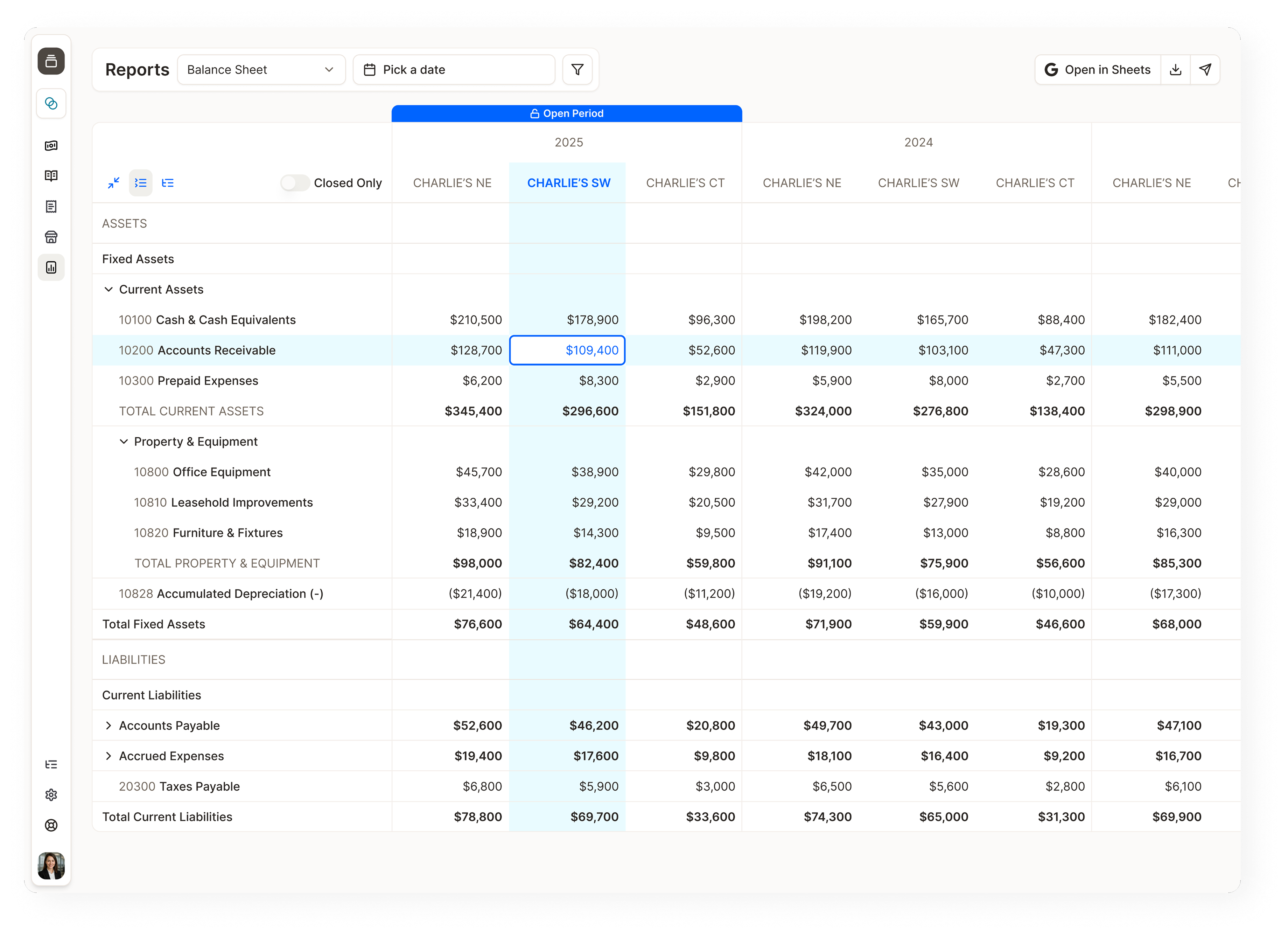
LiveFlow Demo - Always up-to-date reports and insights
Build and customize reports in real time, with the flexibility to match how your business actually runs.
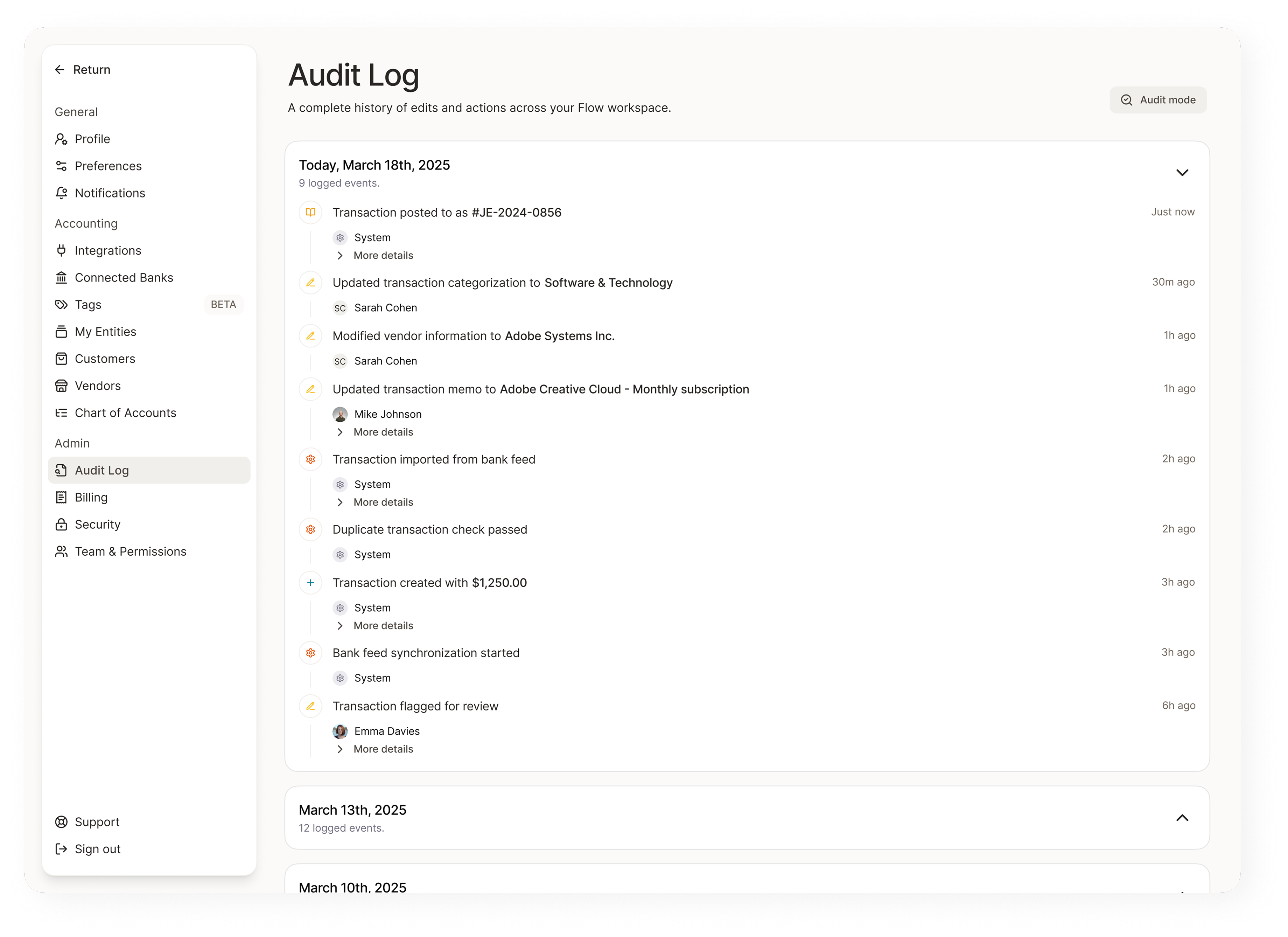
LiveFlow Demo - Maintain an immutable record of workspace events
Keep a complete history of edits and actions across your Flow workspace.
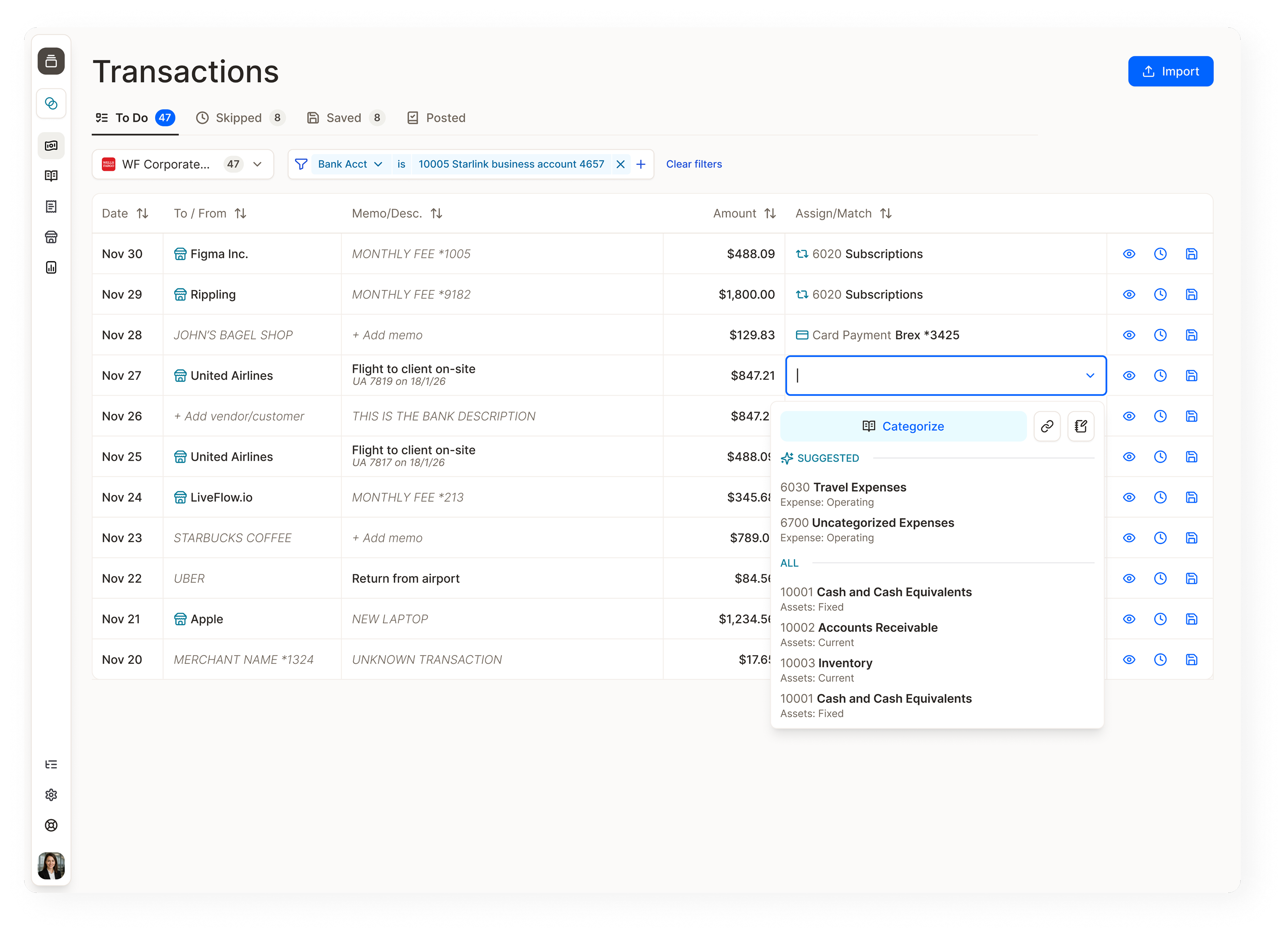
LiveFlow Demo - A transactions page that's like a live bank feed
Flow through your transactions faster than ever before with smart categorization.
LiveFlow Demo - Automate multi-entity consolidation
Consolidate any number of entities with infinite flexibility - get flexible account mapping, multi-currency, department and location consolidation, and much more!
LiveFlow Demo - Transform spreadsheets into your financial command center
Connect Xero or QuickBooks to Excel and Google Spreadsheets with a single click, and watch your data update effortlessly. Skip the manual updates — your dashboards refresh automatically to keep you focused on what matters.
LiveFlow Demo - Monitor Budget vs. Actuals in real-time
Transform financial tracking into strategic foresight, spotting variances instantly to keep your business targets within reach.
LiveFlow Excel & Google Sheets Integration
Play LiveFlow Video
LiveFlow Excel & Google Sheets Integration
LiveFlow Dashboards
Play LiveFlow Video
LiveFlow Dashboards
LiveFlow FinanceIQ
Play LiveFlow Video
LiveFlow FinanceIQ
Product Avatar Image

Have you used LiveFlow before?

Answer a few questions to help the LiveFlow community

LiveFlow Reviews (332)

Reviews

LiveFlow Reviews (332)

4.9
332 reviews

Review Summary

Generated using AI from real user reviews
Users consistently praise the seamless integration with QuickBooks and Google Sheets, which significantly saves time by automating financial reporting. The intuitive interface and easy setup enhance user experience, allowing for efficient report generation and real-time data updates. However, some users note a learning curve and desire for more customization options in reports.

Pros & Cons

Generated from real user reviews
View All Pros and Cons
Search reviews
Filter Reviews
Clear Results
G2 reviews are authentic and verified.
Ali T.
AT
Director of Operations
Small-Business (50 or fewer emp.)
"Customizable Reports That Update Instantly—A Game-Changer!"
What do you like best about LiveFlow?

The ability to manipulate standardized QBO reports to build customer reports that automatically update with changes made to QBO. Review collected by and hosted on G2.com.

What do you dislike about LiveFlow?

Sometimes I struggle with building formulas that work within the boundaries of the software but the liveflow team is always there to assist. Review collected by and hosted on G2.com.

John Kenneth J.
JJ
Senior Accountant
Small-Business (50 or fewer emp.)
"Massive Time Saver for Forecasting & Reporting"
What do you like best about LiveFlow?

LiveFlow has significantly streamlined our workflow. What used to take hours each month—manually updating forecast models and tidying up spreadsheets—is now handled automatically. With LiveFlow integrated into our Google Sheets, everything stays up-to-date and well-organized. Review collected by and hosted on G2.com.

What do you dislike about LiveFlow?

Learning Curve – Some users may find the initial setup or learning how to use LiveFlow effectively a bit challenging, especially if they're not familiar with financial modeling tools or advanced spreadsheet functions.

Limited Customization – While LiveFlow automates a lot, some users might feel restricted by templates or limitations in customizing data imports exactly to their liking. Review collected by and hosted on G2.com.

James  A.
JA
Senior Manager
Mid-Market (51-1000 emp.)
"Seamless Integration with Excel and Quickbooks Boosts Efficiency"
What do you like best about LiveFlow?

I enjoy the seamlessness the most. It works really well with Excel and Quickbooks Online. We have found this to increase our quality and efficiency. Review collected by and hosted on G2.com.

What do you dislike about LiveFlow?

Nothing yet. We have found the software to work well and do what is expected. Review collected by and hosted on G2.com.

Habiba S.
HS
Accounts Manger
Mid-Market (51-1000 emp.)
"Best Integration for creating reports from QBO files"
What do you like best about LiveFlow?

importing QBO reports with google sheet integration Review collected by and hosted on G2.com.

What do you dislike about LiveFlow?

we couldn't sync it to xero and it was frustrating because the customer support was not very supportive in this case Review collected by and hosted on G2.com.

DB
VP Finance
Mid-Market (51-1000 emp.)
"Real-Time Financial Insights and Effortless Consolidation"
What do you like best about LiveFlow?

LiveFlow is a useful tool to perform multi-entity consolidation. Also, LiveFlow helps build reports that are synced up with QuickBooks in real-time, allowing an up to date view of financials. Review collected by and hosted on G2.com.

What do you dislike about LiveFlow?

The speed of refreshing reports could be improved, but it also depends on factors such as internet bandwidth. Review collected by and hosted on G2.com.

Verified User in Investment Management
UI
Small-Business (50 or fewer emp.)
"Fantastic experience saving time and increasing accuracy."
What do you like best about LiveFlow?

It's automated. It's an easy plug-in for Google Sheets. Works seamlessly.

Liveflow is a fantastic addition to bookkeeping and accounting workflow. Yes, it is expensive, even more expensive than QBO itself. HOWEVER, it pays for itself in both productivity and accuracy. Manual data entry is reduced and typos and “fat fingering” are eliminated. If QBO is correct, then your custom-created reports are correct. It does take some time to get the most out of it – but once set up it works great. You can pull raw data from QBO and then use it to create various dashboards and reports. And you can also use it to pull full financial statements and then create dashboards that pull right from there. Great product. And the few times I’ve needed customer service, they’re quite responsive. Highly recommended. Review collected by and hosted on G2.com.

What do you dislike about LiveFlow?

Honestly, it's a bit expensive for the small user. But it works great. Review collected by and hosted on G2.com.

Roland G.
RG
Chief Financial Officer
Small-Business (50 or fewer emp.)
"LiveFlow makes reporting so much easier"
What do you like best about LiveFlow?

I'm a CFO using Xero, and honestly, LiveFlow has made a huge difference for us. Before, month-end felt like running a marathon — exporting reports, consolidating spreadsheets, triple-checking numbers. Now? LiveFlow pulls everything in live from Xero straight into our Google Sheets and Excel dashboards. No more manual exports, no more errors.

What really impressed me is the built-in forecasting. It’s super flexible — you can forecast on a fixed basis (like rent, salaries) or variable (like % of revenue, COGS scaling with sales). Setting up different scenarios is really intuitive, and it’s saved us hours when doing board reporting and cash flow planning.

If you’re tired of spending all your time cleaning data instead of actually analyzing it, you need to check this out. Easily one of the best tools we’ve added to the finance stack. Review collected by and hosted on G2.com.

What do you dislike about LiveFlow?

The only thing I'd love to see added is a native cash flow statement builder — right now, you have to build it manually from the data. Review collected by and hosted on G2.com.

Natalie T.
NT
Senior Financial Analyst
Small-Business (50 or fewer emp.)
"Game Changer"
What do you like best about LiveFlow?

LiveFlow saves hours every month by automatically pulling data from QuickBooks into Google Sheets. I just have to build the report once, either from a template or start from scratch, and from there, I just have to update QBO.

Clients can go in and see their report anytime with the most up-to-date information without asking me to pull it for them.

Their customer support is top-notch, so when I have questions, I can always get a quick reply.

Liveflow is great for multi-entity reporting. Their consolidation feature at implementation makes it easy to pull sister orgs together into one consolidated report. Review collected by and hosted on G2.com.

What do you dislike about LiveFlow?

Initial setup is the only heavy lifting you'll need to do. Once you get everything set up, sending out your financial reports is a breeze. Review collected by and hosted on G2.com.

Verified User in Computer Software
UC
Mid-Market (51-1000 emp.)
"Great tool to connect data directly into Google Sheets"
What do you like best about LiveFlow?

Automates data import and consolidation, cutting months‑end close time significantly. Seamless integration with QuickBooks and Sheets/Excel Review collected by and hosted on G2.com.

What do you dislike about LiveFlow?

The UX could be a bit more modern but that is just a cosmetics Review collected by and hosted on G2.com.

Verified User in Accounting
UA
Small-Business (50 or fewer emp.)
"Modern Financial Reporting Software"
What do you like best about LiveFlow?

Our team's favorite part about Liveflow is the time saving aspect. We are able to create instant reports for departments and share them with the team instead of spending the time creating and sending them to each individual. Also, because of the live real time integration, we can drill down into specific line items if a committee member has a question while on a call. We use LiveFlow monthly for our reporting, and whenever we have issues we chat with customer support and they always hop on a Zoom call with us which is much appreciated when working against a deadline. Review collected by and hosted on G2.com.

What do you dislike about LiveFlow?

There is definitely an initial learning curve with Liveflow - you really need to learn the formulas and have a base knowledge of Google Sheets. Also, we do have to put quite a bit of time into it at the end of the year to update the reporting with new budgets, months, etc. Review collected by and hosted on G2.com.

Questions about LiveFlow? Ask real users or explore answers from the community

Get practical answers, real workflows, and honest pros and cons from the G2 community or share your insights.

GU
Guest User

What is LiveFlow Google Sheets Add-On used for?

Pricing Insights

Averages based on real user reviews.

Time to Implement

1 month

Return on Investment

5 months

Average Discount

10%

LiveFlow Comparisons
Product Avatar Image
Jirav
Compare Now
Product Avatar Image
G-Accon
Compare Now
Product Avatar Image
Causal
Compare Now
LiveFlow Features
Data Import
Data Import
Data Consolidation
Data Validation
Reporting Hierarchy
Report Templates
Report Types
Standard KPIs
Standard Reports
Financial Statements
Product Avatar Image
LiveFlow