

GanttPRO Reviews & Product Details

Pricing

Pricing provided by GanttPRO.

Core

Starting at $7.00
1 User

GanttPRO Integrations

(4)
Verified by GanttPRO

GanttPRO Media

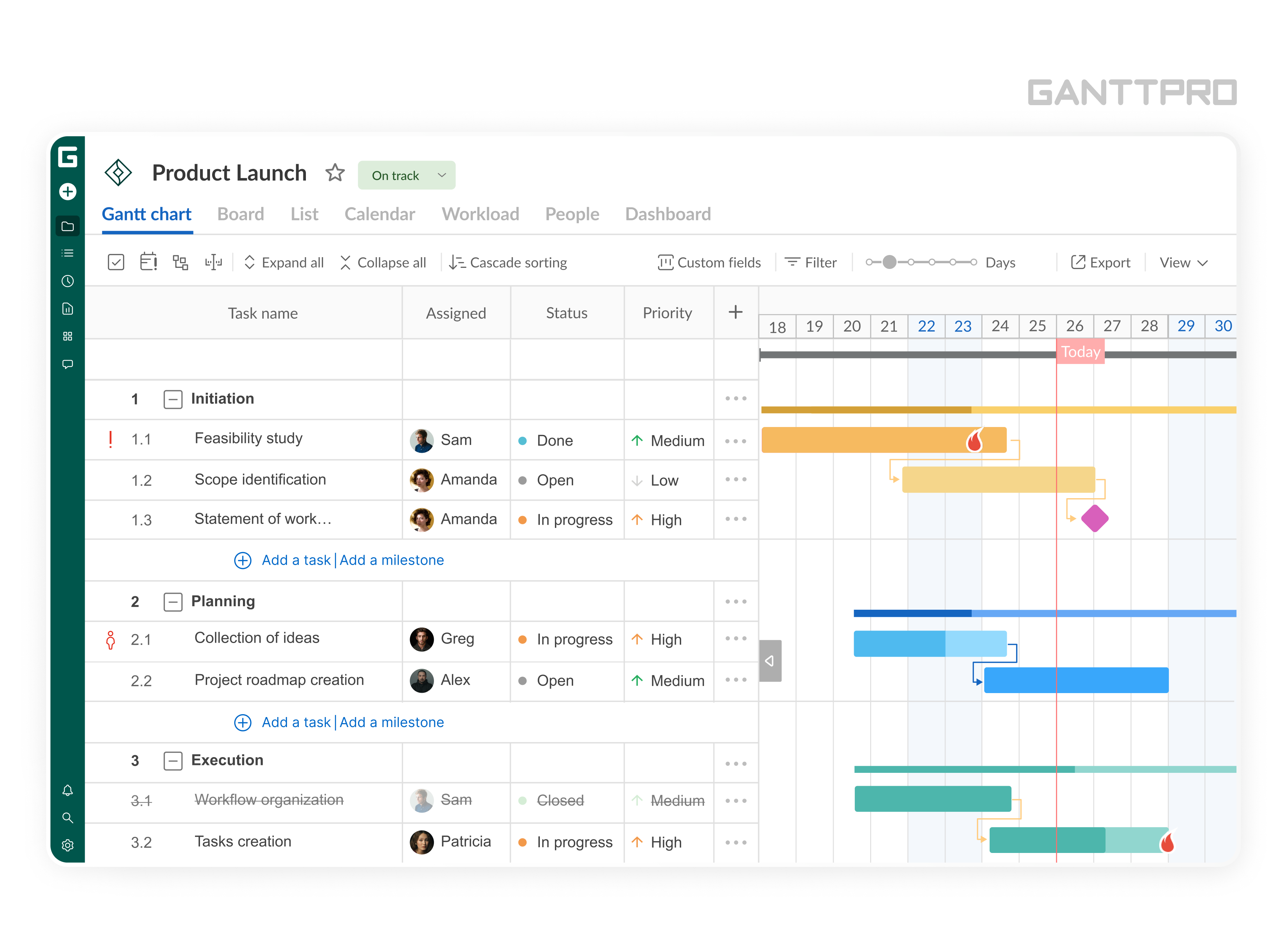
GanttPRO Demo - GanttPRO online Gantt chart software
Overview of GanttPRO online Gantt chart maker
GanttPRO Demo - Views in GanttPRO online Gantt chart maker
Different views in GanttPRO online Gantt chart maker
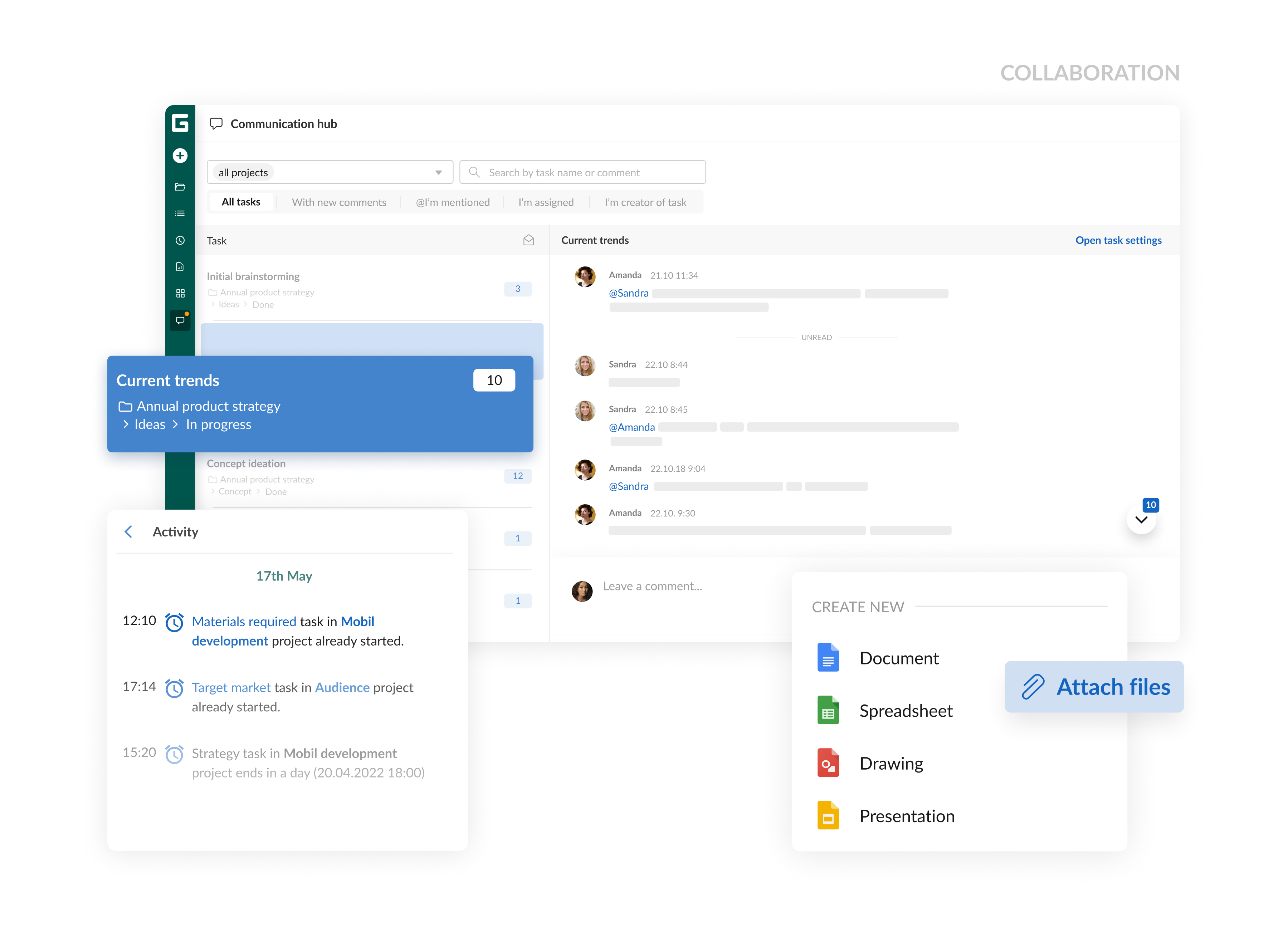
GanttPRO Demo - Collaboration in GanttPRO online Gantt chart generator
Team collaboration in GanttPRO online Gantt chart generator
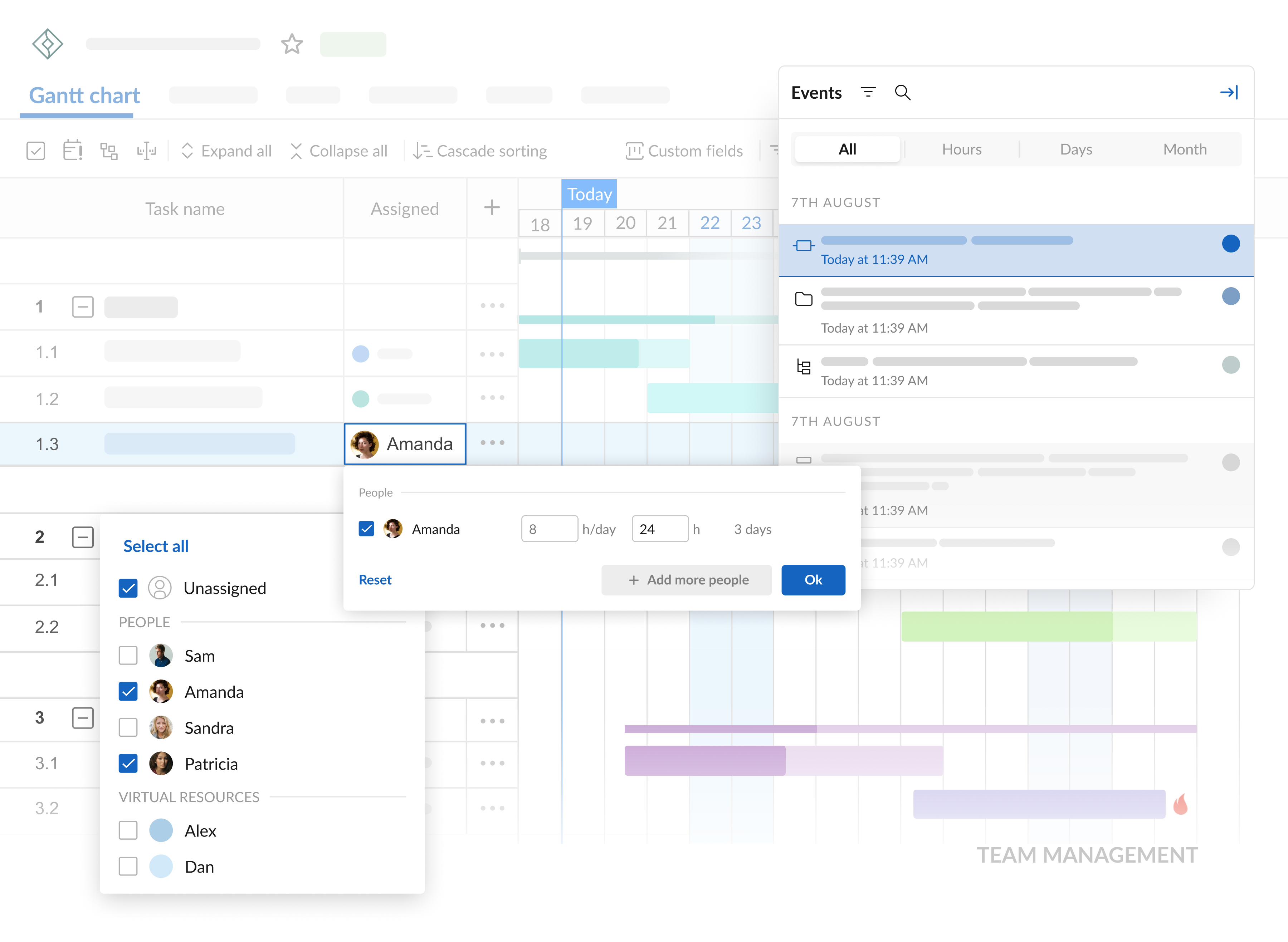
GanttPRO Demo - Team management in GanttPRO online Gantt chart tool
Team management in GanttPRO, the online Gantt chart tool for project management
GanttPRO Demo - Resource management in GanttPRO online Gantt chart software
Resource management in GanttPRO online Gantt chart software for efficient project management
GanttPRO Demo - Time management in GanttPRO online Gantt chart maker
Time management in GanttPRO online Gantt chart tool: deadline management, time log, and more.
An overview of GanttPRO Gantt chart software. Discover how GanttPRO can help in project management and team collaboration. Create charts, set dates, collaborate with your team, and successfully accomplish projects with GanttPRO.
Play GanttPRO Video
An overview of GanttPRO Gantt chart software. Discover how GanttPRO can help in project management and team collaboration. Create charts, set dates, collaborate with your team, and successfully accomplish projects with GanttPRO.
How to make a roadmap for a project? Discover the 6-step process to build professional project roadmaps that guide your team from start to finish.
Play GanttPRO Video
How to make a roadmap for a project? Discover the 6-step process to build professional project roadmaps that guide your team from start to finish.
Best construction scheduling software for projects of any scale – from small businesses to large industrial sites.
Play GanttPRO Video
Best construction scheduling software for projects of any scale – from small businesses to large industrial sites.
How to create a new project in GanttPRO, the online Gantt chart software for efficient project management and collaboration.
Play GanttPRO Video
How to create a new project in GanttPRO, the online Gantt chart software for efficient project management and collaboration.
Differences between GanttPRO subscription plans and hear tips to cut your expenses.
Play GanttPRO Video
Differences between GanttPRO subscription plans and hear tips to cut your expenses.
Official Downloads
(1)
Product Avatar Image

Have you used GanttPRO before?

Answer a few questions to help the GanttPRO community

GanttPRO Reviews (571)

View 1 Video Reviews
Reviews

GanttPRO Reviews (571)

View 1 Video Reviews
4.8
572 reviews

Review Summary

Generated using AI from real user reviews
Users consistently praise GanttPRO for its intuitive interface and ease of use, which simplifies project management and enhances collaboration. The drag-and-drop functionality allows for quick adjustments to timelines and task dependencies, making it ideal for both students and professionals. However, some users note that the pricing can be a barrier, especially for smaller teams or individual users.

Pros & Cons

Generated from real user reviews
View All Pros and Cons
Search reviews
Filter Reviews
Clear Results
G2 reviews are authentic and verified.
Sati K.
SK
Aero Design Deputy Team Leader (DMU Merlin)
Small-Business (50 or fewer emp.)
"Efficient and User-Friendly Project Management Tool"
What do you like best about GanttPRO?

What I like best about GanttPRO is its intuitive interface and clear visual project timelines. The Gantt chart layout makes it easy to organize tasks, set dependencies and track progress in a structured way. I also appreciate how simple it is to assign tasks and manage deadlines, which helps keep projects well organized and easy to follow. Review collected by and hosted on G2.com.

What do you dislike about GanttPRO?

One downside is that some advanced features take a bit of time to fully understand when you first start using the platform. It can also feel slightly limited if you are looking for highly customized workflows, but overall it still provides strong functionality for most project planning needs. Review collected by and hosted on G2.com.

Response from Anastasia Сommunity Manager of GanttPRO

Hi Sati! Thank you so much for sharing your feedback! It’s great to know that GanttPRO became a real solution for you and brought more clarity and progress to your workflow :)

As for the advanced features, I agree that some of them can take a bit of time to get used to, as it’s not always easy to surface the full functionality at first glance. That’s exactly why we offer Help Center (https://help.ganttpro.com/hc/en-us), YouTube videos (https://www.youtube.com/@ganttpro/playlists), and support team always ready to help. And regarding workflow customization, I’d be very happy to hear more of your insights, feel free to email me at anastasia@ganttpro.com.

Warm regards, Anastasia GanttPRO Community Manager

Sergey N.
SN
"Effortless Goal Management with GanttPRO"
What do you like best about GanttPRO?

I like the structure of Portfolio-Projects-Tasks in GanttPRO. It allows me to break down big projects into smaller tasks and assign them specific time slots. It helps me see how much time the tasks will take in total and when my project will be done. If there’s a deadline and I’m not finished with my tasks, I can adjust the time windows or the hours I use to meet my goal on time. The milestones motivate me to achieve what I need to do. I also like the design and layout of the Gantt chart itself, with its nice and subtle coloring and good structure. The initial setup was quite easy, especially with the helpful articles provided by GanttPRO that explain topics and answer questions. Review collected by and hosted on G2.com.

What do you dislike about GanttPRO?

I like everything. Review collected by and hosted on G2.com.

Response from Anastasia Сommunity Manager of GanttPRO

Hi Sergey! Thank you so much for sharing your positive experience! It’s great to hear that the Portfolio–Projects–Tasks structure fits your workflow well, and that milestones and the overall visual layout felt clear and user-friendly.

I hope GanttPRO continues to help you stay on track with exams and large projects!:) Warm regards, Anastasia GanttPRO Community Manager

Saleem U.
SU
Student
Small-Business (50 or fewer emp.)
Guest users or non-business users of the software, not included in G2 scores.
"Outstanding Experience with Seamless Features"
What do you like best about GanttPRO?

GanttPRO shines for its balance of power and simplicity. The interface is clean, fast, and genuinely intuitive—drag-and-drop tasks, create dependencies, and adjust timelines without wrestling with menus. Onboarding is painless: templates, inline editing, and bulk actions let you build a plan in minutes. Critical path, baselines, and workload views make progress and resource conflicts obvious at a glance. Collaboration is smooth with comments, mentions, and role-based permissions, and exports (PDF/PNG/Excel) look professional without extra formatting. I also appreciate the keyboard shortcuts, filter/search, and the way subtasks roll up to summaries. It’s a rare tool that project newcomers and power users both enjoy. Review collected by and hosted on G2.com.

What do you dislike about GanttPRO?

The only thing which i did not found great was that when i want to upload my csv or xlxs file, its pattern is getting a bit changed. Review collected by and hosted on G2.com.

Response from Anastasia Сommunity Manager of GanttPRO

Hi Salem! Many thanks for your amazing feedback! It was a pleasure to read how GanttPRO features helped with messy planning and with keeping your project on track.

I also appreciate your note on pattern change, and very sorry to hear it brought some inconvenience into the process. This does look like a situational technical issue. Please don't hesitate to contact our support team (available directly from GanttPRO interface) for a closer look at your case.

Warm regards, Anastasia GanttPRO Community Manager

Verified User in Automotive
GA
Mid-Market (51-1000 emp.)
Guest users or non-business users of the software, not included in G2 scores.
"Perfect overview for the production of our prototype"
What do you like best about GanttPRO?

For our Formula Student team, GanttPRO is an absolute game changer in production planning. What I like best is the intuitive visualization of dependencies (auto-scheduling). Since we are building a prototype, many assemblies depend on each other – if the production of the monocoque is delayed, all subsequent steps are postponed. GanttPRO immediately shows us these impacts visually on the critical path. Additionally, the learning curve is very flat; new team members can use the tool immediately without long training. The function to assign tasks directly to specific people in the team and track progress in real-time saves us hours of meeting time weekly. Review collected by and hosted on G2.com.

What do you dislike about GanttPRO?

There is little to criticize, but if I had to mention something: The mobile view could be further optimized for smartphones. When we are directly in the workshop and want to quickly glance at the plan, the overview on small screens can sometimes be a bit tricky. Additionally, it would be great if the export functions for PDF reports were a bit more flexible in formatting, so they could be used directly for sponsor updates. Review collected by and hosted on G2.com.

Response from Anastasia Сommunity Manager of GanttPRO

Hello! Thank you so much for sharing your GanttPRO experience! It was great to see how the tool supports your Formula Student team. The scope of your project is truly impressive and I’m glad that GanttPRO helped with planning and coordination throughout such a complex process.

Also, I appreciate your notes on the mobile view and export options! We will take into account your perscpective as we continue refining these areas of the product.

Your project sounds genuinely exciting and it feels like it could make for a great customer story! If you’d be open to that, please feel free to reach out to me at anastasia@ganttpro.com.

Warm regards, Anastasia GanttPRO Community Manager

Thi Thuy Phuong H.
TH
Remote Business Analyst
Small-Business (50 or fewer emp.)
Guest users or non-business users of the software, not included in G2 scores.
"GanttPRO: Intuitive, Powerful, and Perfect for Team Collaboration"
What do you like best about GanttPRO?

GanttPRO is one of the most user-friendly and visually intuitive project management tools I’ve ever used. It allows me to create clear, detailed Gantt charts within minutes and helps my entire team stay aligned on timelines, dependencies, and priorities. The drag-and-drop interface is simple but powerful, and I especially appreciate the ability to assign tasks, track progress, and adjust deadlines effortlessly. The collaboration features, notifications, and export options make it ideal for both internal team planning and reporting to stakeholders. It’s a perfect balance between functionality and simplicity. Review collected by and hosted on G2.com.

What do you dislike about GanttPRO?

There’s very little to dislike. Sometimes I wish for deeper integrations with other tools like Microsoft Teams or Notion, and more customizable dashboard widgets for analytics. However, these are minor compared to the overall efficiency and clarity GanttPRO provides. Review collected by and hosted on G2.com.

Response from Anastasia Сommunity Manager of GanttPRO

Hello Thi Thuy Phuong! Thank you for sharing such a thoughtful review. It was a pleasure to read! It’s always great to see how the tool fits into teams' workflow and helps keep timelines, dependencies, and key information organized in one place.

Your note about integrations makes perfect sense. At the moment, we focus on the most essential ones but the list is constantly growing, and feedback like yours is very valuable for future improvements.

Warm regards, Anastasia GanttPRO Community Manager

AG
Analista de Control de Gestión
Mid-Market (51-1000 emp.)
Guest users or non-business users of the software, not included in G2 scores.
"GanttPRO is the project management tool you were looking for!"
What do you like best about GanttPRO?

My experience with GanttPRO began at university, thanks to the recommendation of a strategic planning professor. What started as an academic tool to visualize the critical path of our projects quickly became an indispensable asset for my professional life. Now, I am applying it for managing schedules and complex work plans in the financial area at my job.

Before GanttPRO, spreadsheets for month-end closing or budget planning were static and prone to errors. With GanttPRO, I achieved total clarity on the dependencies of financial tasks (such as data collection before analysis or approval before disbursement). The interface is incredibly intuitive; the drag-and-drop features make creating tasks, linking dependencies, and reallocating resources quick and easy, even in projects with hundreds of milestones.

The Gantt Chart view is visually clear, allowing me to see the big picture and ensure compliance with critical deadlines. Additionally, collaboration is seamless, enabling my team to always be aware of deadlines without the need for excessive meetings. It is an investment that pays for itself in efficiency and clarity in the financial sector. It definitely deserves five stars. Review collected by and hosted on G2.com.

What do you dislike about GanttPRO?

If I had to mention an area for improvement, it would be the pricing structure. For users who are just starting or very small teams, the absence of a limited free plan or a lower entry cost per user could be a barrier. Although my team and I find that the functionality fully justifies the investment, I would like it to be more accessible so that more students or start-ups could benefit from it.

Another improvement I would love to see, especially from my experience in the financial area, is the customization of reports. While the current reports are functional, I believe the platform could expand its options for advanced analytics and personalized dashboards to create much more detailed performance reports tailored to our internal metrics. Review collected by and hosted on G2.com.

Zaidan Al-ghifari F.
ZF
Bachelor Students
Small-Business (50 or fewer emp.)
"A Powerful Gantt Chart Tool — and a welcome student-discount option"
What do you like best about GanttPRO?

- The chart view is extremely intuitive — dragging tasks, setting dependencies, adjusting timelines all feel very smooth.

- The ability to switch between list, board and calendar views gives me flexibility depending on whether I’m planning a research project, course work or group assignment.

- Collaboration features are solid: I can invite teammates, assign tasks, leave comments, attach files — this makes group work much less chaotic.

- The support and documentation are good, especially for someone like me who doesn’t work in “official project management” but still needs structure. Review collected by and hosted on G2.com.

What do you dislike about GanttPRO?

The pricing for non-discount users is somewhat steep if you’re a student with limited budget, especially since the annual plan is required for best value.

While the free trial is helpful, having more flexible shorter-term payment (for example semester-based) would be great for students. Review collected by and hosted on G2.com.

Response from Anastasia Сommunity Manager of GanttPRO

Hello Zaidan! Thank you very much for sharing your experience and choosing GanttPRO for your academic project :) It's great to hear you preferred the tool over spreadsheets and lists, and that it didn't disappoint!

As for the pricing, you’re totally right that it can feel steep for a student. That’s why we offer a 50% educational discount, please find details here: https://ganttpro.com/software-discounts-for-nonprofits/.

And as for the subscription model, we do currently have monthly and annual plans only. The reason is that most projects run for several months and an annual subscription often provides the best value over that timeframe. But your point sounds absolutely fair and we’ll take it into account going forward!

Warm regards, Anastasia GanttPRO Community Manager

Tanapat S.
TS
Project Manager
Small-Business (50 or fewer emp.)
Guest users or non-business users of the software, not included in G2 scores.
"Intuitive and Powerful Tool for Bridging Theory and Practice"
What do you like best about GanttPRO?

As a Master’s student in IT Management and a Project Manager, I find GanttPRO to be the perfect bridge between academic theory and professional practice. What I like best is its intuitive UI combined with powerful professional features. My Master’s degree allows me to organize complex research schedules effortlessly. In my professional role, the Resource Management and Time Tracking features are game-changers. The ability to set baselines is invaluable for comparing our planned progress against actual performance, which is a core concept I study in my program and apply daily in my projects. Review collected by and hosted on G2.com.

What do you dislike about GanttPRO?

During my initial trial period, I have not encountered any significant issues or dislikes. The onboarding process was smooth, and the learning curve was much shorter than I expected. The software feels very stable and well-thought-out for both beginners and experienced planners. I am still exploring the more advanced integration features, but so far, everything has worked perfectly for my current needs. Review collected by and hosted on G2.com.

Response from Anastasia Сommunity Manager of GanttPRO

Hello Tanapat! Thank you very much for your in-depth review! It was genuinely interesting to read your perspective as both a Master’s student and a practicing Project Manager. I’m glad to hear that the tool helps you connect academic concepts with real project work, especially when it comes to baselines, WBS, and auto-scheduling. Also, your feedback on onboarding is very valuable as our team puts a lot of effort into making the first experience as smooth as possible.

If you ever have questions while diving into more advanced features, please don't hesitate to reach out. We'll be happy to guide you along the way!

Wishing you all the best in both your studies and professional projects :) Warm regards, Anastasia GanttPRO Community Manager

Verified User in Information Technology and Services
GI
Small-Business (50 or fewer emp.)
Guest users or non-business users of the software, not included in G2 scores.
"Transforms Complex Projects into Clear, Actionable Roadmaps"
What do you like best about GanttPRO?

What I like best about GanttPRO is its remarkable ability to turn complex project data into a clear, actionable visual roadmap. Many tools focus either on simple lists or overly complex spreadsheets, but GanttPRO hits the "sweet spot" of professional project management.

Key Favorites:

Intuitive Dependency Management: The ability to visually link tasks is seamless. When I connect two tasks, the software understands the relationship immediately. If the first task is delayed, the Auto-scheduling engine automatically shifts the entire project timeline. This saves me hours of manual adjustments and prevents planning errors.

The Critical Path Feature: This is perhaps the most useful tool for a student or professional. With one click, I can see exactly which tasks are vital to the project's completion date. It allows me to ignore the "noise" and focus my limited energy on the most high-impact work.

Professional Aesthetics: It sounds minor, but the UI is beautiful. When I export a chart to show a professor, it looks polished and professional, which builds confidence in my planning abilities. Review collected by and hosted on G2.com.

What do you dislike about GanttPRO?

While there is a mobile app, it feels significantly more limited than the web version. Review collected by and hosted on G2.com.

Response from Anastasia Сommunity Manager of GanttPRO

Hello! Thank you for your amazing in-depth review! It's always so rewarding to see how GanttPRO becomes the solution to the problem and, especially, makes planning feel less stressful. I also appreciate you highlighting the visual aspect. Presenting plans with confidence matters more than it seems.

As for the mobile app, the web version is indeed currently more feature-rich while the mobile experience is designed mainly for quick access and on-the-go tracking. However, there’s definitely room for growth and feedback like yours is very valuable for upcoming improvements.

All the best to you in your professional journey! Warm regards, Anastasia GanttPRO Community Manager

Valeria C.
VC
Head of Marketing & Communications
Small-Business (50 or fewer emp.)
"Effortless Project Tracking with Intuitive UI"
What do you like best about GanttPRO?

I use GanttPRO day to day to keep track of all my project's deadlines. I really like how intuitive GanttPRO is and how easy it is to use, it's the best platform I've encountered for these tasks out there. The interface is easy to manage, and in just a few minutes, you can have a project up and running and ready to perform. Review collected by and hosted on G2.com.

What do you dislike about GanttPRO?

I think the interface does look a bit outdated, but its intuitiveness makes it worthy of use. Review collected by and hosted on G2.com.

Response from Anastasia Сommunity Manager of GanttPRO

Hi Valeria! Thank you for your positive review! I'm very glad to know you found GanttPRO user-friendly and easy to get started with.

I’m sorry the interface felt a bit outdated. We try to keep it minimal so it’s easier to focus on the work and the features, but there’s always room to improve, and feedback like yours helps us see where we can do better.

Warm regards, Anastasia GanttPRO Community Manager

Pricing Options

Pricing provided by GanttPRO.

Core

Starting at $7.00
1 User

Advanced

Starting at $10.00
1 User

Business

Starting at $17.00
1 User
GanttPRO Comparisons
Product Avatar Image
TeamGantt
Compare Now
Product Avatar Image
monday Work Management
Compare Now
Product Avatar Image
Instagantt
Compare Now
GanttPRO Features
Creation & Assignment
Due Dates
Task Prioritization
Planning
Project Map
GANTT
Resource Definiton
Scheduling
Product Avatar Image
GanttPRO