


Amplitude Guides and Surveys

By Amplitude

4.8 out of 5 stars

How would you rate your experience with Amplitude Guides and Surveys?

Compare this with other toolsSave it to your board and evaluate your options side by side.
Save to board

Amplitude Guides and Surveys Reviews & Product Details

Value at a Glance

Averages based on real user reviews.

Time to Implement

1 month

Amplitude Solutions
(1)

See how Amplitude products can work together to solve real problems.

Amplitude Guides and Surveys Media

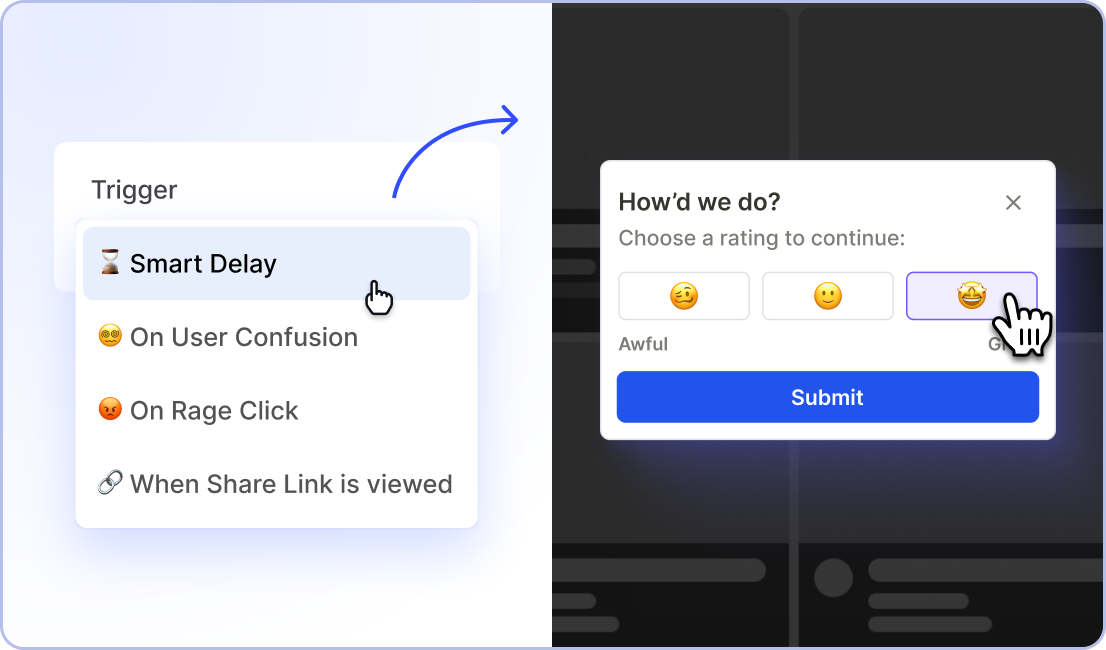
Amplitude Guides and Surveys Demo - Most popups are annoying. They don’t have to be.
Your users should feel like they’re sitting next to a smart friend helping them navigate your product or website—not a spammy salesperson. Guides and Surveys use precise behavior-based targeting and configurable guardrails to ensure users get value.
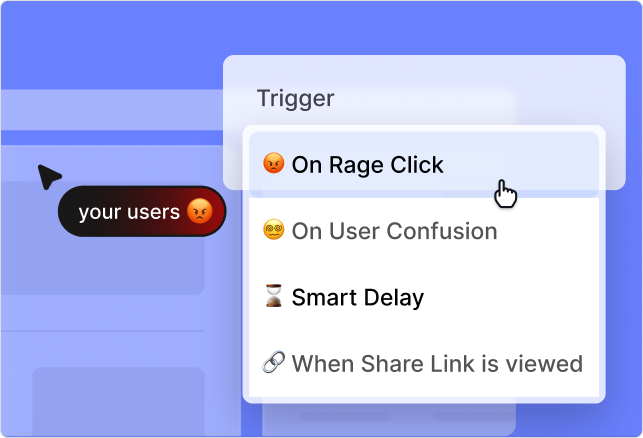
Amplitude Guides and Surveys Demo - Target users based on behaviors—not rigid rules
Set up triggers that match what users try to do in the moment. Prevent confusion, rage clicks, and more with contextually relevant information based on in-product behaviors.
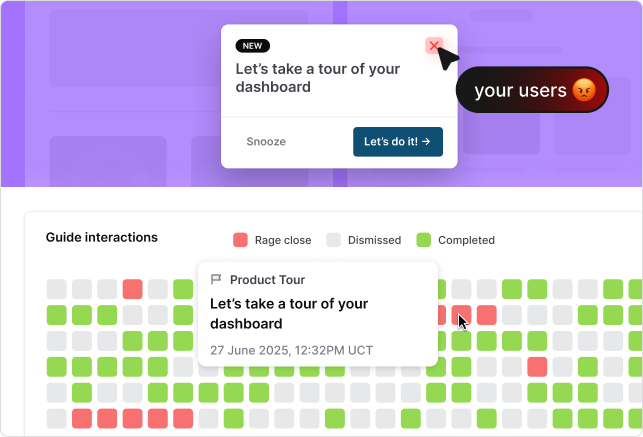
Amplitude Guides and Surveys Demo - Measure annoyance so you don’t leave users frustrated
No one wants another annoying popup. Measure user annoyance with your nudges so you can take corrective action and limit how many guides and surveys are shown to users that get less value from them.
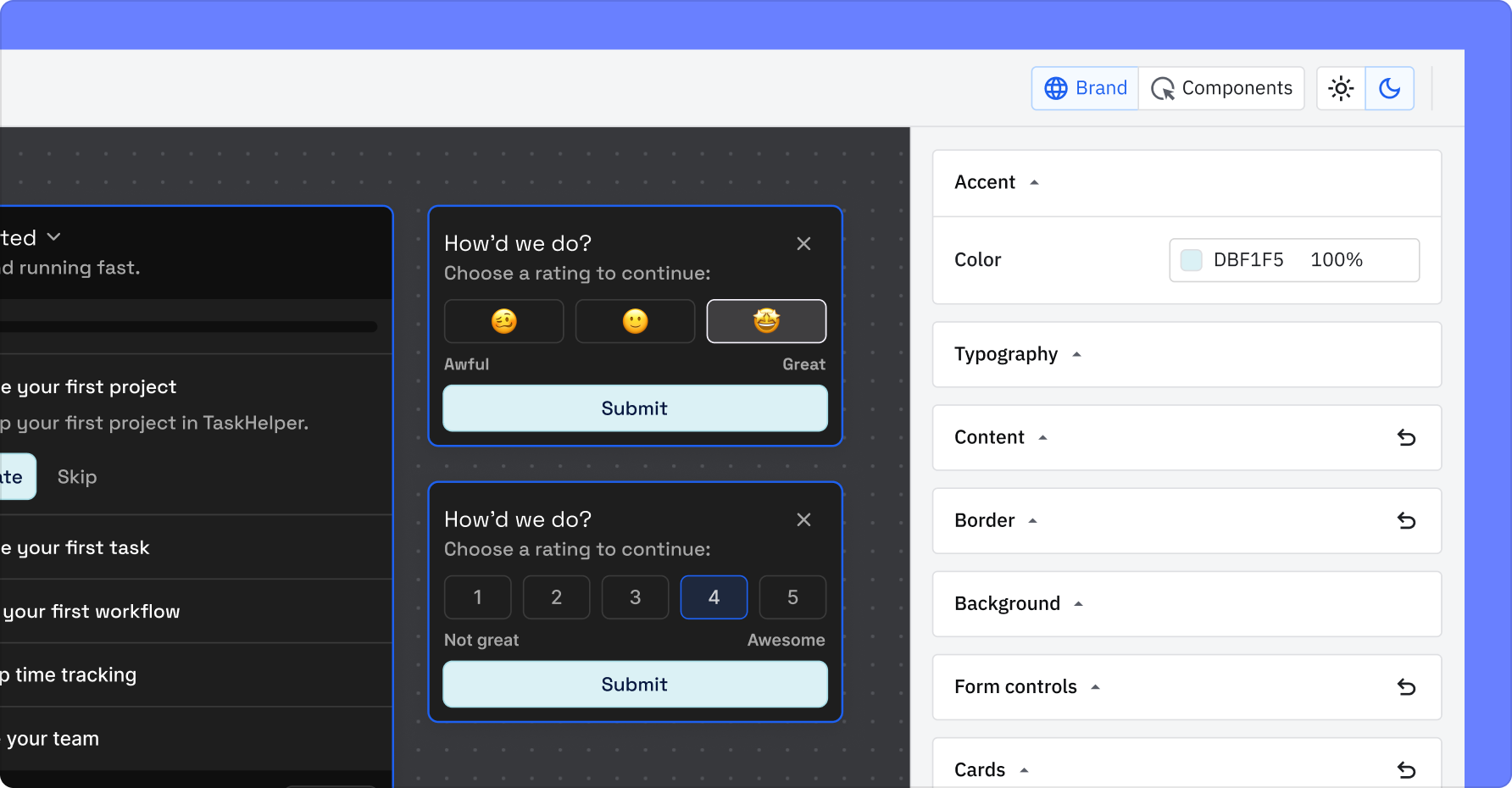
Amplitude Guides and Surveys Demo - On brand, always
Guides and Surveys are ready to suit up for your brand and wear your jersey—colors, fonts, and all.
Product Avatar Image

Have you used Amplitude Guides and Surveys before?

Answer a few questions to help the Amplitude Guides and Surveys community

Amplitude Guides and Surveys Reviews (180)

Reviews

Amplitude Guides and Surveys Reviews (180)

4.8
180 reviews

Review Summary

Generated using AI from real user reviews
Users consistently praise the product for its ease of use and quick setup, allowing teams to create surveys and guides without needing extensive technical support. The intuitive interface and seamless integration into existing workflows enhance user engagement and feedback collection. However, some users note a desire for more customization options to better tailor the guides and surveys to their specific needs.

Pros & Cons

Generated from real user reviews
View All Pros and Cons
Search reviews
Filter Reviews
Clear Results
G2 reviews are authentic and verified.
Larissa M.
LM
Product Management Analyst
Information Technology and Services
Mid-Market (51-1000 emp.)
"Easy-to-Use Modals, But Multi-Project MFE Setup Lacks Data Visibility"
What do you like best about Amplitude Guides and Surveys?

We used Guides and Surveys “modal”, “pop over”, and “pin” features. They’re easy to use, and the modals are useful and straightforward to adapt to our needs. Review collected by and hosted on G2.com.

What do you dislike about Amplitude Guides and Surveys?

We run into problems when configuring guides and surveys across multiple projects, because we’re not always sure whether users are actually seeing the content. This happens due to our setup with microfrontends, where one project is hosted inside other products. We already tried some alternatives, including with a support guidance, but did not work as expected as well. Review collected by and hosted on G2.com.

Mariana M.
MM
Customer Support/Office Manager
Small-Business (50 or fewer emp.)
"Effortless User Engagement with Quick Setup"
What do you like best about Amplitude Guides and Surveys?

I like how easy it is to use Amplitude Guides & Surveys. I learned to set up a new guide in 10 minutes, and it is very easy to update and edit. The transition from different software was very quick due to its ease of use. It's valuable for setting up new product announcements quickly without too much planning or work. The initial setup was also very easy. Review collected by and hosted on G2.com.

What do you dislike about Amplitude Guides and Surveys?

I wish it was easier to segment our users and audience without having to use internal IDs and was easier to flag the organizations with their internal IDs and the connected emails so we could confirm what would be showing to who. Review collected by and hosted on G2.com.

Phil S.
PS
Senior Product Manager
Small-Business (50 or fewer emp.)
"Effective In-Platform Guides, Needs Flexible Pricing"
What do you like best about Amplitude Guides and Surveys?

I love using Amplitude Guides & Surveys for in-platform announcements and guides for new features. It's great that the messaging is delivered in the platform at the right time, and we can follow up with surveys to collect data from users. The builder itself is really slick. After a bit of learning, I'm now proficient at setting up multi-step guides. I love that the themes are now accessible too. Review collected by and hosted on G2.com.

What do you dislike about Amplitude Guides and Surveys?

I find the paywall silly and it doesn't suit our business needs. We're too big for the lower tier, and too small to afford the tier above. Our Account Manager was of no help when we wanted to pay more to solve this. The limit of 10 guides and 5 surveys is annoying, and it's strange that we can't stagger them—they just pop up back to back. Also, while the web setup was very easy, the mobile setup wasn't as smooth because it's still in development on the Amplitude side. I haven't had the confidence to send a guide or survey on mobile yet. Review collected by and hosted on G2.com.

Jules J.
JJ
Lead Analytics Engineer
Mid-Market (51-1000 emp.)
"Easy Integration and Simplified Interface, But Some Limitations"
What do you like best about Amplitude Guides and Surveys?

I appreciate the simplicity of the Amplitude Guides & Surveys interface and its integration with the AI tool. This allows for quick adoption by PMs, reducing the number of questions and thus the time we need to spend helping our employees use it. The initial setup was very easy. Review collected by and hosted on G2.com.

What do you dislike about Amplitude Guides and Surveys?

There are limitations that are not visible, such as having to have a submit button for a form, which forces the user to click on it to generate a result. This complicates the response to the form for a user (they have to click on 2 buttons instead of 1) and complicates understanding for the form creator, as it is not specified. The form does not show an error if the submit button is not present, but it does not collect data when it is pushed to production. Review collected by and hosted on G2.com.

"Effortless User Engagement and Feedback Collection"
What do you like best about Amplitude Guides and Surveys?

I like how easy it is to use Amplitude Guides & Surveys. It takes just a few minutes to construct a guide or survey and put it live for users. The ability to target particular segments and behaviors is even better. The real genius part is that these features are available from the same toolset as our analytics. Honestly, I'd be shocked if all analytics tools don't go in this direction. Review collected by and hosted on G2.com.

What do you dislike about Amplitude Guides and Surveys?

I don't love that the advanced features are hidden behind a paywall. Having to update to enterprise and speak to an account manager is a pain. We don't use it enough to justify going up a tier, but we would pay a little bit extra each month to have full use of the feature. I think keeping the tool simple is also a benefit as it stops PM's from being overzealous and bothering users. Review collected by and hosted on G2.com.

"Essential for Real-Time User Feedback"
What do you like best about Amplitude Guides and Surveys?

I use Amplitude Guides & Surveys to get real-time feedback from our users and help them navigate key parts of our product. It's really useful for spotting pain points and improving onboarding and feature adoption. I appreciate how simple it makes connecting with users and understanding their experience. Being able to guide them through features and get real-time feedback has been a game-changer for improving adoption and satisfaction. The integration with our analytics and CRM tools is a plus, as it helps me track user behavior and connect feedback to specific actions for a clearer understanding of the overall user experience. Setting up Amplitude Guides & Surveys was pretty straightforward; the interface is easy to navigate, and the onboarding guides were helpful. Review collected by and hosted on G2.com.

What do you dislike about Amplitude Guides and Surveys?

I find the customization for surveys and guides could be better, as it feels a bit limited. Setting up more complex user flows can be tricky, and reviewing the feedback isn’t always as straightforward as I’d like. I wish Amplitude Guides & Surveys offered more flexibility with design, like custom themes, fonts, and layouts. It would also be helpful to tailor questions and guides for different user segments. Review collected by and hosted on G2.com.

Verified User in Automotive
UA
Enterprise (> 1000 emp.)
"Intuitive WYSIWYG Guide and Survey Builder, with Room to Improve"
What do you like best about Amplitude Guides and Surveys?

The WYSIWYG guide and survey builder is relatively intuitive once you gain an understanding of how it works. Review collected by and hosted on G2.com.

What do you dislike about Amplitude Guides and Surveys?

Creating and applying Segments (segmentation) is difficult and not very intuitive. Additionally, setting up Tests users. Another issue I have come across is when I preview a survey it shows up in the Insights as someone who has completed the survey, and cannot be deleted. I also find it difficult to style the guides and surveys in a way that matches our design system – and I have used the custom CSS to do so, but wish the theming was a bit easier and there was more flexibility. Review collected by and hosted on G2.com.

"Seamless Survey Integrations, Instantly Accessible Data"
What do you like best about Amplitude Guides and Surveys?

I love how Amplitude Guides & Surveys makes it incredibly straightforward to set up surveys. The programming tool is simple, and the platform efficiently guides me through all relevant fielding options, making the process seamless. I appreciate its integration within the overall Amplitude product, as it fits perfectly and enhances our ability to gather critical user experience information. The ability to trigger surveys at specific moments during a user's interaction with our website is invaluable, allowing us to access insights we wouldn't have otherwise. The availability of ample self-help documentation is impressive, ensuring that if anything doesn't work as expected, I have the resources to resolve issues independently. Our switch from Hotjar was mainly because Amplitude Guides & Surveys offers more comprehensive functionality, not just for surveys but also for collecting extensive data about website usage, which is a significant advantage. Although I wasn't directly involved in the initial setup, it was reported to be easy. Overall, my experience with Amplitude Guides & Surveys is highly positive, and I would highly recommend it. Review collected by and hosted on G2.com.

What do you dislike about Amplitude Guides and Surveys?

NA Review collected by and hosted on G2.com.

BB
Product Marketing Manager
Small-Business (50 or fewer emp.)
"Thank goodness for better UX/UI"
What do you like best about Amplitude Guides and Surveys?

As a Product Marketing Manager, I spend a lot of time building onboarding guides, announcement modals, and other in-app notifications.

In a previous role we used Pendo and my experience with Pendo's UX/UI was really lacking. Simple actions felt challenging to complete, didn't feel natural, and often left me clicking around only to get lost/frustrated.

With Amplitude, my workflow so much more smooth. The flow of building -> launching guides in Amplitude was shorter and easier. The draft setting, testing setting, preview function and ultimately the published settings worked seamlessly. Review collected by and hosted on G2.com.

What do you dislike about Amplitude Guides and Surveys?

The only thing I could think of currently is to have more customization features within the content of the guides. The inclusion of different formatting, etc. Review collected by and hosted on G2.com.

Response from Amanda Brush of Amplitude Guides and Surveys

Thank you for sharing your experience! It’s wonderful to hear that Guides & Surveys have made your workflow smoother and more intuitive, especially when creating onboarding and in-app experiences. We’re excited they’re helping you drive PLG and connect with users at key moments. We also appreciate your feedback on customization — that’s an area we’re actively exploring to give teams even more flexibility.

MM
HR Manager
Mid-Market (51-1000 emp.)
"Effortless User Insights and Enhanced Onboarding with Amplitude"
What do you like best about Amplitude Guides and Surveys?

With Amplitude, we always have it easy when collecting user feedback and this helps in bettering customer experiences.

With the tool, we easily understand behavioral and customer data thus it helps us understand why customers/users make certain decisions.

The tool helps enhance onboading and digital adoption with its great features.

With the tool, measuring customer sentiments and loyalty is always easy.

With the tool in place, we always handle user experimentation easy. Review collected by and hosted on G2.com.

What do you dislike about Amplitude Guides and Surveys?

Having used Amplitude successfully, I have no complaints to make. Review collected by and hosted on G2.com.

People Icons

Start a Discussion about Amplitude Guides and Surveys

Have a software question? Get answers from real users and experts.

Start a Discussion

Pricing Insights

Averages based on real user reviews.

Time to Implement

1 month

Return on Investment

6 months

Average Discount

16%

Amplitude Guides and Surveys Comparisons
Product Avatar Image
Pendo
Compare Now
Product Avatar Image
Appcues
Compare Now
Product Avatar Image
Userflow
Compare Now
Amplitude Guides and Surveys Features
Survey Implementation
Data Analysis
User Segmentation
Multi-Language Support
Behavior-responsive Messaging
Audio-visual Walkthroughs
Text Bubble Walkthroughs
Customization
Control
Route To Human
Product Avatar Image
Amplitude Guides and Surveys