Compare this with other toolsSave it to your board and evaluate your options side by side.
Save to board

Adjust Reviews & Product Details

Pricing

Pricing provided by Adjust.

Base

Free
1500 Attributions Per Month

Adjust Media

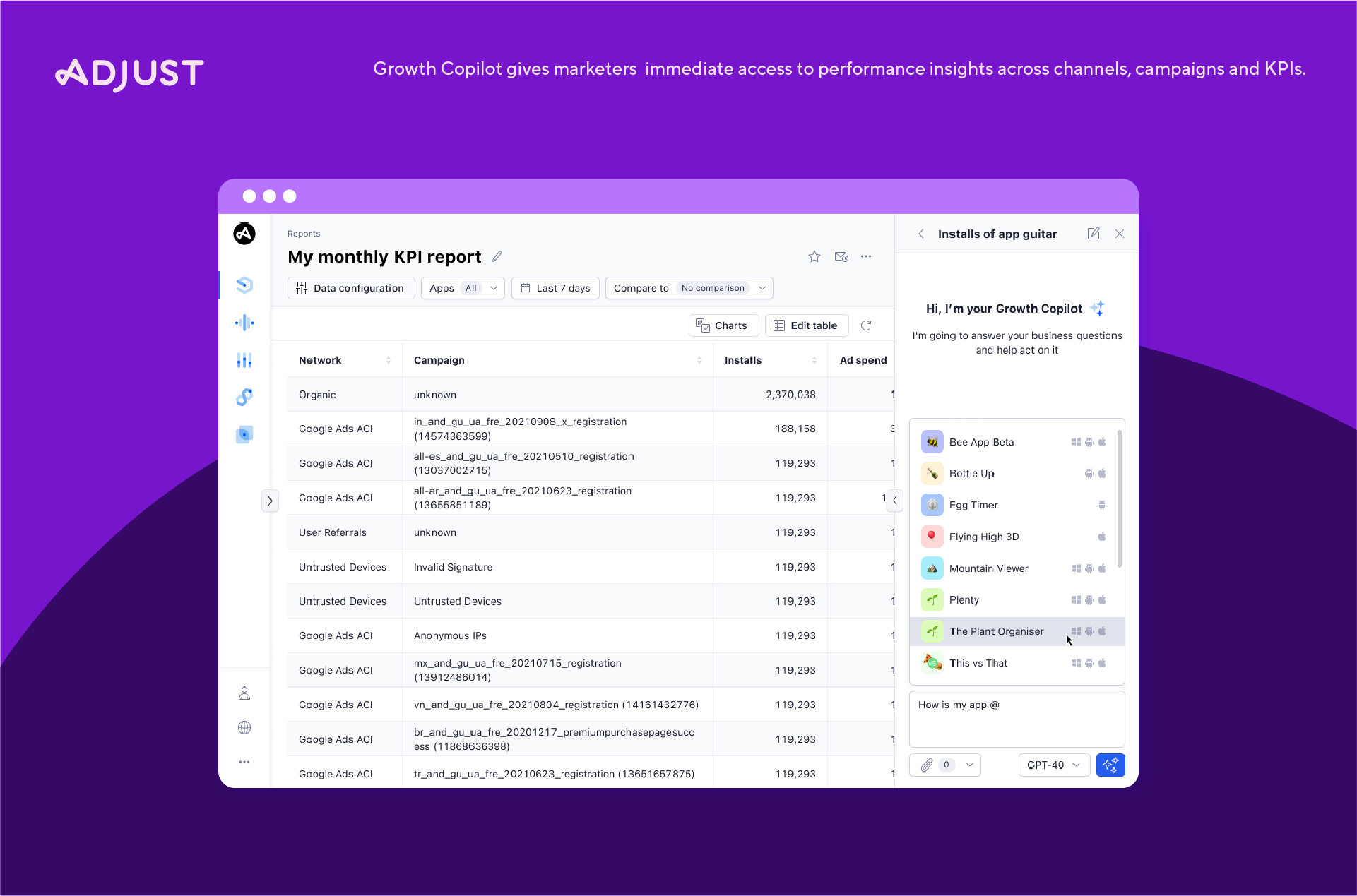
Adjust Demo - Adjust Growth Copilot
Ask real business questions and get immediate, clear answers.
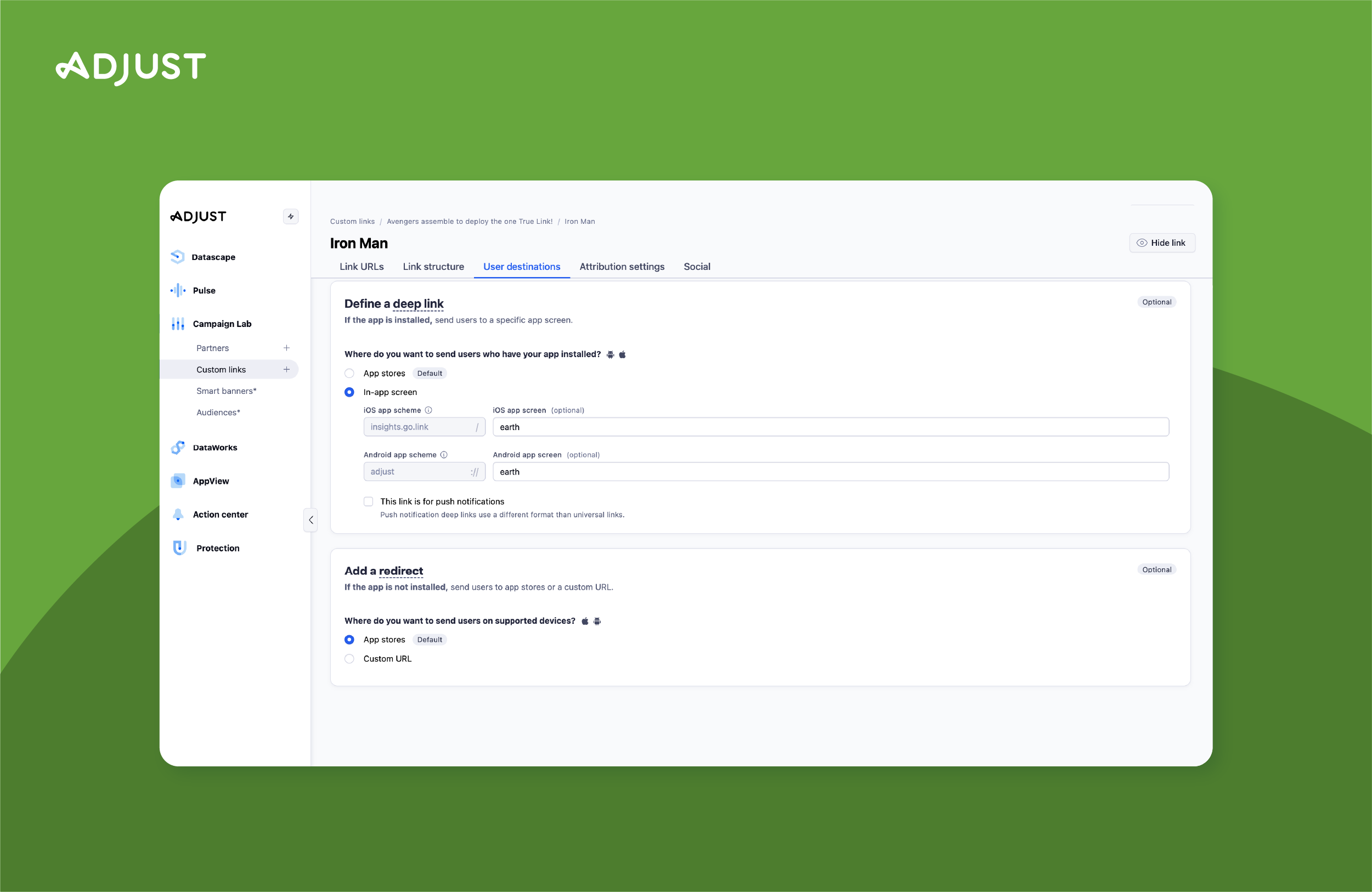
Adjust Demo - TrueLink multi-platform deep links
Increase in-app usage from all platforms and environments
Adjust Demo - User Acquisition Dashboard
Track your profit and performance over time.
Adjust Demo - SKAdNetwork Dashboard
Easily view installs, conversions, and metrics in one glance from the SKAd Network
Adjust Demo - Cohorts Dashboard
See your retention rate per channel and per date.
Adjust Demo - Custom Reports
You decide the most important metrics to include in your view. Bring your team up to speed with fully customizable reports.
Ask real business questions and get immediate, clear answers. Eliminate guesswork, gain intuitive insights, and supercharge productivity.
Play Adjust Video
Ask real business questions and get immediate, clear answers. Eliminate guesswork, gain intuitive insights, and supercharge productivity.
Play Adjust Video
Increase in-app usage from all platforms and environments with TrueLink, the most robust solution for seamless deep linking.
Play Adjust Video
Increase in-app usage from all platforms and environments with TrueLink, the most robust solution for seamless deep linking.
Play Adjust Video
Play Adjust Video
Product Avatar Image

Have you used Adjust before?

Answer a few questions to help the Adjust community

Adjust Reviews (649)

Reviews

Adjust Reviews (649)

4.6
649 reviews

Review Summary

Generated using AI from real user reviews
Users consistently praise Adjust for its user-friendly interface and accurate tracking, which simplify campaign management and data analysis. The platform's ability to provide real-time insights and reliable attribution helps users optimize their marketing strategies effectively. However, some users note that data updates can be delayed, impacting real-time decision-making.

Pros & Cons

Generated from real user reviews
View All Pros and Cons
Search reviews
Filter Reviews
Clear Results
G2 reviews are authentic and verified.
Dung T.
DT
Product Owner
Mid-Market (51-1000 emp.)
"Reliable Attribution Platform for UA, Product, and Monetization Optimization"
What do you like best about Adjust?

What I like best about Adjust is its accurate attribution, strong cohort analysis, and reliable event tracking capabilities. It helps our team clearly understand user acquisition performance across channels and optimize campaigns based on ROAS, retention, and LTV signals.

The platform is also easy to integrate with mobile apps and ad partners, which makes it very efficient for teams working with multiple UA and monetization channels. The dashboard is intuitive enough for daily use, and the raw data exports are useful for deeper product and revenue analysis.

Another strong point is the customer support and technical guidance. The team is responsive whenever we need help with tracking validation, attribution issues, or partner setup. Review collected by and hosted on G2.com.

What do you dislike about Adjust?

One area that could be improved is the dashboard customization and reporting flexibility. Some advanced views still require exporting data instead of allowing easier visualization directly inside the platform.

For non-technical stakeholders, certain attribution or cohort reports can feel a bit complex at first, so there is a small learning curve before teams can fully utilize all available features.

That said, once the implementation is complete, the platform performs very reliably. Review collected by and hosted on G2.com.

Ly Ngoc V.
LV
Product Owner
Mid-Market (51-1000 emp.)
"Reliable Mobile Attribution with Clear Insights and Strong Fraud Prevention"
What do you like best about Adjust?

Adjust stands out for its reliable mobile attribution and user-friendly dashboard. It provides clear insights into campaign performance, making it easy to track ROI and optimize user acquisition. I also appreciate its strong fraud prevention capabilities and seamless integration with major ad networks and analytics tools. Overall, it helps streamline data analysis and supports better decision-making for mobile growth. Review collected by and hosted on G2.com.

What do you dislike about Adjust?

Adjust can feel quite complex to set up and fully utilize, especially for smaller teams or new users. Some advanced features require a steep learning curve, and the dashboard occasionally lacks flexibility for deep custom analysis compared to raw data tools. Additionally, pricing can be relatively high, particularly for scaling apps, and delays or discrepancies in attribution data may sometimes make real-time decision-making more challenging Review collected by and hosted on G2.com.

Xuan H.
XH
UA
Mid-Market (51-1000 emp.)
"User Friendly Interface That Makes User Acquisition Insights Fast and Clean"
What do you like best about Adjust?

What impressed me most about Adjust is its user-friendly and easy-to-understand interface. Everything is logically and clearly organized, so I can immediately understand where my users are coming from without spending too much time checking data. This saves me time to optimize the project and further improve the product. Review collected by and hosted on G2.com.

What do you dislike about Adjust?

There are a few aspects I'm not entirely happy with regarding the current adjustments. Data isn't updated immediately; the system needs time to retrieve data from the ad network, making real-time budget tracking and adjustments much more difficult. Additionally, Adjust sometimes prolong user loops, making it difficult for me to measure project and campaign performance. Review collected by and hosted on G2.com.

Ngân T.
NT
UA Marketing
Small-Business (50 or fewer emp.)
"Clean, User-Friendly Dashboard That Makes User Sources Easy to See"
What do you like best about Adjust?

What I like most about Adjust is how clean and user-friendly the dashboard feels. It makes it easy to quickly see where users are coming from, without having to dig through overly complicated reports or confusing layouts. Review collected by and hosted on G2.com.

What do you dislike about Adjust?

One downside is that data syncing isn’t always immediate. In some cases, platform spend data can be delayed by up to 12 hours, which makes real-time budget monitoring harder. I’ve also noticed that the ad revenue figures aren’t always fully accurate, with occasional gaps of around 20% compared to our internal data. Review collected by and hosted on G2.com.

Trang .
T
UA Marketing
Small-Business (50 or fewer emp.)
"Clean, Fast Channel-Level Reporting That Makes Optimization Easy"
What do you like best about Adjust?

The channel-level breakdown is incredibly useful for day-to-day decision making. I manage campaigns across TikTok, Google Ads, and Facebook simultaneously, and Adjust lets me see all the key metrics — installs, spend, revenue, clicks, purchases — side by side without switching tabs. The dashboard is clean enough that I can spot problems in seconds. For example, if a channel is burning budget with no installs, I catch it immediately instead of discovering it at the end of the week Review collected by and hosted on G2.com.

What do you dislike about Adjust?

I wish Adjust offered deeper creative-level and ad group-level breakdowns directly in the platform. Right now I can see that TikTok drove 46K installs, but if I want to know which specific ad set or creative performed best, I still have to go back to TikTok Ads Manager. That extra step slows down optimization. Also, some channels show up as 'Unknown Devices' with minimal data, which makes full-funnel analysis incomplete and forces me to investigate manually. Review collected by and hosted on G2.com.

Hanh T.
HT
UA Marketing
Small-Business (50 or fewer emp.)
"Intuitive Adjust Dashboard With Instant Visibility Into User Acquisition Sources"
What do you like best about Adjust?

The standout feature of Adjust is its intuitive and streamlined dashboard. It provides immediate visibility into user acquisition sources, eliminating the need to sift through dense reports or complex navigation. Review collected by and hosted on G2.com.

What do you dislike about Adjust?

A significant pain point is the lack of real-time data synchronization. Platform spend can lag by as much as 12 hours, hindering our ability to monitor budgets effectively. Furthermore, we’ve encountered a 20% discrepancy in ad revenue accuracy when compared to our internal tracking, which complicates financial reconciliation. Review collected by and hosted on G2.com.

NH
UA marketer
Marketing and Advertising
Small-Business (50 or fewer emp.)
"Adjust Streamlines Mobile Marketing with Unified Data and Real-Time Insights"
What do you like best about Adjust?

After using Adjust for over 2 years as a mobile app advertiser at Foxcode, I can confidently say it has become an essential part of my daily workflow.

What I like best about Adjust is its ability to consolidate data from multiple advertising channels into a single, unified dashboard. The UI/UX is clean, intuitive, and easy to navigate, which makes it simple to quickly access important metrics without a steep learning curve. This significantly reduces the time spent switching between platforms and improves overall efficiency.

In terms of integrations, Adjust supports a wide range of ad networks and partners, allowing me to seamlessly connect and manage campaigns across different sources. This flexibility is extremely valuable when scaling campaigns or testing new channels.

Performance-wise, the platform is stable and processes data quickly, giving me near real-time insights into campaign results. The attribution system is highly accurate, helping me clearly understand where installs and in-app events are coming from.

From a pricing and ROI perspective, although Adjust may not be the cheapest option, the value it provides through reliable data, time savings, and optimization capabilities makes it worth the investment. It has directly contributed to improving my campaign performance and budget allocation.

Support and onboarding have also been positive experiences. The documentation is detailed, and the support team is responsive when issues arise, which helps minimize downtime and keeps campaigns running smoothly.

Additionally, Adjust has been improving its AI and intelligence features, such as fraud prevention and automated insights, which help detect anomalies and protect campaign performance.

Overall, Adjust has greatly improved my workflow by simplifying data analysis, enhancing transparency across channels, and enabling faster, smarter decision-making. It’s a powerful tool for any mobile marketer looking to scale app growth efficiently. Review collected by and hosted on G2.com.

What do you dislike about Adjust?

While Adjust is a powerful tool, there are a few areas that could be improved.

One of the main issues is the data delay on iOS, especially when working with SKAdNetwork (SKAN). The reporting can sometimes lag behind, which makes it harder to optimize campaigns in real time.

Additionally, the UI can occasionally feel slow to load, particularly when accessing large datasets or switching between dashboards. This can slightly impact workflow efficiency during busy periods.

There are also some limitations in SKAN data granularity, which reduces visibility compared to non-iOS campaigns. Lastly, certain advanced reports require extra setup and are not always as flexible as expected.

Overall, while these issues are not deal-breakers, addressing them would significantly improve the user experience. Review collected by and hosted on G2.com.

Tuấn Kiệt T.
TT
Mobile Application Developer
Small-Business (50 or fewer emp.)
"eliable Attribution Partner for Data-Driven Mobile Marketing"
What do you like best about Adjust?

What I like best about Adjust is its accuracy and reliability in mobile attribution, which has been essential for optimizing our marketing performance. Over the past three years working at Foxcode, I’ve found the platform especially strong in providing clear, real-time insights that help us make data-driven decisions quickly. Its user-friendly dashboard and powerful fraud prevention features also give us confidence in the quality of our campaigns. Overall, Adjust has been a dependable partner in scaling and measuring our marketing efforts effectively. Review collected by and hosted on G2.com.

What do you dislike about Adjust?

One thing I dislike about Adjust is that its interface can sometimes feel a bit complex, especially for new users who are not yet familiar with attribution tools. It may take some time to fully understand all the features and navigate the dashboard efficiently. Additionally, while the platform is powerful, certain custom reports and integrations can require extra setup or support, which can slow down workflows slightly. That said, these challenges are manageable with experience and proper onboarding. Review collected by and hosted on G2.com.
Tuấn Anh H.
TH
Marketing
Mid-Market (51-1000 emp.)
"Game-Changing Granularity and Flawless Real-Time Callbacks for Mobile UA"
What do you like best about Adjust?

As a performance marketer for mobile games, the level of granularity Adjust provides is a game-changer. When scaling across multiple ad networks like Unity, AppLovin, and IronSource simultaneously, their Real-time Callback system is flawless. It allows us to track post-install events (like tutorial completion or level milestones) instantly. This immediate feedback loop is crucial for our UA (User Acquisition) team to optimize bids on the fly. Plus, the UI is clean and fast, which saves us a lot of time when pulling daily performance reports. Review collected by and hosted on G2.com.
What do you dislike about Adjust?

The biggest hurdle is definitely the steep pricing, especially the 'cost per attribution' model which can get expensive quickly as our game scales globally. Also, while the Raw Data Export is powerful, it takes a fair amount of technical setup on our backend to process it effectively. I’ve also noticed that their customer support response times can be a bit hit-or-miss depending on your account tier—sometimes we need urgent help with a postback issue and it takes longer than expected to get a resolution. Review collected by and hosted on G2.com.

Đình Dũng N.
ĐN
User Acquisition Manager
Small-Business (50 or fewer emp.)
"Reliable, Scalable Attribution Across Google, Meta, and TikTok"
What do you like best about Adjust?

As a UA manager running campaigns across both iOS and Android, Adjust has been a very reliable MMP for accurate and scalable measurement.

What I appreciate most is the consistency of attribution across major networks like Google Ads, Meta, and especially TikTok. TikTok has always been challenging in terms of tracking and postback accuracy, but Adjust handles it very well. The integration is smooth, event mapping is flexible, and we’re able to get stable data for optimization without major discrepancies.

On iOS, Adjust performs strongly under SKAdNetwork. The setup is straightforward, and their SKAN configuration tools make it easier to structure conversion values and maintain signal quality. It helps us still make data-driven decisions even with limited tracking.

On Android, real-time attribution and deep linking are very stable, which is critical for scaling campaigns. Fraud prevention is another strong point — it gives us more confidence when increasing budgets across networks.

The dashboard is clean and easy to navigate, but still powerful enough for advanced analysis. We can quickly compare performance across Google, Meta, and TikTok, and drill down into event-level data without much friction.

Overall, Adjust has improved our workflow by providing reliable data, especially for TikTok performance, which directly impacts how we scale and optimize campaigns. Review collected by and hosted on G2.com.

What do you dislike about Adjust?

One area that could be improved is pricing. For teams with more focused or mid-scale UA needs, Adjust can feel slightly expensive compared to the actual usage level.

That said, the value it delivers in terms of accurate attribution, especially across Google, Meta, and TikTok, does justify the cost to a large extent. The reliability of the data and stability of integrations make it easier for us to scale campaigns with confidence.

We’ve been using Adjust for over 3 years now, and despite the pricing being a bit on the higher side, it’s still a platform we trust and are comfortable continuing with. Review collected by and hosted on G2.com.

Questions about Adjust? Ask real users or explore answers from the community

Get practical answers, real workflows, and honest pros and cons from the G2 community or share your insights.

GU
Guest User
Last activity over 3 years ago

How does adjust work?

Rob R.
RR
Rob Robinson
Last activity 4 days ago

What Software Reports Correct Google Shopping Search Term Attribution?

Pricing Options

Pricing provided by Adjust.

Base

Free
1500 Attributions Per Month

Core

Contact Us
250000 Attributions Per Year

Enterprise

Contact Us
Per Year
Adjust Comparisons
Product Avatar Image
AppsFlyer
Compare Now
Product Avatar Image
Branch
Compare Now
Product Avatar Image
Singular
Compare Now
Adjust Features
Conversions
Conversion Goal
Percentage of Traffic
Segmentation
Reports and Dashboards
Custom Targeting
Product Avatar Image
Adjust