Compare this with other toolsSave it to your board and evaluate your options side by side.
Save to board

Adjust Reviews & Product Details

Pricing

Pricing provided by Adjust.

Base

Free
1500 Attributions Per Month

Adjust Media

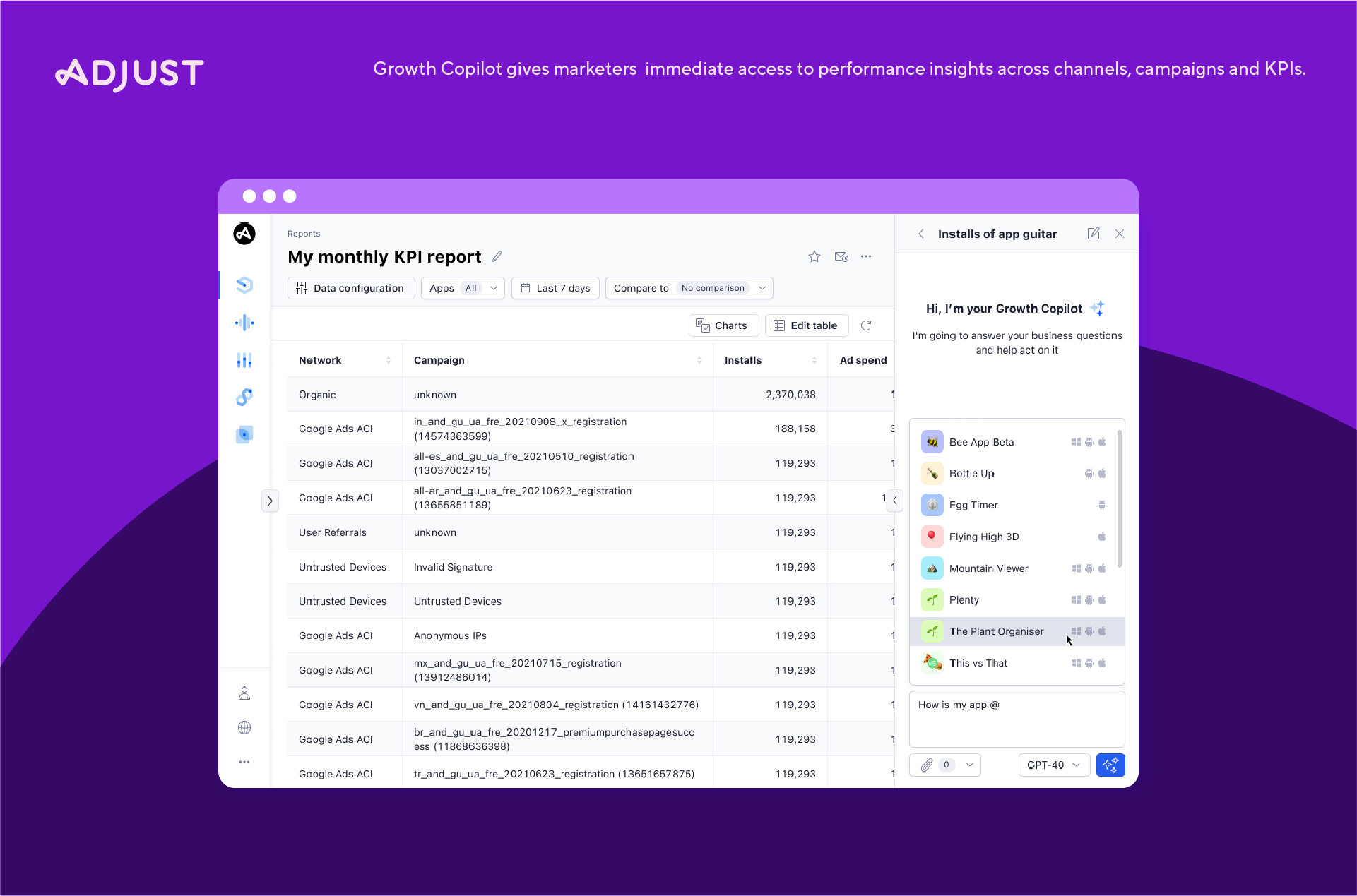
Adjust Demo - Adjust Growth Copilot
Ask real business questions and get immediate, clear answers.
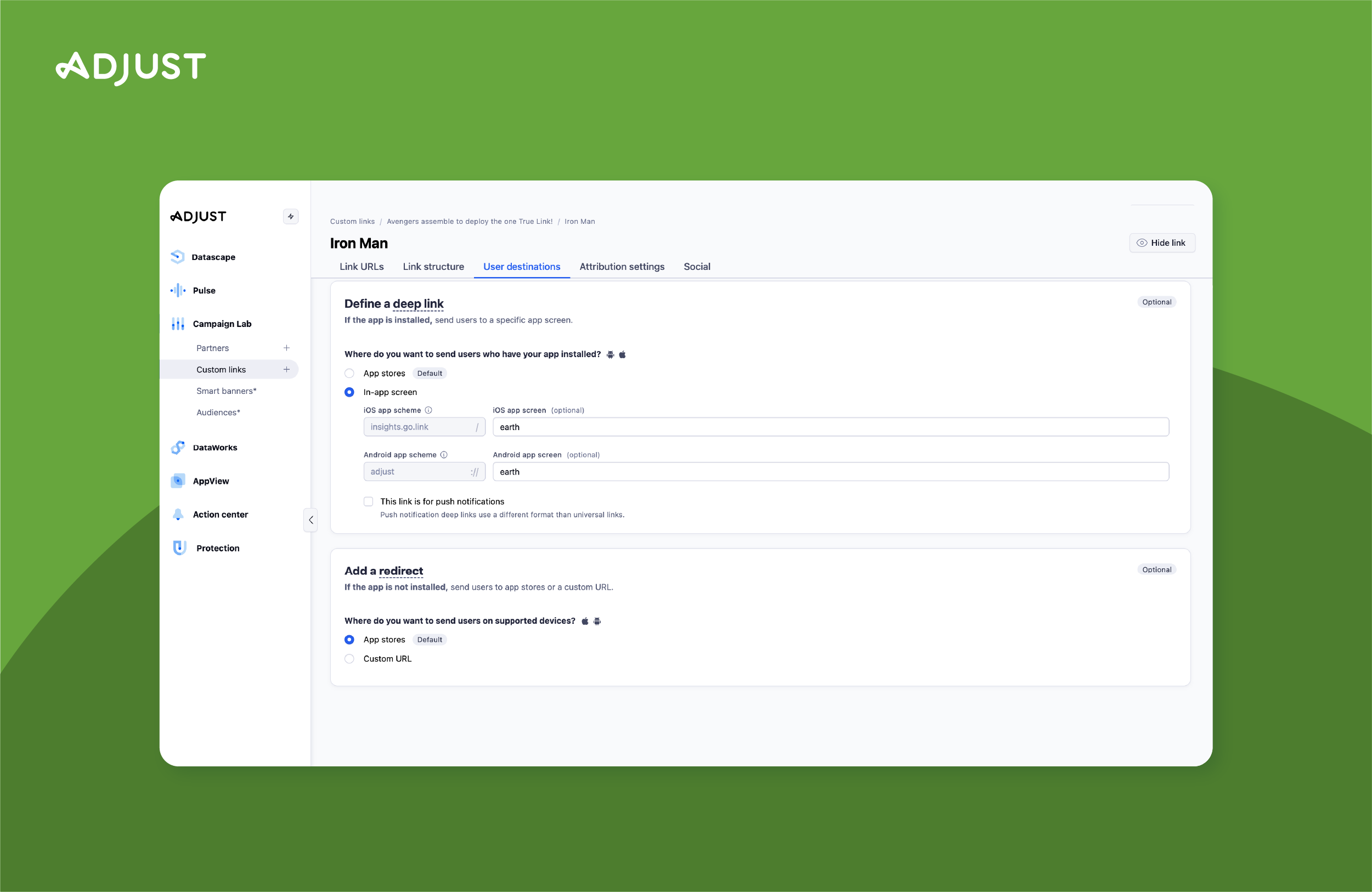
Adjust Demo - TrueLink multi-platform deep links
Increase in-app usage from all platforms and environments
Adjust Demo - User Acquisition Dashboard
Track your profit and performance over time.
Adjust Demo - SKAdNetwork Dashboard
Easily view installs, conversions, and metrics in one glance from the SKAd Network
Adjust Demo - Cohorts Dashboard
See your retention rate per channel and per date.
Adjust Demo - Custom Reports
You decide the most important metrics to include in your view. Bring your team up to speed with fully customizable reports.
Ask real business questions and get immediate, clear answers. Eliminate guesswork, gain intuitive insights, and supercharge productivity.
Play Adjust Video
Ask real business questions and get immediate, clear answers. Eliminate guesswork, gain intuitive insights, and supercharge productivity.
Play Adjust Video
Increase in-app usage from all platforms and environments with TrueLink, the most robust solution for seamless deep linking.
Play Adjust Video
Increase in-app usage from all platforms and environments with TrueLink, the most robust solution for seamless deep linking.
Play Adjust Video
Play Adjust Video
Product Avatar Image

Have you used Adjust before?

Answer a few questions to help the Adjust community

Adjust Reviews (691)

Reviews

Adjust Reviews (691)

4.7
692 reviews

Review Summary

Generated using AI from real user reviews
Users consistently praise Adjust for its accurate attribution and user-friendly interface, which simplify tracking and optimizing marketing campaigns. The platform's ability to consolidate data from multiple ad networks into a single dashboard enhances decision-making and efficiency. However, some users note that the initial setup can be complex, and pricing may be a concern for smaller teams.

Pros & Cons

Generated from real user reviews
View All Pros and Cons
Search reviews
Filter Reviews
Clear Results
G2 reviews are authentic and verified.
PP
User Acquisition Marketing
Small-Business (50 or fewer emp.)
"Powerful Cross-Channel Tracking with Fast, Insightful Datascape Reports"
What do you like best about Adjust?

Adjust has helped me track campaign performance, installs, and user behavior (such as purchases and subscriptions) after installation across all media channels.

Get intuitive, insightful reports quickly through the Datascape tool to see which channels are performing best and make informed reinvestments. Review collected by and hosted on G2.com.

What do you dislike about Adjust?

Sometimes adjusting revenue tracking from different platforms gets mixed up, making data analysis difficult.

Occasionally, data loading is a bit slow. Review collected by and hosted on G2.com.

Minh H.
MH
Marketing
Mid-Market (51-1000 emp.)
"Accurate LTV/ROAS Insights with an Intuitive, Time-Saving Interface"
What do you like best about Adjust?

In my opinion, Adjust’s standout strength is its ability to measure and analyze data with a very high level of accuracy. It reliably tracks user lifetime value (LTV) and return on advertising spend (ROAS), and it also shows which network users come from, which makes it easier to evaluate ROI and optimize campaigns quickly.

On top of that, the interface feels intuitive and the data is presented clearly. The platform is easy to use overall, and the tracking setup process is straightforward, which has saved me a lot of time. Review collected by and hosted on G2.com.

What do you dislike about Adjust?

On the downside, I feel the cost of access is quite high. For a startup, the price of Adjust is far from insignificant. I hope Adjust will consider offering a special package for small businesses so they can more easily access and benefit from this useful tool. Review collected by and hosted on G2.com.

Verified User in Marketing and Advertising
UM
Small-Business (50 or fewer emp.)
"Useful for Mobile Attribution and Multi-Channel UA Tracking"
What do you like best about Adjust?

What I like best about Adjust is that it is actually useful in day-to-day UA work, not just for reporting.

We use it to track installs, in-app events, and partner performance across different channels, but the bigger value is that it helps when something looks off. For example, when numbers between Adjust and ad networks do not match, it gives us a better way to trace where the difference may be coming from instead of just looking at surface-level dashboards.

It is also helpful that most major ad partners are already integrated, so setup and postback workflows are manageable once everything is in place. For a mobile marketing team, it is a tool we use regularly and rely on quite a lot. Review collected by and hosted on G2.com.
What do you dislike about Adjust?

What I dislike is that when you start going deeper into attribution logic, some things are still not very easy to explain internally, especially to non-technical stakeholders.

In real campaign work, we often need to answer why Adjust numbers are different from Google Ads or other platforms, and that conversation is not always simple. The data is there, but getting to the root cause can still take time depending on the setup.

I also think some parts of the UI could be easier to navigate when troubleshooting postbacks, partner settings, or attribution-related issues. It is a strong platform overall, but there is still room to make advanced use cases more user-friendly. Review collected by and hosted on G2.com.
Verified User in Computer Games
UC
Mid-Market (51-1000 emp.)
"Adjust helps me judge user quality, not just acquisition volume"
What do you like best about Adjust?

What I like best about Adjust is that it helps me think more clearly as a marketer. A lot of tools can show numbers, but not many tools help you feel confident about what those numbers actually mean. With Adjust, I do not just see traffic coming in. I can step back and understand where users are coming from, how different channels behave, and whether the performance I am seeing is real or just looking good on the surface.

In UA, that difference matters a lot. It is very easy to be impressed by install volume or CPI at first glance, but those numbers can be misleading if the users do not retain, do not monetize, or never become valuable after the first few days. What I appreciate about Adjust is that it gives me a more grounded way to evaluate performance. It helps me move away from “cheap traffic looks good” thinking and toward “which source is actually bringing quality users” thinking.

Another thing I genuinely like is that Adjust fits both quick decision-making and deeper analysis. On busy days, I can use it to check campaign performance fast and spot what needs attention. On more analytical days, it still gives me enough structure to compare channels over time, evaluate post-install quality, and connect performance to real business value. That balance is important to me because UA work is never only about speed or only about depth. In reality, you need both.

I also like that Adjust feels practical. It does not just exist for reporting. It supports the way performance marketing actually works: testing, comparing, cutting waste, reallocating budget, and trying to scale what is truly working. For me, the best part is not any single feature by itself, but the fact that the platform helps reduce uncertainty. In paid acquisition, uncertainty is expensive, and anything that helps me make cleaner decisions has real value. Review collected by and hosted on G2.com.

What do you dislike about Adjust?

What I dislike most is not about accuracy or trust, but about flexibility inside the reporting experience. There are moments when I already know the question I want to answer, but getting to that answer inside the platform can feel more rigid than I want. This usually happens when I want to go beyond the standard reporting flow and explore performance from a different angle, especially with cohort behavior or custom breakdowns.

As a UA marketer, I often do not think in fixed reporting boxes. My questions change depending on the situation. Sometimes I want to compare early performance against long-term quality. Sometimes I want to look at campaign efficiency in a way that connects spend to downstream behavior more dynamically. Sometimes I want to slice performance in a more exploratory way before deciding whether a pattern is real. In those moments, I feel that Adjust could be more open in how users build their own analysis view directly in the product.

I would say the limitation is not that the data is missing, but that the path to exploring it can feel narrower than the way marketers naturally think. The platform is strong when you already know the standard view you want, but less comfortable when you are in discovery mode and trying to investigate something unusual. That means I sometimes need to export data or rely on external analysis for questions that I wish I could answer more fluidly in the UI itself.

This is not a small complaint, but it is also not a reason I would stop using the product. It is more the kind of friction that becomes noticeable once you spend a lot of time inside the platform and start wanting more freedom from it. In other words, it is the complaint of someone who already finds the tool useful and wants it to go one step further. Review collected by and hosted on G2.com.

Tung L.
TL
UA Marketing
Mid-Market (51-1000 emp.)
"Adjust Makes ROI & ROAS Tracking Clear and Gives Confidence to Scale"
What do you like best about Adjust?

Since using Adjust, I've been able to measure ROI, ROAS (Return on Day 7, Return on Day 30) allows me to know when a project will break even and start making a profit, giving me more confidence to scale the project. I feel this is a useful tool that helps advertisers feel confident in their campaigns. Review collected by and hosted on G2.com.

What do you dislike about Adjust?

Sometimes I find that Adjust can't track the user's source, and sometimes there's a discrepancy in Rev (rev) between Adjust and Admob, making it difficult for me to determine which network the Rev is coming from. Review collected by and hosted on G2.com.

DV
Small-Business (50 or fewer emp.)
"Centralized Dashboard, Needs Real-Time Data"
What do you like best about Adjust?

I really like Adjust's overview dashboard, as it allows me to quickly view the app's performance with key metrics such as installs, ad spend, total revenue, and DAU. This centralization is indispensable, offering a single source of truth instead of logging into multiple ad network platforms. It helps me monitor the app's health at a glance and quickly catch any changes in installs or spending. I also appreciate Adjust's friendly and straightforward setup dashboard, which guides me through integrating Adjust SDK into the app, connecting with networks, sharing events and revenue to marketing networks, and finally accessing the dashboard to see data and metrics. Review collected by and hosted on G2.com.

What do you dislike about Adjust?

I don't like that the page loading is too slow. Also, the data isn't in real-time. Adjust currently calls data only twice a day, and I think it should provide more real-time access by calling data every hour. Review collected by and hosted on G2.com.

LV
Small-Business (50 or fewer emp.)
"Powerful Campaign Analytics, Needs Faster Data Refresh"
What do you like best about Adjust?

I like Adjust for its report dashboard, which lets me collect all data in a single report with real-time data on cost and revenue. The visual interface is highly flexible, allowing us to build custom widgets to track specific KPIs like ROI, LTV, and CPA in real time. This makes it easy to make marketing decisions. I also appreciate the support and documentation Adjust provides for customers. After integrating the SDK into the app, the setup is straightforward with just two steps to connect with channels and access the report dashboard. Review collected by and hosted on G2.com.

What do you dislike about Adjust?

The one thing Adjust doesn't work well is the loading page time. Sometimes the speed is too slow and it makes it difficult for me to make decisions quickly. Also, Adjust only calls data two times a day, causing delays. It should call data every hour. Review collected by and hosted on G2.com.

Nguyen H.
NH
Mid-Market (51-1000 emp.)
"Intuitive Dashboard with Reliable Data but Pricey"
What do you like best about Adjust?

I use Adjust mainly for mobile attribution tracking and performance analysis. I like its reliability and the clarity of its data. The dashboard is intuitive, making it easy to track performance across different channels. I also appreciate the detailed reporting and cohort analysis, which help me understand user behavior and optimize campaigns effectively. The initial setup was quite straightforward thanks to their clear SDK documentation and helpful integration guides. I switched from AppFlyer to Adjust because I found Adjust's dashboard and reporting more intuitive for our needs. Review collected by and hosted on G2.com.

What do you dislike about Adjust?

The pricing is quite high, so more flexible tiers for smaller budgets would be a great improvement. The platform has a steep learning curve, so simplifying the setup process for advanced features would be helpful. I'd like to see faster processing times for large raw data exports and more proactive optimization tips. Review collected by and hosted on G2.com.

Hai H.
HH
Content Stratetric
Mid-Market (51-1000 emp.)
"The Tool Must-Have for Scaling Social Growth"
What do you like best about Adjust?

1. Cross-channel Attribution: Provides a unified view of the user journey across all social platforms.

2. Data-Driven Budgeting: Shifts decision-making from "gut feeling" to actual ROI.

3. Deep Linking (TrueLink): Ensures a seamless transition from social ads to specific in-app content. Review collected by and hosted on G2.com.

What do you dislike about Adjust?

Some advanced strategic features require additional modules rather than being in the core package. Review collected by and hosted on G2.com.

Nguyễn Thanh B.
NB
Mid-Market (51-1000 emp.)
"Essential for Optimizing Game Retention and Monetization"
What do you like best about Adjust?

I am a game designer and I use Adjust as a reliable and detailed source of data to optimize retention and monetization. It helps me better understand user behavior and significantly improve both retention and revenue. Adjust provides me with accurate data, allowing me to evaluate whether the retention and monetization features I implement are truly effective. I like that it helps me clearly see how users interact with ads in my game. I can track when users watch rewarded ads and understand what works better. This makes it easier for me to adjust ad placement and timing to improve engagement without hurting the player experience. I find the event tracking combined with cohort analysis especially useful as it allows me to track users who watch rewarded ads on day 1 and see how their retention or monetization changes over the next few days. Initial setup was very easy, and I was able to get started quickly by learning from colleagues. Adjust has been very helpful for understanding user acquisition and in-game behavior, fitting well into my workflow and working effectively with our internal tools. Review collected by and hosted on G2.com.

What do you dislike about Adjust?

I'm still relatively new to Adjust, so I haven't explored all of its features in depth yet. One thing that could be improved is providing more personalized suggestions or onboarding guidance based on user activity, which would make it easier to discover useful features. Review collected by and hosted on G2.com.

Questions about Adjust? Ask real users or explore answers from the community

Get practical answers, real workflows, and honest pros and cons from the G2 community or share your insights.

Rob R.
RR
Rob Robinson
Last activity 16 days ago

What Software Reports Correct Google Shopping Search Term Attribution?

GU
Guest User
Last activity over 3 years ago

How does adjust work?

Pricing Options

Pricing provided by Adjust.

Base

Free
1500 Attributions Per Month

Core

Contact Us
250000 Attributions Per Year

Enterprise

Contact Us
Per Year
Adjust Comparisons
Product Avatar Image
AppsFlyer
Compare Now
Product Avatar Image
Branch
Compare Now
Product Avatar Image
Singular
Compare Now
Adjust Features
Engagement
Retention
Conversions
Segmentation
Reports and Dashboards
API / Integrations
Performance and Reliability
User, Role, and Access Management
Custom Event Tracking
Attribution
Dashboard
Product Avatar Image
Adjust