Best Managed File Transfer (MFT) Software

How Many Managed File Transfer (MFT) Software Products Does G2 Track?

Total Products under this Category: 145

Category Stats (Oct 2026)

  • Average Rating: 4.62/5 (↓0.01 vs Sep 2026) The average rating of products in this category, based on all submitted ratings
  • Top Trending Product: Quatrix (+0.34%) - Among all products in this category, Quatrix recorded the largest rating increase compared to last month

Last updated: October 07, 2026

How Does G2 Rank Managed File Transfer (MFT) Software Products?

Why You Can Trust G2's Software Rankings:

  • 30 Analysts and Data Experts
  • 4,100+ Authentic Reviews
  • 145+ Products
  • Unbiased Rankings

G2's software rankings are built on verified user reviews, rigorous moderation, and a consistent research methodology maintained by a team of analysts and data experts. Each product is measured using the same transparent criteria, with no paid placement or vendor influence. While reviews reflect real user experiences, which can be subjective, they offer valuable insight into how software performs in the hands of professionals. Together, these inputs power the G2 Score, a standardized way to compare tools within every category.

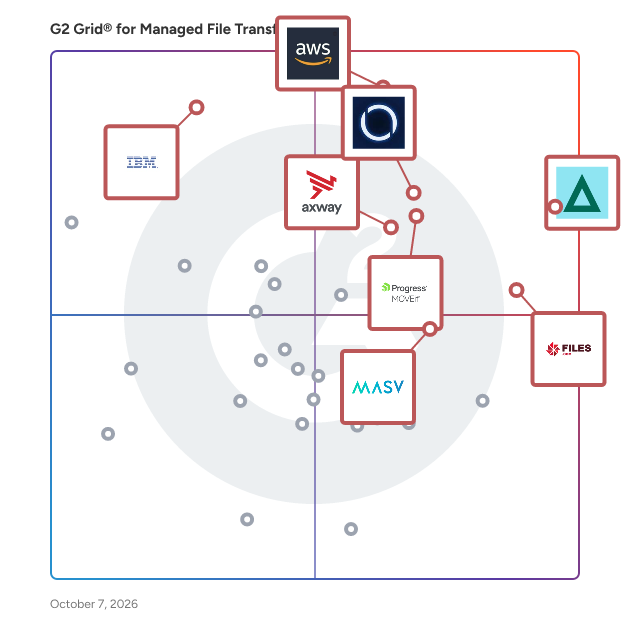
G2 Grid® for Managed File Transfer (MFT) Software

G2 Grid® for Managed File Transfer (MFT) Software plotting products by satisfaction and market presence

Highlighted products: GoAnywhere MFT, AWS Transfer Family, MetaDefender Managed File Transfer™ (MFT), Files.com, Progress MOVEit, Axway Managed File Transfer (MFT), MASV, and IBM Aspera on Cloud.

Underlying data: [Grid® JSON](https://www.g2.com/categories/managed-file-transfer-mft/grids.json?focus%5B%5D=goanywhere-mft&focus%5B%5D=aws-transfer-family&focus%5B%5D=metadefender-managed-file-transfer-mft&focus%5B%5D=files-com&focus%5B%5D=progress-moveit&focus%5B%5D=axway-managed-file-transfer-mft&focus%5B%5D=masv&focus%5B%5D=ibm-aspera-on-cloud)

GoAnywhere MFT

GoAnywhere MFT is a secure managed file transfer solution that automates and secures file transfers between systems, employees, and partners. Keep sensitive data safe—in transit or at rest—with built-in security features and enterprise-level control that meets compliance requirements. GoAnywhere MFT easily allows organizations to connect to internal and external systems, as well as exchange encrypted data using industry standard protocols (e.g., OpenPGP, AES, FTPS, SFTP, HTTPS, AS2/AS3/AS4,and GPG). GoAnywhere MFT goes beyond securing file transfers to seamlessly work with the applications you need daily such as EDI and cloud integration. GoAnywhere is proud to be part of Fortra’s comprehensive portfolio. Fortra simplifies today’s complex automation landscape by bringing products together to solve problems in innovative ways. These solutions address the fast-changing challenges you face in streamlining and securing your organization. With the help of GoAnywhere MFT, Fortra is here for you every step of the way throughout your automation journey.

Average Rating: 4.6/5.0

Total Reviews: 450

How Do G2 Users Rate GoAnywhere MFT?

  • File Transfer Acceleration: 9.0/10 (Category avg: 8.9/10)
  • Compliance: 8.9/10 (Category avg: 9.1/10)
  • Has the product been a good partner in doing business?: 9.1/10 (Category avg: 9.2/10)
  • Access Control: 8.9/10 (Category avg: 8.9/10)

Who Is the Company Behind GoAnywhere MFT?

  • Seller: Fortra
  • Company Website:
  • Year Founded: 1982
  • HQ Location: Eden Prairie, Minnesota
  • Twitter: @fortraofficial
    2,773 Twitter followers
  • LinkedIn® Page: www.linkedin.com
    1,784 employees on LinkedIn®

Who Uses This Product?

  • Who Uses This: System Administrator, DevOps Engineer
  • Top Industries: Information Technology and Services, Hospital & Health Care
  • Company Size: 41% Medium, 35% Large

What Do G2 Reviewers Say About GoAnywhere MFT?

AI-generated summary from verified user reviews

Pros
  • Users appreciate the integration of secure transfers, automation, and monitoring in GoAnywhere MFT, enhancing workflow efficiency.
  • Users value the automation capabilities of GoAnywhere MFT, enhancing efficiency and simplifying workflow management.
  • Users find GoAnywhere MFT's ease of use invaluable, enhancing installation, configuration, and troubleshooting efficiency.
  • Users appreciate the workflow automation of GoAnywhere MFT, enhancing file transfer efficiency and security seamlessly.
  • Users appreciate the secure file transfers of GoAnywhere MFT, benefiting from its automation and reliable monitoring features.
Cons
  • Users find the complexity of GoAnywhere MFT challenging due to a steep learning curve and confusing UI.
  • Users find difficult learning curves for beginners frustrating, with complex workflows and outdated UI hindering usability.
  • Users experience integration issues with GoAnywhere MFT, facing unclear error messages and time-consuming setup challenges.
  • Users criticize the poor interface design of GoAnywhere MFT, noting issues with usability and outdated aesthetics.
  • Users report poor customer support, with slow response times and unhelpful assistance during technical issues.

What Are Recent G2 Reviews of GoAnywhere MFT?

What Are G2 Users Discussing About GoAnywhere MFT?

AWS Transfer Family

AWS Transfer Family offers fully managed support for the transfer of files over SFTP, AS2, FTPS, FTP, and web browsers directly into and out of Amazon S3 or Amazon EFS. You can seamlessly migrate, automate, and monitor your file transfer workflows by maintaining existing client-side configurations for authentication, access, and firewalls — so nothing changes for your customers, partners, and internal teams, or their applications.

Average Rating: 4.3/5.0

Total Reviews: 204

How Do G2 Users Rate AWS Transfer Family?

  • File Transfer Acceleration: 8.5/10 (Category avg: 8.9/10)
  • Compliance: 8.4/10 (Category avg: 9.1/10)
  • Has the product been a good partner in doing business?: 8.7/10 (Category avg: 9.2/10)
  • Access Control: 8.4/10 (Category avg: 8.9/10)

Who Is the Company Behind AWS Transfer Family?

  • Seller: Amazon Web Services (AWS)
  • Year Founded: 2006
  • HQ Location: Seattle, WA
  • Twitter: @awscloud
    2,232,483 Twitter followers
  • LinkedIn® Page: www.linkedin.com
    148,266 employees on LinkedIn®
  • Ownership: NASDAQ: AMZN

Who Uses This Product?

  • Who Uses This: Software Engineer, DevOps Engineer
  • Top Industries: Information Technology and Services, Computer Software
  • Company Size: 48% Small, 30% Medium

What Do G2 Reviewers Say About AWS Transfer Family?

AI-generated summary from verified user reviews

Pros
  • Users love the ease of use of AWS Transfer Family, enabling effortless file transfers without server management.
  • Users appreciate the secure and compliant file transfer provided by AWS Transfer Family, enjoying its simplification and stability.
  • Users appreciate the seamless integration with S3 and EFS, enhancing workflows and reducing operational overhead.
  • Users appreciate the easy integrations of AWS Transfer Family, enabling smooth setups and efficient file management in the cloud.
  • Users value the seamless integration and management of AWS Transfer Family, simplifying secure file transfers effortlessly.
Cons
  • Users find AWS Transfer Family expensive, especially for high volumes of small file transfers, impacting overall affordability.
  • Users find the pricing issues with AWS Transfer Family challenging, especially for low-volume transfers requiring close monitoring.
  • Users find the complexity of setup and advanced features challenging, especially for those lacking AWS knowledge.
  • Users find the setup can be complex, which can hinder the initial adoption and usage of AWS Transfer Family.
  • Users find the difficult learning curve of AWS Transfer Family challenging, though the benefits can outweigh the struggles.

What Are Recent G2 Reviews of AWS Transfer Family?

Files.com

Files.com is the secure, cloud-native File Orchestration Platform built to replace the patchwork of legacy file infrastructure: aging SFTP servers, heavy MFT suites, separate file-sharing tools, and the custom scripts holding them together, all with one system. IT teams stop losing hours to patching servers and chasing failed transfers, while business users get a clean interface that works for technical and non-technical teams alike. Files.com consolidates every file flow into a single platform with centralized access controls, policy enforcement, and complete audit visibility. It presents every storage system (AWS, Azure, Google Cloud, on-premises NAS, and 50+ other connectors) as one governed namespace, so multiple clouds and on-prem storage work as one. Automate mission-critical flows with no-code workflows, or build against a full REST API, SDKs, and a Terraform provider. Files.com speaks SFTP, FTPS, FTP, WebDAV, and AS2, exposes an S3-compatible endpoint, and supports OpenPGP and GPG, connecting modern apps, multiple clouds, and legacy partners without middleware. AES-256 encryption in transit and at rest, fine-grained role-based access, SSO, SCIM, and MFA, and immutable audit trails support SOC 2 Type II, HIPAA, GDPR, and ITAR requirements. Built cloud-native with elastic scaling, there are no servers to patch or manage. Files.com is ranked #1 for Managed File Transfer in Gartner Peer Insights and scores #1 across every attribute on G2's MFT grid. More than 4,000 organizations trust it, including Equifax, Rag & Bone, Cognizant, and Michelin, with over 15 years of operation and zero breaches. Go live fast with expert-led onboarding included.

Average Rating: 4.6/5.0

Total Reviews: 298

How Do G2 Users Rate Files.com?

  • File Transfer Acceleration: 9.2/10 (Category avg: 8.9/10)
  • Compliance: 9.4/10 (Category avg: 9.1/10)
  • Has the product been a good partner in doing business?: 9.5/10 (Category avg: 9.2/10)
  • Access Control: 8.9/10 (Category avg: 8.9/10)

Who Is the Company Behind Files.com?

  • Seller: Files.com
  • Company Website:
  • Year Founded: 2008
  • HQ Location: Scottsdale, Arizona
  • LinkedIn® Page: www.linkedin.com
    82 employees on LinkedIn®

Who Uses This Product?

  • Who Uses This: IT Manager, CTO
  • Top Industries: Information Technology and Services, Computer Software
  • Company Size: 44% Medium, 37% Small

What Do G2 Reviewers Say About Files.com?

AI-generated summary from verified user reviews

Pros
  • Users find Files.com to be easy to navigate, making daily tasks straightforward and efficient for team collaboration.
  • Users commend Files.com for its responsive customer support, providing valuable assistance and enhancing the onboarding experience.
  • Users appreciate the robust integrations and ease of use offered by Files.com, enhancing their file distribution capabilities.
  • Users love the easy integrations with Files.com, enhancing flexibility and automating file-sharing across organizations.
  • Users appreciate the easy integrations of Files.com, simplifying connections between various applications and enhancing functionality.
Cons
  • Users find complexity in navigating multiple options on Files.com, making it challenging to locate files efficiently.
  • Users find the cost of Files.com to be high, particularly with certain configurations and usage patterns.
  • Users are concerned about recurring costs and frequent changes in Files.com's pricing plans affecting budget predictability.
  • Users face a difficult learning curve due to the abundance of features, which may complicate initial usage.
  • Users face integration issues with Files.com, stemming from limited app availability and implementation challenges.

What Are Recent G2 Reviews of Files.com?

What Are G2 Users Discussing About Files.com?

AI can help you find the answers. G2 helps you trust them.

Connect G2 to Claude or ChatGPT for answers grounded in G2's trusted reviews, comparisons, and pricing from real user insights.

How it works

MetaDefender Managed File Transfer™ (MFT)

MetaDefender Managed File Transfer™ (MFT) is OPSWAT’s security-focused managed file transfer solution that unifies automation, usability, and compliance into a single, trusted platform. Secure file analysis is embedded directly into the solution, leveraging AI-based malware detection to deliver a premium MFT experience for both IT and OT environments. This approach provides adaptive zero-day protection by combining real-time file analysis with predictive AI that evaluates file structure and anticipates malicious behavior prior to execution, without detonation. Whether evaluating secure file transfer solutions, exploring MFT automation for workflow efficiency, or seeking MFT compliance to meet stringent standards, OPSWAT's secure MFT solution delivers comprehensive protection with industry-standard protocols and industry-leading file security technologies. With centralized governance, intuitive workflows, and real-time visibility across all security domains, MetaDefender Managed File Transfer simplifies compliance readiness through detailed audit trails, extensive reporting, and policy enforcement aligned with zero-trust architecture. It ensures business continuity by keeping secure file transfers reliable, uninterrupted, and protected from emerging threats while integrating seamlessly with OPSWAT’s ecosystem – including optical diodes, endpoint protection, portable media security, and kiosks – to enable secure, automated workflows

Average Rating: 4.8/5.0

Total Reviews: 41

How Do G2 Users Rate MetaDefender Managed File Transfer™ (MFT)?

  • File Transfer Acceleration: 9.5/10 (Category avg: 8.9/10)
  • Compliance: 9.6/10 (Category avg: 9.1/10)
  • Has the product been a good partner in doing business?: 9.3/10 (Category avg: 9.2/10)
  • Access Control: 9.5/10 (Category avg: 8.9/10)

Who Is the Company Behind MetaDefender Managed File Transfer™ (MFT)?

  • Seller: OPSWAT
  • Company Website:
  • Year Founded: 2002
  • HQ Location: Tampa, Florida
  • Twitter: @OPSWAT
    7,257 Twitter followers
  • LinkedIn® Page: www.linkedin.com
    1,185 employees on LinkedIn®

Who Uses This Product?

  • Top Industries: Information Technology and Services, Computer & Network Security
  • Company Size: 51% Medium, 39% Large

What Do G2 Reviewers Say About MetaDefender Managed File Transfer™ (MFT)?

AI-generated summary from verified user reviews

Pros
  • Users appreciate the enhanced security provided by MetaDefender MFT through advanced threat detection and automated file scanning.
  • Users appreciate the secure transfer capabilities of MetaDefender MFT, enjoying seamless and automated file movement with robust security.
  • Users are impressed by the reliability of MetaDefender MFT, ensuring secure and efficient file transfers every time.
  • Users value the easy file transfer capabilities of MetaDefender MFT, facilitating secure sharing and workflow automation effortlessly.
  • Users value the enhanced compliance standards of MetaDefender MFT, ensuring secure and verified file transfers with detailed monitoring.
Cons
  • Users find the initial setup complexity of MetaDefender MFT challenging, especially for new users with advanced configuration needs.
  • Users face integration issues with MetaDefender MFT, making setup and management challenging, especially for smaller teams.
  • Users find the difficult learning curve for setup and configuration of MetaDefender MFT challenging, especially for new users.
  • Users note the high licensing costs of MetaDefender MFT make it challenging for smaller teams to adopt effectively.
  • Users suggest that more transparent pricing options would benefit smaller teams with lower transfer volumes.

What Are Recent G2 Reviews of MetaDefender Managed File Transfer™ (MFT)?

Progress MOVEit

Progress MOVEit software helps IT operations, enterprise architecture, security and compliance teams automate and secure enterprise file transfers while supporting strict regulatory requirements such as HIPAA, PCI DSS and GDPR. When file transfer volumes grow and oversight requirements tighten, fragmented tools and manual processes can increase operational risk, cause productivity fire drills and add complexity to audit preps. Progress MOVEit Transfer centralizes managed file transfer activity into a single, controlled environment to improve visibility, governance and reliability of mission-critical data flows. Progress MOVEit Cloud extends these capabilities through a fully managed, auditor-certified SaaS deployment that leverages the same documented controls, encryption, detailed audit logging and role-based access without the burden of infrastructure management or software upgrades. Progress MOVEit Automation adds no-code, policy-driven file transfer orchestration that replaces manual scripting, reducing errors that lead to missed SLAs and delays in downstream workflows. MOVEit Automation supports the protocols businesses use today (SFTP, FTPS, HTTPS and more) and seamlessly connects to legacy and cloud endpoints with native connectors. Together, MOVEit Transfer, MOVEit Cloud and MOVEit Automation help regulated organizations or businesses with private data reduce risk, improve operational efficiency and maintain consistent control over data movement. Start your 30-day trial, get a quote, or request more information at www.progress.com/moveit

Average Rating: 4.4/5.0

Total Reviews: 520

How Do G2 Users Rate Progress MOVEit?

  • File Transfer Acceleration: 8.6/10 (Category avg: 8.9/10)
  • Compliance: 8.7/10 (Category avg: 9.1/10)
  • Has the product been a good partner in doing business?: 9.0/10 (Category avg: 9.2/10)
  • Access Control: 8.7/10 (Category avg: 8.9/10)

Who Is the Company Behind Progress MOVEit?

  • Seller: Progress Software
  • Company Website:
  • Year Founded: 1981
  • HQ Location: Burlington, MA.
  • Twitter: @ProgressSW
    48,773 Twitter followers
  • LinkedIn® Page: www.linkedin.com
    4,242 employees on LinkedIn®

Who Uses This Product?

  • Who Uses This: Software Engineer, System Administrator
  • Top Industries: Information Technology and Services, Financial Services
  • Company Size: 40% Medium, 39% Large

What Do G2 Reviewers Say About Progress MOVEit?

AI-generated summary from verified user reviews

Pros
  • Users admire the ease of use of Progress MOVEit, finding it simple to manage and send files effortlessly.
  • Users appreciate the easy file sharing with MOVEit, enjoying seamless transfers and excellent vendor support.
  • Users value the powerful automation capabilities of MOVEit, greatly enhancing efficiency and reducing manual effort.
  • Users value the robust security features of Progress MOVEit, ensuring safe and reliable file transfers.
Cons
  • Users find the installation and maintenance complexity of Progress MOVEit can lead to future issues and headaches.
  • Users find the difficult learning curve for advanced features to be time-consuming, impacting overall user experience.
  • Users face authentication and connectivity problems with MOVEit, particularly when integrating with SharePoint, causing workflow delays.
  • Users report security issues with Progress MOVEit, particularly concerning authentication problems and disaster recovery readiness.
  • Users find the slow performance frustrating, especially with long loading times for the dashboard and document transfers.

What Are Recent G2 Reviews of Progress MOVEit?

What Are G2 Users Discussing About Progress MOVEit?

Axway Managed File Transfer (MFT)

Axway Managed File Transfer (MFT) is a comprehensive solution designed to help organizations effectively manage and control the secure transmission of data. With a strong emphasis on data protection and compliance with regulatory standards, Axway MFT has positioned itself as a leader in the managed file transfer technology space for over two decades. This solution enables businesses to streamline their data transfer processes while safeguarding sensitive information, making it an essential tool for modern enterprises. The Axway MFT solution is particularly advantageous for organizations that require a reliable and scalable method for transferring large volumes of data across various platforms and locations. Its target audience encompasses businesses of all sizes, with a notable focus on industries such as finance, healthcare, and logistics, where data security and compliance are critical. Use cases for Axway MFT include secure file sharing between partners and clients, automated data transfers between internal applications, and the management of sensitive information exchanges—all while ensuring the integrity and confidentiality of the data being transmitted. Key features of Axway MFT include SecureTransport, Transfer CFT, Workbench, and Managed Cloud Services. SecureTransport serves as a robust MFT gateway capable of handling high-volume file transfers with high fault tolerance and availability, ensuring that critical data flows remain uninterrupted. This feature is vital for organizations that cannot afford downtime in their data transfer operations. Transfer CFT simplifies cross-file transfers, allowing for seamless integration across diverse platforms and operating systems, which is essential for businesses operating in a multi-vendor environment. Workbench provides a consolidated view of the health, queue lengths, and service status of the network, enabling organizations to proactively address potential issues before they escalate. The Managed Cloud Services offered by Axway combine the benefits of a cloud-based platform with the expertise of Axway’s technical team. This service not only reduces operational costs but also provides a highly secure environment for data transfers. By leveraging these cloud services, organizations can allocate their IT resources more effectively, allowing them to focus on growth and innovation rather than maintenance tasks. Axway MFT stands out as a robust solution that addresses the complex needs of secure data transmission in today's digital landscape. Its combination of advanced features, scalability, and strong compliance capabilities makes it an invaluable asset for organizations looking to enhance their data transfer processes while ensuring the utmost security and reliability.

Average Rating: 4.5/5.0

Total Reviews: 133

How Do G2 Users Rate Axway Managed File Transfer (MFT)?

  • File Transfer Acceleration: 8.7/10 (Category avg: 8.9/10)
  • Compliance: 8.5/10 (Category avg: 9.1/10)
  • Has the product been a good partner in doing business?: 9.2/10 (Category avg: 9.2/10)
  • Access Control: 8.6/10 (Category avg: 8.9/10)

Who Is the Company Behind Axway Managed File Transfer (MFT)?

  • Seller: Axway
  • Company Website:
  • Year Founded: 2001
  • HQ Location: Scottsdale, AZ
  • LinkedIn® Page: www.linkedin.com
    1,665 employees on LinkedIn®
  • Ownership: 74SW.PA

Who Uses This Product?

  • Top Industries: Banking, Financial Services
  • Company Size: 62% Large, 23% Medium

What Do G2 Reviewers Say About Axway Managed File Transfer (MFT)?

AI-generated summary from verified user reviews

Pros
  • Users value the ease of use of Axway MFT, appreciating its seamless integration and user-friendly interface.
  • Users appreciate the strong security features of Axway MFT, ensuring safety and compliance with major standards.
  • Users value the robust security features of Axway MFT, ensuring secure and compliant file transfers across organizations.
  • Users commend the reliability of Axway MFT, ensuring secure and efficient file transfers across the organization.
  • Users appreciate the prompt customer support from Axway MFT, aiding in effective implementation and monitoring.
Cons
  • Users find the complexity of setup and configuration challenging, especially for those unfamiliar with the platform.
  • Users find the difficult learning curve of Axway MFT challenging, particularly for teams new to the platform.
  • Users often experience integration issues with Axway MFT, complicating workflows and requiring extensive IT support.
  • Users often find Axway MFT expensive, with high costs and complicated setup impacting overall satisfaction and usability.
  • Users express concern about pricing issues, particularly regarding initial setup costs and customization constraints.

What Are Recent G2 Reviews of Axway Managed File Transfer (MFT)?

What Are G2 Users Discussing About Axway Managed File Transfer (MFT)?

MASV

MASV is a cloud-based intelligent managed file transfer (IMFT) designed to orchestrate global file movement in cloud, on-prem, and hybrid workflows. Teams of all sizes rely on MASV to deliver large files securely, automatically, and at blazing speeds with no restrictions, no size limits, and no compromise on reliability, no matter where they are. MASV’s simple, browser-based interface and flexible pricing make it cost-effective for both sporadic and frequent use. The company was founded in Ottawa, Canada, in 2019. To learn more, visit masv.io. Refreshingly simple. Unbelievably powerful. Get started with MASV today.

Average Rating: 4.8/5.0

Total Reviews: 46

How Do G2 Users Rate MASV?

  • File Transfer Acceleration: 9.3/10 (Category avg: 8.9/10)
  • Compliance: 9.3/10 (Category avg: 9.1/10)
  • Has the product been a good partner in doing business?: 10.0/10 (Category avg: 9.2/10)
  • Access Control: 8.8/10 (Category avg: 8.9/10)

Who Is the Company Behind MASV?

  • Seller: MASV
  • Year Founded: 2019
  • HQ Location: Ottawa ON (Canada)
  • Twitter: @masvfast
  • LinkedIn® Page: www.linkedin.com
    45 employees on LinkedIn®

Who Uses This Product?

  • Top Industries: Media Production, Motion Pictures and Film
  • Company Size: 79% Small, 6% Medium

What Do G2 Reviewers Say About MASV?

AI-generated summary from verified user reviews

Pros
  • Users appreciate the ease of use of MASV, noting its intuitive interface and simple onboarding process.
  • Users rave about MASV's excellent customer support, highlighting quick assistance and a seamless user experience.
  • Users commend MASV for its exceptional reliability, ensuring successful file transfers without failures and enhancing workflow efficiency.
  • Users rave about the speed of MASV, noting it surpasses traditional tools for quick file transfers.
  • Users love the effortless large file handling of MASV, ensuring efficient and reliable transfers without complications.
Cons
  • Users find the complexity of the UI challenging, making the delivery process less intuitive and more prone to errors.
  • Users acknowledge that MASV is expensive, but many feel the value justifies the high cost.
  • Users note that the pricing issues of MASV can be high, yet value its efficiency and reliability.
  • Users express concerns about high costs associated with MASV, making it less accessible for some users.
  • Users find the difficult learning curve of MASV frustrating, impacting their delivery efficiency despite successful message transfers.

What Are Recent G2 Reviews of MASV?

What Are G2 Users Discussing About MASV?

IBM Aspera on Cloud

IBM Aspera on Cloud is a hosted SaaS service of IBM Aspera. Rather than optimize or accelerate data transfer, IBM Aspera’s high-speed data transfer fully utilizes available network bandwidth to maximize speed and quickly scale up with no theoretical limit, without impacting other network traffic. The result is unmatched transfer speeds, end-to-end security, reliability, and exceptional bandwidth control. IBM Aspera on Cloud also offers intuitive file sharing, big data transfer, workflow automation, central administration, and real-time visibility.

Average Rating: 4.4/5.0

Total Reviews: 135

How Do G2 Users Rate IBM Aspera on Cloud?

  • File Transfer Acceleration: 9.3/10 (Category avg: 8.9/10)
  • Compliance: 10.0/10 (Category avg: 9.1/10)
  • Has the product been a good partner in doing business?: 8.7/10 (Category avg: 9.2/10)
  • Access Control: 8.3/10 (Category avg: 8.9/10)

Who Is the Company Behind IBM Aspera on Cloud?

  • Seller: IBM
  • Company Website:
  • Year Founded: 1911
  • HQ Location: Armonk, New York, United States
  • Twitter: @IBMSecurity
    74,660 Twitter followers
  • LinkedIn® Page: www.linkedin.com
    344,328 employees on LinkedIn®

Who Uses This Product?

  • Top Industries: Information Technology and Services, Computer Software
  • Company Size: 43% Small, 29% Medium

What Do G2 Reviewers Say About IBM Aspera on Cloud?

AI-generated summary from verified user reviews

Pros
  • Users praise the speed efficiency of IBM Aspera on Cloud, enabling fast and reliable transfers for large files.
  • Users value the fast and reliable transfer of large files with IBM Aspera on Cloud, enhancing team efficiency.
  • Users commend the reliability of IBM Aspera on Cloud for consistently delivering fast and secure file transfers.
  • Users value the high security of IBM Aspera on Cloud, ensuring safe transfers and reliable data synchronization across teams.
  • Users commend the unmatched file transfer speed of IBM Aspera on Cloud, enhancing efficiency for large file transfers.
Cons
  • Users find IBM Aspera on Cloud's pricing model expensive, especially for small teams with varying usage needs.
  • Users find the training required frustrating due to a steep learning curve and a less user-friendly interface.
  • Users express concerns about the high pricing of IBM Aspera on Cloud, especially affecting smaller teams.
  • Users find IBM Aspera on Cloud lacking features, citing an outdated interface and limited use cases that hinder usability.
  • Users find the cost issues concerning, especially for smaller teams managing large data volumes.

What Are Recent G2 Reviews of IBM Aspera on Cloud?

What Are G2 Users Discussing About IBM Aspera on Cloud?

SFTP To Go

SFTP To Go is a cloud-native Managed File Transfer (MFT) solution designed to replace traditional file servers, manual scripting, and fragile legacy setups. Built on highly available AWS infrastructure, it gives IT and security teams a secure, scalable way to centralize file transfers, automate workflows, and maintain visibility over sensitive data exchange. The platform supports compliance requirements including SOC 2, GDPR, HIPAA, GLBA, DORA, and FERPA, with AES-256 encryption, detailed audit logs, SAML SSO, granular directory-level permissions, and flexible data residency options including Bring-Your-Own-Bucket (BYOB). SFTP To Go supports SFTP, FTPS, HTTPS, and Amazon S3, making it easy to connect legacy partner workflows with modern cloud applications. Native File Automations let teams build scheduled or event-driven workflows to move, copy, delete, encrypt, or decrypt files, send notifications, and trigger webhooks without relying on separate scripts. Automatic webhook retries improve the reliability of event-driven integrations, while near real-time audit log streaming to SIEM and observability platforms gives security teams greater operational visibility. Expanded usage metrics also help teams track uploaded, downloaded, deleted, and expired files alongside existing storage and bandwidth data. With flexible APIs, a custom-branded web portal, enterprise-grade SLAs, and expert support, SFTP To Go helps businesses reduce IT overhead, automate file operations, and secure file transfers at scale.

Average Rating: 4.7/5.0

Total Reviews: 168

How Do G2 Users Rate SFTP To Go?

  • File Transfer Acceleration: 8.9/10 (Category avg: 8.9/10)
  • Compliance: 9.3/10 (Category avg: 9.1/10)
  • Has the product been a good partner in doing business?: 9.6/10 (Category avg: 9.2/10)
  • Access Control: 8.8/10 (Category avg: 8.9/10)

Who Is the Company Behind SFTP To Go?

  • Seller: Crazy Ant Labs
  • Company Website:
  • Year Founded: 2019
  • HQ Location: Madrid, Community of Madrid
  • Twitter: @ant_labs
    49 Twitter followers
  • LinkedIn® Page: www.linkedin.com
    7 employees on LinkedIn®

Who Uses This Product?

  • Who Uses This: CTO
  • Top Industries: Information Technology and Services, Computer Software
  • Company Size: 59% Small, 25% Medium

What Do G2 Reviewers Say About SFTP To Go?

AI-generated summary from verified user reviews

Pros
  • Users value the ease of use of SFTP To Go, making file transfers simple and accessible for everyone.
  • Users find the easy setup of SFTP To Go highly convenient, enabling self-management without assistance.
  • Users appreciate the easy setup of SFTP To Go, allowing for quick and independent configuration without support.
  • Users appreciate the responsive customer support from Crazy Ant Labs, making implementation and customization seamless.
  • Users love the intuitive user interface of SFTP To Go, highlighting its ease of navigation and management.
Cons
  • Users find the poor interface design limits efficiency, complicating directory navigation and missing essential features like logs.
  • Users feel the pricing issues are significant, especially with high costs and limited user accounts per tier.
  • Users find SFTP To Go to be expensive as costs rise significantly with growth and international pricing disparities.
  • Users find the difficult learning curve challenging, requiring extra time and support to navigate the interface effectively.
  • Users note limited functionality, expressing concerns over insufficient features and user account restrictions in lower pricing tiers.

What Are Recent G2 Reviews of SFTP To Go?

Kiteworks

Kiteworks’ mission is to empower organizations to effectively manage risk in every send, share, receive, and save of sensitive content. To this end, we created a platform that delivers content governance, compliance, and protection to customers. The platform unifies, tracks, controls, and secures sensitive content moving within, into, and out of their organization, significantly improving risk management and ensuring regulatory compliance on all sensitive content communications. Any professional or organization who sends, shares, receives or saves sensitive content should govern and protect it with Kiteworks. It’s as simple as that. With Kiteworks, CIOs and CISOs gain complete visibility, compliance and control over IP, PII, PHI, and other sensitive content across all 3rd party communication channels, including email, file sharing, mobile, enterprise apps, web portals, SFTP, and MFT. When users click the Kiteworks button, they know it’s the safe, secure way to share sensitive information with the outside world. With on-premise, private cloud, hybrid and FedRAMP deployment options, the Kiteworks platform provides the security and governance CISOs need to protect their organizations, mitigate risk, and adhere to rigorous compliance regulations such as NIST 800-171, HIPAA, SOX, GDPR, GLBA, FISMA, and others.

Average Rating: 4.4/5.0

Total Reviews: 118

How Do G2 Users Rate Kiteworks?

  • File Transfer Acceleration: 9.0/10 (Category avg: 8.9/10)
  • Compliance: 9.2/10 (Category avg: 9.1/10)
  • Has the product been a good partner in doing business?: 8.1/10 (Category avg: 9.2/10)
  • Access Control: 9.2/10 (Category avg: 8.9/10)

Who Is the Company Behind Kiteworks?

  • Seller: Kiteworks
  • Year Founded: 1999
  • HQ Location: Palo Alto, CA
  • Twitter: @Kiteworks
    3,460 Twitter followers
  • LinkedIn® Page: www.linkedin.com
    380 employees on LinkedIn®
  • Phone: 650-485-4300

Who Uses This Product?

  • Top Industries: Information Technology and Services, Marketing and Advertising
  • Company Size: 26% Small, 22% Large

What Do G2 Reviewers Say About Kiteworks?

AI-generated summary from verified user reviews

Pros
  • Users appreciate the strong security and encryption of Kiteworks, confidently sharing sensitive files without worry.
  • Users value the secure sharing features of Kiteworks, enabling confident file transfer without fears of data breaches.
  • Users appreciate the strong security and encryption of Kiteworks, enabling safe sharing of sensitive files with confidence.
  • Users value the strong security features of Kiteworks, enabling safe sharing of sensitive files with peace of mind.
  • Users appreciate the strong security features of Kiteworks, ensuring safe and compliant file sharing for sensitive information.
Cons
  • Users find the complex usability of Kiteworks challenging, especially for new users struggling with navigation and workflows.
  • Users find the interface overly complex, making it challenging for new users to navigate and utilize effectively.
  • Users find the poor interface design of Kiteworks makes it difficult to navigate and utilize effectively.
  • Users find the user interface complex, expressing a desire for a more intuitive and streamlined experience.
  • Users find the poor UI design of Kiteworks overwhelming and clunky, complicating navigation and usability.

What Are Recent G2 Reviews of Kiteworks?

What Are G2 Users Discussing About Kiteworks?

SEEBURGER Business Integration Suite

For 40 years, SEEBURGER has helped companies move data securely, reliably, and with confidence. Today, we help them move smarter – with a platform designed for agility, scale, and the future of integration. With SEEBURGER Business Integration Suite (BIS), you can integrate faster, govern better, and empower more users across your organization: from strategy to execution. SEEBURGER BIS is our unified platform for all integration needs, from B2B/EDI and MFT to APIs, SaaS connectivity and ERP process automation. Built for a fast-moving, hybrid world, BIS brings business and IT together – with the flexibility to adapt, the power to scale, and the clarity to act. Our offering includes: BIS Hub provides a cloud-native, low-code environment that allows business and IT teams to build and manage integrations independently, on one shared platform. It includes AI-assisted mapping, configuration assistance and code generation, reusable integration assets, and role-based access for better alignment and faster outcomes. BIS Server offers a self-managed, enterprise-grade deployment for enterprises that require full control over infrastructure, governance, and compliance. It is suited for complex, regulated environments and supports containerized and hybrid models. As an optional add-on, BIS Accelerator Services support companies with expert guidance, managed operations, application management services and best practices – helping reduce time-to-value and ensure operational excellence across BIS deployments Whether you prefer full control on-premises or want to explore cloud-based scaling options, BIS adapts to your environment and your strategy – not the other way around. SEEBURGER BIS is more than an integration platform: it’s a strategic foundation for secure, scalable, and intelligent digital transformation.

Average Rating: 4.6/5.0

Total Reviews: 54

How Do G2 Users Rate SEEBURGER Business Integration Suite?

  • File Transfer Acceleration: 8.6/10 (Category avg: 8.9/10)
  • Compliance: 8.6/10 (Category avg: 9.1/10)
  • Has the product been a good partner in doing business?: 9.2/10 (Category avg: 9.2/10)
  • Access Control: 8.6/10 (Category avg: 8.9/10)

Who Is the Company Behind SEEBURGER Business Integration Suite?

  • Seller: SEEBURGER
  • Company Website:
  • Year Founded: 1986
  • HQ Location: Bretten, Baden-Wurttemberg
  • LinkedIn® Page: www.linkedin.com
    1,020 employees on LinkedIn®

Who Uses This Product?

  • Top Industries: Automotive, Logistics and Supply Chain
  • Company Size: 57% Large, 28% Medium

What Do G2 Reviewers Say About SEEBURGER Business Integration Suite?

AI-generated summary from verified user reviews

Pros
  • Users value the flexible integration capabilities of SEEBURGER Business Integration Suite, facilitating customized processes and partner onboarding.
  • Users value the extensive functionality and user-friendly management of the SEEBURGER Business Integration Suite for seamless integration.
  • Users value the flexible connectivity options provided by SEEBURGER, enhancing their integration with various protocols and partners.
  • Users find the ease of use in SEEBURGER Business Integration Suite enhances their integration and management experience.
  • Users value the versatility of SEEBURGER Business Integration Suite, enabling tailored solutions and seamless integration with diverse systems.
Cons
  • Users face challenges with difficult learning due to limited expertise and complex web app interfaces requiring technical skills.
  • Users find the complexity of setup and updates challenging, disrupting workflows and requiring technical expertise.
  • Users criticize the poor UI of SEEBURGER Business Integration Suite, finding it less flexible and outdated compared to previous versions.
  • Users find SEEBURGER Business Integration Suite not user-friendly, citing difficulties with modern web apps and inefficient support.
  • Users struggle with poor documentation, making it difficult to navigate the features and functionality of SEEBURGER BIS.

What Are Recent G2 Reviews of SEEBURGER Business Integration Suite?

What Are G2 Users Discussing About SEEBURGER Business Integration Suite?

Globalscape

Fortra’s Globalscape EFT is a sophisticated Managed File Transfer (MFT) solution built to facilitate the secure, efficient, and automated movement of business-critical or sensitive data within Windows-centric enterprises. The platform is tailored for organizations prioritizing reliability and control in their data transfer processes, with flexible deployment options. By replacing legacy scripts with an intuitive, script-less automation framework, Globalscape EFT significantly reduces manual intervention while ensuring military-grade security for every file transfer. The target audience for Globalscape EFT includes IT departments and data management teams in various industries, particularly those that handle sensitive information and must comply with stringent regulatory standards. The solution is also beneficial for organizations looking to modernize their internal file exchanges, secure communications with third parties, and eliminate risky manual processes. With built-in compliance support for standards such as PCI DSS and HIPAA, Globalscape EFT helps organizations streamline governance and mitigate risks associated with data handling. One of the core standout features of Globalscape EFT is its DMZ Gateway, which enforces true zero-data-at-rest protection, ensuring that sensitive data never resides in the demilitarized zone. This capability is crucial for maintaining data integrity and security during transfers. Additionally, the platform supports a wide range of protocols, including SFTP, FTPS, and HTTPS, along with granular role-based access controls and centralized auditing. These features simplify enterprise integration and enhance compliance efforts, making it easier for organizations to demonstrate adherence to regulatory requirements. Globalscape EFT also offers high availability and clustering options, allowing organizations to scale their operations across hybrid environments without sacrificing performance. The platform’s extensive APIs and connectors facilitate integration with IT Service Management (ITSM), Security Information and Event Management (SIEM), and various data platforms. Furthermore, the inclusion of built-in templates accelerates onboarding and standardizes best practices, making it easier for teams to implement effective file transfer processes. In addition, zero downtime capabilities allow updates, maintenance, and configuration changes with minimal disruption to keep critical operations available. In tandem with its robust technical features, Globalscape EFT emphasizes human oversight in automated workflows, providing visibility, alerting, and intervention points to ensure accuracy and trust. For organizations seeking expert assistance, Globalscape’s Professional Services delivers implementation, optimization, and ongoing success planning, to help ensure users can maximize the value of their MFT solution. Overall, Globalscape EFT stands out as a comprehensive file transfer and business process solution that meets the security, scalability, and operational resilience needs of today’s enterprises.

Average Rating: 4.6/5.0

Total Reviews: 74

How Do G2 Users Rate Globalscape?

  • File Transfer Acceleration: 8.8/10 (Category avg: 8.9/10)
  • Compliance: 9.3/10 (Category avg: 9.1/10)
  • Has the product been a good partner in doing business?: 8.9/10 (Category avg: 9.2/10)
  • Access Control: 9.0/10 (Category avg: 8.9/10)

Who Is the Company Behind Globalscape?

  • Seller: Fortra
  • Company Website:
  • Year Founded: 1982
  • HQ Location: Eden Prairie, Minnesota
  • Twitter: @fortraofficial
    2,773 Twitter followers
  • LinkedIn® Page: www.linkedin.com
    1,784 employees on LinkedIn®

Who Uses This Product?

  • Top Industries: Financial Services, Information Technology and Services
  • Company Size: 49% Large, 32% Medium

What Do G2 Reviewers Say About Globalscape?

AI-generated summary from verified user reviews

Pros
  • Users commend the excellent customer support of Globalscape, ensuring quick resolutions and a positive user experience.
  • Users appreciate the ease of use of Globalscape, finding its interface intuitive and support exceptional.
  • Users commend the secure transfer features of Globalscape, ensuring efficient, reliable, and safe file management.
  • Users appreciate the user-friendly interface of Globalscape, noting its ease of navigation and visual appeal.
  • Users commend Globalscape for its impressive security functions, ensuring safe and reliable file transfers and management.
Cons
  • Users experience complexity in upgrades and migrations, facing challenges with bugs and confusing changes over time.
  • Users find the difficult learning curve daunting due to extensive features and confusing changes over time.
  • Users find the cost of Globalscape to be high compared to other MFT solutions, impacting overall value.
  • Users face significant integration issues during upgrades and migrations, complicating their overall experience with Globalscape.
  • Users often face technical issues with Globalscape, including bugs, missing features, and migration challenges that disrupt functionality.

What Are Recent G2 Reviews of Globalscape?

What Are G2 Users Discussing About Globalscape?

bTrade TDXchange

TDXchange is a secure enterprise Managed File Transfer (MFT) and data exchange platform designed to help organizations move critical business data safely, efficiently, and at scale. Built on more than 30 years of file transfer expertise, TDXchange enables organizations to centralize file transfers, automate workflows, integrate applications, onboard trading partners, and maintain complete visibility across their data exchange ecosystem. Key capabilities include: - Quantum-safe encryption and post-quantum cryptography support - Native Zero Trust security architecture - AI-assisted administration and operational intelligence - Workflow automation and orchestration - Real-time monitoring and audit trails - Secure cloud, hybrid cloud, and on-premises deployments - Multi-tenant architecture - Enterprise scalability and high availability - Broad protocol support including AS2, AS4, SFTP, HTTPS, APIs, and cloud storage platforms Trusted by organizations in financial services, healthcare, logistics, manufacturing, retail, and other highly regulated industries, TDXchange helps reduce operational risk, improve efficiency, and strengthen regulatory compliance while supporting secure business-to-business collaboration.

Average Rating: 5.0/5.0

Total Reviews: 12

How Do G2 Users Rate bTrade TDXchange?

  • File Transfer Acceleration: 10.0/10 (Category avg: 8.9/10)
  • Compliance: 10.0/10 (Category avg: 9.1/10)
  • Has the product been a good partner in doing business?: 10.0/10 (Category avg: 9.2/10)
  • Access Control: 10.0/10 (Category avg: 8.9/10)

Who Is the Company Behind bTrade TDXchange?

  • Seller: bTrade
  • Company Website:
  • Year Founded: 1990
  • HQ Location: Dallas, US
  • Twitter: @bTradeLLC
    515 Twitter followers
  • LinkedIn® Page: www.linkedin.com
    19 employees on LinkedIn®

Who Uses This Product?

  • Company Size: 46% Small, 46% Medium

What Do G2 Reviewers Say About bTrade TDXchange?

AI-generated summary from verified user reviews

Pros
  • Users value the automation capabilities of bTrade TDXchange, appreciating its rich integrations and user-friendly architecture.
  • Users value the automation features of bTrade TDXchange, enhancing efficiency with powerful integrations and alert systems.
  • Users appreciate the ease of use of bTrade TDXchange, quickly adapting to its user-friendly interface and features.
  • Users value the easy integrations with bTrade TDXchange, appreciating its rich features and user-friendly configuration.
  • Users appreciate the rich integration features of bTrade TDXchange, which enhance configuration and usability without high costs.

What Are Recent G2 Reviews of bTrade TDXchange?

Diplomat Managed File Transfer

Diplomat MFT by Coviant Software delivers secure-by-design managed file transfer (MFT) that easily integrates with existing business applications and processes. With 20+ years of breach-free performance, Diplomat MFT securely and reliably automates the transfer of sensitive files, reducing business risk. With built-in PGP encryption and SFTP transport, Diplomat MFT is ideal for supporting global data security standards such as HIPAA/HITECH, GLBA, PCI/DSS, GDPR and DORA. Diplomat MFT supports most standard file transfer protocols and works with all the cloud service and storage vendors, including Amazon S3, Azure Files, Google Cloud Storage, Oracle Cloud Storage, Citrix ShareFile, Box, Dropbox, and more. Leading organizations in healthcare, financial services, retail, government, manufacturing, and other industries rely on Coviant Software to send, receive, archive, and retrieve business-critical files across multiple integrations, helping them secure their digital supply chains. With easy no-code integration and a simple user interface, Diplomat MFT incorporates two decades of experience in delivering solutions to happy and loyal customers worldwide. Coviant Software delivers enterprise-grade performance at the best value, thanks to ethical pricing and being privately owned. If you need to securely and reliably send, receive, host, and retrieve business critical files, you will find that—for the price—no other MFT vendor can do what Diplomat MFT does.

Average Rating: 4.7/5.0

Total Reviews: 47

How Do G2 Users Rate Diplomat Managed File Transfer?

  • File Transfer Acceleration: 10.0/10 (Category avg: 8.9/10)
  • Compliance: 8.5/10 (Category avg: 9.1/10)
  • Has the product been a good partner in doing business?: 9.7/10 (Category avg: 9.2/10)
  • Access Control: 9.0/10 (Category avg: 8.9/10)

Who Is the Company Behind Diplomat Managed File Transfer?

  • Seller: Coviant Software
  • Company Website:
  • Year Founded: 2004
  • HQ Location: San Antonio, US
  • Twitter: @coviantsoftware
    89 Twitter followers
  • LinkedIn® Page: www.linkedin.com
    12 employees on LinkedIn®

Who Uses This Product?

  • Top Industries: Hospital & Health Care, Information Technology and Services
  • Company Size: 47% Medium, 26% Small

What Do G2 Reviewers Say About Diplomat Managed File Transfer?

AI-generated summary from verified user reviews

Pros
  • Users find the ease of use of Diplomat Managed File Transfer exceptional, simplifying complex file transfer tasks seamlessly.
  • Users praise the fantastic customer support of Diplomat MFT, ensuring reliable assistance for seamless file transfers.
  • Users value the ease of secure file transfers with Diplomat MFT, highlighting its automation and reliability.
  • Users commend Diplomat MFT for its reliable secure file transfers, enhancing efficiency with automation and detailed logging.
  • Users praise Diplomat for its secure and efficient file transfer capabilities, enhancing data sharing and reporting effortlessly.
Cons
  • Users find the complexity of the interface and setup process requires significant trial and error for effective use.
  • Users find the complex setup requires trial and error, which can be frustrating for new users.
  • Users find the expensive pricing of Diplomat Managed File Transfer to be a significant drawback impacting value for money.
  • Users feel that expensive licensing restricts basic file transfer functions, which should be available on standard licenses.
  • Users find the interface design lacking, wishing for a more modern look and improved initial setup processes.

What Are Recent G2 Reviews of Diplomat Managed File Transfer?

Cleo Integration Cloud

Cleo Integration Cloud is a B2B integration and EDI platform built for companies that need to automate trading partner transactions, connect ERP and supply chain systems, and manage exceptions across high-volume order to-cash and procure-to-pay workflows. Cleo helps teams automate common EDI document flows including purchase orders, acknowledgments, ASNs, invoices, shipment status updates, and other X12/EDIFACT transactions across retail, manufacturing, logistics, wholesale distribution, food and beverage, and healthcare ecosystems. The platform supports EDI, API, AS2, SFTP, MFT, and other B2B connectivity patterns so businesses can exchange data securely with customers, suppliers, carriers, marketplaces, 3PLs, and internal applications. Cleo Integration Cloud is designed for teams that need more than basic EDI compliance. It provides trading partner onboarding, EDI mapping and transformation, real-time transaction visibility, exception monitoring, AI assisted issue resolution, and flexible service models for self-service, managed service, or blended integration teams. Companies use Cleo to replace legacy EDI tools, reduce manual partner work, improve document traceability, connect ERP/TMS/WMS/eCommerce systems, and scale B2B automation as transaction volume and partner complexity grow.

Average Rating: 4.4/5.0

Total Reviews: 585

How Do G2 Users Rate Cleo Integration Cloud?

  • File Transfer Acceleration: 9.0/10 (Category avg: 8.9/10)
  • Compliance: 8.7/10 (Category avg: 9.1/10)
  • Has the product been a good partner in doing business?: 8.9/10 (Category avg: 9.2/10)
  • Access Control: 8.5/10 (Category avg: 8.9/10)

Who Is the Company Behind Cleo Integration Cloud?

  • Seller: Cleo
  • Company Website:
  • Year Founded: 1976
  • HQ Location: Rockford, IL
  • Twitter: @CleoNeverStops
    958 Twitter followers
  • LinkedIn® Page: www.linkedin.com
    581 employees on LinkedIn®

Who Uses This Product?

  • Who Uses This: EDI Analyst, IT Manager
  • Top Industries: Transportation/Trucking/Railroad, Logistics and Supply Chain
  • Company Size: 51% Medium, 29% Large

What Do G2 Reviewers Say About Cleo Integration Cloud?

AI-generated summary from verified user reviews

Pros
  • Users value the responsive customer support of Cleo Integration Cloud, enhancing their overall experience and learning process.
  • Users appreciate the seamless connectivity of Cleo Integration Cloud, enabling diverse and efficient integrations across platforms.
  • Users value the integration capabilities of Cleo Integration Cloud, enabling seamless connections to diverse software with ease.
  • Users value the easy integrations of Cleo Integration Cloud, simplifying complex setups and enhancing overall efficiency.
  • Users value the easy setup of Cleo Integration Cloud, enabling seamless EDI connections for efficient operations.
Cons
  • Users find the difficult learning curve of Cleo Integration Cloud frustrating due to complex tools and minimal support.
  • Users find the pricing to be high, raising concerns about the overall feasibility of Cleo Integration Cloud.
  • Users experience slow processing with Cleo Integration Cloud, citing delayed support and ineffective integration updates.
  • Users find the complexity of integration and training within Cleo Integration Cloud to be challenging and time-consuming.
  • Users often face a steep learning curve with Cleo Integration Cloud, complicating advanced configurations and customizations.

What Are Recent G2 Reviews of Cleo Integration Cloud?

What Are G2 Users Discussing About Cleo Integration Cloud?

Tian Lin
TL
Researched and written by Tian Lin
Updated July 2, 2025

Learn More About Managed File Transfer (MFT) Software

What is Managed File Transfer (MFT) Software?

Data is a key asset for every business and it is critical to ensure that it moves efficiently and securely within the organization. MFT is an evolution of the popular file transfer protocol (FTP) technology. Organizations looking beyond basic ad hoc file transfers like enhanced security, administration, and governance capabilities utilize MFT solutions. Businesses leverage MFT solutions to automate, simplify, and streamline file transfers.

MFT solutions automate file transfers between systems or between companies in a reliable, secure, and auditable manner. Companies use MFT software primarily to allow such transfer of multiple files or data over an established network between both internal and external stakeholders. Common features of MFT software include high-throughput data transfer, the ability to resume and retry file transfers after a connection has been interrupted, and security features such as encryption and authentication. MFT applications may be deployed as both on-premises licensed software packages and software-as-a-service (SaaS) solutions. MFT solutions are similar to FTP software where both types of tools facilitate the transfer of files and data. However, MFT software has stronger added security and management layers. While FTP can also offer an additional security layer which is known as file transfer protocol secure (FTPS), MFT offers a higher level of security than FTP by supporting secure protocols such as FTPS (FTP over SSL/TLS) and SFTP (FTP over SSH). 

What Does MFT Stand For?

MFT stands for managed file transfer. However, managing file transfers is one of the many features that this software can offer. The word “managed” refers to how the solution can automate and transfer data across networks, systems, applications, trading partners, and cloud environments from a single, central point of administration.

It offers features that help businesses with exchanging large volumes of electronic business documents (e.g., invoices, purchase orders, ship schedules, load tender responses, purchase order changes, etc.) on a regular basis. An MFT server also makes transactions with multiple organizations seamless and easy through its process automation feature, ensuring reliability and security as well.

What Types of Managed File Transfer (MFT) Software Exist?

MFT solutions offer two main deployment types to cater to the needs of organizations with regard to budget, resource constraints (infrastructure, personnel), scalability, and geographic location requirements. They are cloud-based MFT and on-premises MFT.  

Cloud-based MFT

Cloud-based MFT eliminates the cost of setting up in-house infrastructure. A cloud MFT allows the pay-as-you-go pricing option and it also allows usage to scale up or down as and when needed with business expansion.

On-premises MFT

On-premises MFT empowers organizations with total control over the implementation of their MFT solution. Users have to manage and install the software on their system. This type of deployment is best suited for closed IT environments that may not have access to the internet. 

What is the best software for secure managed file transfers?

For secure and managed file transfers, these are some of the top G2 rated software options:

  • JSCAPE: A versatile solution that supports all secure protocols, has no file size limits, with 100+ workflow templates.
  • Files.com: Integrates with enterprise systems, supports cloud deployment, and focuses on secure file transfers with ease of use.
  • GoAnywhere: This solution automates secure file transfers, supports integrations, and has a user-friendly interface.

What are the Common Features of Managed File Transfer (MFT) Software?

The following are some core features within MFT software that can help users in secure, compliant, and efficient exchange or delivery of data across a network:

Security and encryption: MFT software supports multiple secure protocols such as FTPS (FTP over SSL/TLS), SFTP (FTP over SSH), AS2, secure copy protocol (SCP), accelerated file transfer protocol (AFTP), Odette file transfer protocol (OFTP) and hypertext transfer protocol secure (HTTP/S). These protocols provide security and encryption capabilities that protect data at rest or in motion from snooping, leakage, and tampering. Advanced features like session breaks and protocol inspection maximize data protection.

Compliance: MFT solutions support compliance needs associated with data protection mandates such as Payment Card Industry Data Security Standard (PCI DSS), Health Insurance Portability and Accountability Act (HIPAA), ISO-27001, General Data Protection Regulation (GDPR), California Consumer Privacy Act (CCPA), and more.

Audit trails: The software helps to track and audit user activity and file movement, which allows users to have a look into the entire file transfer process—who, when, and what volume is being transferred.

Monitor and alert: MFT solutions provide a browser-based interface to users to monitor file transfers in real time, get complete access and control over the data, and manage file transfers and workflow. This also triggers alerts in real time on potential security violations.

Smart routing: MFT offers the feature of routing files based on content, file and data transformation, and file management with versioning capabilities.

Automation: MFT software automates the file transfer processes. They reduce manual processes with automation and scheduling. They also detect and notify users of failed transfers, then automatically retry such transmissions.

File sharing: MFT solutions offer file sharing capabilities along with file transfer. File sharing allows end users to send and request files over the internet through a password.

End-to-end visibility: MFT acts as a centralized platform that generates a dashboard that provides insight into throughput, the number of users, where the data is flowing, and who opens messages.

Integration with IT systems and cloud solutions: The software supports integrations with preexisting security infrastructures such as antivirus, data loss prevention (DLP), access control systems, and cloud solutions.

Deployment options: MFT applications are available as both on-premises licensed software packages and SaaS solutions.

Device support: MFT tools provide support for multiple platforms, devices, applications, and other existing IT infrastructure.

Protocols: MFT supports multiple advanced protocols in addition to protocols such as FTPS, secure shell file transfer protocol (SSH FTP), and hypertext transfer protocol (HTTP).

Other Features of Managed File Transfer Software: Application Integration Capabilities, Extensibility Capabilities, Mobile Support Capabilities, Reporting and Analytics Capabilities

What's the best managed file transfer tool for software firms?

For software firms looking to find the best managed file transfer tool, these are some top G2 recommended solutions:

These MFT platforms offer robust features, including secure file transfer protocols, automation capabilities, compliance support, and strong security measures well-suited for most software companies.

What are the Benefits of Managed File Transfer (MFT) Software?

MFT facilitates the secure, reliable, and automated exchange of electronic data between systems and people. Some of the key benefits of MFT solutions include:

Data security: MFT solutions ensure authentication, authorization, encryption, and completed transfers of files. They help organizations securely manage sensitive data and maintain data integrity and governance.

Regulatory compliance: MFT solutions ensure compliance with major industry and data regulatory mandates. It ensures a company meets its own as well as industry-specific data protection, privacy regulations, and compliance needs.

Fast, large, and secure file transfer solution: This type of software allows the exchange of large and rich media documents with acceleration protocols. They also guarantee delivery along with options like “retry” and “resume” to ensure the delivery success and recovery of failed transfers.

Scalability: MFT solutions let organizations keep business operations moving, irrespective of their file transfer workflows growing in size, complexity, and volume.

End-to-end visibility and management: MFT solutions include real-time monitoring and control, reporting and logging audit trails, and tracking failover and file deliveries in file transfer operations.

Automation: MFT software automates the file transmission process which allows timely and flexible data transfers or movement. It streamlines the workflows in file transfers.

Efficiency: Faster and more efficient transmission of data irrespective of the volume to be transferred or industry compliance standards to be followed with guaranteed delivery.

Who Uses Managed File Transfer (MFT) Software?

Companies that perform large file sharing on a daily basis take advantage of MFT solutions. In particular, industries like retail, healthcare, manufacturing, telecommunication, banking, financial services and insurance (BFSI), media and entertainment, and many more use MFT software. Typically any employee within an organization can use MFT software to transfer documents or files on an ad hoc or regular, scheduled basis.

Retail: MFT solutions allow retailers to transfer customer information securely along with maintaining and protecting the data integrity, maintaining compliance with PCI DSS.

Banking, financial services and insurance (BFSI): Data is very confidential and critical to banking and financial services. To comply with governmental and industry regulations and protect and prevent data loss, these industries use MFT solutions for secure file transfers. Insurance firms have moved towards MFT solutions to secure financial control reporting, claims to process, and other private data transfer processes.

Healthcare: Health care providers depend on file transfers that are scalable, secure, compliant with the HIPAA. MFT solutions make sure patient health care information is safely exchanged between providers on a daily basis. The MFT solutions for this domain should provide strong authentication methods, offer detailed auditing and reporting for worldwide data protection regulations (such as HIPAA in the U.S., the EU’s Directive of Data Protection), and others.

What are the Alternatives to Managed File Transfer (MFT) Software?

The primary function of MFT is to share files that are too large for email. Some of the other tools which provide the same functionalities are:

File transfer protocol (FTP) software: FTP transfers files between a computer and a server over the internet. It is built on a client-server model architecture, in which one computer acts as the server to store information, and the other as the client to send or request files from the server. Companies leverage these tools to transfer large files or large amounts of data between multiple stakeholders.

Cloud content collaboration software: Cloud content collaboration software serves as dedicated cloud storage and offers file sharing solutions for documents, images, videos, spreadsheets, and other files created and used by a business. They allow users to easily store, share, create, collaborate on, and find content within the system and are available from multiple types of devices.

Electronic data interchange (EDI) software: EDI software creates a data exchange between two or more computers. This software is typically used for the fast transfer of business documents within companies and between business partners, such as suppliers or customers. 

Challenges with Managed File Transfer (MFT) Software

Software solutions can come with their own set of challenges. 

On-premises MFT solutions: Traditional MFT solutions are on-premises software installations, enabling tight integration with internal systems. However, hybrid configurations are becoming increasingly common as organizations look to leverage the private cloud infrastructure for operational and cost efficiencies.

How to Buy Managed File Transfer (MFT) Software

Requirements Gathering (RFI/RFP) for Managed File Transfer (MFT) Software

If a company is just starting out and looking to purchase the first MFT software, or maybe an organization needs to update a legacy system--wherever a business is in its buying process, g2.com can help select the best analytics platform for the business.

The particular business pain points might be related to all of the file transfers that must be fast, secure, and reliable. If the company has a lot of data transfers on a day to day basis, the need is to look for a solution that can grow with the organization. Users should think about the pain points and jot them down; these should be used to help create a checklist of criteria. Additionally, the buyer must determine the number of employees who will need to use this software, as this drives the number of licenses they are likely to buy.

Taking a holistic overview of the business and identifying pain points can help the team springboard into creating a checklist of criteria. Identify the features they want in an MFT solution and have an idea of what the organization needs in terms of deployment, industry, and cybersecurity. Buyers must create a checklist of requirements that can be easily referred to when evaluating different MFT solutions.

Compare Managed File Transfer (MFT) Software Products

Create a long list

From meeting the business functionality needs to implementation, vendor evaluations are an essential part of the software buying process. For ease of comparison after all demos are complete, it helps to prepare a consistent list of questions regarding specific needs and concerns to ask each vendor.

Create a short list

From the long list of vendors, it is helpful to narrow down the list of vendors and come up with a shorter list of contenders, preferably no more than three to five. With this list in hand, businesses can produce a matrix to compare the features and pricing of the various solutions.

Conduct demos

To ensure the comparison is thorough, the user should demo each solution on the shortlist with the same use case and datasets. This will allow the business to evaluate like for like and see how each vendor stacks up against the competition. 

Selection of Managed File Transfer (MFT) Software

Choose a selection team

Before getting started, it's crucial to create a winning team that will work together throughout the entire process, from identifying pain points to implementation. The software selection team should consist of members of the organization who have the right interest, skills, and time to participate in this process. 

Negotiation

Many companies are willing to negotiate pricing that is listed on their website. It is imperative to open up a conversation regarding pricing and licensing. For example, the vendor may be willing to give a discount for multi-year contracts or for recommending the product to others.

Final decision

After this stage, and before going all in, it is recommended to roll out a test run or pilot program to test adoption with a small sample size of users. If the tool is well used and well received, the buyer can be confident that the selection was correct. If not, it might be time to go back to the drawing board.  

What Does Managed File Transfer (MFT) Software Cost?

Secure MFT solutions come in all sizes and packages, from small, free tools to enterprise-sized solutions that cost hundreds of thousands of dollars. As mentioned above, MFT solutions come as both on-premises and cloud solutions. Based on the deployment models the software is further available as a perpetual license or as annual or monthly subscriptions. MFT tools are priced as a perpetual license for on-premises software solutions, whereas for cloud-based MFT software, it is available on a subscription basis.

Beyond initial software licenses, most buyers purchase a support package and annual maintenance, so they can upgrade to the latest product version as soon as it’s available.

Buyers should also consider any optional investments to put into the product, such as professional services (e.g., migration and implementation assistance, software training) or add-on modules that expand the functionalities of the MFT solution.

Return on Investment (ROI)

Apart from the ability to secure and automate file transfer tasks, one of the most striking aspects of implementing an MFT solution is the positive ROI. ROI varies, however, as the amount a buyer can save depends on the vendor and product. When evaluating solutions, businesses must ensure the vendor has an ROI tool or resource that will calculate how much their organization stands to save after replacing legacy products, manual file transfers and scripts, and homegrown workflows. 

Users must consider how much is spent and compare that to what is gained, both in terms of efficiency as well as revenue. Therefore, businesses can compare processes between pre- and post-deployment of the software to better understand how processes have been improved and how much time has been saved.