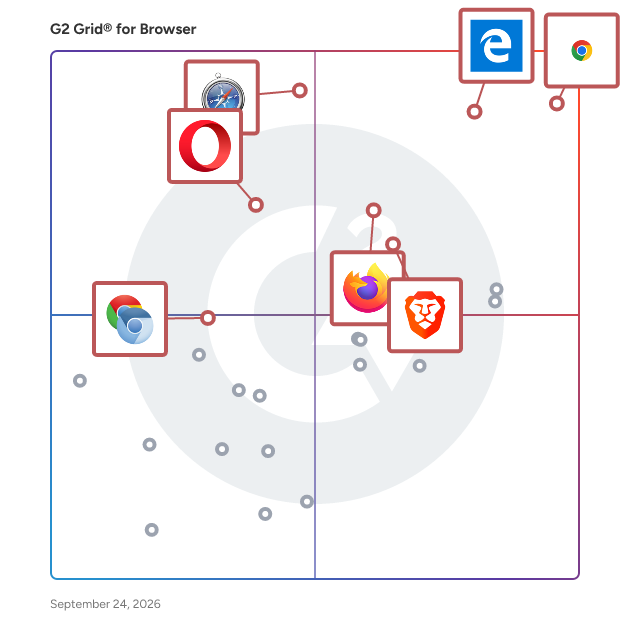
  # Best Browsers for Medium-Sized Businesses

  *By [Neeraja Prakash](https://research.g2.com/insights/author/neeraja-prakash)*


   Products classified in the overall Browser category are similar in many regards and help companies of all sizes solve their business problems. However, medium-sized business features, pricing, setup, and installation differ from businesses of other sizes, which is why we match buyers to the right Medium-Sized Business Browser to fit their needs. Compare product ratings based on reviews from enterprise users or connect with one of G2&#39;s buying advisors to find the right solutions within the Medium-Sized Business Browser category.

In addition to qualifying for inclusion in the Browsers category, to qualify for inclusion in the Medium-Sized Business Browsers category, a product must have at least 10 reviews left by a reviewer from a medium-sized business.


## Top Browsers at a Glance
| # | Product | Rating | Best For | What Users Say |
|---|---------|--------|----------|----------------|
| 1 | [Chrome Enterprise](https://www.g2.com/products/chrome-enterprise/reviews) | 4.7/5.0 (1,734 reviews) | Centralized browser policy enforcement across endpoints | "[Reliable, Fast Chrome with Powerful Extensions and Developer Tools](https://www.g2.com/survey_responses/chrome-enterprise-review-12117281)" |
| 2 | [Microsoft Edge](https://www.g2.com/products/microsoft-edge/reviews) | 4.3/5.0 (340 reviews) | Microsoft-365-native multi-tab productivity browsing | "[An Intuitive Browser with AI That Boosts Productivity.](https://www.g2.com/survey_responses/microsoft-edge-review-12749523)" |
| 3 | [Apple Safari](https://www.g2.com/products/apple-safari/reviews) | 4.1/5.0 (288 reviews) | Apple-ecosystem cross-device browsing with privacy | "[Smooth, Clean Browsing with Better Performance](https://www.g2.com/survey_responses/apple-safari-review-12582489)" |
| 4 | [Brave](https://www.g2.com/products/brave/reviews) | 4.6/5.0 (525 reviews) | Privacy-first browsing with built-in ad-blocking | "[Fast, Clean Browsing with Strong Privacy Right Out of the Box](https://www.g2.com/survey_responses/brave-review-12823192)" |
| 5 | [Multilogin](https://www.g2.com/products/multilogin/reviews) | 4.8/5.0 (96 reviews) | Multi-account browser isolation with anti-fingerprinting | "[Excellent support saved me hours of troubleshooting](https://www.g2.com/survey_responses/multilogin-review-12928284)" |
| 6 | [Mozilla Firefox](https://www.g2.com/products/mozilla-firefox/reviews) | 4.4/5.0 (498 reviews) | Privacy-first browsing with cross-device sync | "[Mozilla Firefox A Lighter and Fast Browser Since the Past](https://www.g2.com/survey_responses/mozilla-firefox-review-9597161)" |
| 7 | [BitBrowser](https://www.g2.com/products/bitbrowser/reviews) | 4.7/5.0 (113 reviews) | Multi-account anti-detect browsing with fingerprint isolation | "[BitBrowser Makes Managing Multiple Isolated Profiles Smooth and Reliable](https://www.g2.com/survey_responses/bitbrowser-review-12951885)" |
| 8 | [Shift](https://www.g2.com/products/redbrick-shift/reviews) | 4.5/5.0 (263 reviews) | Multi-account browsing across unified workspaces | "[Still my favorite way to manage multiple email accounts](https://www.g2.com/survey_responses/shift-review-10022631)" |
| 9 | [Octo Browser](https://www.g2.com/products/octo-browser/reviews) | 4.8/5.0 (65 reviews) | Multi-account browser fingerprint spoofing | "[Octo Browser: Reliable Solution for Multiaccounting Freedom](https://www.g2.com/survey_responses/octo-browser-review-11881911)" |
| 10 | [Opera](https://www.g2.com/products/opera/reviews) | 4.2/5.0 (210 reviews) | All-in-one browsing with built-in VPN and sidebar | "[Smooth, Lightweight Opera with Handy Built In Features](https://www.g2.com/survey_responses/opera-review-12603325)" |

  
## How Many Browsers Products Does G2 Track?
**Total Products under this Category:** 58

### Category Stats (Jun 2026)
- **Average Rating**: 4.43/5 (↓0.04 vs May 2026) The average rating of products in this category, based on all submitted ratings
- **New Reviews This Quarter**: 100
- **Buyer Segments**: Small-Business 75% │ Mid-Market 13% │ Enterprise 12% Represents the distribution of reviewers across all products in this category.
- **Top Trending Product**: BrowserJet (+0.74%) - Among all products in this category, BrowserJet recorded the largest rating increase compared to last month
*Last updated: June 18, 2026*

  
## How Does G2 Rank Browsers Products?

**Why You Can Trust G2's Software Rankings:**

- 30 Analysts and Data Experts
- 4,700+ Authentic Reviews
- 58+ Products
- Unbiased Rankings

G2's software rankings are built on verified user reviews, rigorous moderation, and a consistent research methodology maintained by a team of analysts and data experts. Each product is measured using the same transparent criteria, with no paid placement or vendor influence. While reviews reflect real user experiences, which can be subjective, they offer valuable insight into how software performs in the hands of professionals. Together, these inputs power the G2 Score, a standardized way to compare tools within every category.


  ## What Are the Top-Rated Browsers Products in 2026?
### 1. [Chrome Enterprise](https://www.g2.com/products/chrome-enterprise/reviews)
  Chrome Enterprise is a suite of business offerings that includes Chrome browser, Chrome&#39;s cloud management tool Chrome Enterprise Core, and the advanced security capabilities in Chrome Enterprise Premium.


  **Average Rating:** 4.7/5.0
  **Total Reviews:** 1,734
**How Do G2 Users Rate Chrome Enterprise?**

- **Ease of Use:** 9.5/10 (Category avg: 8.9/10)
- **Has the product been a good partner in doing business?:** 8.9/10 (Category avg: 9.0/10)
- **AI Text Generation:** 8.4/10 (Category avg: 7.6/10)
- **AI Text-to-Speech:** 8.3/10 (Category avg: 6.8/10)

**Who Is the Company Behind Chrome Enterprise?**

- **Seller:** [Google](https://www.g2.com/sellers/google)
- **Year Founded:** 1998
- **HQ Location:** Mountain View, CA
- **Twitter:** @google (31,901,456 Twitter followers)
- **LinkedIn® Page:** https://www.linkedin.com/company/1441/ (341,888 employees on LinkedIn®)
- **Ownership:** NASDAQ:GOOG

**Who Uses This Product?**
  - **Who Uses This:** Software Engineer, Software Developer
  - **Top Industries:** Information Technology and Services, Computer Software
  - **Company Size:** 40% Small-Business, 36% Mid-Market


#### What Are Chrome Enterprise's Pros and Cons?

**Pros:**

- Ease of Use (145 reviews)
- Google Integration (114 reviews)
- Safety/Security (91 reviews)
- Security Features (67 reviews)
- Reliability (66 reviews)

**Cons:**

- Slow Performance (55 reviews)
- RAM Consumption (40 reviews)
- High RAM Usage (39 reviews)
- Data Privacy (37 reviews)
- Limited Customization (34 reviews)

### 2. [Microsoft Edge](https://www.g2.com/products/microsoft-edge/reviews)
  Microsoft Edge is a proprietary, cross-platform web browser developed by Microsoft, designed to deliver a fast, secure, and user-friendly browsing experience. Initially released in 2015, Edge has evolved significantly, transitioning to a Chromium-based architecture in 2020 to enhance compatibility and performance. It is available on multiple platforms, including Windows, macOS, Linux, Android, and iOS. Key Features and Functionality: - Copilot Mode: An AI-powered assistant integrated directly into the browser, enabling users to perform tasks such as summarizing web content, managing tabs, and completing online activities efficiently. - Performance Enhancements: Features like &quot;Startup Boost&quot; and &quot;Sleeping Tabs&quot; improve browser launch times and resource management, leading to faster performance and reduced system resource usage. - Online Safety: Built-in security measures, including Microsoft Defender SmartScreen, help protect users from phishing and malware attacks. Additionally, Edge offers password management and an integrated VPN service for enhanced privacy. - Cross-Platform Availability: Edge is accessible on various operating systems, ensuring a consistent browsing experience across devices. - Gaming Integration: The browser includes features tailored for gamers, such as the in-game browser &quot;Game Assist,&quot; allowing access to guides and favorite sites without leaving the game. Primary Value and User Solutions: Microsoft Edge addresses the need for a high-performance, secure, and versatile web browser. Its integration of AI through Copilot Mode streamlines online tasks, enhancing productivity. The browser&#39;s focus on security features provides users with a safer browsing environment, while performance optimizations ensure efficient use of system resources. Cross-platform support allows users to maintain a seamless experience across different devices, and specialized features cater to specific user groups, such as gamers, enhancing their online activities.


  **Average Rating:** 4.3/5.0
  **Total Reviews:** 340
**How Do G2 Users Rate Microsoft Edge?**

- **Ease of Use:** 9.0/10 (Category avg: 8.9/10)
- **Has the product been a good partner in doing business?:** 8.8/10 (Category avg: 9.0/10)
- **AI Text Generation:** 9.0/10 (Category avg: 7.6/10)
- **AI Text-to-Speech:** 8.5/10 (Category avg: 6.8/10)

**Who Is the Company Behind Microsoft Edge?**

- **Seller:** [Microsoft](https://www.g2.com/sellers/microsoft)
- **Year Founded:** 1975
- **HQ Location:** Redmond, Washington
- **Twitter:** @microsoft (13,091,954 Twitter followers)
- **LinkedIn® Page:** https://www.linkedin.com/company/microsoft/ (231,632 employees on LinkedIn®)
- **Ownership:** MSFT

**Who Uses This Product?**
  - **Who Uses This:** Software Engineer
  - **Top Industries:** Information Technology and Services, Computer Software
  - **Company Size:** 36% Small-Business, 32% Mid-Market


#### What Are Microsoft Edge's Pros and Cons?

**Pros:**

- Microsoft Integration (8 reviews)
- Ease of Use (5 reviews)
- Easy Accessibility (5 reviews)
- Fast Speed (5 reviews)
- Safety/Security (4 reviews)

**Cons:**

- Feature Issues (4 reviews)
- UI/UX Design (4 reviews)
- Limited Customization (3 reviews)
- Update Issues (3 reviews)
- Ad Complaints (2 reviews)

### 3. [Apple Safari](https://www.g2.com/products/apple-safari/reviews)
  Safari is Apple&#39;s web browser, designed to deliver a fast, secure, and customizable internet experience across all Apple devices. It offers robust privacy features, including Intelligent Tracking Prevention, which uses on-device intelligence to prevent cross-site tracking and stops known trackers from using your IP address, making it difficult for them to profile your browsing activity. Safari&#39;s optimized performance ensures efficient battery usage, allowing users to browse longer without compromising speed. With support for 4K HDR video playback, users can enjoy high-quality streaming directly within the browser. Customization options such as Tab Groups and third-party extensions enable a personalized browsing experience. Safari&#39;s deep integration with Apple&#39;s ecosystem ensures seamless synchronization of bookmarks, history, and passwords across devices, enhancing user convenience and productivity. Key Features and Functionality: - Intelligent Tracking Prevention: Utilizes on-device intelligence to prevent cross-site tracking and stops known trackers from using your IP address, enhancing user privacy. - Optimized Performance: Engineered for Apple devices, Safari offers fast browsing speeds while maximizing battery efficiency. - 4K HDR Video Playback: Supports high-definition streaming directly within the browser for an immersive viewing experience. - Customization Options: Features like Tab Groups and support for third-party extensions allow users to tailor their browsing experience. - Seamless Synchronization: Integrates with Apple&#39;s ecosystem to sync bookmarks, history, and passwords across all Apple devices. Primary Value and User Solutions: Safari addresses users&#39; needs for a secure, efficient, and personalized browsing experience. Its advanced privacy protections safeguard personal information, while optimized performance ensures swift page loads and extended battery life. Customization features and seamless device synchronization enhance productivity and convenience, making Safari a comprehensive solution for modern web browsing.


  **Average Rating:** 4.1/5.0
  **Total Reviews:** 288
**How Do G2 Users Rate Apple Safari?**

- **Ease of Use:** 8.8/10 (Category avg: 8.9/10)
- **Has the product been a good partner in doing business?:** 7.2/10 (Category avg: 9.0/10)
- **AI Text Generation:** 7.5/10 (Category avg: 7.6/10)
- **AI Text-to-Speech:** 7.4/10 (Category avg: 6.8/10)

**Who Is the Company Behind Apple Safari?**

- **Seller:** [Apple](https://www.g2.com/sellers/apple)
- **Year Founded:** 1976
- **HQ Location:** Cupertino, CA
- **Twitter:** @Apple (9,936,335 Twitter followers)
- **LinkedIn® Page:** https://www.linkedin.com/company/162479/ (180,534 employees on LinkedIn®)
- **Ownership:** NASDAQ:AAPL

**Who Uses This Product?**
  - **Who Uses This:** Software Engineer
  - **Top Industries:** Computer Software, Information Technology and Services
  - **Company Size:** 54% Small-Business, 29% Mid-Market


#### What Are Apple Safari's Pros and Cons?

**Pros:**

- Ease of Use (5 reviews)
- Easy Accessibility (2 reviews)
- Google Integration (2 reviews)
- Password Management (2 reviews)
- Safety/Security (2 reviews)

**Cons:**

- Compatibility Issues (2 reviews)
- Extension Issues (2 reviews)
- Limited Extensions (2 reviews)
- UI/UX Design (2 reviews)
- Browser Compatibility (1 reviews)

### 4. [Mozilla Firefox](https://www.g2.com/products/mozilla-firefox/reviews)
  Firefox Browser is a free web browser backed by Mozilla, a non-profit dedicated to internet health and privacy. Available now on Windows, Mac, Linux, Android and iOS.


  **Average Rating:** 4.4/5.0
  **Total Reviews:** 498
**How Do G2 Users Rate Mozilla Firefox?**

- **Ease of Use:** 9.1/10 (Category avg: 8.9/10)
- **Has the product been a good partner in doing business?:** 8.8/10 (Category avg: 9.0/10)
- **AI Text Generation:** 8.2/10 (Category avg: 7.6/10)
- **AI Text-to-Speech:** 7.9/10 (Category avg: 6.8/10)

**Who Is the Company Behind Mozilla Firefox?**

- **Seller:** [Mozilla](https://www.g2.com/sellers/mozilla)
- **Year Founded:** 2005
- **HQ Location:** San Francisco, CA
- **Twitter:** @mozilla (261,899 Twitter followers)
- **LinkedIn® Page:** https://www.linkedin.com/company/13948/ (1,751 employees on LinkedIn®)

**Who Uses This Product?**
  - **Who Uses This:** Software Engineer, Owner
  - **Top Industries:** Information Technology and Services, Computer Software
  - **Company Size:** 44% Small-Business, 41% Mid-Market


#### What Are Mozilla Firefox's Pros and Cons?

**Pros:**

- Fast Speed (7 reviews)
- Customizability Options (6 reviews)
- Extension Support (6 reviews)
- Reliability (6 reviews)
- Safety/Security (6 reviews)

**Cons:**

- Slow Performance (5 reviews)
- Tab Management (5 reviews)
- Browser Compatibility (3 reviews)
- Limited Extensions (3 reviews)
- Update Issues (3 reviews)

### 5. [Brave](https://www.g2.com/products/brave/reviews)
  Brave Software’s fast, privacy-oriented browser, combined with its blockchain-based digital advertising platform, is reinventing the Web for users, publishers and advertisers. Users get a private, speedier Web experience with much longer battery life, publishers increase their revenue share, and advertisers achieve better conversion. Users can opt into privacy-respecting ads that reward them with a frequent flyer-like token they can redeem or use to tip or contribute to publishers and other content creators. The Brave solution is a win-win for everyone who has a stake in the open Web and who is weary of giving up privacy and revenue to the ad-tech intermediaries. Brave currently has over 50 million monthly active users and 20 million daily active users. Brave Software was co-founded by Brendan Eich, creator of JavaScript and co-founder of Mozilla (Firefox), and Brian Bondy, formerly of Khan Academy and Mozilla.


  **Average Rating:** 4.6/5.0
  **Total Reviews:** 525
**How Do G2 Users Rate Brave?**

- **Ease of Use:** 9.5/10 (Category avg: 8.9/10)
- **Has the product been a good partner in doing business?:** 9.1/10 (Category avg: 9.0/10)
- **AI Text Generation:** 8.6/10 (Category avg: 7.6/10)
- **AI Text-to-Speech:** 7.7/10 (Category avg: 6.8/10)

**Who Is the Company Behind Brave?**

- **Seller:** [Brave](https://www.g2.com/sellers/brave)
- **Year Founded:** 2015
- **HQ Location:** San Francisco, California
- **Twitter:** @brave (417,109 Twitter followers)
- **LinkedIn® Page:** https://www.linkedin.com/company/7929354/ (335 employees on LinkedIn®)

**Who Uses This Product?**
  - **Who Uses This:** Software Engineer, Information Technology Support Specialist
  - **Top Industries:** Information Technology and Services, Computer Software
  - **Company Size:** 58% Small-Business, 29% Mid-Market


#### What Are Brave's Pros and Cons?

**Pros:**

- Ad Blocking (16 reviews)
- Privacy (9 reviews)
- Brave Rewards (8 reviews)
- Ease of Use (7 reviews)
- Speed (6 reviews)

**Cons:**

- Ad Complaints (3 reviews)
- Limited Extensions (3 reviews)
- Slow Performance (3 reviews)
- Ad Issues (2 reviews)
- Feature Issues (2 reviews)

### 6. [Octo Browser](https://www.g2.com/products/octo-browser/reviews)
  Antidetect browser is a specialized software solution designed to facilitate multi-accounting by allowing users to create and manage multiple online accounts seamlessly. This type of browser is particularly valuable for individuals and businesses that require the ability to operate various accounts without the risk of IP bans or additional costs associated with traditional methods of account management. Octo Browser also supports mobile device fingerprints. The target audience for an antidetect browser includes digital marketers, social media managers, affiliate marketers, and anyone else who needs to juggle multiple online identities for business purposes. It is also useful for individuals who want to maintain privacy and anonymity while browsing the internet. By providing a secure environment for account creation and management, this browser helps users avoid common pitfalls associated with multi-accounting, such as being flagged for suspicious activity or facing restrictions due to shared IP addresses. Key features of an antidetect browser include advanced fingerprinting technology, which allows users to mask their digital fingerprints effectively. This feature is crucial in preventing websites from detecting multiple accounts linked to the same user. Additionally, the browser often supports the use of proxy servers, enabling users to change their IP addresses easily and further reduce the risk of being banned. The ability to manage cookies and browser settings on a per-account basis is another significant advantage, as it allows for a tailored browsing experience that aligns with the specific requirements of each account. The benefits of using an antidetect browser extend beyond just avoiding bans. Users can save time and resources by managing all their accounts from a single interface, eliminating the need for multiple devices or browsers. This streamlined approach not only enhances productivity but also provides a level of organization that is often lacking when handling numerous accounts manually. Furthermore, the enhanced privacy features ensure that users can operate without the fear of their activities being tracked or monitored, making it an essential tool for anyone serious about online account management. Overall, an antidetect browser stands out in its category by offering a comprehensive solution for multi-accounting challenges. Its unique features and focus on privacy and security make it a valuable asset for users looking to navigate the complexities of online account management effectively.


  **Average Rating:** 4.8/5.0
  **Total Reviews:** 65
**How Do G2 Users Rate Octo Browser?**

- **Ease of Use:** 9.9/10 (Category avg: 8.9/10)
- **Has the product been a good partner in doing business?:** 10.0/10 (Category avg: 9.0/10)
- **AI Text Generation:** 9.4/10 (Category avg: 7.6/10)
- **AI Text-to-Speech:** 9.6/10 (Category avg: 6.8/10)

**Who Is the Company Behind Octo Browser?**

- **Seller:** [Octo Browser](https://www.g2.com/sellers/octo-browser)
- **HQ Location:** London, GB
- **Twitter:** @OctoBrowser (1,991 Twitter followers)
- **LinkedIn® Page:** https://www.linkedin.com/company/octo-browser/ (18 employees on LinkedIn®)

**Who Uses This Product?**
  - **Top Industries:** Accounting, Marketing and Advertising
  - **Company Size:** 53% Small-Business, 29% Mid-Market


#### What Are Octo Browser's Pros and Cons?

**Pros:**

- Ease of Use (17 reviews)
- Reliability (12 reviews)
- Easy Accessibility (9 reviews)
- Security Features (8 reviews)
- User Interface (7 reviews)

**Cons:**

- Feature Issues (3 reviews)
- High RAM Usage (3 reviews)
- Limited Customization (2 reviews)
- Slow Loading (2 reviews)
- Ad Complaints (1 reviews)

### 7. [RoxyBrowser](https://www.g2.com/products/roxybrowser/reviews)
  RoxyBrowser is an antidetect browser designed to streamline your workflows and manage multiple accounts. By generating unique browser fingerprints for each profile, it ensures online anonymity and helps users bypass website detection mechanisms. Whether you&#39;re managing social media accounts, running ads, or handling e-commerce operations, with features like online activities protection and multi-window synchronizer, RoxyBrowser provides a secure and efficient solution for your needs.


  **Average Rating:** 4.7/5.0
  **Total Reviews:** 33
**How Do G2 Users Rate RoxyBrowser?**

- **Ease of Use:** 9.1/10 (Category avg: 8.9/10)
- **Has the product been a good partner in doing business?:** 8.3/10 (Category avg: 9.0/10)
- **AI Text Generation:** 2.2/10 (Category avg: 7.6/10)
- **AI Text-to-Speech:** 0.4/10 (Category avg: 6.8/10)

**Who Is the Company Behind RoxyBrowser?**

- **Seller:** [LINKV TECH](https://www.g2.com/sellers/linkv-tech)
- **Year Founded:** 2024
- **HQ Location:** Singapore, SG
- **LinkedIn® Page:** https://www.linkedin.com/company/No-Linkedin-Presence-Added-Intentionally-By-DataOps (1 employees on LinkedIn®)

**Who Uses This Product?**
  - **Top Industries:** Computer Software, Information Technology and Services
  - **Company Size:** 64% Mid-Market, 33% Small-Business


#### What Are RoxyBrowser's Pros and Cons?

**Pros:**

- Security Features (9 reviews)
- Ease of Use (7 reviews)
- Safety/Security (5 reviews)
- Time Efficiency (5 reviews)
- Customizability Options (4 reviews)

**Cons:**

- Update Issues (2 reviews)
- Feature Issues (1 reviews)
- Limited Extensions (1 reviews)
- Reward Issues (1 reviews)
- Slow Loading (1 reviews)

### 8. [Opera](https://www.g2.com/products/opera/reviews)
  Opera is a user-centric and innovative software company focused on enabling the best possible internet browsing experience across all devices. Hundreds of millions use Opera web browsers for their unique and secure features on mobile phones and desktop computers. Founded in 1995 and headquartered in Oslo, Norway, Opera is a public company listed on the Nasdaq stock exchange under the ticker symbol OPRA. Download the Opera web browsers and other Opera products from opera.com. Check out Opera Ads here: https://www.g2.com/products/opera-ads/reviews


  **Average Rating:** 4.2/5.0
  **Total Reviews:** 210
**How Do G2 Users Rate Opera?**

- **Ease of Use:** 9.0/10 (Category avg: 8.9/10)
- **Has the product been a good partner in doing business?:** 7.9/10 (Category avg: 9.0/10)
- **AI Text Generation:** 8.3/10 (Category avg: 7.6/10)
- **AI Text-to-Speech:** 8.0/10 (Category avg: 6.8/10)

**Who Is the Company Behind Opera?**

- **Seller:** [Opera](https://www.g2.com/sellers/opera)
- **Year Founded:** 1995
- **HQ Location:** Oslo, Norway
- **Twitter:** @opera (571,099 Twitter followers)
- **LinkedIn® Page:** https://www.linkedin.com/company/7327/ (2,405 employees on LinkedIn®)
- **Ownership:** Opera Limited (NASDAQ: OPRA)

**Who Uses This Product?**
  - **Who Uses This:** Software Engineer
  - **Top Industries:** Information Technology and Services, Computer Software
  - **Company Size:** 63% Small-Business, 25% Mid-Market


#### What Are Opera's Pros and Cons?

**Pros:**

- VPN Features (5 reviews)
- Ad Blocking (3 reviews)
- Fast Speed (3 reviews)
- Safety/Security (3 reviews)
- Ease of Use (2 reviews)

**Cons:**

- Limited Extensions (2 reviews)
- Ad Blocking (1 reviews)
- Ad Complaints (1 reviews)
- Browser Compatibility (1 reviews)
- Compatibility Issues (1 reviews)

### 9. [Shift](https://www.g2.com/products/redbrick-shift/reviews)
  Shift is a customizable browser built for people who live in their browser all day. Unlike standard browsers, Shift lets you drag and drop apps, bars, and controls to build a layout that actually matches how you work. Choose from 6 starter templates or build from scratch. Either way, you end up with a browser that fits your workflow, not the other way around. Whether you&#39;re a freelancer juggling clients, a remote worker managing multiple tools, or an entrepreneur running several projects at once, Shift gives you the flexibility to shape your digital workspace around your life. Sign into 1,500+ web apps, stay logged into multiple accounts at once, and use Spaces to keep work, side hustles, and personal browsing completely separate. Shift AI is built right in, so you can summarize pages, draft content, and get answers without jumping between tools or losing your train of thought. Everything you need lives in one place — your calendar, email, project management tools, and favorite apps — all accessible without the tab overload that comes with a standard browser. No more context-switching chaos, just one calm, organized place to get things done and stay focused on what actually matters. Shift is a Certified B Corp, a pioneer in carbon-neutral browsing, and has been recognized as a top browser on G2, TrustRadius, and SourceForge. Founded in 2016 in Victoria, BC, and part of the Redbrick portfolio, Shift is reimagining what a browser can do, not just for productivity, but for the planet.


  **Average Rating:** 4.5/5.0
  **Total Reviews:** 263
**How Do G2 Users Rate Shift?**

- **Ease of Use:** 9.1/10 (Category avg: 8.9/10)
- **Has the product been a good partner in doing business?:** 8.8/10 (Category avg: 9.0/10)
- **AI Text Generation:** 4.2/10 (Category avg: 7.6/10)
- **AI Text-to-Speech:** 4.6/10 (Category avg: 6.8/10)

**Who Is the Company Behind Shift?**

- **Seller:** [Redbrick](https://www.g2.com/sellers/redbrick)
- **Company Website:** https://rdbrck.com/
- **Year Founded:** 2011
- **HQ Location:** Victoria, British Columbia
- **Twitter:** @rdbrck (1,633 Twitter followers)
- **LinkedIn® Page:** https://www.linkedin.com/company/2859057/ (168 employees on LinkedIn®)

**Who Uses This Product?**
  - **Who Uses This:** Owner, CEO
  - **Top Industries:** Marketing and Advertising, Information Technology and Services
  - **Company Size:** 86% Small-Business, 10% Mid-Market


#### What Are Shift's Pros and Cons?

**Pros:**

- Ease of Use (112 reviews)
- Easy Accessibility (71 reviews)
- Daily Use (51 reviews)
- Easy Access (49 reviews)
- Simple (49 reviews)

**Cons:**

- App Issues (40 reviews)
- Missing Features (19 reviews)
- Software Bugs (18 reviews)
- Slow Performance (14 reviews)
- Limited Customization (11 reviews)

### 10. [Chromium](https://www.g2.com/products/chromium/reviews)
  Chromium is an open-source browser project that aims to build a safer, faster, and more stable way for all Internet users to experience the web.


  **Average Rating:** 4.5/5.0
  **Total Reviews:** 46
**How Do G2 Users Rate Chromium?**

- **Ease of Use:** 9.0/10 (Category avg: 8.9/10)
- **Has the product been a good partner in doing business?:** 9.5/10 (Category avg: 9.0/10)
- **AI Text Generation:** 8.3/10 (Category avg: 7.6/10)
- **AI Text-to-Speech:** 9.2/10 (Category avg: 6.8/10)

**Who Is the Company Behind Chromium?**

- **Seller:** [Chromium](https://www.g2.com/sellers/chromium)
- **Year Founded:** 2009
- **HQ Location:** Mountain View, CA
- **Twitter:** @ChromiumDev (420,052 Twitter followers)
- **LinkedIn® Page:** https://www.linkedin.com/company/790956/ (79 employees on LinkedIn®)

**Who Uses This Product?**
  - **Top Industries:** Information Technology and Services, Computer Software
  - **Company Size:** 35% Enterprise, 33% Small-Business


### 11. [Ulaa browser](https://www.g2.com/products/ulaa-browser/reviews)
  A privacy-first browser loaded with features like Modes, Adblocker, Smart Tabs and more, designed to enhance your online productivity and security.


  **Average Rating:** 4.3/5.0
  **Total Reviews:** 32
**How Do G2 Users Rate Ulaa browser?**

- **Ease of Use:** 9.1/10 (Category avg: 8.9/10)
- **Has the product been a good partner in doing business?:** 8.3/10 (Category avg: 9.0/10)
- **AI Text Generation:** 7.9/10 (Category avg: 7.6/10)
- **AI Text-to-Speech:** 7.5/10 (Category avg: 6.8/10)

**Who Is the Company Behind Ulaa browser?**

- **Seller:** [Ulaa](https://www.g2.com/sellers/ulaa)
- **Year Founded:** 1996
- **HQ Location:** Chennai, Tamil Nadu
- **Twitter:** @UlaaBrowser (3,219 Twitter followers)
- **LinkedIn® Page:** https://www.linkedin.com/company/ulaa-browser/ (4 employees on LinkedIn®)

**Who Uses This Product?**
  - **Top Industries:** Computer Software, Information Technology and Services
  - **Company Size:** 50% Small-Business, 41% Mid-Market


### 12. [Wavebox](https://www.g2.com/products/wavebox/reviews)
  Wavebox is a powerful productivity browser like no other. We&#39;ve taken Chromium, and supercharged it with essential features like multi-account sign-in, tab sleeping, groups &amp; pins, built-in chat and screenshare, and shared workspaces. Wavebox lets you work swiftly and securely across all your online tools, and will transform how you work on the web. Wavebox is the ultimate productivity hack for 2021.


  **Average Rating:** 4.6/5.0
  **Total Reviews:** 44
**How Do G2 Users Rate Wavebox?**

- **Ease of Use:** 9.1/10 (Category avg: 8.9/10)
- **Has the product been a good partner in doing business?:** 9.2/10 (Category avg: 9.0/10)
- **AI Text Generation:** 9.2/10 (Category avg: 7.6/10)
- **AI Text-to-Speech:** 8.5/10 (Category avg: 6.8/10)

**Who Is the Company Behind Wavebox?**

- **Seller:** [Bookry](https://www.g2.com/sellers/bookry)
- **Year Founded:** 2012
- **HQ Location:** Bangor, GB
- **Twitter:** @waveboxio (753 Twitter followers)
- **LinkedIn® Page:** https://www.linkedin.com/company/2760947 (2 employees on LinkedIn®)

**Who Uses This Product?**
  - **Top Industries:** Information Technology and Services, Computer Software
  - **Company Size:** 61% Small-Business, 32% Mid-Market


#### What Are Wavebox's Pros and Cons?

**Pros:**

- Customizability Options (1 reviews)
- Ease of Use (1 reviews)
- Feature-rich (1 reviews)


    ## What Is Browsers?
  [Collaboration &amp; Productivity Software](https://www.g2.com/categories/collaboration-productivity)

  
---

## How Do You Choose the Right Browsers?

### What You Should Know About Browser Software

### What is a browser?

A browser is a software application that lets users access, explore, and retrieve information from the internet on their desktops and mobile devices. Users must have internet access to use browsers.&amp;nbsp;

A browser client program sends a user’s information queries to a [server](https://www.g2.com/glossary/server-definition). It then receives HTML, JavaScript, or CSS responses from the web address with the desired information. Next, the web browser uses a rendering engine to translate and render server responses in formats humans can understand, including text and images. Browsers use HTTP and HTTPS protocols to facilitate this communication between users and websites.

### Browser features

Web browsers offer several features for meeting web standards, making the web accessible, and allowing users to enjoy the internet.

- **The home page** is the first page that loads after a user opens a browser. Most browser programs feature default home page settings, which users can change according to their preferences.&amp;nbsp;
- **The home button** is an icon that typically appears at the top of a web page. When users click it, it takes them to the starting point of a website. Many browsers let users set the home page, which they can visit by clicking the home button.&amp;nbsp;
- **The address bar** or uniform resource locator (URL) is where users navigate where they want to visit on the web.&amp;nbsp;They can also type [domain names](https://www.g2.com/glossary/domain-name-definition) and hit enter to see specific websites.&amp;nbsp;
- **Navigation buttons** return users to pages they previously opened and move forward to pages based on their browser history. Users can find navigation buttons in the upper left corner of the browser window.
- **Browsing history** is where the browser saves all the websites a user has visited. This section also retains metadata like page title and time of visit to help users revisit pages.&amp;nbsp;
- **Bookmarks** are essential to web browsing as they let users store website URL addresses for future reference. People often use bookmarks to visit their most frequented sites, instead of typing out the URL.
- **Autofill** helps users fill out forms based on the information they previously provided.&amp;nbsp;
- **The refresh button** resembles a circular arrow icon and sits on the left or right side of the browser address bar, depending on which browser you’re using. It reloads and accesses updated content when users can’t do so themselves.&amp;nbsp;
- **Tabbed browsing** offers users the option to open multiple web pages in one window. This feature is meant to help users organize and switch between pages.
- **The stop button** stops a web page from loading by forcing the browser to cancel communication with the server.&amp;nbsp;
- **Extensions** or plugins are software applications that users install to enhance the functionality of web browsers. 

### Types of browsers

Browsers are of two types: open-source and closed-source.&amp;nbsp;

- **Open-source browsers** publicly share source code that developers can use or modify to improve browser performance. Mozilla Firefox is a free, open-source browser software available under the Mozilla Public License.&amp;nbsp;
- **Closed-source or proprietary browsers** keep their codebase private, meaning developers can’t modify or redistribute them. Microsoft Edge is an example of a proprietary web browser.

### Benefits of using a browser

Modern browsers provide users with various advantages.

- **Cross-platform compatibility:** People can easily use web browsers on various [operating systems](https://www.g2.com/categories/operating-system), including Windows, Mac OS, and Linux.&amp;nbsp;&amp;nbsp;
- **Easy installation and updates:** Installation, maintenance, and updating browser systems are easy via the web server.&amp;nbsp;
- **Faster web page rendering:** Browsers feature advanced technology with memory and storage capability to execute JavaScript and render web pages faster.&amp;nbsp;
- **Highly deployable:** Their manageability and cross-platform support make deploying web browsers simple. That’s why they’re ideal for giving users access to remote data even when bandwidth is limited.&amp;nbsp;
- **Improved security:** Web browsers offer parental controls, anti-phishing protection, and malware prevention features to help lusers protect data and access the internet safely.
- **Web standards compliance:** Today, most browsers come with improved performance and faster [page speed](https://learn.g2.com/page-speed) because they comply with the web standards the World Wide Web Consortium (W3C) set.&amp;nbsp;
- **Free availability:** Many web-based browsers cost nothing to download and install.

### Browsers vs. search engines

Browsers make it possible for users to retrieve information from the World Wide Web. When someone enters a domain name into the address bar, a browser uses the domain name server (DNS)&amp;nbsp;to match it against the corresponding IP address. The user’s device or the client requests HTTP and transmission control protocol (TCP) to the server with the web page a user wants to visit. The server then analyzes the requests and shares the web page in HTML format with the client device. A web browser’s job is to retrieve and display the data to the user.&amp;nbsp;

Search engine applications use proprietary search algorithms to find [database](https://www.g2.com/articles/what-is-a-database) items salient to the user query. Modern search engines work by first crawling and indexing web pages, videos, and images available online. Next, they rank these results based on their freshness, relevance, and authority before showing search results to users.

The key difference is that a browser retrieves and displays web page data, whereas a search engine helps users discover the most relevant results for their queries.

### Who uses web browsers?

Internet users, business professionals, developers, researchers, and business entities commonly use web browsers.&amp;nbsp;

- **Internet users** rely on browsers for various purposes, including reading news, viewing&amp;nbsp;websites, shopping online, connecting to [social media platforms](https://www.g2.com/categories/social-networks), and streaming videos.&amp;nbsp;
- **Business professionals** use web browser systems to research, communicate via email and video conferencing, manage customer relationships, and collaborate with peers.
- **Developers and IT professionals** turn to web browsers to test websites, cross-browser compatibility, and access documentation.&amp;nbsp;
- **Researchers** review academic articles and access information from online databases using browsers.&amp;nbsp;
- **Businesses** depend on browsers for distributing information and engaging with stakeholders.

### Browser pricing

Most mainstream web browsers are free to download and use. They generate revenue with [paid search](https://learn.g2.com/paid-search), advertising, and data analytics. Some browsers may also offer freemium options, i.e., charging a fee for premium add-ons like [virtual private network (VPN)](https://www.g2.com/articles/what-is-a-vpn) and ad-blocking. Enterprise browser systems like Chrome Enterprise or Microsoft Edge for Business provide advanced security features and charge businesses based on the number of users or devices.&amp;nbsp;

### How to choose the best web browsers

Users must consider factors like load time, compatibility, security, interface design, and support options to compare and choose the best web browsers.&amp;nbsp;

- **Load time:** This criterion refers to the time a web browser takes to retrieve information from the world wide web and share it with the user. A slower load time creates a frustrating experience. Browsers with speedy load times that can block intrusive ads and unnecessary images significantly improve [user experience](https://www.g2.com/glossary/user-experience).
- **Compatibility:** Some browsers end up offering sluggish experience on different operating systems despite their supposed cross-platform compatibility. That’s why checking what’s suitable for each user’s existing system is necessary.&amp;nbsp;
- **Security:** Frequent security updates help users prevent [data security breaches](https://www.g2.com/articles/data-breach), avoid identity theft, and mitigate vulnerabilities. The updates keep browsers secure by testing, addressing, and fixing bugs and security issues.
- **Functionality:** A functional browser features an easy-to-use interface and doesn’t complicate simple things. Users should choose browsers that function best for their needs to guarantee a superior browsing experience.
- **Sync:** Most web browsers feature [cloud storage](https://learn.g2.com/what-is-cloud-storage) memory to store web search history, passwords, and bookmarks so users can access them across devices. Picking a browser with sync capabilities eliminates the need for signing in and out on different devices.
- **Availability of extensions:** Browsers with plugins are suitable for users who need browser extensions to manage internet content.

### Web browsers with the best compatibility

The [HTML5test](https://html5test.com/) website scores browsers based on their ability to support the HTML5 standard and other specifications created by the Web Hypertext Application Technology Working Group (WHATWG). Chrome leads the pack, closely followed by Opera, Mozilla Firefox, Microsoft Edge, and Apple Safari.

Reviewed and Edited by [Aisha West](https://www.linkedin.com/in/westeawest/)


