Best Enterprise Assessment Software

How Many Assessment Software Products Does G2 Track?

Total Products under this Category: 362

Category Stats (Sep 2026)

  • Average Rating: 4.26/5 (↓0.01 vs Aug 2026) The average rating of products in this category, based on all submitted ratings
  • Top Trending Product: Gradescope (+2.56%) - Among all products in this category, Gradescope recorded the largest rating increase compared to last month

Last updated: September 01, 2026

How Does G2 Rank Assessment Software Products?

Why You Can Trust G2's Software Rankings:

  • 30 Analysts and Data Experts
  • 10,800+ Authentic Reviews
  • 362+ Products
  • Unbiased Rankings

G2's software rankings are built on verified user reviews, rigorous moderation, and a consistent research methodology maintained by a team of analysts and data experts. Each product is measured using the same transparent criteria, with no paid placement or vendor influence. While reviews reflect real user experiences, which can be subjective, they offer valuable insight into how software performs in the hands of professionals. Together, these inputs power the G2 Score, a standardized way to compare tools within every category.

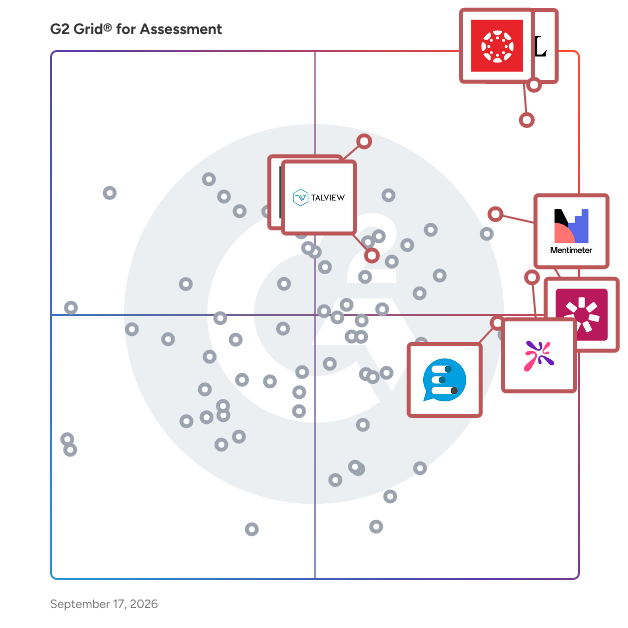
G2 Grid® for Assessment Software

G2 Grid® for Assessment Software plotting products by satisfaction and market presence

Highlighted products: Canvas LMS, D2L Brightspace, Mentimeter, Blackboard, iSpring Suite, Vevox, Talview, and AhaSlides.

Underlying data: [Grid® JSON](https://www.g2.com/categories/assessment/grids.json?focus%5B%5D=canvas-lms&focus%5B%5D=d2l-brightspace&focus%5B%5D=mentimeter&focus%5B%5D=blackboard&focus%5B%5D=ispring-suite&focus%5B%5D=vevox&focus%5B%5D=talview&focus%5B%5D=ahaslides&segment=enterprise)

Canvas LMS

Canvas by Instructure is a versatile, cloud-based learning management system (LMS) designed to transform online learning across every stage of education. Since its launch in 2011, Canvas has become the foundational hub for digital classrooms, empowering institutions to deliver high-quality instruction from K-12 to Corporate Training. Trusted by millions worldwide, Canvas remains the #1 educational software and the core of the Instructure ecosystem. Comprehensive Instructor Tools for Every Environment Canvas is built with flexibility at its core, allowing organizations to tailor the platform to their unique goals. Whether you are managing complex curricula in Higher Education or streamlining Primary/Secondary Education (K-12), our robust instructor tools ensure that every learning experience is impactful and learner-centered. From educational initiatives to professional development, Canvas adapts to your mission by providing a seamless interface to: -Create and manage online courses and high-quality learning materials. -Deliver assignments, quizzes, and assessments that meet diverse learning standards. -Enable collaboration through integrated discussions and messaging to boost student engagement. -Track student progress and learning outcomes through real-time data. -Integrate with third-party education tools, with over 900+ partners to choose from. Empowering Success Through Virtual Learning The platform provides a scalable, secure environment for virtual learning that goes beyond the traditional classroom. By combining course management with advanced assessments and grading features, Canvas reduces administrative friction and allows educators to focus on what matters most: student success. Key Features & Benefits Intuitive Design: An easy-to-use interface reduces overhead and ensures learners stay focused on their goals. Mobile Accessibility: The top-rated Canvas mobile app keeps learners connected, even offline. Advanced Analytics: Gain actionable insights to monitor student engagement and improve institutional outcomes. Scalable Ecosystem: With 500+ third-party integrations, Canvas connects with your existing tech stack to build a truly dynamic learning environment. Industries We Serve Canvas by Instructure is the trusted partner for organizations aiming to unlock the full potential of their learners across: -Higher Education -Primary/Secondary Education (K-12) -Corporate Training

Average Rating: 4.5/5.0

Total Reviews: 1,732

How Do G2 Users Rate Canvas LMS?

  • Ease of Use: 8.5/10 (Category avg: 8.4/10)
  • Real-time assessment: 8.8/10 (Category avg: 8.5/10)
  • Analytics dashboard: 8.9/10 (Category avg: 8.3/10)
  • White-labeling: 8.1/10 (Category avg: 7.9/10)

Who Is the Company Behind Canvas LMS?

  • Seller: Instructure
  • Year Founded: 2008
  • HQ Location: Salt Lake City, Utah
  • Twitter: @Instructure
    12,576 Twitter followers
  • LinkedIn® Page: www.linkedin.com
    2,279 employees on LinkedIn®
  • Ownership: NYSE: INST

Who Uses This Product?

  • Who Uses This: Teacher, Student
  • Top Industries: Higher Education, Education Management
  • Company Size: 45% Medium, 42% Large

What Do G2 Reviewers Say About Canvas LMS?

AI-generated summary from verified user reviews

Pros
  • Users appreciate the ease of use of Canvas LMS, finding it intuitive and beneficial for incorporating content.
  • Users appreciate the user-friendly interface of Canvas LMS, making it accessible for all levels of tech ability.
  • Users highlight the intuitive design of Canvas LMS, making it easy for all demographics to navigate effectively.
  • Users value the feature diversity of Canvas LMS, enhancing the learning experience for both teachers and students.
  • Users value the intuitive interface of Canvas LMS, making it accessible for all levels of users.
Cons
  • Users desire more native design tools in Canvas LMS and find essential features lacking or behind paywalls.
  • Users find the lack of intuitiveness in Canvas LMS navigation creates challenges, especially for younger students.
  • Users report poor support from Canvas, with decreased quality and challenges in getting timely assistance when needed.
  • Users express a desire for limited customization within Canvas LMS, wishing for more tailored features for specific educational needs.
  • Users often face navigation issues on Canvas LMS, hindering their ability to easily access important features.

What Are Recent G2 Reviews of Canvas LMS?

What Are G2 Users Discussing About Canvas LMS?

D2L Brightspace

Learning That Transforms Lives D2L Brightspace is a powerful, flexible learning platform designed to put learners first. Whether you’re supporting students, employees, or members, Brightspace helps you create personalized, engaging, and measurable learning experiences that drive success. Built for Your World Brightspace adapts to the needs of every learning environment: K–12: Empower teachers and inspire every learner Higher Education: Deliver personalized learning at scale Corporate: Drive business results through smarter learning Associations: Turn training into a competitive advantage Training Providers: Deliver scalable, high-impact learning programs Modernize with Confidence Easily digitize your courses and adopt intuitive tools designed to enhance engagement, accessibility, and outcomes—no technical background required. Scale Personalized Learning Automate routine tasks, unlock actionable insights, and build learning paths that adapt to each learner’s needs. Brightspace helps you save time while improving outcomes. Support Advanced Learning Models From mastery-based progressions to competency-based learning, Brightspace has the power and flexibility to support even the most advanced online and blended strategies. A True Partner in Your Success More than a platform, Brightspace comes with a team dedicated to helping you succeed. From onboarding to optimization, we align our support and services to your goals—every step of the way.

Average Rating: 4.4/5.0

Total Reviews: 669

How Do G2 Users Rate D2L Brightspace?

  • Ease of Use: 8.4/10 (Category avg: 8.4/10)
  • Real-time assessment: 7.5/10 (Category avg: 8.5/10)
  • Analytics dashboard: 8.3/10 (Category avg: 8.3/10)
  • White-labeling: 10.0/10 (Category avg: 7.9/10)

Who Is the Company Behind D2L Brightspace?

  • Seller: Desire2Learn
  • Company Website:
  • Year Founded: 1999
  • HQ Location: Kitchener, ON
  • Twitter: @D2L
    23,447 Twitter followers
  • LinkedIn® Page: www.linkedin.com
    1,260 employees on LinkedIn®

Who Uses This Product?

  • Who Uses This: Instructional Designer, Teacher
  • Top Industries: Higher Education, Education Management
  • Company Size: 45% Medium, 40% Large

What Do G2 Reviewers Say About D2L Brightspace?

AI-generated summary from verified user reviews

Pros
  • Users find D2L Brightspace to be user-friendly, with an intuitive interface that enhances personalized learning experiences.
  • Users appreciate the user-friendly interface of D2L Brightspace, making navigation and setup effortless for both teachers and students.
  • Users appreciate the flexible feature diversity of D2L Brightspace, enhancing engagement and usability for both trainers and students.
  • Users value the intuitive and visually appealing design of D2L Brightspace, enhancing their teaching and learning experience.
  • Users appreciate the ease of learning with D2L Brightspace, highlighting its user-friendly interface and effective tools.
Cons
  • Users note limited features in Brightspace, leading to inefficient workflows and inconsistencies across different tools.
  • Users find limited customization options frustrating, as it complicates their ability to adapt the platform to specific needs.
  • Users find the complexity of configurations overwhelming, making tasks unnecessarily time-consuming and confusing.
  • Users experience navigation issues due to complex structures and excessive clicks needed to access discussions efficiently.
  • Users find the user interface cluttered and unintuitive, making navigation and accessibility frustrating and challenging.

What Are Recent G2 Reviews of D2L Brightspace?

What Are G2 Users Discussing About D2L Brightspace?

Mentimeter

Mentimeter is the audience engagement platform. Easy-to-use, interactive, and innovative; presenting has never been less stressful and more effortless! Create unique and dynamic presentations that will impress and engage your audience. With Mentimeter you can better connect with your students, colleagues, and clients. No matter if it is a lecture, workshop or meeting, Mentimeter has been designed to suit every type of presentation. Zoom and Teams integrations make it even easier to stand out in the remote and hybrid world. 1.Build a presentation The easy-to-use online editor makes presentation building a quick and easy process. Create a full slide deck filled with questions, polls, quizzes, content slides, word clouds, and more. 2. Connect with your audience Your audience uses their smartphones to connect to the presentation where they can submit responses. The real-time visual will help spark chat, discuss, and debate no matter if the meeting takes place online or in-person. 3. Learn from the experience Once the presentation is over, download the results and use what you have learned to improve for future meetings, classes or conferences.

Average Rating: 4.7/5.0

Total Reviews: 788

How Do G2 Users Rate Mentimeter?

  • Ease of Use: 9.1/10 (Category avg: 8.4/10)
  • Real-time assessment: 9.4/10 (Category avg: 8.5/10)
  • Analytics dashboard: 8.5/10 (Category avg: 8.3/10)
  • White-labeling: 7.7/10 (Category avg: 7.9/10)

Who Is the Company Behind Mentimeter?

  • Seller: Mentimeter
  • Year Founded: 2014
  • HQ Location: Stockholm
  • Twitter: @Mentimeter
    10,398 Twitter followers
  • LinkedIn® Page: www.linkedin.com
    434 employees on LinkedIn®

Who Uses This Product?

  • Who Uses This: Teacher, Lecturer
  • Top Industries: Higher Education, Education Management
  • Company Size: 35% Small, 34% Medium

What Do G2 Reviewers Say About Mentimeter?

AI-generated summary from verified user reviews

Pros
  • Users value the ease of use of Mentimeter, enhancing interactivity and engagement in presentations effortlessly.
  • Users appreciate the engaging interactivity of Mentimeter, enhancing participation and understanding during presentations and workshops.
  • Users love the interactive engagement of Mentimeter, enhancing participation and making presentations fun and dynamic.
  • Users enjoy the fun and interactive experience Mentimeter provides, enhancing engagement in presentations and classrooms.
  • Users praise the easy interactions in Mentimeter presentations, enhancing engagement and participation effortlessly.
Cons
  • Users find the limited customization options of Mentimeter restrictive, especially with advanced features behind a paywall.
  • Users find Mentimeter lacks advanced features, often feeling it’s too basic and limited in functionality.
  • Users report that PowerPoint integration can be glitchy, affecting functionality and limiting presentation capabilities.
  • Users experience glitches with PowerPoint integration, making it challenging to import slides seamlessly into Mentimeter.
  • Users find the limited features of Mentimeter restricts customization and complicates the setup for advanced sessions.

What Are Recent G2 Reviews of Mentimeter?

What Are G2 Users Discussing About Mentimeter?

Blackboard

Every day, millions of students around the world learn, collaborate, and grow with Blackboard. More than an LMS, Blackboard is where learning comes to life—where students build skills, gain confidence, and prepare for what’s next. It supports modern teaching and learning by helping institutions deliver engaging instruction, improve accessibility, and better understand learner progress. Used by learners, instructors, and administrators across more than 70 countries, Blackboard is designed in close partnership with educators, helping ensure innovation is grounded in proven teaching practices and aligned with what institutions need most. Blackboard supports the full teaching lifecycle, from course and content creation to assessment, grading, and ongoing engagement—across online, in-person, and hybrid learning models. A key priority for Blackboard is reducing the administrative burden on instructors so they can spend more time on teaching and student support. With native AI capabilities, Blackboard helps streamline practical course-building and assessment tasks by offering a strong starting point that instructors can tailor to their own teaching style. Blackboard also includes accessibility support that helps instructors create more inclusive learning experiences, while giving institutions a clearer path toward measurable progress at scale. Blackboard is evolving quickly. It has delivered the fastest rate of innovation in the LMS market for four years in a row, releasing frequent updates informed directly by the global learning community. Combined with deep integrations across the broader education ecosystem, mobile-first access, and actionable insights, Blackboard helps institutions continuously improve teaching and learning. Visit www.anthology.com/why-choose-blackboard to see what sets Blackboard apart.

Average Rating: 4.0/5.0

Total Reviews: 1,016

How Do G2 Users Rate Blackboard?

  • Ease of Use: 7.8/10 (Category avg: 8.4/10)
  • Real-time assessment: 8.6/10 (Category avg: 8.5/10)
  • Analytics dashboard: 8.3/10 (Category avg: 8.3/10)
  • White-labeling: 7.6/10 (Category avg: 7.9/10)

Who Is the Company Behind Blackboard?

  • Seller: Blackboard
  • Year Founded: 1997
  • HQ Location: Washington, DC
  • Twitter: @Blackboard
    38,486 Twitter followers
  • LinkedIn® Page: www.linkedin.com
    2,829 employees on LinkedIn®
  • Phone: 800.483.9106

Who Uses This Product?

  • Who Uses This: Student, Teacher
  • Top Industries: Higher Education, Education Management
  • Company Size: 46% Large, 38% Medium

What Do G2 Reviewers Say About Blackboard?

AI-generated summary from verified user reviews

Pros
  • Users find Blackboard easy to use for both administrators and students, enhancing overall accessibility and experience.
  • Users value the streamlined navigation of Blackboard, making course access intuitive and enhancing the overall learning experience.
  • Users appreciate the user-friendly interface of Blackboard, making course creation and navigation intuitive for instructors and students.
  • Users value the feature diversity of Blackboard, enhancing both teaching and learning with multimedia and interactive tools.
  • Users praise Blackboard for its robust features, including multimedia support, video assignments, and engaging discussion boards.
Cons
  • Users find the limited features in Blackboard restrict their ability to customize courses and manage grades effectively.
  • Users find the lack of intuitiveness in Blackboard frustrating, making navigation and task completion challenging.
  • Users find limited customization options in Blackboard, impacting their ability to create engaging and modern course designs.
  • Users express frustration over missing features that hinder usability, causing concerns about updates and functionality.
  • Users find the user interface unintuitive, complicating navigation and causing frustration in accessing course materials and assignments.

What Are Recent G2 Reviews of Blackboard?

What Are G2 Users Discussing About Blackboard?

iSpring Suite

iSpring Suite is an AI-powered authoring tool that helps instructional designers, corporate trainers, educators, and subject-matter experts build interactive online courses inside Microsoft PowerPoint. It supports creating slide-based and scrollable eLearning courses, quizzes, video lessons, screencasts, and branching scenarios for delivery through an LMS or as standalone HTML5 content. The tool combines a PowerPoint-based editor with AI capabilities built for each stage of course production. Course creators can turn a topic description or existing materials, such as SME notes, slides, and PDFs, into a structured course outline built around instructional principles like Bloom's Taxonomy, then generate slide text, quiz questions, images, and narration inside the same file. Cloud-based AI tools extend a similar workflow to scrollable, page-like courses created and edited in a browser. Because the editor is built on PowerPoint, users keep native slide design features such as animations, transitions, and SmartArt, and publish finished projects to SCORM, xAPI, cmi5, HTML5, and AICC-compatible systems. An in-product AI assistant also answers technical questions about the software itself, so that users don’t have to search through separate documentation. A fully desktop-based deployment option, without cloud functionality, is available for organizations with data-security requirements that limit cloud tool use. Main capabilities include: - AI course generation that drafts a course structure, slide text, and assessments from a topic or uploaded source material - AI-powered voiceovers, image generation, and course translation into 70+ languages, alongside 14 quiz question types and 14 interaction templates - Branching scenarios and role-plays for practicing decision-making, plus screencasting and video-lesson tools - A library of more than 130,000 ready-made characters, backgrounds, and templates - Compatibility with 160+ LMS platforms and standard eLearning publishing formats iSpring Suite is used across corporate training, compliance, and onboarding programs, in academic settings, and by independent course developers and consultants building eLearning content for clients. It supports more than 61,000 clients in over 170 countries and has over 4.5 million users worldwide.

Average Rating: 4.6/5.0

Total Reviews: 841

How Do G2 Users Rate iSpring Suite?

  • Ease of Use: 9.1/10 (Category avg: 8.4/10)
  • Real-time assessment: 8.1/10 (Category avg: 8.5/10)
  • Analytics dashboard: 7.3/10 (Category avg: 8.3/10)
  • White-labeling: 8.6/10 (Category avg: 7.9/10)

Who Is the Company Behind iSpring Suite?

  • Seller: iSpring
  • Company Website:
  • Year Founded: 2001
  • HQ Location: Alexandria, VA
  • Twitter: @iSpringPro
    6,522 Twitter followers
  • LinkedIn® Page: www.linkedin.com
    270 employees on LinkedIn®

Who Uses This Product?

  • Who Uses This: Instructional Designer, President
  • Top Industries: E-Learning, Higher Education
  • Company Size: 45% Small, 32% Medium

What Do G2 Reviewers Say About iSpring Suite?

AI-generated summary from verified user reviews

Pros
  • Users highlight the ease of use of iSpring Suite, streamlining the creation of interactive e-learning content.
  • Users praise iSpring Suite for its easy creation of engaging courses, enhancing both speed and creativity in design.
  • Users appreciate the intuitive and powerful features of iSpring Suite, enhancing course creation and engaging content delivery.
  • Users love the ease of learning with iSpring Suite, rapidly boosting productivity through familiar PowerPoint integration.
  • Users love the seamless PowerPoint integration of iSpring Suite, making course creation fast and efficient.
Cons
  • Users find the limited features of iSpring Suite restrictive for advanced or branded learning experiences and Mac compatibility issues.
  • Users find limited customization options frustrating, especially for complex content and accessibility features in iSpring Suite.
  • Users often face technical issues with iSpring Suite, particularly with the cumbersome folder structure and file management difficulties.
  • Users find feature limitations in iSpring Suite, seeking more extensive customization and advanced interactive options.
  • Users experience a learning curve due to the multitude of features, requiring time to fully master the tool.

What Are Recent G2 Reviews of iSpring Suite?

What Are G2 Users Discussing About iSpring Suite?

Vevox

Vevox is a real-time polling and anonymous Q&A platform for employee engagement. Rated #1 by users across Trustpilot, G2, and Capterra, Vevox makes online and in-person meetings & classes unmissable by providing participants, wherever they are located, the opportunity to have an equal say. Participants can freely interact by using the Vevox App or integrations to answer polls or contribute to Q&A’s through their smartphones or laptops. Giving your staff a voice and hearing their feedback has never been easier, or more inclusive. What makes it so good? Vevox is the most intuitive employee engagement technology there is, with user friendly features that have been fine-tuned in partnership with customers just like you. Vevox users say their hybrid comms meetings have been transformed. Getting started is quick and easy and the platform can run independently as a standalone tool, or seamlessly integrates with your existing meeting tech, including Microsoft Teams, Zoom, PowerPoint and other technologies, offering a one-stop solution to running successful and engaging hybrid meetings. Make your meetings more interactive, democratic – and more fun!

Average Rating: 4.7/5.0

Total Reviews: 454

How Do G2 Users Rate Vevox?

  • Ease of Use: 9.2/10 (Category avg: 8.4/10)
  • Real-time assessment: 9.4/10 (Category avg: 8.5/10)
  • Analytics dashboard: 9.1/10 (Category avg: 8.3/10)
  • White-labeling: 8.7/10 (Category avg: 7.9/10)

Who Is the Company Behind Vevox?

  • Seller: Vevox
  • Company Website:
  • Year Founded: 2016
  • HQ Location: Oakhanger, GB
  • Twitter: @Vevoxapp
    2,564 Twitter followers
  • LinkedIn® Page: www.linkedin.com
    24 employees on LinkedIn®

Who Uses This Product?

  • Who Uses This: Senior Lecturer, Director
  • Top Industries: Higher Education, Pharmaceuticals
  • Company Size: 40% Large, 29% Medium

What Do G2 Reviewers Say About Vevox?

AI-generated summary from verified user reviews

Pros
  • Users find Vevox to be incredibly easy to use, enhancing engagement and interaction during meetings and classes.
  • Users appreciate the high engagement and interactivity that Vevox fosters in both lectures and meetings.
  • Users appreciate the high interactivity and ease of use of Vevox, enhancing engagement in lectures and meetings.
  • Users appreciate the highly interactive engagement Vevox offers, fostering inclusive and responsive learning experiences.
  • Users love the highly interactive polling in Vevox, enhancing engagement and inclusivity in sessions and learning environments.
Cons
  • Users dislike the limited layout control and aesthetics of Vevox in PowerPoint, affecting presentation quality.
  • Users express frustration with PowerPoint layout limitations in Vevox, impacting question visibility and layout control.
  • Users feel the missing features in Vevox hinder its full potential, limiting engagement and quiz functionality.
  • Users feel that the limited customization options diminish branding potential and flexibility in using Vevox effectively.
  • Users experience integration issues with Vevox, leading to confusion and navigation difficulties between platforms.

What Are Recent G2 Reviews of Vevox?

What Are G2 Users Discussing About Vevox?

Talview

Talview is the security layer for exams and interviews. AI can now sit an exam or an interview for a candidate, and nobody has to look away from the screen to do it. Deepfakes and proxy networks make the identity check harder in the same moment. Talview answers this in three layers. Identity: verifying the candidate is who they claim, before and during the session. Context: naming what is happening on the screen and in the room while it happens, not a generic alert. Record: a timestamped account of every flag and every human decision with its reason attached, built to hold up when a result is challenged. Talview never makes the disqualification decision. It builds the record the customer's own reviewer uses to make it. Alvy, the AI proctoring agent, watches a live exam, names what is happening on the candidate's screen and in the room, and writes it to a record a certifying body can defend years later. Ivy, the AI interviewer, runs thousands of structured interviews at once with real-time follow-ups, and leaves a scored, reviewable record for each one. Interview Rooms secures live interviewing, with face authentication, secondary-camera monitoring, and code jam for technical rounds. Cambridge, La Trobe University, PwC, and HCLTech run on the platform. Talview is SOC 2, ISO 27001 and GDPR compliant, meets WCAG 2.1 AA accessibility, and holds US Patent 12,361,115 B1 covering contextual, real-time session detection.

Average Rating: 4.4/5.0

Total Reviews: 112

How Do G2 Users Rate Talview?

  • Ease of Use: 8.5/10 (Category avg: 8.4/10)
  • Real-time assessment: 8.0/10 (Category avg: 8.5/10)
  • Analytics dashboard: 8.1/10 (Category avg: 8.3/10)
  • White-labeling: 7.9/10 (Category avg: 7.9/10)

Who Is the Company Behind Talview?

  • Seller: Talview
  • Company Website:
  • Year Founded: 2017
  • HQ Location: San Mateo, California
  • Twitter: @Talview
    1,623 Twitter followers
  • LinkedIn® Page: www.linkedin.com
    283 employees on LinkedIn®

Who Uses This Product?

  • Top Industries: Information Technology and Services, Education Management
  • Company Size: 58% Large, 23% Small

What Do G2 Reviewers Say About Talview?

AI-generated summary from verified user reviews

Pros
  • Users appreciate the ease of use of Talview, finding it simple to navigate and efficient for high-volume hiring.
  • Users commend the great customer support from Talview, noting quick turnaround times and helpful staff.
  • Users praise the customizable assessment tools and excellent support of Talview, enhancing their hiring efficiency and effectiveness.
  • Users commend the helpful customer support of Talview, appreciating timely assistance and valuable guidance throughout their experience.
  • Users praise Talview for its efficient candidate assessment, streamlining recruitment and enhancing selection processes significantly.
Cons
  • Users point out a significant lack of clarity in proctoring policies and assessment criteria, affecting overall user satisfaction.
  • Users often face technical challenges, such as video issues and vague error messages, complicating candidate management.
  • Users feel there are missing features in Talview, hindering aspects like multi-screen support and authentication improvements.
  • Users find the UI to be poor and not intuitive, hindering a seamless experience across platforms.
  • Users face scheduling issues with time zone differences and lack of notifications, complicating the interview process.

What Are Recent G2 Reviews of Talview?

What Are G2 Users Discussing About Talview?

AhaSlides

AhaSlides: The All-in-One Interactive Presentation Software for Real-Time Engagement AhaSlides is an industry-leading interactive presentation platform designed to transform passive audiences into active participants. Trusted by over 4 million educators and business professionals worldwide, AhaSlides provides a comprehensive suite of engagement tools for meetings, classrooms, hybrid training sessions, and live events. The Ultimate Solution for Audience Engagement In an era of remote work and digital classrooms, "death by PowerPoint" is a major hurdle for communication. AhaSlides solves this by making every slide a two-way conversation. Our cloud-based presentation software allows you to build dynamic decks featuring: Live Polling & Surveys: Gather instant feedback, run pulse checks, and visualize results with bar charts, donuts, and pie charts. Gamified Quizzes & Leaderboards: Turn learning into a fun, competitive experience with live trivia, timed answers, and real-time scoreboards. Interactive Word Clouds: Crowdsource ideas and visualize the "big picture" of audience sentiment in seconds. Real-Time Q&A: Facilitate transparent dialogue with audience upvoting and moderation tools, perfect for all-hands meetings and town halls. Brainstorming & Idea Boards: Allow participants to submit, categorize, and vote on ideas to foster true collaboration. Designed for Every Use Case Whether you are looking for a Slido alternative for corporate events or a Mentimeter alternative for higher education, AhaSlides is built to be versatile: For Corporate Training & HR: Boost retention in employee onboarding and professional development workshops. For Educators & Lecturers: Increase student participation with formative assessments and interactive icebreakers. For Event Organizers: Scale your engagement from small team-building sessions to massive international conferences. Seamless Participation – No App Required One of the biggest barriers to engagement is technical friction. With AhaSlides, participants join your session instantly via a QR code or a custom URL using their mobile browser. There is no app download needed, ensuring 100% participation regardless of the device. Advanced Features & Integrations AhaSlides integrates seamlessly into your existing tech stack, supporting Microsoft PowerPoint, Google Slides, Microsoft Teams, and Zoom. Presenters can take advantage of our AI-powered slide assistant to generate quiz questions instantly, and deep-dive into post-session reports and analytics to measure engagement ROI. Join the mission to end boring presentations. Start for free today and see why AhaSlides is the preferred choice for interactive communication!

Average Rating: 4.7/5.0

Total Reviews: 384

G2 Deal: Save 20% on AhaSlides Conference Packages

AhaSlides makes conferences, summits, and corporate events interactive and effortless. Special deal 20% for G2 users. Unlimited sessions. Up to 2,500 participants. Multiple presenters. Zero tech headaches.

Price: ~~279 USD~~ → 199.8 USD

View this exclusive G2 deal

How Do G2 Users Rate AhaSlides?

  • Ease of Use: 9.2/10 (Category avg: 8.4/10)
  • Real-time assessment: 9.2/10 (Category avg: 8.5/10)
  • Analytics dashboard: 8.4/10 (Category avg: 8.3/10)
  • White-labeling: 8.5/10 (Category avg: 7.9/10)

Who Is the Company Behind AhaSlides?

  • Seller: AhaSlides
  • Company Website:
  • Year Founded: 2019
  • HQ Location: Singapore
  • Twitter: @AhaSlides
    520 Twitter followers
  • LinkedIn® Page: www.linkedin.com
    47 employees on LinkedIn®

Who Uses This Product?

  • Who Uses This: Teacher, Professor
  • Top Industries: Higher Education, Education Management
  • Company Size: 55% Small, 32% Medium

What Do G2 Reviewers Say About AhaSlides?

AI-generated summary from verified user reviews

Pros
  • Users love the ease of use of AhaSlides, making quiz creation fun and accessible for all ages.
  • Users highlight the high engagement AhaSlides fosters, making lessons interactive and enjoyable for participants.
  • Users love AhaSlides for its user-friendly interface and engaging interactivity, enhancing quizzes and presentations effortlessly.
  • Users love AhaSlides for its fun and interactive quizzes, making group settings more engaging and enjoyable.
  • Users love the interactive engagement of AhaSlides, enhancing participation and enjoyment during presentations effortlessly.
Cons
  • Users are discouraged by limited options on the free plan, affecting participant capacity and customization features.
  • Users wish for limited customization options in AhaSlides, expressing a desire for better flexibility and visual integration.
  • Users find the missing features in AhaSlides, like limited slides in the free version, quite frustrating.
  • Users find AhaSlides expensive, especially for NGOs and students with tight budgets, limiting upgrade possibilities.
  • Users face access limitations with the free version, restricting thorough testing and usage for quizzes.

What Are Recent G2 Reviews of AhaSlides?

What Are G2 Users Discussing About AhaSlides?

PowerSchool Schoology Learning

Schoology Learning, the leading K-12 learning management system (LMS), is part of the PowerSchool Unified Classroom solution. The system is designed to help schools and districts improve student performance, parent engagement, and overall communication and collaboration. With Schoology Learning, you can support student growth with individualized instruction and equitable access to learning for every student—at home, at school, or anywhere in between.

Average Rating: 4.4/5.0

Total Reviews: 382

How Do G2 Users Rate PowerSchool Schoology Learning?

  • Ease of Use: 8.5/10 (Category avg: 8.4/10)
  • Real-time assessment: 8.3/10 (Category avg: 8.5/10)
  • Analytics dashboard: 7.9/10 (Category avg: 8.3/10)
  • White-labeling: 7.6/10 (Category avg: 7.9/10)

Who Is the Company Behind PowerSchool Schoology Learning?

  • Seller: PowerSchool
  • HQ Location: Folsom, CA
  • Twitter: @MyPowerSchool
    12,129 Twitter followers
  • LinkedIn® Page: www.linkedin.com
    3,303 employees on LinkedIn®
  • Ownership: NYSE: PWSC

Who Uses This Product?

  • Who Uses This: Teacher, Educator
  • Top Industries: Primary/Secondary Education, Education Management
  • Company Size: 48% Medium, 34% Large

What Do G2 Reviewers Say About PowerSchool Schoology Learning?

AI-generated summary from verified user reviews

Pros
  • Users value the seamless integration of Schoology with PowerSchool, enhancing lesson pacing and professional development tracking.
  • Users appreciate the navigation ease of PowerSchool Schoology Learning, enhancing accessibility for both teachers and students.
  • Users find PowerSchool Schoology Learning to be very user-friendly, allowing easy access to organized resources for both teachers and students.
  • Users appreciate the efficient organization of student work in Schoology, enhancing assignment management and analysis.
  • Users value the organized assessment tools in PowerSchool Schoology Learning, facilitating easy resource allocation and curriculum management.
Cons
  • Users often face technical glitches and non-intuitive features in PowerSchool Schoology, complicating their overall experience.
  • Users experience integration issues with outside resources, leading to difficulties in achieving a seamless learning experience.
  • Users find the lack of intuitiveness in PowerSchool Schoology Learning frustrating, complicating their ability to use features smoothly.
  • Users struggle with limited customization options in PowerSchool Schoology Learning, finding it challenging to tailor the system effectively.
  • Users find the embedded features not intuitive, leading to frustrating troubleshooting and a complicated experience.

What Are Recent G2 Reviews of PowerSchool Schoology Learning?

What Are G2 Users Discussing About PowerSchool Schoology Learning?

Watermark Course Evaluations & Surveys

Watermark gives higher education institutions the tools they need to easily track, manage, and examine their data. For over twenty years, colleges and universities have used Watermark solutions to complete assessment and accreditation requirements, capture and analyze student feedback, showcase faculty accomplishments, and improve student engagement. Watermark's Educational Impact Suite (EIS) puts data into context so faculty and staff can focus on what really matters: institutional and student success. Learn why Watermark is trusted by over 1,700 colleges and universities to support continuous improvement at www.watermarkinsights.com.

Average Rating: 4.3/5.0

Total Reviews: 68

How Do G2 Users Rate Watermark Course Evaluations & Surveys?

  • Ease of Use: 8.7/10 (Category avg: 8.4/10)
  • Real-time assessment: 10.0/10 (Category avg: 8.5/10)
  • Analytics dashboard: 8.1/10 (Category avg: 8.3/10)
  • White-labeling: 7.8/10 (Category avg: 7.9/10)

Who Is the Company Behind Watermark Course Evaluations & Surveys?

  • Seller: Watermark
  • HQ Location: Austin, TX
  • Twitter: @watermark_ed
    492 Twitter followers
  • LinkedIn® Page: www.linkedin.com
    668 employees on LinkedIn®

Who Uses This Product?

  • Top Industries: Higher Education, Education Management
  • Company Size: 71% Medium, 19% Large

What Do G2 Reviewers Say About Watermark Course Evaluations & Surveys?

AI-generated summary from verified user reviews

Pros
  • Users find the ease of use in Watermark Course Evaluations & Surveys invaluable for streamlining evaluation processes.
  • Users appreciate the seamless platform integration with Canvas, enhancing visibility and automation in managing courses and reports.
  • Users commend the easy-to-read reporting features of Watermark, enhancing accessibility for faculty and staff.
  • Users value the easy setup of Watermark Course Evaluations & Surveys, allowing quick implementation and efficient surveys.
  • Users highlight the amazing customer support of Watermark, making survey implementation and management effortless and efficient.
Cons
  • Users find the poor reporting capabilities frustrating, impacting their ability to analyze data effectively.
  • Users find the initial setup and hierarchy structure confusing, complicating survey management and organization.
  • Users find Watermark Course Evaluations & Surveys not easily customizable, lacking flexibility and options for complex survey needs.
  • Users are frustrated by the lack of customization in Watermark Course Evaluations, limiting their ability to tailor reports.
  • Users find the interface not intuitive, requiring time and effort to navigate and understand effectively.

What Are Recent G2 Reviews of Watermark Course Evaluations & Surveys?

What Are G2 Users Discussing About Watermark Course Evaluations & Surveys?

Lumio

Lumio is a web-based instructional platform that offers more ways to effortlessly make learning fun and engaging on student devices. Teachers can start from scratch, or import existing content like PDFs, Google Slides, PowerPoints, and Canva designs and transform them into dynamic, engaging learning experiences on any device. Within Lumio, they can mix and match file types and add interactive elements like games, collaborative whiteboards, handouts, and assessments, all from a single place. Teachers can even share content with colleagues through shared libraries and co-edit lessons in real-time to leverage one another’s classroom experiences. Tools like instructional audio, activity dashboards, and the ability to offer real-time feedback make Lumio a one-stop tool for teachers. It allows them to personalize learning, enable student creation, and gain insight into learning while providing engaging, active lessons. Lumio inspires and supports curriculum with EdTech partners teachers already know and trust, like Desmos, PhET, Epic!, Tynker, and more. All while integrating with common LMS platforms Canvas and Schoology. Not only does Lumio offer more ways to engage students, it’s also specifically designed to improve outcomes – it’s not just fun, it works! Lumio is developed and updated based on an extensive logic model, ensuring that product improvements lead to desired learning outcomes. With the Research-Based Design Certification from Digital Promise, educators and administrators can feel confident in the benefits of using Lumio. With three available plan options (Free, Standard, and Spark), there’s a Lumio plan, and price, that’s right for everyone. Note: Lumio was formerly known as SMART Learning Suite Online (SLSO)

Average Rating: 4.8/5.0

Total Reviews: 165

How Do G2 Users Rate Lumio?

  • Ease of Use: 9.5/10 (Category avg: 8.4/10)
  • Real-time assessment: 9.5/10 (Category avg: 8.5/10)
  • Analytics dashboard: 8.0/10 (Category avg: 8.3/10)
  • White-labeling: 8.2/10 (Category avg: 7.9/10)

Who Is the Company Behind Lumio?

Who Uses This Product?

  • Who Uses This: Teacher, Instructional Technology Specialist
  • Top Industries: Primary/Secondary Education, Education Management
  • Company Size: 45% Medium, 28% Large

What Do G2 Reviewers Say About Lumio?

AI-generated summary from verified user reviews

Pros
  • Users love Lumio for its easy-to-use interactive templates, enhancing student engagement and creativity in lessons.
  • Users love the customization options in Lumio, enabling unique and interactive educational experiences tailored to their students.
  • Users find Lumio's ease of use invaluable for creating engaging and interactive lessons effortlessly.
  • Users love the easy-to-create engaging content with Lumio, enhancing student interaction and learning experiences effectively.
  • Users love Lumio for its ease of creating interactive lessons, enhancing student engagement through various formats.
Cons
  • Users find the extra costs for tiered components frustrating, limiting access for teachers under budget constraints.
  • Users find the extra costs for tiered components frustrating, particularly with budget constraints affecting access for teachers.
  • Users are frustrated with the lack of integration with Canvas grade passback, affecting usability in educational settings.
  • Users are frustrated with the lack of Canvas grade passback integration, affecting usability in educational settings.
  • Users find the subscription costs for tiered components frustrating, particularly under tight school budgets affecting access.

What Are Recent G2 Reviews of Lumio?

What Are G2 Users Discussing About Lumio?

Explorance Blue

- What is Explorance Blue: Explorance Blue is a feedback analytics platform that helps institutions and organizations gather, analyze, and act on feedback at scale. From course evaluations and student experience surveys to employee engagement and 360-degree feedback, Blue supports a wide range of feedback use cases. With flexible workflows, deep integration capabilities, and powerful analytics, Blue adapts to your unique structures and systems – whether centralized or decentralized. Automate survey delivery, streamline reporting, and turn feedback into meaningful insights that drive continuous improvement in student and employee experiences. - Explorance Blue for Higher Education: Institutions are increasingly looking for ways to boost survey response rates and streamline feedback across diverse academic structures. Explorance Blue solves this with automated workflows, deep customization, robust reporting, and seamless integration with your SIS, LMS, and other existing IT systems. It improves student participation by delivering timely, personalized surveys and simplifies feedback collection across schools, departments, and programs. With real-time response rate monitoring and automated reporting, institutions can turn feedback into actionable insights that drive teaching effectiveness and improve the student experience. * Use Cases: All central and major feedback gathering initiatives within an institution, including: Course evaluations, Midterm surveys, Peer evaluations, 360-degree Feedback, Student engagement surveys, Clinical rotations, Placement surveys, Student exit surveys, Faculty/Staff surveys, Alumni surveys - Explorance Blue for the Workplace: Forward-thinking HR teams are seeking better ways to translate employee feedback into impactful organizational change. Explorance Blue simplifies the process with automated survey delivery, built-in data governance, and integration with existing HR systems. It empowers leaders with clear, real-time insights to employee engagement drivers, track trends, and make data-informed decisions. The result is stronger engagement, better performance, and a more responsive workplace culture. * Use Cases: All central and major feedback gathering initiatives within an organization, including: Employee engagement surveys, Employee experience surveys, employee listening strategies, Voice of the employee initiatives, 360-degree feedback, Stay/exit surveys - Key Features: 1- Automated and Flexible Survey Management: * Automatically distributes personalized surveys with delegated customization across departments, roles, and programs * Uses organizational hierarchies and role-based logic for targeted survey and report delivery * Native support for complex course evaluation scenarios including cross-listed and team-taught courses, and unique course stat/end dates. * Leverages existing data sources to minimize manual setup and reduce administrative workload 2- Multi-Channel Delivery and Inclusive Accessibility * Delivers surveys through LMS, HRIS, email, SMS, and QR codes to maximize response rates * Fully responsive and compliant with WCAG 2.1 AA and Section 508 accessibility standards * Supports multiple languages for global and diverse respondent groups * Real-time response rate monitoring, built-in reporting and dashboard suites, and automated reminders to drive survey participation 3- Insightful Reporting with Built-In Privacy and Security * Offers real-time analytics, data visualizations, and contextualized reports with internal benchmarks * Global Employee Engagement benchmarks across key themes such as Culture & Values, Career Development, Inclusiveness/DEI, Teamwork, and more. * Enables role-based access and automated report distribution based on organizational hierarchy, roles, and responsibilities * Provides AI-powered qualitative analysis through Explorance MLY for deeper understanding of open-ended feedback * Ensures data privacy with configurable confidentiality settings and secure delivery workflows 4- Seamless Integration and Centralized Oversight * Integrates with SIS, LMS, HRIS, and data warehouses for a unified feedback ecosystem * Automated supports for roster syncs and dynamic data updates * Centralized platform to manage diverse feedback types—from engagement and satisfaction surveys to 360-degree feedback and course evaluations

Average Rating: 4.3/5.0

Total Reviews: 55

How Do G2 Users Rate Explorance Blue?

  • Ease of Use: 7.8/10 (Category avg: 8.4/10)
  • Real-time assessment: 8.9/10 (Category avg: 8.5/10)
  • Analytics dashboard: 9.1/10 (Category avg: 8.3/10)
  • White-labeling: 8.8/10 (Category avg: 7.9/10)

Who Is the Company Behind Explorance Blue?

  • Seller: Explorance
  • Year Founded: 2003
  • HQ Location: Montreal, Quebec
  • Twitter: @explorance
    866 Twitter followers
  • LinkedIn® Page: www.linkedin.com
    249 employees on LinkedIn®

Who Uses This Product?

  • Top Industries: Higher Education
  • Company Size: 40% Large, 36% Small

What Do G2 Reviewers Say About Explorance Blue?

AI-generated summary from verified user reviews

Pros
  • Users find Blue's ease of use enhances productivity, making tasks like data collection and recording effortless and efficient.
  • Users value the efficiency of Explorance Blue, praising its speed and convenience in data collection and idea generation.
  • Users highlight the easy setup of Explorance Blue, making deployment smooth and hassle-free for creativity and data collection.
  • Users find the initial setup easy, enhancing their creative tasks and data collection experiences with Blue.
  • Users find the setup ease of Explorance Blue highly beneficial for quick deployment and enhanced creativity.
Cons
  • Users find the login requirements frustrating, causing interruptions during critical moments like recording sessions.
  • Users find the difficult setup of Explorance Blue challenging, complicating their initial experience with the software.
  • Users find Blue to be expensive and challenging, particularly in terms of initial setup and resource demands.

What Are Recent G2 Reviews of Explorance Blue?

What Are G2 Users Discussing About Explorance Blue?

Kahoot!

Kahoot!, is a global learning and engagement platform company, and we're on a mission to make learning awesome by empowering everyone, children, students, and employees, to reach their full potential. Our platform enables individuals and organizations to easily create, share, and host engaging learning sessions. Kahoot! offers free and paid plans designed for use at school, at work, or at home with more than 13 billion participants (non-unique) in more than 200+ countries and regions using Kahoot! since our launch. Annually, over 9 million educators worldwide, from K-12 all the way to higher education, use Kahoot! to create engaging lessons, homework and assignments, reviews, and formative assessments. Kahoot! is also used by businesses with 97% of Fortune 500 companies to make corporate learning, presentations, events, and communication more engaging and impactful. On our platform, users can discover millions of engaging kahoots that bring learning to life, and get access to a comprehensive library of premium ready-made games and resources. Learning content creators and brands can also share and offer their high-quality learning content for sale, directly on the Kahoot! platforms and apps, with Kahoot! Marketplace.

Average Rating: 4.6/5.0

Total Reviews: 398

How Do G2 Users Rate Kahoot!?

  • Ease of Use: 9.3/10 (Category avg: 8.4/10)
  • Real-time assessment: 9.6/10 (Category avg: 8.5/10)
  • Analytics dashboard: 9.1/10 (Category avg: 8.3/10)
  • White-labeling: 7.8/10 (Category avg: 7.9/10)

Who Is the Company Behind Kahoot!?

  • Seller: Kahoot!
  • Year Founded: 2012
  • HQ Location: Oslo, Oslo
  • Twitter: @GetKahoot
    538 Twitter followers
  • LinkedIn® Page: www.linkedin.com
    574 employees on LinkedIn®

Who Uses This Product?

  • Who Uses This: Teacher, Student
  • Top Industries: Education Management, Primary/Secondary Education
  • Company Size: 46% Medium, 28% Small

What Do G2 Reviewers Say About Kahoot!?

AI-generated summary from verified user reviews

Pros
  • Users enjoy the engaging and interactive experience that Kahoot! provides for team building and educational activities.
  • Users enjoy the high engagement of Kahoot!, finding it fun and effective for interactive learning and collaboration.
  • Users find that Kahoot! offers a highly interactive engagement that boosts collaboration and makes learning enjoyable.
  • Users appreciate the ease of use in Kahoot!, finding it user-friendly and convenient for engaging teams and classrooms.
  • Users find it easy to create engaging quizzes with Kahoot!, enhancing team activities and classroom interactions.
Cons
  • Users find the limited free features of Kahoot! disappointing, as many essential functions require costly upgrades.
  • Users face performance issues in Kahoot!, such as lagging games and frustrating loading problems, especially on weak connections.
  • Users experience technical issues with Kahoot!, including lag, limited avatars, and frustrating loading times.
  • Users find Kahoot! to be expensive, with limited features behind paywalls that reduce accessibility and flexibility.
  • Users find Kahoot! to have extra costs that make its pricing feel expensive and restrictive for larger groups.

What Are Recent G2 Reviews of Kahoot!?

What Are G2 Users Discussing About Kahoot!?

WeVideo

WeVideo is the interactive video learning platform where instruction, demonstration, and assessment happen in one place. Purpose-built for K-12 school districts and higher education institutions, WeVideo closes the loop from creation directly through to the gradebook, helping educators save time while giving institutions clear evidence of student understanding. By consolidating video creation, interactivity, screen recording, and hosting into a single platform, WeVideo replaces redundant tech stack line items and delivers measurable learning outcomes. The platform empowers educators to transform passive video viewing into active, measurable learning. Teachers build interactive lessons with embedded questions, branched pathways, and real-time polls to quickly gauge who is understanding the material. At the same time, students can record video reflections to explain and defend their reasoning in their own words, giving instructors observable proof of critical thinking. WeVideo unifies the entire learning lifecycle into a single cloud-based tool. Educators and students can record, edit, and access over 2 million royalty-free media assets. Instructors can evaluate student video submissions against custom rubrics, monitor real-time engagement, and track concept mastery across classrooms or programs. Built with enterprise-grade LTI 1.3 integrations, WeVideo connects seamlessly with major LMS platforms—including Canvas, Blackboard, D2L, Moodle, and Schoology—for secure Single Sign-On, easy assignment distribution, and automatic grade passback.

Average Rating: 4.6/5.0

Total Reviews: 94

How Do G2 Users Rate WeVideo?

  • Ease of Use: 9.1/10 (Category avg: 8.4/10)

Who Is the Company Behind WeVideo?

  • Seller: WeVideo
  • Year Founded: 2011
  • HQ Location: Lake Forest, US
  • Twitter: @WeVideo
    14,686 Twitter followers
  • LinkedIn® Page: www.linkedin.com
    105 employees on LinkedIn®

Who Uses This Product?

  • Who Uses This: Teacher
  • Top Industries: Primary/Secondary Education, Education Management
  • Company Size: 40% Medium, 31% Small

What Do G2 Reviewers Say About WeVideo?

AI-generated summary from verified user reviews

Pros
  • Users appreciate the creativity options in WeVideo, enabling them to engage students interactively and vividly with content.
  • Users love the ease of use of WeVideo, appreciating its intuitive interface and seamless integration with other platforms.
  • Users value the seamless integration of WeVideo with educational platforms, enhancing engagement and interactivity in online courses.
  • Users praise the intuitive user interface of WeVideo, enhancing engagement and creativity in their video projects.
  • Users appreciate the outstanding customer support of WeVideo, which enhances their overall experience and satisfaction.
Cons
  • Users feel restricted by the limitations of the free version, missing out on key features like the video archive.
  • Users are frustrated by the tiered output limitations in WeVideo, which restricts quality to 720p at their school.
  • Users often experience software bugs that prevent critical features from functioning correctly, impacting student learning.

What Are Recent G2 Reviews of WeVideo?

What Are G2 Users Discussing About WeVideo?

McGraw-Hill Connect

McGraw-Hill Education Connect is a robust toolkit of learning resources designed with the flexibility instructors need, to unlock the potential of a diverse student population. Connect provides opportunities for both formative and summative assessment. Our adaptive technology provides students with a safe place to make mistakes encouraging deliberate practice and enabling them to move one step closer to mastery. AUTO-GRADING Your valuable time and expertise should be devoted to teaching—not grading. Connect will automatically grade assignments and quizzes, providing you with easy-to-read reports so you know which students need more guidance. CONSOLIDATED RESOURCES Who has the time to sift through multiple files, folders and click through various websites? Not you. Everything you need to be an effective educator is at your fingertips; consolidate all your course materials with Connect. TAGGED LEARNING OBJECTIVES Focus on what’s important: learning outcomes. Within Connect, you can create assignments and run reports to quickly assess whether students are learning crucial course content. SMARTBOOK SmartBook is a digital version of your course textbook. It contains the same content within the textbook, but unlike a typical eBook, SmartBook actively tailors that content to your individual needs as a student. SmartBook can be accessed online through your laptop. And, many SmartBooks are available on tablet, too!

Average Rating: 3.6/5.0

Total Reviews: 167

How Do G2 Users Rate McGraw-Hill Connect?

  • Ease of Use: 7.3/10 (Category avg: 8.4/10)
  • Real-time assessment: 8.0/10 (Category avg: 8.5/10)
  • Analytics dashboard: 6.7/10 (Category avg: 8.3/10)
  • White-labeling: 6.3/10 (Category avg: 7.9/10)

Who Is the Company Behind McGraw-Hill Connect?

Who Uses This Product?

  • Who Uses This: Teacher, Associate Professor
  • Top Industries: Higher Education, Education Management
  • Company Size: 42% Large, 36% Medium

What Are Recent G2 Reviews of McGraw-Hill Connect?

What Are G2 Users Discussing About McGraw-Hill Connect?

Emma Stein
ES
Researched and written by Emma Stein
Updated