Compare this with other toolsSave it to your board and evaluate your options side by side.
Save to board

SugarSync Reviews & Product Details

Profile Status

This profile is currently managed by SugarSync but has limited features.

Are you part of the SugarSync team? Upgrade your plan to enhance your branding and engage with visitors to your profile!

Pricing

Pricing provided by SugarSync.

100GB

$7.49
per month

250Gb

$9.99
per month

SugarSync Media

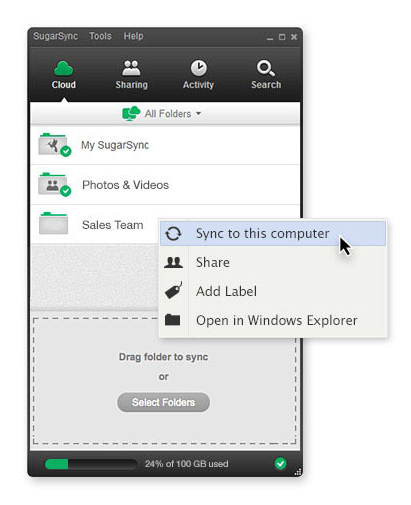
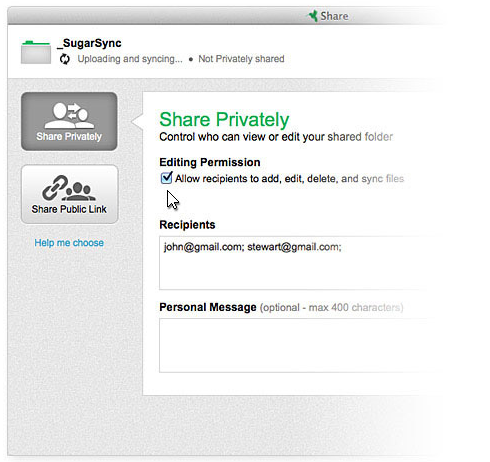
SugarSync Demo -
SugarSync Demo -
SugarSync Demo -
SugarSync Demo -
SugarSync Demo -
SugarSync Demo -
Product Avatar Image

Have you used SugarSync before?

Answer a few questions to help the SugarSync community

SugarSync Reviews (73)

Reviews

SugarSync Reviews (73)

4.0
73 reviews

Review Summary

Generated using AI from real user reviews
Users consistently praise SugarSync for its ease of use and reliable file synchronization across multiple devices, making it a convenient choice for accessing files anytime. Many appreciate the automatic updates and secure cloud storage, although some note that the service can be expensive compared to competitors.

Pros & Cons

Generated from real user reviews
View All Pros and Cons
Search reviews
Filter Reviews
Clear Results
G2 reviews are authentic and verified.
Natalie P.
NP
owner
Information Technology and Services
Small-Business (50 or fewer emp.)
"Great solution for syncing two computers"
What do you like best about SugarSync?

I like that this program will keep certain folders on both my computers synced so that I have the same files in the same place on both computers. This keeps me more organized and efficient when trying to get my work done. Review collected by and hosted on G2.com.

What do you dislike about SugarSync?

I had a very hard time understanding how this program worked. There are support documents but I feel they were hard to understand. It also seemed that the sync process took a very long time and slowed down other activities running on my computer. Review collected by and hosted on G2.com.

Verified User in Information Technology and Services
UI
Small-Business (50 or fewer emp.)
"Works as expected!"
What do you like best about SugarSync?

-Any folder on your computer can be synced, unlike Dropbox, which requires you to put any files to be put in the cloud into the Dropbox folder. (You can also sync your Dropbox folder to SugarSync, which is fun.)

-Is free. You also get more free storage space from SugarSync (5G, I think) vs 2G from Dropbox. However, when signing up on SugarSync, you really have to search around for that free option since they really push the paid account.

Review collected by and hosted on G2.com.

What do you dislike about SugarSync?

Access. Interface is not as easy or user-friendly. The one-click on the Dropbox icon while working on your computer to open up the synced folder is something I wish SugarSync would do. The SugarSync app for Kindle is also a bit obnoxious in that it is sometimes hard to get it to manually sync, and sometimes it crashes. Review collected by and hosted on G2.com.

Renee F.
RF
Owner
Computer & Network Security
Small-Business (50 or fewer emp.)
"Happy SugarSync user since 2008. "
What do you like best about SugarSync?

The Syncing between multiple computers. As a computer consultant this feature, to me, is better than Dropbox. Dropbox creates a directory within the User/Home directory. The nice thing about SugarSync is that your offsite backup can take place within your User/Documents directory. As far as function, depending on the speed of your internet access, along with glitches in the connection, the syncing is fabulous. I have created a virtual paperless business with an administrator, data entry personnel, executive and bookkeeper in separate offices many miles apart. Review collected by and hosted on G2.com.

What do you dislike about SugarSync?

That no longer offers the free 5GB program or a smaller size maximum than 100GB. This can deal breaker for me selling the idea to new clients with a small amount of documents and no pictures, videos or music. I prefer the Premium Documents to Go iOS and Android app over the SugarSync app for file access. Review collected by and hosted on G2.com.

Verified User in Hospital & Health Care
UH
Small-Business (50 or fewer emp.)
"Great file sharing site"
What do you like best about SugarSync?

SugarSync has great options for size of cloud space that is fairly inexpensive. It is very easy to choose which files go into the cloud and which do not. It is very easy to access files from any computer or device at any time. Review collected by and hosted on G2.com.

What do you dislike about SugarSync?

Their app could use quite a bit of work in ease of use and showing picture files in your cloud space. Review collected by and hosted on G2.com.

Verified User in Computer Software
UC
Mid-Market (51-1000 emp.)
"Great in the classroom"
What do you like best about SugarSync?

I used SugarSync as a classroom teacher and loved it. I had three different computers that I used on a daily basis: my classroom laptop, my classroom mac mini, and my personal computer at home. I loved how easy it was to sync between these three machines. It worked and worked well.

I had a few things working against me that really affected my work flow. First off, we had a lot of good websites blocked by the school's proxy. This is common and actually understandable. What I was able to do was collect material at home on my own unsrestricted network (all fair-use, off course from youtube and other sites that were blocked at school and place them in my shared folder for easy access at school the next day. Review collected by and hosted on G2.com.

What do you dislike about SugarSync?

My biggest gripe about the service was that it converted to paid only. This is what actually drove me away. I had actually collected quite a few referrals and was sitting on some bonus storage when I found that I would need to pay for future service. I took the initial deal due to the fact that it was something like 50% off. Review collected by and hosted on G2.com.

Brandon S.
BS
Digital Marketing Manager
Hospitality
"Overall Satisfied with SugarSync"
What do you like best about SugarSync?

Syncing across devices is seamless and enjoy accessing all my files on the go. The pin-code lock is a very handy feature and better than remembering a password. Accessing files between PC and Mac works pretty well. Review collected by and hosted on G2.com.

What do you dislike about SugarSync?

No phone support unless you pay for it. I am very tech savvy. If you are not tech savvy it is very difficult to go through all of the help files to find what you are looking for. It is even more frustrating when you do not know the proper name of the item you are looking for. Figuring out how to download and install the program on a MAC computer coming from a PC was a nightmare. If you don't move your files to the right area then its just a mess. For something i think should have taken 20 minutes took several hours. Review collected by and hosted on G2.com.

Alex C.
AC
"You're files, exactly where they should be"
What do you like best about SugarSync?

- My Documents, Desktop and other folders sync across my home PC, work PC and laptop.

- All files are also available on my phone and iPad.

- Quick file sharing from my phone. Create public download link and email it in just a couple clicks.

- Almost everything else you expect in a cloud storage solution. Review collected by and hosted on G2.com.

What do you dislike about SugarSync?

It's easy to configure but the process takes longer than other cloud storage apps. However, once it's configured properly, you forget that it's even installed. Things are simply where they should be on all of your devices. Review collected by and hosted on G2.com.

Verified User in Financial Services
CF
Enterprise (> 1000 emp.)
Business partner of the seller or seller's competitor, not included in G2 scores.
"SugarSync has made business easier"
What do you like best about SugarSync?

It is very simple to use, simple to learn. It is adaptable to different type of devices, whether MAC or PC, or tablet. I like its ability to access previous versions of a file, add to its appeal. It is one of the cheaper cloud-based file-syncing and storage services out there. Review collected by and hosted on G2.com.

What do you dislike about SugarSync?

When there needs to be multiple user accesses, the price adds up. The new interface is a little bit harder for users to grasp than the old one. The old one is much easier to use. It is harder to navigate and perform rudimentary tasks. Also, I cannot see how many files are left to sync. Review collected by and hosted on G2.com.

Verified User in Computer Software
AC
Mid-Market (51-1000 emp.)
"I used it in my classroom to sync between home and work computers."
What do you like best about SugarSync?

What I liked best about SugarSync was its ease of use. It was quick and easy to use and safe for a school environment. Review collected by and hosted on G2.com.

What do you dislike about SugarSync?

What I dislike about SugarSync is that it was free and then they started charging for it. Review collected by and hosted on G2.com.

Verified User in Human Resources
UH
Small-Business (50 or fewer emp.)
"Doesn't hit the sweet spot"
What do you like best about SugarSync?

It's an effective solution for cloud storage synchronized across your smart phone, tablet, laptop, and desktop. Review collected by and hosted on G2.com.

What do you dislike about SugarSync?

I have a few cloud solutions that I use. The usability of SugarSync is not as good as its competitors. Review collected by and hosted on G2.com.

Questions about SugarSync? Ask real users or explore answers from the community

Get practical answers, real workflows, and honest pros and cons from the G2 community or share your insights.

GU
Guest User

What is SugarSync used for?

Verified User in Public Relations and Communications
G2
Verified User in Public Relations and Communications
Last activity almost 6 years ago

Sharing with non-SugarSync users: is it free?

Pricing Options

Pricing provided by SugarSync.

100GB

$7.49
per month

250Gb

$9.99
per month

500GB

$24.99
per month
SugarSync Comparisons
Product Avatar Image
Microsoft OneDrive
Compare Now
Product Avatar Image
pCloud
Compare Now
Product Avatar Image
Microsoft SharePoint
Compare Now
SugarSync Features
Device Syncing
Web Interface
File Type Support
File following
File Sharing
Simultaneously Editing
Device Management
Storage Limits
Security
Real-time Sync
Storage Capacity
Product Avatar Image
SugarSync