


Restream

By Restream

4.3 out of 5 stars

How would you rate your experience with Restream?

Compare this with other toolsSave it to your board and evaluate your options side by side.
Save to board

Restream Reviews & Product Details

Pricing

Pricing provided by Restream.

Standard

$19.00
Per Month

Restream Media

Restream Demo - Studio
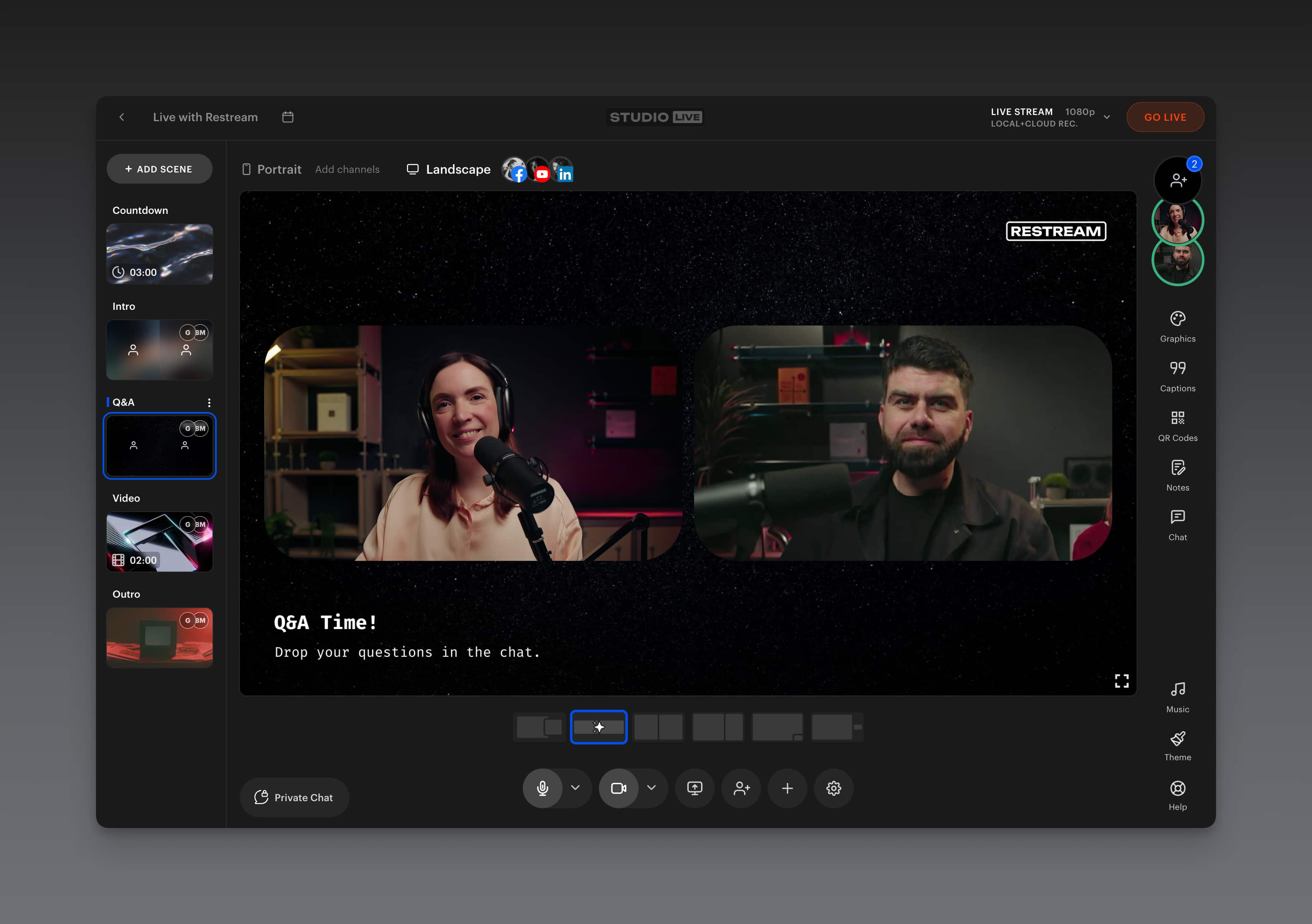
Stream and record in stunning 4K directly from your browser. Restream Studio gives you everything you need for a professional live stream — no downloads required.
Restream Demo - Multistreaming
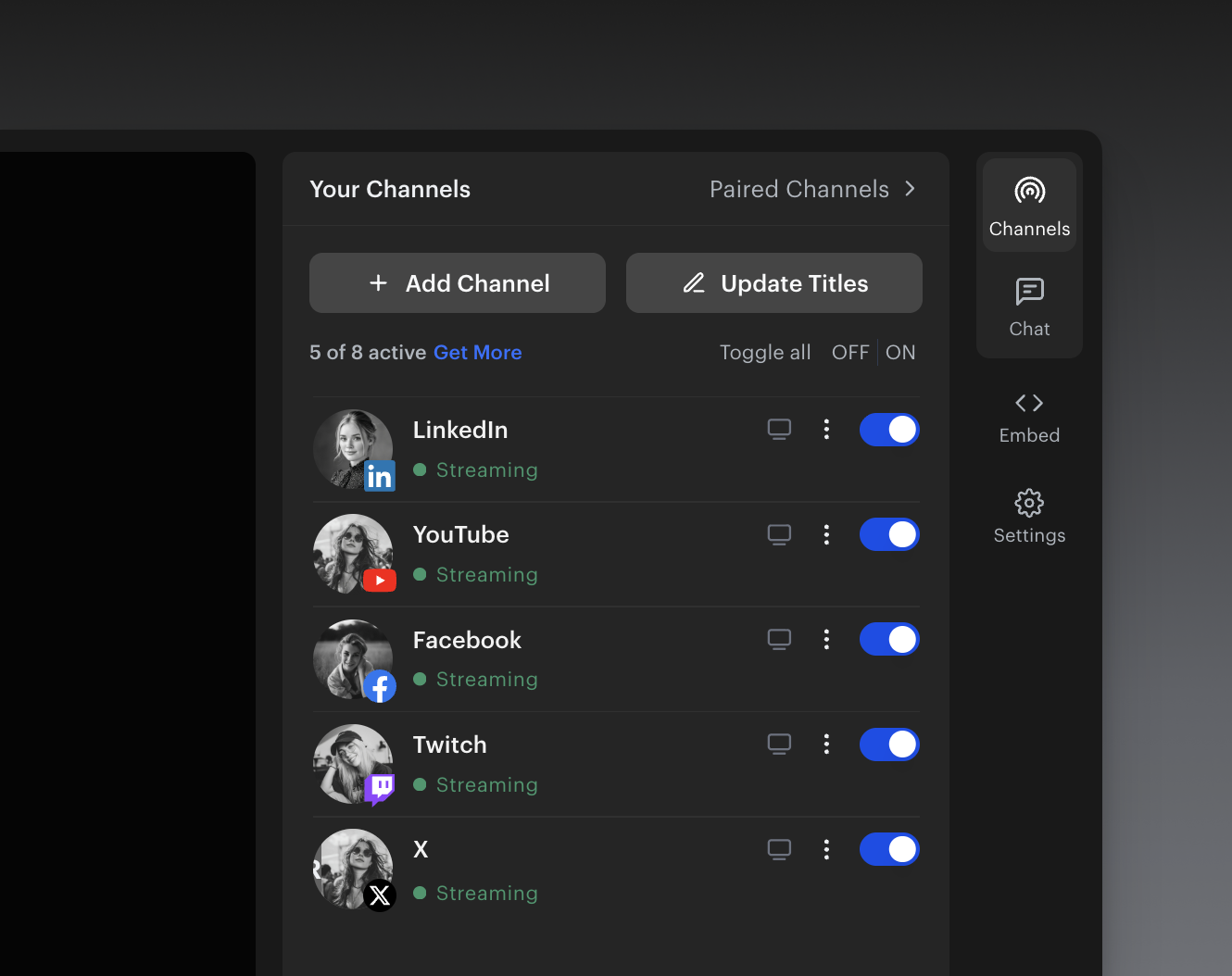
Go live to 30+ platforms at once with a single stream. Reach your entire audience on YouTube, Twitch, LinkedIn, and more.
Restream Demo - Upload and Stream
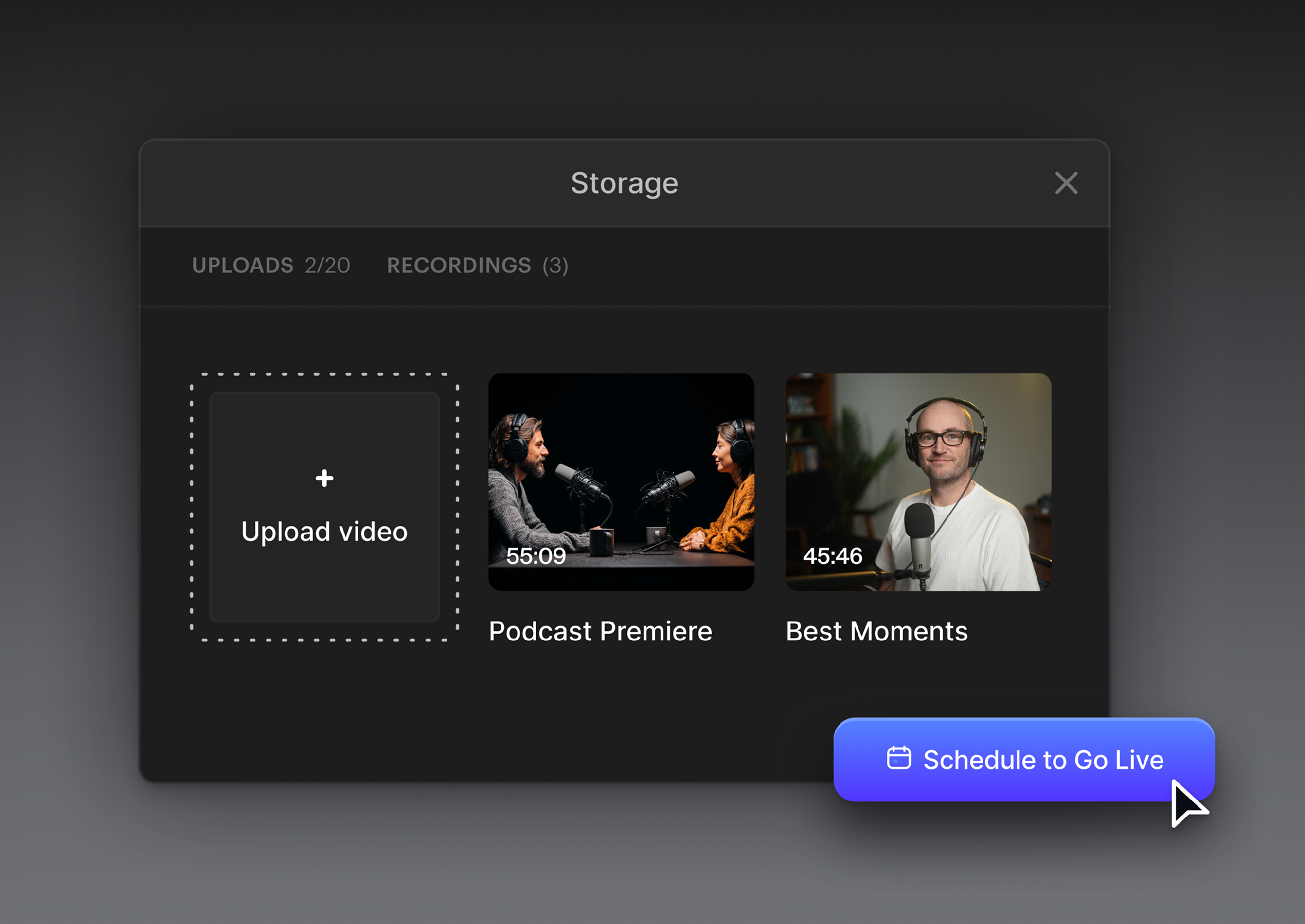
Schedule recorded videos to go live automatically. Algorithms favor live content, so your channel stays active, your views keep climbing, and you keep earning while you sleep.
Restream Demo - Clips
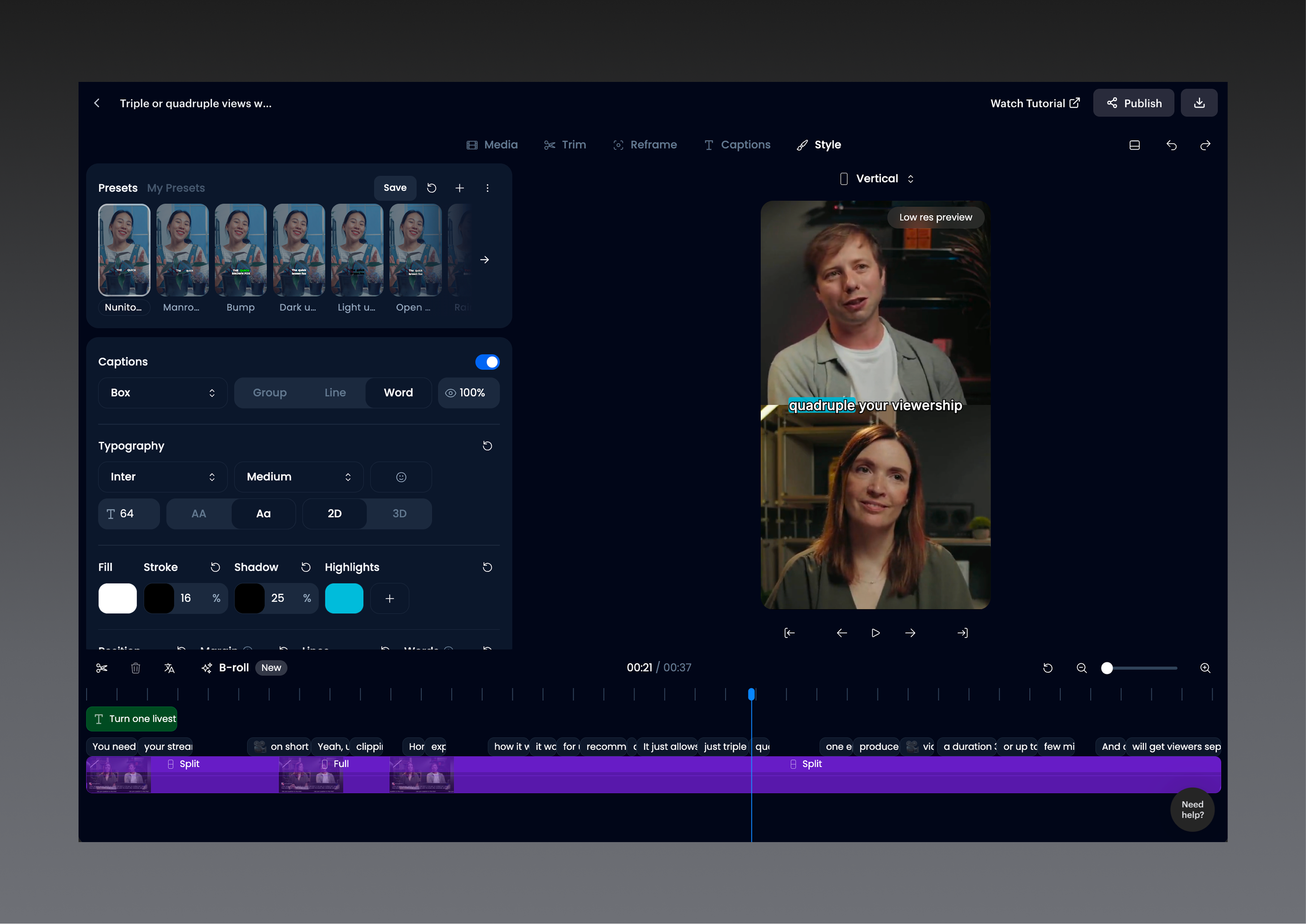
Turn your best moments into viral clips. Repurpose your live streams into short-form content while you’re still live and keep your audience engaged long after you go offline.
Restream Demo - Dual Output
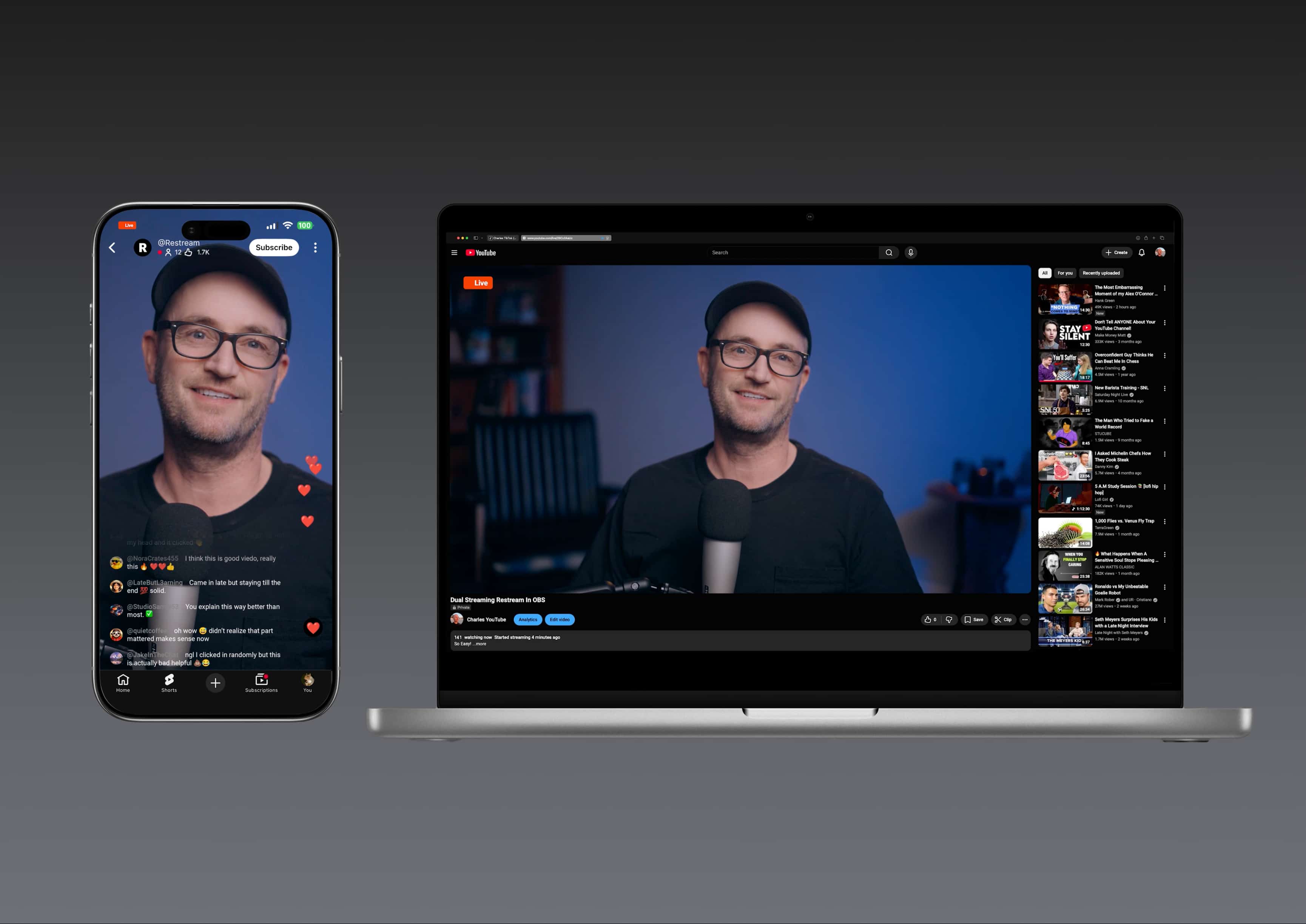
Stream in portrait and landscape mode at the same time. Reach horizontal platforms like YouTube and vertical ones like TikTok with one stream. Look your best on any device.
Restream Studio Scenes let you stay focused on your story by letting you pre-build every layout, camera view, and graphic - then switch between them instantly, live on air.
Play Restream Video
Restream Studio Scenes let you stay focused on your story by letting you pre-build every layout, camera view, and graphic - then switch between them instantly, live on air.
Most creators wait until after the stream to post highlights. By then, the moment's gone and so is the audience.

Use Live Clipping to capture, choose, and share your best moments as they happen.
Play Restream Video
Most creators wait until after the stream to post highlights. By then, the moment's gone and so is the audience. Use Live Clipping to capture, choose, and share your best moments as they happen.
Dual stream vertical and horizontal video at the same time using Restream Studio.
Play Restream Video
Dual stream vertical and horizontal video at the same time using Restream Studio.
Ask AI in Restream Analytics acts like your personal data scientist, analyzing your stream transcripts, chat, and performance data to give you clear, actionable insights in plain English. No charts to decode. No experience required.
Play Restream Video
Ask AI in Restream Analytics acts like your personal data scientist, analyzing your stream transcripts, chat, and performance data to give you clear, actionable insights in plain English. No charts to decode. No experience required.
Product Avatar Image

Have you used Restream before?

Answer a few questions to help the Restream community

Restream Reviews (56)

View 1 Video Reviews
Reviews

Restream Reviews (56)

View 1 Video Reviews
4.3
56 reviews

Review Summary

Generated using AI from real user reviews
Users consistently praise the user-friendly interface of Restream, which simplifies the process of streaming to multiple platforms simultaneously. The ability to easily manage and schedule streams enhances the overall experience, making it a preferred choice for many content creators. However, some users note a limited storage duration for recordings, which can be inconvenient for those needing longer access to their content.

Pros & Cons

Generated from real user reviews
View All Pros and Cons
Search reviews
Filter Reviews
Clear Results
G2 reviews are authentic and verified.
Verified User in Entertainment
UE
Small-Business (50 or fewer emp.)
"A decent software to livestream on multiple platforms!"
What do you like best about Restream?

Restream is a good enough tool to live stream events on multiple platforms at once. It's easy to use, has a great user interface because of which it is very easy to get around this software. The support team is also quick to respond and that is a very helpful service from their end. My favorite feature, however, of this tool, that sets it apart from its competitors is the streaming monitor. It's great how you can monitor if the live stream is good even without entering the studio. This feature really makes things easy for the whole team. Review collected by and hosted on G2.com.

What do you dislike about Restream?

While it's a good software, this isn't perfect. For its features, I find it a bit expensive and that too with limited options. The second best variant only offers 10 custom destinations at a time which honestly isn't a lot, even for a small-medium scale organization. Even the top-most variant offers only 20 custom destinations, which makes it quite a task to organize simultaneous events. Hence, in terms of its pricing and the features that it offers, I would definitely go ahead with similar tools instead of this one. Review collected by and hosted on G2.com.


Zachary A.
ZA
Director of Digital Media and Technology
Mid-Market (51-1000 emp.)
"Restream, its great for what it us, but not for what its not."
What do you like best about Restream?

Great service with a ton of flexibility when producing video Review collected by and hosted on G2.com.
What do you dislike about Restream?

Its made for streamers not really business who want to stream content or events Review collected by and hosted on G2.com.

CG
COO
Small-Business (50 or fewer emp.)
"Amazing tool for streaming content to multiple platforms simultaneously"
What do you like best about Restream?

It's super user-friendly, making it VERY easy to link multiple social media platforms. You can also feed live meetings/webinars from zoom and push that feed to your linked platforms in real-time. Restream studio also has a LOT of added features, graphic/text overlay options, etc. for anyone that doesn't want to use Zoom. Review collected by and hosted on G2.com.

What do you dislike about Restream?

Unfortunately, there isn't a way to link Instagram for restreaming, currently. Review collected by and hosted on G2.com.

Jordan T.
JT
$mart $tart Wage Negotiation Workshop Facilitator & Ambassador
Small-Business (50 or fewer emp.)
"Great for beginners in live-streaming"
What do you like best about Restream?

I used this as a Technology Coordinator for a church congregation's Sunday service live-streaming. I liked that Restream allows you to stream simultaneously to multiple social media platforms from one user interface Review collected by and hosted on G2.com.

What do you dislike about Restream?

It was a bit difficult in the beginning learning the user interface, and it seemed like every time we logged in, there was some delay or issue with the password. Review collected by and hosted on G2.com.

Jean Bertin C.
JC
Analyst MLU - Area Growth & Performance Indicators Team Leader , MSR
Small-Business (50 or fewer emp.)
"Makes it an easy broadcast but hate Branding"
What do you like best about Restream?

I can't say enough good things about restream.io! After using xSplit for a long while, I was having some problems with bandwidth so I was looking around for something that would allow me to multi-stream my streams more effectively. Since I was already using OBS, I knew it would be an easy transition to use Restream. It's so easy to set up and only takes a few minutes to get going. I was able to immediately get 0-lag and was also able to try out a lot of different bandwidth settings to make sure I was getting the most effective one for my situation. Since the views of our broadcasts have increased and donations have increased significantly and I don't have to worry about whether or not I should be streaming on one platform or another. I highly recommend checking out restream.io, you're going to love it! Review collected by and hosted on G2.com.

What do you dislike about Restream?

Restream provides a very useful service for people who want to stream but they need to make some improvements on their branding. The branding on the site is too much and it makes it seem too corporate and not personal. Also, the website isn't very interactive and the colors are not as vibrant as they could be. However, It is a very useful tool and it is very easy to use. Review collected by and hosted on G2.com.

Eirik S.
ES
Product Lead
Small-Business (50 or fewer emp.)
"Great Low Budget Streaming Platform - Pain to Setup Streams"
What do you like best about Restream?

- You can quickly enter the streaming room after a Stream is created.

- Restream made connecting to LinkedIn and YouTube reasonably easy.

- Restream seems to have an excellent Discord integration, but it's not something we used. Review collected by and hosted on G2.com.

What do you dislike about Restream?

- While we were using the product, it was a pain to set up the stream. You would have to go to YouTube and schedule a live streaming event. Then come back to Restream to connect the scheduled event to a Restream based streaming event. The process was relatively unintuitive.

- To my knowledge, after using the service for four months. There is no way to invite multiple people onto your stream. It's just you.

- Very limited customizability on the display of YouTube comments during a stream. This feature is something Streamyard does VERY well (we switched to them because of this). Review collected by and hosted on G2.com.

Response from Victor Bous of Restream

Hello Eirik,

Thank you for the review! We wanted to offer some solutions if you’re going to try our service again in the future.

Using Restream Events, you can post an upcoming event on YouTube (also Facebook and Linkedin) directly on our website. Restream Events provides options to create the event, add a thumbnail, and go live all in one place. Here is a guide for next time:

https://support.restream.io/en/articles/4364026-getting-started-with-restream-events

The Restream Studio also offers the Guest URL, which can invite people to go live with you. You can have up to 10 people creating content simultaneously with you right in the Studio. Here is a guide for the future:

https://support.restream.io/en/articles/3998533-restream-studio-guests

We greatly appreciate your feedback about the customization options you are looking for with the Comments from the connected channels. We will take your feedback and use it to improve in meaningful ways.

Feel free to contact our support team by chat at our website (available 24/7 for everyone), and we will be happy to offer you a free trial of our paid plans and a discount for returning. Hope to hear from you soon!

Rachael W.
RW
Founder/ CEO/ Owner/ Coach
Small-Business (50 or fewer emp.)
"Restream is a brilliant way to Livestream on multiple platforms"
What do you like best about Restream?

Restream is easy to navigate and connect to my social media platforms. Multiple platforms can be linked, including Facebook pages, Facebook groups, LinkedIn, Twitter, and YouTube. Their studio allows me to add graphic/text overlays. Review collected by and hosted on G2.com.

What do you dislike about Restream?

Unfortunately, there is no option to Livestream on Instagram at the moment. Review collected by and hosted on G2.com.

AW
Web Developer
Small-Business (50 or fewer emp.)
"Need to 'live' stream on multiple platforms? Restream is what you need"
What do you like best about Restream?

Restream gives us the ability to multi-stream 'live' to both YouTube and Facebook simultaneously without needing to use any OBS software installed on a local computer Review collected by and hosted on G2.com.

What do you dislike about Restream?

The one thing I dislike about Restream's Scheduler is that it needs any pre-recorded videos over 2GB to be uploaded and scheduled at least 2 hours before streaming is scheduled to start. Review collected by and hosted on G2.com.

Verified User in Information Technology and Services
UI
Small-Business (50 or fewer emp.)
"Nice Experience"
What do you like best about Restream?

I really just like the multi stream aspect of it. It is very smooth & intuitive. Review collected by and hosted on G2.com.

What do you dislike about Restream?

Titles Page is my issue. When you i am selecting a game, i cant just type in the game and it comes up automatically. Let's say "Anthem" for example. Because it is a low priority game, i always have to manually type it in for each of my platforms instead of Restream just letting it update all of my titles along with the game of my choosing automatically. So low priority games are my issue. Review collected by and hosted on G2.com.

EB
Artist
Small-Business (50 or fewer emp.)
"Versatile solution for multi-streaming live and prerecorded video"
What do you like best about Restream?

Restream makes it easy to send a single livestream to multiple destinations, it consolidates chat comments from all destinations into a single thread, and it makes it possible to schedule streams in advance. Standout features: it can receive and pass along RTMP data from other sources (such as Zoom), and it's possible to upload video for scheduled livestreams of prerecorded video content. Restream's tech support is also quite responsive. Review collected by and hosted on G2.com.

What do you dislike about Restream?

Restream's subscription tiers are a bit pricey compared to its closest competitor, Streamyard, especially when it comes to getting rid of branded backgrounds and watermarks in Live Studio, Restream's in-the-box production option. The latest features that allow integration of both RTMP source data and custom overlays and branding are only available at a higher tier. Review collected by and hosted on G2.com.

Questions about Restream? Ask real users or explore answers from the community

Get practical answers, real workflows, and honest pros and cons from the G2 community or share your insights.

GU
Guest User

What is Restream used for?

Mike G.
MG
Mike Grafius
Last activity over 4 years ago

Are there plans to integrate voice chat through the chat service?

Pricing Options

Pricing provided by Restream.

Standard

$19.00
Per Month

Professional

$49.00
Per Month

Business

$239.00
Per Month
Restream Comparisons
Product Avatar Image
StreamYard
Compare Now
Product Avatar Image
Streamlabs
Compare Now
Product Avatar Image
Resi
Compare Now
Restream Features
Hosted Platform
Social Media Stream
Multi-Platform Streaming
Live Rewind
Live Chat
Pause
Highlight Clips
Video Archive
Analytics
Product Avatar Image
Restream