


Compare this with other toolsSave it to your board and evaluate your options side by side.
Save to board

Nerdio Manager Reviews & Product Details

Pricing

Pricing provided by Nerdio Manager.

Azure Virtual Desktop Core

Starting at $6.00
1 AVD User

Nerdio Manager Media

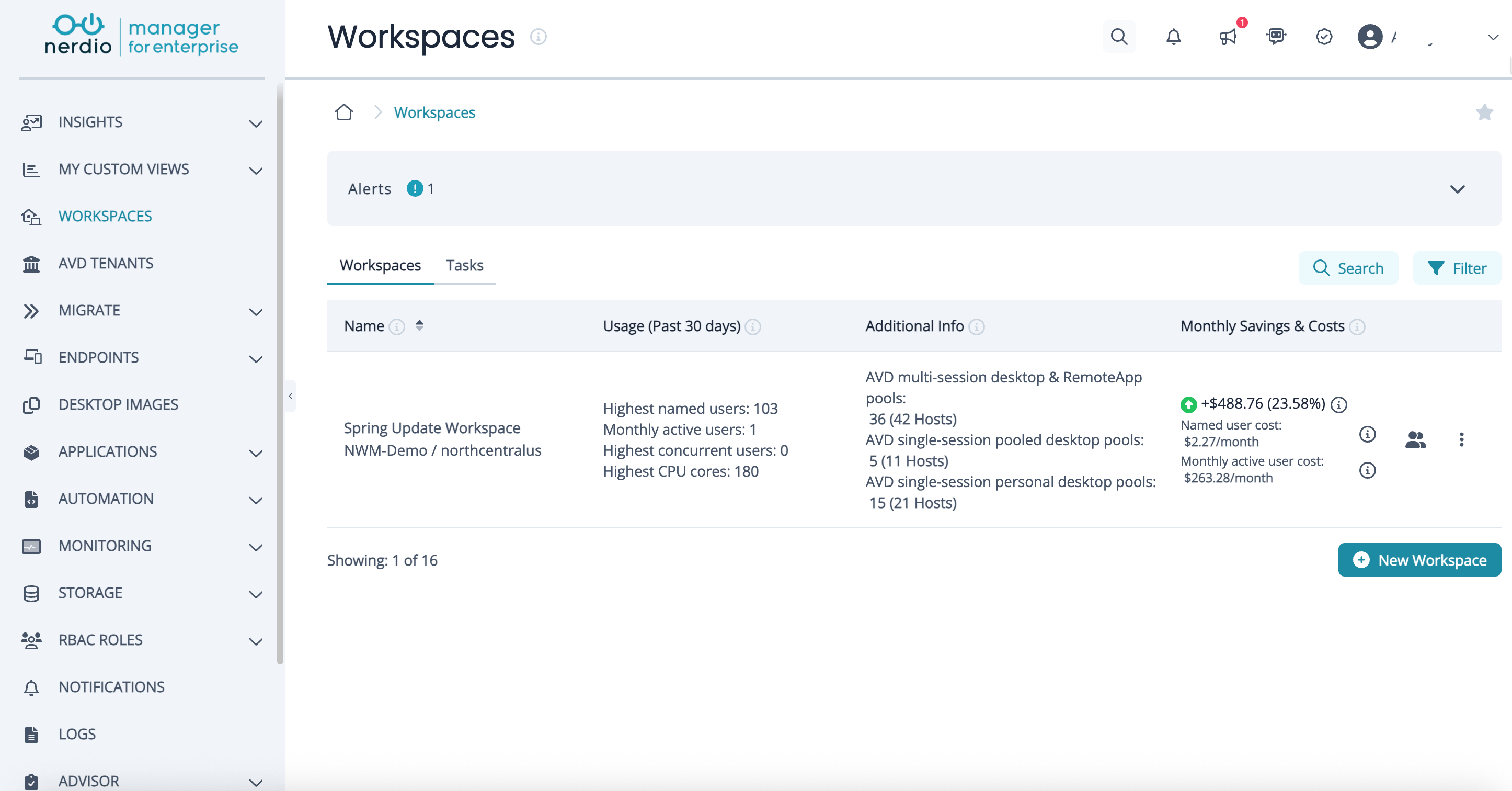
Nerdio Manager Demo - Nerdio Manager homescreen
Manage AVD and Windows 365 workspaces while tracking usage, concurrency, and monthly cost and savings across environments.
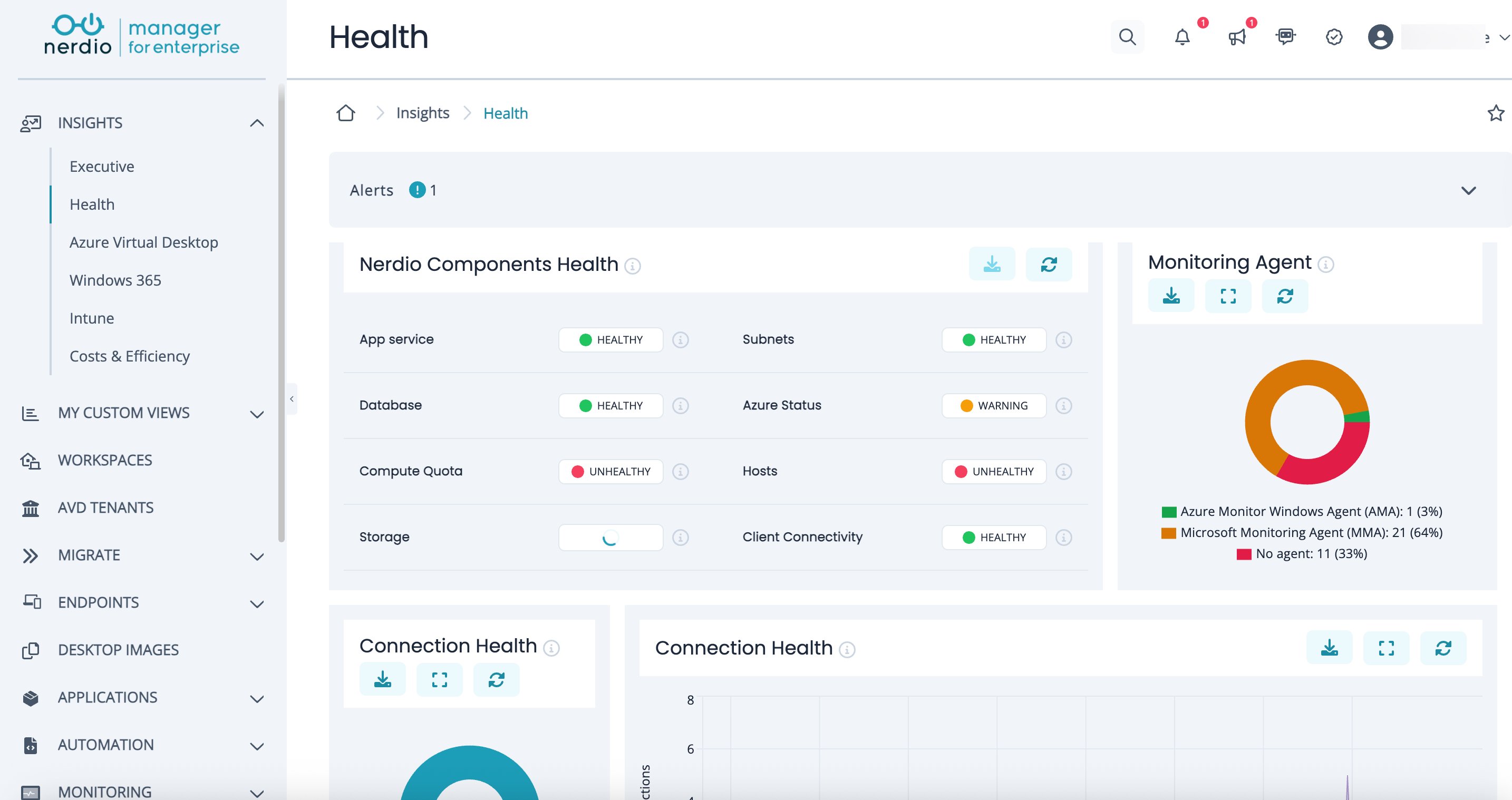
Nerdio Manager Demo - Nerdio Manager health insights
Monitor the health of Nerdio components, Azure infrastructure, and user connectivity with built-in alerts and visual status indicators.
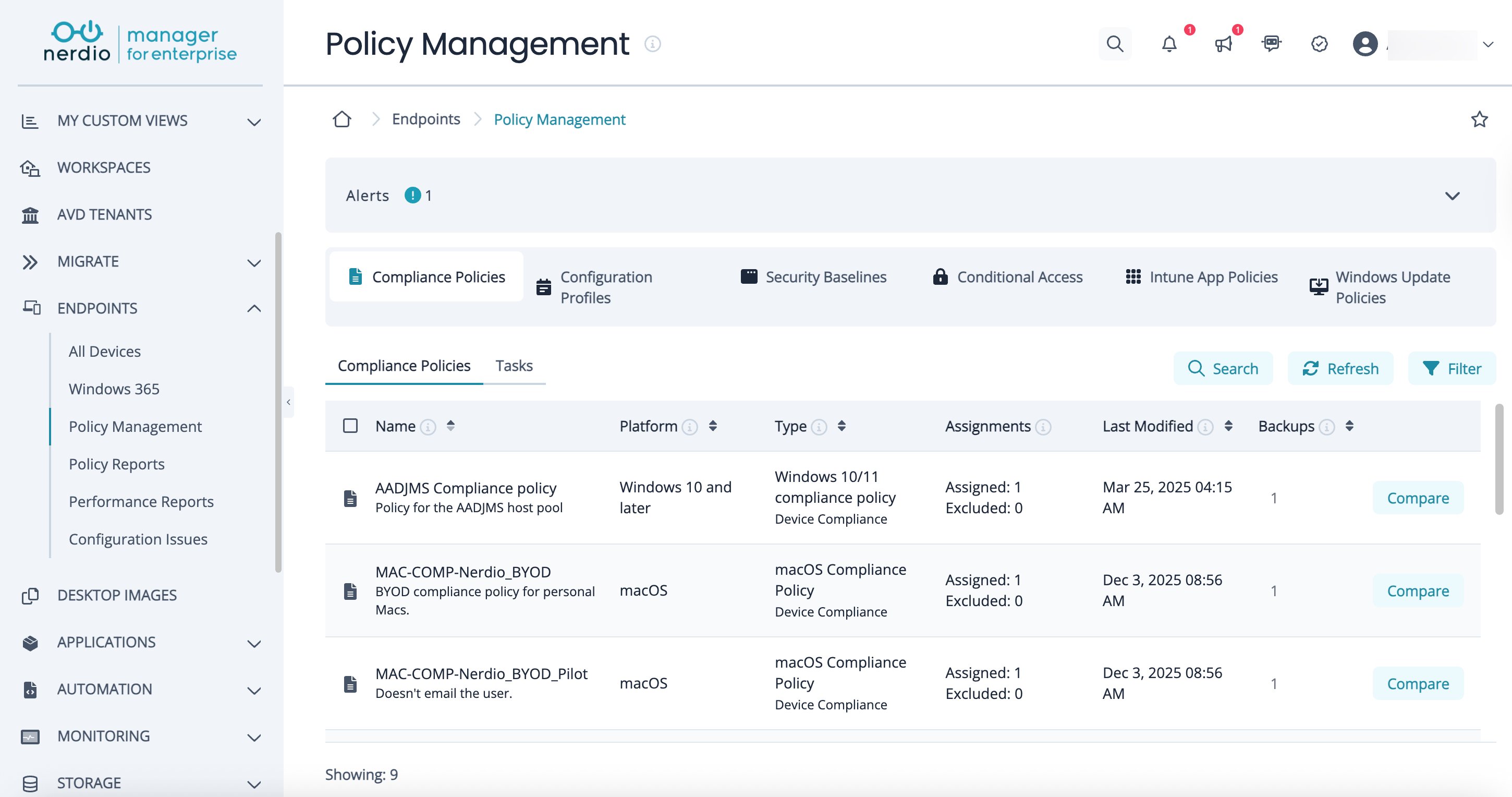
Nerdio Manager Demo - Nerdio Manager policy management
View, manage, and compare Intune compliance policies, configuration profiles, security baselines, and conditional access rules from a single unified console.
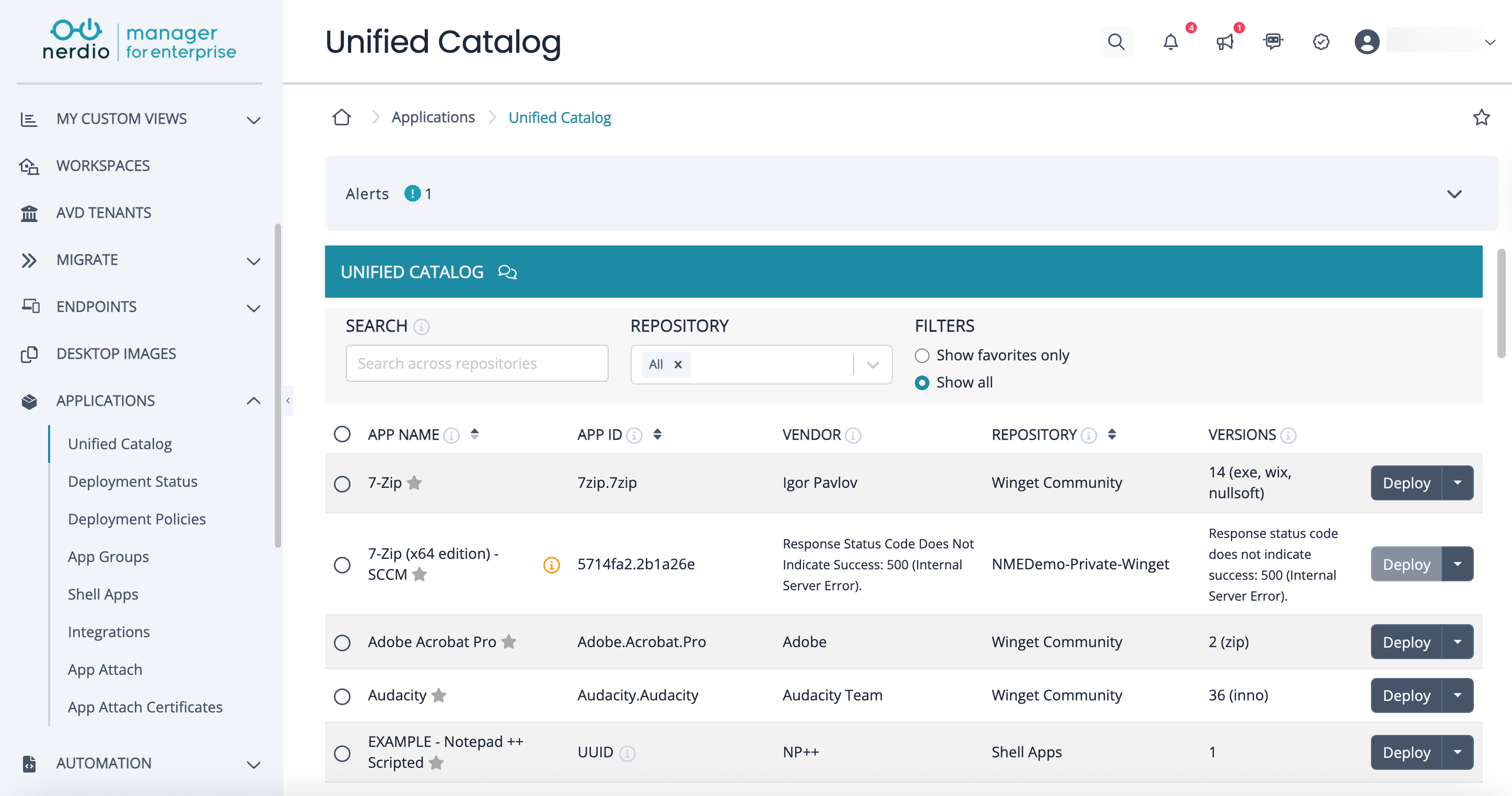
Nerdio Manager Demo - Nerdio Manager application management
Browse, deploy, and manage applications from multiple repositories using a single unified catalog with built-in deployment actions.
Full in-depth demo of Nerdio Manager
Play Nerdio Manager Video
Full in-depth demo of Nerdio Manager
Product Avatar Image

Have you used Nerdio Manager before?

Answer a few questions to help the Nerdio Manager community

Nerdio Manager Reviews (232)

Reviews

Nerdio Manager Reviews (232)

4.7
232 reviews

Review Summary

Generated using AI from real user reviews
Users consistently praise the ease of use and fast setup of Nerdio Manager, highlighting its ability to simplify Azure Virtual Desktop management and automate complex tasks. Many appreciate how it enhances productivity by reducing administrative overhead and providing clear cost visibility. However, some users note that the licensing costs can be high, which may limit its accessibility for smaller businesses.

Pros & Cons

Generated from real user reviews
View All Pros and Cons
Search reviews
Filter Reviews
Clear Results
G2 reviews are authentic and verified.
MH
Customer Support Agent Tier ll
Environmental Services
Small-Business (50 or fewer emp.)
"Streamlines Azure Management, Saves Costs"
What do you like best about Nerdio Manager?

I find Nerdio Manager really easy to use for managing Microsoft Azure Virtual Desktop. Instead of wrestling with the complicated Azure portal, I like that I can deploy virtual computers for our employees, manage their updates, and keep an eye on our cloud performance from a single, easy dashboard. The auto-scaling feature is a game-changer—it automatically wakes up computers as people log in for work and shuts them down when they log off, saving us a massive amount of money every month for the billing cost. What I like most is its cost estimator and unified management. The cost estimator tells us exactly how much it will cost per user, so there are no surprises on our bills. The unified management allows us to manage both personal and multi-session desktops in the same place without switching profiles. As an IT professional, I find the initial setup easy, as it turns hours of manual cloud configuration into a few simple clicks. Review collected by and hosted on G2.com.

What do you dislike about Nerdio Manager?

I think they need to improve the dashboard interface because Nerdio Manager adds new features almost every week, and the dashboard can feel a bit crowded. They should categorize all the new features into different categories so we can find the tools easier. And, I think they need to fix the learning logic because while it's here, that raw concept requires you to understand the best networking and cloud concepts to set up the really advanced automation. Review collected by and hosted on G2.com.


XR
End-user computing engineer
Telecommunications
Small-Business (50 or fewer emp.)
"Better control over virtual environments in daily work"
What do you like best about Nerdio Manager?

I like Nerdio Manager primarily because it enhances uniformity in my activities. Prior to its use, tasks were usually disproportionate and involved more manual verifications. Everything is more standardized now. The features make it easy to organize without any additional effort. It has altered my work attitude, as I no longer need to check every step twice to be sure of the predictable results. Review collected by and hosted on G2.com.

What do you dislike about Nerdio Manager?

When the basic steps required to do something do not work as expected Nerdio Manager can be frustrating. The amount of features is good, but the positioning of features is not always user friendly. This translates to my daily work routine where I end up taking longer time to navigate than work. Review collected by and hosted on G2.com.

JG
Desktop Virtualization Engineer
Information Technology and Services
Small-Business (50 or fewer emp.)
"Clear structure for handling our daily virtual system tasks"
What do you like best about Nerdio Manager?

The best thing about Nerdio is that it maintains our virtual desktop environment in an orderly and manageable manner. It assists in managing user access and system resources more in an organized manner. The quantity of features dedicated to automation and cost management is highly helpful. It is compatible in our cloud environment and minimizes the number of manual changes. This has enabled me to work more efficiently and with less stress in handling a number of users in my daily work. Review collected by and hosted on G2.com.

What do you dislike about Nerdio Manager?

I dislike that certain advanced settings are not very intuitive, and thus can make the adjustments slow. The list of features can be daunting, particularly when searching certain features. This has also affected my job when I have to effect a quick change as it takes more time than anticipated. Review collected by and hosted on G2.com.

AL
Client computing engineer
Information Services
Small-Business (50 or fewer emp.)
"Nerdio Manager helps reduce repetitive admin work"
What do you like best about Nerdio Manager?

In my case, it is the best option since it enhances my resource planning and management among teams. I am able to regulate access by the user and the cost of management in a more organized manner. The features enable me to maintain consistency in the environment without overseeing them all the time. It makes me hopeful that things will work out as planned. Review collected by and hosted on G2.com.

What do you dislike about Nerdio Manager?

One of the negative aspects I have observed is that some of the operations in Nerdio Manager are overly complex. It can be time consuming when I have to make some quick changes. This impacts my work since even simple tasks start adding extra effort. When I have to work with multiple environments, these delays accumulate and impact my productivity. Review collected by and hosted on G2.com.

IB
Senior Software Engineer
Mid-Market (51-1000 emp.)
"One Place for Inventory, Automation, Patch Management, and Remote Troubleshooting"
What do you like best about Nerdio Manager?

Using it I can look at all of the machines I am responsible for, what is installed on them, and what is occurring on them, all from one place. Before we had different systems for inventory, remote access, deployment, etc., so now we have one system. The Couch is comfy tonight so I spent some time playing around with the Automation. Patch Management alone will save our Team a stupid amount of time every Month. Take Control has worked well when it does work; it allows us to have multiple people troubleshooting the same machine without stepping on each other. Review collected by and hosted on G2.com.

What do you dislike about Nerdio Manager?

Machines are listed as "Disconnected" when they are clearly not connected. I still do not understand why. We use another Remote Access Tool for these issues. This makes no sense since the reason we were looking for One Tool was to avoid using Multiple Tools. The Interface is a lot (a LOT) and it will be a little while before you feel your way out of the maze that is the interface. Review collected by and hosted on G2.com.

Patrick B.
PB
IT Consultant
Information Technology and Services
Small-Business (50 or fewer emp.)
"Effortless Azure Integration with Powerful Features and Cost Savings"
What do you like best about Nerdio Manager?

Adds additional features to (in our case) Azure Environments. easy to understand and enables a repeatable process. Simple integration into existing environments or setup into new environments.

Great savings generated when non 24x7 type of resources are setup. Single pane of glass to view multiple Azure environments that utilize host pools, azure files, servers and networking.

Integrations with multiple identity platforms (even on-prem) for various use cases.

Support is great and helpful. Implementation is quick and simple. Review collected by and hosted on G2.com.

What do you dislike about Nerdio Manager?

If not configured correctly, settings applied through Nerdio may conflict with scripts, registry entries, Group Policy Objects, or other policies. While this is largely a user-related issue, having visibility into any downstream overrides would be an extremely useful feature. Review collected by and hosted on G2.com.

SZ
Customer Success Manager
Mid-Market (51-1000 emp.)
"Ridiculously Easy Instance Creation and Onboarding"
What do you like best about Nerdio Manager?

The process of creating and shutting off new instances is ridiculously easy to accomplish; I did not even need to consult a tutorial or manual. And while the couch is comfortable, and I was nearly asleep by the end of the onboarding process, I was able to complete the onboarding process easily enough; I consider this to be a positive indicator. Review collected by and hosted on G2.com.

What do you dislike about Nerdio Manager?

This made me stressed-out, as I would sit there waiting for some type of notification, trying to guess how many credits I would consume. In addition to billing, the Dashboard would take a significant amount of time to populate with information. There is no warning system regarding Memory Thresholds - my application will simply stop working, and then I will find out later that it stopped working due to memory threshold limits. Review collected by and hosted on G2.com.

IL
Cloud network administrator
Design
Small-Business (50 or fewer emp.)
"Structured administration of virtual workspaces across departments"
What do you like best about Nerdio Manager?

The largest benefit of Nerdio Manager to me is that it enhances the process of managing the cloud based workstations. Our IT department is engaged in deep work with Microsoft Azure and Microsoft 365, and Nerdio fits into such ecosystem. I also like the automated option to provision desktops and control user permissions. It spares our administrators a lot of tedious work. Consequently, our department is not busy with routine set up activities, it is busy in providing assistance to employees throughout the company. Review collected by and hosted on G2.com.

What do you dislike about Nerdio Manager?

One of the difficulties that I have had with Nerdio Manager is that some of the configuration options are hidden in several menus. In cases where our team has to alter desktop settings or environment rules, it is sometimes taking longer than anticipated to locate the right controls. Review collected by and hosted on G2.com.

SC
Cloud Desktop Engineer
Information Technology and Services
Small-Business (50 or fewer emp.)
"Nerdio Manager helps manage cloud workspaces for growing companies like ours"
What do you like best about Nerdio Manager?

My best experience with Nerdio Manager is that it gives us an order in our virtual desktop management. I am in charge of IT cloud operations, and the number of features can easier control user environments and schedule resources. The adoption was effective with Microsoft Azure and our company directory and so our team did not have to reassemble the existing processes. Because I use them all day long, it is much easier to have these management options on a single place. Review collected by and hosted on G2.com.

What do you dislike about Nerdio Manager?

My biggest weakness with Nerdio Manager is that it can take time to have configuration rules about various users. Within our company, different areas of work would need different workspace configurations, and checking on these arrangements can at times slow my productivity. The flexibility of the number of features comes at the cost of additional administrative actions. Review collected by and hosted on G2.com.

MP
Chief Operating Officer
Mid-Market (51-1000 emp.)
"Fast VM Deployment and a Single Interface from Any Device"
What do you like best about Nerdio Manager?

Honestly I was impressed by how quickly it deploys VMs and builds machines; when you are supporting an organization with hundreds of desktops in many locations with various vendors, building machines quickly makes a difference. As someone who has supported customers for some time now, I have to respond to numerous customer support requests each day and being able to view everything through a single interface is really great. The ability to use the browser as well as access the system from nearly any device without installing additional certificates or software is a nice feature. Review collected by and hosted on G2.com.

What do you dislike about Nerdio Manager?

The pricing for the license is very expensive, so small businesses should look elsewhere. Also, even though "requires strong network" is a clear requirement for a cloud product, it is still frustrating when applications will freeze after a Windows Update. Session Analytics has much easier to use filters, currently I feel like I need a manual to find the actual information I want. Additionally, the company seems to be constantly renaming their products - XenApp, Xendesktop, Virtual Apps & Desktops, and now Nerdio Manager. Review collected by and hosted on G2.com.

Questions about Nerdio Manager? Ask real users or explore answers from the community

Get practical answers, real workflows, and honest pros and cons from the G2 community or share your insights.

GU
Guest User

What is Nerdio Manager for MSP used for?

GU
Guest User

What is Nerdio Manager for MSP used for?

Pricing Options

Pricing provided by Nerdio Manager.

Azure Virtual Desktop Core

Starting at $6.00
1 AVD User

Azure Virtual Desktop Premium

Starting at $10.00
1 AVD User

Windows 365

Starting at $3.00
1 Windows 365 user
Nerdio Manager Comparisons
Nerdio Manager Features
Two-Factor Authentication
Single Sign-On (SSO)
Encryption
Admin Console
Administration Console
Test Automation
Product Avatar Image
Nerdio Manager