Compare this with other toolsSave it to your board and evaluate your options side by side.
Save to board

Lucid Visual Collaboration Suite Reviews & Product Details

Pricing

Pricing provided by Lucid Visual Collaboration....

Free Bundle

$0.00

Lucid Visual Collaboration Suite Media

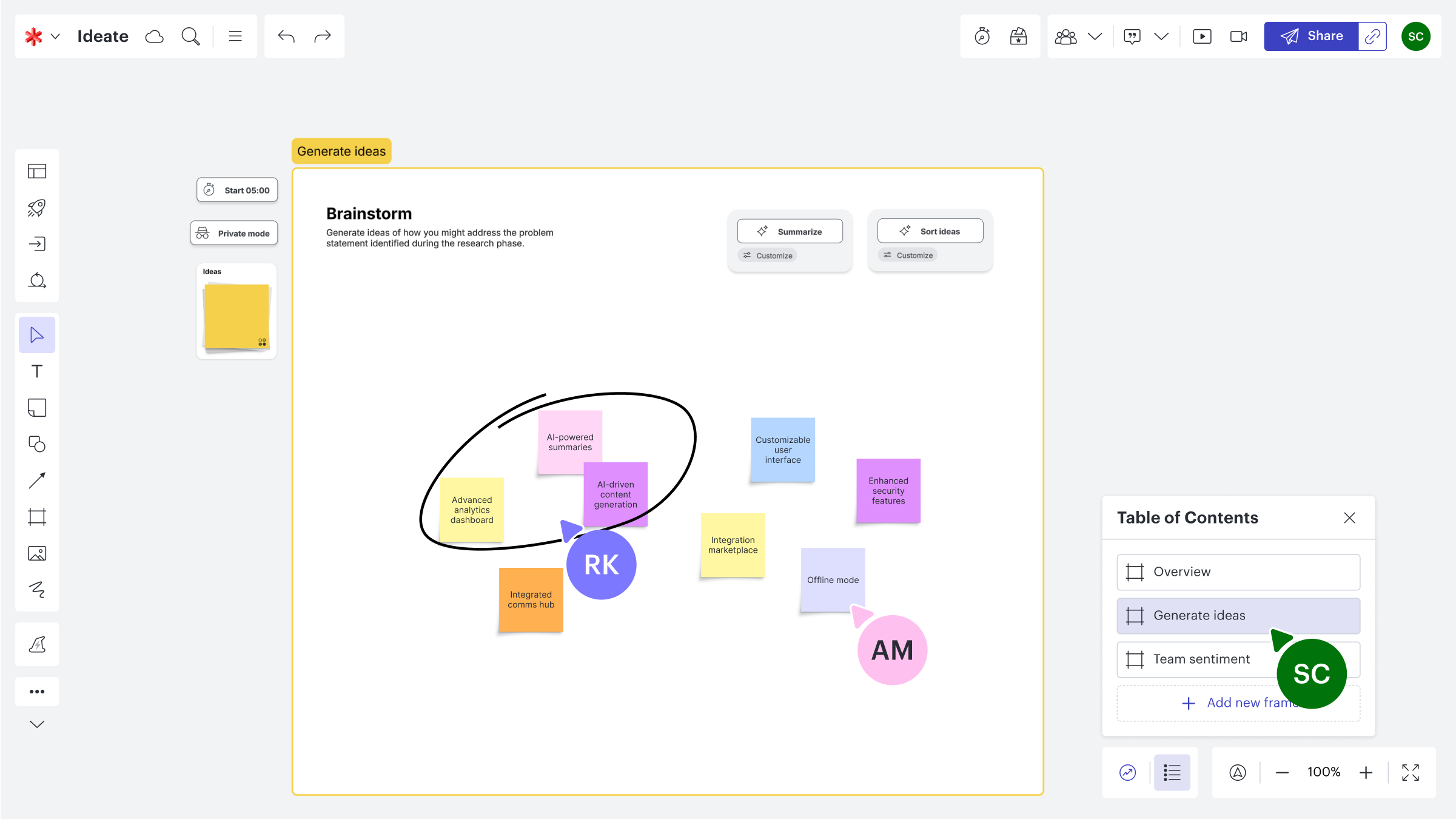
Lucid Visual Collaboration Suite Demo - Lucidspark Brainstorming Board
An interactive brainstorming board in Lucidspark where team members co-create and organize ideas using sticky notes, frames, and annotations. The screenshot highlights features like “Summarize” and “Sort ideas,” empowering teams to refine creative thinking into actionable strategies with clarity ...
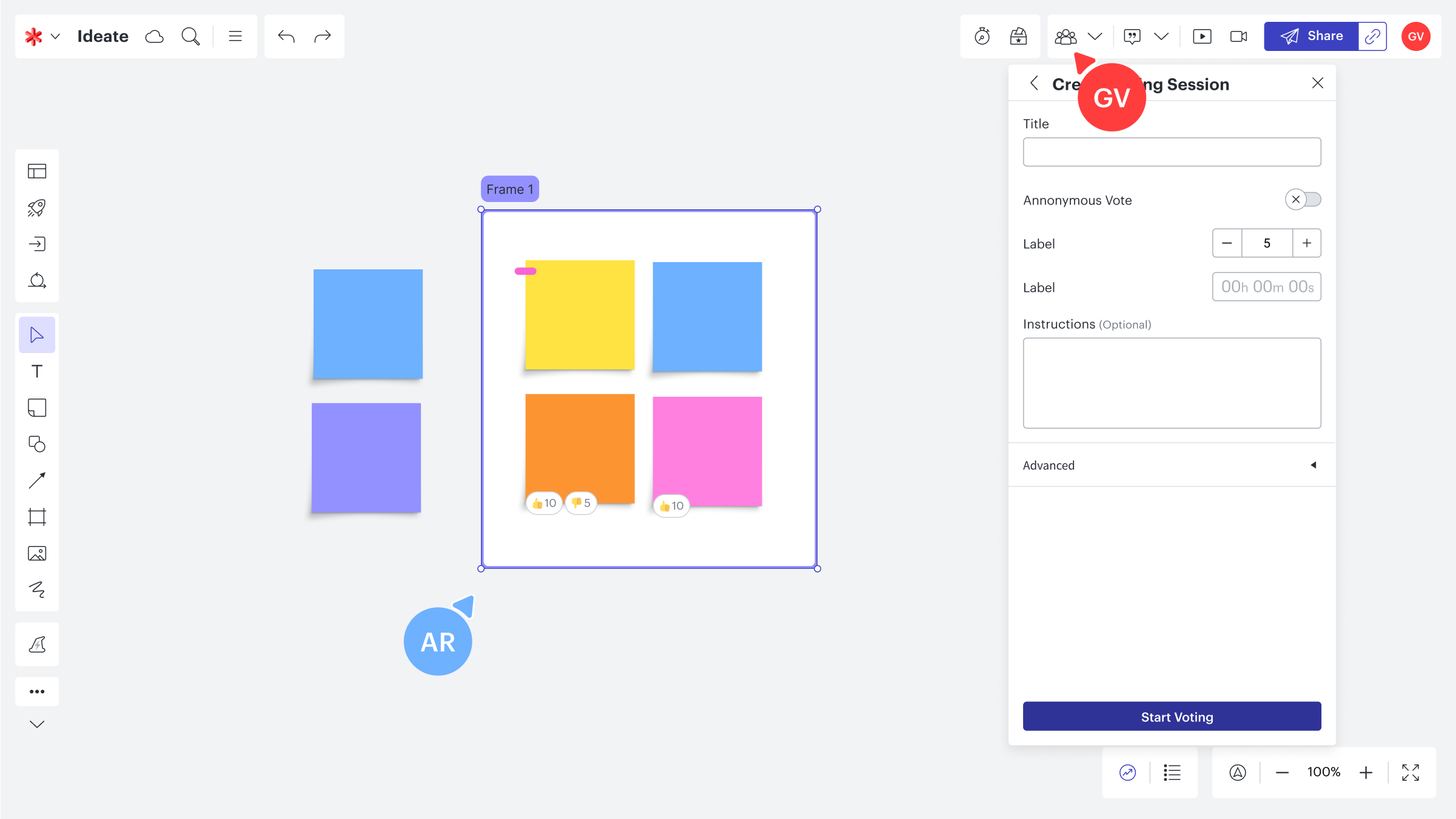
Lucid Visual Collaboration Suite Demo - Lucidspark Collaborative Voting Session
A Lucidspark board in action during a team ideation session, featuring colorful sticky notes and real-time collaboration tools. The image showcases Lucid’s built-in voting feature—allowing teams to prioritize ideas, give feedback, and make data-driven decisions in an engaging, visual workspace.
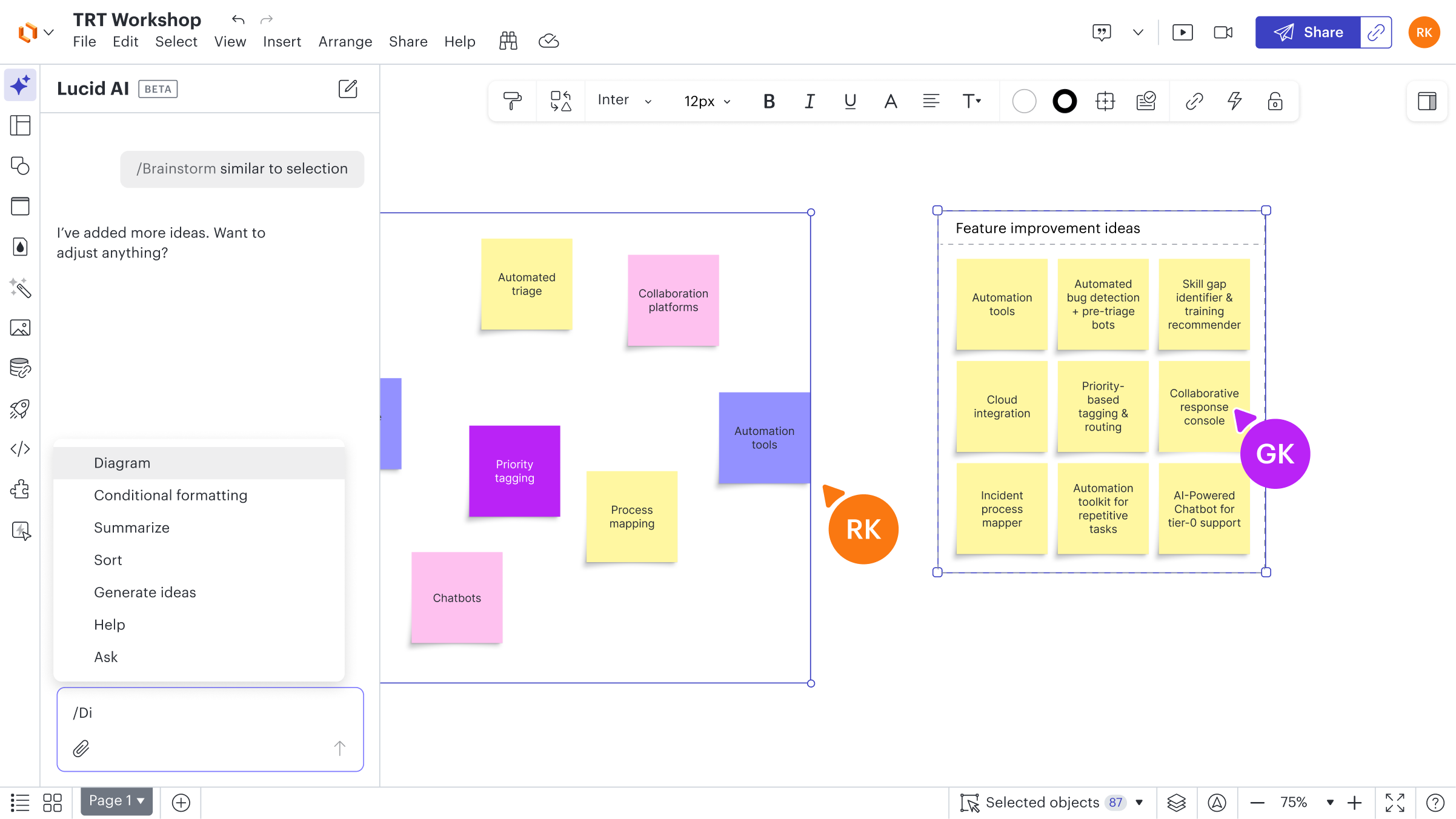
Lucid Visual Collaboration Suite Demo - Lucidchart AI for Idea Generation
A Lucid AI-enhanced workshop board showing AI-assisted brainstorming and idea clustering. The screenshot captures how AI helps teams generate new ideas, categorize insights, and accelerate innovation through intelligent suggestions—all seamlessly integrated into Lucid’s collaborative canvas.
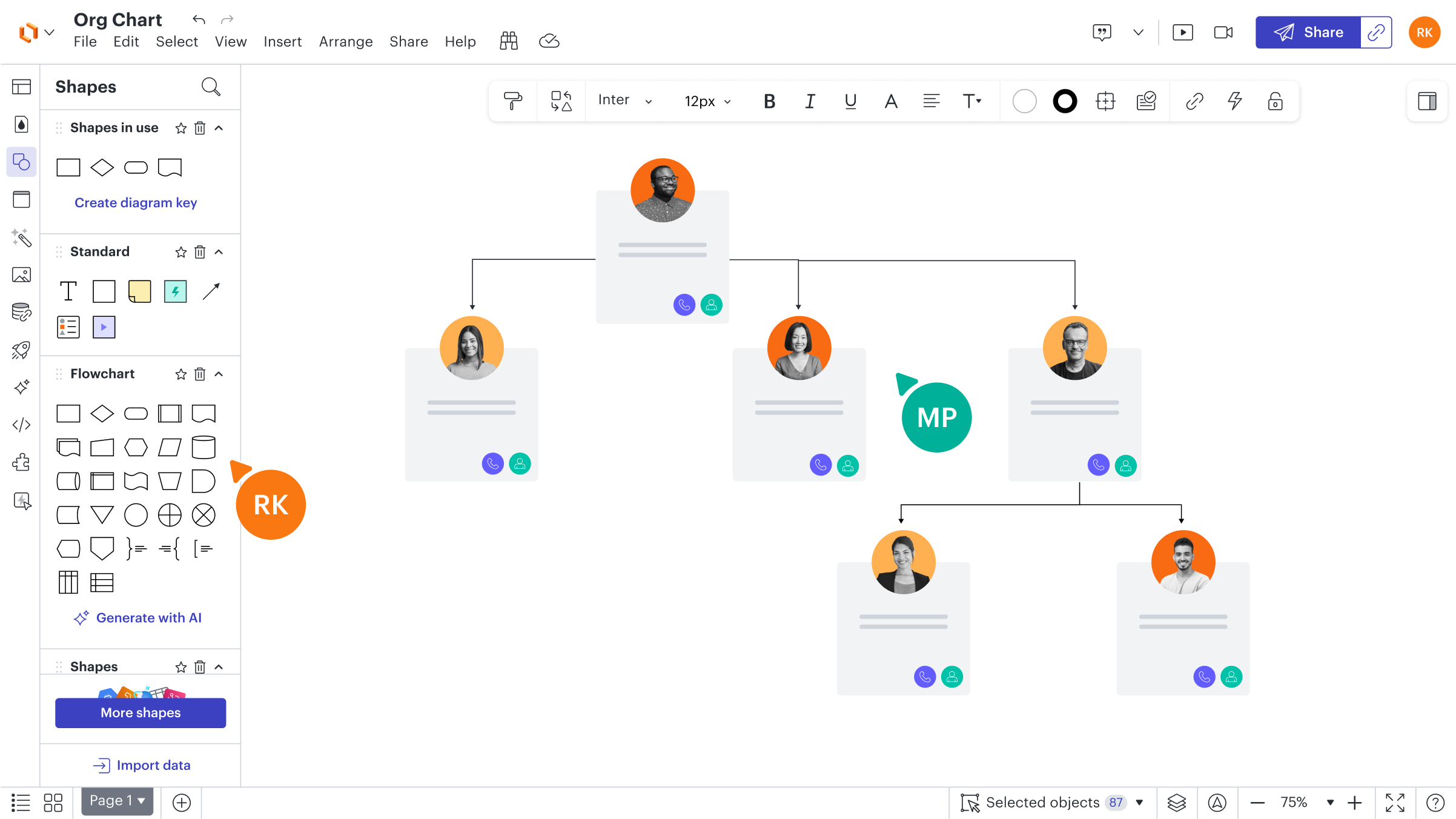
Lucid Visual Collaboration Suite Demo - Lucidchart Org Chart Example
A sample organization chart built in Lucidchart, showing a clean, collaborative workspace with connected employee cards, profile photos, and role hierarchies. The interface highlights Lucid’s intuitive diagramming tools—drag-and-drop shapes, smart connectors, and integrated team collaboration fea...
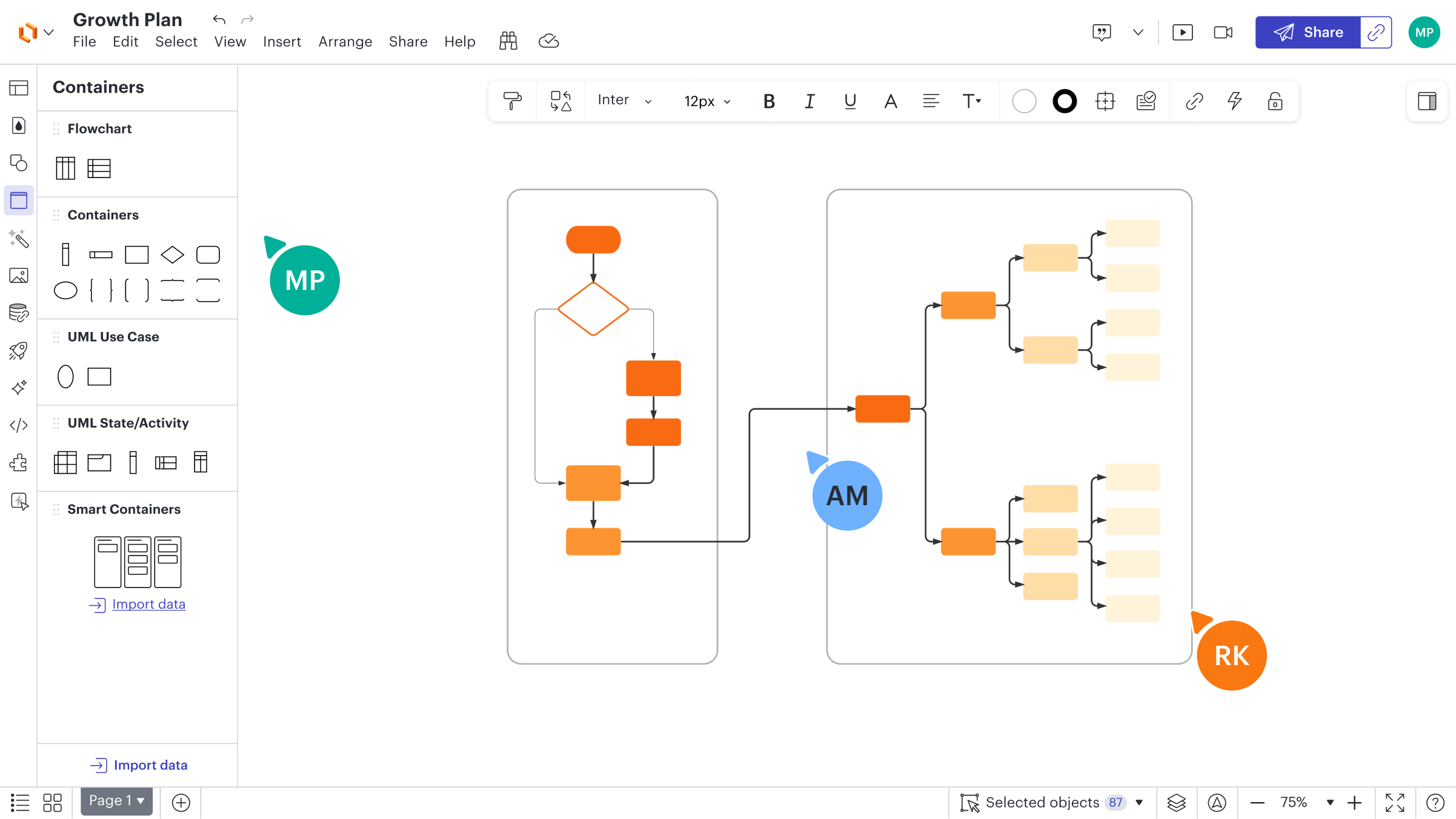
Lucid Visual Collaboration Suite Demo - Lucidchart Growth Plan Diagram
A visual growth strategy map created in Lucidchart, showcasing interconnected flowcharts and smart containers for process planning and team alignment. The image highlights Lucid’s collaborative diagramming interface—intuitive shapes, connectors, and data-driven visuals that make it easy for teams...
Discover how Lucidspark and Lucidchart work together inside the Lucid Visual Collaboration Suite to take your team from concept to clarity.
Play Lucid Visual Collaboration Suite Video
Discover how Lucidspark and Lucidchart work together inside the Lucid Visual Collaboration Suite to take your team from concept to clarity.
Product Avatar Image

Have you used Lucid Visual Collaboration Suite before?

Answer a few questions to help the Lucid Visual Collaboration Suite community

Lucid Visual Collaboration Suite Reviews (8,538)

View 8 Video Reviews
Reviews

Lucid Visual Collaboration Suite Reviews (8,538)

View 8 Video Reviews
4.5
8,538 reviews

Review Summary

Generated using AI from real user reviews
Users consistently praise the intuitive interface and real-time collaboration features of Lucid Visual Collaboration Suite, which make it easy to create and share diagrams. The platform's flexibility allows for effective visualization of complex processes, enhancing team communication and project organization. However, some users note that performance can slow down with larger projects.

Pros & Cons

Generated from real user reviews
View All Pros and Cons
Search reviews
Filter Reviews
Clear Results
G2 reviews are authentic and verified.
MW
Sales Administration Support
Information Technology and Services
Small-Business (50 or fewer emp.)
"Makes Site Photos Easy to Turn Into Shareable Construction Drawings"
What do you like best about Lucid Visual Collaboration Suite?

For my purposes, this app helps me take a photo of a live installation site and then draw construction images that I can share with contractors, whether they’re electrical or in other trades. It’s also helpful that multiple members of my team can view the drawings, edit them, and add comments. Review collected by and hosted on G2.com.

What do you dislike about Lucid Visual Collaboration Suite?

When I was first getting started, I found I needed to spend time learning each individual function in order to draw the diagrams correctly. I don’t usually use tutorials (even though I probably should), so I ended up testing each function to see what it did before I could get the result I wanted. To be fair, once I saw a few examples of how the diagrams were supposed to look, everything became a lot easier. Review collected by and hosted on G2.com.

Fernando G.
FG
Gerente de Supply Chain
Enterprise (> 1000 emp.)
"The Most Complete, Easy-to-Use Tool for Org Charts, Mind Maps, and Flowcharts"
What do you like best about Lucid Visual Collaboration Suite?

From all the software I’ve tested (Mind Meister, Miro, Visio), I find Lucid to be the most complete overall. With it, I can do great work on org charts, mind maps, and flow charts. I’ve used it to assess my team: I was able to import the data via CSV and then, later on, edit the data fields directly in Lucid.

I also find it one of the easiest tools to use. That simplicity helps me move faster when I’m trying to materialize something that’s still amorphous in my head, so I can step back, see the big picture, and understand how things correlate. Review collected by and hosted on G2.com.

What do you dislike about Lucid Visual Collaboration Suite?

When I look specifically at the mind map functionality, Mind Meister feels far superior. It automatically creates topics and subtopics and organizes them into a tree structure. With Lucid, I can achieve the same result, but it takes more effort and requires more manual manipulation. Review collected by and hosted on G2.com.

JH
Student
Small-Business (50 or fewer emp.)
"Lucid Made Flowcharts Fast and Clear for My Computer Science Final examination project"
What do you like best about Lucid Visual Collaboration Suite?

I used the Lucid collaboration suite for my computer science exam. This software made it much easier to create flowcharts, and it honestly saved me because I had forgotten to make one and only had a few hours to finish everything. Lucid performed really well and let me map out my Python code and embedded systems process clearly, so I was able to put it together in under an hour. Review collected by and hosted on G2.com.

What do you dislike about Lucid Visual Collaboration Suite?

The only complaint I have about Lucid is that it was a bit tedious to delete elements in the flowchart I made on an iPad. I had to press and hold an element for several seconds before the delete option appeared, which got annoying. Other than that, everything else was great. Review collected by and hosted on G2.com.

Mohammed Dastageer G.
MG
Mba Student
Small-Business (50 or fewer emp.)
"Real time collaboration made simplen - A mba student experience with Lucid"
What do you like best about Lucid Visual Collaboration Suite?

The drag drop diagram interface is very intuitive, creating flowcharts , mindmaps and diagrams are easy. The same canvas working feature is a time saver. Microsoft 365 integrations are my favorite which saves my time in presentations.There were no lags during my usage and canvas loading was quite good and pricing is okish. The support and onboarding tutorials are too good and helped me to know lucid better. The ai integration in Lucid is also a timesaver which helped me convert text to diagrams. Review collected by and hosted on G2.com.

What do you dislike about Lucid Visual Collaboration Suite?

The Mouse issue like zoom in outs need to be somewhat rectified. Review collected by and hosted on G2.com.

VT
Broadcast Engineer Trainee
Mid-Market (51-1000 emp.)
"Simple, Fast Diagramming That Makes Real-Time Collaboration Easy"
What do you like best about Lucid Visual Collaboration Suite?

What I like most about Lucid Visual Collaboration Suite is how simple and user-friendly it is. I can create diagrams quickly without getting confused, and the drag-and-drop tools keep the whole process fast and straightforward. It’s also excellent for teamwork, since multiple people can work on the same diagram in real time, making collaboration smooth, efficient, and easy to manage. Review collected by and hosted on G2.com.

What do you dislike about Lucid Visual Collaboration Suite?

What I dislike about Lucid Visual Collaboration Suite is that it can sometimes feel a bit slow, especially when I’m working on larger or more complex diagrams. I also find it limiting that some useful features are locked behind the paid version. And at times, when I’m managing multiple elements on the canvas at once, things can get a little confusing. Review collected by and hosted on G2.com.

Vaishnavi S.
VS
Consultant
Mid-Market (51-1000 emp.)
"Simplifying Complex Ideas Visually"
What do you like best about Lucid Visual Collaboration Suite?

What I like most about Lucid Visual Collaboration Suite is how intuitive it is and how well it supports collaboration when the work gets complex. The interface feels genuinely user-friendly, so I can quickly build flowcharts, diagrams, and other visual frameworks without needing extensive training.

I also really value the real-time collaboration features. They make it easy for teams to work together smoothly, share ideas right away, and stay aligned even when everyone is remote. Being able to combine visuals with structured thinking helps me break down complicated concepts and communicate them with more clarity.

Another standout for me is its versatility. Whether I’m doing process mapping, brainstorming, or putting together structured workflows, Lucid adapts well to different use cases. Overall, it boosts productivity and makes collaboration feel more engaging and efficient. Review collected by and hosted on G2.com.

What do you dislike about Lucid Visual Collaboration Suite?

While Lucid Visual Collaboration Suite is highly effective overall, there are still a few areas where it could improve. At times, the platform feels a bit slow or laggy when I’m working on larger or more complex diagrams, especially when multiple collaborators are editing at the same time.

Some advanced features and templates are also locked behind premium plans, which can be limiting if you rely on the free version. On top of that, there’s a learning curve once you start exploring the more advanced functionality, since it isn’t always immediately intuitive.

Finally, stronger offline support and smoother performance in low-bandwidth environments would make the experience even better. Review collected by and hosted on G2.com.

MS
Senior Staff Software Engineer
Enterprise (> 1000 emp.)
"Intuitive, AI-Powered Diagramming That Supercharges Team Collaboration"
What do you like best about Lucid Visual Collaboration Suite?

It allows the team to collaborate during the design phase, share suggestions, and refine the final outcome. It provides the right tools and visual elements to create a clear, meaningful architecture. The AI-powered diagram generator is also very useful.

The UI for the application is very intuitive and specially drag and drop feature. It speeds up the process and requires very less effort to get used to.

Integration with 3rd party tools is amazing, it lets you import data from google sheets, SQL, excel, csv and even sticky notes and build charts and diagrams based on that. It is perfect blend of performance and simplicity while keeping the experience snappy. It is a value for money product and provides good ROI. Their support system is very pro-active and community provides answer to most of the questions. Review collected by and hosted on G2.com.

What do you dislike about Lucid Visual Collaboration Suite?

Just one thing that comes to my mind is, having a desktop lucid app would be a nice addition for people who still prefer a desktop app instead of a browser-based app. Review collected by and hosted on G2.com.

Edward C.
EC
Ecommerce Manager
Small-Business (50 or fewer emp.)
"Intuitive, No-Frills Visual Aid Tool"
What do you like best about Lucid Visual Collaboration Suite?

I use Lucid Visual Collaboration Suite to make my company's Amazon workflow. I needed software that was easy to use and understand, and that I can export to a PDF file. It's highly valuable for organizing my thoughts into a visual decision tree. I like that I didn't have to go to any tutorial to use the website or encounter any pay walls to start using. I appreciate the snap-on features for the arrows, which make building and modifying decision trees easy without worrying about the nuances of the arrows. The initial setup was super easy, very intuitive, and I could start using it right off the bat, which I really liked. Review collected by and hosted on G2.com.

What do you dislike about Lucid Visual Collaboration Suite?

Nothing to complain about, it's simple and easy. Review collected by and hosted on G2.com.

Lavanya J.
LJ
Sr Design Researcher
Mid-Market (51-1000 emp.)
"A game changer"
What do you like best about Lucid Visual Collaboration Suite?

As a researcher, I’ve found that Lucid is where my messy qualitative data finally starts to make sense. It’s been a game-changer for moving from "stacks of notes" to clear, visual service blueprints that stakeholders actually enjoy reading. I use the infinite canvas to bridge the gap between deep-dive ethnographic observations and high-level design thinking, nesting granular user insights directly into broader ecosystem maps.

The real-time collaboration features are what save me during workshops; instead of just presenting a static deck, I can lead live "How Might We" sessions that turn abstract ideas into a shared visual narrative. It has fundamentally changed how I communicate complex systems to leadership, making the research feel less like a report and more like a living roadmap. It’s honestly the most reliable way I've found to keep cross-functional teams aligned on the same user story. Review collected by and hosted on G2.com.

What do you dislike about Lucid Visual Collaboration Suite?

While I’m a power user, the biggest hurdle is the friction between the different "modes" of the suite; jumping between the fluid, messy brainstorming of Lucidspark and the rigid structure of Lucidchart can break my creative flow when I’m trying to turn raw interview notes into a formal service map. I’ve also noticed that once a board gets populated with hundreds of sticky notes and high-res images from ethnographic sessions, the performance starts to lag, which is a bit stressful during a high-stakes live workshop. The "smart" formatting tools are helpful for speed, but they can be surprisingly stubborn when I need to customize a specific layout for a unique user journey. I’d love to see a more seamless bridge between the two products and a bit more "snappiness" when handling massive, data-heavy canvases so the tool can truly keep up with the pace of a fast-moving research synthesis. Review collected by and hosted on G2.com.

MIHIR U.
MU
Developer
Information Technology and Services
Mid-Market (51-1000 emp.)
"Intuitive Tool Simplifies Complex Ideas, Needs Performance Boost for Large Diagrams"
What do you like best about Lucid Visual Collaboration Suite?

I use Lucid Visual Collaboration Suite to create flowcharts, diagrams, and visual workflows that help my team plan projects. I use it regularly during project planning and discussions. It makes complex ideas easier to understand and helps the team stay aligned. I like that it's easy to use and helps the team visualize ideas clearly.

The drag-and-drop diagrams and pre-made templates are very helpful because they make it quick to create clear visuals without starting from scratch, which saves time and makes workflows easier to understand. It’s also quick to set up, and the integration with Microsoft Teams helps with real-time collaboration. The customer support resources and documentation are also helpful when we need guidance. Review collected by and hosted on G2.com.

What do you dislike about Lucid Visual Collaboration Suite?

One challenge is that large diagrams can become cluttered, and editing or moving many elements at once can be a bit slow. When diagrams contain many shapes and connectors, dragging or rearranging them sometimes lags. Improving performance for complex diagrams would make the experience even better. Review collected by and hosted on G2.com.

Questions about Lucid Visual Collaboration Suite? Ask real users or explore answers from the community

Get practical answers, real workflows, and honest pros and cons from the G2 community or share your insights.

GU
Guest User
Last activity 9 days ago

What is Lucidchart used for?

GU
Guest User
Last activity 21 days ago

Is Lucidchart any good?

Pricing Options

Pricing provided by Lucid Visual Collaboration....

Free Bundle

$0.00

Individual Bundle

Starting at $11.93

Team Bundle

Starting at $13.50
Lucid Visual Collaboration Suite Comparisons
Product Avatar Image
Miro
Compare Now
Product Avatar Image
Visio
Compare Now
Product Avatar Image
Draw.io
Compare Now
Lucid Visual Collaboration Suite Features
Drawing
Marker Colors
Mind Mapping
Voting
Commenting
CMS Integrations
Sharing
In-Browser
Product Avatar Image
Lucid Visual Collaboration...