

It's been two months since this profile received a new review
Leave a Review
Compare this with other toolsSave it to your board and evaluate your options side by side.
Save to board

Dropbox Dash Reviews & Product Details

Value at a Glance

Averages based on real user reviews.

Time to Implement

<1 month

Dropbox Dash Media

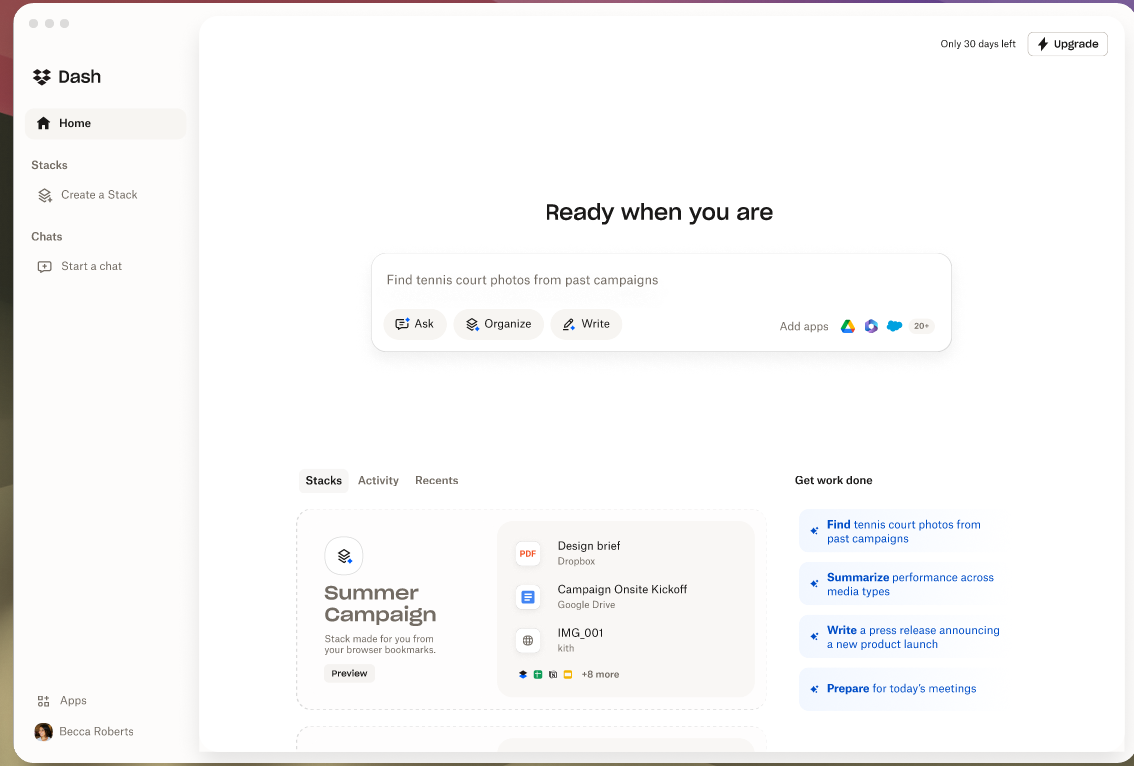
Dropbox Dash Demo - Start Page
Accomplish more, from one AI-powered workplace.
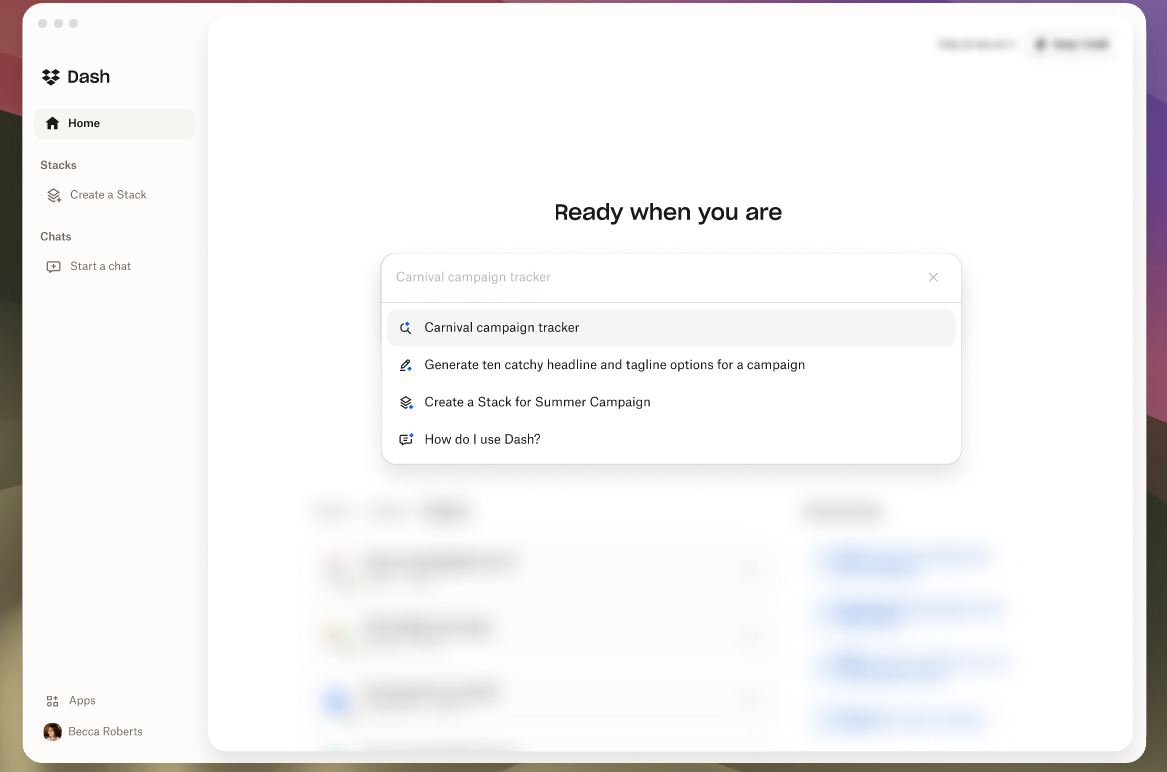
Dropbox Dash Demo - Find
Dash brings all of your content, across connected apps into one searchable hub. Search files, media, people, and more - all in one place.
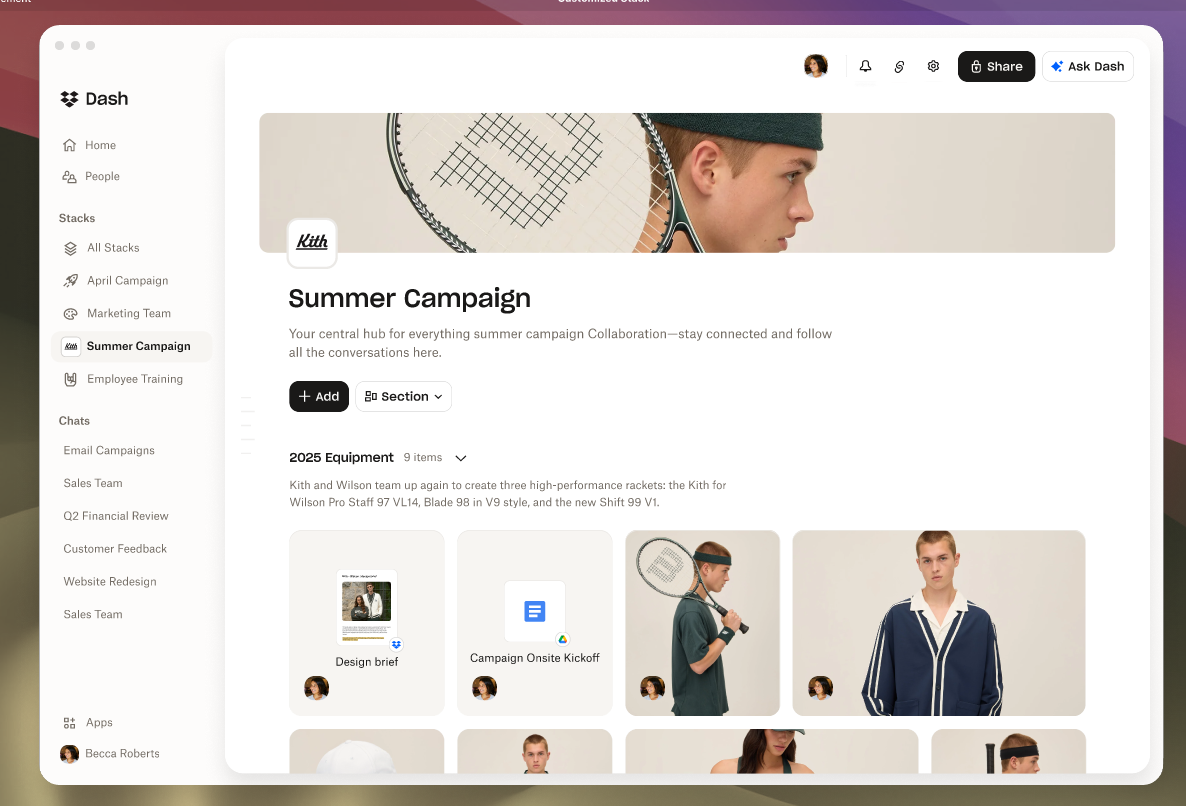
Dropbox Dash Demo - Stacks
Organize, share, learn, and collaborate with ease.
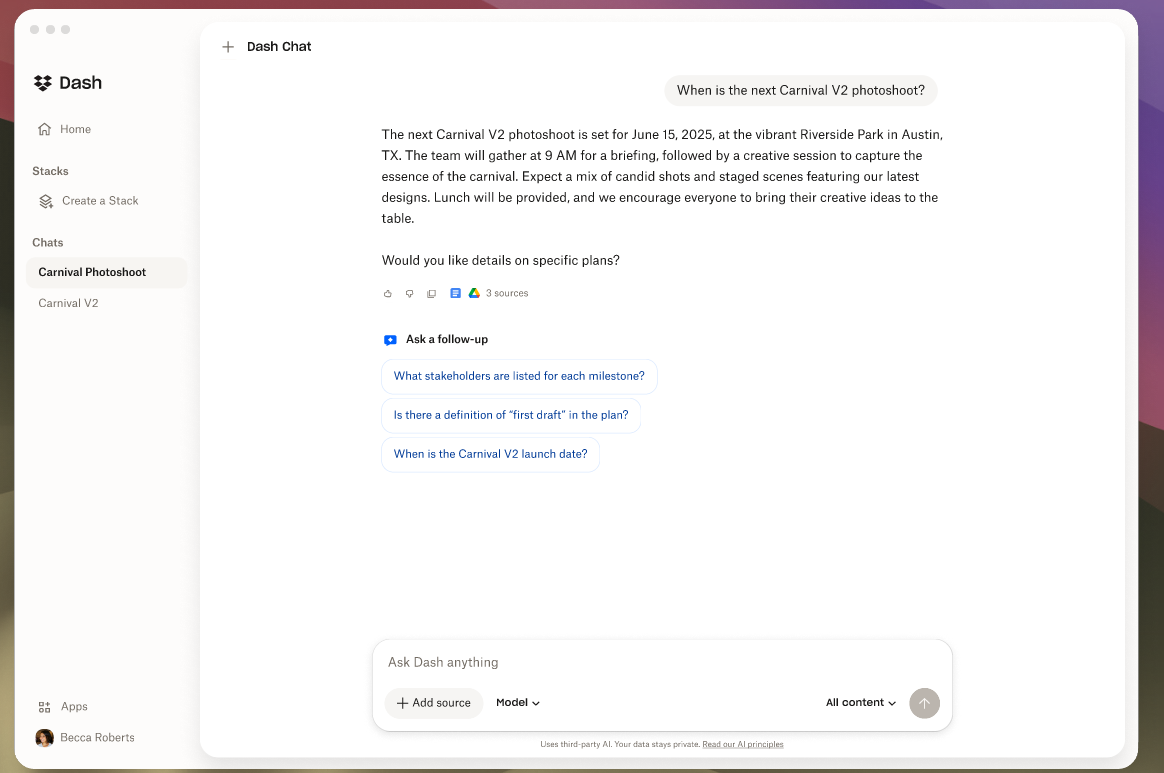
Dropbox Dash Demo - Chat
Use Dash Chat to ask questions, summarize long documents, or draft from scratch - powered by content in your connected tools.
Interactive Demo
Try an interactive demo created by the software seller (right here on G2).
Product Avatar Image

Have you used Dropbox Dash before?

Answer a few questions to help the Dropbox Dash community

Dropbox Dash Reviews (86)

Reviews

Dropbox Dash Reviews (86)

4.2
86 reviews

Review Summary

Generated using AI from real user reviews
Users consistently praise the ease of use and powerful search functionality of Dropbox Dash, highlighting how it simplifies file organization and retrieval across multiple platforms. The intuitive setup process and seamless integration with various tools enhance productivity, making it a valuable asset for managing digital content. However, some users express concerns about data privacy and the need for improved integration with additional applications.

Pros & Cons

Generated from real user reviews
View All Pros and Cons
Search reviews
Filter Reviews
Clear Results
G2 reviews are authentic and verified.
Fábio L.
FL
President DuPont Brasil
"Fast and Reliable, but Could Be More Intuitive"
What do you like best about Dropbox Dash?

I have been using Dropbox Dash for a couple of years, mainly to store and easily access my personal files. I discovered Dropbox Dash a few years ago and it has helped me have quick and remote access to my files. The ease of searching for information about my files is something I really appreciate, as Dropbox Dash is fast and reliable. In the past, I spent a lot of time organizing my files into directories, and sometimes it was difficult to find them, but Dropbox Dash makes the process of organizing and locating information easier, even if they have been stored in different locations. I find the interface quite user-friendly and responsive to commands, and I rarely needed to look for documentation for the initial setup. Review collected by and hosted on G2.com.

What do you dislike about Dropbox Dash?

I miss more integration with artificial intelligence tools that could suggest content based on the information contained in the files. This would make the experience more interesting and practical. Review collected by and hosted on G2.com.

"Promising Features, Needs Better Automation"
What do you like best about Dropbox Dash?

I find the setup of Dropbox Dash to be incredibly easy, which made getting started smooth and hassle-free. Additionally, I am impressed with the instant answers feature. This capability of Dropbox Dash is beneficial because it allows me to get quick responses to queries regarding my stored documentation, such as family medical records and expenses. The search functionality is another aspect I appreciate, as it enables efficient retrieval of specific documents and information I need. Moreover, the integration of my Raven scanner with Dropbox to organize scanned documents has been very effective for keeping my files in order. The automations I set up, including the use of PHP and Python scripts to route documents correctly, have proven extremely helpful. The potential of having a personal assistant capable of searching through my Dropbox and providing detailed insights and organization, like categorizing documents and tracking expenses, is something I greatly value. Lastly, I feel confident in Dropbox's strong privacy and security protocols, which protect my sensitive data effectively. Review collected by and hosted on G2.com.

What do you dislike about Dropbox Dash?

I'm currently not benefiting from Dropbox Dash, which is why I don't use it often. Even though it's easy to set up, the lack of clear advantages for my needs makes it less appealing. I am curious about the potential of using it to search through stored documentation like family medical records and expenses but haven't found it beneficial yet. Another aspect I would like to see improved is the automation features. I find the current capabilities lacking in terms of setting up personalized rules to efficiently file, tag, and route documents using a smart language model. This means whenever certain documents like charitable donations or tax forms come in, they should automatically be moved to the correct folder. The ability to personalize rules for such organizing and automating tasks would greatly enhance its usability. Review collected by and hosted on G2.com.

Tasha R.
TR
Founder
Small-Business (50 or fewer emp.)
"Effortless Sharing, Enhances User Reach"
What do you like best about Dropbox Dash?

I appreciate the ease of use of Dropbox Dash, which simplifies sharing my documents with people. By just clicking a link, users across the country can access my freebies for free, making the process incredibly straightforward and efficient. Additionally, Dropbox Dash plays a significant role in expanding my reach and connecting with more people. I have been using it for over five years, and its popularity reassures me of its reliability. The initial setup was not difficult, and although I had to use the help section to figure out some settings, overall it was easy. The platform’s seamless integration with other software like Zapier, PowerPoint, and my email has been helpful in streamlining my workflow. Review collected by and hosted on G2.com.

What do you dislike about Dropbox Dash?

I find it inconvenient that I cannot make document edits directly within Dropbox Dash. Instead, I have to work from one software and then pull that information into Dropbox Dash, which complicates the editing process. Review collected by and hosted on G2.com.

Carl O.
CO
Autonomous Vehicle Engineer
Internet
Mid-Market (51-1000 emp.)
"Intuitive and Essential for Document Sharing"
What do you like best about Dropbox Dash?

I love Dropbox Dash for its intuitive nature, which made the setup process straightforward and easy to figure out. This intuitiveness greatly benefits my day-to-day activities and encourages me to learn new capabilities every time I use it. I appreciate the product for all its features, as they prove to be consistently useful for my work involving sharing documents with clients and colleagues. I also value the reliability of Dropbox, as I have been a long-time user and have not needed to switch from another vendor. The product impresses with its ongoing utility, making me eager to purchase it again primarily because of its intuitive interface. My satisfaction with the intuitive design and smooth functionality also influences my willingness to highly recommend Dropbox Dash to friends or colleagues, as evidenced by my recommendation score of ten out of ten. Overall, Dropbox Dash enhances my workflow significantly with its simplicity and the breadth of features it offers. Review collected by and hosted on G2.com.

What do you dislike about Dropbox Dash?

Nothing. Review collected by and hosted on G2.com.

"Seamless Multi-Device File Accessibility"
What do you like best about Dropbox Dash?

I have been using Dropbox for over two decades, which speaks to its long-standing reliability and performance. I especially appreciate its capability to keep my password safe database and essential files secure and accessible across different devices. The initial setup process was quite straightforward, with features like making a new folder or entry being self-explanatory and requiring no technical expertise. This simplicity greatly enhances usability. Additionally, Dropbox solves the critical problem of accessing files from multiple devices seamlessly, ensuring my files are always within reach regardless of where I am or which device I am using. This feature significantly aids in managing my daily personal tasks, like monitoring statistics related to my spending and task frequencies. The cloud storage feature itself is crucial, as it ensures my files are always accessible, which aligns perfectly with my usage pattern. Despite not having used Dropbox Dash specifically, the core functionalities of Dropbox – accessibility, ease of use, and reliable cloud storage – are highlights that make my experience positive and would make me endorse it. Review collected by and hosted on G2.com.

What do you dislike about Dropbox Dash?

I like everythihg about it. Review collected by and hosted on G2.com.

"Streamlined File Search with Room for Improvement"
What do you like best about Dropbox Dash?

I really appreciate how Dropbox Dash has transformed my search experience. The search functionality is incredibly efficient and has greatly improved over what I experienced with the Dropbox app and Dropbox web. I found the previous search experience quite convoluted and unintuitive, often making it challenging to locate specific content within files. However, with Dropbox Dash, I'm able to organize and find my files much faster. The Dash app functions almost like a WhatsApp search for all things Dropbox, which I find extremely useful. Setting it up was a breeze as well; it was very easy to connect my account and allow permissions, making the process seamless. I also like the integration with services like LinkedIn, email accounts, and Google, which allows me to search through my documents and emails effortlessly. Review collected by and hosted on G2.com.

What do you dislike about Dropbox Dash?

I find the search interface in the Dropbox app and Dropbox web convoluted and difficult to use, lacking intuitiveness. It struggles with contextual searches, like finding a specific word inside a file. The user interface of Dropbox Dash itself feels cluttered, presenting too much information upon opening, which detracts from a streamlined search experience. I want a more minimalistic approach, where only the essential search bar is visible without unnecessary distractions. Review collected by and hosted on G2.com.

"Convenient for Large Files, But Pricey"
What do you like best about Dropbox Dash?

I appreciate Dropbox Dash for its ease of use, especially when it comes to navigating the site and sharing large files efficiently. This utility is a significant asset when I need to share large files through email with others. Setting up Dropbox Dash was also relatively easy, which I find beneficial as it doesn't add complexity to my workflow. The capability to share and store large files effectively using Dropbox Dash, in conjunction with other auxiliary storage solutions, enhances my data management experience. Review collected by and hosted on G2.com.

What do you dislike about Dropbox Dash?

I think the pricing for Dropbox Dash is quite expensive, especially since I am not employed full-time anymore and don't need to use it very often. The plan offering seems not to align well with my current needs for lower usage levels, where even the two gigabytes would be sufficient for my usage pattern. Therefore, maintaining it becomes financially challenging. I would prefer that the price was cheaper to better match the occasional use. The pricing structure also affects my recommendation likelihood, as I would rate it around a four, finding it convenient for handling large files but not cost-effective for ongoing maintenance. Review collected by and hosted on G2.com.

"Effortless Document Search in a Unified Space"
What do you like best about Dropbox Dash?

I find the setup process in Dropbox Dash to be quite straightforward and user-friendly. Setting up everything I needed was pretty simple through the walkthrough process, which made the initial usage hassle-free for me. I absolutely appreciate the powerful search feature, which stands out as the most useful feature for my needs. This function allowed me to quickly locate all of my old sermons that were haphazardly saved over the years, enabling me to organize them efficiently into a separate folder for my writing project. The ability of Dropbox Dash to integrate all my files from various sources such as Dropbox, OneDrive, and Google Drive under one search interface is incredibly beneficial, making it easy for me to compile documents spread across different platforms. I am able to perform deep research into each file, finding specific content like biblical passages, which is invaluable for my work as a pastor. These features not only streamline my workflow but also give me the confidence to rely on Dropbox Dash as a primary tool for managing my extensive file library. The integration capability with other software ensures that I am not restricted by platform limitations, and all features collectively contribute to my productivity and efficiency. Review collected by and hosted on G2.com.

What do you dislike about Dropbox Dash?

I find that Dropbox Dash could be enhanced with a file organization system that automatically categorizes and sorts files. My experience with finding old documents, like my Christmas sermons, could have been improved if Dropbox Dash had the capability to not only search and locate them but also categorize them into folders. Currently, managing decades' worth of documents feels cumbersome as there's no systematic organization, which poses challenges in retrieving documents efficiently. Review collected by and hosted on G2.com.

Pastor Carlos M.
PM
"Effortless File Organization & Seamless Integration"
What do you like best about Dropbox Dash?

I appreciate how Dropbox Dash helps me stay organized by allowing me to see all my files in one place, eliminating the need to go to different locations. This feature greatly enhances my productivity and keeps things streamlined. I enjoy the ease of setup since it practically sets itself up and the only additional task I had was adding other drives. This simplicity makes the onboarding process effortless. I love the ease with which I can move files around without hesitation, which is crucial for efficiently managing my documents. Dropbox Dash's seamless integration with all the systems I use, such as OneDrive, Google Drive, and other document platforms, is a significant advantage that enhances workflow and makes it indispensable for me. Additionally, the fact that I discovered Dropbox Dash through new features when it was first rolled out and ended up loving it speaks highly of its ability to capture and retain users' interest. These integrations are vital, making Dropbox Dash an essential tool in my digital ecosystem. Overall, the combination of these functionalities and benefits makes Dropbox Dash a tool I would absolutely recommend and repurchase without any hesitation. Review collected by and hosted on G2.com.

What do you dislike about Dropbox Dash?

One place for all my files Review collected by and hosted on G2.com.

Kit K.
KK
Business Development Manager
Small-Business (50 or fewer emp.)
"Effortless Organization with Dropbox Dash, Needs Better Search"
What do you like best about Dropbox Dash?

I find Dropbox Dash incredibly useful for organizing my thoughts and files, offering an elegant expansion on what Dropbox already provides. The organization aspect of Dropbox Dash stands out to me as its most valuable feature, easing the process of keeping my resources neatly arranged. It's particularly beneficial for personal use, and even after using it for just a few weeks, I am impressed with its capability in simplifying the task of managing my digital content. My appreciation for the organization aspect of Dropbox Dash is a key reason I would consider repurchasing it. Furthermore, I am very likely to recommend Dropbox Dash to others, as indicated by my maximum rating of 10 on a recommendation scale. Review collected by and hosted on G2.com.

What do you dislike about Dropbox Dash?

I would like it to be easier to log in and have a better search function. Review collected by and hosted on G2.com.

People Icons

Start a Discussion about Dropbox Dash

Have a software question? Get answers from real users and experts.

Start a Discussion

Pricing Insights

Averages based on real user reviews.

Time to Implement

<1 month

Return on Investment

5 months

Dropbox Dash Features
File Type Support
Metadata
OCR Scanning
Performance and Reliability
Reporting and Auditing
System of Record Integration
Federated Search
File Types
Typo Tolerance
Natural Language