

It's been two months since this profile received a new review
Leave a Review
Compare this with other toolsSave it to your board and evaluate your options side by side.
Save to board

Dropbox Dash Reviews & Product Details

Value at a Glance

Averages based on real user reviews.

Time to Implement

<1 month

Dropbox Dash Media

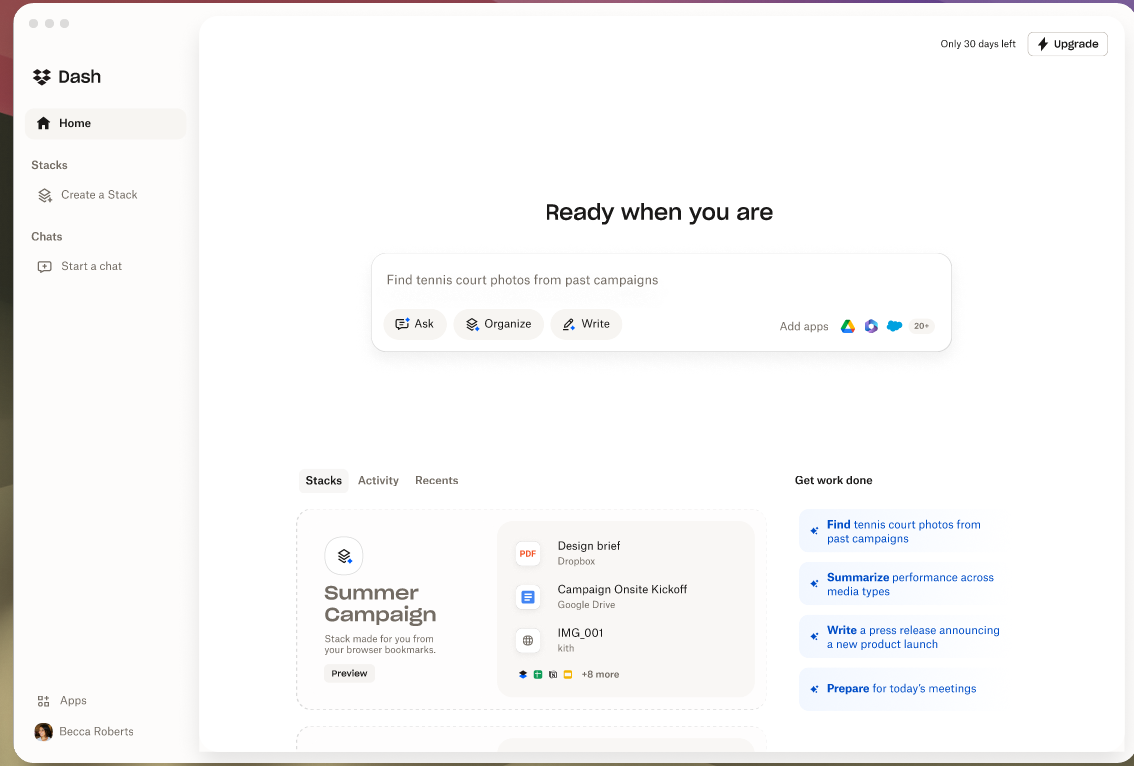
Dropbox Dash Demo - Start Page
Accomplish more, from one AI-powered workplace.
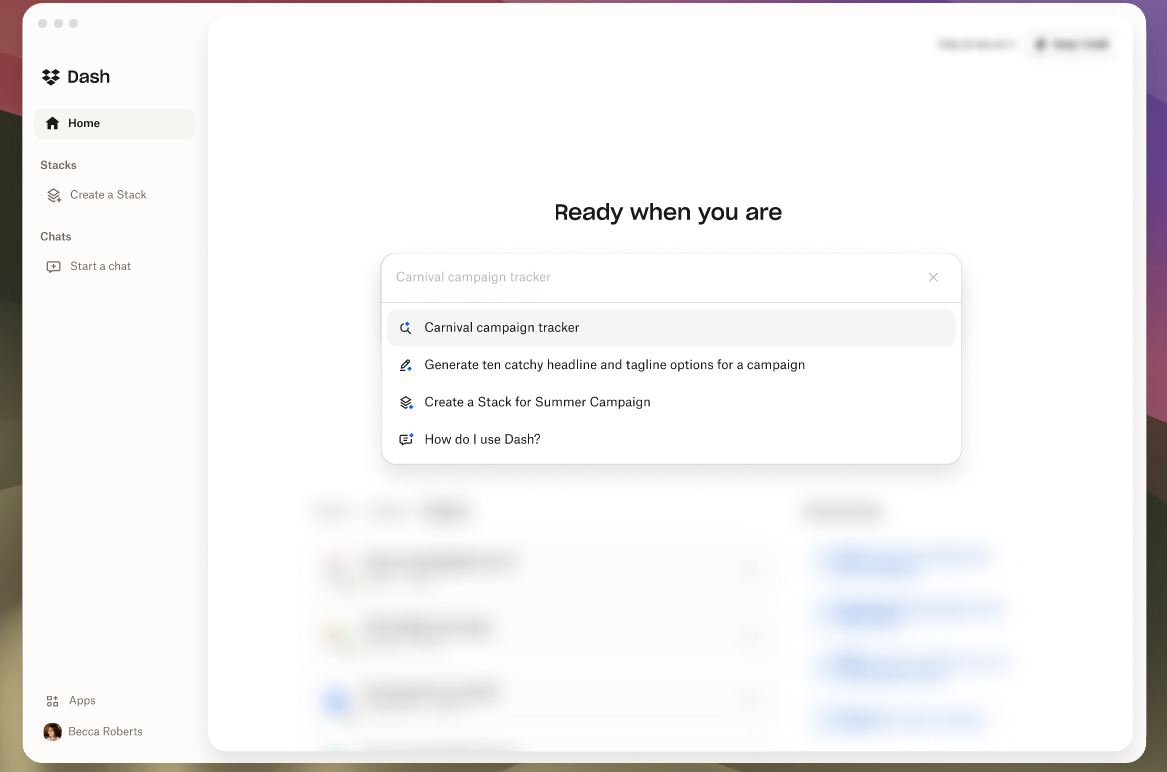
Dropbox Dash Demo - Find
Dash brings all of your content, across connected apps into one searchable hub. Search files, media, people, and more - all in one place.
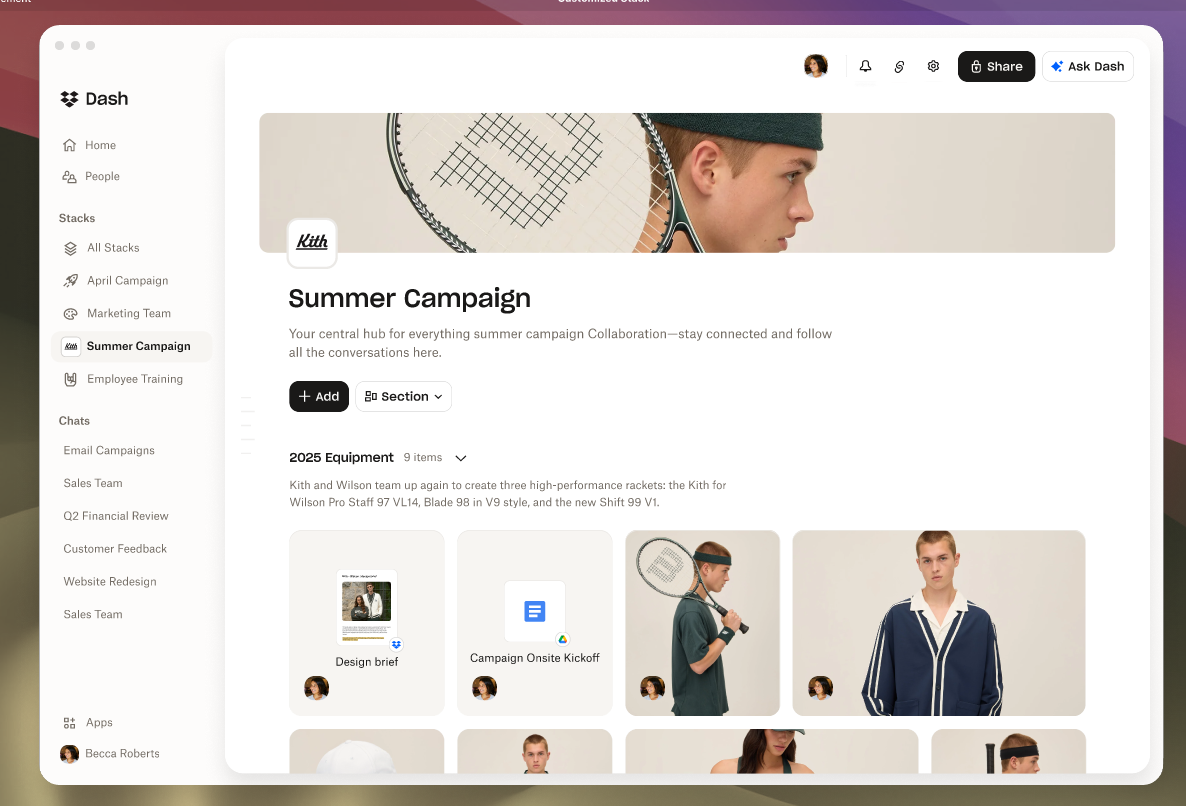
Dropbox Dash Demo - Stacks
Organize, share, learn, and collaborate with ease.
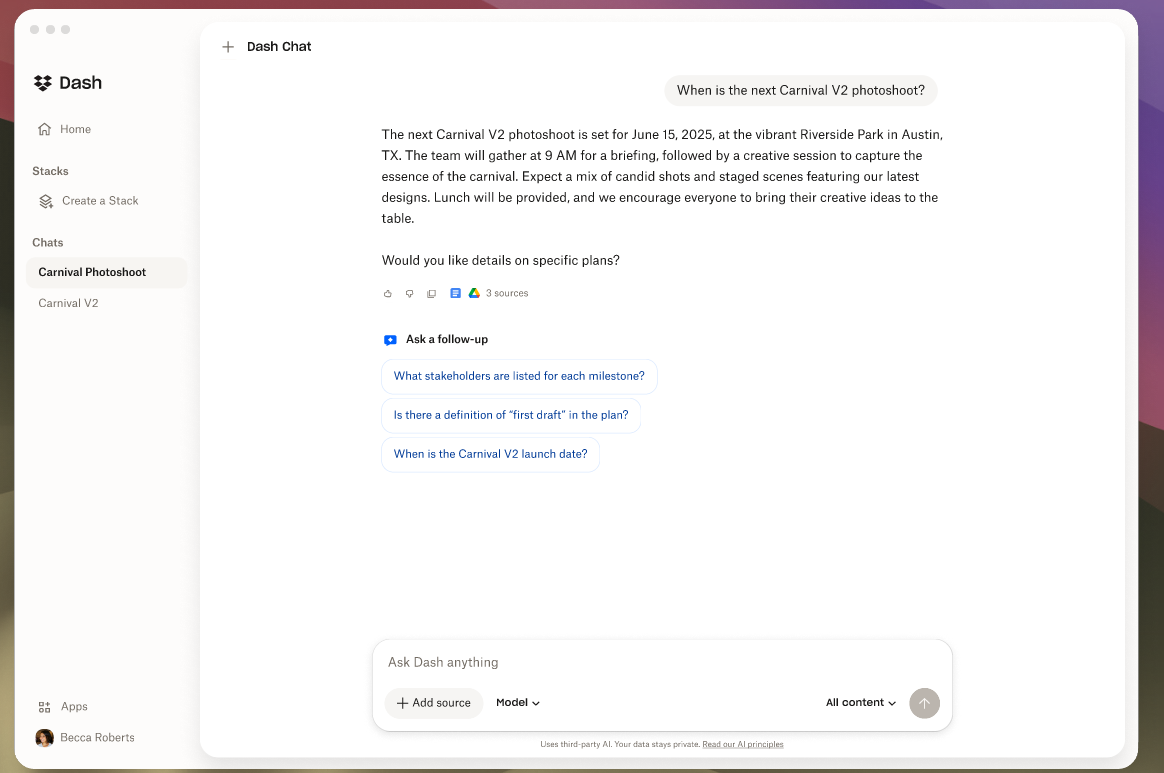
Dropbox Dash Demo - Chat
Use Dash Chat to ask questions, summarize long documents, or draft from scratch - powered by content in your connected tools.
Interactive Demo
Try an interactive demo created by the software seller (right here on G2).
Product Avatar Image

Have you used Dropbox Dash before?

Answer a few questions to help the Dropbox Dash community

Dropbox Dash Reviews (86)

Reviews

Dropbox Dash Reviews (86)

4.2
86 reviews

Review Summary

Generated using AI from real user reviews
Users consistently praise the ease of use and powerful search functionality of Dropbox Dash, highlighting how it simplifies file organization and retrieval across multiple platforms. The intuitive setup process and seamless integration with various tools enhance productivity, making it a valuable asset for managing digital content. However, some users express concerns about data privacy and the need for improved integration with additional applications.

Pros & Cons

Generated from real user reviews
View All Pros and Cons
Search reviews
Filter Reviews
Clear Results
G2 reviews are authentic and verified.
Joe B.
JB
Stewardship Strategist and OD Consultant
Small-Business (50 or fewer emp.)
"Efficient File Search, Smooth Setup"
What do you like best about Dropbox Dash?

I really appreciate Dropbox Dash for its seamless setup, which was incredibly easy, requiring just a few clicks to get started. The feature I find most valuable is its efficient search capability, particularly for locating specific words or phrases within my Dropbox account and across other software accounts on my laptop. This functionality has been particularly helpful in overcoming the challenge of finding files and information buried deep within my extensive file repositories. Additionally, the integration with other commonly used software like Microsoft Office Suites and Google Office products enhances its utility, making it a versatile tool in my daily workflow. The value Dropbox Dash provides is significant enough that I would consider purchasing it again, even if the price were slightly increased, due to the substantial benefits it offers. Review collected by and hosted on G2.com.

What do you dislike about Dropbox Dash?

I found on occasion that it simply couldn't find files. This was a concern as I had to resort to other means to locate these files. Therefore, a more robust search engine would be helpful. Review collected by and hosted on G2.com.

"Enhancing Collaboration and Organization with Ease"
What do you like best about Dropbox Dash?

I appreciate Dropbox Dash's fast interface, which goes beyond just file drag and drop, enhancing my productivity significantly. The transition to Dropbox Dash was seamless because I already had a Dropbox account, making setup very straightforward. I find the ability to collaborate with others and stay organized extremely helpful for keeping on track with my projects. The feature allowing instant answers and the convenience of searching once to access everything I need is exceptionally useful. Moreover, Dropbox Dash integrates well with the Adobe tools I use frequently, enabling me to modify, update, and store images and video files efficiently. Review collected by and hosted on G2.com.

What do you dislike about Dropbox Dash?

I would love to have more of a gallery portfolio type setup in Dropbox Dash, something that would allow me to share media files with clients and also do the hosting of those files. The existing setup does not seem to provide an efficient way to do this. Review collected by and hosted on G2.com.

Eden W.
EW
Senior Accountant
Small-Business (50 or fewer emp.)
"Great Tab Management, But Reliability Issues Hold It Back"
What do you like best about Dropbox Dash?

For me, I loved that I could have the extension pinned in my browser, then I had a stack of the tabs I used to keep pinned. I went from 5-7 pinned tabs to 1. It was awesome! Review collected by and hosted on G2.com.

What do you dislike about Dropbox Dash?

It doesn't always work; I'd click on my pinned extension, and it would just be a blank screen. I'd refresh it and nothing. I'd have to go into the extension and open it a new tab. Then there was the desktop app that would close the window anytime I clicked anything. And then it just completely stopped working. I don't even know if it uninstalled or what, but the extension was gone, it wasn't on my desktop, it didn't launch at startup like it used to. I literally just got a new computer, and IT took the old one, so I can't even investigate why. Review collected by and hosted on G2.com.

Shagah Z.
SZ
Member
Small-Business (50 or fewer emp.)
"Consolidated Search Made Easy"
What do you like best about Dropbox Dash?

I really appreciate how easy Dropbox Dash is to set up. It saves me an incredible amount of time, as it allows me to search across various digital spaces, like Google Drive, Microsoft, and Dropbox files, without needing to log into each service separately. As someone with multiple platforms and email addresses to manage, this feature significantly boosts my efficiency. The consolidated interface stands out as extremely useful, allowing for seamless navigation and management of various tasks and documents. Moreover, I find it to be a valuable resource for organizations working across multiple platforms, as it enables quick and efficient searches of all necessary files and communications in one unified place. Additionally, the integration with Google Docs and my email services is particularly handy. I also admire the calendar integrations which showcase the potential for enhanced organization within the platform. Review collected by and hosted on G2.com.

What do you dislike about Dropbox Dash?

I feel that Dropbox Dash could benefit from integrating all related and complementary services into a single platform or application. Needing to log into multiple services, like Dropbox alongside another Dropbox-acquired scheduling program and Adobe for PDF work, is cumbersome. I wish for a more unified experience where everything is accessible in one place, potentially through a comprehensive desktop application. This fragmentation makes it less efficient when trying to manage documents and schedules, and I miss an integrated solution that consolidates these functionalities more effectively. Review collected by and hosted on G2.com.

"Easy to Use and Perfect for File Organization"
What do you like best about Dropbox Dash?

I have been using Dropbox Dash for about four months primarily for paper crafting, and I find it to be the best tool for my needs. The setup wasn’t difficult, and using it has been smooth and straightforward, making it a pleasant experience. Dropbox Dash significantly helps me in managing and keeping track of my paper kits, and it simplifies the printing process, which is incredibly valuable to me. I am using the free version now, but the product's ease of use, simplicity in printing, and effective file management make me feel that it provides excellent value. If someone needs a way to keep track of their files efficiently, I would very likely recommend Dropbox Dash, rating it a solid ten out of ten for this purpose. Review collected by and hosted on G2.com.

What do you dislike about Dropbox Dash?

Nothing that I can think of….. maybe more storage space Review collected by and hosted on G2.com.

"Essential for Seamless Multi-Device Access"
What do you like best about Dropbox Dash?

I truly appreciate how Dropbox Dash helps me stay connected across multiple devices and locations, which is crucial for my lifestyle since I occasionally travel for business or personal reasons. This connectivity ensures that I have seamless and instant access to the necessary data, which significantly supports my productivity. I find it invaluable that it integrates effortlessly with my macOS and can be used simultaneously with another computer, which enhances my workflow by making access to data both quick and easy. The straightforward setup process of Dropbox Dash is another aspect I like, as it was relatively easy to get everything up and running. Thanks to these features and capabilities, Dropbox Dash plays a crucial role in maintaining data access and availability across numerous systems. I am also impressed by the product enough to consider it highly recommendable, scoring a perfect ten on likelihood to recommend to others. Review collected by and hosted on G2.com.

What do you dislike about Dropbox Dash?

Nothing Review collected by and hosted on G2.com.

"Seamless Tool Integration with Powerful Search"
What do you like best about Dropbox Dash?

I absolutely love that Dropbox Dash allows me to integrate all my different tools like Notion, Dropbox, Slack, and Gmail, which means I no longer have to switch between multiple apps. This feature helps me maintain focus and momentum throughout my workday, as it speeds up my workflow significantly. The ease of setting up the different components, like the desktop app and browser extensions, and how easy it was to connect my apps was impressive. The universal search feature is incredibly useful, enabling me to search across various tools without switching tabs. I also appreciate the smart collections or stacks, and the chat feature, AskDash, is fantastic. The AI-powered answers feature stands out as exceptionally good, and the overall ease of access that Dropbox Dash provides is commendable. I value the user-friendly interface, which enhances my productivity and makes my everyday tasks more seamless. Review collected by and hosted on G2.com.

What do you dislike about Dropbox Dash?

I would make offline or mobile support more seamless. The cross-device experiences could be more integrated for better functionality. Review collected by and hosted on G2.com.

"AI-Powered File Management with Dropbox Dash"
What do you like best about Dropbox Dash?

I appreciate how straightforward the setup process was with Dropbox Dash, making it easy to get started. The AI assistant stands out as a particularly useful feature, serving as a one-stop shop for understanding how features work and what tasks they can accomplish for me. This feature significantly simplifies my file management and increases my understanding of my assets without the need for me to dive deep into complex details. The AI aspect is innovative, providing valuable insights and simplifying tasks that would otherwise require more effort on my part. Overall, Dropbox Dash offers significant help in organizing and managing my digital assets, adding to its appeal. Review collected by and hosted on G2.com.

What do you dislike about Dropbox Dash?

I would like the onboarding process to be simplified and for the program to better teach users how to use Dropbox Dash to its maximum potential. Review collected by and hosted on G2.com.

Craig S.
CS
Software Engineer
Small-Business (50 or fewer emp.)
"Solid Choice for Dropbox Users, Integration Needs Work"
What do you like best about Dropbox Dash?

I enjoy using Dropbox Dash primarily as a launcher and for its ability to integrate seamlessly with other apps like Zoom, making it easy for me to bring up meetings and opportunities by tying it into my calendar. I find great value in its ability to unify my schedules from both Outlook and Google Calendar, thus preventing me from searching through both platforms separately. This feature allows me to efficiently list upcoming meetings and receive notifications, making it much easier to handle tasks across multiple applications. Additionally, I appreciate that Dropbox Dash is capable of AI-assisted searches, helping me avoid manually hunting through folders or file explorers. Just activating Dropbox Dash and typing in a partial file or app name suffices for performing necessary tasks efficiently. Moreover, while I think it's more suited to Dropbox users, I like Dropbox Dash and appreciate that it caters well to its targeted audience, offering more tailored solutions that make the investment worthwhile for Dropbox customers. Review collected by and hosted on G2.com.

What do you dislike about Dropbox Dash?

I found initial setup to be challenging due to limitations on integration with Google Workspace, particularly if you do not have an enterprise-level account. This lack of integration caused issues when my documents were not part of a Google Workspace enterprise level, and Dropbox Dash had problems integrating them. Additionally, there were unresolved security issues that arose from these integration challenges. The product would also benefit from having more application integrations and the ability for users to define their own workflows, similar to what is offered by a competing app, Alfred. Lastly, I would appreciate if Dropbox Dash could keep a chronological list of commands to anticipate my actions based on patterns of usage. Review collected by and hosted on G2.com.

"Seamless Collaboration, Easy Setup"
What do you like best about Dropbox Dash?

I appreciate how Dropbox Dash has been relatively easy to set up, and it feels kind of intuitive, which enhances my overall user experience. I have been using Dropbox since it originally came out, and sticking with it feels like a natural choice since its transition to Dropbox Dash, as I did not feel the need to switch to or consider other vendors. One of the standout features for me is its ability to facilitate sharing and collaboration on large-scale projects. This capability has been extremely beneficial for my work on a music video for a retirement ceremony. The file sharing feature of Dropbox Dash is particularly valuable, ensuring efficient and seamless collaboration. I have also integrated it with Cakewalk software, which helps streamline my workflow further. Overall, Dropbox Dash has become a key component of my toolkit, supporting various project needs with its robust collaboration and sharing capabilities. Review collected by and hosted on G2.com.

What do you dislike about Dropbox Dash?

I miss the ability to save my passwords using Dropbox and Dropbox Dash. Review collected by and hosted on G2.com.

People Icons

Start a Discussion about Dropbox Dash

Have a software question? Get answers from real users and experts.

Start a Discussion

Pricing Insights

Averages based on real user reviews.

Time to Implement

<1 month

Return on Investment

5 months

Dropbox Dash Features
File Type Support
Metadata
OCR Scanning
Performance and Reliability
Reporting and Auditing
System of Record Integration
Federated Search
File Types
Typo Tolerance
Natural Language