Best Network Management Tools for Small Business

How Many Network Management Tools Products Does G2 Track?

Total Products under this Category: 186

Category Stats (Oct 2026)

  • Average Rating: 4.43/5 (↑0.01 vs Sep 2026) The average rating of products in this category, based on all submitted ratings
  • Top Trending Product: Total Network Inventory (+5.98%) - Among all products in this category, Total Network Inventory recorded the largest rating increase compared to last month

Last updated: October 07, 2026

How Does G2 Rank Network Management Tools Products?

Why You Can Trust G2's Software Rankings:

  • 30 Analysts and Data Experts
  • 4,200+ Authentic Reviews
  • 186+ Products
  • Unbiased Rankings

G2's software rankings are built on verified user reviews, rigorous moderation, and a consistent research methodology maintained by a team of analysts and data experts. Each product is measured using the same transparent criteria, with no paid placement or vendor influence. While reviews reflect real user experiences, which can be subjective, they offer valuable insight into how software performs in the hands of professionals. Together, these inputs power the G2 Score, a standardized way to compare tools within every category.

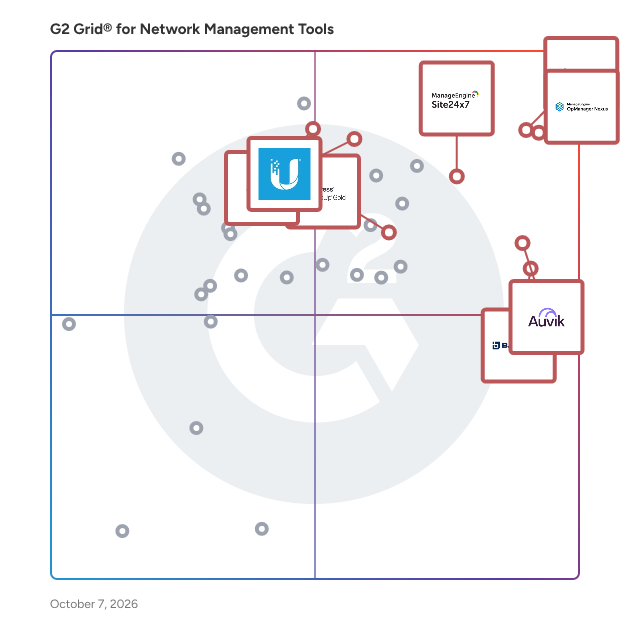
G2 Grid® for Network Management Tools

G2 Grid® for Network Management Tools plotting products by satisfaction and market presence

Highlighted products: OpManager Nexus, Check Point Next Generation Firewalls (NGFWs), Site24x7, Ubiquiti Network Management System, Kilter, Auvik, VMware NSX, and Progress WhatsUp Gold.

Underlying data: [Grid® JSON](https://www.g2.com/categories/network-management-tools/grids.json?focus%5B%5D=opmanager-nexus&focus%5B%5D=check-point-next-generation-firewalls-ngfws&focus%5B%5D=site24x7&focus%5B%5D=ubiquiti-network-management-system&focus%5B%5D=kilter&focus%5B%5D=auvik-networks&focus%5B%5D=vmware-nsx&focus%5B%5D=progress-whatsup-gold&segment=small-business)

OpManager Nexus

OpManager Nexus is a full-stack observability platform that helps IT teams monitor and manage their entire infrastructure, including networks, servers, applications, databases, and websites, from a single console. Designed for mid-size to large organizations managing hybrid and on-premises environments, OpManager Nexus provides deep visibility across every layer of the IT stack. IT teams gain a consolidated view of their infrastructure, eliminating the need for multiple disconnected monitoring tools and reducing the operational overhead that comes with managing them. This unified approach enables faster decision-making and helps organizations maintain service reliability across complex, distributed environments where downtime can have a direct impact on business continuity. OpManager Nexus includes AIOps capabilities that go beyond traditional monitoring. Agentic AI and generative AI integrations automate routine diagnostics and accelerate issue resolution, while smart event correlation identifies relationships between alerts across the stack. Together, these capabilities help IT teams detect issues early, cut through alert noise, and resolve problems before they impact end users or broader business operations. For IT teams dealing with high volumes of events across large environments, this level of automation significantly reduces the time spent on manual troubleshooting. On the deployment front, OpManager Nexus supports both on-premises installation and cloud access (powered by Site24x7) through ManageEngine's private datacenters. Organizations can choose the model that aligns with their infrastructure strategy, security policies, and compliance requirements, without compromising on monitoring depth or platform capability. As part of the ManageEngine ecosystem, OpManager Nexus integrates natively with ITSM, analytics, and security tools, giving IT teams the full operational context needed to manage infrastructure performance and respond to incidents end to end.

Average Rating: 4.5/5.0

Total Reviews: 232

How Do G2 Users Rate OpManager Nexus?

  • Network Monitoring: 9.3/10 (Category avg: 9.0/10)
  • Network Asset Mapping: 8.7/10 (Category avg: 8.6/10)
  • Network Discovery: 9.1/10 (Category avg: 8.8/10)
  • Ease of Admin: 8.9/10 (Category avg: 8.7/10)

Who Is the Company Behind OpManager Nexus?

  • Seller: Zoho
  • Company Website:
  • Year Founded: 1996
  • HQ Location: Austin, TX
  • Twitter: @Zoho
    137,880 Twitter followers
  • LinkedIn® Page: www.linkedin.com
    30,913 employees on LinkedIn®

Who Uses This Product?

  • Who Uses This: IT Manager, Network Administrator
  • Top Industries: Information Technology and Services, Financial Services
  • Company Size: 54% Medium, 32% Large

What Do G2 Reviewers Say About OpManager Nexus?

AI-generated summary from verified user reviews

Pros
  • Users value the effective monitoring capabilities of OpManager Nexus, essential for managing bandwidth and network performance.
  • Users value the real-time monitoring capabilities of OpManager Nexus, enhancing issue resolution and network visibility.
  • Users find OpManager Nexus to have ease of use with intuitive dashboards and efficient monitoring capabilities.
  • Users value the intuitive user interface of OpManager Nexus, praising its easy-to-use dashboards and monitoring capabilities.
  • Users appreciate the comprehensive monitoring capabilities of OpManager Nexus, enhancing the management of critical devices and networks.
Cons
  • Users find the setup complex for large networks, with performance slowdowns and additional licensing adding to the challenge.
  • Users find the complex configuration of OpManager Nexus challenging, particularly in large network setups and advanced features.
  • Users find the complex setup of OpManager Nexus challenging, especially for large networks and during onboarding.
  • Users note the missing features in OpManager Nexus, particularly lacking advanced metrics and cloud-native integrations.
  • Users find the difficult configuration of OpManager challenging, particularly when managing alerts and third-party integrations.

What Are Recent G2 Reviews of OpManager Nexus?

What Are G2 Users Discussing About OpManager Nexus?

Check Point Next Generation Firewalls (NGFWs)

Strengthen Your Security with Check Point Gateways and Firewalls Check Point Hybrid Mesh Network Security is a comprehensive cybersecurity solution designed to protect networks from sophisticated cyber threats while ensuring seamless management across diverse hybrid environments – on-premises, cloud, SaaS, and remote users. This product encompasses advanced threat prevention, real-time global threat intelligence, and unified policy management, making it an essential tool for organizations looking to secure their IT infrastructure, including data centers, hybrid clouds, and remote endpoints. Targeted at enterprises of all sizes, Check Point's solution caters to a wide range of industries that require robust security measures to safeguard sensitive data and maintain operational integrity. The product is particularly beneficial for organizations with complex network architectures, including those utilizing cloud services, Software as a Service (SaaS) applications, and remote workforces. By addressing the unique security challenges posed by these environments, Check Point enables businesses to maintain a secure and resilient IT ecosystem. One of the standout features of Check Point Hybrid Mesh Network Security is its AI-powered threat prevention capabilities. This technology allows for the identification and mitigation of threats in real-time, ensuring that organizations can respond swiftly to potential breaches. Additionally, the solution offers comprehensive security for various aspects of the IT landscape, including network and cloud security. This multi-faceted approach ensures that users, applications, and data are protected regardless of their location, whether on-premises, or in the cloud. This adaptability is complemented by unified security management, which simplifies operations through a single platform that provides visibility, policy enforcement, and posture control across the entire network. Furthermore, Check Point Hybrid Mesh Network Security is designed to optimize performance and cost. With high-speed, prevention-first security and on-device security controls, organizations can achieve effective protection without compromising on efficiency. The consistent application of zero-trust policies across the hybrid mesh network enhances security posture, ensuring that all components of the IT environment are uniformly protected against evolving cyber threats. This comprehensive solution empowers organizations to level up their protection and confidently navigate the complexities of modern cybersecurity challenges.

Average Rating: 4.5/5.0

Total Reviews: 517

How Do G2 Users Rate Check Point Next Generation Firewalls (NGFWs)?

  • Network Monitoring: 9.2/10 (Category avg: 9.0/10)
  • Network Asset Mapping: 8.7/10 (Category avg: 8.6/10)
  • Network Discovery: 9.1/10 (Category avg: 8.8/10)
  • Ease of Admin: 8.6/10 (Category avg: 8.7/10)

Who Is the Company Behind Check Point Next Generation Firewalls (NGFWs)?

Who Uses This Product?

  • Who Uses This: Network Security Engineer, Network Engineer
  • Top Industries: Computer & Network Security, Information Technology and Services
  • Company Size: 44% Medium, 42% Large

What Do G2 Reviewers Say About Check Point Next Generation Firewalls (NGFWs)?

AI-generated summary from verified user reviews

Pros
  • Users highlight the impressive threat prevention engine of Check Point NGFWs, ensuring strong and accurate network security.
  • Users are impressed by the strong and accurate threat detection of Check Point NGFWs, ensuring robust network protection.
  • Users value the reliable performance and ease of use of Check Point NGFWs with its comprehensive features.
  • Users value the threat prevention capabilities of Check Point NGFWs, ensuring robust network security against external threats.
  • Users value the centralized management system of Check Point NGFWs, which simplifies updates and policy modifications efficiently.
Cons
  • Users find the high cost of Check Point NGFWs to be a significant barrier to adoption and satisfaction.
  • Users find the complexity of configuration challenging, particularly for those lacking technical expertise.
  • Users find the complex setup of Check Point NGFWs to be overwhelming, especially for those new to the system.
  • Users experience slow performance issues, particularly with TAC response delays and latency affecting application operation.
  • Users find the difficult learning curve of Check Point NGFWs challenging, especially for those new to the system.

What Are Recent G2 Reviews of Check Point Next Generation Firewalls (NGFWs)?

What Are G2 Users Discussing About Check Point Next Generation Firewalls (NGFWs)?

Site24x7

ManageEngine Site24x7 offers unified cloud monitoring for DevOps and IT operations within small to large organizations. The solution monitors the experience of real users accessing websites and applications from desktop and mobile devices. In-depth monitoring capabilities enable DevOps teams to monitor and troubleshoot applications, servers and network infrastructure, including private and public clouds. End-user experience monitoring is done from more than 100 locations across the world and various wireless carriers.

Average Rating: 4.6/5.0

Total Reviews: 465

How Do G2 Users Rate Site24x7?

  • Network Monitoring: 9.4/10 (Category avg: 9.0/10)
  • Network Asset Mapping: 9.2/10 (Category avg: 8.6/10)
  • Network Discovery: 8.5/10 (Category avg: 8.8/10)
  • Ease of Admin: 8.9/10 (Category avg: 8.7/10)

Who Is the Company Behind Site24x7?

  • Seller: Zoho
  • Year Founded: 1996
  • HQ Location: Austin, TX
  • Twitter: @Zoho
    137,880 Twitter followers
  • LinkedIn® Page: www.linkedin.com
    30,913 employees on LinkedIn®
  • Phone: +1 (888) 900-9646

Who Uses This Product?

  • Who Uses This: CEO, IT Manager
  • Top Industries: Information Technology and Services, Computer Software
  • Company Size: 46% Medium, 41% Small

What Do G2 Reviewers Say About Site24x7?

AI-generated summary from verified user reviews

Pros
  • Users appreciate the ease of use of Site24x7, making implementation and daily operations smooth and efficient.
  • Users appreciate the single pane of glass visibility in Site24x7, enhancing efficiency and monitoring flexibility.
  • Users appreciate the real-time monitoring capabilities of Site24x7, providing comprehensive oversight for networks and infrastructure.
  • Users value the extensive monitoring features of Site24x7, enabling efficient oversight of multiple resources from one interface.
  • Users enjoy the extensive visibility of Site24x7, appreciating its ease of setup and efficient monitoring capabilities.
Cons
  • Users face missing alerts and limited interface visibility, hindering their ability to monitor system efficiency effectively.
  • Users find the complexity of tool integration and plan options overwhelming, preferring a simplified default view.
  • Users find the pricing overwhelming and feel it could be more flexible for smaller businesses or startups.
  • Users find the learning curve for advanced features of Site24x7 challenging, impacting effective usage of the platform.
  • Users find the UI lacking modernity, making it difficult to adopt and navigate smoothly.

What Are Recent G2 Reviews of Site24x7?

What Are G2 Users Discussing About Site24x7?

AI can help you find the answers. G2 helps you trust them.

Connect G2 to Claude or ChatGPT for answers grounded in G2's trusted reviews, comparisons, and pricing from real user insights.

How it works

Ubiquiti Network Management System

Ubiquiti's Network Management System, known as UniFi, is a comprehensive platform designed to streamline the management of IT infrastructure across various environments. It integrates networking, security, and communication solutions into a unified interface, facilitating efficient control and monitoring of devices and services. UniFi is particularly suited for both enterprise and home settings, offering scalability and ease of use. Key Features and Functionality: - Centralized Management: UniFi provides a single interface to monitor and manage multiple locations, enabling administrators to oversee distributed networks seamlessly. - Multi-Site Connectivity: With Site Magic, UniFi allows for effortless connection of gateways across various sites, creating a high-performance and scalable Software-Defined Wide Area Network (SD-WAN). - Comprehensive Application Suite: The platform includes applications such as UniFi Network for internet gateways and WiFi management, UniFi Protect for AI-driven camera surveillance, UniFi Access for secure door control, UniFi Talk for VoIP communication, and UniFi Connect for managing digital signage and other enterprise devices. - Intuitive Setup and Management: UniFi emphasizes user-friendly installation and configuration, allowing for quick deployment and management without extensive technical training. - Scalability: The system is designed to scale from small setups to large deployments, maintaining a single integrated management system regardless of the network size. Primary Value and Solutions Provided: UniFi addresses the complexities of managing diverse and expansive IT infrastructures by offering a unified platform that simplifies network administration. It reduces the need for multiple disparate systems by integrating various functionalities into a cohesive solution. This integration enhances operational efficiency, improves security through centralized monitoring, and provides scalability to accommodate growing network demands. By offering intuitive management tools and eliminating licensing fees, UniFi delivers a cost-effective and user-friendly solution for comprehensive network management.

Average Rating: 4.5/5.0

Total Reviews: 37

How Do G2 Users Rate Ubiquiti Network Management System?

  • Network Monitoring: 9.6/10 (Category avg: 9.0/10)
  • Network Asset Mapping: 9.3/10 (Category avg: 8.6/10)
  • Network Discovery: 10.0/10 (Category avg: 8.8/10)
  • Ease of Admin: 9.3/10 (Category avg: 8.7/10)

Who Is the Company Behind Ubiquiti Network Management System?

  • Seller: Ubiquiti Networks
  • Year Founded: 2005
  • HQ Location: New York, NY
  • LinkedIn® Page: www.linkedin.com
    1,579 employees on LinkedIn®
  • Ownership: UBNT
  • Total Revenue (USD mm): $1,284

Who Uses This Product?

  • Top Industries: Information Technology and Services
  • Company Size: 58% Small, 39% Medium

What Do G2 Reviewers Say About Ubiquiti Network Management System?

AI-generated summary from verified user reviews

Pros
  • Users appreciate the excellent customer support provided by Ubiquiti, enhancing their overall experience with the system.
  • Users appreciate the strong cybersecurity features of Ubiquiti Network Management System, enhancing their overall network security.
  • Users appreciate the ease of use of the Ubiquiti Network Management System, finding installation and navigation simple.
  • Users appreciate the user-friendly interface of Ubiquiti Network Management System, simplifying SSID network management for corporations.
  • Users appreciate the super easy installation of Ubiquiti Network Management System, making setup a breeze.
Cons
  • Users struggle with poor documentation when recovering their UDM Pro SE after firmware update failures.

What Are Recent G2 Reviews of Ubiquiti Network Management System?

What Are G2 Users Discussing About Ubiquiti Network Management System?

Kilter

More than 500 enterprises worldwide trust Kilter by BackBox as their network cyber resilience platform. Kilter includes support for network devices from over 180 vendors, thousands of pre-built automations, and a no-code way to create new ones. Kilter empowers teams with the confidence to automate critical network processes, maintain business continuity during disruptions, and recover swiftly. From backups and OS updates to configuration compliance and vulnerability management, Kilter ensures that automations deliver consistent, reliable outcomes.

Average Rating: 4.5/5.0

Total Reviews: 194

How Do G2 Users Rate Kilter?

  • Network Monitoring: 8.4/10 (Category avg: 9.0/10)
  • Network Asset Mapping: 8.2/10 (Category avg: 8.6/10)
  • Network Discovery: 8.5/10 (Category avg: 8.8/10)
  • Ease of Admin: 9.1/10 (Category avg: 8.7/10)

Who Is the Company Behind Kilter?

  • Seller: BackBox
  • Company Website:
  • Year Founded: 2009
  • HQ Location: Global, OO
  • Twitter: @Back_Box
    292 Twitter followers
  • LinkedIn® Page: www.linkedin.com
    62 employees on LinkedIn®

Who Uses This Product?

  • Who Uses This: Senior Network Administrator
  • Top Industries: Information Technology and Services, Computer & Network Security
  • Company Size: 38% Large, 32% Small

What Do G2 Reviewers Say About Kilter?

AI-generated summary from verified user reviews

Pros
  • Users value the automation capabilities of BackBox, enhancing workflow efficiency and reducing manual efforts in backups.
  • Users find BackBox highly easy to use, enhancing workflow efficiency with its flexible automation and excellent support.
  • Users appreciate the robust backup and recovery features of BackBox, ensuring operational efficiency and heightened security.
  • Users value the time-saving automation of BackBox, enhancing workflow efficiency and reducing manual backup efforts.
  • Users value the ease of managing backups across multiple devices and appreciate the automation and proactive updates from BackBox.
Cons
  • Users find the complex setup of BackBox challenging, particularly for those lacking prior experience with the tool.
  • Users find the steep learning curve of BackBox daunting, making initial setup challenging for smaller teams.
  • Users find the interface complex and advanced features challenging, requiring significant time and effort to master.
  • Users find a lack of features like streamlined scheduling and automation templates limits effective use of BackBox.
  • Users experience slow performance with BackBox, especially during mass deployments and updates, affecting their workflow efficiency.

What Are Recent G2 Reviews of Kilter?

What Are G2 Users Discussing About Kilter?

Auvik

Auvik’s cloud-based IT management platform empowers IT teams to confidently navigate change with less friction. The key is absolute simplicity: seamless deployment, an intuitive interface, and effortless automation. IT teams are able to proactively manage diverse networks, endpoints and SaaS applications. Users are able to work however and wherever they want. It’s absolutely that simple. Simplify Everything: Simplicity of deployment, ease of use and effortless automation save time so that everyone can focus on strategic business priorities and the new opportunities that come with change. Boost Visibility: Our platform delivers total visibility into key parts of your infrastructure. By enabling a proactive—rather than reactive—approach to IT management, Auvik reduces friction and lowers operational risk while raising confidence in IT infrastructure. Move Forward, Faster: Auvik offers faster detection, accelerated speed to resolution, and reduced downtime, which improves efficiency and extends the bandwidth of IT teams and end users. This means more time is able to be invested in the work that keeps everyone moving forward. And empowers IT teams to confidently navigate change with less friction.

Average Rating: 4.5/5.0

Total Reviews: 379

How Do G2 Users Rate Auvik?

  • Network Monitoring: 8.6/10 (Category avg: 9.0/10)
  • Network Asset Mapping: 8.6/10 (Category avg: 8.6/10)
  • Network Discovery: 8.9/10 (Category avg: 8.8/10)
  • Ease of Admin: 8.7/10 (Category avg: 8.7/10)

Who Is the Company Behind Auvik?

  • Seller: Auvik Networks Inc.
  • Company Website:
  • Year Founded: 2011
  • HQ Location: Waterloo, Ontario
  • Twitter: @AuvikOfficial
    2,988 Twitter followers
  • LinkedIn® Page: www.linkedin.com
    359 employees on LinkedIn®

Who Uses This Product?

  • Who Uses This: IT Manager, Network Engineer
  • Top Industries: Information Technology and Services, Computer & Network Security
  • Company Size: 51% Small, 41% Medium

What Do G2 Reviewers Say About Auvik?

AI-generated summary from verified user reviews

Pros
  • Users find Auvik's ease of use impressive, appreciating its intuitive interface and simple setup process.
  • Users value Auvik's alert notifications for quick identification of network issues, enhancing efficiency in troubleshooting.
  • Users find Auvik's easy setup facilitates quick network monitoring across various sites, enhancing overall efficiency.
  • Users value Auvik's effective monitoring capabilities, benefiting from quick alerts and an intuitive network map feature.
  • Users value Auvik's reliability, appreciating its operational clarity and improved incident response across complex networks.
Cons
  • Users face device limitations in Auvik, with misidentification and lack of granular control affecting usability.
  • Users find the missing features in Auvik, such as top-level diagrams and DNS name improvements, disappointing.
  • Users find the alert tuning process cumbersome, leading to excessive noise and requiring significant effort for effective management.
  • Users find Auvik to be expensive, particularly due to pricing tied to device counts in large environments.
  • Users experience device misidentification issues with Auvik, leading to frustrating false alerts and correlation problems.

What Are Recent G2 Reviews of Auvik?

What Are G2 Users Discussing About Auvik?

VMware NSX

VMware NSX® is a powerful network virtualization solution for VMware Cloud Foundation™ (VCF) that enables network connectivity, operations, and scale. NSX Network Virtualization brings the simplicity of the cloud operating model to networking, allowing you to streamline, accelerate, and scale both traditional and modern applications in private/hybrid clouds.

Average Rating: 4.4/5.0

Total Reviews: 83

How Do G2 Users Rate VMware NSX?

  • Network Monitoring: 10.0/10 (Category avg: 9.0/10)
  • Ease of Admin: 7.9/10 (Category avg: 8.7/10)

Who Is the Company Behind VMware NSX?

  • Seller: Broadcom
  • Year Founded: 1991
  • HQ Location: San Jose, CA
  • Twitter: @broadcom
    63,909 Twitter followers
  • LinkedIn® Page: www.linkedin.com
    44,602 employees on LinkedIn®
  • Ownership: NASDAQ: CA

Who Uses This Product?

  • Top Industries: Computer & Network Security, Information Technology and Services
  • Company Size: 36% Large, 32% Medium

What Do G2 Reviewers Say About VMware NSX?

AI-generated summary from verified user reviews

Pros
  • Users appreciate the ease of use with VMware NSX, benefiting from its simple dashboard and robust functionality.
  • Users value the integrated features and simplicity of VMware NSX, enhancing network security and management efficiency.
  • Users value the enhanced security features of VMware NSX, facilitating effective microsegmentation and Zero Trust implementations.
  • Users value the easy integrations of VMware NSX, enhancing functionality and network management across diverse environments.
  • Users value the seamless integration of VMware NSX with other VMware services, enhancing security and network management.
Cons
  • Users find the complex architecture of VMware NSX difficult to understand, complicating security and management tasks.
  • Users find the cost prohibitive, making VMware NSX unsuitable for smaller businesses or those with limited resources.
  • Users find VMware NSX's pricing issues cumbersome, making it unaffordable for small businesses and limited-resource enterprises.
  • Users find the learning difficulty of VMware NSX challenging, impacting the setup and configuration process significantly.
  • Users find the high costs of VMware NSX prohibitive, especially for small businesses with limited resources.

What Are Recent G2 Reviews of VMware NSX?

Progress WhatsUp Gold

WhatsUp Gold is an IT infrastructure monitoring software designed to help users identify and resolve network issues swiftly, often before they impact end users. This solution provides comprehensive visibility into network performance and availability, enabling IT professionals to maintain optimal operations across their infrastructure. With its interactive mapping interface, WhatsUp Gold allows users to visualize the status of all devices connected to their network, making it easier to monitor both on-premise and cloud-based resources. Targeted primarily at IT administrators and network engineers, WhatsUp Gold is particularly beneficial for organizations that rely heavily on network performance for their daily operations. Its user-friendly design caters to both seasoned professionals and those new to network management, offering a range of features that streamline the monitoring process. The software is designed to support various use cases, from small businesses needing basic monitoring capabilities to large enterprises requiring advanced network management solutions. One of the standout features of WhatsUp Gold is its customizable drag-and-drop dashboards, which provide users with the flexibility to tailor their monitoring experience according to specific needs. These dashboards present real-time data on device status and performance, allowing users to quickly assess the health of their network. Additionally, the software’s automatic discovery and mapping capabilities enable users to visualize their entire network topology, ensuring that no device goes unnoticed during monitoring. WhatsUp Gold also emphasizes optimization, helping users manage network traffic and bandwidth utilization effectively. By providing actionable insights and unified views of network performance, the software empowers IT teams to troubleshoot issues efficiently. The ability to identify and resolve network and server problems proactively not only enhances operational efficiency but also improves overall user satisfaction by minimizing downtime. In summary, WhatsUp Gold offers a robust and interactive solution for IT infrastructure monitoring, combining ease of use with powerful features. Its focus on real-time visibility, customization, and proactive troubleshooting makes it a valuable tool for organizations looking to enhance their network management capabilities.

Average Rating: 4.4/5.0

Total Reviews: 380

How Do G2 Users Rate Progress WhatsUp Gold?

  • Network Monitoring: 8.8/10 (Category avg: 9.0/10)
  • Network Asset Mapping: 8.7/10 (Category avg: 8.6/10)
  • Network Discovery: 8.7/10 (Category avg: 8.8/10)
  • Ease of Admin: 8.2/10 (Category avg: 8.7/10)

Who Is the Company Behind Progress WhatsUp Gold?

  • Seller: Progress Software
  • Company Website:
  • Year Founded: 1981
  • HQ Location: Burlington, MA.
  • Twitter: @ProgressSW
    48,773 Twitter followers
  • LinkedIn® Page: www.linkedin.com
    4,242 employees on LinkedIn®

Who Uses This Product?

  • Who Uses This: Network Engineer, Network Administrator
  • Top Industries: Information Technology and Services, Education Management
  • Company Size: 58% Medium, 27% Large

What Do G2 Reviewers Say About Progress WhatsUp Gold?

AI-generated summary from verified user reviews

Pros
  • Users value the ease of use of Progress WhatsUp Gold, appreciating its intuitive interface and simple setup process.
  • Users love the real-time visibility provided by WhatsUp Gold’s interactive network maps and intuitive dashboards.
  • Users value the real-time visibility and ease of use provided by Progress WhatsUp Gold for network performance monitoring.
  • Users value the timely and proactive alert notifications of Progress WhatsUp Gold, enhancing issue detection and network reliability.
  • Users appreciate the intuitive user interface of Progress WhatsUp Gold, enhancing real-time network monitoring and management.
Cons
  • Users find the cost of Progress WhatsUp Gold to be high, especially for smaller organizations and add-ons.
  • Users find the poor interface design of Progress WhatsUp Gold can be clunky and outdated in complex setups.
  • Users find the complex setup process of Progress WhatsUp Gold to be cumbersome and challenging, especially for advanced configurations.
  • Users note a steep learning curve with Progress WhatsUp Gold, particularly for advanced configuration and initial setup.
  • Users find the interface outdated, especially when managing complex environments, impacting overall user experience.

What Are Recent G2 Reviews of Progress WhatsUp Gold?

What Are G2 Users Discussing About Progress WhatsUp Gold?

Domotz

Domotz is a network monitoring and management software platform used by MSPs and IT teams to gain visibility and operational control across distributed network environments. It enables organizations to monitor, manage, and troubleshoot network infrastructure across multiple sites or customer environments from a centralized interface. Founded in 2015 and headquartered in Draper, Utah, Domotz supports organizations worldwide that are responsible for maintaining reliable and secure network operations. The platform is used in a wide range of environments, including small and mid sized businesses, enterprise locations, and managed service provider deployments. Domotz provides automated device discovery and asset inventory, allowing teams to identify all devices connected to the network and maintain accurate records over time. It supports SNMP monitoring, alerting, and performance tracking to help teams detect availability issues, degradation, or misconfigurations before they impact users. Network topology visualization helps teams understand how devices are connected and identify potential points of failure. Additional capabilities include configuration backup and change tracking for supported devices, secure remote access without requiring VPNs, and tools for troubleshooting network issues remotely. Domotz can be used to monitor and manage routers, switches, firewalls, access points, servers, cameras, printers, and other IP enabled devices across heterogeneous vendor environments. Domotz is designed for operational use by technical teams. It can be deployed quickly, provides access to real network data, and supports ongoing monitoring and troubleshooting as networks evolve. The platform integrates with common MSP and IT tools to support workflows related to documentation, alerting, and service delivery. Pricing is based on a per device monthly model, currently priced at $1.50 per device per month. This pricing structure allows organizations to scale monitoring based on the number of devices managed while maintaining predictable costs. Users can start with Free Discovery to evaluate their environment using real network data before committing.

Average Rating: 4.8/5.0

Total Reviews: 101

How Do G2 Users Rate Domotz?

  • Network Monitoring: 8.6/10 (Category avg: 9.0/10)
  • Network Asset Mapping: 8.7/10 (Category avg: 8.6/10)
  • Network Discovery: 9.3/10 (Category avg: 8.8/10)
  • Ease of Admin: 9.1/10 (Category avg: 8.7/10)

Who Is the Company Behind Domotz?

  • Seller: Domotz
  • Company Website:
  • Year Founded: 2015
  • HQ Location: Draper, Utah
  • Twitter: @domotz
    2,420 Twitter followers
  • LinkedIn® Page: www.linkedin.com
    70 employees on LinkedIn®

Who Uses This Product?

  • Who Uses This: Owner
  • Top Industries: Information Technology and Services, Computer & Network Security
  • Company Size: 71% Small, 23% Medium

What Do G2 Reviewers Say About Domotz?

AI-generated summary from verified user reviews

Pros
  • Users value the ease of use of Domotz, enhancing their ability to monitor and manage networks effortlessly.
  • Users value the customizable alerts and seamless monitoring of network devices offered by Domotz for efficient troubleshooting.
  • Users value the customizable alert notifications from Domotz, enabling quick responses to network device issues.
  • Users appreciate the customizable alerts from Domotz, enabling quick responses to device issues and enhancing network management.
  • Users highlight the excellent customer support of Domotz, emphasizing quick responses and helpful assistance.
Cons
  • Users find the network diagram feature lacking and experience lag with the desktop app when managing multiple devices.
  • Users face challenges with alert issues, including false positives and overwhelming notifications during network outages.
  • Users find the costs prohibitive for SMEs and individuals, with frequent price increases adding to their concerns.
  • Users note the missing features in Domotz, particularly for beginners and flat networks, limiting functionality and flexibility.
  • Users face integration issues due to lack of API support, making setup and notifications challenging initially.

What Are Recent G2 Reviews of Domotz?

What Are G2 Users Discussing About Domotz?

Cisco FindIT Network Management

Cisco FindIT Network Management is purpose-built for managing networks of Cisco 100 to 500 Series devices. It lets you proactively manage the network instead of just reacting to events. FindIT Network Management is the perfect addition to your business's network.

Average Rating: 4.4/5.0

Total Reviews: 27

How Do G2 Users Rate Cisco FindIT Network Management?

  • Network Monitoring: 8.3/10 (Category avg: 9.0/10)
  • Network Asset Mapping: 8.3/10 (Category avg: 8.6/10)
  • Network Discovery: 10.0/10 (Category avg: 8.8/10)
  • Ease of Admin: 8.3/10 (Category avg: 8.7/10)

Who Is the Company Behind Cisco FindIT Network Management?

  • Seller: Cisco
  • Year Founded: 1984
  • HQ Location: San Jose, CA
  • Twitter: @Cisco
    720,366 Twitter followers
  • LinkedIn® Page: www.linkedin.com
    95,294 employees on LinkedIn®
  • Ownership: NASDAQ:CSCO

Who Uses This Product?

  • Company Size: 50% Medium, 37% Small

What Are Recent G2 Reviews of Cisco FindIT Network Management?

What Are G2 Users Discussing About Cisco FindIT Network Management?

ngrok

One gateway for all your traffic. ngrok replaces your networking hodgepodge—reverse proxies, load balancers, VPNs, auth layers, model routers, and the rest of the kludge—with one cloud networking platform. Secure, transform, and route traffic to services running anywhere. localhost to prod, APIs to AI models, and much more, already built by millions of developers and trusted by teams at Twilio, GitHub, Okta, Microsoft, Zoom, and Databricks.

Average Rating: 4.2/5.0

Total Reviews: 15

How Do G2 Users Rate ngrok?

  • Network Monitoring: 8.3/10 (Category avg: 9.0/10)

Who Is the Company Behind ngrok?

  • Seller: ngrok
  • Year Founded: 2015
  • HQ Location: San Francisco, US
  • Twitter: @ngrokHQ
    4,596 Twitter followers
  • LinkedIn® Page: www.linkedin.com
    88 employees on LinkedIn®

Who Uses This Product?

  • Company Size: 73% Small, 33% Medium

What Do G2 Reviewers Say About ngrok?

AI-generated summary from verified user reviews

Pros
  • Users find ngrok's service to be easy to set up, enhancing their overall experience with minimal hassle.
  • Users find ngrok's service to be easy to set up, enhancing their experience despite some other issues.
  • Users appreciate the easy setup of ngrok, finding it straightforward and convenient for their needs.
  • Users find ngrok easy to set up, appreciating the straightforward service despite concerns about pricing and support.
Cons
  • Users are frustrated by delayed support, with unhelpful responses that don't address urgent issues effectively.
  • Users find ngrok's pricing to be expensive and convoluted, leading to frustration with unexpected costs and delays.
  • Users express frustration with hidden costs in ngrok's pricing, leading to unexpected charges and poor customer service experiences.
  • Users express frustration with high licensing costs and unclear pricing, leading to unexpected expenses and delays in service activation.
  • Users report poor customer support, with misleading replies and lack of urgency in resolving issues affecting their experience.

What Are Recent G2 Reviews of ngrok?

What Are G2 Users Discussing About ngrok?

SolarWinds Observability

SolarWinds® Observability is a comprehensive full-stack observability solution designed to meet the diverse needs of modern organizations, regardless of their size. This solution provides deep visibility into hybrid ecosystems, enabling users to monitor and manage both on-premises and cloud environments effectively. By optimizing performance and ensuring availability across distributed hybrid IT infrastructures, SolarWinds Observability supports organizations in navigating the complexities of their IT environments. Targeted at IT professionals and organizations that require robust monitoring capabilities, SolarWinds Observability caters to a wide range of use cases. It is particularly beneficial for businesses operating in hybrid environments, where the integration of on-premises and cloud resources is essential. The solution allows users to gain a holistic view of their networks, applications, databases, and user experiences, thereby facilitating better decision-making and operational efficiency. This is especially crucial in today’s fast-paced digital landscape, where downtime can significantly impact service reliability and customer satisfaction. One of the standout features of SolarWinds Observability is its built-in intelligence powered by AIOps capabilities. This functionality accelerates issue remediation by enabling users to detect, troubleshoot, and resolve problems more efficiently. The advanced predictive analysis and anomaly-based alerts help organizations proactively address potential issues before they escalate, ultimately reducing downtime and enhancing service reliability. Additionally, the solution's log pattern analysis further streamlines the troubleshooting process, allowing IT teams to focus on strategic initiatives rather than being bogged down by operational challenges. SolarWinds Observability offers flexibility in deployment, providing users with the option to choose between self-hosted and SaaS models. The self-hosted option integrates seamlessly with other SolarWinds services, such as security and storage monitoring, while the SaaS option is tailored for deeper monitoring of custom and cloud-based applications. This adaptability ensures that organizations can select the deployment method that best aligns with their operational needs and infrastructure. Moreover, SolarWinds Observability stands out by consolidating multiple monitoring tools into a single, integrated solution. This not only simplifies the monitoring process but also helps organizations reduce costs associated with managing disparate systems. By offering comprehensive visibility across hybrid IT environments, SolarWinds Observability empowers organizations to optimize their operations and enhance overall performance.

Average Rating: 4.3/5.0

Total Reviews: 831

How Do G2 Users Rate SolarWinds Observability?

  • Network Monitoring: 9.4/10 (Category avg: 9.0/10)
  • Network Asset Mapping: 5.7/10 (Category avg: 8.6/10)
  • Network Discovery: 8.0/10 (Category avg: 8.8/10)
  • Ease of Admin: 8.3/10 (Category avg: 8.7/10)

Who Is the Company Behind SolarWinds Observability?

  • Seller: SolarWinds Worldwide LLC
  • Company Website:
  • Year Founded: 1999
  • HQ Location: Austin, TX
  • Twitter: @solarwinds
    19,570 Twitter followers
  • LinkedIn® Page: www.linkedin.com
    2,864 employees on LinkedIn®

Who Uses This Product?

  • Who Uses This: Network Engineer, Network Administrator
  • Top Industries: Information Technology and Services, Hospital & Health Care
  • Company Size: 44% Large, 35% Medium

What Do G2 Reviewers Say About SolarWinds Observability?

AI-generated summary from verified user reviews

Pros
  • Users love the intuitive interface of SolarWinds Observability, making system management and monitoring effortless and efficient.
  • Users appreciate the comprehensive visibility of SolarWinds Observability, simplifying performance monitoring across diverse environments.
  • Users value the unified visibility across infrastructure that simplifies monitoring and accelerates troubleshooting effectively.
  • Users appreciate the monitoring capabilities of SolarWinds Observability, effectively managing and analyzing network environments.
  • Users appreciate the intuitive user interface of SolarWinds, enhancing the management and visibility of network performance.
Cons
  • Users find the pricing escalates quickly, making SolarWinds Observability less affordable for larger setups and features.
  • Users face a significant learning curve with SolarWinds Observability, complicating the use of advanced features and integrations.
  • Users face integration issues due to complex setups and limited support for ITSM platform connections, affecting usability.
  • Users find the complex setup of SolarWinds Observability challenging, requiring significant technical expertise and time investment.
  • Users find the configuration difficulty of SolarWinds Observability to be a significant hurdle in effective deployment.

What Are Recent G2 Reviews of SolarWinds Observability?

What Are G2 Users Discussing About SolarWinds Observability?

Tian Lin
TL
Researched and written by Tian Lin
Updated