Best Enterprise Endpoint Management Software

How Many Endpoint Management Software Products Does G2 Track?

Total Products under this Category: 137

Category Stats (Sep 2026)

  • Average Rating: 4.45/5 The average rating of products in this category, based on all submitted ratings
  • Top Trending Product: TeamViewer ONE (+1.39%) - Among all products in this category, TeamViewer ONE recorded the largest rating increase compared to last month

Last updated: September 15, 2026

How Does G2 Rank Endpoint Management Software Products?

Why You Can Trust G2's Software Rankings:

  • 30 Analysts and Data Experts
  • 25,700+ Authentic Reviews
  • 137+ Products
  • Unbiased Rankings

G2's software rankings are built on verified user reviews, rigorous moderation, and a consistent research methodology maintained by a team of analysts and data experts. Each product is measured using the same transparent criteria, with no paid placement or vendor influence. While reviews reflect real user experiences, which can be subjective, they offer valuable insight into how software performs in the hands of professionals. Together, these inputs power the G2 Score, a standardized way to compare tools within every category.

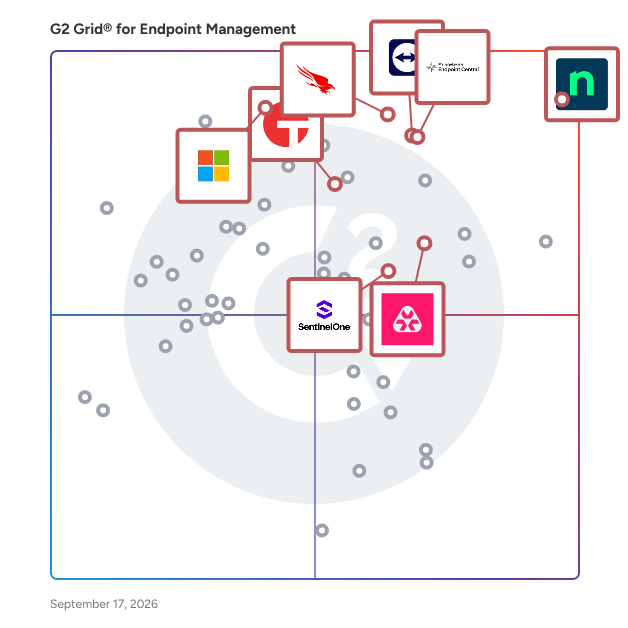
G2 Grid® for Endpoint Management Software

G2 Grid® for Endpoint Management Software plotting products by satisfaction and market presence

Highlighted products: NinjaOne, CrowdStrike Falcon Endpoint Protection Platform, ManageEngine Endpoint Central, Microsoft Intune Enterprise Application Management, Remote Monitoring and Management, Tanium, TeamViewer, and SentinelOne Singularity Endpoint.

Underlying data: [Grid® JSON](https://www.g2.com/categories/endpoint-management/grids.json?focus%5B%5D=ninjaone&focus%5B%5D=crowdstrike-falcon-endpoint-protection-platform&focus%5B%5D=manageengine-endpoint-central&focus%5B%5D=microsoft-intune-enterprise-application-management&focus%5B%5D=remote-monitoring-and-management&focus%5B%5D=tanium&focus%5B%5D=teamviewer&focus%5B%5D=sentinelone-singularity-endpoint&segment=enterprise)

NinjaOne

NinjaOne is the unified IT operations platform that helps IT teams and managed service providers manage, secure, and support every endpoint from a single cloud-native console. Nearly 40,000 customers across 140+ countries use NinjaOne to replace fragmented point tools with one platform built to scale. The platform brings together the core work of modern IT operations: endpoint management, autonomous patch management, vulnerability management, endpoint and SaaS backup, remote access, and IT service desk. Teams monitor and control Windows, macOS, Linux, mobile, and virtual devices in one place, automate routine work with policy-based automation and human-centered AI, and cut the cost and risk that come from running many disconnected tools. NinjaOne serves internal IT teams and MSPs alike, from lean IT departments to mid-market and large enterprise organizations managing distributed, multi-site environments. Common uses include consolidating IT tooling, automating patching for security and compliance, managing distributed and hybrid workforces, improving endpoint visibility, and strengthening backup and ransomware readiness. NinjaOne has maintained a 98 percent customer satisfaction score for more than five years, backed by free unlimited onboarding and 24/7 support in seven languages. Organizations that move to NinjaOne report replacing four or more separate tools with the single platform. NinjaOne is FedRAMP Moderate Authorized and SOC 2 Type II and Type III compliant, and supports audit-ready compliance evidence across frameworks including CMMC, ISO 27001, and HIPAA. The mission behind the platform is simple: unify IT to simplify work, giving IT teams better tools and employees a great technology experience at work.

Average Rating: 4.7/5.0

Total Reviews: 4,989

How Do G2 Users Rate NinjaOne?

  • Has the product been a good partner in doing business?: 9.4/10 (Category avg: 9.2/10)
  • Ease of Admin: 9.1/10 (Category avg: 8.7/10)
  • Quality of Support: 9.1/10 (Category avg: 8.7/10)
  • Ease of Use: 9.1/10 (Category avg: 8.9/10)

Who Is the Company Behind NinjaOne?

  • Seller: NinjaOne
  • Company Website:
  • Year Founded: 2013
  • HQ Location: Austin, Texas
  • Twitter: @NinjaOne
    3,607 Twitter followers
  • LinkedIn® Page: www.linkedin.com
    2,376 employees on LinkedIn®

Who Uses This Product?

  • Who Uses This: IT Manager, Owner
  • Top Industries: Information Technology and Services, Computer & Network Security
  • Company Size: 47% Medium, 45% Small

What Do G2 Reviewers Say About NinjaOne?

AI-generated summary from verified user reviews

Pros
  • Users value the ease of use of NinjaOne, highlighting its seamless implementation and effective support for MSPs.
  • Users appreciate the ongoing feature enhancements of NinjaOne, ensuring the platform continuously evolves to meet our needs.
  • Users praise NinjaOne for its easy-to-navigate remote access and full visibility, enhancing IT support efficiency.
  • Users praise the powerful automation features of NinjaOne, enhancing efficiency and simplifying management tasks.
  • Users appreciate the exceptional customer support of NinjaOne, which simplifies learning and enhances overall usability.
Cons
  • Users notice the missing features in NinjaOne, specifically regarding client and customer portal capabilities.
  • Users find the limited features of NinjaOne frustrating, especially regarding user management and third-party software automation.
  • Users find the search function lacking and struggle with visibility and usability issues in NinjaOne.
  • Users feel the search function needs improvement and find the visibility of the NinjaOne icon inconsistent.
  • Users express concerns about feature issues, including confusion over roles, auto-installations, and OS compatibility challenges.

What Are Recent G2 Reviews of NinjaOne?

What Are G2 Users Discussing About NinjaOne?

CrowdStrike Falcon Endpoint Protection Platform

Organizations today face a serious challenge: managing numerous security vendors and tools while confronting an ever-evolving threat landscape. Sophisticated adversaries are becoming smarter, faster, and more evasive, launching complex attacks that can strike in minutes or even seconds. Traditional security approaches struggle to keep pace, leaving businesses vulnerable. The CrowdStrike Falcon Platform addresses this by offering a unified, cloud-native solution. It consolidates previously siloed security solutions and incorporates third-party data into a single platform with one efficient and resource-conscious agent, leveraging advanced AI and real-time threat intelligence. This approach simplifies security operations, speeds analyst decision making, and enhances protection to stop the breach, allowing organizations to reduce risk with less complexity and lower costs. CrowdStrike's Falcon Platform includes: - Endpoint Security: Secure the endpoint, stop the breach - Identify Protection: Identity is the front line, defend it - Next-Gen SIEM: The future of SIEM, today - Data Protection: Real-time data protection from endpoint to cloud - Exposure Management: Understand risk to stop breaches - Charlotte AI: Powering the next evolution of the SOC

Average Rating: 4.7/5.0

Total Reviews: 543

How Do G2 Users Rate CrowdStrike Falcon Endpoint Protection Platform?

  • Has the product been a good partner in doing business?: 9.3/10 (Category avg: 9.2/10)
  • Ease of Admin: 8.9/10 (Category avg: 8.7/10)
  • Quality of Support: 9.0/10 (Category avg: 8.7/10)
  • Ease of Use: 9.0/10 (Category avg: 8.9/10)

Who Is the Company Behind CrowdStrike Falcon Endpoint Protection Platform?

  • Seller: CrowdStrike
  • Company Website:
  • Year Founded: 2011
  • HQ Location: Sunnyvale, CA
  • Twitter: @CrowdStrike
    110,809 Twitter followers
  • LinkedIn® Page: www.linkedin.com
    21,058 employees on LinkedIn®

Who Uses This Product?

  • Who Uses This: Security Analyst, Security Engineer
  • Top Industries: Information Technology and Services, Financial Services
  • Company Size: 46% Large, 40% Medium

What Do G2 Reviewers Say About CrowdStrike Falcon Endpoint Protection Platform?

AI-generated summary from verified user reviews

Pros
  • Users appreciate the lightweight performance and powerful threat detection of CrowdStrike Falcon, enhancing security without slowing down systems.
  • Users commend the effective threat detection capabilities of CrowdStrike Falcon, ensuring robust security without system slowdowns.
  • Users appreciate the ease of use of CrowdStrike Falcon, benefiting from its lightweight impact and efficient incident management.
  • Users appreciate the advanced real-time threat protection of CrowdStrike Falcon, ensuring efficient security without system performance issues.
  • Users praise the exceptional threat detection of CrowdStrike Falcon, noting its effectiveness against both known and unknown threats.
Cons
  • Users find the cost prohibitive for smaller organizations, especially with additional modules increasing overall expenses.
  • Users find the complexity of the user interface and additional costs challenging, complicating their overall experience.
  • Users face a steep learning curve with CrowdStrike’s query language, making transitions from other platforms challenging.
  • Users find the limited features challenging, especially concerning cost and technical accessibility for smaller businesses.
  • Users find that pricing can be a barrier for smaller organizations, complicating access to advanced features.

What Are Recent G2 Reviews of CrowdStrike Falcon Endpoint Protection Platform?

What Are G2 Users Discussing About CrowdStrike Falcon Endpoint Protection Platform?

ManageEngine Endpoint Central

ManageEngine Endpoint Central is an all-in-one unified endpoint management and security (UEMS) solution that delivers end-to-end life cycle management and endpoint protection. From automated multi-OS patching and software deployment to asset intelligence and mobile device management, it unifies the core workflows IT teams rely on every day. On the security side, its next-generation antivirus (NGAV) uses behavioral detection, AI, and real-time analytics to detect and stop advanced threats, while built-in attack surface management, browser security, and data loss prevention keep sensitive data protected across office, remote, and frontline endpoints alike. Endpoint Central also prioritizes productivity through digital employee experience (DEX) monitoring, delivering real-time insights into device health, application performance, and endpoint telemetry so IT teams can resolve issues before they impact employees. Recognized as a leader by Gartner®, IDC, and Forrester, Endpoint Central is trusted by over 31, 000 enterprises worldwide and available in both on-premises and SaaS editions. This solution streamlines the complex landscape of endpoint management, empowering IT and security teams to manage more with less, delivering intelligent automation and AI-powered threat mitigation through one unified platform. Business benefits and ROI A commissioned Forrester Total Economic Impact™ study found that organizations deploying Endpoint Central achieved several significant business benefits, including: - 442% return on investment over three years, driven by tool consolidation, automation, and reduced operational overhead. - $4.5 million in total quantified economic benefits (present value), a net present value of $3.7 million, and a payback period of under six months. - 95% reduction in manual patching time, as well as cut licensing and insurance costs through improved security posture and compliance. - Significant reductions in compliance violations and security-related disruptions driven by Endpoint Central’s capability to convert endpoint stability and risk reduction into measurable business outcomes.

Average Rating: 4.5/5.0

Total Reviews: 1,125

How Do G2 Users Rate ManageEngine Endpoint Central?

  • Has the product been a good partner in doing business?: 8.9/10 (Category avg: 9.2/10)
  • Ease of Admin: 8.8/10 (Category avg: 8.7/10)
  • Quality of Support: 8.5/10 (Category avg: 8.7/10)
  • Ease of Use: 8.7/10 (Category avg: 8.9/10)

Who Is the Company Behind ManageEngine Endpoint Central?

  • Seller: Zoho
  • Year Founded: 1996
  • HQ Location: Austin, TX
  • Twitter: @Zoho
    137,880 Twitter followers
  • LinkedIn® Page: www.linkedin.com
    30,913 employees on LinkedIn®
  • Phone: +1 (888) 900-9646

Who Uses This Product?

  • Who Uses This: IT Manager, System Administrator
  • Top Industries: Information Technology and Services, Financial Services
  • Company Size: 64% Medium, 24% Large

What Do G2 Reviewers Say About ManageEngine Endpoint Central?

AI-generated summary from verified user reviews

Pros
  • Users find the ease of use of ManageEngine Endpoint Central invaluable for efficient IT operations and streamlined management.
  • Users value the efficient patch management in ManageEngine Endpoint Central, simplifying endpoint updates and enhancing security.
  • Users appreciate the extensive features of ManageEngine Endpoint Central, enabling efficient endpoint and security management in one platform.
  • Users value the software deployment capabilities of ManageEngine Endpoint Central for efficient and streamlined management of endpoints.
  • Users value the comprehensive endpoint management features of ManageEngine Endpoint Central for efficient security and asset management.
Cons
  • Users feel the product lacks reporting functionality and dynamic group settings, which limits flexibility for managed service providers.
  • Users experience feature issues with Endpoint Central, particularly regarding Active Directory updates and unclear deployment remarks.
  • Users face patching issues with ManageEngine Endpoint Central, experiencing problems with updates and continuous review popups.
  • Users find the initial complexity of Endpoint Central challenging due to numerous features and unclear documentation.
  • Users find the learning curve and limited customization challenging, requiring time and training for effective use.

What Are Recent G2 Reviews of ManageEngine Endpoint Central?

What Are G2 Users Discussing About ManageEngine Endpoint Central?

Microsoft Intune Enterprise Application Management

Microsoft Intune Enterprise Application Management is a cloud-based solution designed to simplify the discovery, deployment, and updating of applications within an organization. By providing a securely hosted catalog of prepackaged Microsoft and third-party applications, it reduces the time and effort IT administrators spend on app management. This service ensures that applications remain current and secure, mitigating potential security risks associated with outdated software. Key Features and Functionality: - Enterprise App Catalog: Access a comprehensive collection of prepackaged applications, including both Microsoft and third-party apps, directly from the Intune console. - Streamlined Deployment: Easily discover, package, and deploy applications, reducing complexity and saving time for IT administrators. - Automated Updates: Keep applications up to date by leveraging a guided upgrade experience, proactively identifying and updating outdated apps. - Security Risk Mitigation: Deploy app fixes immediately when security vulnerabilities are discovered, reducing potential risks and ensuring compliance. - Integration with Windows Autopilot: Support for Windows Autopilot allows for seamless integration, enabling the selection of blocking apps from the Enterprise App Catalog in Enrollment Status Page (ESP) and Device Preparation Page (DPP) profiles. Primary Value and Problem Solved: Microsoft Intune Enterprise Application Management addresses the challenges organizations face in managing the lifecycle of applications across diverse endpoints. By offering a centralized, cloud-based platform, it simplifies the processes of app discovery, deployment, and maintenance. This not only enhances operational efficiency but also strengthens security by ensuring that applications are consistently updated and compliant with organizational policies. Ultimately, it empowers IT teams to focus on strategic initiatives rather than routine app management tasks.

Average Rating: 4.5/5.0

Total Reviews: 255

How Do G2 Users Rate Microsoft Intune Enterprise Application Management?

  • Has the product been a good partner in doing business?: 8.9/10 (Category avg: 9.2/10)
  • Ease of Admin: 8.6/10 (Category avg: 8.7/10)
  • Quality of Support: 8.4/10 (Category avg: 8.7/10)
  • Ease of Use: 8.6/10 (Category avg: 8.9/10)

Who Is the Company Behind Microsoft Intune Enterprise Application Management?

  • Seller: Microsoft
  • Year Founded: 1975
  • HQ Location: Redmond, Washington
  • Twitter: @microsoft
    13,091,739 Twitter followers
  • LinkedIn® Page: www.linkedin.com
    232,750 employees on LinkedIn®
  • Ownership: MSFT

Who Uses This Product?

  • Who Uses This: System Engineer, System Administrator
  • Top Industries: Information Technology and Services, Computer & Network Security
  • Company Size: 41% Medium, 40% Large

What Do G2 Reviewers Say About Microsoft Intune Enterprise Application Management?

AI-generated summary from verified user reviews

Pros
  • Users value the centralized management of Microsoft Intune, simplifying app lifecycle management and enhancing security effortlessly.
  • Users value the enhanced security and compliance capabilities of Microsoft Intune Enterprise Application Management for IT operations.
  • Users appreciate the ease of use of Microsoft Intune, allowing for seamless app lifecycle management and device setup.
  • Users value the centralized app lifecycle management of Microsoft Intune, boosting security and simplifying IT operations.
  • Users appreciate the streamlined software deployment capabilities of Microsoft Intune, enhancing security and compliance for all devices.
Cons
  • Users find the setup complexity challenging, with a steep learning curve and unclear feature activation times.
  • Users often face complexity in policy integration with Intune, making setup and management challenging for new administrators.
  • Users find the learning curve steep, as setup and policy configuration can be complex for beginners.
  • Users note the missing features in Microsoft Intune, particularly regarding cross-platform consistency and non-Microsoft app protection.
  • Users find cross-platform consistency lacking in Intune, hindering its usability and complicating management for new administrators.

What Are Recent G2 Reviews of Microsoft Intune Enterprise Application Management?

What Are G2 Users Discussing About Microsoft Intune Enterprise Application Management?

Remote Monitoring and Management

Atera is defining the category of Autonomous IT, where AI agents resolve technical incidents end to end, without a technician in the loop. Atera's AI-native IT management platform consolidates RMM, helpdesk, ticketing, advanced reporting, and automation, empowering IT teams and MSPs to manage and protect infrastructure, automate tasks, and boost service quality by reducing downtime and improving SLAs. Atera’s autonomous AI agent, Robin, detects, diagnoses, remediates, and verifies incidents by taking action directly on devices, servers, networks, and mainframes, resolving Tier-1 and complex Tier-2 incidents in full. 1) Resolution without the wait. Robin doesn't just suggest or assist, it acts and resolves, on its own, instantly. 2) Always-on coverage, day and night. Robin extends your team's reach around the clock, resolving issues at 2am just as reliably as at 2pm, so your team isn't the only line of defense when it comes to fighting downtime. 3) A personal IT tech for every employee. An intelligent, context-aware AI agent that understands your environment, adapts to each user, and responds instantly. Built on a patented architecture, Robin operates as a system of action within your existing enterprise environment, adhering to the highest enterprise-grade security and compliance standards. It's governed by configurable guardrails, a complete audit trail, and approval workflows, so autonomy never comes at the cost of control. More than 13,000 organizations across 120+ countries rely on Atera to keep their people working, uninterrupted. Discover how Atera can help you achieve unparalleled organizational efficiency at www.atera.com.

Average Rating: 4.6/5.0

Total Reviews: 1,245

How Do G2 Users Rate Remote Monitoring and Management?

  • Has the product been a good partner in doing business?: 9.2/10 (Category avg: 9.2/10)
  • Ease of Admin: 9.0/10 (Category avg: 8.7/10)
  • Quality of Support: 9.0/10 (Category avg: 8.7/10)
  • Ease of Use: 9.2/10 (Category avg: 8.9/10)

Who Is the Company Behind Remote Monitoring and Management?

  • Seller: Atera
  • Company Website:
  • Year Founded: 2011
  • HQ Location: New York
  • Twitter: @ateracloud
    1,675 Twitter followers
  • LinkedIn® Page: www.linkedin.com
    416 employees on LinkedIn®

Who Uses This Product?

  • Who Uses This: Owner, IT Manager
  • Top Industries: Information Technology and Services, Computer & Network Security
  • Company Size: 56% Small, 31% Medium

What Do G2 Reviewers Say About Remote Monitoring and Management?

AI-generated summary from verified user reviews

Pros
  • Users find Atera's ease of use exceptional, streamlining management and enhancing efficiency across various tasks.
  • Users appreciate the powerful automation tools of Atera, enabling efficient management and consistent setup for new employees.
  • Users appreciate the all-in-one dashboard of Atera, enhancing efficiency with seamless access to various tools and features.
  • Users praise Atera for its efficiency, streamlining processes and enhancing remote management of devices.
  • Users value the proactive monitoring and all-in-one platform of Atera, significantly enhancing productivity and efficiency.
Cons
  • Users find missing features in Atera, such as insufficient alert context and lack of essential ticketing tools.
  • Users find the limited features of Atera, especially in the mobile app, restrict overall functionality for freelancers.
  • Users find improvement needed in Atera's interface changes and agent installation process, along with remote access reliability.
  • Users note that report loading times and limited customization can hinder efficiency, revealing areas for improvement.
  • Users express concerns about feature issues in Atera, citing limitations and disruptions affecting their workflow.

What Are Recent G2 Reviews of Remote Monitoring and Management?

What Are G2 Users Discussing About Remote Monitoring and Management?

Tanium

Trusted by 40% of the Fortune 100, 8 of the top 10 U.S. Banks, and all 6 branches of the U.S. Armed Forces. Tanium is the platform the world's most security-conscious organizations trust. The Tanium Autonomous IT Platform unifies endpoint management and security on a single, unified platform. Driven by real-time intelligence and generative, agentic, and predictive AI, Tanium ensures every insight and automation is based on accurate, trustworthy data so IT operations and security teams can act faster, stay resilient, and drive better business outcomes with confidence. Built on Tanium’s patented Linear Chain Architecture, teams can deploy trusted automation progressively, then execute actions safely at speed and scale - without scans or manual workflows. Continuous visibility across IT, mobile, OT, and cloud environments helps organizations accelerate decision agility, save costs through integrated automation, and strengthen resilience with closed-loop security.

Average Rating: 4.5/5.0

Total Reviews: 83

How Do G2 Users Rate Tanium?

  • Has the product been a good partner in doing business?: 8.8/10 (Category avg: 9.2/10)
  • Ease of Admin: 8.3/10 (Category avg: 8.7/10)
  • Quality of Support: 8.9/10 (Category avg: 8.7/10)
  • Ease of Use: 8.7/10 (Category avg: 8.9/10)

Who Is the Company Behind Tanium?

  • Seller: Tanium
  • Company Website:
  • Year Founded: 2007
  • HQ Location: Emeryville, CA
  • Twitter: @Tanium
    7,243 Twitter followers
  • LinkedIn® Page: www.linkedin.com
    2,318 employees on LinkedIn®

Who Uses This Product?

  • Top Industries: Information Technology and Services, Hospital & Health Care
  • Company Size: 48% Large, 31% Medium

What Do G2 Reviewers Say About Tanium?

AI-generated summary from verified user reviews

Pros
  • Users value the ease of use of Tanium, enabling efficient device management and real-time endpoint visibility.
  • Users value the real-time visibility and comprehensive endpoint management features of Tanium for enhanced security and efficiency.
  • Users commend the reliability of Tanium for effective endpoint management and real-time visibility across assets.
  • Users value the strong security capabilities of Tanium, enhancing their endpoint security management significantly.
  • Users commend the real-time visibility provided by Tanium, enhancing their ability to manage endpoints effectively.
Cons
  • Users find the learning curve steep with Tanium, requiring significant time to become proficient in its features.
  • Users find Tanium's complexity challenging, especially those new to cybersecurity aiming for hands-on experience.
  • Users report limited features in Tanium, including outdated vulnerability databases and troublesome troubleshooting processes.
  • Users experience insufficient information during onboarding, making the initial use of Tanium challenging and time-consuming.
  • Users note that Tanium has a steep learning curve and lacks clear onboarding resources, making initial use overwhelming.

What Are Recent G2 Reviews of Tanium?

TeamViewer

TeamViewer is a leading provider of remote connectivity software for individuals and businesses of all sizes. Our remote software enables companies across various industries to enhance their efficiency and achieve their business goals by digitally transforming their processes. We offer a selection of bespoke solutions: TeamViewer Tensor, our enterprise remote connectivity solution, enables businesses to connect, manage, and protect computers, mobile devices, and embedded platforms – on site and around the globe. TeamViewer Remote, our remote access and support solution, enables secure access to devices for remote support in small and medium-sized businesses. A free version of TeamViewer Remote is available for personal use. TeamViewer is actively working to shape the digital revolution by innovating in the fields of augmented reality (AR) and the Internet of Things (IoT). Our AR platform, Frontline, brings digital technology onto the shop floor with industrial AR solutions designed to optimize manual processes. Strategic partnerships and software integrations with other industry leaders such as SAP, Google, and Microsoft let us provide our customers with a seamless experience, regardless of their device or operating system. Since TeamViewer was founded in Göppingen, Germany, in 2005, our solutions have been installed on more than 2.5 billion devices worldwide. For more information, visit www.teamviewer.com.

Average Rating: 4.5/5.0

Total Reviews: 4,081

How Do G2 Users Rate TeamViewer?

  • Has the product been a good partner in doing business?: 8.6/10 (Category avg: 9.2/10)
  • Ease of Admin: 8.9/10 (Category avg: 8.7/10)
  • Quality of Support: 8.6/10 (Category avg: 8.7/10)
  • Ease of Use: 9.1/10 (Category avg: 8.9/10)

Who Is the Company Behind TeamViewer?

  • Seller: TeamViewer
  • Company Website:
  • Year Founded: 2005
  • HQ Location: Goppingen
  • Twitter: @TeamViewer
    48,070 Twitter followers
  • LinkedIn® Page: www.linkedin.com
    2,818 employees on LinkedIn®

Who Uses This Product?

  • Who Uses This: Software Engineer, IT Manager
  • Top Industries: Information Technology and Services, Computer Software
  • Company Size: 41% Small, 34% Medium

What Do G2 Reviewers Say About TeamViewer?

AI-generated summary from verified user reviews

Pros
  • Users appreciate the ease of use of TeamViewer, enjoying a smooth experience for remote access and support.
  • Users appreciate the easy remote access provided by TeamViewer, simplifying connections and enhancing productivity.
  • Users value the easy remote access with TeamViewer, simplifying connections and control over devices effortlessly.
  • Users love the Easy Access feature of TeamViewer, making remote connections seamless and efficient.
  • Users appreciate the seamless remote access of TeamViewer, enhancing productivity through easy connections and cross-platform compatibility.
Cons
  • Users face significant connection issues with TeamViewer, impacting performance during slow or unstable internet conditions.
  • Users experience connectivity issues with TeamViewer, leading to poor performance during slow or bad connections.
  • Users find TeamViewer expensive in South Africa due to high subscription fees and limited performance on slow connections.
  • Users experience slow performance with TeamViewer, particularly during weak internet connections and after network disruptions.
  • Users often face remote access issues with TeamViewer, including connection failures and confusing control panel interfaces.

What Are Recent G2 Reviews of TeamViewer?

What Are G2 Users Discussing About TeamViewer?

SentinelOne Singularity Endpoint

SentinelOne Singularity Endpoint is a software designed to protect endpoints by autonomously detecting, preventing, and responding to threats across devices within an organization. The software leverages machine learning and behavioral AI to identify and mitigate a wide range of cyber threats, including malware, ransomware, and fileless attacks. It provides continuous monitoring and automated remediation capabilities to help reduce manual intervention and response time during security incidents. SentinelOne Singularity Endpoint integrates with existing IT security and management workflows, offering visibility into endpoint activities and assisting organizations in maintaining compliance by ensuring devices meet security standards. The software is engineered to address business challenges related to endpoint protection, threat management, and operational efficiency in cybersecurity environments.

Average Rating: 4.7/5.0

Total Reviews: 205

How Do G2 Users Rate SentinelOne Singularity Endpoint?

  • Has the product been a good partner in doing business?: 9.2/10 (Category avg: 9.2/10)
  • Ease of Admin: 8.9/10 (Category avg: 8.7/10)
  • Quality of Support: 8.9/10 (Category avg: 8.7/10)
  • Ease of Use: 8.9/10 (Category avg: 8.9/10)

Who Is the Company Behind SentinelOne Singularity Endpoint?

  • Seller: SentinelOne
  • Company Website:
  • Year Founded: 2013
  • HQ Location: Mountain View, CA
  • Twitter: @SentinelOne
    57,863 Twitter followers
  • LinkedIn® Page: www.linkedin.com
    6,571 employees on LinkedIn®

Who Uses This Product?

  • Top Industries: Information Technology and Services, Computer & Network Security
  • Company Size: 46% Medium, 36% Large

What Do G2 Reviewers Say About SentinelOne Singularity Endpoint?

AI-generated summary from verified user reviews

Pros
  • Users value the tool efficiency of SentinelOne Singularity Endpoint, appreciating its user-friendly interface and effective threat detection.
  • Users find the ease of integration with Nable RMM and setup straightforward for daily operations.
  • Users praise the exceptional malware protection of SentinelOne, effectively stopping threats before they can cause harm.
  • Users find SentinelOne Singularity Endpoint to be a highly useful tool for incident notification and investigation.
  • Users appreciate the quick alerts and feature-rich capabilities of SentinelOne, enhancing security management and support.
Cons
  • Users face update issues with SentinelOne Singularity, leading to login problems and cumbersome agent management.
  • Users find the difficult learning curve of SentinelOne Singularity Endpoint challenging, especially for beginners navigating its features.
  • Users find the frequent updates challenging, as rapid changes lead to login issues and a steep learning curve.
  • Users report challenges with agent removal issues impacting application functionality and requiring improvement in uninstallation processes.
  • Users report ineffective alerts that hinder troubleshooting and prevent them from addressing application issues effectively.

What Are Recent G2 Reviews of SentinelOne Singularity Endpoint?

What Are G2 Users Discussing About SentinelOne Singularity Endpoint?

Trellix Endpoint Security

The Trellix Endpoint Security Suite is a comprehensive and unified set of solutions that protects devices and endpoints across your hybrid network, empowering your organization to address complex, distributed security issues thoroughly, efficiently, and quickly. It uses analytics and machine learning to achieve industry-leading threat protection, all while offering the flexibility to connect to products from other vendors. The solution helps you unify your data and threat defenses from device to cloud, for integrated security.

Average Rating: 4.3/5.0

Total Reviews: 319

How Do G2 Users Rate Trellix Endpoint Security?

  • Has the product been a good partner in doing business?: 8.1/10 (Category avg: 9.2/10)
  • Ease of Admin: 8.2/10 (Category avg: 8.7/10)
  • Quality of Support: 8.5/10 (Category avg: 8.7/10)
  • Ease of Use: 8.6/10 (Category avg: 8.9/10)

Who Is the Company Behind Trellix Endpoint Security?

  • Seller: Trellix
  • Year Founded: 2004
  • HQ Location: Plano, TX
  • Twitter: @Trellix
    241,168 Twitter followers
  • LinkedIn® Page: www.linkedin.com
    3,811 employees on LinkedIn®

Who Uses This Product?

  • Who Uses This: Software Developer, Senior Software Engineer
  • Top Industries: Information Technology and Services, Computer Software
  • Company Size: 42% Medium, 41% Large

What Do G2 Reviewers Say About Trellix Endpoint Security?

AI-generated summary from verified user reviews

Pros
  • Users find Trellix Endpoint Security to be very user-friendly, facilitating easy implementation and effective threat management.
  • Users appreciate the robust multi-layered protection of Trellix Endpoint Security against a wide range of threats.
  • Users value the advanced threat detection of Trellix Endpoint Security, stopping sophisticated attacks before they can cause harm.
  • Users commend the responsive customer support of Trellix Endpoint Security, enhancing their overall experience with the product.
  • Users value the robust, multi-layered protection of Trellix Endpoint Security against a wide array of threats.
Cons
  • Users find the difficult configuration of Trellix Endpoint Security to be overwhelming, especially for new or smaller teams.
  • Users find Trellix Endpoint Security expensive, noting that competitors offer more features at a lower price.
  • Users experience agent issues that lead to high CPU and memory usage during startup, requiring advanced configuration skills.
  • Users find the complex installation of Trellix Endpoint Security challenging, especially for those unfamiliar with enterprise systems.
  • Users find the complex interface of Trellix Endpoint Security overwhelming, especially for beginners and smaller teams.

What Are Recent G2 Reviews of Trellix Endpoint Security?

What Are G2 Users Discussing About Trellix Endpoint Security?

Right Click Tools

Right Click Tools is a powerful suite of endpoint management, automation, and remediation tools designed to elevate what IT teams can accomplish with Microsoft ConfigMgr (SCCM) and Intune. Modern IT environments are complex, distributed, and constantly changing—and traditional consoles often don’t provide the visibility or speed required to stay ahead. Right Click Tools closes those gaps. By bringing real-time insights, one-click actions, and scalable automation directly into the tools IT already uses, it enables teams to see issues clearly, fix them quickly, and move on with confidence. Right Click Tools is built for the IT professionals responsible for keeping endpoints healthy, secure, and compliant. This includes systems administrators who need to troubleshoot and remediate issues quickly; IT directors who are focused on reducing risk, improving efficiency, and maintaining compliance; and security leaders who require real-time visibility into vulnerabilities like missing encryption, policy drift, or privileged access. Whether an organization manages thousands of devices on-premises, across hybrid environments, or entirely in the cloud, Right Click Tools gives teams the control and consistency required to support a modern, distributed workforce. Core features include real-time visibility, bulk automation, and powerful remediation capabilities that dramatically streamline endpoint management. IT teams can instantly surface non compliant devices, check encryption and patch status, manage local admin rights, deploy software, or kill rogue processes—all without scripting or switching tools. Right Click Tools becomes even more powerful with its three specialized add on modules: the Patching module delivers advanced patch reporting and compliance enforcement; the Privileged Access module enables controlled elevation and temporary admin rights without compromising security; and the Insights module provides rich dashboards and analytics that highlight vulnerabilities, policy drift, and operational gaps. Together, these capabilities give organizations the unified control, speed, and intelligence they need to identify issues quickly and remediate them at scale. What sets Right Click Tools apart is its unique combination of speed, simplicity, and depth. It brings together capabilities that would otherwise require multiple disconnected tools—or deep PowerShell expertise—and makes them intuitive and accessible to IT teams of any skill level. Its tight integration with both ConfigMgr and Intune, including a browser extension for the Intune console and advanced automation via Recast Management Server, gives organizations a seamless experience across cloud and on-premises environments. Trusted by more than 60,000 IT professionals worldwide, Right Click Tools consistently reduces risk, improves compliance, and saves teams hundreds of hours annually. It’s the essential toolkit for organizations that want to manage endpoints smarter, faster, and more securely—no scripting required.

Average Rating: 4.8/5.0

Total Reviews: 68

How Do G2 Users Rate Right Click Tools?

  • Has the product been a good partner in doing business?: 9.6/10 (Category avg: 9.2/10)
  • Ease of Admin: 9.4/10 (Category avg: 8.7/10)
  • Quality of Support: 9.3/10 (Category avg: 8.7/10)
  • Ease of Use: 9.6/10 (Category avg: 8.9/10)

Who Is the Company Behind Right Click Tools?

  • Seller: Recast Software
  • Company Website:
  • Year Founded: 2015
  • HQ Location: St. Louis Park
  • Twitter: @RecastSoftware
    2,103 Twitter followers
  • LinkedIn® Page: www.linkedin.com
    172 employees on LinkedIn®

Who Uses This Product?

  • Top Industries: Information Technology and Services, Hospital & Health Care
  • Company Size: 75% Large, 21% Medium

What Do G2 Reviewers Say About Right Click Tools?

AI-generated summary from verified user reviews

Pros
  • Users find Right Click Tools to be a user-friendly solution that simplifies daily IT management tasks effectively.
  • Users love the powerful feature set of Right Click Tools, especially its Remote Software Center and automation capabilities.
  • Users love the automation capabilities of Right Click Tools, significantly reducing manual work and improving efficiency.
  • Users appreciate the responsive and easy-to-work-with customer support of Right Click Tools, enhancing their IT management experience.
  • Users celebrate the usefulness of features in Right Click Tools, greatly enhancing their daily work routines.
Cons
  • Users note integration issues with remote devices and the slow migration to cloud services affecting overall management capabilities.
  • Users find the access restrictions confusing as unlicensed products clutter the interface unnecessarily.
  • Users face implementation issues with Right Click Tools, particularly regarding cloud migration and required setup efforts.
  • Users often face access issues that complicate permission settings and hinder smooth operation of Right Click Tools.
  • Users find authentication issues challenging at times, affecting access and functionality of Right Click Tools.

What Are Recent G2 Reviews of Right Click Tools?

What Are G2 Users Discussing About Right Click Tools?

Ivanti Autonomous Endpoint Management

Ivanti Autonomous Endpoint Management is a software designed to automate and simplify the management of devices throughout their lifecycle. The software provides capabilities for endpoint discovery, configuration, security, monitoring, and remediation across various platforms, including Windows, macOS, Linux, and mobile devices. It enables organizations to reduce manual IT workloads by leveraging automation for patch management, software distribution, compliance enforcement, and device provisioning. The software also offers insights into device health and usage, helping businesses address vulnerabilities, ensure policy adherence, and maintain endpoint performance while supporting remote and hybrid work environments. Ivanti Autonomous Endpoint Management aims to improve operational efficiency by centralizing endpoint administration and minimizing risks associated with unmanaged or unpatched devices.

Average Rating: 4.3/5.0

Total Reviews: 384

How Do G2 Users Rate Ivanti Autonomous Endpoint Management?

  • Has the product been a good partner in doing business?: 8.4/10 (Category avg: 9.2/10)
  • Ease of Admin: 8.1/10 (Category avg: 8.7/10)
  • Quality of Support: 8.3/10 (Category avg: 8.7/10)
  • Ease of Use: 8.2/10 (Category avg: 8.9/10)

Who Is the Company Behind Ivanti Autonomous Endpoint Management?

  • Seller: Ivanti
  • Company Website:
  • Year Founded: 1985
  • HQ Location: South Jordan, UT
  • Twitter: @GoIvanti
    6,761 Twitter followers
  • LinkedIn® Page: www.linkedin.com
    3,026 employees on LinkedIn®

Who Uses This Product?

  • Who Uses This: Software Engineer
  • Top Industries: Information Technology and Services, Computer & Network Security
  • Company Size: 47% Large, 34% Medium

What Do G2 Reviewers Say About Ivanti Autonomous Endpoint Management?

AI-generated summary from verified user reviews

Pros
  • Users appreciate the strong automation features of Ivanti Neurons, making endpoint management seamless and efficient.
  • Users value the robust automation and AI-driven features of Ivanti Neurons, enhancing IT efficiency and productivity.
  • Users value the strong automation and self-healing features of Ivanti Neurons, enhancing device management and visibility.
  • Users value the access ease of Ivanti Neurons UEM, praising its effortless integration across various operating systems.
  • Users value the effective Apple Device Management of Ivanti Neurons, simplifying device locking and enhancing functionality.
Cons
  • Users experience communication delays in support responsiveness, impacting critical troubleshooting during high-priority incidents.
  • Users report feature issues such as a cluttered UI and sluggish performance with large device counts.
  • Users find the UI cluttered and unintuitive, making navigation and accessing essential tools more difficult.
  • Users experience slow performance when managing large device counts, impacting efficiency during critical operations.
  • Users find the complexity of setup and customization challenging, leading to a steep learning curve.

What Are Recent G2 Reviews of Ivanti Autonomous Endpoint Management?

What Are G2 Users Discussing About Ivanti Autonomous Endpoint Management?

PDQ Connect

PDQ is an endpoint management platform designed for IT administrators and sysadmins. Manage, secure, and automate endpoints across remote, hybrid, and on-site environments. Manage your organization's Windows and macOS machines from a central platform designed to make the grind of everyday IT workflows seamless and the thorny why-the-hell-isn’t-this-working issues easier to diagnose. Core capabilities include patch management, vulnerability remediation, remote desktop access and monitoring, and software deployment. In short, the stuff you actually tell us to build. Just look at our Discord. Vulnerabilities are continuously detected and prioritized using real-world exploit activity in addition to CVSS, enabling remediation based on real, not theoretical, business risk. Patch both Windows OS and over 1,000 Windows and macOS packages from a hand-built library sourced directly from publishers, virus-scanned, stripped of nonsense, and typically updated within hours of a new release. PDQ pre-built workflows and automations are running within minutes of onboarding, but most of our sysadmins combine custom multistep packages, advanced PowerShell scanners, dynamic device groups, vulnerability automations, and a community-shared script library to create an end-to-end system tailor-built for their situation, reducing what was once days into minutes. And for when all else fails, PDQ ships with a native device-level diagnostics and a remote desktop tool that fires up quickly to help you diagnose, fix, and move on, whether you’re dealing with an x64 Lenovo or an ARM Macbook Pro. Multi-tenant support allows IT teams managing multiple environments to operate from a single console. Real-time, event-driven automation allows IT teams to execute workflows based on device state and predefined conditions — deployments trigger the moment a condition is met, without waiting for a scheduled window. Offline device deployment queuing ensures no device is skipped regardless of connectivity at the time a deployment runs. And where compliance, regulatory, or org policy requires, PDQ’s core deployment and patching capabilities can also be deployed as an on-premise, agentless solution. PDQ is SOC 2 certified and includes security features including MFA, role-based access controls, encryption, and audit logging to support compliance requirements. Pricing is publicly available and supports self-service purchasing without requiring a sales call. A 14-day free trial is available with no credit card required.

Average Rating: 4.6/5.0

Total Reviews: 424

How Do G2 Users Rate PDQ Connect?

  • Has the product been a good partner in doing business?: 9.4/10 (Category avg: 9.2/10)
  • Ease of Admin: 9.4/10 (Category avg: 8.7/10)
  • Quality of Support: 9.2/10 (Category avg: 8.7/10)
  • Ease of Use: 9.1/10 (Category avg: 8.9/10)

Who Is the Company Behind PDQ Connect?

  • Seller: PDQ.com
  • Company Website:
  • Year Founded: 2001
  • HQ Location: Salt Lake City, Utah, United States
  • Twitter: @admarsenal
    987 Twitter followers
  • LinkedIn® Page: www.linkedin.com
    392 employees on LinkedIn®

Who Uses This Product?

  • Who Uses This: IT Manager, Systems Administrator
  • Top Industries: Manufacturing, Information Technology and Services
  • Company Size: 56% Medium, 15% Large

What Do G2 Reviewers Say About PDQ Connect?

AI-generated summary from verified user reviews

Pros
  • Users value the ease of use in PDQ Connect, simplifying deployment and management tasks effortlessly.
  • Users appreciate the ease of software deployment with PDQ Connect, enhancing efficiency and simplifying remote device management.
  • Users value the easy deployment capabilities of PDQ Connect, facilitating efficient software management across diverse environments.
  • Users find the easy setup of PDQ Connect a significant advantage, enhancing efficiency and user experience from the start.
  • Users value the remote access capabilities of PDQ Connect, enabling efficient management and support for off-site personnel.
Cons
  • Users express concerns about missing features in PDQ Connect, hindering efficiency in command execution and device management.
  • Users feel that improvement is needed in patch management and the user interface for PDQ Connect.
  • Users note the limited features of PDQ Connect, wishing for more options like vulnerability scanning and software deployment.
  • Users experience remote access issues due to internet dependency and subpar connection prompts hinder usability and speed.
  • Users face deployment issues with PDQ Connect, often finding package creation and device identification challenging and inconvenient.

What Are Recent G2 Reviews of PDQ Connect?

Check Point Infinity Platform

Check Point Infinity is the only fully consolidated cyber security architecture that provides unprecedented protection against Gen V mega-cyber attacks as well as future cyber threats across all networks, endpoint, cloud and mobile. The architecture is designed to resolve the complexities of growing connectivity and inefficient security.

Average Rating: 4.6/5.0

Total Reviews: 109

How Do G2 Users Rate Check Point Infinity Platform?

  • Has the product been a good partner in doing business?: 8.8/10 (Category avg: 9.2/10)
  • Ease of Admin: 8.6/10 (Category avg: 8.7/10)
  • Quality of Support: 8.8/10 (Category avg: 8.7/10)
  • Ease of Use: 9.1/10 (Category avg: 8.9/10)

Who Is the Company Behind Check Point Infinity Platform?

Who Uses This Product?

  • Top Industries: Computer & Network Security, Information Technology and Services
  • Company Size: 44% Large, 37% Medium

What Do G2 Reviewers Say About Check Point Infinity Platform?

AI-generated summary from verified user reviews

Pros
  • Users commend the advanced security features of Check Point Infinity Platform, effectively preventing future attacks on cloud infrastructures.
  • Users value the cloud security features of Check Point Infinity Platform for efficient audits and infrastructure evaluations.
  • Users commend the proactive threat detection of Check Point Infinity Platform, enhancing security for cloud applications.
  • Users highlight the comprehensive security features of Check Point Infinity Platform, effectively shielding against future attacks.
  • Users value the advanced security features of Check Point Infinity for effectively safeguarding their cloud infrastructure.
Cons
  • Users find the steep learning curve of Check Point Infinity Platform challenging due to its complexity and extensive features.
  • Users find the complex setup process for Check Point Infinity Platform can be time-consuming and confusing at times.
  • Users feel that improvement is needed in real-time support and custom ruleset creation for better functionality.
  • Users express concerns about poor support services, indicating a need for improvement in customer assistance and log visibility.
  • Users find the limited customization options challenging, affecting their ability to tailor the platform to their needs.

What Are Recent G2 Reviews of Check Point Infinity Platform?

What Are G2 Users Discussing About Check Point Infinity Platform?

Acronis Cyber Protect Cloud

Acronis delivers the world’s most complete cyber resilience platform, combining backup, disaster recovery, cybersecurity, RMM, and business operations tools into a single, natively integrated solution. Built specifically for Managed Service Providers (MSPs) and IT teams, Acronis simplifies operations with one agent, one console, and one license model. Automation, AI-driven insights, and multi-tenant management ensure that fewer technicians can manage more clients at lower cost. With predictable pricing and transparent billing, Acronis enables partners and IT teams to scale efficiently, comply with regulations, and deliver unmatched resilience. No other vendor delivers this level of integration, efficiency, and MSP alignment. Acronis Cyber Protect Cloud unites backup and next-generation, AI-based anti-malware, antivirus, and endpoint protection management in one solution. Integration and automation provide unmatched ease for service providers — reducing complexity while increasing productivity and decreasing operating costs. Acronis Cyber Protect Cloud is the single service provider solution that combines backup, anti-malware (including anti-virus, anti-ransomware, and anti-cryptojacking) and security and management capabilities such as vulnerability assessments, patch management, URL filtering and more. Now, service providers can eliminate complexity and make security a centerpiece of their offerings while increasing SLAs, decreasing churn, and generating more recurring revenue. Get upgraded security with integrated AI-based defenses that protect clients from modern threats, make smarter use of resources so your team can focus on clients, and earn new recurring revenue and higher margins that strengthen your business. Enriched with next-gen, full-stack anti-malware protection and comprehensive yet simple management tools, built on top of our industry-leading backup and data recovery solution, Acronis Cyber Protect Cloud simplifies onboarding, daily operations, and reporting, and combats advanced attacks with new use cases enabled by integration. Acronis Cyber Protect Cloud makes it easy to deliver the modern cyber protection your clients seek. Acronis is majority-owned by EQT.

Average Rating: 4.7/5.0

Total Reviews: 1,386

How Do G2 Users Rate Acronis Cyber Protect Cloud?

  • Has the product been a good partner in doing business?: 9.2/10 (Category avg: 9.2/10)
  • Ease of Admin: 9.1/10 (Category avg: 8.7/10)
  • Quality of Support: 8.8/10 (Category avg: 8.7/10)
  • Ease of Use: 9.1/10 (Category avg: 8.9/10)

Who Is the Company Behind Acronis Cyber Protect Cloud?

  • Seller: Acronis
  • Company Website:
  • Year Founded: 2003
  • HQ Location: Schaffhausen
  • Twitter: @acronis
    94,498 Twitter followers
  • LinkedIn® Page: www.linkedin.com
    1,923 employees on LinkedIn®

Who Uses This Product?

  • Who Uses This: Director, CEO
  • Top Industries: Information Technology and Services, Computer & Network Security
  • Company Size: 68% Small, 28% Medium

What Do G2 Reviewers Say About Acronis Cyber Protect Cloud?

AI-generated summary from verified user reviews

Pros
  • Users appreciate the ease of use of Acronis Cyber Protect Cloud, making management and customization straightforward and efficient.
  • Users value the effective backup solutions of Acronis Cyber Protect Cloud for their simplicity and integration.
  • Users value the robust security features of Acronis Cyber Protect Cloud, ensuring safe data management and ransomware protection.
  • Users value the ease of backup management with Acronis Cyber Protect Cloud's all-in-one platform, simplifying their operations.
  • Users value the all-in-one platform of Acronis Cyber Protect Cloud, integrating backup, cybersecurity, and management seamlessly.
Cons
  • Users often experience slow performance with Acronis Cyber Protect Cloud, affecting the efficiency of backups and restores.
  • Users find Acronis Cyber Protect Cloud expensive compared to competitors, complicating their decision-making due to unclear pricing.
  • Users are frustrated with the poor customer support, especially due to unavailability on weekends during critical backup tests.
  • Users find the complexity of the interface and pricing confusing, which complicates their overall experience with Acronis Cyber Protect Cloud.
  • Users report backup issues with Acronis Cyber Protect Cloud, particularly concerning multiple export files and limited weekend support.

What Are Recent G2 Reviews of Acronis Cyber Protect Cloud?

What Are G2 Users Discussing About Acronis Cyber Protect Cloud?

Action1

Action1 is an autonomous endpoint management platform trusted by many Fortune 500 companies. Cloud-native, infinitely scalable, highly secure, and configurable in 5 minutes—it just works and is always free for the first 200 endpoints, with no functional limits. By pioneering autonomous OS and third-party patching with peer-to-peer patch distribution and real-time vulnerability assessment without needing a VPN, it eliminates routine labor, preempts ransomware and security risks, and protects the digital employee experience. In 2025, Action1 was recognized by Inc. 5000 as the fastest-growing private software company in America. The company is founder-led by Alex Vovk and Mike Walters, American entrepreneurs who previously founded Netwrix, a multi-billion-dollar cybersecurity company.

Average Rating: 4.9/5.0

Total Reviews: 1,195

How Do G2 Users Rate Action1?

  • Has the product been a good partner in doing business?: 9.6/10 (Category avg: 9.2/10)
  • Ease of Admin: 9.5/10 (Category avg: 8.7/10)
  • Quality of Support: 9.3/10 (Category avg: 8.7/10)
  • Ease of Use: 9.5/10 (Category avg: 8.9/10)

Who Is the Company Behind Action1?

  • Seller: Action1
  • Company Website:
  • Year Founded: 2018
  • HQ Location: Houston, Texas
  • Twitter: @Action1corp
    609 Twitter followers
  • LinkedIn® Page: www.linkedin.com
    137 employees on LinkedIn®

Who Uses This Product?

  • Who Uses This: IT Manager, System Administrator
  • Top Industries: Information Technology and Services, Manufacturing
  • Company Size: 56% Medium, 37% Small

What Do G2 Reviewers Say About Action1?

AI-generated summary from verified user reviews

Pros
  • Users find Action1's ease of use exceptional, enabling quick setup and efficient remote management of devices.
  • Users value Action1 for its effective and reliable patch management, streamlining their endpoint management with remarkable ease.
  • Users find Action1's easy setup and configuration a significant advantage, simplifying device management and monitoring.
  • Users value the automated update capabilities of Action1, significantly reducing time spent on server maintenance and management.
  • Users benefit from automated server updates in Action1, significantly reducing time and effort previously needed for manual updates.
Cons
  • Users note the missing Linux agent, which limits functionality for server and client systems in Action1.
  • Users find the remote access issues needing improvement, citing speed and usability concerns with the connection.
  • Users note certain feature limitations in Action1, especially regarding customizations and missing support for Linux clients.
  • Users find the report generation and logging readability lacking, making the experience less user-friendly.
  • Users feel that Action1 requires improvement in report creation and readability to enhance overall user experience.

What Are Recent G2 Reviews of Action1?

What Are G2 Users Discussing About Action1?

Brandon Summers-Miller
BS
Researched and written by Brandon Summers-Miller
Updated