Best Enterprise Data Center Infrastructure Management (DCIM) Software

How Many Data Center Infrastructure Management (DCIM) Software Products Does G2 Track?

Total Products under this Category: 69

Category Stats (Oct 2026)

  • Average Rating: 4.43/5 The average rating of products in this category, based on all submitted ratings
  • Top Trending Product: Modius OpenData (+1.2%) - Among all products in this category, Modius OpenData recorded the largest rating increase compared to last month

Last updated: October 07, 2026

How Does G2 Rank Data Center Infrastructure Management (DCIM) Software Products?

Why You Can Trust G2's Software Rankings:

  • 30 Analysts and Data Experts
  • 1,000+ Authentic Reviews
  • 69+ Products
  • Unbiased Rankings

G2's software rankings are built on verified user reviews, rigorous moderation, and a consistent research methodology maintained by a team of analysts and data experts. Each product is measured using the same transparent criteria, with no paid placement or vendor influence. While reviews reflect real user experiences, which can be subjective, they offer valuable insight into how software performs in the hands of professionals. Together, these inputs power the G2 Score, a standardized way to compare tools within every category.

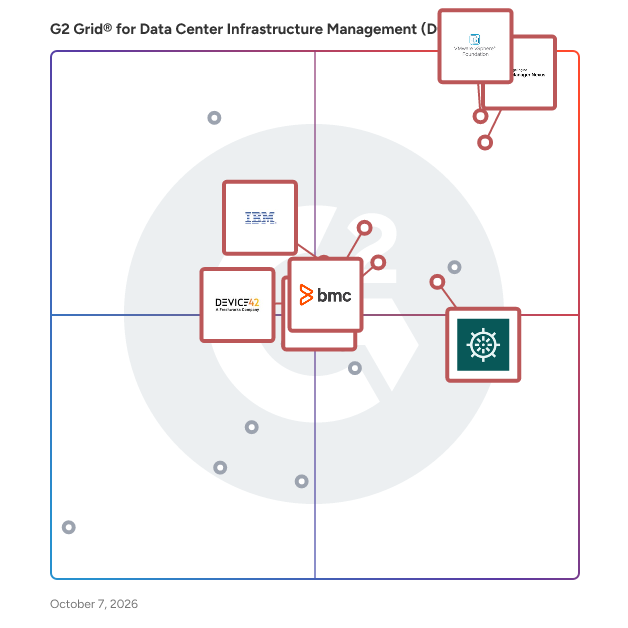
G2 Grid® for Data Center Infrastructure Management (DCIM) Software

G2 Grid® for Data Center Infrastructure Management (DCIM) Software plotting products by satisfaction and market presence

Highlighted products: VMware vSphere Foundation (VVF), OpManager Nexus, Nlyte, BMC AMI Ops, Faddom, IBM Turbonomic, and Device42, A Freshworks Company.

Underlying data: [Grid® JSON](https://www.g2.com/categories/data-center-infrastructure-management-dcim/grids.json?focus%5B%5D=vmware-vsphere-foundation-vvf&focus%5B%5D=opmanager-nexus&focus%5B%5D=nlyte&focus%5B%5D=bmc-ami-ops&focus%5B%5D=faddom&focus%5B%5D=ibm-turbonomic&focus%5B%5D=device42-a-freshworks-company&segment=enterprise)

VMware vSphere Foundation (VVF)

VMware vSphere Foundation (VVF) is the enterprise workload engine built to optimize the IT infrastructure for organizations of all sizes by boosting operational efficiency, supercharging workload performance, elevating security, and accelerating innovation. It delivers intelligent operations management, purpose-built to enable the best performance, availability and efficiency from your infrastructure, while providing comprehensive visibility and analytics in one place.

Average Rating: 4.3/5.0

Total Reviews: 33

How Do G2 Users Rate VMware vSphere Foundation (VVF)?

  • Server Performance: 8.3/10 (Category avg: 8.2/10)
  • Space Planning: 0.0/10 (Category avg: 8.4/10)
  • Quality of Support: 8.5/10 (Category avg: 8.4/10)
  • Energy Consumption: 6.7/10 (Category avg: 7.9/10)

Who Is the Company Behind VMware vSphere Foundation (VVF)?

  • Seller: Broadcom
  • Company Website:
  • Year Founded: 1991
  • HQ Location: San Jose, CA
  • Twitter: @broadcom
    63,909 Twitter followers
  • LinkedIn® Page: www.linkedin.com
    44,602 employees on LinkedIn®

Who Uses This Product?

  • Company Size: 45% Large, 36% Medium

What Do G2 Reviewers Say About VMware vSphere Foundation (VVF)?

AI-generated summary from verified user reviews

Pros
  • Users find the easy management of VMware vSphere Foundation ideal for small teams and new VMware users.
  • Users value the cost-effective entry point of VMware vSphere Foundation, ideal for small businesses seeking reliability.
  • Users value the customization options of VMware vSphere Foundation, tailoring features to their specific small business needs.
  • Users find deployment ease in VMware vSphere Foundation, appreciating its streamlined setup without unnecessary complexities.
  • Users find the easy setup of VMware vSphere Foundation ideal for quick deployment and efficient management.
Cons
  • Users find VMware vSphere Foundation's cost to be too expensive, particularly for small and medium-sized organizations.
  • Users highlight learning difficulties due to simplified interface, lacking the advanced features and controls expected by administrators.
  • Users find the limited functionality of VMware vSphere Foundation restricts growth and lacks essential features for effective management.
  • Users find networking issues with VMware vSphere Foundation, impacting functionality in private or hybrid cloud setups.
  • Users face scaling issues with VMware vSphere Foundation due to a strict 4-host limitation and poor value scaling.

What Are Recent G2 Reviews of VMware vSphere Foundation (VVF)?

OpManager Nexus

OpManager Nexus is a full-stack observability platform that helps IT teams monitor and manage their entire infrastructure, including networks, servers, applications, databases, and websites, from a single console. Designed for mid-size to large organizations managing hybrid and on-premises environments, OpManager Nexus provides deep visibility across every layer of the IT stack. IT teams gain a consolidated view of their infrastructure, eliminating the need for multiple disconnected monitoring tools and reducing the operational overhead that comes with managing them. This unified approach enables faster decision-making and helps organizations maintain service reliability across complex, distributed environments where downtime can have a direct impact on business continuity. OpManager Nexus includes AIOps capabilities that go beyond traditional monitoring. Agentic AI and generative AI integrations automate routine diagnostics and accelerate issue resolution, while smart event correlation identifies relationships between alerts across the stack. Together, these capabilities help IT teams detect issues early, cut through alert noise, and resolve problems before they impact end users or broader business operations. For IT teams dealing with high volumes of events across large environments, this level of automation significantly reduces the time spent on manual troubleshooting. On the deployment front, OpManager Nexus supports both on-premises installation and cloud access (powered by Site24x7) through ManageEngine's private datacenters. Organizations can choose the model that aligns with their infrastructure strategy, security policies, and compliance requirements, without compromising on monitoring depth or platform capability. As part of the ManageEngine ecosystem, OpManager Nexus integrates natively with ITSM, analytics, and security tools, giving IT teams the full operational context needed to manage infrastructure performance and respond to incidents end to end.

Average Rating: 4.5/5.0

Total Reviews: 232

How Do G2 Users Rate OpManager Nexus?

  • Server Performance: 9.3/10 (Category avg: 8.2/10)
  • Space Planning: 8.4/10 (Category avg: 8.4/10)
  • Quality of Support: 8.7/10 (Category avg: 8.4/10)
  • Energy Consumption: 8.3/10 (Category avg: 7.9/10)

Who Is the Company Behind OpManager Nexus?

  • Seller: Zoho
  • Company Website:
  • Year Founded: 1996
  • HQ Location: Austin, TX
  • Twitter: @Zoho
    137,880 Twitter followers
  • LinkedIn® Page: www.linkedin.com
    30,913 employees on LinkedIn®

Who Uses This Product?

  • Who Uses This: IT Manager, Network Administrator
  • Top Industries: Information Technology and Services, Financial Services
  • Company Size: 54% Medium, 32% Large

What Do G2 Reviewers Say About OpManager Nexus?

AI-generated summary from verified user reviews

Pros
  • Users value the effective monitoring capabilities of OpManager Nexus, essential for managing bandwidth and network performance.
  • Users value the real-time monitoring capabilities of OpManager Nexus, enhancing issue resolution and network visibility.
  • Users find OpManager Nexus to have ease of use with intuitive dashboards and efficient monitoring capabilities.
  • Users value the intuitive user interface of OpManager Nexus, praising its easy-to-use dashboards and monitoring capabilities.
  • Users appreciate the comprehensive monitoring capabilities of OpManager Nexus, enhancing the management of critical devices and networks.
Cons
  • Users find the setup complex for large networks, with performance slowdowns and additional licensing adding to the challenge.
  • Users find the complex configuration of OpManager Nexus challenging, particularly in large network setups and advanced features.
  • Users find the complex setup of OpManager Nexus challenging, especially for large networks and during onboarding.
  • Users note the missing features in OpManager Nexus, particularly lacking advanced metrics and cloud-native integrations.
  • Users find the difficult configuration of OpManager challenging, particularly when managing alerts and third-party integrations.

What Are Recent G2 Reviews of OpManager Nexus?

What Are G2 Users Discussing About OpManager Nexus?

Nlyte

Nlyte is a sophisticated Data Center Infrastructure Management (DCIM) solution designed to assist organizations in effectively managing their data center environments. This software addresses the complexities of data center operations by automating the management of assets, resources, processes, and personnel throughout the entire lifecycle of compute infrastructure. Nlyte stands out in the market as a highly customizable and scalable platform, ensuring that it can adapt to the evolving needs of businesses as technology progresses. Targeted primarily at IT professionals and data center managers, Nlyte caters to organizations that require a robust tool for managing their hybrid digital infrastructures. The software is particularly beneficial for enterprises that are navigating the complexities of both on-premises and cloud environments. By providing a comprehensive view of all data center operations, Nlyte enables users to optimize resource allocation, improve operational efficiency, and enhance overall performance. This makes it an essential tool for organizations looking to streamline their data center management processes. One of the key features of Nlyte is its open, protocol, and vendor-agnostic platform, which facilitates seamless integration with a variety of best-in-breed tools. This flexibility allows organizations to maintain their existing systems while enhancing their capabilities with Nlyte's advanced functionalities. Additionally, the software's customizable nature means that it can be tailored to meet the specific requirements of different organizations, ensuring that users can implement solutions that align with their unique operational needs. Nlyte also emphasizes innovation driven by customer feedback, which has led to the development of features that support the management of hybrid cloud environments. As technology continues to evolve, Nlyte remains committed to providing solutions that help organizations adapt to changes in their infrastructure. This forward-thinking approach not only enhances the software's relevance in a rapidly changing landscape but also empowers users to effectively manage their compute infrastructure in a way that aligns with their strategic goals. In summary, Nlyte DCIM is a comprehensive solution that addresses the intricate demands of data center management. With its focus on automation, customization, and integration, Nlyte equips organizations with the tools necessary to optimize their operations and adapt to the complexities of modern hybrid infrastructures.

Average Rating: 4.5/5.0

Total Reviews: 50

How Do G2 Users Rate Nlyte?

  • Server Performance: 8.6/10 (Category avg: 8.2/10)
  • Space Planning: 9.5/10 (Category avg: 8.4/10)
  • Quality of Support: 8.7/10 (Category avg: 8.4/10)
  • Energy Consumption: 8.6/10 (Category avg: 7.9/10)

Who Is the Company Behind Nlyte?

  • Seller: Nlyte
  • Company Website:
  • Year Founded: 2003
  • HQ Location: Kennesaw, Georgia
  • Twitter: @nlyte
    1,951 Twitter followers
  • LinkedIn® Page: www.linkedin.com
    108 employees on LinkedIn®

Who Uses This Product?

  • Top Industries: Information Technology and Services, Financial Services
  • Company Size: 63% Large, 25% Medium

What Do G2 Reviewers Say About Nlyte?

AI-generated summary from verified user reviews

Pros
  • Users value the automation capabilities of Nlyte, finding it simplifies workflows and enhances data center management.
  • Users love the ease of use of Nlyte, noting its intuitive interface and seamless integration for effective management.
  • Users find Nlyte's robust asset management features greatly enhance operational efficiency and reduce data center downtime.
  • Users appreciate the efficiency optimization of Nlyte, enhancing operational performance and minimizing downtime in data centers.
  • Users appreciate the user-friendly interface of Nlyte, enabling easy management and real-time monitoring of devices.
Cons
  • Users find the complexity of setup and documentation challenging, affecting their overall experience with Nlyte.
  • Users find the setup difficulty challenging, particularly due to the steep learning curve for new users.
  • Users find the steep learning curve of Nlyte challenging, particularly for new users tackling its interface and setup.
  • Users experience poor customer support with Nlyte, facing challenges in response time and documentation clarity.
  • Users find Nlyte's high cost a significant drawback, impacting its value and perceived effectiveness.

What Are Recent G2 Reviews of Nlyte?

What Are G2 Users Discussing About Nlyte?

AI can help you find the answers. G2 helps you trust them.

Connect G2 to Claude or ChatGPT for answers grounded in G2's trusted reviews, comparisons, and pricing from real user insights.

How it works

BMC AMI Ops

BMC AMI Ops is an AI-driven mainframe operations management solution for IBM Z environments. It helps enterprises monitor, automate, and optimize the performance and availability of mission-critical systems while reducing operational complexity and manual effort. BMC AMI Ops uses real-time monitoring, intelligent automation, and predictive analytics to detect issues early, prioritize actions, and resolve problems faster across z/OS, Db2, IMS, and supporting infrastructure. The solution enables operations teams to shift from reactive monitoring to proactive, service-focused operations. Key capabilities include: - Real-time and predictive monitoring of mainframe workloads and resources - Intelligent automation to reduce manual intervention and operator dependency - Root cause analysis and anomaly detection to accelerate problem resolution - Service-level visibility aligned to business outcomes - On-premises execution that keeps operational data on the mainframe By modernizing mainframe operations with AI and automation, BMC AMI Ops helps organizations improve system reliability, reduce downtime, and operate IBM Z environments more efficiently at scale.

Average Rating: 4.1/5.0

Total Reviews: 63

How Do G2 Users Rate BMC AMI Ops?

  • Server Performance: 10.0/10 (Category avg: 8.2/10)
  • Quality of Support: 8.7/10 (Category avg: 8.4/10)

Who Is the Company Behind BMC AMI Ops?

  • Seller: BMC Software
  • Company Website:
  • Year Founded: 1980
  • HQ Location: Houston, TX
  • Twitter: @BMCSoftware
    47,946 Twitter followers
  • LinkedIn® Page: www.linkedin.com
    8,646 employees on LinkedIn®

Who Uses This Product?

  • Top Industries: Information Technology and Services, Banking
  • Company Size: 47% Large, 30% Small

What Are Recent G2 Reviews of BMC AMI Ops?

What Are G2 Users Discussing About BMC AMI Ops?

Faddom

Faddom is an agentless Application Dependency Mapping (ADM) platform designed for complex hybrid environments. In less than 60 minutes, Faddom automatically discovers and continuously maps infrastructure, business applications, and dependencies across on-premises and cloud environments without deploying agents. By enriching infrastructure visibility with real-time business application context, organizations gain actionable insights into how their environments truly operate. Faddom eliminates the need for outdated spreadsheets, siloed visibility, and complex deployments by creating a continuously updated single source of truth for Security, Cloud, and IT teams. Organizations worldwide use Faddom to simplify change management, accelerate cloud and data center migration planning, strengthen security posture, support compliance initiatives, and improve operational resilience through accurate, real-time infrastructure visibility.

Average Rating: 4.5/5.0

Total Reviews: 108

How Do G2 Users Rate Faddom?

  • Server Performance: 7.9/10 (Category avg: 8.2/10)
  • Space Planning: 5.8/10 (Category avg: 8.4/10)
  • Quality of Support: 9.2/10 (Category avg: 8.4/10)
  • Energy Consumption: 5.6/10 (Category avg: 7.9/10)

Who Is the Company Behind Faddom?

  • Seller: Faddom
  • Company Website:
  • Year Founded: 2022
  • HQ Location: Tel Aviv
  • Twitter: @faddommapping
    57 Twitter followers
  • LinkedIn® Page: www.linkedin.com
    76 employees on LinkedIn®

Who Uses This Product?

  • Top Industries: Information Technology and Services, Hospital & Health Care
  • Company Size: 44% Large, 41% Medium

What Do G2 Reviewers Say About Faddom?

AI-generated summary from verified user reviews

Pros
  • Users appreciate the ease of use and intuitive UI of Faddom, facilitating efficient network mapping and troubleshooting.
  • Users praise Faddom for its user-friendly interface and efficient network mapping, greatly enhancing their network management capabilities.
  • Users value the effective tracking capabilities of Faddom, aiding in network monitoring and asset management.
  • Users commend Faddom's exceptional customer support, highlighting their availability and effectiveness in assisting with onboarding and troubleshooting.
  • Users appreciate Faddom's integration options, which streamline deployment and enhance visibility across networks and systems.
Cons
  • Users note a learning difficulty with Faddom's terminology and features, requiring time and effort to master.
  • Users find the limited features of Faddom restrict usability, particularly in complex environments requiring deeper customization.
  • Many users find Faddom's pricing challenging, especially for smaller organizations with limited budgets and growing needs.
  • Users face integration issues with Faddom, as it lacks native remediation and struggles in complex environments.
  • Users face a steep learning curve with Faddom's terminology and initial setup, affecting ease of use.

What Are Recent G2 Reviews of Faddom?

What Are G2 Users Discussing About Faddom?

IBM Turbonomic

IBM Turbonomic, now part of the Concert platform, is a real-time application resource management platform designed to help users optimize and manage resources across hybrid and multi-cloud environments. This innovative solution continuously analyzes application performance and resource utilization, automating critical resourcing decisions to ensure optimal application performance while minimizing costs associated with cloud and infrastructure resources. IBM Turbonomic addresses the challenges of managing complex, dynamic environments. As organizations increasingly adopt hybrid and multi-cloud strategies, the need for effective resource management becomes paramount. Turbonomic provides a comprehensive approach to performance management by analyzing the entire technology stack, identifying inefficiencies, and uncovering dependencies that can impact application performance. This proactive management capability allows organizations to maintain high service levels while controlling costs. One of the key features of IBM Turbonomic is its ability to continuously adjust application resources in real time. By monitoring resource utilization and application performance, Turbonomic prevents performance degradation and overprovisioning. This dynamic adjustment ensures that applications receive the necessary resources when needed, which is crucial for maintaining optimal performance levels. Additionally, the platform automates resource decisions such as scaling and placement, allowing organizations to focus on strategic initiatives rather than manual resource management tasks. Turbonomic customers report an average 33% reduction in cloud and infrastructure waste without impacting application performance, and return-on-investment of 471% over three years. IBM Turbonomic is also available on AWS Marketplace. By leveraging Turbonomic, businesses can ensure that their applications run smoothly, resources are utilized effectively, and costs are kept in check, all while maintaining a focus on innovation and growth. For further information, please visit www.ibm.com/products/turbonomic

Average Rating: 4.4/5.0

Total Reviews: 287

How Do G2 Users Rate IBM Turbonomic?

  • Server Performance: 9.0/10 (Category avg: 8.2/10)
  • Space Planning: 8.9/10 (Category avg: 8.4/10)
  • Quality of Support: 8.9/10 (Category avg: 8.4/10)
  • Energy Consumption: 8.8/10 (Category avg: 7.9/10)

Who Is the Company Behind IBM Turbonomic?

  • Seller: IBM
  • Year Founded: 1911
  • HQ Location: Armonk, New York, United States
  • Twitter: @IBMSecurity
    74,660 Twitter followers
  • LinkedIn® Page: www.linkedin.com
    344,328 employees on LinkedIn®
  • Ownership: SWX:IBM

Who Uses This Product?

  • Who Uses This: Software Engineer, System Engineer
  • Top Industries: Information Technology and Services, Computer Software
  • Company Size: 42% Large, 32% Medium

What Do G2 Reviewers Say About IBM Turbonomic?

AI-generated summary from verified user reviews

Pros
  • Users appreciate the intelligent cost optimization of IBM Turbonomic, effectively reducing cloud expenses while maintaining performance.
  • Users appreciate the intelligent automation of IBM Turbonomic, optimizing resources and reducing costs efficiently.
  • Users value the ease of use of IBM Turbonomic, which streamlines resource management and enhances efficiency.
  • Users appreciate the intelligent automation of IBM Turbonomic, ensuring optimal performance while reducing cloud costs and over-provisioning.
  • Users value the real-time monitoring of IBM Turbonomic, which optimizes resources effectively, enhancing performance and reducing costs.
Cons
  • Users find the complexity of setup and reporting in IBM Turbonomic challenging, impacting efficient utilization and time-to-value.
  • Users find the learning curve challenging, requiring time and better documentation for effective onboarding and setup.
  • Users face complex configuration challenges with IBM Turbonomic, leading to longer setup times and delayed value realization.
  • Users face a difficult learning curve with IBM Turbonomic, requiring time and effort to become comfortable with the tool.
  • Users find the difficult setup of IBM Turbonomic challenging, requiring significant time and effort to get accustomed.

What Are Recent G2 Reviews of IBM Turbonomic?

What Are G2 Users Discussing About IBM Turbonomic?

Device42, A Freshworks Company

With customers across 70+ countries, organizations of all sizes rely on Device42 as the most trusted, advanced, and complete full-stack agentless discovery and dependency mapping platform for Hybrid IT. With access to information that perfectly mirrors the reality of what is on the network, IT teams are able to run their operations more efficiently, solve problems faster, migrate and modernize with ease, and achieve compliance with flying colors. Device42 continuously discovers, maps, and optimizes infrastructure and applications across data centers and cloud, while intelligently grouping workloads by application affinities and other resource formats that provide a clear view of what is connected to the environment at any given time. As part of the Freshworks family, we are committed to, and you should expect us to provide even better solutions and continued support for our global customers and partners, just as we always have.

Average Rating: 4.7/5.0

Total Reviews: 48

How Do G2 Users Rate Device42, A Freshworks Company?

  • Server Performance: 7.8/10 (Category avg: 8.2/10)
  • Space Planning: 8.9/10 (Category avg: 8.4/10)
  • Quality of Support: 9.5/10 (Category avg: 8.4/10)
  • Energy Consumption: 9.4/10 (Category avg: 7.9/10)

Who Is the Company Behind Device42, A Freshworks Company?

  • Seller: Device42
  • Year Founded: 2010
  • HQ Location: West Haven, CO
  • Twitter: @device42
    1,688 Twitter followers
  • LinkedIn® Page: www.linkedin.com
    70 employees on LinkedIn®

Who Uses This Product?

  • Top Industries: Information Technology and Services, Computer Software
  • Company Size: 44% Large, 37% Medium

What Do G2 Reviewers Say About Device42, A Freshworks Company?

AI-generated summary from verified user reviews

Pros
  • Users value the clear visibility of IT assets and dependencies that Device42 provides, enhancing tracking and troubleshooting.
  • Users highlight the ease of use of Device42, simplifying IT asset tracking and troubleshooting significantly.
  • Users value the productivity improvement offered by Device42, as it simplifies infrastructure tracking and troubleshooting.
  • Users value the advanced asset management capabilities of Device42, particularly its comprehensive hybrid IT discovery.
  • Users value the easy tracking of IT assets with Device42, simplifying infrastructure management and troubleshooting significantly.
Cons
  • Users find Device42 to have a complex setup and navigation, which can be challenging for smaller teams initially.
  • Users experience latency issues, particularly when handling large data sets or multiple requests, affecting performance.
  • Users find the learning curve steep for Device42, making setup and navigation challenging for smaller teams.
  • Users find navigation issues in Device42 challenging, particularly during initial setup for smaller teams.
  • Users experience occasional performance issues when handling large data sets or requests, impacting overall efficiency.

What Are Recent G2 Reviews of Device42, A Freshworks Company?

What Are G2 Users Discussing About Device42, A Freshworks Company?

Shalaka Joshi
SJ
Researched and written by Shalaka Joshi
Updated
Reviews & FAQs

Reviews Summary: The Best Data Center Infrastructure Management (DCIM) Software for Enterprise Businesses

Thanks to 1048 Data Center Infrastructure Management (DCIM) software reviews and associated data from users working for large-scale companies, at G2 we have some of the most definitive data on the best Data Center Infrastructure Management (DCIM) software for the large space. We have identified 7 individual Data Center Infrastructure Management (DCIM) products offering the features, pricing and support that Enterprise companies look for when comparing Data Center Infrastructure Management (DCIM) software and solutions. These reviews are generated using the qualitative and quantitative feedback from G2 members working in large-scale companies and who have used these Data Center Infrastructure Management (DCIM) software products.

When G2 reviewers submit their Data Center Infrastructure Management (DCIM) software reviews, they often provide information on the type of company they work for and what market segment they belong to. We break these different market segments into three distinct groups:

  • Small Business Data Center Infrastructure Management (DCIM) Software Reviews (< 50 employees)
  • large Data Center Infrastructure Management (DCIM) Software Reviews (51-1,000 employees)
  • Enterprise Data Center Infrastructure Management (DCIM) Software Reviews (1,001+ employees)

large businesses have their own unique requirements when it comes to Data Center Infrastructure Management (DCIM) software compared to small or enterprise companies. That is why these individual large-scale company Data Center Infrastructure Management (DCIM) software reviews are especially helpful when comparing product set up, ease of use and overall cost.

Below you will find FAQs and review snippets for Data Center Infrastructure Management (DCIM) software products that work well in large environments. These reviews are written by real G2 users working for these Enterprise companies who have real-world experience with these Data Center Infrastructure Management (DCIM) software products.

FAQs About Data Center Infrastructure Management (DCIM) Software for Enterprise Businesses

Q. What are the best Data Center Infrastructure Management (DCIM) software products for large-scale businesses, according to G2 reviewers?
  • VMware vSphere Foundation (VVF) - 4.3-stars, 14 reviews (48% from large reviewers)
  • OpManager Nexus - 4.6-stars, 19 reviews (35% from large reviewers)
  • Nlyte - 4.4-stars, 30 reviews (67% from large reviewers)
  • BMC AMI Ops - 4.3-stars, 12 reviews (63% from large reviewers)
  • Faddom - 4.5-stars, 32 reviews (51% from large reviewers)
Q. What are the least-liked Data Center Infrastructure Management (DCIM) software products for professionals at large-scale companies, based on the overall G2 rating?
  • Device42, A Freshworks Company - 4.8-stars, 18 reviews (49% from large reviewers)
  • IBM Turbonomic - 4.5-stars, 33 reviews (72% from large reviewers)
Q. What are the highest-rated Data Center Infrastructure Management (DCIM) software tool features according to employees at Enterprise companies?
  • Server Performance - 4.4-stars
  • Space Planning - 4.4-stars
  • Real Time Reporting - 4.2-stars
Q. What are the features that are rated lowest by employees at Enterprise companies?
  • Change Management - 4.1-stars
  • Workflow Automation - 4.1-stars
  • Energy Consumption - 4.2-stars
Q. How many Data Center Infrastructure Management (DCIM) software reviews are from users working in large companies?

383 out of all Data Center Infrastructure Management (DCIM) software reviews on G2 are from users working in Enterprise companies (37%).

Here's What Reviewers Working at large Businesses Have to Say About Data Center Infrastructure Management (DCIM) Software

What Enterprise Professionals Liked What Enterprise Professionals Disliked

Intel Data Center Manager: “Data centre power and thermal consumption, monitoring, controlling is always the tough task but with Intel's product its easy to manage”

Read Review

BMC AMI Ops: “Configuration Friction. Alert fatigue and huge cpu”

Read Review

Nlyte: “easy of use for all my assets globally, viasually review my cabinets and location details”

Read Review

Faddom: “The documentation was complicated and often conflicting. One document led me to believe I could use a Faddom-provided AWS CloudFormation template to roll it into a test AWS VPC I set up. Faddom Support later confirmed there is no such template and I had to go back and create the VPC flow logs manually. One set of documentation indicated I should use AWS Traffic Mirror to capture the netflow data needed for dependency mapping. Faddom Support and other documentation later confirmed Traffic Mirror is not supported by Faddom and that I should use VPC Flow Logs. I also ran into some permissions issues with accessing the VPC Flow Logs. I can't say if the delay was because of AWS or because of Faddom, but the changes I made to the permissions didn't seem to propagate to Faddom in a reasonable time period.”

Read Review

NetZoom: “This application contains many templates to make more straightforward build solutions. The user interface is pretty good and is easier to use. Then, reports have different file formats.”

Read Review

VMware vSphere Foundation (VVF): “In prior to 9 releases, difficulty with SDDC”

Read Review

Recommendations To Others Problems Solved & Benefits

Nlyte: “I would recommend everyone to use nlyte software. It is pure gold when you want everything at once place. Well designed and makes it easy to operate.”

Read Review

Modius OpenData: “Modius OpenData solves data access and client visibility issues across nonstandard BMS architectures and simplifies deploying DCIM in complex multisite systems with excellent technical support.”

Read Review

RACKWISE DCiM X: “Recommended”

Read Review

BMC AMI Ops: “It provides a greater level of monitoring and automation functionality. Event clustering was one of the essential features and helped us a lot during implementation. Another noticeable benefit was root-cause isolation, along with the implementation of agentic AI workflows.”

Read Review

RunSmart: “Someone who is not much comprehensive of a solution will get benefit from this software.”

Read Review

BMC AMI Ops: “BMC AMI Ops addresses hidden performance bottlenecks and sudden outages in mainframe environments, directly improving system reliability and minimizing costly downtime. It eliminates fragmented monitoring by centralizing operational metrics into clear, actionable dashboards, which drastically reduces the time spent diagnosing complex issues. It tackles manual alert fatigue and inefficient troubleshooting through advanced automation, enabling our team to resolve incidents faster and focus on core infrastructure improvements.”

Read Review