Introducing G2.ai, the future of software buying.Try now

Best Multi-Factor Authentication (MFA) Software

Brandon Summers-Miller
BS
Researched and written by Brandon Summers-Miller

Multi-factor authentication (MFA) software secures users’ accounts by requiring them to prove their identity in two or more ways before granting access to accounts, sensitive information, systems, or applications. In addition to a single authentication factor, such as inputting a username and password, users are prompted to provide a second authentication factor to validate who the user says they are. Examples of authentication factors include one-time passcodes (OTPs) for SMS, email, or phone call, software tokens, hardware tokens, which are commonly small thumb drives or keycards, mobile-push on a software application to a mobile device, biometric factors, and contextual or risk-based authentication.

Businesses use MFA tools for security purposes to confirm a user is who they say they are prior to accessing privileged information or applications. This software can help companies prevent internal theft or data loss, as well as external access from unapproved parties. MFA tools are traditionally used by businesses, but they can also be used by individuals hoping to improve security on their personal devices or online accounts.

Risk-based authentication software is a form of MFA, but achieves authentication through different means by taking into account factors such as the user’s geolocation, IP address, IP address reputation, time since last authentication, device posture, device management, and other factors to determine the user’s authentication and risk. Passwordless authentication software is a form of MFA as well, which eliminates passwords as an authentication factor, instead relying on additional factors to authenticate a user.

MFA software can be sold as a point solution, where it can be integrated with a business’ user accounts, or it can be sold as part of a compound solution, typically in identity products, such as workforce-based identity and access management (IAM) software or customer-based customer identity and access management (CIAM) solutions.

To qualify for inclusion in the Multi-Factor Authentication (MFA) category, a product must:

Utilize a secondary authentication method such as OTPs, mobile push, software token, hardware token, biometric factors, or more
Prompt authentication from a user
Allow for triggered MFA for new users and devices
Show More
Show Less

Featured Multi-Factor Authentication (MFA) Software At A Glance

Free Plan Available:
Ory
Sponsored
Highest Performer:
Easiest to Use:
Top Trending:
Show LessShow More
Highest Performer:
Easiest to Use:
Top Trending:

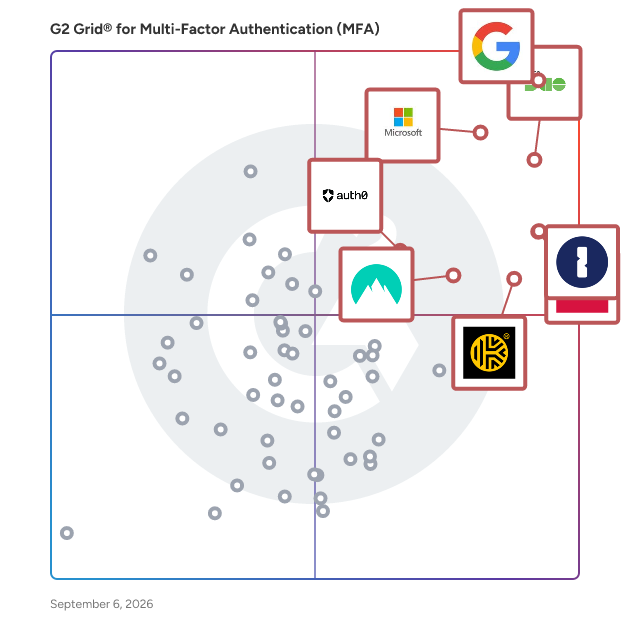
G2 takes pride in showing unbiased reviews on user satisfaction in our ratings and reports. We do not allow paid placements in any of our ratings, rankings, or reports. Learn about our scoring methodologies.

Coming Soon
Get Trending Multi-Factor Authentication (MFA) Products in Your Inbox

A weekly snapshot of rising stars, new launches, and what everyone's buzzing about.

Sample Trending Products Newsletter
No filters applied
260 Listings in Multi-Factor Authentication (MFA) Available
(522)4.6 out of 5
1st Easiest To Use in Multi-Factor Authentication (MFA) software
Save to My Lists
  • Overview
    Expand/Collapse Overview
  • Product Description
    How are these determined?Information
    This description is provided by the seller.

    Google Authenticator is a multifactor app for mobile devices.

    Users
    • Software Engineer
    • Owner
    Industries
    • Information Technology and Services
    • Computer Software
    Market Segment
    • 45% Small-Business
    • 36% Mid-Market
  • Pros and Cons
    Expand/Collapse Pros and Cons
  • Google Authenticator Pros and Cons
    How are these determined?Information
    Pros and Cons are compiled from review feedback and grouped into themes to provide an easy-to-understand summary of user reviews.
    Pros
    Ease of Use
    31
    Security
    18
    2FA Security
    10
    Time-Saving
    6
    Easy Setup
    5
    Cons
    Password Management
    5
    Authentication Issues
    4
    Inadequate Security
    4
    Sync Issues
    3
    Limited Customization
    2
  • User Satisfaction
    Expand/Collapse User Satisfaction
  • Google Authenticator features and usability ratings that predict user satisfaction
    9.3
    Has the product been a good partner in doing business?
    Average: 9.0
    8.8
    Multi-Device Sync
    Average: 8.9
    9.5
    Easy Setup
    Average: 9.0
    8.6
    Backup
    Average: 8.7
  • Seller Details
    Expand/Collapse Seller Details
  • Seller Details
    Seller
    Google
    Year Founded
    1998
    HQ Location
    Mountain View, CA
    Twitter
    @google
    31,716,915 Twitter followers
    LinkedIn® Page
    www.linkedin.com
    311,319 employees on LinkedIn®
    Ownership
    NASDAQ:GOOG
Product Description
How are these determined?Information
This description is provided by the seller.

Google Authenticator is a multifactor app for mobile devices.

Users
  • Software Engineer
  • Owner
Industries
  • Information Technology and Services
  • Computer Software
Market Segment
  • 45% Small-Business
  • 36% Mid-Market
Google Authenticator Pros and Cons
How are these determined?Information
Pros and Cons are compiled from review feedback and grouped into themes to provide an easy-to-understand summary of user reviews.
Pros
Ease of Use
31
Security
18
2FA Security
10
Time-Saving
6
Easy Setup
5
Cons
Password Management
5
Authentication Issues
4
Inadequate Security
4
Sync Issues
3
Limited Customization
2
Google Authenticator features and usability ratings that predict user satisfaction
9.3
Has the product been a good partner in doing business?
Average: 9.0
8.8
Multi-Device Sync
Average: 8.9
9.5
Easy Setup
Average: 9.0
8.6
Backup
Average: 8.7
Seller Details
Seller
Google
Year Founded
1998
HQ Location
Mountain View, CA
Twitter
@google
31,716,915 Twitter followers
LinkedIn® Page
www.linkedin.com
311,319 employees on LinkedIn®
Ownership
NASDAQ:GOOG
(1,915)4.4 out of 5
Optimized for quick response
5th Easiest To Use in Multi-Factor Authentication (MFA) software
Save to My Lists
Entry Level Price:$4.25
  • Overview
    Expand/Collapse Overview
  • Product Description
    How are these determined?Information
    This description is provided by the seller.

    LastPass is a secure, cloud-based password manager that takes the hassle out of remembering and managing passwords. It works across all your devices, so you can log in faster and stay protected everyw

    Users
    • Owner
    • CEO
    Industries
    • Information Technology and Services
    • Computer Software
    Market Segment
    • 63% Small-Business
    • 25% Mid-Market
  • Pros and Cons
    Expand/Collapse Pros and Cons
  • LastPass Pros and Cons
    How are these determined?Information
    Pros and Cons are compiled from review feedback and grouped into themes to provide an easy-to-understand summary of user reviews.
    Pros
    Ease of Use
    238
    Password Management
    175
    Security
    160
    Easy Access
    106
    Autofill Feature
    105
    Cons
    Password Management
    89
    Autofill Issues
    83
    Login Issues
    67
    Password Issues
    50
    Browser Extension Issues
    36
  • User Satisfaction
    Expand/Collapse User Satisfaction
  • LastPass features and usability ratings that predict user satisfaction
    8.6
    Has the product been a good partner in doing business?
    Average: 9.0
    9.1
    Multi-Device Sync
    Average: 8.9
    9.0
    Easy Setup
    Average: 9.0
    8.6
    Backup
    Average: 8.7
  • Seller Details
    Expand/Collapse Seller Details
  • Seller Details
    Seller
    LastPass
    Company Website
    Year Founded
    2008
    HQ Location
    Boston, Massachusetts
    Twitter
    @LastPass
    46,521 Twitter followers
    LinkedIn® Page
    www.linkedin.com
    794 employees on LinkedIn®
Product Description
How are these determined?Information
This description is provided by the seller.

LastPass is a secure, cloud-based password manager that takes the hassle out of remembering and managing passwords. It works across all your devices, so you can log in faster and stay protected everyw

Users
  • Owner
  • CEO
Industries
  • Information Technology and Services
  • Computer Software
Market Segment
  • 63% Small-Business
  • 25% Mid-Market
LastPass Pros and Cons
How are these determined?Information
Pros and Cons are compiled from review feedback and grouped into themes to provide an easy-to-understand summary of user reviews.
Pros
Ease of Use
238
Password Management
175
Security
160
Easy Access
106
Autofill Feature
105
Cons
Password Management
89
Autofill Issues
83
Login Issues
67
Password Issues
50
Browser Extension Issues
36
LastPass features and usability ratings that predict user satisfaction
8.6
Has the product been a good partner in doing business?
Average: 9.0
9.1
Multi-Device Sync
Average: 8.9
9.0
Easy Setup
Average: 9.0
8.6
Backup
Average: 8.7
Seller Details
Seller
LastPass
Company Website
Year Founded
2008
HQ Location
Boston, Massachusetts
Twitter
@LastPass
46,521 Twitter followers
LinkedIn® Page
www.linkedin.com
794 employees on LinkedIn®

This is how G2 Deals can help you:

  • Easily shop for curated – and trusted – software
  • Own your own software buying journey
  • Discover exclusive deals on software
(1,174)4.6 out of 5
Optimized for quick response
6th Easiest To Use in Multi-Factor Authentication (MFA) software
Save to My Lists
100% Off
  • Overview
    Expand/Collapse Overview
  • Product Description
    How are these determined?Information
    This description is provided by the seller.

    Keeper Security is transforming cybersecurity for millions of individuals and thousands of organizations globally. Built with end-to-end encryption, Keeper's intuitive cybersecurity platform is truste

    Users
    • IT Manager
    • Owner
    Industries
    • Information Technology and Services
    • Financial Services
    Market Segment
    • 42% Small-Business
    • 42% Mid-Market
  • Pros and Cons
    Expand/Collapse Pros and Cons
  • Keeper Password Manager Pros and Cons
    How are these determined?Information
    Pros and Cons are compiled from review feedback and grouped into themes to provide an easy-to-understand summary of user reviews.
    Pros
    Ease of Use
    189
    Security
    138
    Secure Sharing
    101
    Password Management
    100
    Features
    76
    Cons
    Password Management
    83
    Autofill Issues
    60
    Login Issues
    42
    Learning Curve
    38
    Browser Extension Issues
    37
  • User Satisfaction
    Expand/Collapse User Satisfaction
  • Keeper Password Manager features and usability ratings that predict user satisfaction
    8.9
    Has the product been a good partner in doing business?
    Average: 9.0
    8.8
    Multi-Device Sync
    Average: 8.9
    8.8
    Easy Setup
    Average: 9.0
    8.2
    Backup
    Average: 8.7
  • Seller Details
    Expand/Collapse Seller Details
  • Seller Details
    Company Website
    Year Founded
    2011
    HQ Location
    Chicago, IL
    Twitter
    @keepersecurity
    18,984 Twitter followers
    LinkedIn® Page
    www.linkedin.com
    681 employees on LinkedIn®
Product Description
How are these determined?Information
This description is provided by the seller.

Keeper Security is transforming cybersecurity for millions of individuals and thousands of organizations globally. Built with end-to-end encryption, Keeper's intuitive cybersecurity platform is truste

Users
  • IT Manager
  • Owner
Industries
  • Information Technology and Services
  • Financial Services
Market Segment
  • 42% Small-Business
  • 42% Mid-Market
Keeper Password Manager Pros and Cons
How are these determined?Information
Pros and Cons are compiled from review feedback and grouped into themes to provide an easy-to-understand summary of user reviews.
Pros
Ease of Use
189
Security
138
Secure Sharing
101
Password Management
100
Features
76
Cons
Password Management
83
Autofill Issues
60
Login Issues
42
Learning Curve
38
Browser Extension Issues
37
Keeper Password Manager features and usability ratings that predict user satisfaction
8.9
Has the product been a good partner in doing business?
Average: 9.0
8.8
Multi-Device Sync
Average: 8.9
8.8
Easy Setup
Average: 9.0
8.2
Backup
Average: 8.7
Seller Details
Company Website
Year Founded
2011
HQ Location
Chicago, IL
Twitter
@keepersecurity
18,984 Twitter followers
LinkedIn® Page
www.linkedin.com
681 employees on LinkedIn®
(1,540)4.6 out of 5
3rd Easiest To Use in Multi-Factor Authentication (MFA) software
View top Consulting Services for 1Password
Save to My Lists
100% Off: 0
  • Overview
    Expand/Collapse Overview
  • Product Description
    How are these determined?Information
    This description is provided by the seller.

    The Most Used Enterprise Password Manager, trusted by over 175,00 businesses, 1Password helps improve security, visibility and control over how their passwords and company data are protected. Secu

    Users
    • Software Engineer
    • CEO
    Industries
    • Computer Software
    • Information Technology and Services
    Market Segment
    • 57% Small-Business
    • 31% Mid-Market
  • Pros and Cons
    Expand/Collapse Pros and Cons
  • 1Password Pros and Cons
    How are these determined?Information
    Pros and Cons are compiled from review feedback and grouped into themes to provide an easy-to-understand summary of user reviews.
    Pros
    Ease of Use
    196
    Security
    166
    Password Management
    86
    Intuitive
    77
    Easy Access
    66
    Cons
    Password Management
    67
    Expensive
    58
    Login Issues
    34
    Cost
    33
    Learning Curve
    31
  • User Satisfaction
    Expand/Collapse User Satisfaction
  • 1Password features and usability ratings that predict user satisfaction
    9.4
    Has the product been a good partner in doing business?
    Average: 9.0
    8.9
    Multi-Device Sync
    Average: 8.9
    9.1
    Easy Setup
    Average: 9.0
    8.7
    Backup
    Average: 8.7
  • Seller Details
    Expand/Collapse Seller Details
  • Seller Details
    Seller
    1Password
    Company Website
    Year Founded
    2005
    HQ Location
    Ontario
    Twitter
    @1Password
    139,776 Twitter followers
    LinkedIn® Page
    www.linkedin.com
    2,604 employees on LinkedIn®
Product Description
How are these determined?Information
This description is provided by the seller.

The Most Used Enterprise Password Manager, trusted by over 175,00 businesses, 1Password helps improve security, visibility and control over how their passwords and company data are protected. Secu

Users
  • Software Engineer
  • CEO
Industries
  • Computer Software
  • Information Technology and Services
Market Segment
  • 57% Small-Business
  • 31% Mid-Market
1Password Pros and Cons
How are these determined?Information
Pros and Cons are compiled from review feedback and grouped into themes to provide an easy-to-understand summary of user reviews.
Pros
Ease of Use
196
Security
166
Password Management
86
Intuitive
77
Easy Access
66
Cons
Password Management
67
Expensive
58
Login Issues
34
Cost
33
Learning Curve
31
1Password features and usability ratings that predict user satisfaction
9.4
Has the product been a good partner in doing business?
Average: 9.0
8.9
Multi-Device Sync
Average: 8.9
9.1
Easy Setup
Average: 9.0
8.7
Backup
Average: 8.7
Seller Details
Seller
1Password
Company Website
Year Founded
2005
HQ Location
Ontario
Twitter
@1Password
139,776 Twitter followers
LinkedIn® Page
www.linkedin.com
2,604 employees on LinkedIn®
(790)4.5 out of 5
7th Easiest To Use in Multi-Factor Authentication (MFA) software
View top Consulting Services for Microsoft Entra ID
Save to My Lists
Entry Level Price:Free
  • Overview
    Expand/Collapse Overview
  • Product Description
    How are these determined?Information
    This description is provided by the seller.

    Entra ID is a complete identity and access management solution with integrated security that connects people to their apps, devices, and data and helps protect from identity compromise. With Entra ID,

    Users
    • Software Engineer
    • Senior Software Engineer
    Industries
    • Information Technology and Services
    • Computer Software
    Market Segment
    • 39% Enterprise
    • 38% Mid-Market
  • Pros and Cons
    Expand/Collapse Pros and Cons
  • Microsoft Entra ID Pros and Cons
    How are these determined?Information
    Pros and Cons are compiled from review feedback and grouped into themes to provide an easy-to-understand summary of user reviews.
    Pros
    Ease of Use
    76
    Security
    69
    Identity Management
    54
    Single Sign-On
    48
    SSO (Single Sign-On)
    41
    Cons
    Expensive
    33
    Cost
    20
    Integration Issues
    20
    Missing Features
    17
    Complexity
    16
  • User Satisfaction
    Expand/Collapse User Satisfaction
  • Microsoft Entra ID features and usability ratings that predict user satisfaction
    9.1
    Has the product been a good partner in doing business?
    Average: 9.0
    8.9
    Multi-Device Sync
    Average: 8.9
    8.9
    Easy Setup
    Average: 9.0
    8.6
    Backup
    Average: 8.7
  • Seller Details
    Expand/Collapse Seller Details
  • Seller Details
    Seller
    Microsoft
    Year Founded
    1975
    HQ Location
    Redmond, Washington
    Twitter
    @microsoft
    13,263,534 Twitter followers
    LinkedIn® Page
    www.linkedin.com
    220,934 employees on LinkedIn®
    Ownership
    MSFT
Product Description
How are these determined?Information
This description is provided by the seller.

Entra ID is a complete identity and access management solution with integrated security that connects people to their apps, devices, and data and helps protect from identity compromise. With Entra ID,

Users
  • Software Engineer
  • Senior Software Engineer
Industries
  • Information Technology and Services
  • Computer Software
Market Segment
  • 39% Enterprise
  • 38% Mid-Market
Microsoft Entra ID Pros and Cons
How are these determined?Information
Pros and Cons are compiled from review feedback and grouped into themes to provide an easy-to-understand summary of user reviews.
Pros
Ease of Use
76
Security
69
Identity Management
54
Single Sign-On
48
SSO (Single Sign-On)
41
Cons
Expensive
33
Cost
20
Integration Issues
20
Missing Features
17
Complexity
16
Microsoft Entra ID features and usability ratings that predict user satisfaction
9.1
Has the product been a good partner in doing business?
Average: 9.0
8.9
Multi-Device Sync
Average: 8.9
8.9
Easy Setup
Average: 9.0
8.6
Backup
Average: 8.7
Seller Details
Seller
Microsoft
Year Founded
1975
HQ Location
Redmond, Washington
Twitter
@microsoft
13,263,534 Twitter followers
LinkedIn® Page
www.linkedin.com
220,934 employees on LinkedIn®
Ownership
MSFT
(628)4.5 out of 5
Optimized for quick response
4th Easiest To Use in Multi-Factor Authentication (MFA) software
Save to My Lists
20% Off: $2.87 user / month
  • Overview
    Expand/Collapse Overview
  • Product Description
    How are these determined?Information
    This description is provided by the seller.

    Trusted by more than 9,000 businesses worldwide, NordPass is a password management tool that upholds the finest privacy and security standards for businesses. Unlock the ease of cybersecurity and b

    Users
    • CEO
    • CTO
    Industries
    • Information Technology and Services
    • Marketing and Advertising
    Market Segment
    • 72% Small-Business
    • 25% Mid-Market
  • Pros and Cons
    Expand/Collapse Pros and Cons
  • NordPass Business Pros and Cons
    How are these determined?Information
    Pros and Cons are compiled from review feedback and grouped into themes to provide an easy-to-understand summary of user reviews.
    Pros
    Ease of Use
    231
    Security
    166
    Password Management
    140
    Sharing Ease
    138
    Intuitive
    131
    Cons
    Password Management
    103
    Password Issues
    80
    Login Issues
    65
    Autofill Issues
    54
    Browser Extension Issues
    51
  • User Satisfaction
    Expand/Collapse User Satisfaction
  • NordPass Business features and usability ratings that predict user satisfaction
    9.0
    Has the product been a good partner in doing business?
    Average: 9.0
    8.8
    Multi-Device Sync
    Average: 8.9
    8.9
    Easy Setup
    Average: 9.0
    8.6
    Backup
    Average: 8.7
  • Seller Details
    Expand/Collapse Seller Details
  • Seller Details
    Company Website
    Year Founded
    2012
    HQ Location
    Global
    Twitter
    @NordPass
    9,480 Twitter followers
    LinkedIn® Page
    www.linkedin.com
    1,755 employees on LinkedIn®
Product Description
How are these determined?Information
This description is provided by the seller.

Trusted by more than 9,000 businesses worldwide, NordPass is a password management tool that upholds the finest privacy and security standards for businesses. Unlock the ease of cybersecurity and b

Users
  • CEO
  • CTO
Industries
  • Information Technology and Services
  • Marketing and Advertising
Market Segment
  • 72% Small-Business
  • 25% Mid-Market
NordPass Business Pros and Cons
How are these determined?Information
Pros and Cons are compiled from review feedback and grouped into themes to provide an easy-to-understand summary of user reviews.
Pros
Ease of Use
231
Security
166
Password Management
140
Sharing Ease
138
Intuitive
131
Cons
Password Management
103
Password Issues
80
Login Issues
65
Autofill Issues
54
Browser Extension Issues
51
NordPass Business features and usability ratings that predict user satisfaction
9.0
Has the product been a good partner in doing business?
Average: 9.0
8.8
Multi-Device Sync
Average: 8.9
8.9
Easy Setup
Average: 9.0
8.6
Backup
Average: 8.7
Seller Details
Company Website
Year Founded
2012
HQ Location
Global
Twitter
@NordPass
9,480 Twitter followers
LinkedIn® Page
www.linkedin.com
1,755 employees on LinkedIn®
(428)4.5 out of 5
Optimized for quick response
2nd Easiest To Use in Multi-Factor Authentication (MFA) software
View top Consulting Services for Cisco Duo
Save to My Lists
Entry Level Price:Free
  • Overview
    Expand/Collapse Overview
  • Product Description
    How are these determined?Information
    This description is provided by the seller.

    Duo stops identity-based threats and boosts workforce productivity. Our Continuous Identity Security solution provides the best access management experience across users, devices, and applications whi

    Users
    • Software Engineer
    • Consultant
    Industries
    • Information Technology and Services
    • Higher Education
    Market Segment
    • 44% Enterprise
    • 38% Mid-Market
  • Pros and Cons
    Expand/Collapse Pros and Cons
  • Cisco Duo Pros and Cons
    How are these determined?Information
    Pros and Cons are compiled from review feedback and grouped into themes to provide an easy-to-understand summary of user reviews.
    Pros
    Security
    23
    Ease of Use
    21
    Authentication
    15
    Authentication Ease
    13
    Reliability
    11
    Cons
    Authentication Issues
    8
    Access Limitations
    7
    Expensive
    7
    Internet Dependency
    6
    Complexity
    5
  • User Satisfaction
    Expand/Collapse User Satisfaction
  • Cisco Duo features and usability ratings that predict user satisfaction
    9.1
    Has the product been a good partner in doing business?
    Average: 9.0
    8.7
    Multi-Device Sync
    Average: 8.9
    9.0
    Easy Setup
    Average: 9.0
    8.1
    Backup
    Average: 8.7
  • Seller Details
    Expand/Collapse Seller Details
  • Seller Details
    Seller
    Cisco
    Company Website
    Year Founded
    1984
    HQ Location
    San Jose, CA
    Twitter
    @Cisco
    723,927 Twitter followers
    LinkedIn® Page
    www.linkedin.com
    95,148 employees on LinkedIn®
Product Description
How are these determined?Information
This description is provided by the seller.

Duo stops identity-based threats and boosts workforce productivity. Our Continuous Identity Security solution provides the best access management experience across users, devices, and applications whi

Users
  • Software Engineer
  • Consultant
Industries
  • Information Technology and Services
  • Higher Education
Market Segment
  • 44% Enterprise
  • 38% Mid-Market
Cisco Duo Pros and Cons
How are these determined?Information
Pros and Cons are compiled from review feedback and grouped into themes to provide an easy-to-understand summary of user reviews.
Pros
Security
23
Ease of Use
21
Authentication
15
Authentication Ease
13
Reliability
11
Cons
Authentication Issues
8
Access Limitations
7
Expensive
7
Internet Dependency
6
Complexity
5
Cisco Duo features and usability ratings that predict user satisfaction
9.1
Has the product been a good partner in doing business?
Average: 9.0
8.7
Multi-Device Sync
Average: 8.9
9.0
Easy Setup
Average: 9.0
8.1
Backup
Average: 8.7
Seller Details
Seller
Cisco
Company Website
Year Founded
1984
HQ Location
San Jose, CA
Twitter
@Cisco
723,927 Twitter followers
LinkedIn® Page
www.linkedin.com
95,148 employees on LinkedIn®
(230)4.3 out of 5
15th Easiest To Use in Multi-Factor Authentication (MFA) software
Save to My Lists
Entry Level Price:Free
  • Overview
    Expand/Collapse Overview
  • Product Description
    How are these determined?Information
    This description is provided by the seller.

    Auth0 takes a modern approach to Identity, providing secure access to any application, for any user. Safeguarding billions of login transactions each month, Auth0 delivers convenience, privacy, and se

    Users
    • Software Engineer
    • Software Developer
    Industries
    • Computer Software
    • Information Technology and Services
    Market Segment
    • 48% Small-Business
    • 30% Mid-Market
  • Pros and Cons
    Expand/Collapse Pros and Cons
  • Auth0 Pros and Cons
    How are these determined?Information
    Pros and Cons are compiled from review feedback and grouped into themes to provide an easy-to-understand summary of user reviews.
    Pros
    Ease of Use
    30
    Security
    30
    Authentication
    23
    Integrations
    23
    Easy Integrations
    22
    Cons
    Expensive
    15
    Cost
    10
    Pricing Issues
    9
    Difficult Learning
    8
    Expensive Pricing
    8
  • User Satisfaction
    Expand/Collapse User Satisfaction
  • Auth0 features and usability ratings that predict user satisfaction
    8.3
    Has the product been a good partner in doing business?
    Average: 9.0
    8.8
    Multi-Device Sync
    Average: 8.9
    9.2
    Easy Setup
    Average: 9.0
    9.2
    Backup
    Average: 8.7
  • Seller Details
    Expand/Collapse Seller Details
  • Seller Details
    Seller
    Okta
    Company Website
    Year Founded
    2009
    HQ Location
    San Francisco, California
    Twitter
    @okta
    42,545 Twitter followers
    LinkedIn® Page
    www.linkedin.com
    6,381 employees on LinkedIn®
Product Description
How are these determined?Information
This description is provided by the seller.

Auth0 takes a modern approach to Identity, providing secure access to any application, for any user. Safeguarding billions of login transactions each month, Auth0 delivers convenience, privacy, and se

Users
  • Software Engineer
  • Software Developer
Industries
  • Computer Software
  • Information Technology and Services
Market Segment
  • 48% Small-Business
  • 30% Mid-Market
Auth0 Pros and Cons
How are these determined?Information
Pros and Cons are compiled from review feedback and grouped into themes to provide an easy-to-understand summary of user reviews.
Pros
Ease of Use
30
Security
30
Authentication
23
Integrations
23
Easy Integrations
22
Cons
Expensive
15
Cost
10
Pricing Issues
9
Difficult Learning
8
Expensive Pricing
8
Auth0 features and usability ratings that predict user satisfaction
8.3
Has the product been a good partner in doing business?
Average: 9.0
8.8
Multi-Device Sync
Average: 8.9
9.2
Easy Setup
Average: 9.0
9.2
Backup
Average: 8.7
Seller Details
Seller
Okta
Company Website
Year Founded
2009
HQ Location
San Francisco, California
Twitter
@okta
42,545 Twitter followers
LinkedIn® Page
www.linkedin.com
6,381 employees on LinkedIn®
(161)4.3 out of 5
Optimized for quick response
Save to My Lists
Entry Level Price:$1.71 / user, per month
  • Overview
    Expand/Collapse Overview
  • Product Description
    How are these determined?Information
    This description is provided by the seller.

    A centralized solution for managing customer and workforce identity and access including capabilities such as single-sign-on, multifactor authentication, adaptive AI-based access, passwordless access,

    Users
    No information available
    Industries
    • Information Technology and Services
    • Computer Software
    Market Segment
    • 59% Enterprise
    • 42% Mid-Market
    User Sentiment
    How are these determined?Information
    These insights, currently in beta, are compiled from user reviews and grouped to display a high-level overview of the software.
    • IBM Verify CIAM is a product that centralizes user access, tracks consent, and logs activity, providing secure authentication and compliance reporting.
    • Users like the product's scalability and flexibility in managing a large user base, its robust authentication mechanisms, and its detailed monitoring and analytics for auditing and compliance.
    • Users reported that the initial setup can be complex, the admin dashboard is sometimes slow, and the documentation can be too technical for new users.
  • Pros and Cons
    Expand/Collapse Pros and Cons
  • IBM Verify CIAM Pros and Cons
    How are these determined?Information
    Pros and Cons are compiled from review feedback and grouped into themes to provide an easy-to-understand summary of user reviews.
    Pros
    Security
    47
    Ease of Use
    33
    Authentication
    28
    Single Sign-On
    23
    Features
    22
    Cons
    Complex Setup
    23
    Difficult Learning
    21
    Complexity
    20
    Complex Administration
    18
    Difficult Setup
    15
  • User Satisfaction
    Expand/Collapse User Satisfaction
  • IBM Verify CIAM features and usability ratings that predict user satisfaction
    8.1
    Has the product been a good partner in doing business?
    Average: 9.0
    8.2
    Multi-Device Sync
    Average: 8.9
    7.9
    Easy Setup
    Average: 9.0
    8.6
    Backup
    Average: 8.7
  • Seller Details
    Expand/Collapse Seller Details
  • Seller Details
    Seller
    IBM
    Company Website
    Year Founded
    1911
    HQ Location
    Armonk, NY
    Twitter
    @IBM
    710,904 Twitter followers
    LinkedIn® Page
    www.linkedin.com
    322,159 employees on LinkedIn®
Product Description
How are these determined?Information
This description is provided by the seller.

A centralized solution for managing customer and workforce identity and access including capabilities such as single-sign-on, multifactor authentication, adaptive AI-based access, passwordless access,

Users
No information available
Industries
  • Information Technology and Services
  • Computer Software
Market Segment
  • 59% Enterprise
  • 42% Mid-Market
User Sentiment
How are these determined?Information
These insights, currently in beta, are compiled from user reviews and grouped to display a high-level overview of the software.
  • IBM Verify CIAM is a product that centralizes user access, tracks consent, and logs activity, providing secure authentication and compliance reporting.
  • Users like the product's scalability and flexibility in managing a large user base, its robust authentication mechanisms, and its detailed monitoring and analytics for auditing and compliance.
  • Users reported that the initial setup can be complex, the admin dashboard is sometimes slow, and the documentation can be too technical for new users.
IBM Verify CIAM Pros and Cons
How are these determined?Information
Pros and Cons are compiled from review feedback and grouped into themes to provide an easy-to-understand summary of user reviews.
Pros
Security
47
Ease of Use
33
Authentication
28
Single Sign-On
23
Features
22
Cons
Complex Setup
23
Difficult Learning
21
Complexity
20
Complex Administration
18
Difficult Setup
15
IBM Verify CIAM features and usability ratings that predict user satisfaction
8.1
Has the product been a good partner in doing business?
Average: 9.0
8.2
Multi-Device Sync
Average: 8.9
7.9
Easy Setup
Average: 9.0
8.6
Backup
Average: 8.7
Seller Details
Seller
IBM
Company Website
Year Founded
1911
HQ Location
Armonk, NY
Twitter
@IBM
710,904 Twitter followers
LinkedIn® Page
www.linkedin.com
322,159 employees on LinkedIn®
  • Overview
    Expand/Collapse Overview
  • Product Description
    How are these determined?Information
    This description is provided by the seller.

    AuthX is a cloud-based IAM platform offering Passwordless Authentication with SSO, MFA, Passkeys, Badge Tap & Go, and Biometrics. It streamlines secure access across Workstations, Web, Network, an

    Users
    No information available
    Industries
    • Information Technology and Services
    Market Segment
    • 77% Mid-Market
    • 17% Enterprise
  • Pros and Cons
    Expand/Collapse Pros and Cons
  • AuthX Pros and Cons
    How are these determined?Information
    Pros and Cons are compiled from review feedback and grouped into themes to provide an easy-to-understand summary of user reviews.
    Pros
    Ease of Use
    37
    Security
    36
    Single Sign-On
    27
    Easy Access
    20
    Time-saving
    18
    Cons
    Difficult Learning
    2
    Difficult Learning Process
    2
    High Learning Curve
    2
    Learning Curve
    2
    API Difficulty
    1
  • User Satisfaction
    Expand/Collapse User Satisfaction
  • AuthX features and usability ratings that predict user satisfaction
    10.0
    Has the product been a good partner in doing business?
    Average: 9.0
    9.9
    Multi-Device Sync
    Average: 8.9
    9.8
    Easy Setup
    Average: 9.0
    9.8
    Backup
    Average: 8.7
  • Seller Details
    Expand/Collapse Seller Details
  • Seller Details
    Seller
    AuthX
    Year Founded
    2019
    HQ Location
    Gaithersburg, Maryland, United States
    Twitter
    @auth_x
    222 Twitter followers
    LinkedIn® Page
    www.linkedin.com
    38 employees on LinkedIn®
Product Description
How are these determined?Information
This description is provided by the seller.

AuthX is a cloud-based IAM platform offering Passwordless Authentication with SSO, MFA, Passkeys, Badge Tap & Go, and Biometrics. It streamlines secure access across Workstations, Web, Network, an

Users
No information available
Industries
  • Information Technology and Services
Market Segment
  • 77% Mid-Market
  • 17% Enterprise
AuthX Pros and Cons
How are these determined?Information
Pros and Cons are compiled from review feedback and grouped into themes to provide an easy-to-understand summary of user reviews.
Pros
Ease of Use
37
Security
36
Single Sign-On
27
Easy Access
20
Time-saving
18
Cons
Difficult Learning
2
Difficult Learning Process
2
High Learning Curve
2
Learning Curve
2
API Difficulty
1
AuthX features and usability ratings that predict user satisfaction
10.0
Has the product been a good partner in doing business?
Average: 9.0
9.9
Multi-Device Sync
Average: 8.9
9.8
Easy Setup
Average: 9.0
9.8
Backup
Average: 8.7
Seller Details
Seller
AuthX
Year Founded
2019
HQ Location
Gaithersburg, Maryland, United States
Twitter
@auth_x
222 Twitter followers
LinkedIn® Page
www.linkedin.com
38 employees on LinkedIn®
(26)4.8 out of 5
13th Easiest To Use in Multi-Factor Authentication (MFA) software
Save to My Lists
  • Overview
    Expand/Collapse Overview
  • Product Description
    How are these determined?Information
    This description is provided by the seller.

    Yubico is a modern cybersecurity company, focused on stopping cyber attacks in their tracks. Most attackers don’t break in—they log in. Companies often rely on legacy passwords and authenticator app

    Users
    No information available
    Industries
    No information available
    Market Segment
    • 35% Enterprise
    • 35% Small-Business
  • Pros and Cons
    Expand/Collapse Pros and Cons
  • YubiKey Pros and Cons
    How are these determined?Information
    Pros and Cons are compiled from review feedback and grouped into themes to provide an easy-to-understand summary of user reviews.
    Pros
    Security
    5
    Cloud Services
    2
    Easy Setup
    2
    Reliability
    2
    Scalability
    2
    Cons
    Limited Compatibility
    2
    Authentication Issues
    1
    Complex Setup
    1
    Difficult Setup
    1
    Expertise Required
    1
  • User Satisfaction
    Expand/Collapse User Satisfaction
  • YubiKey features and usability ratings that predict user satisfaction
    10.0
    Has the product been a good partner in doing business?
    Average: 9.0
    8.7
    Multi-Device Sync
    Average: 8.9
    9.5
    Easy Setup
    Average: 9.0
    7.2
    Backup
    Average: 8.7
  • Seller Details
    Expand/Collapse Seller Details
  • Seller Details
    Seller
    Yubico
    Company Website
    Year Founded
    2007
    HQ Location
    Santa Clara
    Twitter
    @Yubico
    39,821 Twitter followers
    LinkedIn® Page
    www.linkedin.com
    543 employees on LinkedIn®
Product Description
How are these determined?Information
This description is provided by the seller.

Yubico is a modern cybersecurity company, focused on stopping cyber attacks in their tracks. Most attackers don’t break in—they log in. Companies often rely on legacy passwords and authenticator app

Users
No information available
Industries
No information available
Market Segment
  • 35% Enterprise
  • 35% Small-Business
YubiKey Pros and Cons
How are these determined?Information
Pros and Cons are compiled from review feedback and grouped into themes to provide an easy-to-understand summary of user reviews.
Pros
Security
5
Cloud Services
2
Easy Setup
2
Reliability
2
Scalability
2
Cons
Limited Compatibility
2
Authentication Issues
1
Complex Setup
1
Difficult Setup
1
Expertise Required
1
YubiKey features and usability ratings that predict user satisfaction
10.0
Has the product been a good partner in doing business?
Average: 9.0
8.7
Multi-Device Sync
Average: 8.9
9.5
Easy Setup
Average: 9.0
7.2
Backup
Average: 8.7
Seller Details
Seller
Yubico
Company Website
Year Founded
2007
HQ Location
Santa Clara
Twitter
@Yubico
39,821 Twitter followers
LinkedIn® Page
www.linkedin.com
543 employees on LinkedIn®
(18)4.8 out of 5
9th Easiest To Use in Multi-Factor Authentication (MFA) software
Save to My Lists
  • Overview
    Expand/Collapse Overview
  • Product Description
    How are these determined?Information
    This description is provided by the seller.

    Silverfort’s Unified Identity Protection Platform is the first to consolidate security controls across corporate networks and cloud environments to block identity-based attacks. Using innovative age

    Users
    No information available
    Industries
    No information available
    Market Segment
    • 44% Small-Business
    • 39% Mid-Market
  • Pros and Cons
    Expand/Collapse Pros and Cons
  • Silverfort Pros and Cons
    How are these determined?Information
    Pros and Cons are compiled from review feedback and grouped into themes to provide an easy-to-understand summary of user reviews.
    Pros
    Security
    4
    Ease of Use
    2
    MFA Security
    2
    Setup Ease
    2
    Time-Saving
    2
    Cons
    Poor Customer Support
    2
    Account Management
    1
    Complexity
    1
    Difficulty Locating
    1
    Implementation Difficulty
    1
  • User Satisfaction
    Expand/Collapse User Satisfaction
  • Silverfort features and usability ratings that predict user satisfaction
    9.7
    Has the product been a good partner in doing business?
    Average: 9.0
    8.8
    Multi-Device Sync
    Average: 8.9
    8.8
    Easy Setup
    Average: 9.0
    6.7
    Backup
    Average: 8.7
  • Seller Details
    Expand/Collapse Seller Details
  • Seller Details
    Year Founded
    2016
    HQ Location
    Tel Aviv, Israel
    Twitter
    @silverfort
    644 Twitter followers
    LinkedIn® Page
    www.linkedin.com
    535 employees on LinkedIn®
Product Description
How are these determined?Information
This description is provided by the seller.

Silverfort’s Unified Identity Protection Platform is the first to consolidate security controls across corporate networks and cloud environments to block identity-based attacks. Using innovative age

Users
No information available
Industries
No information available
Market Segment
  • 44% Small-Business
  • 39% Mid-Market
Silverfort Pros and Cons
How are these determined?Information
Pros and Cons are compiled from review feedback and grouped into themes to provide an easy-to-understand summary of user reviews.
Pros
Security
4
Ease of Use
2
MFA Security
2
Setup Ease
2
Time-Saving
2
Cons
Poor Customer Support
2
Account Management
1
Complexity
1
Difficulty Locating
1
Implementation Difficulty
1
Silverfort features and usability ratings that predict user satisfaction
9.7
Has the product been a good partner in doing business?
Average: 9.0
8.8
Multi-Device Sync
Average: 8.9
8.8
Easy Setup
Average: 9.0
6.7
Backup
Average: 8.7
Seller Details
Year Founded
2016
HQ Location
Tel Aviv, Israel
Twitter
@silverfort
644 Twitter followers
LinkedIn® Page
www.linkedin.com
535 employees on LinkedIn®
  • Overview
    Expand/Collapse Overview
  • Product Description
    How are these determined?Information
    This description is provided by the seller.

    Help prevent account takeovers from phishing attacks.

    Users
    No information available
    Industries
    • Computer Software
    • Information Technology and Services
    Market Segment
    • 44% Small-Business
    • 35% Mid-Market
  • User Satisfaction
    Expand/Collapse User Satisfaction
  • Google Security Key Enforcement features and usability ratings that predict user satisfaction
    9.0
    Has the product been a good partner in doing business?
    Average: 9.0
    0.0
    No information available
    8.6
    Easy Setup
    Average: 9.0
    0.0
    No information available
  • Seller Details
    Expand/Collapse Seller Details
  • Seller Details
    Seller
    Google
    Year Founded
    1998
    HQ Location
    Mountain View, CA
    Twitter
    @google
    31,716,915 Twitter followers
    LinkedIn® Page
    www.linkedin.com
    311,319 employees on LinkedIn®
    Ownership
    NASDAQ:GOOG
Product Description
How are these determined?Information
This description is provided by the seller.

Help prevent account takeovers from phishing attacks.

Users
No information available
Industries
  • Computer Software
  • Information Technology and Services
Market Segment
  • 44% Small-Business
  • 35% Mid-Market
Google Security Key Enforcement features and usability ratings that predict user satisfaction
9.0
Has the product been a good partner in doing business?
Average: 9.0
0.0
No information available
8.6
Easy Setup
Average: 9.0
0.0
No information available
Seller Details
Seller
Google
Year Founded
1998
HQ Location
Mountain View, CA
Twitter
@google
31,716,915 Twitter followers
LinkedIn® Page
www.linkedin.com
311,319 employees on LinkedIn®
Ownership
NASDAQ:GOOG
(119)4.5 out of 5
Optimized for quick response
14th Easiest To Use in Multi-Factor Authentication (MFA) software
Save to My Lists
Entry Level Price:Free
  • Overview
    Expand/Collapse Overview
  • Product Description
    How are these determined?Information
    This description is provided by the seller.

    FusionAuth is a powerful customer identity and access management (CIAM) platform designed for developers, by developers. Headquartered in Denver, Colorado, FusionAuth was founded in 2016 to provide se

    Users
    • CEO
    • CTO
    Industries
    • Computer Software
    • Information Technology and Services
    Market Segment
    • 47% Small-Business
    • 45% Mid-Market
  • Pros and Cons
    Expand/Collapse Pros and Cons
  • FusionAuth Pros and Cons
    How are these determined?Information
    Pros and Cons are compiled from review feedback and grouped into themes to provide an easy-to-understand summary of user reviews.
    Pros
    Ease of Use
    41
    Features
    35
    Integrations
    35
    Easy Integrations
    33
    Customer Support
    31
    Cons
    Complexity
    21
    Complex Setup
    15
    Difficult Learning
    14
    Limited Customization
    12
    Limited Features
    12
  • User Satisfaction
    Expand/Collapse User Satisfaction
  • FusionAuth features and usability ratings that predict user satisfaction
    9.3
    Has the product been a good partner in doing business?
    Average: 9.0
    7.9
    Multi-Device Sync
    Average: 8.9
    8.6
    Easy Setup
    Average: 9.0
    7.9
    Backup
    Average: 8.7
  • Seller Details
    Expand/Collapse Seller Details
  • Seller Details
    Company Website
    Year Founded
    2009
    HQ Location
    Broomfield, US
    Twitter
    @FusionAuth
    1,947 Twitter followers
    LinkedIn® Page
    www.linkedin.com
    62 employees on LinkedIn®
Product Description
How are these determined?Information
This description is provided by the seller.

FusionAuth is a powerful customer identity and access management (CIAM) platform designed for developers, by developers. Headquartered in Denver, Colorado, FusionAuth was founded in 2016 to provide se

Users
  • CEO
  • CTO
Industries
  • Computer Software
  • Information Technology and Services
Market Segment
  • 47% Small-Business
  • 45% Mid-Market
FusionAuth Pros and Cons
How are these determined?Information
Pros and Cons are compiled from review feedback and grouped into themes to provide an easy-to-understand summary of user reviews.
Pros
Ease of Use
41
Features
35
Integrations
35
Easy Integrations
33
Customer Support
31
Cons
Complexity
21
Complex Setup
15
Difficult Learning
14
Limited Customization
12
Limited Features
12
FusionAuth features and usability ratings that predict user satisfaction
9.3
Has the product been a good partner in doing business?
Average: 9.0
7.9
Multi-Device Sync
Average: 8.9
8.6
Easy Setup
Average: 9.0
7.9
Backup
Average: 8.7
Seller Details
Company Website
Year Founded
2009
HQ Location
Broomfield, US
Twitter
@FusionAuth
1,947 Twitter followers
LinkedIn® Page
www.linkedin.com
62 employees on LinkedIn®
(80)4.8 out of 5
Optimized for quick response
8th Easiest To Use in Multi-Factor Authentication (MFA) software
Save to My Lists
Entry Level Price:Free
  • Overview
    Expand/Collapse Overview
  • Product Description
    How are these determined?Information
    This description is provided by the seller.

    Descope is a drag & drop customer authentication and identity management platform. Our no / low code CIAM solution helps organizations easily create and customize their entire user journey using v

    Users
    • CTO
    Industries
    • Computer Software
    • Information Technology and Services
    Market Segment
    • 85% Small-Business
    • 15% Mid-Market
  • Pros and Cons
    Expand/Collapse Pros and Cons
  • Descope Pros and Cons
    How are these determined?Information
    Pros and Cons are compiled from review feedback and grouped into themes to provide an easy-to-understand summary of user reviews.
    Pros
    Customer Support
    31
    Ease of Use
    31
    Implementation Ease
    22
    Authentication
    21
    Easy Setup
    20
    Cons
    Complex Setup
    6
    Missing Features
    6
    Poor Documentation
    5
    Difficult Learning
    4
    Lack of Information
    4
  • User Satisfaction
    Expand/Collapse User Satisfaction
  • Descope features and usability ratings that predict user satisfaction
    9.8
    Has the product been a good partner in doing business?
    Average: 9.0
    9.9
    Multi-Device Sync
    Average: 8.9
    9.7
    Easy Setup
    Average: 9.0
    0.0
    No information available
  • Seller Details
    Expand/Collapse Seller Details
  • Seller Details
    Seller
    Descope
    Company Website
    Year Founded
    2022
    HQ Location
    Los Altos, California
    Twitter
    @descopeinc
    563 Twitter followers
    LinkedIn® Page
    www.linkedin.com
    96 employees on LinkedIn®
Product Description
How are these determined?Information
This description is provided by the seller.

Descope is a drag & drop customer authentication and identity management platform. Our no / low code CIAM solution helps organizations easily create and customize their entire user journey using v

Users
  • CTO
Industries
  • Computer Software
  • Information Technology and Services
Market Segment
  • 85% Small-Business
  • 15% Mid-Market
Descope Pros and Cons
How are these determined?Information
Pros and Cons are compiled from review feedback and grouped into themes to provide an easy-to-understand summary of user reviews.
Pros
Customer Support
31
Ease of Use
31
Implementation Ease
22
Authentication
21
Easy Setup
20
Cons
Complex Setup
6
Missing Features
6
Poor Documentation
5
Difficult Learning
4
Lack of Information
4
Descope features and usability ratings that predict user satisfaction
9.8
Has the product been a good partner in doing business?
Average: 9.0
9.9
Multi-Device Sync
Average: 8.9
9.7
Easy Setup
Average: 9.0
0.0
No information available
Seller Details
Seller
Descope
Company Website
Year Founded
2022
HQ Location
Los Altos, California
Twitter
@descopeinc
563 Twitter followers
LinkedIn® Page
www.linkedin.com
96 employees on LinkedIn®

Learn More About Multi-Factor Authentication (MFA) Software

What You Should Know About Multi-Factor Authentication (MFA) Software


What is Multi-Factor Authentication (MFA) Software?

The main purpose of using multi-factor authentication (MFA) software is for increased security when users log in to accounts. Companies use this software to ensure only authorized users—such as employees, contractors, or customers have secure access to specific company accounts. This helps prevent both insider threats, such as unauthorized employees from accessing sensitive data, and external threats, like cybercriminals deploying phishing attacks for data breaches, from accessing restricted accounts. 

MFA requires users to complete additional authentication steps to prove their identity prior to being granted access to applications, systems, or sensitive information. The software helps secure accounts by providing additional security using a layered, multi-step authentication approach. Generally, the first step to authenticate a user’s identity includes a standard username and password login process. After this initial login attempt, the second step might require users to enter a code provided by a software app on a mobile device, a hardware token like a key fob, or a code sent to a user via (SMS) text message, email, or phone call. Other authentication steps might include presenting a biometric like a fingerprint or a faceprint, or presenting other identifying signals like the user’s typical IP address, their device ID, or via behavioral factors verified by risk-based authentication (RBA) tools.

What Does MFA Stand For?

MFA stands for multi-factor authentication. It requires two or more different authentication factors. This software may also be referred to as two-factor authentication (2FA) or two-step verification when employing exactly two different authentication factors. 

What are the factors of authentication?

MFA software requires users to authenticate with some or all of the following five factors:

Single-factor authentication: Single-factor authentication requires users to authenticate with something they know. The most common single-factor authentication is password-based authentication. This is considered insecure because many people use weak passwords or passwords that are easily compromised.

Two-factor authentication: Two-factor authentication requires users to authenticate with something they have. It requires users to provide the information they have, usually, a code provided by an authenticator app on their mobile devices, SMS or text message, software token (soft token), or hardware token (hard token). The code provided can be either an HMAC-based one-time password (HOTP) which does not expire until used, or a time-based one-time password (TOTP) that expires in 30 seconds.

Three-factor authentication: Three-factor authentication requires users to authenticate with what they are. It takes into account something unique to the user such as biometric factors. They can include fingerprint scans, finger geometry, palmprint or hand geometry scans, and facial recognition. Using biometrics for authentication is becoming increasingly common as biometric logins on mobile devices, including facial recognition software and fingerprint scanning capabilities, have gained in popularity among consumers. Other biometric authentication methods, such as ear shape recognition, voiceprints, retina scans, iris scans, DNA, odor identity, gait patterns, vein patterns, handwriting and signature analysis, and typing recognition, have not yet been widely commercialized for MFA purposes.

Four-factor authentication: Four-factor authentication requires users to authenticate with where they are and when. It considers a user’s geographic location and the time it took for them to get there. Usually, these authentication methods do not require a user to actively authenticate this information, instead, this runs in the background when determining a specific user’s authentication risk. Four-factor authentication verifies a user’s geolocation, which points to where they currently are and their geo-velocity, which is the reasonable amount of time it takes for a person to travel to a given location. For example, if a user authenticates with an MFA software provider in Chicago and 10 minutes later attempts to authenticate from Moscow, there is a security issue.

Five-factor authentication: Five-factor authentication requires users to authenticate with something they do. It relates to specific gestures or touch patterns that users generate. For example, using a touch-screen enabled with a relatively new OS, that supports the feature, users can create a picture password where they draw circles, straight lines, or tap an image to create a unique gesture password.

What Types of Multi-Factor Authentication (MFA) Software Exist?

There are several kinds of MFA software. In addition to standard MFA functionality, many companies are moving toward RBA software, also known as intelligent MFA, which uses risk monitoring to determine when to request users for authentication. The different types of authentication methods can include:

Mobile apps: A common way users prefer to authenticate is using MFA software’s mobile app.

Software token: Software tokens enable users to use MFA mobile apps including wearable devices. Using software tokens is considered more secure than using OTP via SMS, since these messages can be intercepted by hackers. Software tokens can be used when offline, making it convenient for end users who may not have access to the internet.

Push notifications: Push notifications make authentication simple for end users. A notification is sent to a user’s mobile device asking them to approve or deny the authentication request. Convenience is crucial for user adoption of MFA tools.

Hardware token: Hardware tokens are pieces of hardware users carry with them to authenticate their identity. Examples include OTP key fobs, USB devices, and smart cards. Common issues with hardware tokens include the hardware’s expense plus the added cost of replacements when users lose them.

One-time passwords (OTP) via SMS, voice, or email: Users who can’t use mobile apps on their phones can opt to use OTP sent to their mobile devices via SMS text message, voice call, or email. However, receiving authentication codes via SMS is considered one of the least secure ways to authenticate users.

Risk-based authentication (RBA) software: RBA, also known as intelligent or adaptive MFA, uses real-time information about end users to evaluate their risk and prompt them to authenticate when needed. RBA software analyzes IP addresses, devices, behaviors, and identities to set personalized authentication methods for each distinct user attempting to access the network. 

Passwordless authentication: Passwordless authentication, also known as invisible authentication, relies on RBA factors such as location, IP address, and other user behaviors. Push notifications are considered passwordless authentication, as a user is not required to enter a code, but merely asked to accept or reject an authentication request.

Biometrics: Biometric authentication factors, such as facial and fingerprint recognition, are gaining popularity among consumers, and therefore, MFA software providers are beginning to support them. Currently, other biometric factors, such as iris scanning, are not available in MFA tools. One issue with using biometrics for authentication is that once they are compromised, they are compromised forever.

MFA as a service: Tying in with a company’s cloud-based directories, some MFA providers offer cloud-based MFA as a service solution. These often support multiple authentication methods including push notifications, software tokens, hardware tokens, online and offline authentication, and biometrics.

On-premises MFA: On-premises MFA solutions run on a company’s server. Many software vendors are phasing out these kinds of MFA solutions and pushing customers to cloud-based solutions.

Offline-available MFA: Users who need to authenticate, but do not have access to the internet, can use MFA solutions with offline support. For example, many federal employees work in controlled, secure environments and might not have access to the internet. Federal government civilian employees might use personal identity verification (PIV) cards to authenticate, while the Department of Defense employees authenticate using a common access card (CAC). For general civilians, they can authenticate offline using a mobile app with offline access to OTPs or one that uses a hardware-based U2F security key. 

Enterprise solutions: Companies that manage MFA deployments to many users need robust solutions and will opt for software with administrator consoles, endpoint visibility, and connect with single sign-on (SSO) software.

What are the Common Features of Multi-Factor Authentication (MFA) Software?

The following are some core features within MFA software that can help users authenticate via multiple modalities.

Multiple authentication methods: To meet diverse needs, end users may like to authenticate in different ways. These might include OTPs sent via SMS, voice, email, push notifications sent to mobile devices, biometrics like fingerprints or facial recognition, hardware tokens such as key fobs, or fast identity online (FIDO) devices. Different software offer various kinds of authentication methods. It’s important to consider what type of authentication would work best for a specific organization.

Supports access types: Ensuring MFA software works with a company’s existing cloud applications, local and remote desktops, web, VPN, and other applications is important.

Prebuilt APIs: Developers adding MFA software in their applications may seek a provider with a prebuilt API for ease of development. Many software providers offer branded MFA functionality to maintain the look and feel of a developer’s own applications.

Supports FIDO protocols: FIDO is a set of protocols based on public-key encryption created by the FIDO Alliance that is more secure than OTPs. FIDO supports authentication of almost any type, including USB, near-field communication (NFC), and Bluetooth. FIDO protocols are the basis of passwordless authentication.

Self-registration and self-help portals: Positive user experience is critical for end-user adoption of MFA software. Many providers offer self-registration processes for end users, as well as self-service portals which save the deployment team’s time.

Administrator tools: Administrators need tools to help them be most effective in deploying MFA software, as well as meeting company policies. Some MFA providers allow administrators to limit MFA to specific IP addresses or applications and specific geographical or secure locations. Many MFA tools have policy settings that restrict end users from using jailbroken devices. When employees leave or change roles, some MFA providers offer automatic deprovisioning features.

Other Features of Multi-Factor Authentication Software: Backup Capabilities, Biometric Factor Capabilities, Compound Capabilities, Email Capabilities, Hardware Capabilities, Mobile SDK Capabilities, Multi-Device Sync Capabilities, Phone Capabilities, Point Capabilities, Risk-based Capabilities, SMS Capabilities, Voice-Based Telephony Capabilities, Web SDK Capabilities

What are the Benefits of Multi-Factor Authentication (MFA) Software?

Security: The main purpose of MFA software is for increased security when logging in to accounts. Companies use this software to ensure that only authorized users can log on and have access to specific company accounts. This helps the company prevent both insider threats, such as unauthorized employees, and external threats, like hackers, from accessing restricted accounts.

Simplified login processes: Another reason businesses use MFA software is to simplify login processes for their employees. Passwords can be a hassle and are not enough to secure an account anymore. Considering the number of accounts users have, many people struggle to remember their passwords and reuse weak or compromised passwords across multiple accounts. Because of password fatigue, companies need ways to secure their employees' accounts while keeping the process simple for end users. MFA can reduce, and in some instances entirely remove the need for passwords.

Improve customer experience: Developers use MFA software to increase security while simplifying login processes for their customers by embedding MFA tools in their applications. Trust is paramount for a company's success, so encouraging customers and other end users to secure their accounts is essential. Application developers are increasingly implementing MFA in the design of their applications.

Save time for helpdesk teams: MFA software also improves productivity for help desk teams who deploy these tools to employees. Many of these tools are easy to install and have simple interfaces, contributing to widespread adoption. Many include self-help tools that free up help desk team members' time.

Meet regulatory compliance: Some regulatory compliance rules, such as payment processing and healthcare regulations, require that MFA software be set up on user accounts.

Who Uses Multi-Factor Authentication (MFA) Software?

Everyone--from individual users to company employees and customers--should use MFA software to protect their accounts. It is even more important to use it to secure email accounts and password vaults to reduce the risk of being hacked. There are free versions of MFA software available for individuals and light users, as well as enterprise-level software available with added functionality for corporate deployments.

Individuals: individuals use MFA software to protect their personal accounts including email, password vaults, social media, banking, and other apps.

Administrators: Administrators or help desk technicians deploy MFA software to their colleagues. With large deployments, many administrators seek an MFA solution that provides a robust administrator platform to help with provisioning, deprovisioning, and setting risk policies.

End users: End users, like company employees or customers, use MFA software on a daily basis. Accessible solutions with easy usability increase the adoption of these tools, improving security. Presently, many MFA software deployments utilize mobile device applications in the process.

Developers: Developers, engineers, and product teams use MFA software to ensure the applications they’ve built are secure for end users. While some developers might choose to build their own MFA software, many are embedding existing MFA software solutions in their apps using APIs that allow developers’ software to integrate with the MFA software.

Software Related to Multi-Factor Authentication (MFA) Software

Related solutions include:

Passwordless authentication software: Passwordless authentication is a type of MFA software that eliminates a password as an authentication type. Instead of using passwords (something the user knows), passwordless authentication relies on authenticating a user via other means, such as something a user has (like a trusted mobile device or a hardware security key) and something that they are (for example, scanning their fingerprint).

Biometric authentication software: Biometric authentication software is a type of MFA software that helps improve security for networks, applications, and physical locations by requiring biometric factors as an additional access qualifier. Biometric authentication tools utilize physical characteristics including facial, fingerprint, or voice recognition, to verify a user’s identity.

Risk-based authentication software: RBA software is a type of MFA software that analyzes contextual factors like the user’s IP addresses, devices, behaviors, and identities to set customized authentication methods for each individual user attempting to access the network. Non-suspicious users accessing applications from known devices, locations, and networks may be automatically signed in. Suspicious users may be required to provide step-up authentication methods, such as inputting an SMS code, biometric verification, or email confirmation actions to properly verify their identity.

Single sign-on (SSO) software: SSO software is an authentication tool that provides users with access to multiple applications or datasets without requiring multiple logins through the use of federation. Many SSO solutions have MFA functionality native within their software.

Identity and access management (IAM) software: IAM software authenticates workforce users, provides access to systems and data, tracks user activity, and provides reporting tools to ensure employees comply with company policies. MFA is one component of this software.

Customer identity and access management (CIAM) software: Businesses use CIAM software to manage customer user identities and offer those customers a secure, seamless login experience for the company’s websites, applications, and other online services. MFA is one component of this software. CIAM software also allows businesses to manage customer identities, preferences, and profile information at scale. These solutions enable customers to self register for services, login and authenticate, and manage their own user profiles, including consent and other preferences.

Identity verification software: Businesses verify user identities to create trust online and offline, prevent identity fraud, and comply with privacy and anti-fraud regulations using identity verification software. This is different from authentication. With identity verification, companies are trying to verify who an unknown person is (1:N match). With authentication, however, a company is trying to ensure that the person logging in is indeed the known person they already know (1:1 match).

Challenges with Multi-Factor Authentication (MFA) Software

MFA methods: It is important to choose the best MFA methods for the workforce. For example, if the workforce cannot carry mobile phones to their job sites—such as those in manufacturing, healthcare, or government roles—businesses must consider using a hardware token. If the workforce often needs to authenticate themselves while they are not online, businesses should choose a solution that allows offline authentication. 

User adoption: Unlike many security tools that information security professionals deploy in the background, MFA tools are used by everyday users. It is important to properly train employees and ensure they understand how to use these tools.

Which Companies Should Buy Multi-Factor Authentication (MFA) Software?

All companies that have end users accessing important company resources should authenticate their users’ identities prior to granting access. Given that usernames and passwords are easily hacked, having a second or third form of authentication is advisable. 

All companies: Any company that wants to ensure that only verified, permissioned people--such as employees, contractors, or customers--have access to company accounts.

Regulated industries: While all companies should secure their resources, companies operating in regulated industries may be required by industry standards or law to do so. For example, many businesses that process credit card payments are subject to the Payment Card Industry Data Security Standard (PCI DSS) compliance standards that require MFA on their accounts. Similarly, the European Union Payment Services Directive requires strong customer authentication for electronic payments. Additionally, other bodies, such as the Health Insurance Portability and Accountability Act (HIPAA) for healthcare and the Sarbanes-Oxley Act (SOX) for finance and accounting, require strong authentication processes.

How to Buy Multi-Factor Authentication (MFA) Software

Requirements Gathering (RFI/RFP) for Multi-Factor Authentication (MFA) Software

As the buyer develops their list of requirements and priorities for selecting MFA software, they must keep these items in mind:

End user use cases: Determining the company’s end-user use cases is essential. The buyer should also classify the users they are trying to authenticate--are they employees, contractors, or customers? For example, employees may be able to use authentication methods such as hardware tokens and biometrics, while customers might rely on in-app mobile pushes or OTPs sent via email, SMS, or phone. 

Authentication methods: The buyer must determine the types of authentication methods that will and will not work for their end users. Are there limitations on the types of factors that the employees can use? For example, if employees in a manufacturing facility or healthcare unit cannot carry a mobile phone with them, authentication factors requiring a mobile device may not be suitable.

Licenses needed: Buyers must determine how many licenses are needed for their end users and if there are different license types based on user type.

Business segment or region-specific solution: If someone is looking for software tailored to the small businesses segment versus mid-market or enterprise segments, they have to be clear in their RFP about this. Similarly, if the buyer needs a tool that works well in a specific geographical region or language, they should include it in their RFP.

Integrations: The buyer must determine which integrations are important to their company.

Timeline: The company must decide how quickly they need to implement the solution.

Level of support: Buyers should know if they require high-quality support or if they prefer implementing the solution in house.

Compare Multi-Factor Authentication (MFA) Software Products

Create a long list

There are hundreds of MFA solutions available on the market, which can be daunting to sift through. It is best to narrow the list of potential vendors based on the features that are most important to the organization, such as the type of authentication available to end users. 

Buyers can review MFA products on g2.com, where they can search by languages supported, features such as authentication type, and whether the solution is a point solution for MFA or if MFA is a part of a more comprehensive identity product. Once the buyer has narrowed down the product selection, they can save them in the “My List” on g2.com.

Create a short list

After storing the long list of potential MFA products, the list further can be further narrowed down by reading user reviews, checking the product’s ranking on the G2 Grid® report for the Multi-Factor Authentication (MFA) software category, and reading usability ratings.

Conduct demos

After researching the options, it is time to conduct demos to ask detailed questions of the vendor and ensure it meets particular business needs. Potential buyers can contact many vendors directly on g2.com to request demos by selecting the “Get a quote” button. At each demo, buyers must be sure to ask the same questions and use case scenarios to best evaluate each product. 

Selection of Multi-Factor Authentication (MFA) Software

Choose a selection team

The software selection team should be a handful of people representing different areas of the business. Personas should include the ultimate decision maker, IT or security administrators, and end users. It is important to include at least one end user on the selection team because end-user adoption is critical to the success of this software solution.

Negotiation

When negotiating a contract, typically longer length contracts and larger license counts can improve discounting. 

Final decision

Prior to making a final decision on which tool to purchase, buyers should ask the vendor if they offer a trial period to test with a small number of users before going all in on the product. If the tool is well received by end users and administrators, businesses can feel more confident in their purchase.