2026 Best Software Awards are here!See the list
Rupesh M.
RM
Managing Director
Marketing and Advertising
Small-Business (50 or fewer emp.)
"The on the go solution for posts taht works across platforms and formats"
What do you like best about Adobe Express?

ease of use combined with useful templates. cross-platform use. it allows for various levels of expertise, from beginner to expert. the interface is easy to understand Review collected by and hosted on G2.com.

What do you dislike about Adobe Express?

limited to mobile devices and web browsers makes this a difficult option for professionals. bit prescriptive at times. and sometimes clunky. the cost from Adobe is very high and it is the single biggest issue I have Review collected by and hosted on G2.com.

Adobe Express

Adobe Express Reviews & Product Details

Pricing

Pricing provided by Adobe Express.

Free Plan

$0.00
Adobe Solutions
(1)

See how Adobe products can work together to solve real problems.

Adobe Express Media

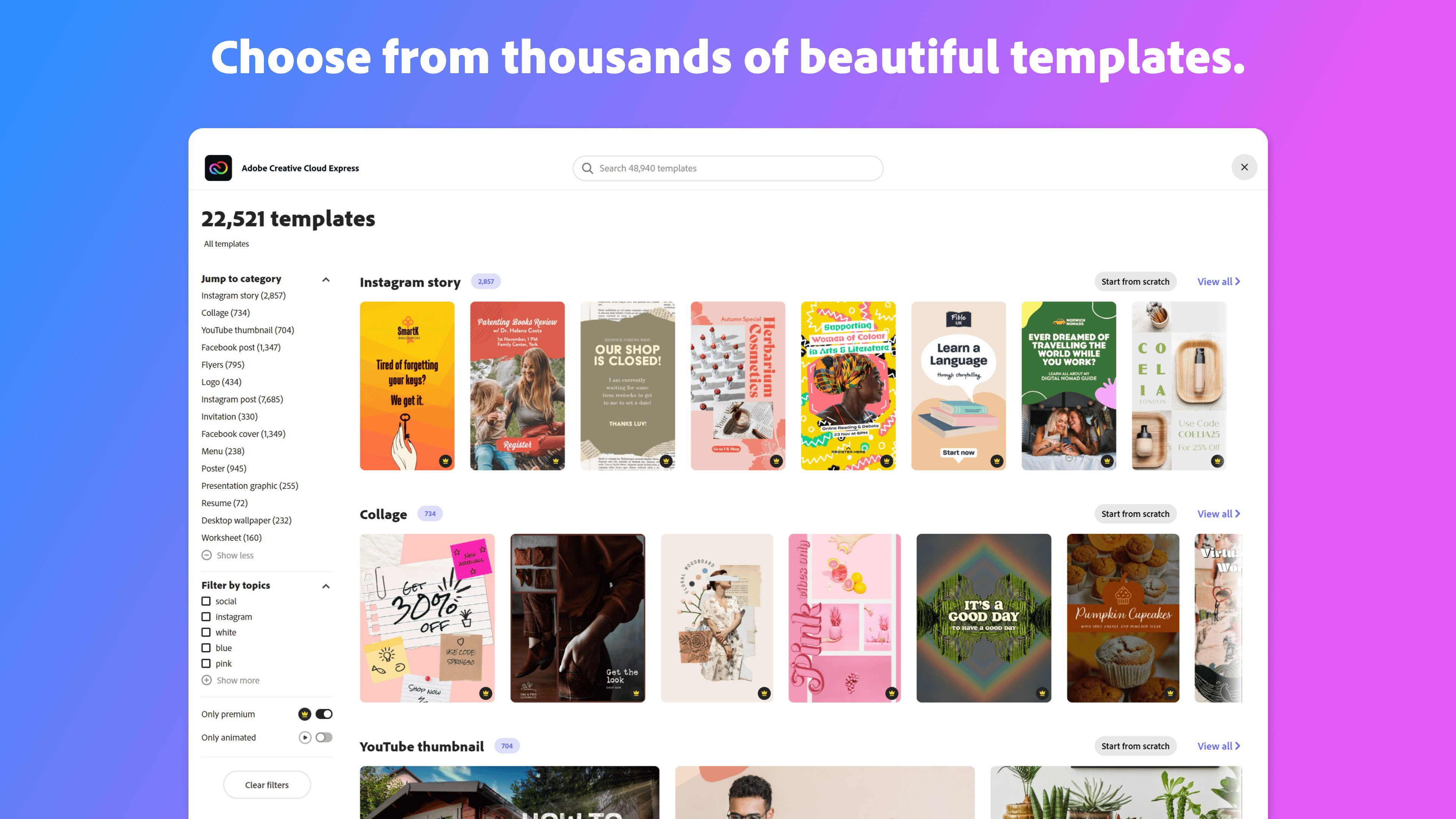
Adobe Express Demo - Thousands of beautiful templates
Start from thousands of templates or from a blank canvas.
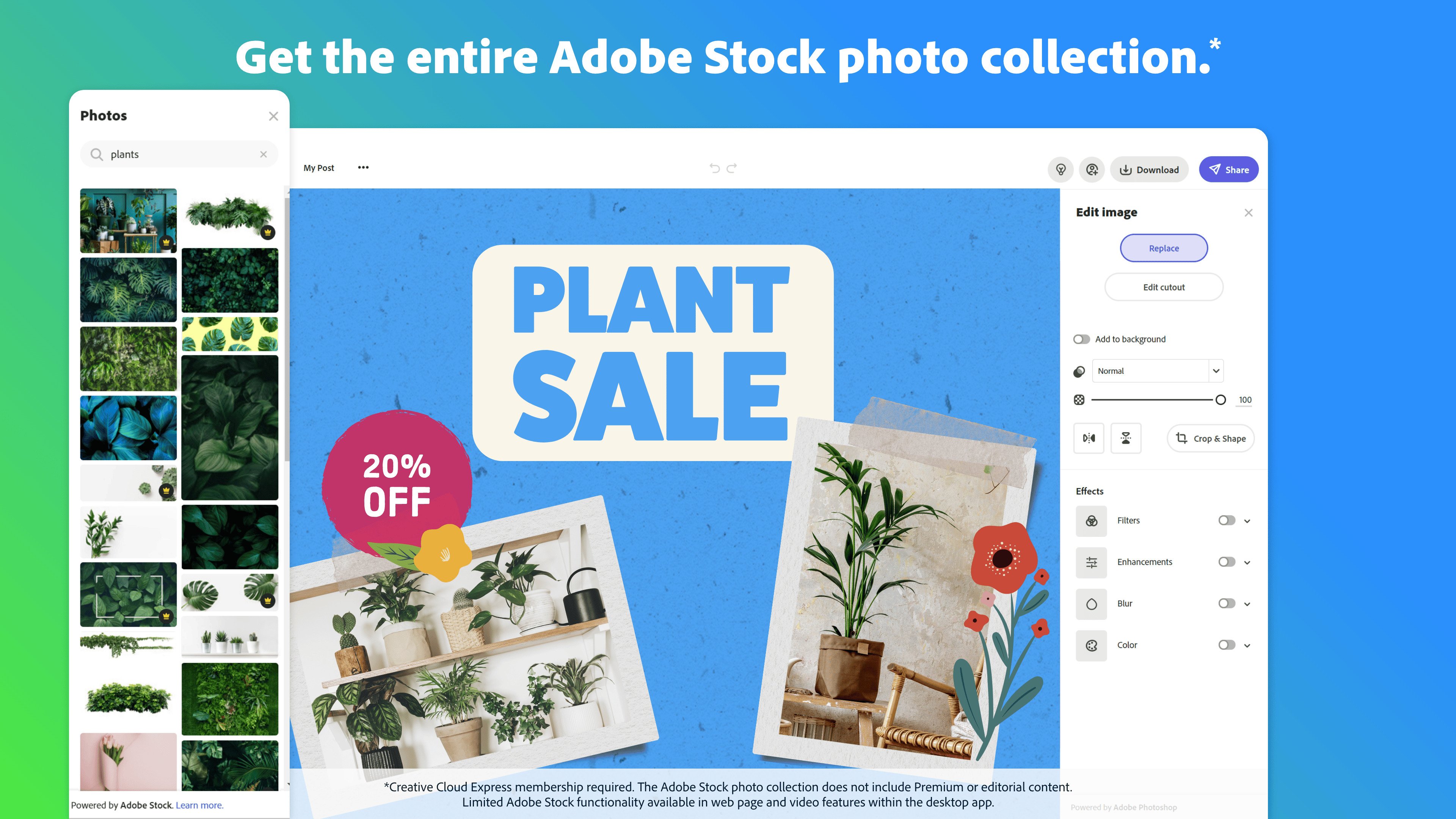
Adobe Express Demo - Adobe Stock photos
Chose from royalty-free high quality Adobe Stock photos.
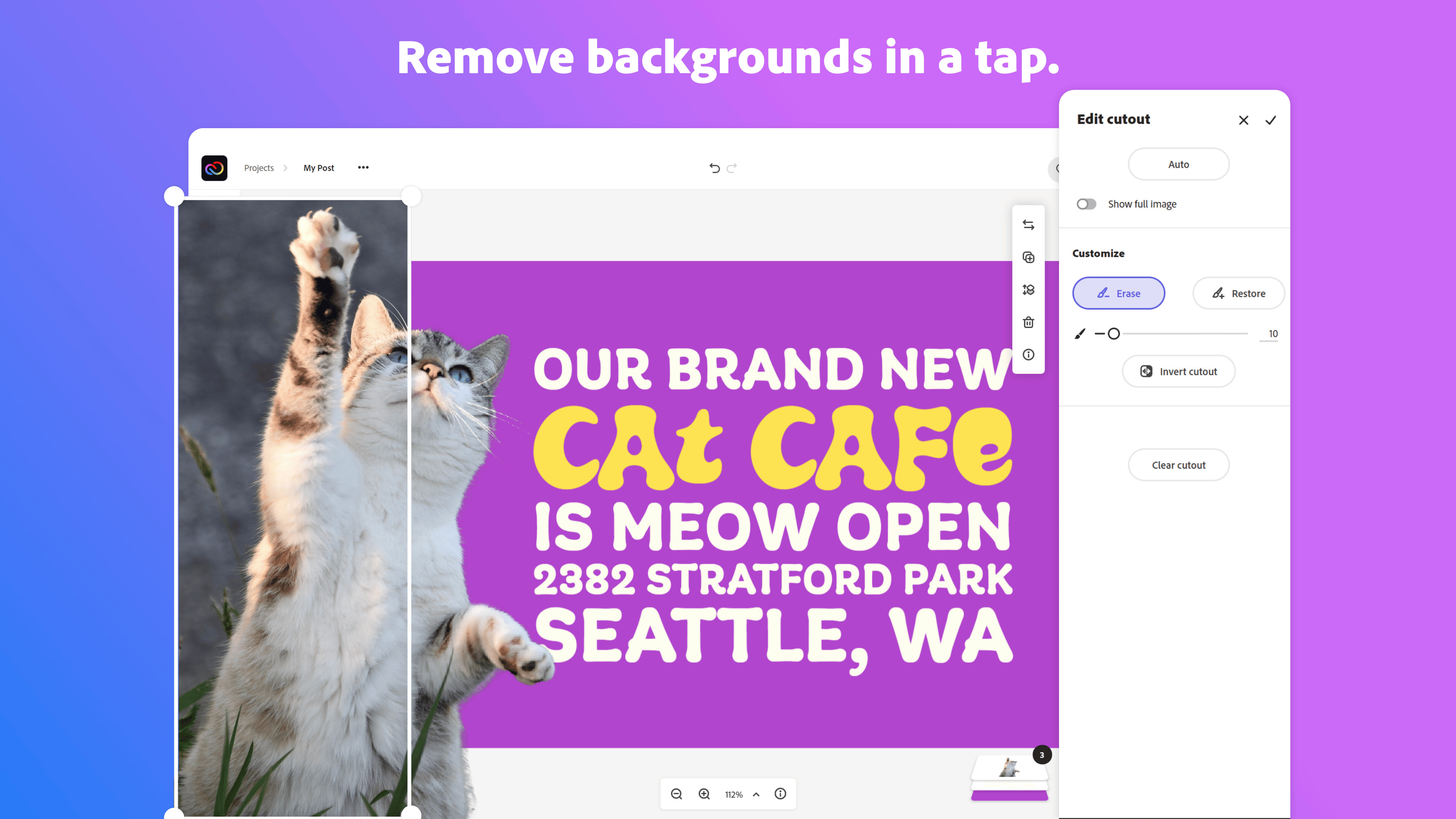
Adobe Express Demo - Remove backgrounds
Start from thousands of templates for social media graphics, stories, and thumbnails, as well as posters, flyers, business cards, logos, and more.
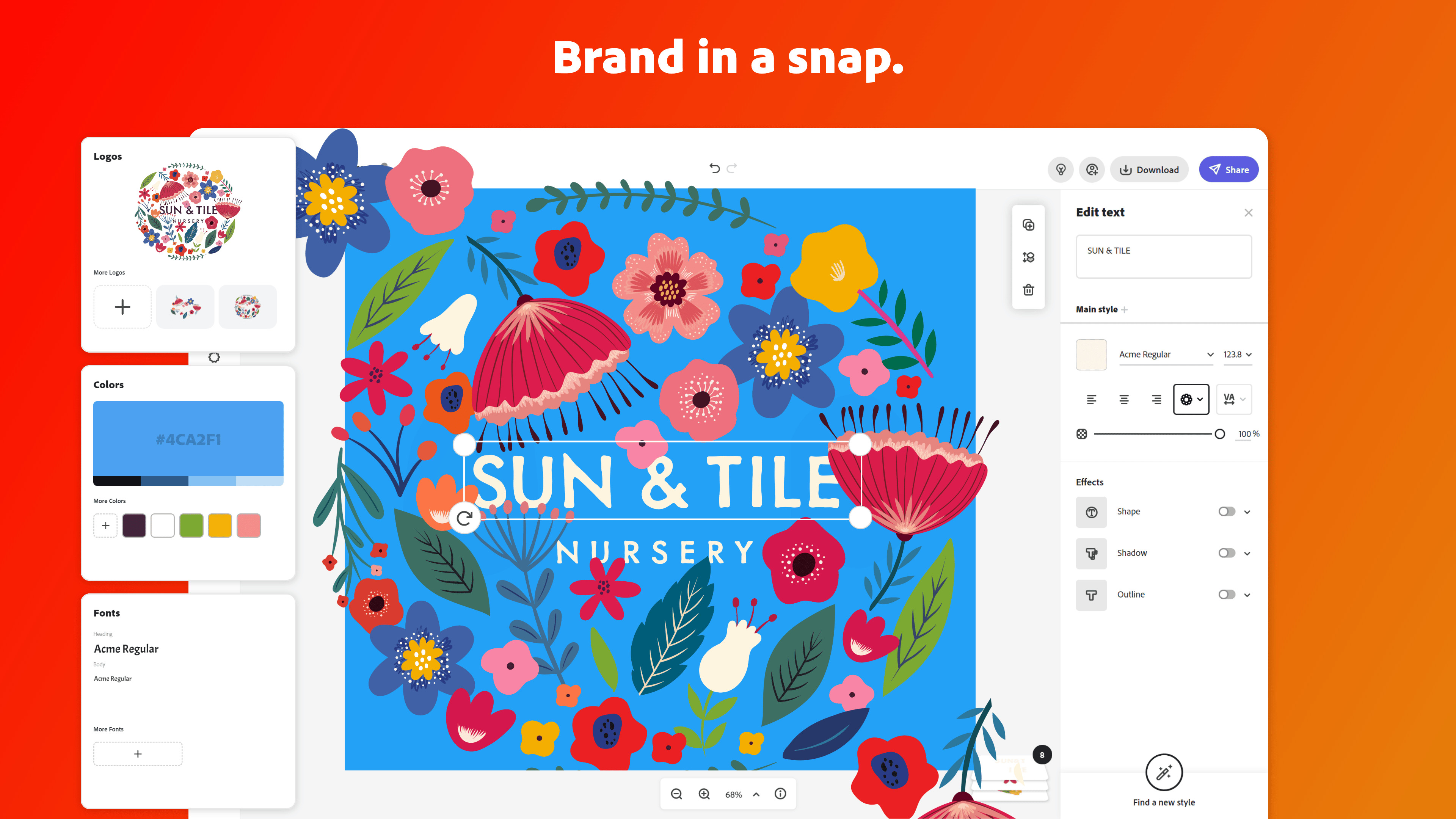
Adobe Express Demo - Brand in a snap
Upload your brand logo, fonts, and colors and apply them to any design with one tap.
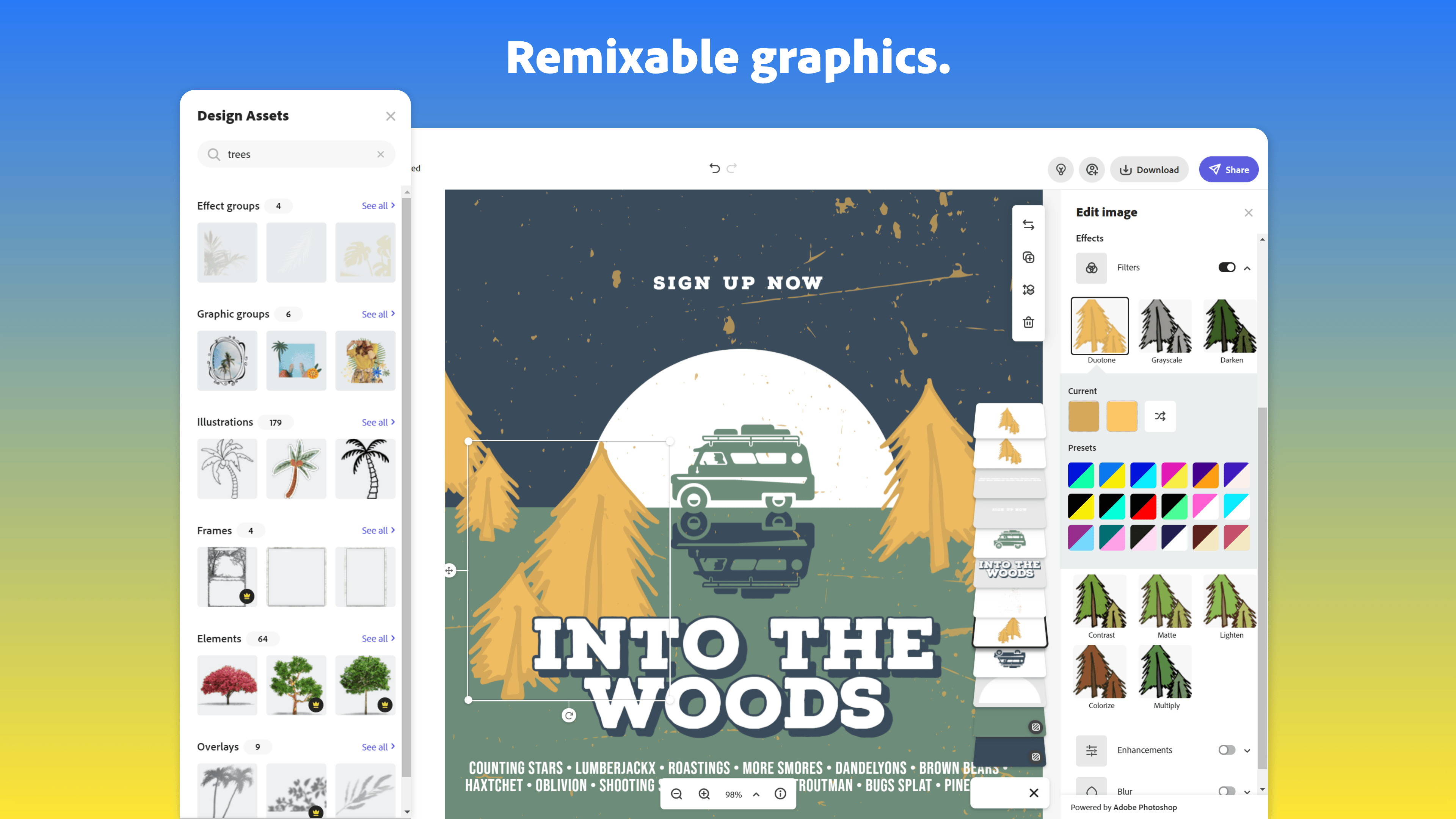
Adobe Express Demo - Remixable graphics
Effortlessly cut out backgrounds without having to outline your subject.
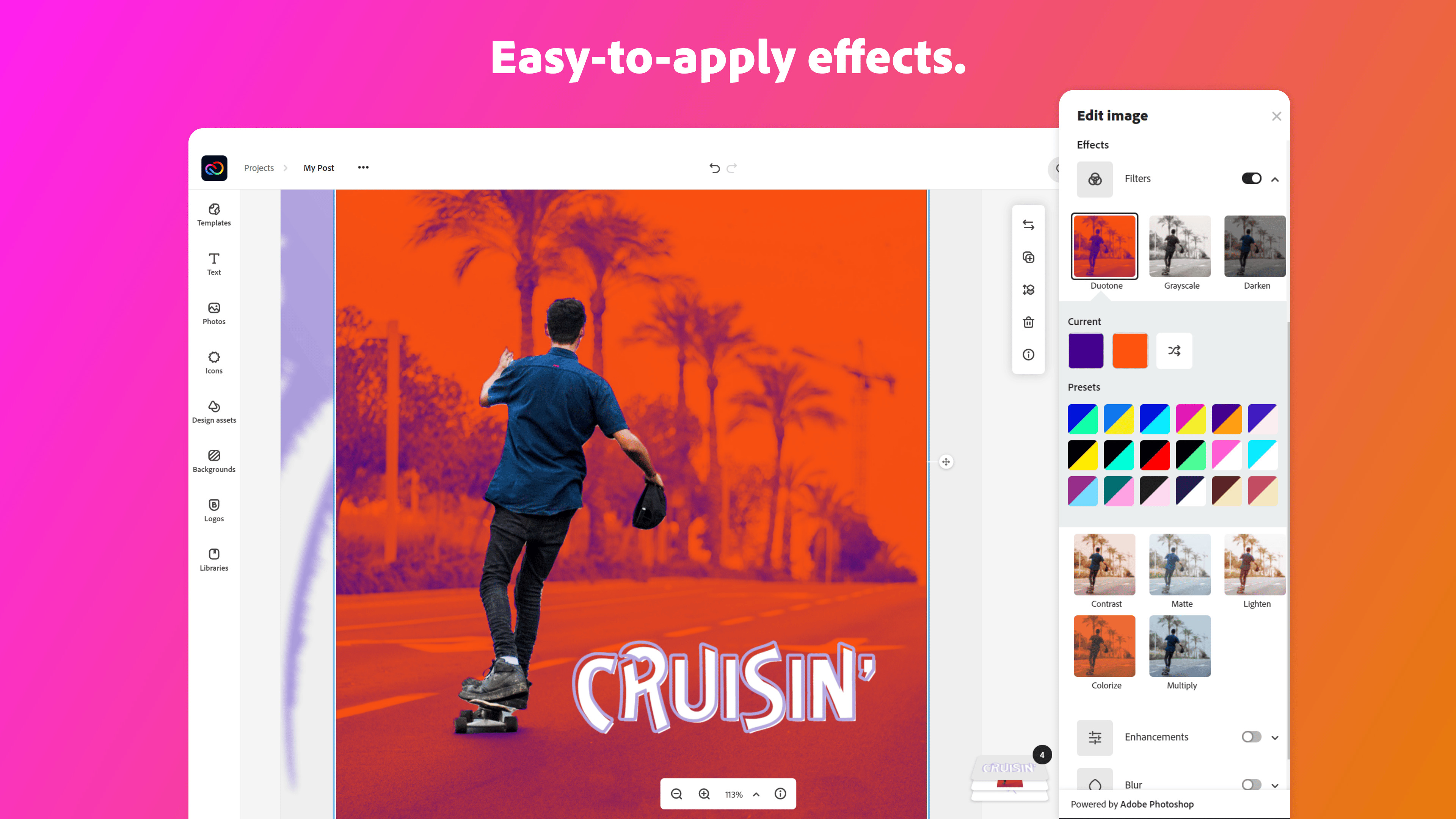
Adobe Express Demo - Easy to apply effects
Get the look you want with easy-to-apply effects, filters, textures, and overlays.
Product Avatar Image

Have you used Adobe Express before?

Answer a few questions to help the Adobe Express community

Adobe Express Reviews (755)

View 4 Video Reviews
Reviews

Adobe Express Reviews (755)

View 4 Video Reviews
4.5
755 reviews

Review Summary

Generated using AI from real user reviews
Users consistently praise the ease of use and professional results achieved with Adobe Express, making it ideal for non-designers to create visually appealing content quickly. The extensive library of templates and intuitive interface streamline the design process, allowing for efficient content creation. However, some users note that advanced customization options are limited, particularly in the free version.

Pros & Cons

Generated from real user reviews
View All Pros and Cons
Search reviews
Filter Reviews
Clear Results
G2 reviews are authentic and verified.
HB
Full Stack developer
Small-Business (50 or fewer emp.)
"Easy, Fast, and Professional Designs from Day One with Adobe Express"
What do you like best about Adobe Express?

What I like most about Adobe Express is how easy it feels from the first use. I didn't need any design background to start creating posters, social media posts, or simple graphics. Everything is already well arranged, so I just choose a template, change the text, and add my image. It saves a lot of effort and time. Another good thing is the clean design quality. Even when I make something quickly, it still looks professional and attractive. The fonts, colors, and layout are balanced so my designs don't look messy or overdone. I also like how fast it works. I don't feel lost inside too many tools or options. The interface is simple, which makes the whole design process smooth and stress-free. For quick marketing posts or personal projects, it feels very practical. Review collected by and hosted on G2.com.

What do you dislike about Adobe Express?

One thing I don't like much is that some advanced features are limited unless you upgrade. Sometimes I want more customization or premium assets, but they are locked behind a paid plan, which can feel restrictive. Another issue is that the deep editing options are not always available. If I want very detailed control over layers or design elements, it can feel basic compared to full design software. Also, when working on complex designs, it sometimes feels less flexible. It's great for quick work but not always ideal for long or highly detailed design tasks. Review collected by and hosted on G2.com.

JL
Account Manager
Enterprise (> 1000 emp.)
"Easy for Beginners with Clean Design and Tons of Templates"
What do you like best about Adobe Express?

I like Adobe Express because it is very easy to use, even for beginners. The layout is clean and simple, so it doesn’t feel overwhelming when you first open it. All the tools are clearly labeled, which makes it quick to find what you need. I also appreciate the wide variety of templates available for social media posts, presentations, flyers, and other projects. These templates make it easy to create professional-looking designs in a short amount of time. Review collected by and hosted on G2.com.
What do you dislike about Adobe Express?

One thing I dislike about Adobe Express is that some of the best features are only available with a paid subscription. While the free version is useful, certain templates, fonts, images, and advanced tools are locked behind a premium plan, which can be frustrating if you’re trying to create something specific without paying. Review collected by and hosted on G2.com.
Chardane M.
CM
Digital Designer
Mid-Market (51-1000 emp.)
"Ideal for Quick, Creative Social Media Posts"
What do you like best about Adobe Express?

I use Adobe Express for creating social media posts and videos for my live webinars, and it's great for changing text and resizing posters. I really appreciate the numerous templates that save me time because I only need to make minimal changes to fit my brand. The animation presets are very helpful, and I love the one-click option to animate static posters. The AI feature that automatically fills in empty spaces when I resize my canvas is amazing. Adobe Express is super friendly, and even people who aren't designers, like students, can use it easily. Review collected by and hosted on G2.com.

What do you dislike about Adobe Express?

I think the credits when exporting videos are a bit frustrating. When I upload bigger duration videos like 5 minutes, it takes up a lot of credits when exporting. Also, when I upload many videos in Adobe Express, they automatically expire or get deleted from my dashboard, which shouldn't happen unless I click delete, but I didn't do it. I tried using Adobe Express for retyping text for a risk warning because it's easier to use and web-based, so anyone can edit it. But I noticed that after I rewrite it and exit the editing, the video expires, so I have to redo it again. Review collected by and hosted on G2.com.

Jay V.
JV
software Engineer
Small-Business (50 or fewer emp.)
"Quick, Stress-Free Design with Polished Templates in Adobe Express"
What do you like best about Adobe Express?

What I like best about Adobe Express is how quick and stress-free it makes designing. You don't need to be a designer or understand complex tools. You can open it and start creating immediately, which feels very welcoming. Another thing I really enjoy is the ready-made template. Whether it's a social media post, flyer, poster, or thumbnail, there's always a template that gives a good starting point. This saves a lot of time, especially when ideas are clear but execution is slow. Adobe Express also feels very clean and easy to use. The layout is simple, buttons are easy to understand, and nothing feels overwhelming. It doesn't have to search too much to find tools. I also like how it connects well with Adobe assets. Fonts, icons, images, and colors are already well designed, so the final result usually looks polished even with minimal effort. The ability to use it on both desktop and mobile is another big plus. I can start a design on my laptop and make quick edits on my phone, which is very convenient. Review collected by and hosted on G2.com.
What do you dislike about Adobe Express?

One thing I dislike is that advanced design control is limited. If I want a very detailed layout or deep customization, the tool can feel restrictive compared to professional design software. Some of the best templates and features are locked behind a paid plan, which can be frustrating when you find something perfect but can't use it without upgrading. Layer management is quick and basic. When designs become slightly complex, it becomes hard to control elements properly. Sometimes the editor feels slow when working with many elements, especially on lower-end devices. It's also not ideal for print-level or brand-heavy designs. If someone needs pixel-perfect control or strict brand rules, Adobe Express may not fully meet those needs. Review collected by and hosted on G2.com.
Sanket P.
SP
Software engineering
Small-Business (50 or fewer emp.)
"Effortless Design Creation for Non-Designers"
What do you like best about Adobe Express?

What I like best about Adobe Express is how easy and fast it is to create good-looking designs without needing deep design skills. When I need to make something quickly, like social media posts, banners, thumbnails, or simple marketing creatives, I don't have to open heavy tools or start from scratch. Everything is already well structured and ready to use. The templates are one of the strongest parts for me. They can be clean, modern, and usable in real projects, not just demo designs. I can pick a template, change text, colors, and images, and export it in minutes. This saves a lot of time, especially when deadlines are tight. Another thing I really like is that it works very smoothly in a browser. I don't always need to install software, and I can switch between devices easily. This is helpful when I want to do quick edits or review designs on the go. Review collected by and hosted on G2.com.
What do you dislike about Adobe Express?

One thing I dislike about Adobe Express is that advanced customization is limited. When I want very fine control over design elements like precise alignment, advanced effects, or complex layout, it starts to feel restrictive compared to tools like Photoshop or Illustrator. Another downside is that some useful features and assets are locked behind the paid plan. While the free version is good for basic use, you quickly feel the limitations if you use it regularly for professional work. Sometimes performance can feel a bit slow when working on heavier designs or when switching between multiple projects in the browser. It's not a major issue, but it can interrupt the flow. Also for developers or technical users, exporting assets in very specific formats or resolutions is not always as flexible as expected. you may need extra steps another fool to finalize things Review collected by and hosted on G2.com.
Vamshi B.
VB
React js Developer
Computer Software
Small-Business (50 or fewer emp.)
"Effortless Visual Creation with Time-Saving Templates"
What do you like best about Adobe Express?

i really like how quickly and easy it is to create visuals, whether it's presentation documents, or internal updates. the templates save a lot of time, and interface is clean enough that i don't need to spend hours figuring out design tools.even as a developer, i can put together something that looks decent without needing a designer Review collected by and hosted on G2.com.
What do you dislike about Adobe Express?

sometime it feels a bit limited if i want more control over fine details. also exporting some assets can be slower than i'd like, and a few features feel like they're hidden behind extra clicks, which interrupts the flow when I'm in a hurry. Review collected by and hosted on G2.com.
Shruti S.
SS
Backend Developer
Small-Business (50 or fewer emp.)
"Effortless Visual Creation for Non-Designers"
What do you like best about Adobe Express?

What I like most about Adobe Express is how easy it is to use. As an developer, I am not a designer, but I still need to create visuals for presentations, internal docs, feature demos and sometimes quick UI or flow explanations. The ready-made templates and drag and drop editor make it easy to create clean visuals without spending too much time on design work. Review collected by and hosted on G2.com.

What do you dislike about Adobe Express?

Some advanced features and assets are available only in the paid version, which can be limiting at times. Also for more detailed or custom designs, it doesn't offer the same level of control as full designs tools. Review collected by and hosted on G2.com.

Alex H.
AH
Owner Outward Element Creative Studio
Small-Business (50 or fewer emp.)
"Effortless Creativity and Collaboration for Beginners"
What do you like best about Adobe Express?

Adobe Express strikes a great balance between being effective, quick, and easy to create powerful designs with minimal experience in the creative industry. It allows relatively new users to jump in and create impressive projects without needing the in-depth training that other advanced software often requires. The platform is also very affordable, offering a free base version and paid options for advanced features. I really appreciate how easy it is to search for and add creative elements—there’s a wide variety available, even in the free version. Even as a experienced user of advanced programs like photoshop, illustrator and InDesign - I often find it quicker, simpler, and more flexible to design quick elements and newsletters inside of Adobe Express. When I add a photo, it is very easy to replace it quickly, as well as very quickly make color adjustments. Having rulers and guides now is a new addition that adds even more capability to make your designs aligned and more professional. I also value that it’s web-based and collaborative. Being able to share a link and invite others to edit instantly, without any downloads or installations, is a huge advantage for team projects. Another standout feature is how quick and simple it is to use generative tools, like removing photo backgrounds, which works impressively well in just seconds. The option to share a direct view link or download a PDF for sharing is also extremely helpful. Adobe Express has become my go-to tool for creating quarterly newsletters filled with images, text, links, and design elements. I also use it frequently to design one-off pages for my volunteer programs. The non-profit groups I volunteer with include people who aren’t as tech-savvy, but after I made a tutorial video, I’m confident they can get started and make changes within minutes, all without needing to install anything. It’s incredibly easy to use. The Adobe team is also very engaged with users, listening to feedback and supporting the creative community. I’ve been using this software since its launch, and it has improved dramatically and become even more useful over time! Review collected by and hosted on G2.com.

What do you dislike about Adobe Express?

Depending on your needs, Adobe Express is not as powerful as other stand-alone installed software, it has limitations that other programs like InDesign and Illustrator are better for - but that takes tons of training. Although updated and improving constantly - some seemingly simple tasks are a bit tricky, but many of these have work-around tricks. I would like to see the ability to hyperlink an image (the workaround is make linked text behind the image that is scaled to the size of image). It can take a bit of use to get familiar with how some effects and things are done - the more you use it, the quicker everything becomes. I have also on occasion seen some glitches when I export to PDF where a couple images inside of frames are misaligned, but this was solved by simply replacing and re-uploading the images. Review collected by and hosted on G2.com.

KK
Software developer tire 2
Mid-Market (51-1000 emp.)
"Effortless Professional Designs with Seamless Adobe Integration"
What do you like best about Adobe Express?

It is very easy to use and allows me to create professional-looking designs quickly without needing advanced design skills. I really like the wide range of ready-made templates, fonts, and graphics, which save a lot of time. The integration with other Adobe products and cloud storage is also very helpful, as it makes editing and sharing designs seamless across devices. Overall, it’s a reliable tool for creating social media posts, marketing materials, and quick design assets efficiently. Review collected by and hosted on G2.com.

What do you dislike about Adobe Express?

While It is easy to use, some advanced design features are limited compared to full tools like Adobe Photoshop or Illustrator. Customization options for certain templates can feel restrictive, and performance may slow down when working with larger or more complex projects. Review collected by and hosted on G2.com.

Antonio G.
AG
SQL Server, Power BI, Web, SEO Specialist
Small-Business (50 or fewer emp.)
"Fast, Fun, and Effortless Design with Adobe Express"
What do you like best about Adobe Express?

I have a valid PHOTOSHOP license but I often use Adobe Express for quick mockups ot templating.

Adobe Express is really easy for me to use, and it helps a lot when I need to make something quickly. I just pick a template, change a few things, and it already looks good. It saves me time for thumbnails and small graphics, and the tools feel simple even if I'm not a designer. Overall, it makes my work faster and a bit more fun. Review collected by and hosted on G2.com.

What do you dislike about Adobe Express?

If I have to point out a few things I don’t like about Adobe Express, I’d say it can feel a bit slow sometimes, especially when loading bigger projects. Some features are locked behind the paid plan, so you quickly hit limits if you use it often. The mobile app is good, but not always as smooth as the desktop version. And sometimes the interface hides options in places that are not super obvious, so I need a moment to find what I want. Nothing terrible, but a few small things that could be better. Review collected by and hosted on G2.com.

Pricing Options

Pricing provided by Adobe Express.

Free Plan

$0.00

Premium Plan

$9.99

Teams

Starting at $4.99
Adobe Express Comparisons
Product Avatar Image
Canva
Compare Now
Adobe Express Features
Image Upload
Stock Image Library
Drag & Drop Editing
Font Selection
Scale
Schedule
Templates
Layout editor
Publishing formats
Product Avatar Image
Adobe Express