Zoho WorkDrive Reviews & Product Details

Profile Status

This profile is currently managed by Zoho WorkDrive but has limited features.

Are you part of the Zoho WorkDrive team? Upgrade your plan to enhance your branding and engage with visitors to your profile!


This product is included in:

Value at a Glance

Averages based on real user reviews.

Time to Implement

2 months

Return on Investment

10 months

Zoho WorkDrive Media

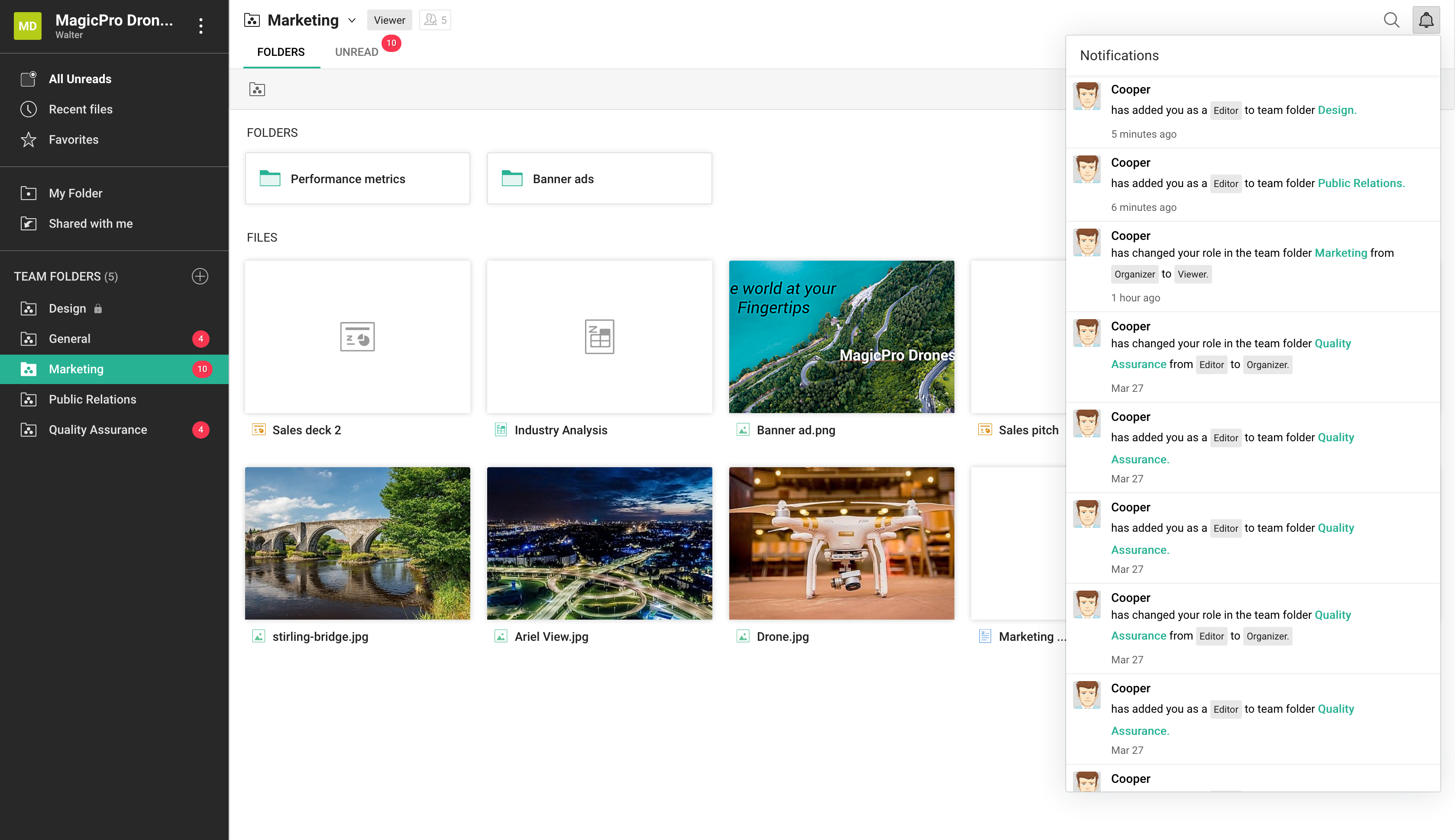
Zoho WorkDrive Demo - team-folders
team-folders
Zoho WorkDrive Demo - notifications
notifications
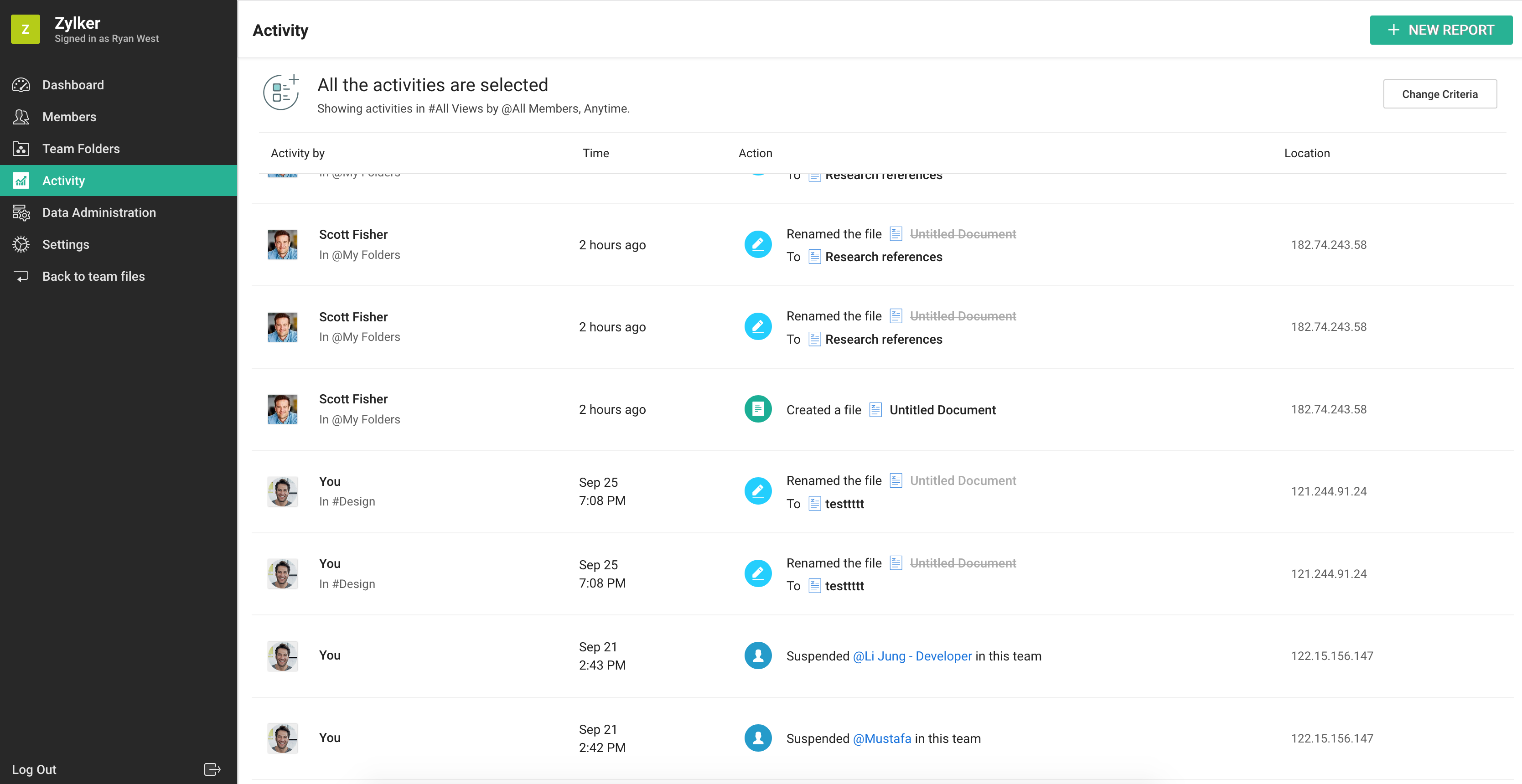
Zoho WorkDrive Demo - Screen-Shot
Screen-Shot
Zoho WorkDrive Demo - draft
draft
Zoho WorkDrive Demo - work-in-own-space
work-in-own-space
Product Avatar Image

Have you used Zoho WorkDrive before?

Answer a few questions to help the Zoho WorkDrive community

Zoho WorkDrive Reviews (669)

View 3 Video Reviews
Reviews

Zoho WorkDrive Reviews (669)

View 3 Video Reviews
4.4
669 reviews

Review Summary

Generated using AI from real user reviews
Users consistently praise the easy-to-use interface and seamless team collaboration features of Zoho WorkDrive, which facilitate efficient file management and sharing. The platform's centralized storage and strong permission controls enhance organization and security, making it a reliable choice for teams. However, some users note that syncing large files can be slow, which may hinder workflow during critical tasks.

Pros & Cons

Generated from real user reviews
View All Pros and Cons
Search reviews
Filter Reviews
Clear Results
G2 reviews are authentic and verified.
MA
Network Engineer
Mid-Market (51-1000 emp.)
Business partner of the seller or seller's competitor, not included in G2 scores.
"All-in-one Platform for Easy File Sharing and Collaboration"
What do you like best about Zoho WorkDrive?

What i like best about Zoho WorkDrive is its smooth collaboration and team-focused design. It makes sharing files, managing team folders, and controlling access rally simple without needing technical knowledge. Another strong point is its tight integration with other Zoho apps like Zoho Writer, Sheet, and Show, which allows you to create, edit, and collaborate on documents in real time without switching platforms. Review collected by and hosted on G2.com.

What do you dislike about Zoho WorkDrive?

Here are a few common drawbacks of Zoho WorkDrive that users often point out:

1. Limited offline access.

2. Search functionality can be slow or inaccurate.

3. Limited third-party integrations outside Zoho ecosystem.

4. File preview not supported for all formats.

5. Editing features are basic compared to advanced tools.

6. Slow performance with large files or bulk data.

7. Mobile app experience is not very user-friendly. Review collected by and hosted on G2.com.

Mostafa A.
MA
founder of (EL-DocToOoR-66 ) company for creat applictions (Innovation for The Future)
Pharmaceuticals
Small-Business (50 or fewer emp.)
"Zoho One: Unbeatable Value with Deep All-in-One Integration"
What do you like best about Zoho WorkDrive?

Zoho is a powerhouse in the cloud software space, known for its "all-in-one" ecosystem. Zoho is a massive suite of 50+ applications (CRM, Mail, Projects, Books, etc.) that can run an entire business.

Here is the 2026 report on the advantages and disadvantages of the Zoho Cloud ecosystem:

🟢 Advantages (Pros)

1. Unbeatable Value for Money

Zoho’s "Zoho One" bundle is often called the "Operating System for Business." For a single flat fee per employee, you get access to nearly every app they make. Compared to buying Salesforce, Slack, and QuickBooks separately, Zoho can save companies 50% to 70% in software costs.

2. Deep Native Integration

Because all apps are built by the same company, data flows seamlessly.

Example: When a lead is closed in Zoho CRM, an invoice can be automatically generated in Zoho Books, and a project folder created in Zoho WorkDrive.

3. Zia: The Unified AI Assistant

Zoho’s AI, Zia, works across the entire cloud. She can predict sales trends, suggest the best time to contact a customer, and even help you write emails or code custom functions. By 2026, Zia has become highly adept at natural language queries (e.g., "Show me sales by region for last month").

4. Extreme Customization

Zoho is incredibly flexible. With its Canvas design tool, you can completely redesign the user interface of your CRM to look exactly how you want. For more technical users, their scripting language (Deluge) allows you to build complex, custom automations.

5. Privacy & Ad-Free Culture

Unlike some competitors, Zoho owns its entire tech stack (down to the data centers) and has a strict policy against selling user data or showing ads, even on their free plans. Review collected by and hosted on G2.com.

What do you dislike about Zoho WorkDrive?

1. Steep Learning Curve

Because Zoho does everything, the interface can feel cluttered and overwhelming. New users often complain that it takes significantly longer to set up and master compared to "single-purpose" apps like Trello or HubSpot.

2. "Jack of All Trades, Master of Some"

While Zoho CRM and Zoho Books are industry leaders, some of their smaller apps (like Zoho Meetings or Zoho Social) may feel less "polished" or feature-rich than best Review collected by and hosted on G2.com.

AK
Founder
Small-Business (50 or fewer emp.)
"Effortless Team File Sharing and Collaboration with Zoho WorkDrive"
What do you like best about Zoho WorkDrive?

The best thing that i liked about zoho WorkDrive is how easily you can share work files and drafts with your team without making much effort. You can make a team and add the members you want and you are ready to go. We don't need to share access to the drive like google drive Review collected by and hosted on G2.com.
What do you dislike about Zoho WorkDrive?

One thing that i dont like about zoho workdrive is whenever you sign up on the portal, it will automatically add you in a trial paid plan and there's not option to uncheck that Review collected by and hosted on G2.com.

LOKESH G.
LG
Engineer.SGB TCS-FS CORE BANKING,Production
Information Technology and Services
Enterprise (> 1000 emp.)
"Reliable cloud collaboration tool with strong team features"
What do you like best about Zoho WorkDrive?

Zoho WorkDrive is very easy to use and works well for team collaboration. I especially like the way files are organized through Team Folders, which makes it simple to share documents while keeping things secure. The real-time collaboration tools, version history, and permission controls are strong features that help teams stay efficient and work without confusion. It also integrates smoothly with other Zoho apps, which is a big plus for keeping everything connected. Review collected by and hosted on G2.com.
What do you dislike about Zoho WorkDrive?

The interface can feel a bit slow when I’m working with large files, and the search function isn’t always as accurate as I’d like. Some of the more advanced features also aren’t very intuitive for first-time users, so there’s a small learning curve before everything feels natural. And compared to competitors like Google Drive, the available third-party integrations seem somewhat limited. Review collected by and hosted on G2.com.
Tinu C.
TC
Founder
Media Production
Small-Business (50 or fewer emp.)
"Clean, Intuitive, and Effortless Document Management with Zoho WorkDrive"
What do you like best about Zoho WorkDrive?

I really appreciate how clean and easy-to-use Zoho WorkDrive is. The interface feels intuitive, so I can quickly organize files, create folders, and colleborate with my team without any confusion. The real-time collaboration fetures are smooth, and I love that everything stays synced across devices. It’s reliable, simple, and makes document management feel effortless. Review collected by and hosted on G2.com.

What do you dislike about Zoho WorkDrive?

One thing I find a bit frustrating is that the synking can feel slower than expected, especially when handling large files or switching between devices. Some of the advanced setings also take a little time to figure out, and the navigation not always as smooth. These aren’t deal‑breakers, but they do interrupt the workflow now and then. Review collected by and hosted on G2.com.

Suman M.
SM
Lead Generation & Business Development Manager
Small-Business (50 or fewer emp.)
"Great for Team Folders, Seamless Browser-to-Desktop Editing with Auto-Save Uploads"
What do you like best about Zoho WorkDrive?

I use it for Team Folders, and it’s great for working across teams.

It lets you open any file—even complex ones like a Photoshop (.psd), CAD file, or specialized video format—directly from your web browser into its native desktop app.

When you hit Ctrl+S (Save) on your computer, Genie automatically uploads the updated version back to the cloud, so there’s no need to manually download, edit, and re-upload files. Review collected by and hosted on G2.com.

What do you dislike about Zoho WorkDrive?

Sharing external share links can sometimes feel a bit "fussy," like a client is telling us the link will expire very soon. Review collected by and hosted on G2.com.

Amparo S.
AS
Small-Business (50 or fewer emp.)
"Reliable and Compliant for B2B Document Management"
What do you like best about Zoho WorkDrive?

I appreciate how Zoho WorkDrive balances simplicity, team collaboration, and GDPR-compliant data security, which are all critical for our German B2B software development team. It provides a centralized space for us to store technical specs, architecture documents, client requirements, and compliance records with reliable permission controls. The real-time collaboration features keep our projects organized without relying on messy email attachments or scattered cloud storage. It's great that the platform supports GDPR and data protection requirements out of the box, which aligns with German enterprise standards. The initial setup was straightforward and required almost no learning curve, with an intuitive interface that makes navigation and uploads easy even for non-tech-savvy colleagues. I also like the secure sharing capabilities with fine-grained access rights, and the integration with other Zoho ecosystem apps helps us keep everything aligned. Review collected by and hosted on G2.com.

What do you dislike about Zoho WorkDrive?

First, the desktop sync client can be slow and unreliable with large technical files—like architecture exports, database backups, log files, and big project archives. We occasionally run into sync conflicts or delayed updates, which creates uncertainty when sharing critical documentation across the team. Second, the integrations with developer tools feel basic. We work heavily with Git repositories, MyEclipse, Jira, and CI/CD pipelines, but WorkDrive doesn’t offer deep, native connections to these. We end up manually uploading or sharing links instead of having a seamless flow between code, specs, and documentation. Review collected by and hosted on G2.com.

NS
Senior UX/UI Designer
Information Technology and Services
Small-Business (50 or fewer emp.)
"Simplifying Team Collaboration tool with Control"
What do you like best about Zoho WorkDrive?

Collaboration in real time, version history, and the ease with which everything can be shared inspire trust, as it is always possible to track the location of the files and ensure that the files being used are the latest copy.Organizing files, team folders, and permissions are not confusing, and this helps users forget about permissions and concentrate on the tasks at hand. Review collected by and hosted on G2.com.

What do you dislike about Zoho WorkDrive?

Navigating between personal spaces, team folders, and individual items can often be challenging, as it sometimes requires extra clicks just to figure out where a particular file is stored. Additionally, the feedback provided for certain actions, like setting permissions or synchronizing, could be clearer and more intuitive. As it stands, users may be left uncertain whether these tasks have been completed successfully. Review collected by and hosted on G2.com.

Ujjwal Y.
UY
Software Trainee
Computer Software
Mid-Market (51-1000 emp.)
"Easy-to-Use Interface and Seamless Team Collaboration in Zoho WorkDrive"
What do you like best about Zoho WorkDrive?

What I like best about Zoho WorkDrive is its easy-to-use interface and seamless team collaboration features. It allows teams to organize files efficiently using Team Folders and share documents securely with controlled access. The smooth integration with other apps in the Zoho Workplace ecosystem also makes document management and collaboration much more efficient. Review collected by and hosted on G2.com.

What do you dislike about Zoho WorkDrive?

One drawback of Zoho WorkDrive is that file syncing and loading can sometimes be slow when working with very large folders or files. The search functionality could also be improved to make finding documents faster. Additionally, some advanced integrations available in other platforms are limited compared to tools like Google Drive. Review collected by and hosted on G2.com.

Anant T.
AT
Lead Solution Architect
Mid-Market (51-1000 emp.)
"Effortless Team Collaboration and Organization with Zoho WorkDrive"
What do you like best about Zoho WorkDrive?

Zoho WorkDrive is very easy to implement, and getting the team onboard is simple. The Team Folders make collaboration organized, and features like version history and permission controls are genuinely helpful in daily use. It’s affordable, works smoothly with other Zoho apps, and the overall experience feels reliable for frequent use. Customer support is also responsive when you need help. Review collected by and hosted on G2.com.

What do you dislike about Zoho WorkDrive?

The sync performance can be slow, especially with large files, and offline access isn’t as strong as other tools. It also doesn’t offer zero-knowledge encryption, which might matter for highly sensitive data. Integrations outside the Zoho ecosystem are somewhat limited, and some users may find the interface less polished compared to bigger competitors. Review collected by and hosted on G2.com.

Pricing Insights

Averages based on real user reviews.

Time to Implement

2 months

Return on Investment

10 months

Average Discount

9%

Zoho WorkDrive Comparisons
Product Avatar Image
Microsoft OneDrive
Compare Now
Product Avatar Image
Microsoft SharePoint
Compare Now
Product Avatar Image
DiskStation
Compare Now
Zoho WorkDrive Features
Device Syncing
Web Interface
File Type Support
File following
File Sharing
Simultaneously Editing
User and Role Management
Policies and Controls
Device Management