


Compare this with other toolsSave it to your board and evaluate your options side by side.
Save to board

WorkflowMAX Reviews & Product Details

Pricing

Pricing provided by WorkflowMAX.

STANDARD

Starting at $25.00
Per Month

WorkflowMAX Media

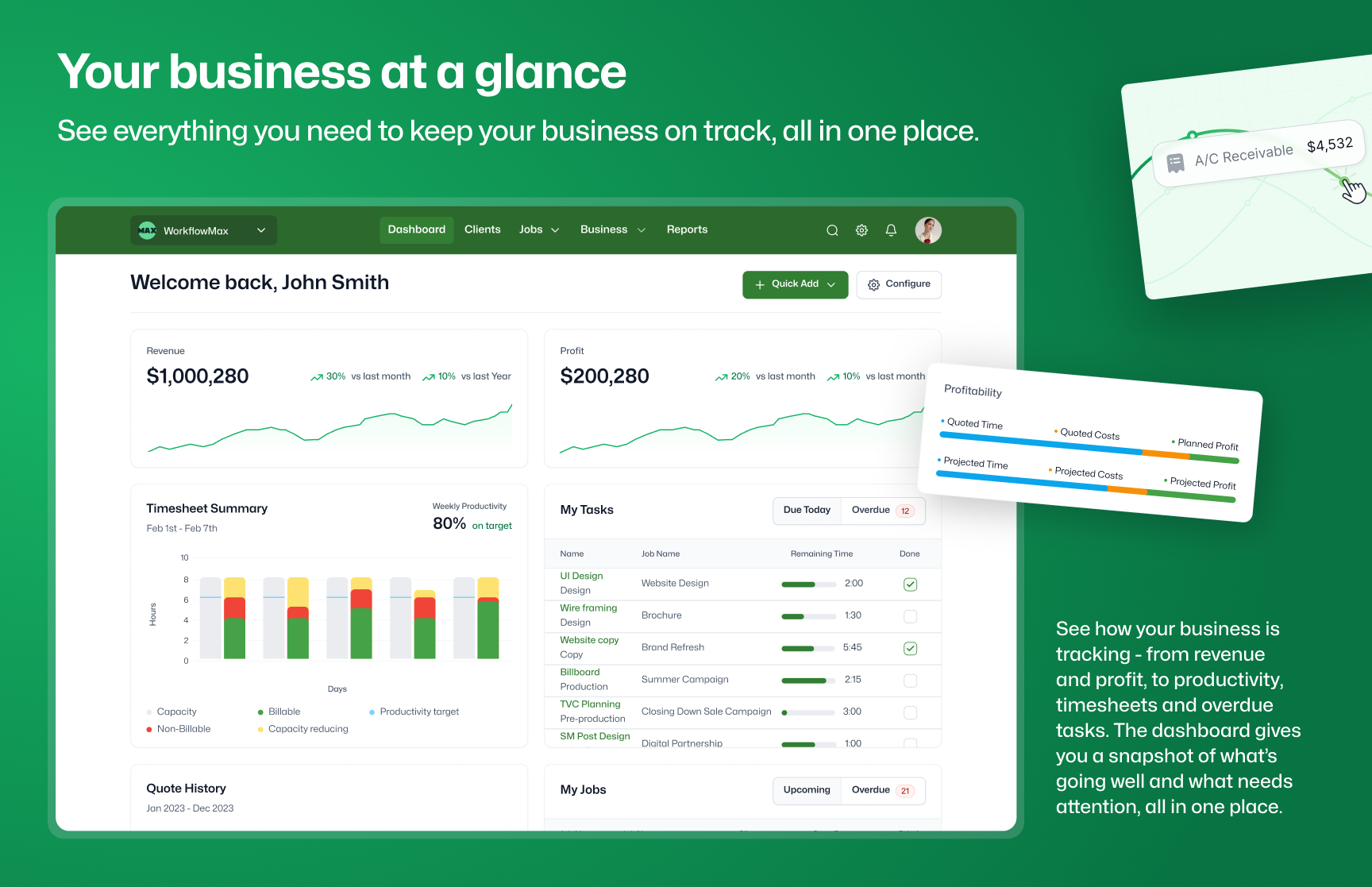
WorkflowMAX Demo - Welcome to WorkflowMax
Boost your profitability and performance. Do it all from anywhere – quotes, jobs, scheduling, time tracking, invoicing, reporting, and more.
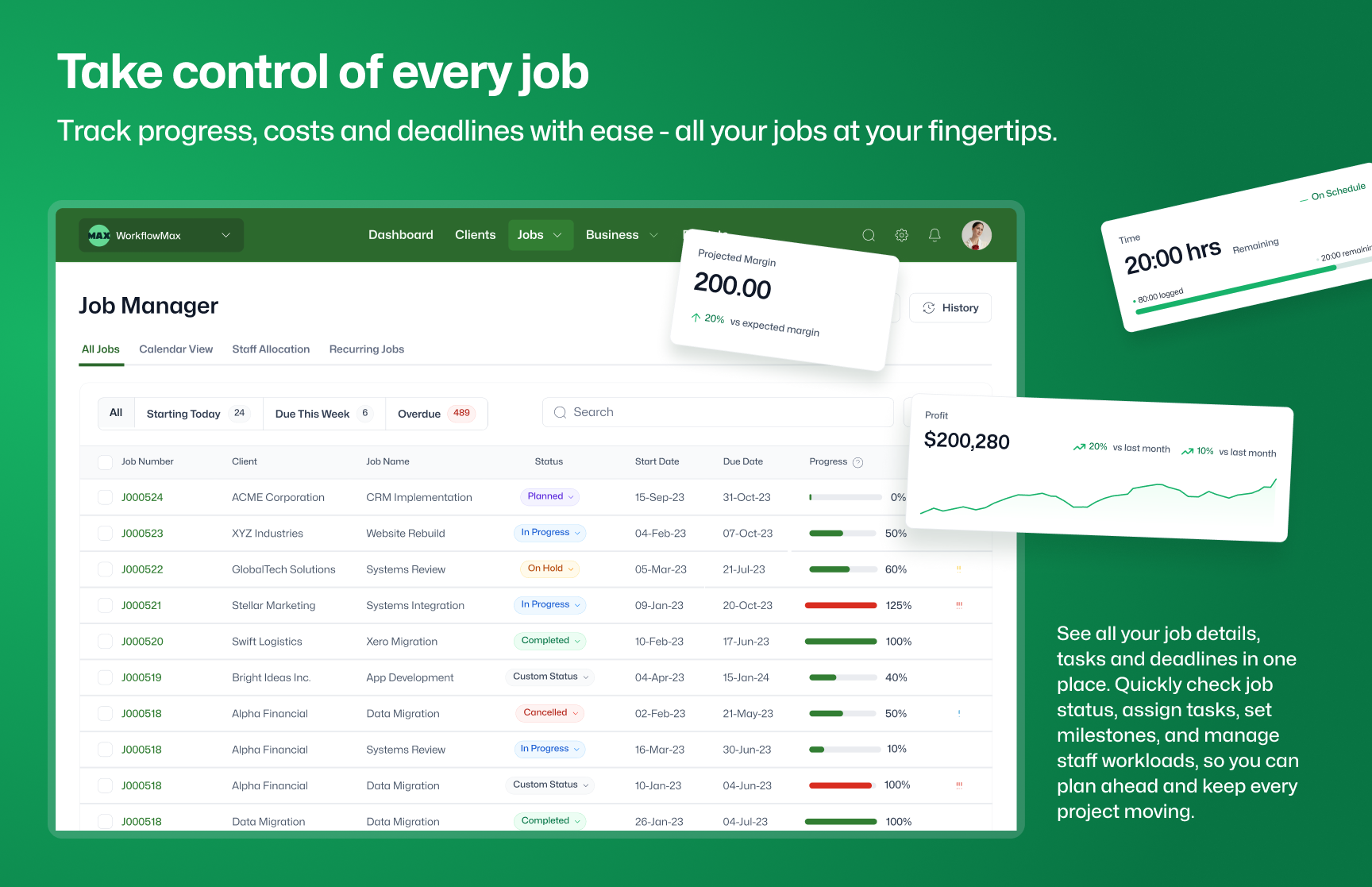
WorkflowMAX Demo - Stay in control of your job management
Track and record all aspects of your jobs, from resources and time to costs and profitability. Experience seamless workflow management and gain valuable insights through reporting.
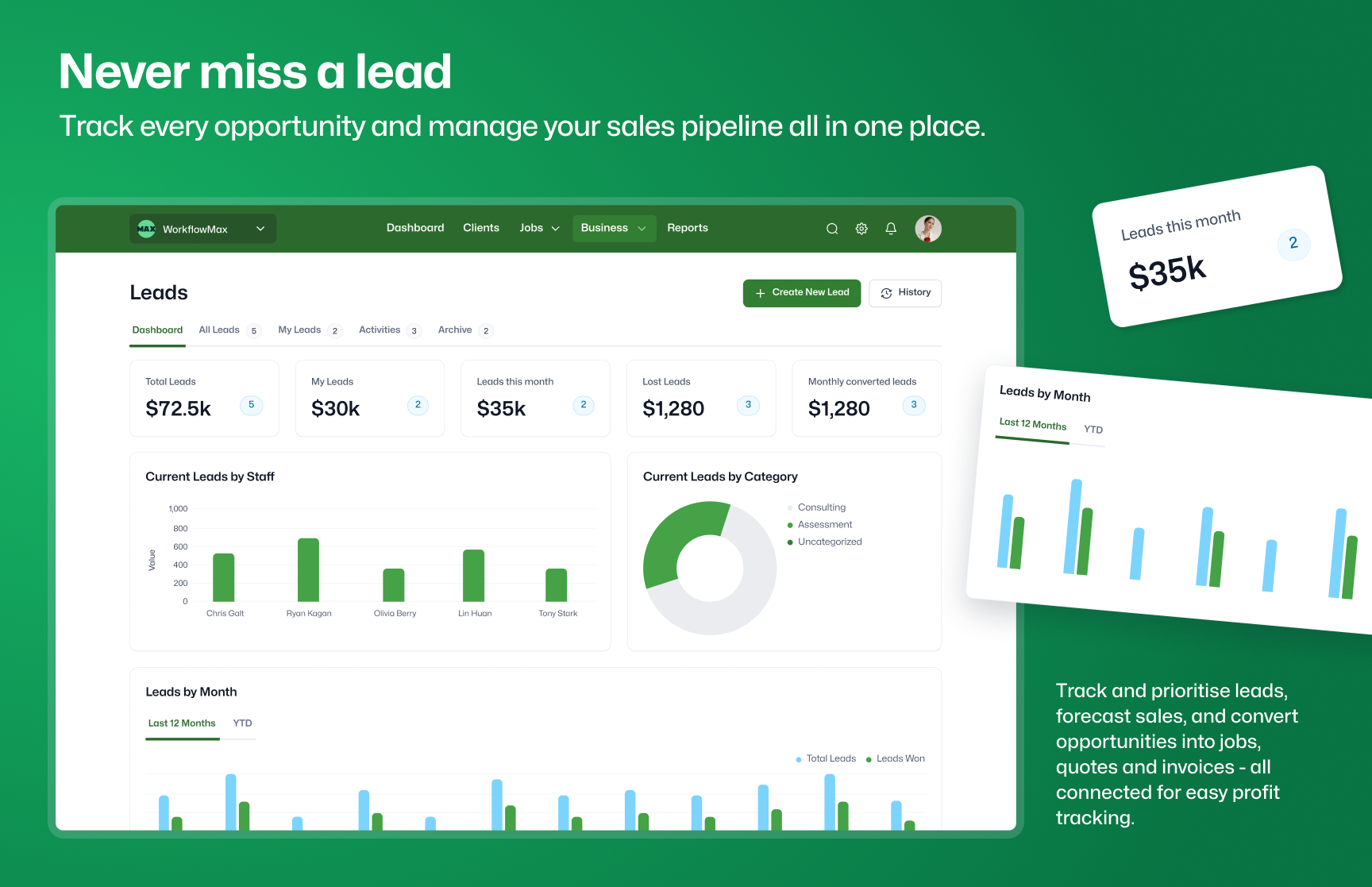
WorkflowMAX Demo - Online lead and sales management
Never miss winning a customer again with WorkflowMax's online lead management software. Track every step in your sales pipeline all from one place.
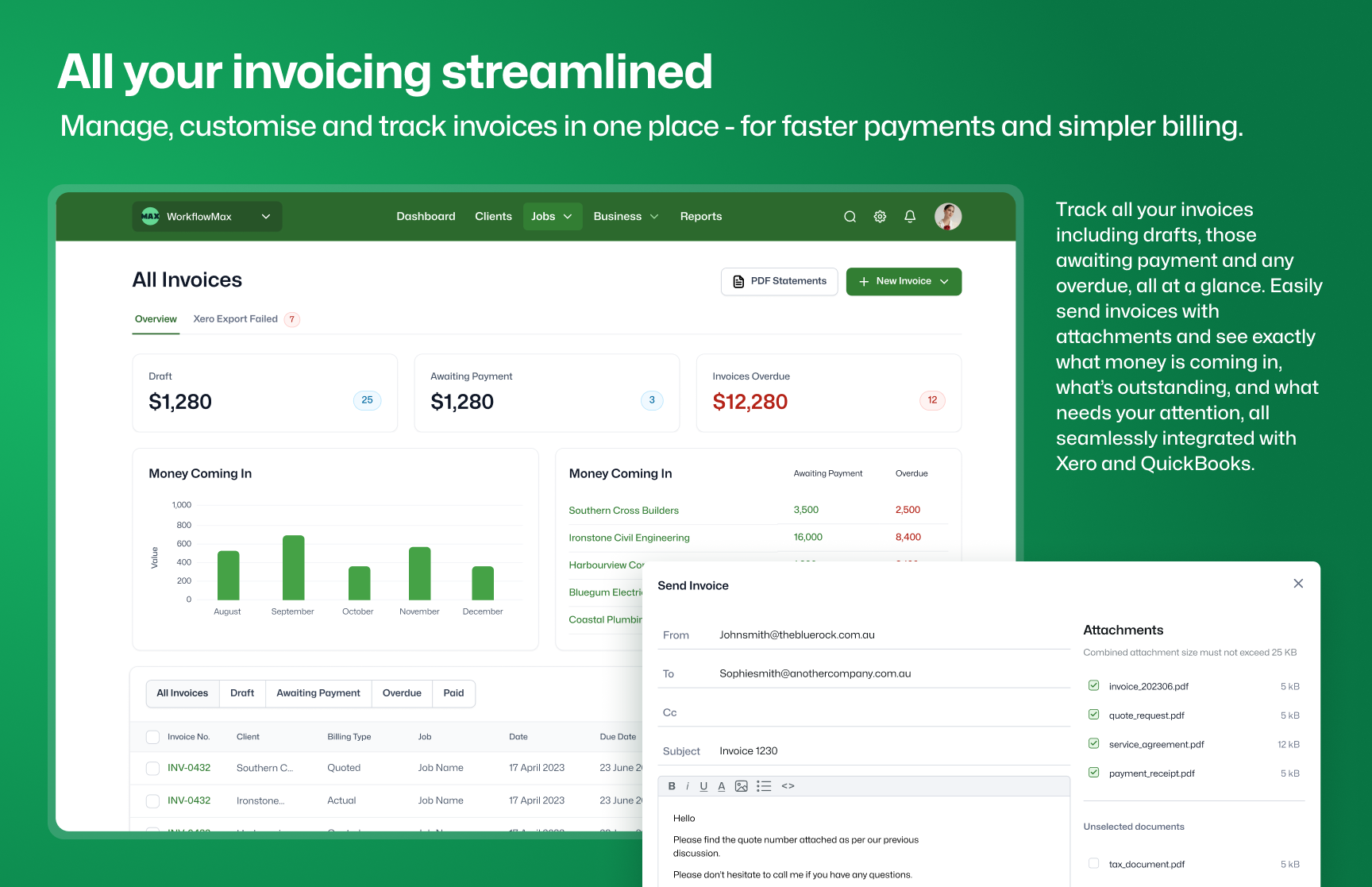
WorkflowMAX Demo - Simplify your billing with online invoicing software
Get paid faster with customised invoices. Enjoy the integration between job, time and cost tracking with a seamless data flow into Xero and QuickBooks for end-to-end efficiency.
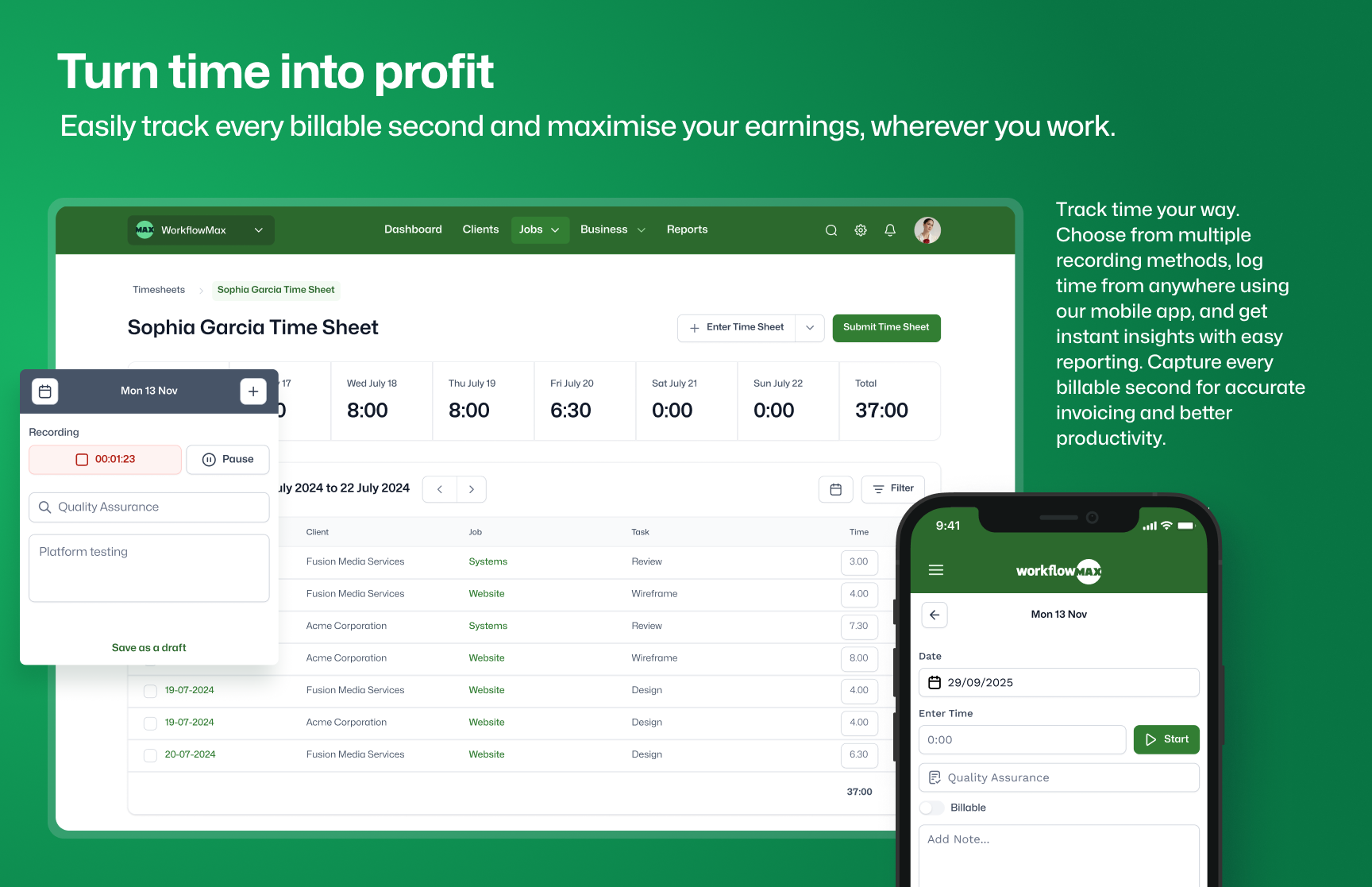
WorkflowMAX Demo - The easy way to track employee time
Effortlessly convert time into revenue with our advanced time tracking software. Capture every billable second accurately and never miss an opportunity to maximise your earnings.
Play WorkflowMAX Video
Product Avatar Image

Have you used WorkflowMAX before?

Answer a few questions to help the WorkflowMAX community

WorkflowMAX Reviews (66)

Reviews

WorkflowMAX Reviews (66)

4.1
66 reviews

Review Summary

Generated using AI from real user reviews
Users consistently praise the ease of use and intuitive interface of WorkflowMax, highlighting how it simplifies project management and time tracking. The seamless integration with Xero is frequently noted as a significant benefit, allowing for efficient invoicing and financial management. However, some users mention a need for improved reporting features and a more modern user interface.

Pros & Cons

Generated from real user reviews
View All Pros and Cons
Search reviews
Filter Reviews
Clear Results
G2 reviews are authentic and verified.
VINAY P.
VP
Mechanical Design Engineer
Design
Mid-Market (51-1000 emp.)
"WorkflowMax bought better structure to our operations and helps us to organise work efficiently"
What do you like best about WorkflowMAX?

What I like most about WorkflowMax is the way it brings several essential business functions together in one platform, which makes project management feel much more controlled and less fragmented. Instead of relying on separate tools for job tracking, time logging, quoting, and invoicing, everything is connected in a way that supports a smoother workflow from the beginning of a project to its completion. This level of integration reduces manual effort, improves visibility, and helps the team stay aligned on what needs to be done, who is responsible, and how work is progressing. I really appreciate the visibility of both operational and financial aspects of work. Being able to track specific jobs, monitor tasks, progress, and link that directly to cost and billing gives us much better control of project performance. It not only helps with internal planning and accountability but also improves accuracy in quoting and invoicing. The platform makes it easier to understand where time is being spent and ensures projects are staying on track, which is a major advantage for teams handling multiple client accounts at once. Overall, what stands out most is how WorkflowMax turns what could be a scattered and manual process into something much more streamlined, transparent, and manageable. Review collected by and hosted on G2.com.

What do you dislike about WorkflowMAX?

One area where WorkflowMax could be improved is the overall user experience and interface because at times, it can feel less modern and less intuitive than some newer project management platforms. While the system is powerful and includes many features, certain tasks take a little longer than expected, especially for new users who are still learning how different parts connect. The initial learning curve can be noticeable, and some parts of the navigation could be simplified to make everyday use more efficient. A cleaner layout and more streamlined workflow for common actions would make the platform even easier to adapt across teams. Another aspect that could work better is flexibility in reporting and customization. Although the platform provides simple visibility into jobs and costs, more advanced reporting options and dashboard customization would be valuable. This would help teams analyze performance in a more tailored way without relying on extra manual work, depending on the complexity of the business. Users may also want deeper customization in how project status or workflow structure is presented. Review collected by and hosted on G2.com.

NB
Economist
Small-Business (50 or fewer emp.)
"Outstanding Experience with No Drawbacks"
What do you like best about WorkflowMAX?

What I like most about WorkflowMax is how central it is to my everyday work. I use it every working day to track my time and manage my time budgets across the various projects I am involved in. The system makes it easy to see where my time is going and to stay accountable to project budgets.

I also value the range of features available for time and job tracking, particularly the ability to clearly distinguish between billable and non-billable hours. Being able to see how many hours I have spent on billable work is especially useful for managing workloads and supporting accurate invoicing and reporting. Review collected by and hosted on G2.com.

What do you dislike about WorkflowMAX?

Not anything I can think of, so I guess there is none. Review collected by and hosted on G2.com.

Verified User in Graphic Design
AG
Mid-Market (51-1000 emp.)
"Perfect for Creative Studios: Easy Reporting and Seamless Xero Integration"
What do you like best about WorkflowMAX?

We've been working with WorkflowMax since we started up about 10 years ago. We're a creative studio and the app works well for us. Time recording and job reporting are all easy to use and the Xero interface works well. We tend to do fixed price jobs so some of the time billing features are superfluous for us. The report design feature has been particularly helpful. The only thing missing for us is multi-currency billing. That would be a big ask, but would make this a five star app. Review collected by and hosted on G2.com.
What do you dislike about WorkflowMAX?

The only thing missing for us is multi-currency billing. Review collected by and hosted on G2.com.

Debbie I.
DI
Conference Convenor
Small-Business (50 or fewer emp.)
"Simple, Flexible WFM That Streamlines Time Tracking, Jobs, Quotes, and Payroll"
What do you like best about WorkflowMAX?

Love WFM, for its simplicity and functionality for our team of consultants, to record time, easily manage clients, multiple jobs and quotes, integrate with payroll, and report on how we are doing!

Lots of flexibility with rates/ tasks/ job tracking, to make life easily for us, and helps to streamline our processes!

Support people have been responsive and helpful Review collected by and hosted on G2.com.

What do you dislike about WorkflowMAX?

Nothing really...reporting is improving and good to see new features Review collected by and hosted on G2.com.

MB
Manager
Small-Business (50 or fewer emp.)
"Game-Changing Time Sheet App"
What do you like best about WorkflowMAX?

The time sheet app really helps to keep track of job hours in real time, gone are the days of inputting from a diary Review collected by and hosted on G2.com.

What do you dislike about WorkflowMAX?

when WFM changed to blue rock it lost its integration with Dext. the Dext to WFM was the best feature and saved hours per week. Review collected by and hosted on G2.com.

Phil H.
PH
Creative Operations
Small-Business (50 or fewer emp.)
Guest users or non-business users of the software, not included in G2 scores.
"WorkflowMax Review"
What do you like best about WorkflowMAX?

We've been using WorkflowMax primarily to create estimates and quotes for our projects, and it's made a noticeable difference in how efficiently we're able to manage that part of our workflow. The system is intuitive and flexible, which is important for the type of work we do.

We're currently in the process of setting up the scheduling functionality, and we're optimistic about how it will further streamline our operations. The built-in training resources, especially the user videos, have been incredibly helpful—clear, concise, and easy to follow, making the onboarding process much smoother for our team.

Overall, WorkflowMax has been a solid addition to our business toolset, and we're looking forward to exploring more of its features as we grow. Review collected by and hosted on G2.com.

What do you dislike about WorkflowMAX?

We haven’t encountered any dislikes so far, WorkflowMax has met our needs well and continues to be a reliable tool for our business. Review collected by and hosted on G2.com.

Linda T.
LT
Principal Solicitor
Small-Business (50 or fewer emp.)
"Easy to use, never a problem"
What do you like best about WorkflowMAX?

WorkflowMax is great because I can use it myself without hiring an expert or consultant. It is so intuitive that even I--someone with no accounting background--can use it successfully and easily. My bills are out on time and accurate. Review collected by and hosted on G2.com.

What do you dislike about WorkflowMAX?

Hard to think of anything. I'm just very pleased Review collected by and hosted on G2.com.

CC
Archi-Tech
Small-Business (50 or fewer emp.)
"Convenient to use"
What do you like best about WorkflowMAX?

I love the way we can track the hours we spend on each project and the ease of use. There might be space for improvements to make it more convenient though. Review collected by and hosted on G2.com.

What do you dislike about WorkflowMAX?

The only thing I do not like is that we have to manually enter the next time we started another project on the same day. This causes some times spent on a project to double up.

It would be really convenient and efficient if you guys could program it so that the next project we enter can automatically start from the end (time) of the last project.

For example, if we ended a project at 13:00, the next project can automatically start at 13:00, without the need for us to enter this time again. Review collected by and hosted on G2.com.

Christine S.
CS
Accounts Administrator
Small-Business (50 or fewer emp.)
"New and Improved WFM"
What do you like best about WorkflowMAX?

This job management platform is easy to use and manage . Seamless integration with Xero for easy accounting. Nice that they tried to incorporate things that worked from the old WFM. We were originally WFM users and migrated to WFM by BlueRock. Some initial teething issues were always promptly resolved. It is now definitely an improvement on the original and offers better features and updates but still with the great support. This is user friendly product. I recommend. Review collected by and hosted on G2.com.

What do you dislike about WorkflowMAX?

I don't like that when you go back to the previous screen you were on you loose your place, for instance clicking into a job to check something and then going back and having to scroll again to that job number... Review collected by and hosted on G2.com.

DN
"Simplifies Invoicing and Time-Tracking for Consultancies"
What do you like best about WorkflowMAX?

I really like that WorkflowMax is simple and straightforward to use. Another thing I appreciate is the good integration with Xero, which saves time by avoiding unnecessary repetition. The integration with Zapier also allows a direct connection to our ISO9001 quality management system. Additionally, the reports are good and they help me keep the important aspects of my business under review. Setting it up was all very straightforward too. Review collected by and hosted on G2.com.

What do you dislike about WorkflowMAX?

I think the ability to attach files to costs would be great. Review collected by and hosted on G2.com.

Response from David Oliver of WorkflowMAX

Thank you so much for the amazing review David! We are so happy you find WorkflowMax easy to use. That's exactly what we were aiming to achieve.

I'm glad that our integrations with Xero and Zapier are helping to streamline your processes and save you time.

I really appreciate your feedback regarding attaching documents to costs. I will add your comments to our internal discussion regarding future developments.

Thanks again for supporting WorkflowMax!

Questions about WorkflowMAX? Ask real users or explore answers from the community

Get practical answers, real workflows, and honest pros and cons from the G2 community or share your insights.

GU
Guest User

What is WorkflowMax used for?

Pricing Options

Pricing provided by WorkflowMAX.

STANDARD

Starting at $25.00
Per Month

PREMIUM

Starting at $85.00
Per Month

ADVANCED

Contact Us
WorkflowMAX Comparisons
Product Avatar Image
Asana
Compare Now
Product Avatar Image
Basecamp
Compare Now
Product Avatar Image
Scoro
Compare Now
WorkflowMAX Features
Reporting
APIs / Integration
Internationalization
Ease of Completing Timesheets
Tracking Time to Project/Task
Billable Time Rate Management
Invoice Creation and Delivery
Project Accounting / Revenue Recognition
Time Tracking
Product Avatar Image
WorkflowMAX