

Compare this with other toolsSave it to your board and evaluate your options side by side.
Save to board

Whereby Meetings Reviews & Product Details

Profile Status

This profile is currently managed by Whereby Meetings but has limited features.

Are you part of the Whereby Meetings team? Upgrade your plan to enhance your branding and engage with visitors to your profile!

Pricing

Pricing provided by Whereby Meetings.

Embedded Explore

Free
Per Month

Embedded Build

$9.99
Per Month

Whereby Meetings Media

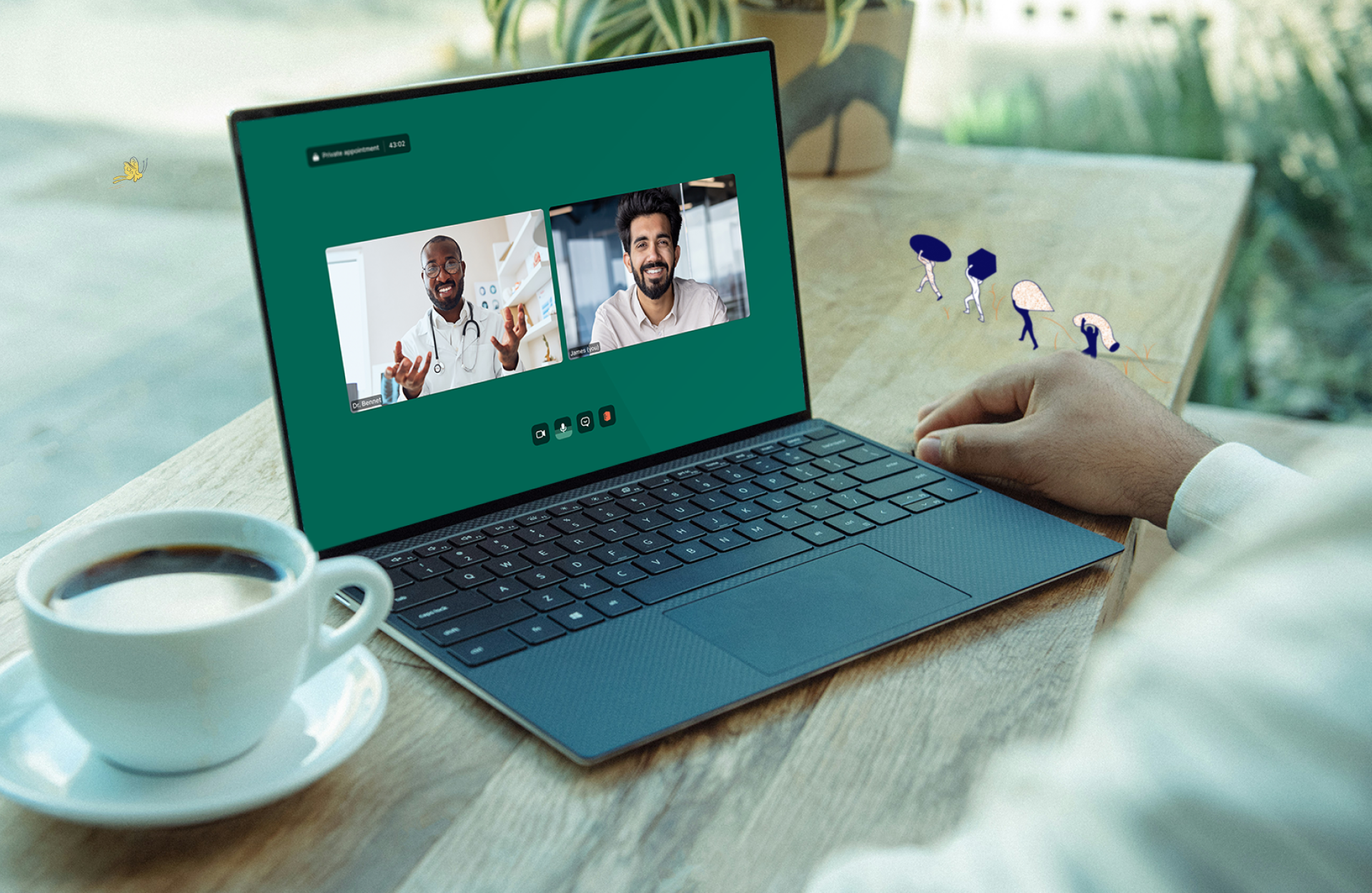
Whereby Meetings Demo - User-friendly UI
Browser-based meetings with human-focused UI designed for ease of use.
Whereby Meetings Demo - Seamless integration using Embedded
Get started in minutes and integrate video calls directly into your platform, website or app
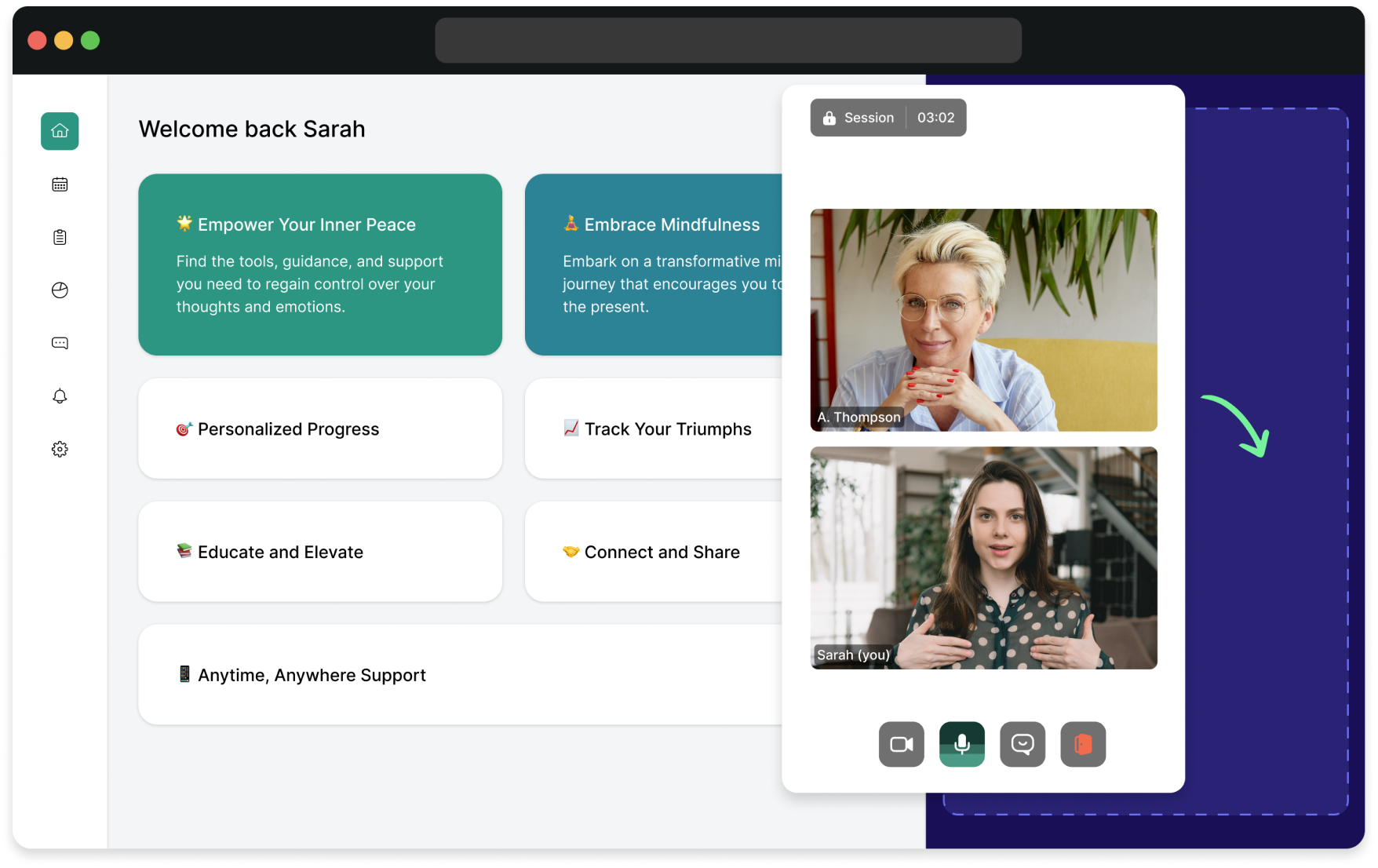
Whereby Meetings Demo - Out-of-the box features
Tons of features included as standard, we'll take care of the maintenance
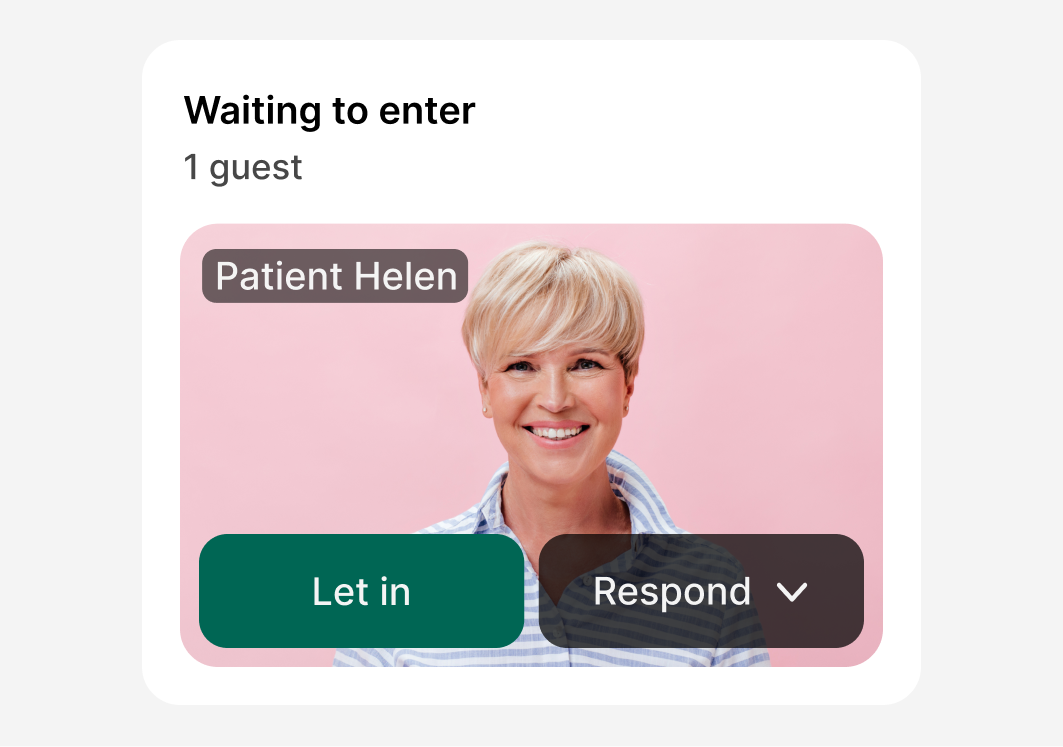
Whereby Meetings Demo - Waiting rooms
Built in privacy and meeting control via waiting rooms.
Whereby Meetings Demo - High reliability & compatibility
Reliable, high quality video calls across devices and in low-bandwidth scenarios.
Product Avatar Image

Have you used Whereby Meetings before?

Answer a few questions to help the Whereby Meetings community

Whereby Meetings Reviews (1,162)

View 2 Video Reviews
Reviews

Whereby Meetings Reviews (1,162)

View 2 Video Reviews
4.6
1,162 reviews

Review Summary

Generated using AI from real user reviews
Users consistently praise the ease of use and browser-based access of Whereby Meetings, highlighting that participants can join without downloads or accounts. The platform's reliable video quality and customizable meeting rooms enhance the overall experience, making it ideal for both casual and professional settings. However, some users note that the free version has limitations, particularly regarding participant capacity.

Pros & Cons

Generated from real user reviews
View All Pros and Cons
Search reviews
Filter Reviews
Clear Results
G2 reviews are authentic and verified.
ES
Finance - Project Manager IV
Education Management
Small-Business (50 or fewer emp.)
"Whereby’s Permanent Rooms Make Budget Meetings Fast and Effortless"
What do you like best about Whereby Meetings?

I mainly utilize Whereby Meetings as a collaborative agile space for coordinating budget follow-up meetings with central administration and to review timelines and forecasting adjustments. The permanent room and link simplify the logistical burden of having to create accounts, set up links, etc., and allow all participants to easily enter the meeting. I typically also share my screen to review budget documents and other materials and I hold regular one on ones with our administrative leaders. The ease at which I am able to enter the meeting directly from the browser and share materials has greatly reduced the amount of time spent on coordination. Review collected by and hosted on G2.com.

What do you dislike about Whereby Meetings?

Overall Whereby performs well, though the success of the experience hinges to a degree on the connection speed of some external participants, such as the international collaborators, as a lag can result in a slow shared document reviews for everyone. Review collected by and hosted on G2.com.


The Fashion Brand Guru S.
TS
Project Manager
Small-Business (50 or fewer emp.)
"Effortless Setup with Seamless Google Integration"
What do you like best about Whereby Meetings?

I love that Whereby Meetings integrates easily with Google Workspace and that I don't have to worry about getting cut off with limits like with Zoom. I appreciate the quality and the user interface design, which is very nice. I find it very simple to use, and I think innovation is coming within Whereby. The international component and API integration are excellent, and I feel safe with the web integration. It's very easy to set up, taking just two seconds, and it allows me to manage permissions effectively within Google integration. I like that it's straightforward for mobile compatibility, works well for international calls, and doesn't involve a complex setup. Review collected by and hosted on G2.com.

What do you dislike about Whereby Meetings?

I wish it had more emoji features, more colorful interfacing, and more interaction. When I do more fun calls, me working in the fashion space, I definitely wanna keep the interaction going. Also, I feel like it could have more unique reactions and different skin tones for hand emojis within the platform. Review collected by and hosted on G2.com.

AE
Marketing Intern
Small-Business (50 or fewer emp.)
Guest users or non-business users of the software, not included in G2 scores.
"Perfect for quick browser based meetings."
What do you like best about Whereby Meetings?

What I like best about where by meetings is how simple and initiative it is in joining a call doesn't require downloads or complicated set up. The interface is clean and it is just work right in the browser which makes scheduling and hosting feel effortless. Review collected by and hosted on G2.com.

What do you dislike about Whereby Meetings?

What a dislike about where my meetings is that it feel sometimes a bit limited on future compared to other platforms thing like advanced collaboration, tools, or robust meeting controls are missing so far larger or more complexation. It's something falls short. Review collected by and hosted on G2.com.

Rocio M.
RM
VS Operations Specialist
Mid-Market (51-1000 emp.)
Guest users or non-business users of the software, not included in G2 scores.
"Whereby: The "No-Installation" Meeting Solution You Actually Need"
What do you like best about Whereby Meetings?

Zero Friction: The biggest pro is its simplicity. You send a custom link (e.g., whereby.com/your-brand), and your client can join instantly in their browser. No logins, no “waiting for updates,” and no “I can’t install apps on my work laptop” excuses.

Beautiful Minimalism: The interface is clean and aesthetically pleasing. It doesn’t feel like a cluttered spreadsheet; it feels like a modern workspace.

Collaboration Tools: It integrates smoothly with Miro, Trello, and Google Drive, so you can brainstorm or edit docs right inside the video window.

Privacy First: Based in Norway, Whereby follows strict GDPR standards, which makes it feel like a safer bet if you’re worried about data mining. Review collected by and hosted on G2.com.

What do you dislike about Whereby Meetings?

Whereby used to be very generous, but they recently tightened their belts.

The "30-Minute Wall": Free meetings are now limited to 30 minutes. Compared to Google Meet (60 mins) or even Zoom (40 mins), it feels very short.

Participant Cap: You can only have up to 4 people in a free room. This makes it strictly a tool for 1-on-1s or very tiny teams unless you pay. Review collected by and hosted on G2.com.

MOHAMMAD A.
MA
Small-Business (50 or fewer emp.)
"Effortless Communication, Minimal Friction"
What do you like best about Whereby Meetings?

I use Whereby Meetings to connect with my clients because it's easy and works better than Google Meet, Zoom, or WhatsApp calls. Setting up meetings is very straightforward; you just make a room name and share the link easily, unlike Google Meet which requires more steps. I also appreciate that clients don't have to log in to join a meeting, which is very convenient and reduces friction compared to Google Meet. Review collected by and hosted on G2.com.

What do you dislike about Whereby Meetings?

Whereby free plans are limited to 30 minutes. It could have been longer than that. Whereby is a meeting app but I see a possible inclusion of having a remote access feature like we have in Anydesk etc. That way it will become no brainer for the users. Review collected by and hosted on G2.com.

CMA Anurag T.
CT
Accounts and finance
Small-Business (50 or fewer emp.)
Guest users or non-business users of the software, not included in G2 scores.
"Instant, Hassle-Free Meetings Made Simple"
What do you like best about Whereby Meetings?

I really like Whereby Meetings for its simplicity and ease of use. The ability to join meetings directly through a browser without downloading any software is incredibly convenient, especially when working with clients or external teams. Its clean and intuitive interface ensures even first-time users can navigate it without confusion. I also appreciate the stable video and audio quality, along with features like screen sharing and chat, which make collaboration smooth and efficient. The browser-based access removes the biggest barriers to joining meetings, like installations or logins, making the process quick and seamless. Additionally, it's very quick to set up—there's no complicated installation or configuration, and I can start using it almost immediately. These aspects make it a very reliable and time-saving tool for regular communication, particularly beneficial for teams of 10–50 employees, like mine. Review collected by and hosted on G2.com.

What do you dislike about Whereby Meetings?

While Whereby Meetings works well for simple and quick meetings, there are a few areas that could be improved. For larger meetings or more advanced use cases, it feels somewhat limited compared to other platforms, especially in terms of features like detailed meeting controls or integrations. Occasionally, the video quality can depend heavily on internet stability, which can impact the overall experience. Additionally, customization and advanced collaboration tools (like breakout rooms or more robust file-sharing options) could be enhanced to better support bigger teams or more complex workflows. Expanding these capabilities would make the platform even more versatile while still maintaining its simplicity. Review collected by and hosted on G2.com.

JA
Batch processing specialist
Information Technology and Services
Mid-Market (51-1000 emp.)
"Quick, No-Install Setup for Secure Meetings in Seconds"
What do you like best about Whereby Meetings?

What I think best about Whereby Meetings in my opinion is how quick it is to setup a virtual meetings and simple steps to join a meeting session by clicking the invitation links and enter the secure code. Software installation isn't nieeded, it work by visiting the website from web-browser, entering virtual meeting conference, hosting virtual meeting and scheduling new meeting is done in seconds. Review collected by and hosted on G2.com.

What do you dislike about Whereby Meetings?

Whereby Meetings only support for basic meeting features nad tools unlike software like Zoom meeting. Hosting meeting for larger participant (more than 10) is impossible, which is a huge weakness. Review collected by and hosted on G2.com.

Saarthak B.
SB
Software Tester
Small-Business (50 or fewer emp.)
"Intuitive Interface and Reliable Video Quality Across Devices"
What do you like best about Whereby Meetings?

The interface is pretty intuitive and clean. Setting up meetings is straightforward, and the video quality is solid. I appreciate that it works smoothly across different devices and browsers. The screen sharing feature is reliable, and I haven't had many issues with connection stability. It's also nice that you can customize meeting rooms without too much hassle. Review collected by and hosted on G2.com.

What do you dislike about Whereby Meetings?

Pricing can be a bit steep compared to some competitors, especially for smaller teams. The mobile app experience isn't quite as smooth as the web version. Also, some advanced features are locked behind higher tier plans which can be frustrating. Integration with other tools could be more robust, and occasionally I've experienced minor lag during peak hours. Review collected by and hosted on G2.com.

Catalina  R.
CR
Small-Business (50 or fewer emp.)
"Intuitive Platform with High-Quality Video and Affordable Pricing"
What do you like best about Whereby Meetings?

I use Whereby Meetings for online lessons, and it's great because it allows me to create webinars for multiple participants. I find it easy to understand, and it does what it says on the tin. I appreciate the good quality video and sound, and it's affordable. The app is very intuitive, which makes it easier to use over time. Review collected by and hosted on G2.com.

What do you dislike about Whereby Meetings?

I would like more easy to understand demos because it doesn't show a real demonstration but just someone talking. At first, because of the demo videos it wasn't that easy, but I got it with time. The app is very intuitive. Review collected by and hosted on G2.com.

Anson  D.
AD
Software Test Engineer
Mid-Market (51-1000 emp.)
Guest users or non-business users of the software, not included in G2 scores.
"Effortless, No-Install Meetings with a Clean, Orderly Interface"
What do you like best about Whereby Meetings?

Whereby runs with almost no effort - people enter a meeting - clicking a link - nothing has to install, a relief for guests from outside the firm. The screen shows only what is needed, arranged in a plain and orderly way. Review collected by and hosted on G2.com.

What do you dislike about Whereby Meetings?

The platform lacks numerous advanced functions seen in the most fully loaded meeting tools. For large gatherings or intricate layouts, users often notice the constraints. Review collected by and hosted on G2.com.

Questions about Whereby Meetings? Ask real users or explore answers from the community

Get practical answers, real workflows, and honest pros and cons from the G2 community or share your insights.

BW
benny wikago
Last activity almost 3 years ago

How do i can record and save it automatically named like the meetings room ?

Free Pass i.
FI
Free Pass idiomas
Last activity almost 4 years ago

Why can't we not have the chat saved? We can save the recordings that seem to be more complex.

Pricing Options

Pricing provided by Whereby Meetings.

Embedded Explore

Free
Per Month

Embedded Build

$9.99
Per Month

Embedded Enterprise

Contact Us
Per Year
Whereby Meetings Comparisons
Product Avatar Image
Zoom Workplace
Compare Now
Product Avatar Image
Jitsi
Compare Now
Product Avatar Image
GoTo Meeting
Compare Now
Whereby Meetings Features
Screen Sharing
Presentations
Whiteboarding
Scheduling
Recording
Participant Permissions
Mobile
Browser Application
Desktop Application
Autonomous Task Execution
Proactive Assistance
Decision Making
Product Avatar Image
Whereby Meetings