


Tabs

By Tabs

4.8 out of 5 stars

How would you rate your experience with Tabs?

Compare this with other toolsSave it to your board and evaluate your options side by side.
Save to board

Tabs Reviews & Product Details

Value at a Glance

Averages based on real user reviews.

Time to Implement

1 month

Tabs Media

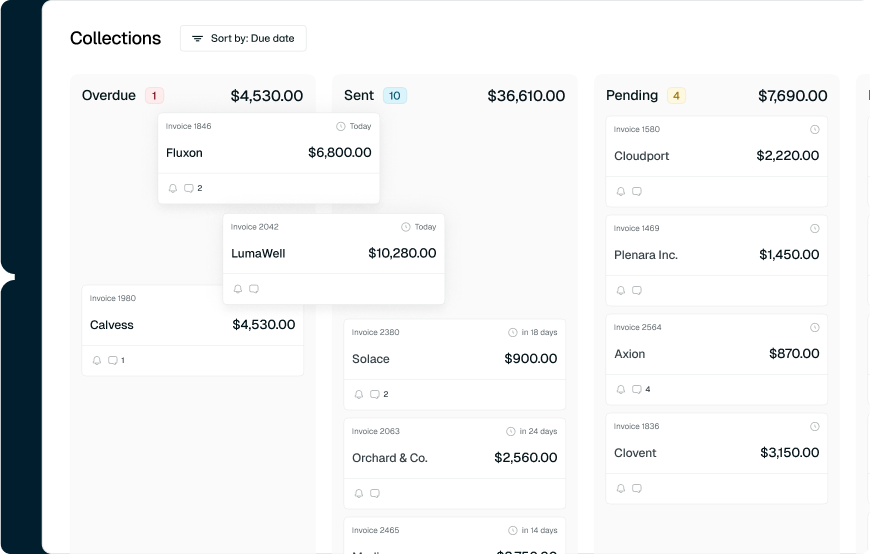
Tabs Demo - Kanban View
Track and manage invoices in real time by moving them across overdue, sent, pending, and paid columns. Easily edit, prioritize, and follow up on collections to keep cash flow on track.
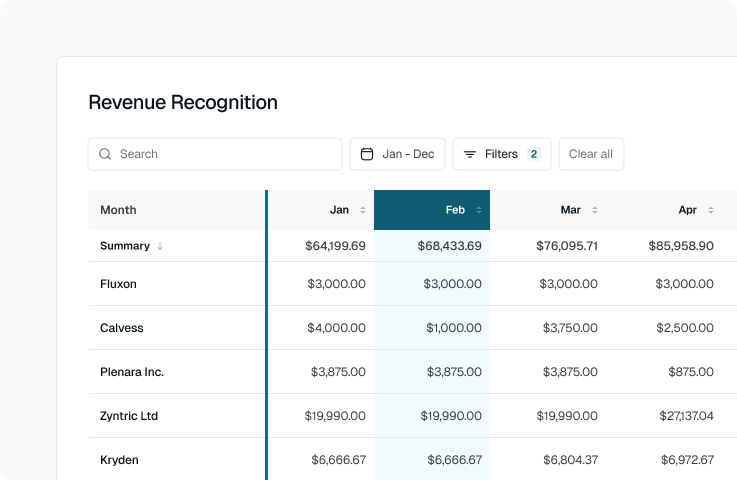
Tabs Demo - Revenue Recognition
Automate revenue recognition. Eliminate manual spreadsheets with real-time tracking, clear month-by-month reporting, and built-in ASC 606 compliance — all synced directly to your ERP.
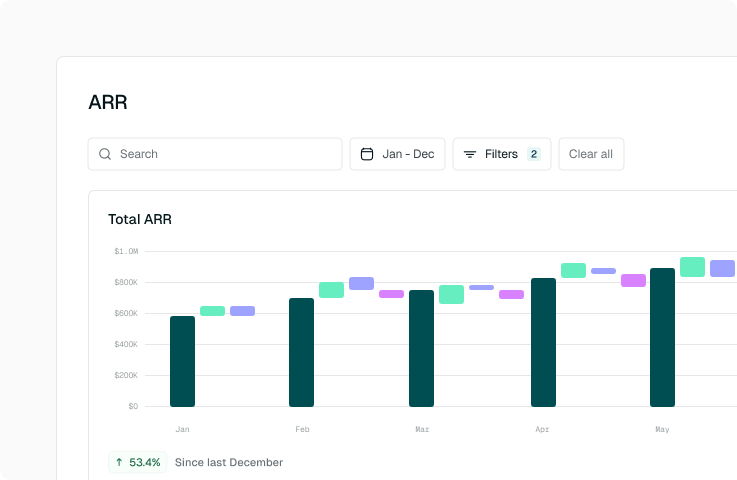
Tabs Demo - ARR Waterfall
Visualize how your ARR grows over time with clear waterfall charts that break down new bookings, expansions, contractions, and churn. Get real-time insight into growth drivers so you can track performance and forecast with confidence
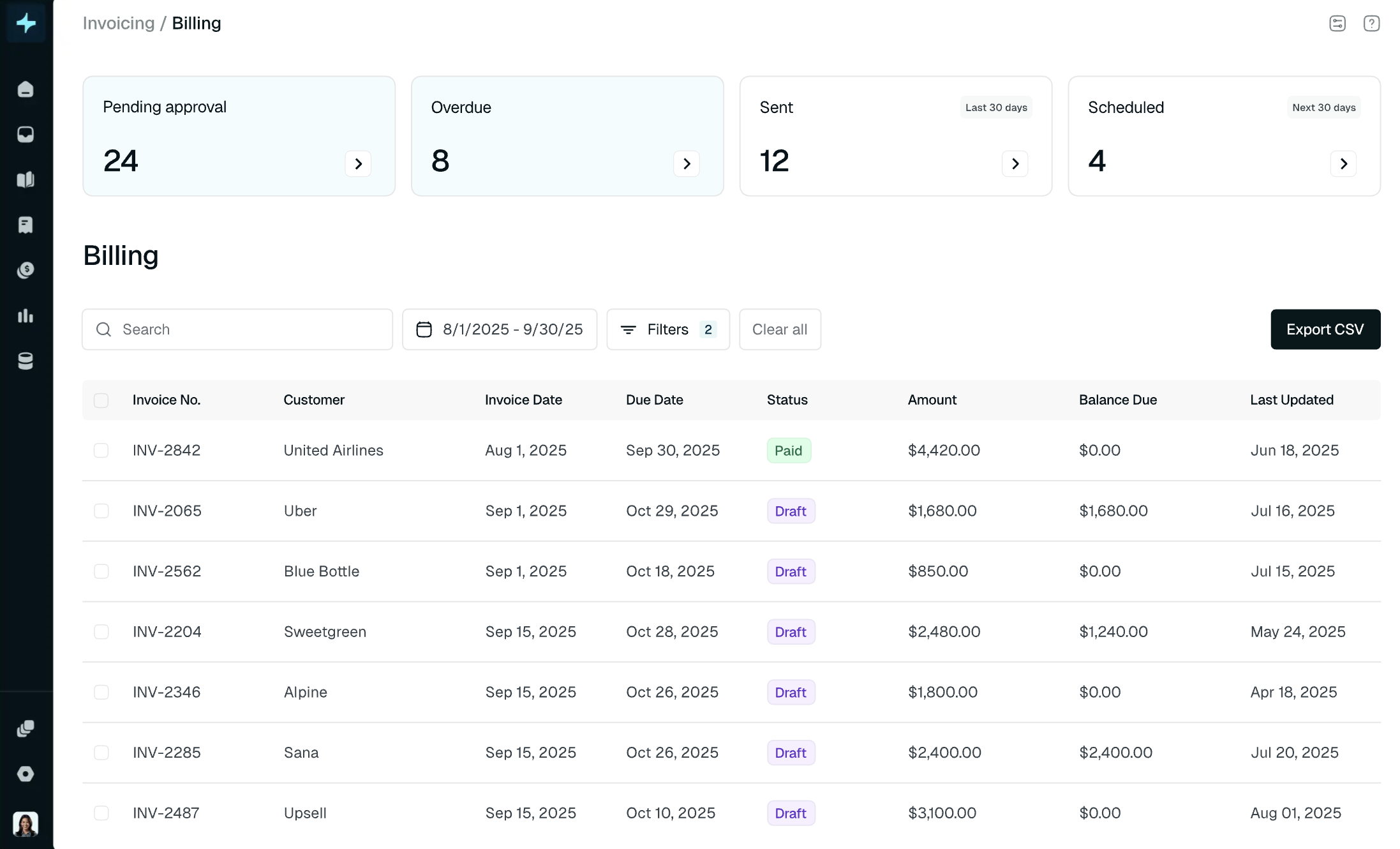
Tabs Demo - Billing and Tracking
Create, approve, and send invoices with ease. Track status across draft, scheduled, sent, and paid — all while keeping everything accurate, compliant, and exportable in just a few clicks.
Tabs Agents | AI Agents for Billing & Collections
Play Tabs Video
Tabs Agents | AI Agents for Billing & Collections
Interactive Demo
Try an interactive demo created by the software seller (right here on G2).
Product Avatar Image

Have you used Tabs before?

Answer a few questions to help the Tabs community

Tabs Reviews (88)

Reviews

Tabs Reviews (88)

4.8
88 reviews

Review Summary

Generated using AI from real user reviews
Users consistently praise the ease of use and responsive support provided by Tabs, highlighting how it significantly streamlines invoicing and revenue management processes. The platform's automation capabilities save time and reduce manual errors, making it a valuable tool for finance teams. However, some users note that certain features, like tax integration, could be improved.

Pros & Cons

Generated from real user reviews
View All Pros and Cons
Search reviews
Filter Reviews
Clear Results
G2 reviews are authentic and verified.
Erika Louisse S.
ES
Accountant
Mid-Market (51-1000 emp.)
"Streamlined Invoicing: Reduced Monthly Invoicing Time"
What do you like best about Tabs?

This has improved the time spent on monthly invoice processing, including sending invoices to customers and issuing payment reminders. Previously, completing these tasks manually or processing each invoice in NetSuite would take at least two to three full days. As a result, this improvement has freed up a significant amount of time, allowing me to focus on other priorities beyond invoicing. Review collected by and hosted on G2.com.

What do you dislike about Tabs?

Automated reviewing of agreements still requires improvement, as item mapping is occasionally incorrect. These errors are typically only identified during our revenue recap process. Additionally, when updates are made to an already issued invoice (e.g., adding sales tax), the internal or unique ID in NetSuite changes, rather than applying the update to the existing record. Review collected by and hosted on G2.com.

Erik M.
EM
Head of Finance
Small-Business (50 or fewer emp.)
"Tabs Streamlines Billing with AI Contract Ingestion and Automated Invoicing"
What do you like best about Tabs?

Tabs has been a great fit for our finance team. The AI contract ingestion pulls billing terms directly from our signed order forms and automatically generates invoices, so there’s no manual data entry required. It’s saved us a significant amount of time across our billing cycle and helps keep everything consistent, with the contract serving as the source of truth. The collections automation is another plus, making it easier to stay on top of outstanding invoices without all the back-and-forth. Review collected by and hosted on G2.com.

What do you dislike about Tabs?

Honestly, there’s nothing to dislike, if anything, it saves me so much time that I’m not even sure what to do with myself. Review collected by and hosted on G2.com.

Liam S.
LS
Finance & Operations Analyst
Small-Business (50 or fewer emp.)
"Clean UI, Highly Accurate AI, and Responsive Support"
What do you like best about Tabs?

The UI/UX is clean and fairly easy to pick up after some training. The AI intelligence is really good as well, and it’s correct about 99% of the time. Support has also been solid, with the CS team getting back to us in a pretty timely manner. Review collected by and hosted on G2.com.

What do you dislike about Tabs?

Doesn't seem to work as well for enterprise customers because the sent off tabs feature limiting our ability to report on customers that don't want to be emailed directly. Many customers use SAP, Coupa, Areba, ect. and do don't want a manual invoice sent to them. Review collected by and hosted on G2.com.

Tianna T.
TT
Mid-Market (51-1000 emp.)
"Intuitive Quote-to-Cash Transformation with Tabs"
What do you like best about Tabs?

I really enjoy the UI of Tabs. It's easy to navigate, which makes it simple to train new team members. This is especially important for a small team as it allows team members to easily continue where someone else left off. Additionally, one of our favorite features is that Tabs can interpret nuanced enterprise software contracts and set the proper invoicing schedule and rev rec -- it only requires a one time review from the team, and it is completely automated from there. Review collected by and hosted on G2.com.

What do you dislike about Tabs?

The areas for improvements are reporting/insights and localization. End users need a more robust mechanism for manipulating the data they need. Additionally, we ran into some issues with localization (specifically for France), which is anticipated but that would be the other area to inveset in the future. Review collected by and hosted on G2.com.

Mike A.
MA
Small-Business (50 or fewer emp.)
"Streamlined Invoicing with Intuitive Features"
What do you like best about Tabs?

Tabs is a slick application with constantly new features being added that improve our business operations. It's great that it enables me to get from a contract to an invoice out the door near-instantaneously without any effort from my team. I also value the direct link to our bank account, which allows me to track payments in real time. The combination of their technology and team made the implementation seamless, although it wasn't labor-free. Review collected by and hosted on G2.com.

What do you dislike about Tabs?

I'm looking forward to a time when I can use Tabs to track our auto renewals and ensure that there's a seamless process between the date the auto renewal occurs and the ongoing contracting and invoicing that's been automated. Review collected by and hosted on G2.com.

Verified User in Accounting
UA
Mid-Market (51-1000 emp.)
"Turning Invoicing Headaches into Seamless Automation"
What do you like best about Tabs?

Their cash application process is really helpful. The AI learns quickly and does a good job suggesting which invoice a specific payment is for. I also like that you can handle the entire process in Slack, which saves a lot of time. Review collected by and hosted on G2.com.

What do you dislike about Tabs?

There’s a one-day delay before bank transactions feed into Tabs. This can sometimes create a timing mismatch: if an invoice is due today and the payment is received the same day, the automatic invoice payment follow-up may still trigger before the transaction appears in Tabs. Review collected by and hosted on G2.com.

DR
Controller
Mid-Market (51-1000 emp.)
"New Tabs Customer"
What do you like best about Tabs?

Tabs' UI is easyto use and the the ability to upload a customer contract and have the system create the billing components helps with efficiency and allows you to perform a review of the setup independent of creating the components manually. The ability to load our usage data without having to put it in a special format also helps with efficiency and accuracy of data.

I especially liked the implementation process which didn't require a significant level of effort. The integration with NetSuite is pretty seamless.

I like the fact that it is easy to modify an invoice and resend to a customer if the necessary. Review collected by and hosted on G2.com.

What do you dislike about Tabs?

I don't dislike anything presently. I look forward to being able to modify the reminder email messages in the future. Review collected by and hosted on G2.com.

Verified User in Higher Education
UH
Mid-Market (51-1000 emp.)
"Contract-to-Revenue Automation with Outstanding Support"
What do you like best about Tabs?

Tabs has supercharged our contract to revenue process. Contracts come in from Hubspot, invoices, products, and revenue schedules are created automatically with audit history. This removes so much manual effort from our AR team, allowing us to focus on more important strategic initiatives. The support team is extremely helpful, shoutout Robbie. Tabs Agent for cash application is super helpful, I can do it right in Slack. Their roadmap for future Agents is very impressive. Review collected by and hosted on G2.com.

What do you dislike about Tabs?

Sometimes the product can be slow and a bit buggy, but the support team is super responsive and resolves issues quickly. Contract processing can take some time and occasionally has errors. Review collected by and hosted on G2.com.

Diego R.
DR
Director of Finance
Small-Business (50 or fewer emp.)
"Tabs has automated our post sale cash processes"
What do you like best about Tabs?

We love the contract ingestion tool at Tabs. We work with customers across a few different industries, all with unique contract structures and terms. Tabs's AI contract ingestion is agnostic to the structure of those documents and allows us to automate billing for each and every customer we serve. This has freed up a lot of time on our small finance team to focus on more value add activities like strategic decision support. We also love that Tabs integrates well with our entire tech stack and supports our already existing processes. Review collected by and hosted on G2.com.

What do you dislike about Tabs?

Tabs is still a young company so there are some features that need a bit of polish, but the fact that they are young and small means that feedback is quickly acted on. Review collected by and hosted on G2.com.

Monette Q.
MQ
"Exceptional Automation and Integrations with Tabs"
What do you like best about Tabs?

I love how Tabs saves our team countless hours by automatically ingesting contracts, pulling out products, and setting up future invoices. This automation allows us to be reviewers instead of preparers, and we no longer need to track future invoices manually. I also appreciate the automation for auto-sending future invoices and performing dunning. The ability to generate revenue waterfalls and ARR schedules in Tabs is invaluable, with fully tagged products. Tabs seamlessly integrates with our accounting books, saving us additional steps, and the integration with Salesforce helps our AEs stay updated on customer payment statuses, which is crucial for their commissions. The comprehensive functionality and built-in automation from contract execution to billing are wonderful. I find all the features valuable as they save us hours managing billing, collections, and revenue recognition, effectively eliminating the need for an AR Accountant. Review collected by and hosted on G2.com.

What do you dislike about Tabs?

One area we are waiting for Tabs to stand up is consumption and getting that area more automated. This allows us to not have to upload a .csv file and invoices can be generated quicker. Review collected by and hosted on G2.com.

People Icons

Start a Discussion about Tabs

Have a software question? Get answers from real users and experts.

Start a Discussion

Pricing Insights

Averages based on real user reviews.

Time to Implement

1 month

Return on Investment

3 months

Average Discount

17%

Tabs Comparisons
Product Avatar Image
Maxio
Compare Now
Tabs Features
Revenue Types
Revenue Allocation
Reclassification
Customer Performance
Contract Performance
Revenue KPIs
ERP and Accounting
Payments
Templates
Digital Billing
Recurring Billing
Product Avatar Image
Tabs