


Compare this with other toolsSave it to your board and evaluate your options side by side.
Save to board

Designcenter Solid Edge Reviews & Product Details

Pricing

Pricing provided by Designcenter Solid Edge.

Solid Edge Design and Drafting XaaS

Starting at $90.47
Per Month

Designcenter Solid Edge Media

Designcenter Solid Edge Demo - Large Assembly
Faster performance and memory load time when developing large assemblies. New support for embedded components inside the assembly with no file reference, for simplified supplier data workflow.
Designcenter Solid Edge Demo - Next-generation Cloud-Based Collaboration
Synchronize files with cloud storage, while you work; view, measure and markup any computer-aided design (CAD) on any device; securely share projects with anyone; and, review designs in augmented reality (AR) on phones and tablets.
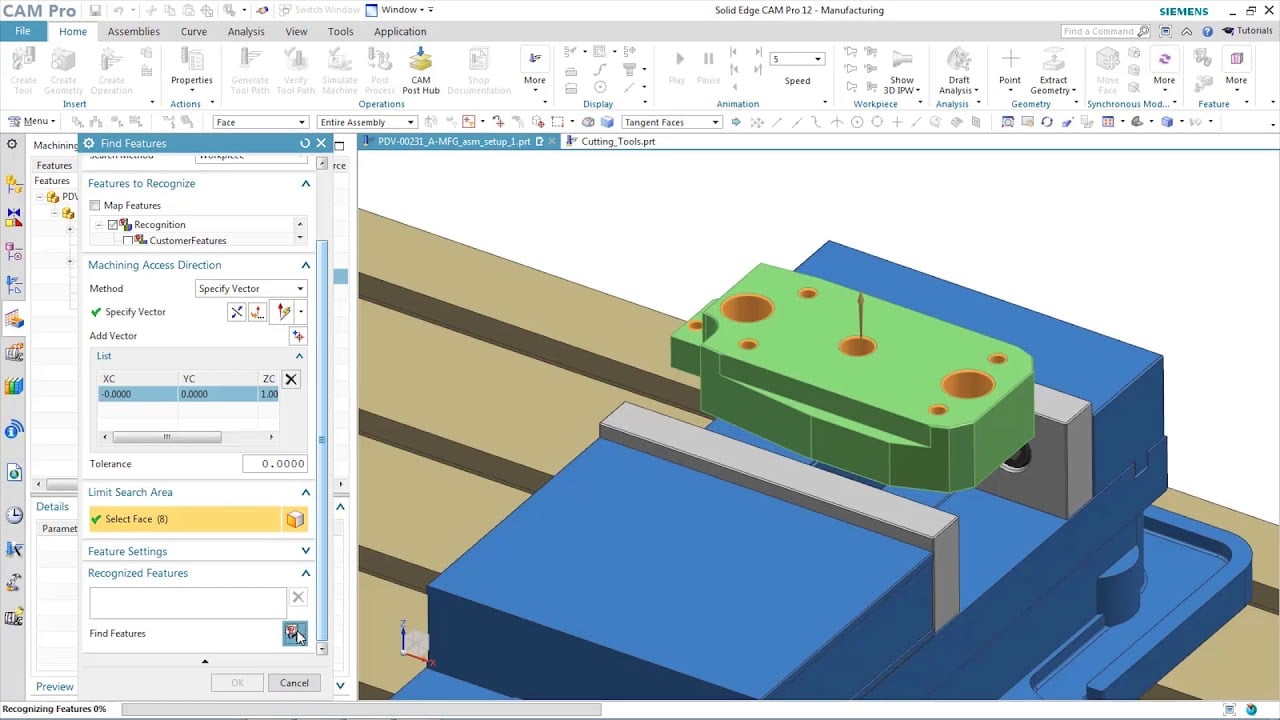
Designcenter Solid Edge Demo - CAM & Machining
Solid Edge manufacturing solutions provide fast and easy feature-based machining, allowing you to automatically determine the machining process for a wide range of features.
Designcenter Solid Edge Demo - Faster reverse engineering
Reduce time spent on reverse engineering with lightning-fast performance enhancements including deviation analysis.
Designcenter Solid Edge Demo - Technical Publications
Open, save and revise data from Teamcenter, Siemens’ powerful PLM solution, with tight integration to ensure your working with the right data, every time. Go from engineering to documentation quickly and seamlessly working directly with Solid Edge 3D models; leveraging the digital twin ensures al...
Designcenter Solid Edge Demo - FLOEFD
Better integration between flow simulation and structural simulation help create a more accurate digital twin. Add fluid pressure and temperatures results from Simcenter FLOEFD for Solid Edge for analysis in Solid Edge Simulation. Digitally validating and optimizing parts, assemblies and complete...
Play Designcenter Solid Edge Video
Product Avatar Image

Have you used Designcenter Solid Edge before?

Answer a few questions to help the Designcenter Solid Edge community

Designcenter Solid Edge Reviews (580)

View 1 Video Reviews
Reviews

Designcenter Solid Edge Reviews (580)

View 1 Video Reviews
4.3
581 reviews

Review Summary

Generated using AI from real user reviews
Users consistently praise the intuitive interface and synchronous technology of Designcenter Solid Edge, which streamline the design process and facilitate quick modifications. Many appreciate its ability to handle complex assemblies efficiently, making it a reliable choice for mechanical design. However, some users note that performance can lag with larger projects, and the learning curve may be steep for beginners.

Pros & Cons

Generated from real user reviews
View All Pros and Cons
Search reviews
Filter Reviews
Clear Results
G2 reviews are authentic and verified.
Rohan H.
RH
Continuous Improvement Engineering Manager
Mid-Market (51-1000 emp.)
"Simulation-Driven Digital Twin Design with Solid Edge + FLOEFD"
What do you like best about Designcenter Solid Edge?

We use Siemens Solid Edge as the backbone of our product and factory development lifecycle, from concept through to commissioning. All machinery layouts, custom equipment designs, and factory expansion models are developed in Solid Edge, allowing us to rapidly iterate designs, validate fit within real-world constraints, and maintain a single, accurate digital representation of our production environment.

By integrating Simcenter FLOEFD directly within Solid Edge, we move beyond traditional CAD into simulation-driven design. We actively simulate airflow, temperature distribution, and humidity behaviour across our processing and packaging environments—critical for drying performance, product consistency, and hygiene compliance. This enables us to identify issues such as condensation risk, airflow inefficiencies, and thermal inconsistencies before physical implementation.

The value this delivers is substantial:

Reduced risk: Problems are identified and solved digitally before capital is committed or equipment is installed.

Faster decision-making: Design iterations that would take weeks physically are completed in hours.

Optimised performance: Equipment and facility layouts are engineered for real operating conditions, not assumptions.

Cost efficiency: Minimises rework, avoids overdesign, and improves ROI on major capital investments.

Scalable digital foundation: As we expand, our full factory exists as a validated digital twin, supporting future automation, upgrades, and process optimisation.

In short, Solid Edge combined with FLOEFD allows us to design smarter, de-risk faster, and execute expansion projects with a level of confidence and precision that would not be achievable with CAD alone.

The UI has been greatly improved in its feel and operation. Making it more modern and user friendly. Really happy about the dark mode addition as well.

In overall the performance has improved on the operation of the software. Enjoying the performance mode it has to offer.

Pricing is ok but feel like better options and bundles should be created to allow for adding more employees easier.

The Siemens Academy use to be the go to but needs more work done, cannot wait for the revamp to be completed. There are tons of resources online that are helpful when required.

New AI features are really helpful for speeding up daily use!

Keep adding more please! Review collected by and hosted on G2.com.

What do you dislike about Designcenter Solid Edge?

It really is a one of a kind Digital creation software that can be used in all industries globally. Its hard to dislike since it is so versatile and adaptable. But if I had to choose something, maybe not utilizing enough multi core threading would be one. Review collected by and hosted on G2.com.

Verified User in Mechanical or Industrial Engineering
UM
Small-Business (50 or fewer emp.)
"Effortless CAD Modifications with Synchronous Tech"
What do you like best about Designcenter Solid Edge?

I like using Designcenter Solid Edge throughout the entire product development lifecycle, from initial design to final validation. I appreciate that we can open models from different formats without converting them to a neutral format and edit them using Synchronous Technology. It's really great for handling large assemblies and editing non-native models, which saves a ton of time because I don't have to create the model from scratch. I find it really efficient in opening and editing large assemblies, which are usually heavy and problematic in other similar 3D CAD solutions. Also, I found the initial setup to be very straightforward. Review collected by and hosted on G2.com.

What do you dislike about Designcenter Solid Edge?

The selection of small entities (faces) is really hard at times. This is an old issue that has been reported for years. Review collected by and hosted on G2.com.

HN
Small-Business (50 or fewer emp.)
"Efficient CAD Solution with Room for Improvement"
What do you like best about Designcenter Solid Edge?

I use Designcenter Solid Edge primarily for mechanical design and product development. I like how fast and flexible the modeling workflow is, especially with the synchronous technology that makes it really easy to edit geometry without rebuilding the whole feature tree, which saves a lot of time when designs change. The assembly management and drawing tools are also great, as it's straightforward to go from a 3D model to a detailed 2D production grade drawing. Updates to the model automatically reflect in the drawing, making design iterations and revisions much smoother. Review collected by and hosted on G2.com.

What do you dislike about Designcenter Solid Edge?

One thing that could be improved is performance, it tends to slow down on large assemblies which is a problem when working on large projects with lots of components. Certain features are very intuitive but others such as interference detection is hidden away in menus and require several clicks to access. One final thing is better import compatibility from other CAD systems since imported geometry often needs extra cleanup before it's usable. Review collected by and hosted on G2.com.

David G.
DG
Technical Engineer in Substations
Mid-Market (51-1000 emp.)
"Solid and efficient CAD solution for mechanical design workflows"
What do you like best about Designcenter Solid Edge?

One of the aspects I appreciate the most about Designcenter Solid Edge is its intuitive approach to mechanical design and drafting. The software provides a solid set of tools for creating precise 3D models and detailed technical drawings while keeping the workflow relatively straightforward compared to other CAD platforms.

I particularly value the synchronous technology, which allows quick modifications without having to rebuild the entire model history. This flexibility is extremely useful when working on engineering projects where design changes are frequent.

Another positive point is the integration between 3D modeling and 2D drafting, making it efficient to generate manufacturing drawings directly from the models. Overall, it is a reliable CAD solution for mechanical engineers and designers who need accurate and efficient design workflows. Review collected by and hosted on G2.com.

What do you dislike about Designcenter Solid Edge?

While Solid Edge is a capable CAD platform, there are still some areas where improvements could make the experience smoother. For example, the user interface can sometimes feel less modern compared to some competing CAD solutions.

In addition, performance may decrease when working with very large assemblies or complex models, which can slow down the workflow in demanding projects. Some features also require a bit of a learning curve for new users who are transitioning from other CAD systems.

Despite these aspects, once users become familiar with the software, it remains a powerful tool for mechanical design and engineering tasks. Review collected by and hosted on G2.com.

Dharamveer p.
DP
Application Security Engineer
Information Technology and Services
Small-Business (50 or fewer emp.)
"A Reliable Design Management Tool for Solid Edge Workflows"
What do you like best about Designcenter Solid Edge?

What I like most is how seamlessly it integrates with Solid Edge. Accessing standard parts and features directly within the design environment is very convenient. It makes reuse simple, keeps designs consistent, and significantly reduces design time for recurring components. Review collected by and hosted on G2.com.

What do you dislike about Designcenter Solid Edge?

The interface feels a bit dated, and navigation can be less intuitive for new users. It also takes some time to understand how to organize libraries effectively. Better onboarding guidance and a more modern UI would improve the overall experience. Review collected by and hosted on G2.com.

MH
Design Engineer
Small-Business (50 or fewer emp.)
"From Frustration to Power ToolWhat I appreciate"
What do you like best about Designcenter Solid Edge?

What I appreciate about SolidEdge is the balance it strikes between functionality and practicality. I work in high end mechanical design and metal fabrication environment, and the software provides exactly the level of capability we need without feel8ng unnecessarily bloated. Review collected by and hosted on G2.com.

What do you dislike about Designcenter Solid Edge?

SolidEdge can be frustrating sometimes, especially in the early stages of learning. The learning curve is real, and earlier versions were more prone to glitches and stsbility issues. Without a solid understanding of how the system is structured, certain workflows can feel unintuitive.

But many of these problems dissappear with experience and customization. Review collected by and hosted on G2.com.

Jacob D.
JD
Sales Staff
Enterprise (> 1000 emp.)
"Smooth Performance, Easy Setup"
What do you like best about Designcenter Solid Edge?

I like how smooth running the applications are with Designcenter Solid Edge, which is crucial for helping clients understand a project without it being slow and laggy. I also enjoy the zooming in and out tool, as it adds to the smooth experience. Additionally, I appreciate that it runs a lot smoother compared to SketchUp, which was our previous software. The initial setup of Designcenter Solid Edge was very easy. Review collected by and hosted on G2.com.

What do you dislike about Designcenter Solid Edge?

I don't like the highlighting tool because when you click on a specific part of the project, it doesn't give you the needed information like measurements, depth, or size. Review collected by and hosted on G2.com.

Shivratna M.
SM
Mechanical design engineer
Small-Business (50 or fewer emp.)
"Everything Organized and Perfect—Easy Task Completion Every Time"
What do you like best about Designcenter Solid Edge?

Everything is organised and perfect. I find it easy to complete task without facing any difficulties. I always suggest this product to many of my friends. Review collected by and hosted on G2.com.

What do you dislike about Designcenter Solid Edge?

Designcenter in Solid Edge is often disliked because its interface feels dated and unintuitive.

It can be slow to load and navigate, especially when libraries are large or stored on a network.

Searching for parts is inefficient and heavily dependent on strict naming conventions.

Customizing and maintaining company-specific libraries requires unnecessary effort.

It does not integrate smoothly with modern collaborative or PLM-based workflows.

Many users feel the learning curve is too steep for the limited productivity benefits it provides. Review collected by and hosted on G2.com.

Harrison T.
HT
Web Designer
Design
Small-Business (50 or fewer emp.)
"Approachable, Powerful CAD with Fast Synchronous Design Changes"
What do you like best about Designcenter Solid Edge?

What stands out most about Designcenter Solid Edge is how approachable it feels for a professional CAD tool. The interface is clean and well-structured, making it easier to understand compared to some more complex alternatives. The synchronous technology is a big plus, as it allows for quick design changes without breaking workflows. It also integrates well within the wider Siemens ecosystem, which gives confidence in terms of long-term support, reliability, and scalability. Overall, it feels like a powerful yet practical solution for design and engineering teams. Review collected by and hosted on G2.com.

What do you dislike about Designcenter Solid Edge?

One downside is that there can be a learning curve for users who are completely new to CAD or coming from simpler tools. Some advanced features aren’t immediately intuitive and require time or training to fully understand. Documentation is solid, but certain workflows would benefit from more beginner-focused examples. Additionally, like many enterprise-level tools, licensing and configuration can feel a bit complex at first, particularly for smaller teams or individual users who just want to get started quickly. Review collected by and hosted on G2.com.

"Streamlined CAD Projects with Efficient Part Reuse"
What do you like best about Designcenter Solid Edge?

I use Designcenter Solid Edge to manage and reuse standard parts and design components across my CAD projects, which helps me quickly access frequently used items, maintain design consistency, and reduce repetitive work. What I like most about Designcenter Solid Edge is how practical it is in day-to-day work. It makes it really easy to reuse parts I’ve already created instead of starting from scratch every time. Having everything organized and easy to find saves time and keeps my designs consistent, especially when working on similar projects. The feature I use and value the most is the ability to reuse parts and design resources easily. Instead of creating the same components again and again, I can just pick what I need and continue working. It saves time, keeps my work organized, and makes the whole design process feel smoother and less repetitive. Review collected by and hosted on G2.com.

What do you dislike about Designcenter Solid Edge?

Sometimes browsing large libraries can be a bit slow, and the interface could be a little more user-friendly. It would be great if the library browsing was faster and if the interface allowed more customization. Review collected by and hosted on G2.com.

Questions about Designcenter Solid Edge? Ask real users or explore answers from the community

Get practical answers, real workflows, and honest pros and cons from the G2 community or share your insights.

Verified User
G2
Verified User
Last activity about 4 years ago

free models

GU
Guest User
Last activity over 2 years ago

What is Solid Edge used for?

Pricing Options

Pricing provided by Designcenter Solid Edge.

Solid Edge Design and Drafting XaaS

Starting at $90.47
Per Month

Solid Edge X Standard

Starting at $261.00
Per Month

Solid Edge X Advanced

Starting at $312.00
Per Month

Solid Edge X Premium

Starting at $413.00
Per Month

G2 Deals

Exclusive savings on Designcenter Solid Edge through G2 Deals

Get 25% off any monthly or annual subscription of Solid Edge and accelerate your product development process using best-in-class 3D design tools.

How to claim this offer

Claim the offer via G2 and use code G2START25 during checkout.

Designcenter Solid Edge Comparisons
Product Avatar Image
SOLIDWORKS
Compare Now
Product Avatar Image
Inventor
Compare Now
Product Avatar Image
Designcenter NX
Compare Now
Designcenter Solid Edge Features
CAD-CAM Import
Drawing
Modeling
Visualize
File Import
Push/Pull
Views
Annotate
Documentation
Data Extract
Product Avatar Image
Designcenter Solid Edge