



Compare this with other toolsSave it to your board and evaluate your options side by side.
Save to board

ShareGate Reviews & Product Details

Pricing

Pricing provided by ShareGate.

Migrate Essentials

Starting at $5,995.00
1 machine activation Per Year

ShareGate Integrations

(6)
Verified by ShareGate

ShareGate Media

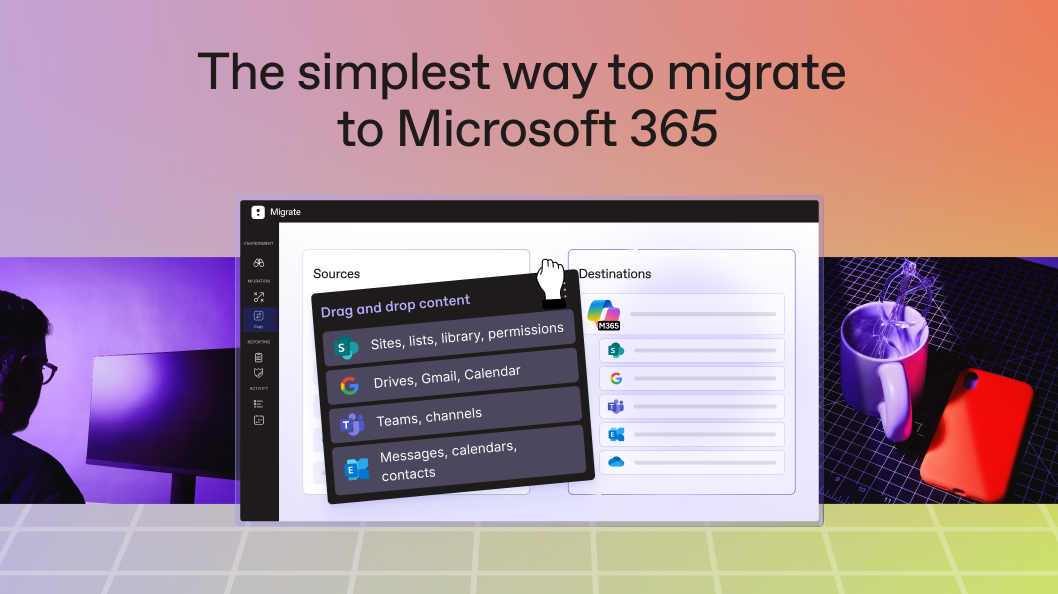
ShareGate Demo - The simplest way to migrate to Microsoft 365
Whether you’re moving from on-prem to the cloud, tenant-to-tenant, handling an M&A, or modernizing, ShareGate has you covered for your migration to Microsoft 365.
ShareGate Demo - The simplest way to migrate to Microsoft 365
With ShareGate, migrations are as easy as 1-2-3. Just pick your copy type, choose your source and destination, and hit Copy. That’s it!
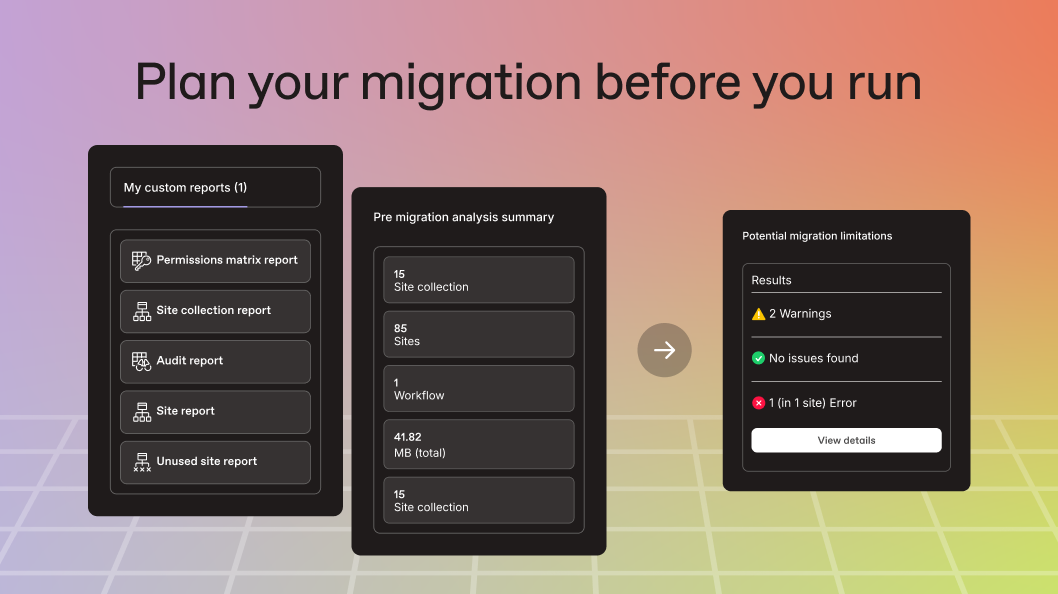
ShareGate Demo - Plan your migration before you run
With ShareGate, you can quickly assess your content, spot potential issues, and map out a clear, actionable migration plan before you begin.
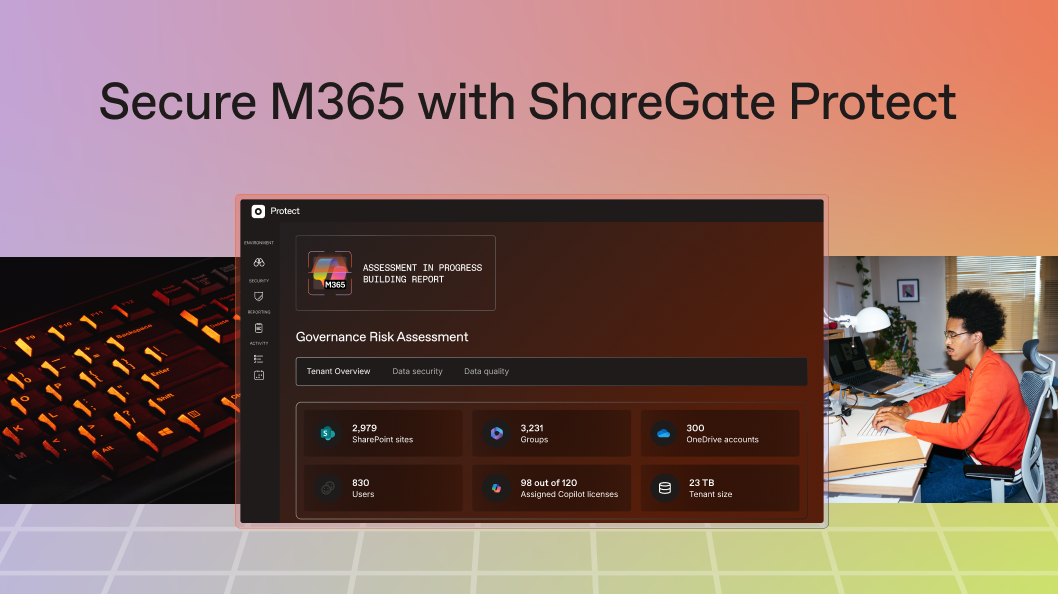
ShareGate Demo - Secure M365 with ShareGate Protect
De-risk your project, spot issues early, and fix what will cause problems, fast. ShareGate Protect helps you do just that in hours, not days.
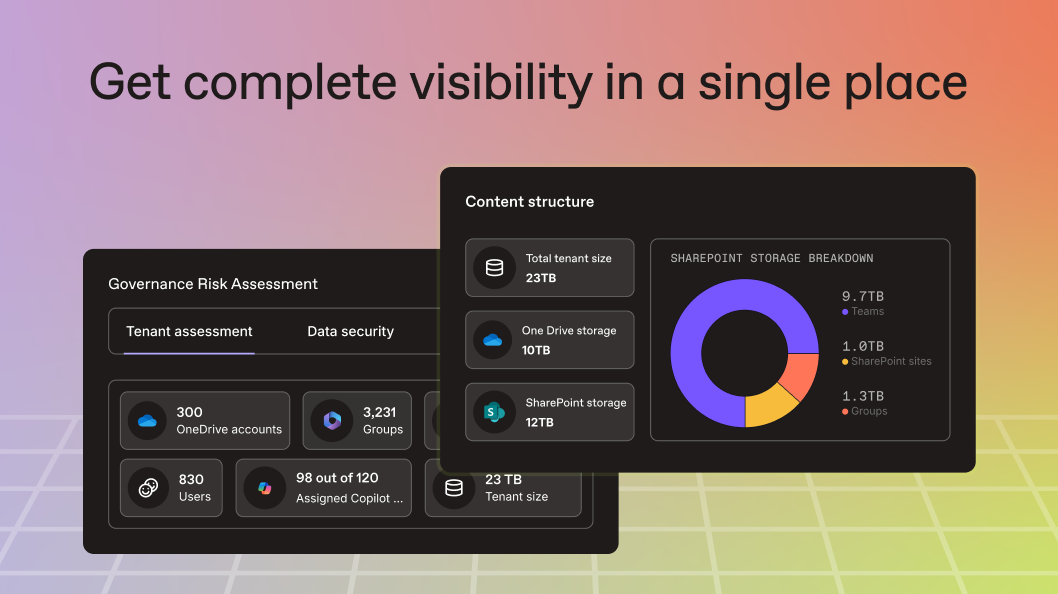
ShareGate Demo - Get complete visibility in a single place
Unify visibility across Microsoft 365 in one simple console. ShareGate Protect connects signals from SharePoint, Teams, OneDrive, and more, so you can skip the PowerShell scripts and admin center hopping.
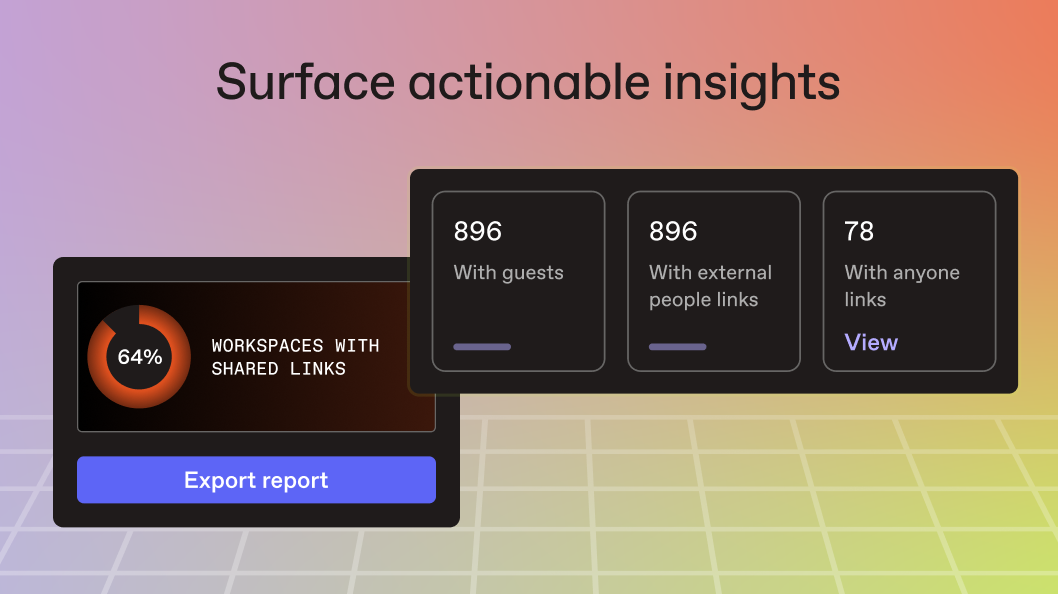
ShareGate Demo - Surface actionable insights
ShareGate Protect surfaces the risks that actually matter like guest access, oversharing and inactive workspaces, using a built-in Governance Risk Assessment and ShareGate’s proven expertise. Skip the overwhelming dashboards and start with what’s actionable.
Product Avatar Image

Have you used ShareGate before?

Answer a few questions to help the ShareGate community

ShareGate Reviews (148)

View 1 Video Reviews
Reviews

ShareGate Reviews (148)

View 1 Video Reviews
4.6
148 reviews

Review Summary

Generated using AI from real user reviews
Users consistently praise ShareGate for its ease of use and intuitive interface, which simplifies complex migration tasks and enhances productivity. The tool's reliable performance during migrations and comprehensive reporting features are also highly valued, making it a preferred choice for managing SharePoint and Teams environments. However, some users note that migration speed can be an issue, particularly with large data sets.

Pros & Cons

Generated from real user reviews
View All Pros and Cons
Search reviews
Filter Reviews
Clear Results
G2 reviews are authentic and verified.
Darlene S.
DS
Lead Consultant
Enterprise (> 1000 emp.)
"Never want to live without SharePoint & Teams Migrations, Governance, and Reporting"
What do you like best about ShareGate?

Besides being my go-to application for performing migrations, it’s also an essential tool for the administration and governance of SharePoint and Teams. I really appreciate the reporting and exporting features, which make it easier to manage and share the information I need. Review collected by and hosted on G2.com.

What do you dislike about ShareGate?

I’d like to be able to refine the Permissions Matrix reports more easily by importing a CSV of the specific sites I want to report on. This would be a great enhancement when I need to choose a subset of sites from thousands, instead of having to select each site manually. Review collected by and hosted on G2.com.

Sam B.
SB
Senior Software Engineer
Mid-Market (51-1000 emp.)
"Invaluable tool for migration, with some caveats"
What do you like best about ShareGate?

Can save time when migrating from one SharePoint site to another, taking with it permissions and other settings. The audit feature is helpful to prepare for a migration and prevent having to redo it. Review collected by and hosted on G2.com.

What do you dislike about ShareGate?

The activation/deactivation process of licensing is the most awful and complex thing I have ever seen. The ridiculous hoops you have to jump through, with disconnecting internet, reconnecting, jumping between desktop and website, copying codes here and there, are you actually serious with this garbage? I bet some middle manager came up with this to justify his existence and just ruined it for every customer. Review collected by and hosted on G2.com.

Response from Eva Bloudoff of ShareGate

Thank you for the honest feedback, Sam. Your organization has made specific security requests to disable some connected features, and we're sorry that this has created some frustration. We would love to collaborate on how to handle this in high-security environments, and a member of our team will reach out shortly.

Julien F.
JF
Ingénieur systèmes
Enterprise (> 1000 emp.)
""
AD
SharePoint Business Systems Analyst
Enterprise (> 1000 emp.)
"Easy Data Management Across SharePoint and OneDrive"
What do you like best about ShareGate?

ShareGate gives us the ability to manage and move data from SharePoint sites and OneDrive accounts. This helped a lot during the OneDrive cleanup that was needed due to changes made by Microsoft this year. Permissions reports on SharePoint sites helps keep management informed.

Secure and simple to integrate with our tenant. Updates to the server-based tool are regular and do not disrupt use of the system. Review collected by and hosted on G2.com.

What do you dislike about ShareGate?

Teams management tools that we used to rely on were removed several months ago and have not (yet?) been replaced Review collected by and hosted on G2.com.

Robert R.
RR
SharePoint Solution Developer
Government Administration
Mid-Market (51-1000 emp.)
"Intuitive UI and Clear Reporting Make ShareGate a Must-Have"
What do you like best about ShareGate?

I find ShareGate's overall UI very intuitive and easy to navigate, which makes my tasks straightforward. I particularly appreciate the reporting on data migration success; it's clear and concise, so I don't have to search around in the UI to find the specific task I'm trying to accomplish. ShareGate also provides a description error and links to ways to resolve issues when certain items don't migrate successfully. The installation instructions are clear, and the upgrade process has been seamless. Review collected by and hosted on G2.com.

What do you dislike about ShareGate?

I would like the ability to create SharePoint list migrations without list data (i.e. schema only) without having to select deselect the list data option in the current defaults. Review collected by and hosted on G2.com.

TD
Microsoft 365 Consultant
Mid-Market (51-1000 emp.)
"Best SharePoint migration tool in the business"
What do you like best about ShareGate?

ShareGate allows us to perform cross-tenant migrations with little effort. Whether the content is in another M365 tenant, a local file share, google drive or an on-premise farm, ShareGate will be able to migrate it and not only migrate it, but do so efficiently without a steep learning curve. For scripted migrations, we have full access to the API via PowerShell. The growing suite of analysis tools give ShareGate a constant bump in value. The Permissions Matrix report in particular is a must-have to understand and plan for the migration of permissions and it can run this on huge sites in a matter of seconds. There is also the option to run a test migration or "what if" which allows us to figure out what may go wrong before we perform the actual migration. Review collected by and hosted on G2.com.

What do you dislike about ShareGate?

If you are a highly specialized consultant and you bump into a problem with ShareGate, the support line is there and they will help for sure. However, I personally feel that most of the time spent in support is to explain a problem to an entry-level support agent before it gets escalated to the technical team. This often makes it so that I have to repeat everything and demo the problem again to multiple people. This is an area that ShareGate could definitely improve. There are also a couple of feature requests that the community has asked for again and again, such as the ability to Move (not copy) content, that have yet to be made available (fingers crossed). Review collected by and hosted on G2.com.

PB
Application Support Admin
Enterprise (> 1000 emp.)
"Effortless, Reliable Migrations—ShareGate Exceeds Expectations"
What do you like best about ShareGate?

Using ShareGate to migrate our legacy file shares into Microsoft 365 has been an outstanding experience from start to finish. The tool delivers exactly what IT teams need during a complex data migration: simplicity, reliability, and full transparency throughout the process.

ShareGate’s interface is exceptionally intuitive, making it easy to assess source environments, map permissions, and configure migration jobs without the usual headaches often associated with large-scale data moves. Even with nested folder structures and inconsistent legacy permissions, ShareGate handled everything smoothly, preserving metadata and ensuring a clean transition into SharePoint Online and OneDrive.

Performance was consistently strong—migration speeds were impressive, and the built‑in reporting provided clear insights into progress, issues, and post‑migration validation. When unexpected file conflicts or policy issues arose, ShareGate presented actionable recommendations that saved hours of troubleshooting.

Beyond the technical capabilities, the time savings and reduced risk were the biggest wins. What could have been a complicated, multi‑week project became a structured, stress‑free process thanks to ShareGate’s automation options and smart checks.

If you're looking to modernize file storage and move confidently into Microsoft 365, ShareGate is an invaluable tool. It’s reliable, efficient, and built with real‑world migration challenges in mind. Highly recommended. Review collected by and hosted on G2.com.

What do you dislike about ShareGate?

Im yet to find a downside of this tool, might be good to see further pre-writen report to help better manage 365 sites Review collected by and hosted on G2.com.

Pablo A.
PA
Especialista TI
Enterprise (> 1000 emp.)
""
CM
Lead Business Systems Analyst
Enterprise (> 1000 emp.)
"All the tools you need for easy SharePoint migrations and tenant management"
What do you like best about ShareGate?

I use ShareGate for SharePoint migrations. It makes it easy to copy content from on-prem to cloud, whether the content is in a SharePoint instance, file shares, or other location. It is particularly great for mapping permissions and metadata. The reposts are useful to identify errors or content that needs additional remediation after copy. Delta copy is super helpful when migrating active sites.

Installing the software is easy, and you can manage your subscription and authorized users through the web interface. Review collected by and hosted on G2.com.

What do you dislike about ShareGate?

Having to sign in every time you connect to a cloud location via browser authentication. Not sure that this is actually a ShareGate issue, though. It would also be helpful if you didn't need a server extension installed to maintain item IDs during the copy process.

Another pain point is that it's not straightforward to roll back from an update when there are issues. I would like a revert option for updates. Review collected by and hosted on G2.com.

Richard S.
RS
Head of Cyber & Infrastructure
Mid-Market (51-1000 emp.)
"Effortless SharePoint Management with Intuitive Tools"
What do you like best about ShareGate?

ShareGate makes managing SharePoint much easier. Its intuitive interface means that very little training is needed to get started. In our organization, we rely on it for tenant audits, reviewing permissions, and migrating content. What used to take us hours can now be completed in just minutes. The reporting tools also provide clear insights into our environment, eliminating the need for PowerShell scripts. Review collected by and hosted on G2.com.

What do you dislike about ShareGate?

The licensing model can become expensive if you require several administrators. Additionally, certain features we assumed would be included in the base product are only available in the premium tier. From time to time, updates alter the interface layout, leading to a short period of adjustment. Review collected by and hosted on G2.com.

Questions about ShareGate? Ask real users or explore answers from the community

Get practical answers, real workflows, and honest pros and cons from the G2 community or share your insights.

GU
Guest User
Last activity over 3 years ago

Is ShareGate a Microsoft product?

GU
Guest User
Last activity about 3 years ago

How much does ShareGate cost?

Pricing Options

Pricing provided by ShareGate.

Migrate Essentials

Starting at $5,995.00
1 machine activation Per Year

Migrate Pro

Starting at $9,995.00
5 machine activations Per Year

Migrate Enterprise

Starting at $17,995.00
25 machine activations Per Year
ShareGate Comparisons
Product Avatar Image
Quest Software
Compare Now
Product Avatar Image
Veeam Data Cloud for...
Compare Now
Product Avatar Image
Quest Migration Manager
Compare Now
ShareGate Features
Reporting
Management
Dashboard
Storage Insights
Cloud
Security and Authentication
Bulk User Management
Data Migration
Data Variety
Alerts and Logging
Product Avatar Image
ShareGate