Introducing G2.ai, the future of software buying.Try now

Rev Reviews & Product Details

Pricing

Pricing provided by Rev.

Free

Free
Per Month

Rev Media

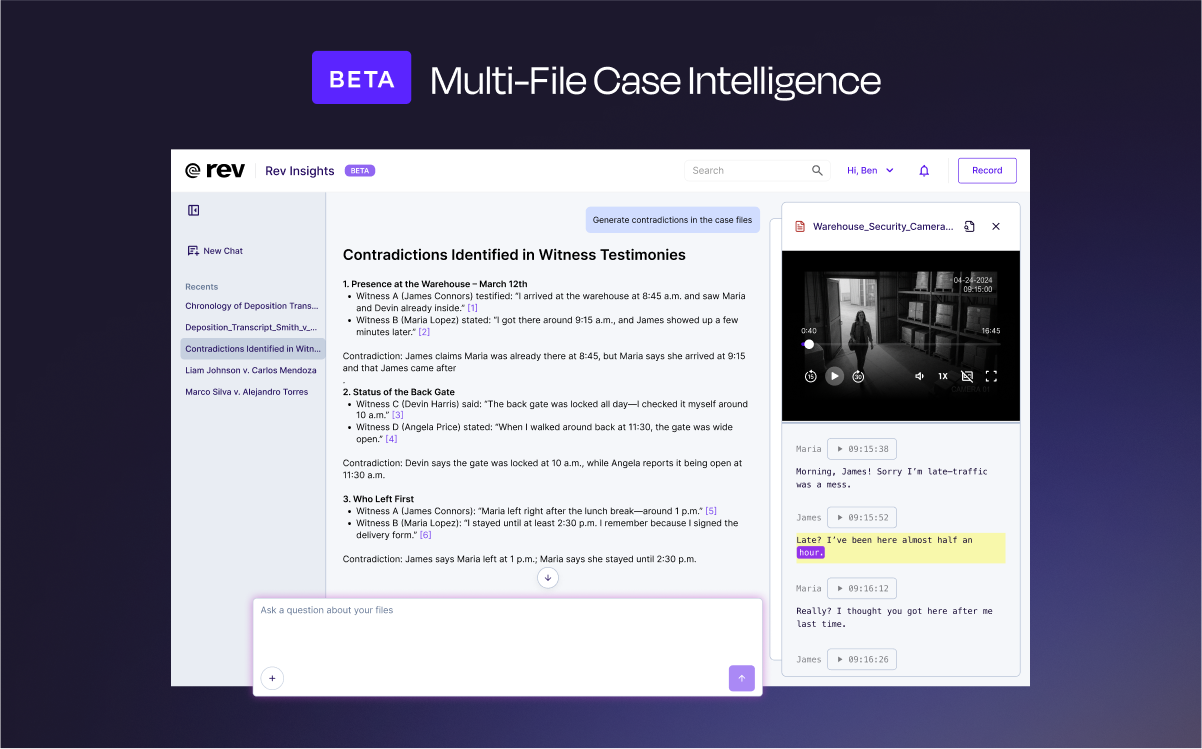
Rev Demo - Multi-File Analysis
Consolidate audio depositions, video interviews, written records, and text documents in one searchable workspace. Rev Insights works with any combination of audio recordings, video evidence, and text documents—identifying discrepancies across all formats and surfacing contradictions that strength...
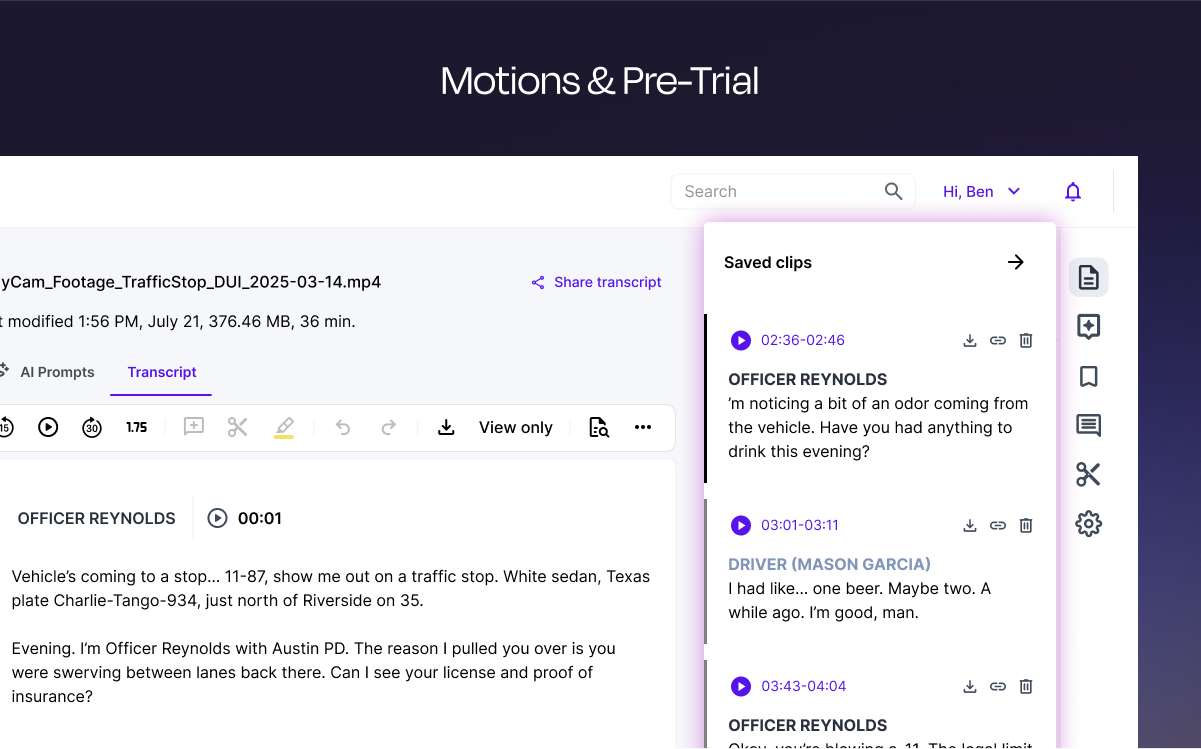
Rev Demo - Motions & Pre-Trial
Rev organizes and summarizes testimony transcripts. Easily clip and share key evidence from the transcript editor.
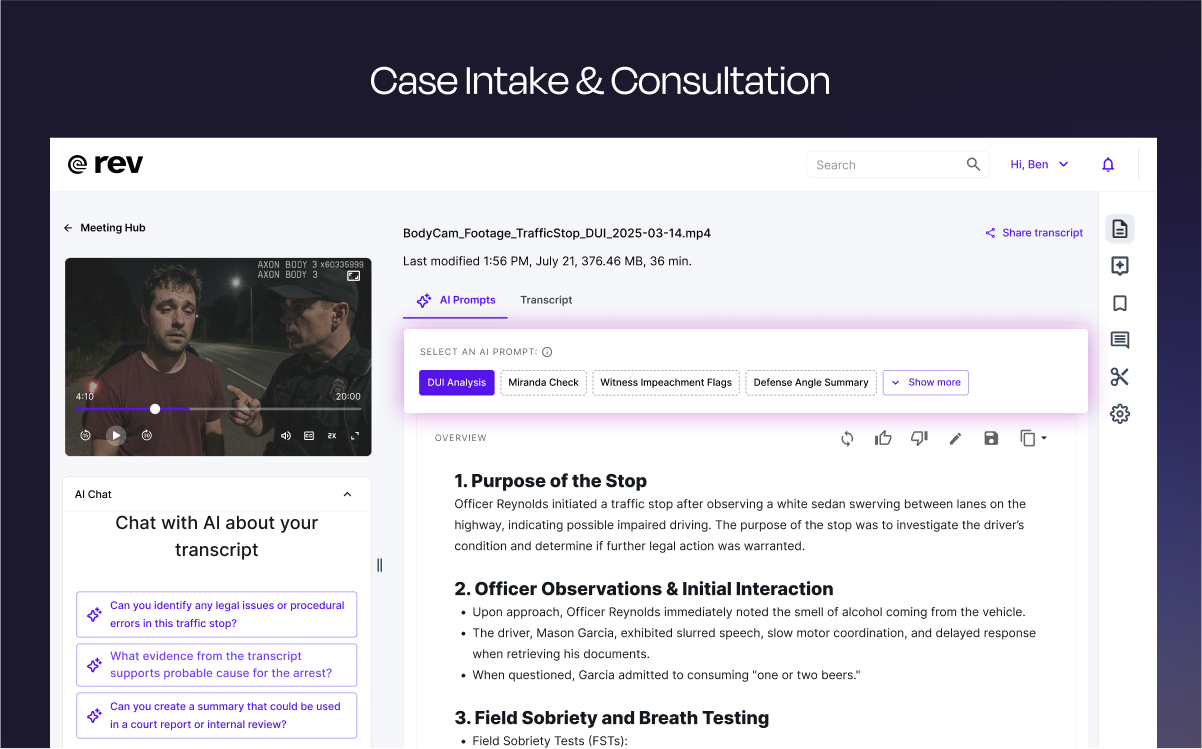
Rev Demo - Client Intake & Consultation
Tailored prompts that immediately surface key patterns with precision, without compromising the original record—because in legal, nuance is everything.
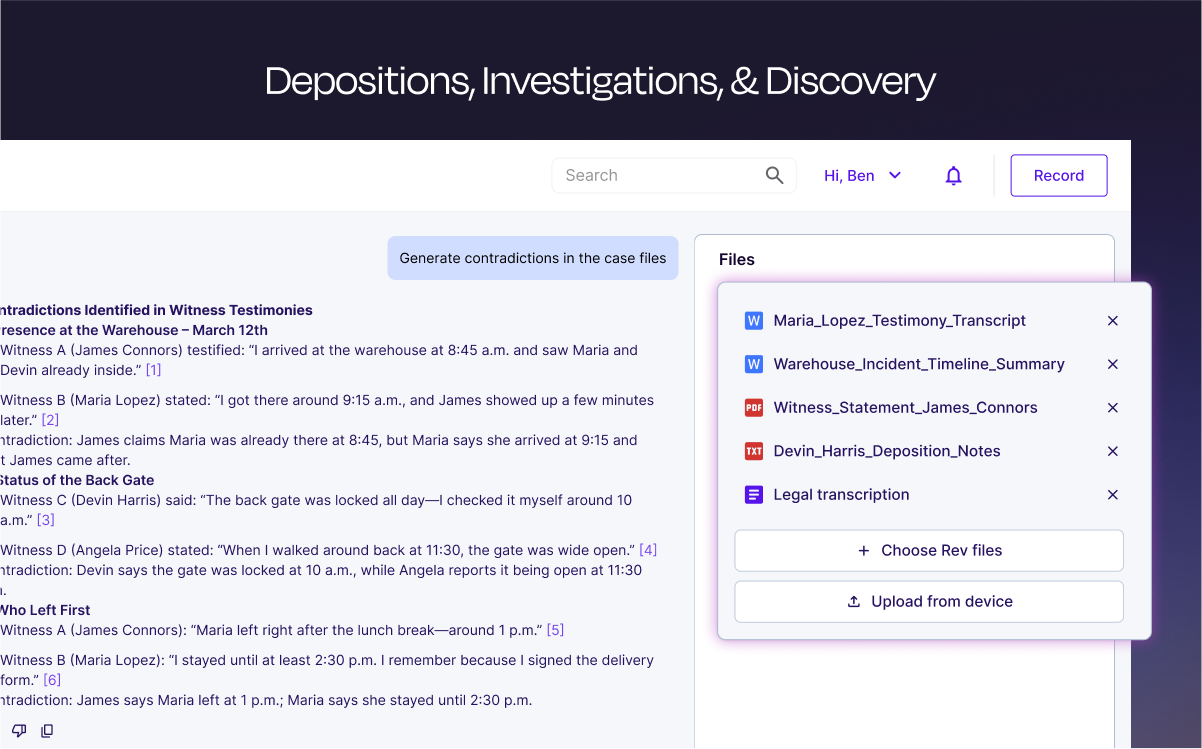
Rev Demo - Depositions, Investigations, & Discovery
Upload files of testimonies, interviews, and more and industry leading AI legal transcription or or 99%+ accurate human transcription. AI insights surface contradictions and key statements across multiple files.
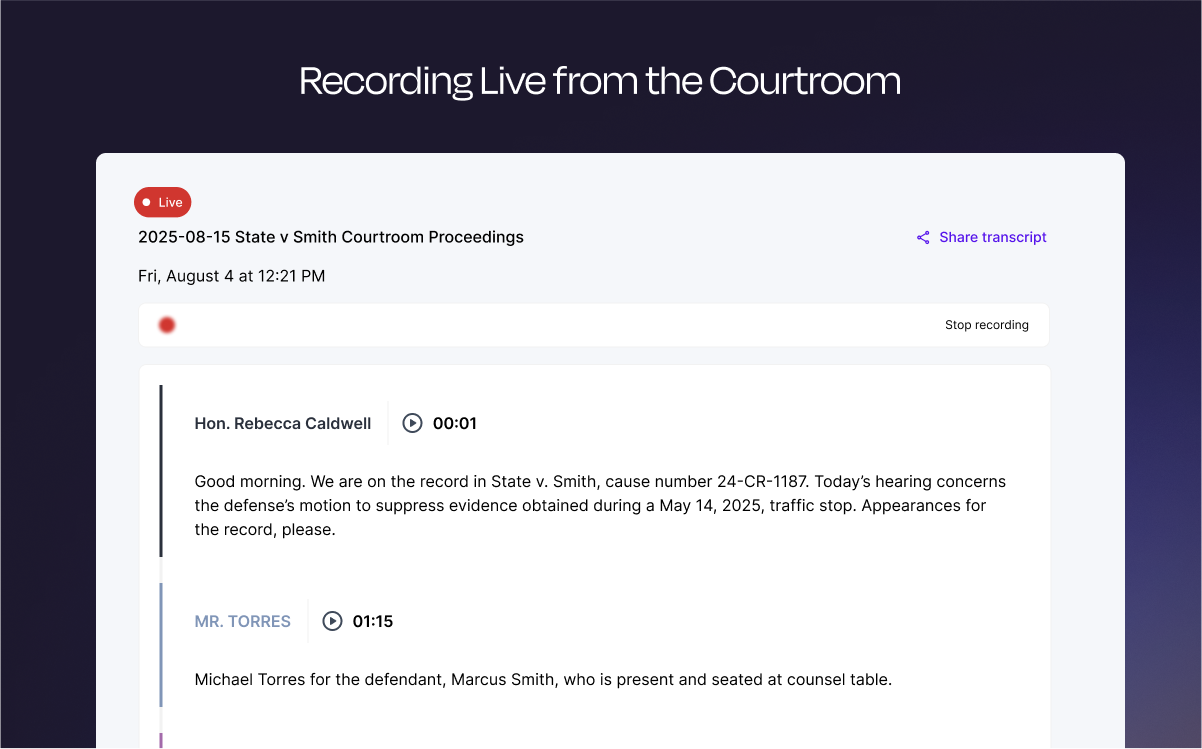
Rev Demo - Recording Live From The Courtroom
Never miss crucial courtroom details with real-time, 96%+ accurate law transcription so you can better cross-examine, search 911 phone call transcripts, and more easily impeach witnesses.
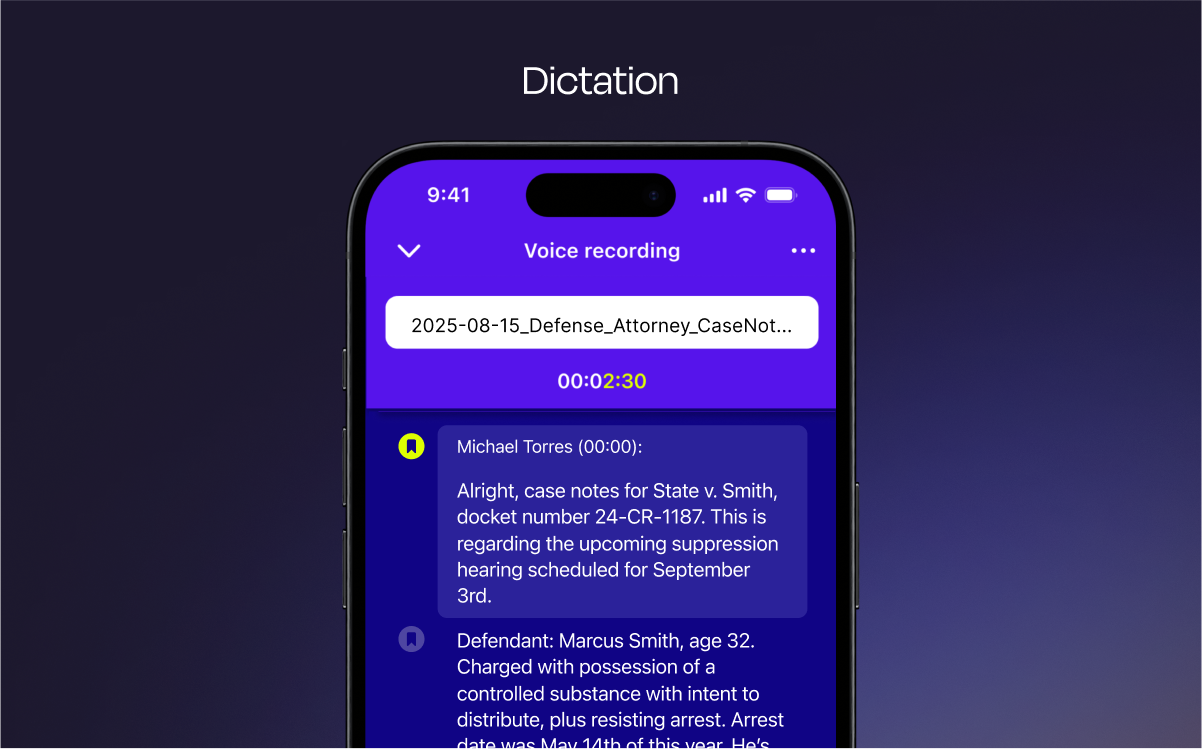
Rev Demo - Dictation
Take down notes confidentially from anywhere with legal transcription that seamlessly syncs across devices for immediate access.
Drowning in case files? Rev Insights (now in beta!) is here to change everything. Our new AI-powered legal analysis tool organizes transcripts, body cam footage, jail calls, police reports, and more into one secure, searchable workspace.
Play Rev Video
Drowning in case files? Rev Insights (now in beta!) is here to change everything. Our new AI-powered legal analysis tool organizes transcripts, body cam footage, jail calls, police reports, and more into one secure, searchable workspace.
Criminal defense attorney Brian Anderson gave Rev a try and was an immediate convert. As a solo practicioner representing children charged with crimes in juvenile court, Brian is always looking for ways to get to just results faster. With R
Play Rev Video
Criminal defense attorney Brian Anderson gave Rev a try and was an immediate convert. As a solo practicioner representing children charged with crimes in juvenile court, Brian is always looking for ways to get to just results faster. With R
See how e-Depos founder Mark Ivey transformed his court reporting business with Rev's trusted transcription services. Mark shares why Rev is their
Play Rev Video
See how e-Depos founder Mark Ivey transformed his court reporting business with Rev's trusted transcription services. Mark shares why Rev is their "most important partner" - delivering the accuracy his team relies on while helping attorneys
Product Avatar Image

Have you used Rev before?

Answer a few questions to help the Rev community

Rev Reviews (559)

View 2 Video Reviews
Reviews

Rev Reviews (559)

View 2 Video Reviews
4.7
560 reviews

Pros & Cons

Generated from real user reviews
View All Pros and Cons
Search reviews
Filter Reviews
Clear Results
G2 reviews are authentic and verified.
Amber M.
AM
Owner / Business Mentor / Hypnotherapise
Small-Business (50 or fewer emp.)
"Excellent. Accurate. Used it for years and it only gets better."
What do you like best about Rev?

The automated transcriptions are incredibly accurate for most things. It's incredibly quick even for long video files. I've never needed to use Customer Support because there has never been an issue. I use Rev probably 3 or 4 times a week for business. I use it to transcribe master classes, meetings, client calls and courses as well as use the SRT files for captions were needed and use the AI features to help create module description and summaries. It's easy to use and intuitive to implement. Review collected by and hosted on G2.com.

What do you dislike about Rev?

There isn't anything I dislike about using Rev. Review collected by and hosted on G2.com.

CC
Senior Fellow
Mid-Market (51-1000 emp.)
"It keeps getting better"
What do you like best about Rev?

I tend to use the AI transcript service. First, it is really affordable. Second, it takes a lot of the labor out of the free kind of transcriptions that are running in parallel to whatever you're viewing online. Third, the AI transcripts are fast to arrive. I don't tend to need absolutely pristine transcripts--95% accuracy is my standard and Rev always exceeds that. Fourth, the summary function is a nice add on (it's free, though I wish it would download with the Word transcript). If you need a polished version, select the human review version. I did that once and it was worth it. Delivered before the deadline it set for itself. Fifth, the desktop interface (including invoices) is super handy. I find myself using Rev more and more. Review collected by and hosted on G2.com.

What do you dislike about Rev?

Not much to dislike. I like the AI summary function--and I realise it may still be beta--but I wish it would download with the transcript when I save it as a Word document. Review collected by and hosted on G2.com.

Laura D.
LD
Director, Digital Marketing
Mid-Market (51-1000 emp.)
"Tried Rev Once, Been Hooked Ever Since!"
What do you like best about Rev?

I first started using Rev in 2019 when I was a podcast producer for a B2B CRM company. We would record our podcasts via Zoom, render the audio file, then upload the file through Rev to generate a transcript. From there, we turned that transcript into a blog that was optimized with meta data, canonical URLs, everything possible to help our podcast episodes see the most traffic and time on site. It also helped us stay ADA compliant for the hearing impaired who could still following along with the content of the podcast. I still employ that particular use case till this day, but also, I use it to transcribe videos and webinars and turn the transcriptions into thought leadership pieces, short-form content, video descriptions, teaser copy, etc. Plus, the transcriptions always come back within a day, sometimes within the hour! I love Rev and refuse to use any other kind of transcription tool! Review collected by and hosted on G2.com.

What do you dislike about Rev?

To be honest, can't think of anything I don't like about it. Since I started using it, the UX has improved and it more streamlined. Review collected by and hosted on G2.com.

Katherine L.
KL
Associate professor
Mid-Market (51-1000 emp.)
"Rev - a critical tool for data analysis"
What do you like best about Rev?

I have compared many different AI generated transcripts and captions, and Rev by far is the best and most accurate! One thing that really sets it apart from others is that it is incredibly easy to edit the AI generated transcripts to correct small mistakes and add non-verbals and create a 100% accurate transcript, which is required for the kinds of qualitative data analysis that I do. Rev enables you to watch the video, use key board short cuts to control play back, and correct the transcript in real time, or add additional information. This has saved me countless hours, and produced much higher quality and more usable transcripts. I also appreciate how the corrected transcipt file can be downloaded as a caption file. I can't recommend Rev highly enough. Review collected by and hosted on G2.com.

What do you dislike about Rev?

My only complaint is that sometimes Rev will roll out a user interface improvement that actually decreases the functionality. In general, these have been short-lived and they have improved it again back to its original functionaly. Review collected by and hosted on G2.com.

Stephen C.
SC
Sales
Small-Business (50 or fewer emp.)
"Fast, accurate, and easy to use"
What do you like best about Rev?

The speed and accuracy are impressive—most files are turned around faster than promised, and the text is highly accurate with minimal editing needed. The interface is clean and intuitive, so uploading files and receiving transcripts feels effortless. I also appreciate the option to choose between automated and human transcription depending on my budget and needs. Review collected by and hosted on G2.com.

What do you dislike about Rev?

Sometimes the automated transcription struggles with heavy accents or poor audio quality, which means I have to spend extra time editing. The pricing for human transcription, while fair for the quality, can add up quickly for longer projects. Review collected by and hosted on G2.com.

Katherine C.
KC
Fractional CMO & Marketing Consultant for B2B Software Companies
Small-Business (50 or fewer emp.)
"Best in class subscription service"
What do you like best about Rev?

I've been using Rev for about 10 years. It's my go-to for quick, accurate transcriptions of meetings, interviews, and recorded notes. The automated transcription is good enough for 99% of my needs, but knowing human transcription is available is reassuring.

The new monthly programs are wonderful. I love simply having the service built into my tech stack overhead instead of having to track transcription fees by project. A couple of the AI tools I use can also do transcription, but Rev's ease of use and transcription quality make it more than worth the subscription cost.

It automatically creates a summary of each transcription, which is very helpful. Review collected by and hosted on G2.com.

What do you dislike about Rev?

I really like the ability to organize projects into folders, but it would be a lot more helpful if you could also have subfolders to organize parts of projects.

Also, the AI transcription works better if you set the context at the beginning of the meeting by saying each person's name. I never remember to do that - it would be nice if the project setup form included a box to add context - speaker names & roles, product names, specific jargon, etc. Being able to save this context for all the transcriptions in each project's folder would be great too.

But even though I often do a relatively poor job of giving the AI contextual info, it still transcribes very well with only a few minor updates required for specialized names or industry vocabulary.

It would be nice if clicking download would automatically download both the transcription and the summary. Review collected by and hosted on G2.com.

AS
Marketing Director
Small-Business (50 or fewer emp.)
"Fast, Accurate, and Reliable – Rev Delivers Every Time!"
What do you like best about Rev?

I’ve been using Rev for a while now, and it has completely exceeded my expectations. The app is incredibly easy to navigate, and the turnaround times are lightning fast—often faster than promised. Accuracy is spot-on, even with more complex or technical content, and the quality of the transcriptions is outstanding. I love that Rev also offers multiple services—transcription, captions, and translations—so it’s a one-stop shop for my needs.

In short, Rev saves me time, makes my work easier, and delivers top-notch results every single time. Highly recommend it to anyone looking for reliable and professional transcription services! Review collected by and hosted on G2.com.

What do you dislike about Rev?

There is nothing I can say that is negative! REV is a lifesaver! Review collected by and hosted on G2.com.

Sonia Patricia Z.
SZ
Science Teacher
Small-Business (50 or fewer emp.)
"My New Teacher’s Sidekick"
What do you like best about Rev?

Despite the variety of options, the site is very intuitive to use. Review collected by and hosted on G2.com.

What do you dislike about Rev?

The "sharing" options. Once you change from "restricted" to whatever, you must click the "save" button and then copy the link. Many people that I've worked with in this app forget to click the "save" button. I think that it would be so much better just to change the options and have it automatically saved. Review collected by and hosted on G2.com.

TL
Managing Director
Small-Business (50 or fewer emp.)
"Very accurate and transcribes fast"
What do you like best about Rev?

Rev's transcription is very accurate, more so than several other major transcription platforms that my business has also been using.

In big group meetings, Rev easily recognizes the distinct participants even when their speech overlaps, and separates and assigns the transcription accordingly. I'm also amazed at how it's highly adaptable to speakers with different (sometimes thick) accents, and does a very good job at accurately deciphering their spoken words. What's more, it works just as well if you upload the audio files.

Another impressive feature is Rev's AI meeting summary and the "Chat with AI about your transcript" function. The AI does a very good job at analyzing the transcripts, and summarizing concisely while accurately highlighting the key discussions points. I find it so useful when I need to review previous meetings, especially from weeks or even months ago - so I can just review the AI summary section or ask Rev's AI chat a few questions to glean the useful information, without having to read through the extensive transcriptions. And if I want to share the transcripts with my clients or other employees - I can export them in different file formats for email, or just click the "Share Transcript" button, which also allows me to set access privileges on a per-transcription file basis.

Also, I use all of the major online conferencing platforms for my business, and configuring Rev to integrate with everyone of them are simple and straightforward. Once setup, it'll just automatically joins any and all meetings in my calendar, without having me to intervene.

After using Rev for a few weeks, I've now canceled the the subscriptions for all other online transcription tools. Review collected by and hosted on G2.com.

What do you dislike about Rev?

The web interface is a bit "busy", more like an Admin Panel interface. Several of my employees find that to be a bit overwhelming. So while I appreciate the extensive features and functionality accessible through the platform's web interface, I do wish there's a more user-friendly type interface for just normal (i.e., non-power) users. Review collected by and hosted on G2.com.

Jenna K.
JK
Virtual Assistant
Small-Business (50 or fewer emp.)
"My go to platform for podcasting support"
What do you like best about Rev?

I love how easy it is to use! It's so simple to drag and drop my audio files (or videos!) and know a reliable transcript will be generated within minutes. I use it weekly for all of my podcast clients! I also use it when I need to generate a transcript of a meeting or brainstorm session. Review collected by and hosted on G2.com.

What do you dislike about Rev?

I dislike how some of the AI generated summaries and reports actually make up quotes. It's still helpful to start to get the ideas flowing, but I always have to go back to the timestamp and actually see if that is what was said. As a podcast editor who is featuring clients quotes, it is important that this is accurate and it's weird to me that AI just makes it up or builds off of only part of what was said. Review collected by and hosted on G2.com.

Pricing Options

Pricing provided by Rev.

Free

Free
Per Month

Basic

Starting at $14.99
Per Month

Pro

Starting at $34.99
Per Month
Rev Comparisons
Product Avatar Image
Otter.ai
Compare Now
Product Avatar Image
3Play Media
Compare Now
Product Avatar Image
Verbit
Compare Now
Rev Features
Dictation
Accuracy
Speaker Identification
Timecode Management
Closed Captioning
Collaboration
Spell Check and Punctuation
Text Editing
Data Security
API
Voice Files
Product Avatar Image
Rev