
PDS Vista

By Personnel Data Systems

Re-claim Profile

Unlock access to PDS Vista profile for Free

Your G2 page is often the first place buyers evaluate you. Take control of how your brand shows up

WHAT YOU UNLOCK

Control your profile

Update logo, screenshots, pricing info

Engage with customers

Respond to reviews, build trust with prospects

See buyer activity

Track who’s viewing, understand engagement

Collect reviews

Create landing page and collect reviews

Sellers who actively manage their G2 profile build more trust and convert more buyers

4.3 out of 5 stars

How would you rate your experience with Vista?

Compare this with other toolsSave it to your board and evaluate your options side by side.
Save to board

PDS Vista Reviews & Product Details

Value at a Glance

Averages based on real user reviews.

Perceived Cost

$$$$$

PDS Vista Media

PDS Vista Demo - PDS Vista Human Resources
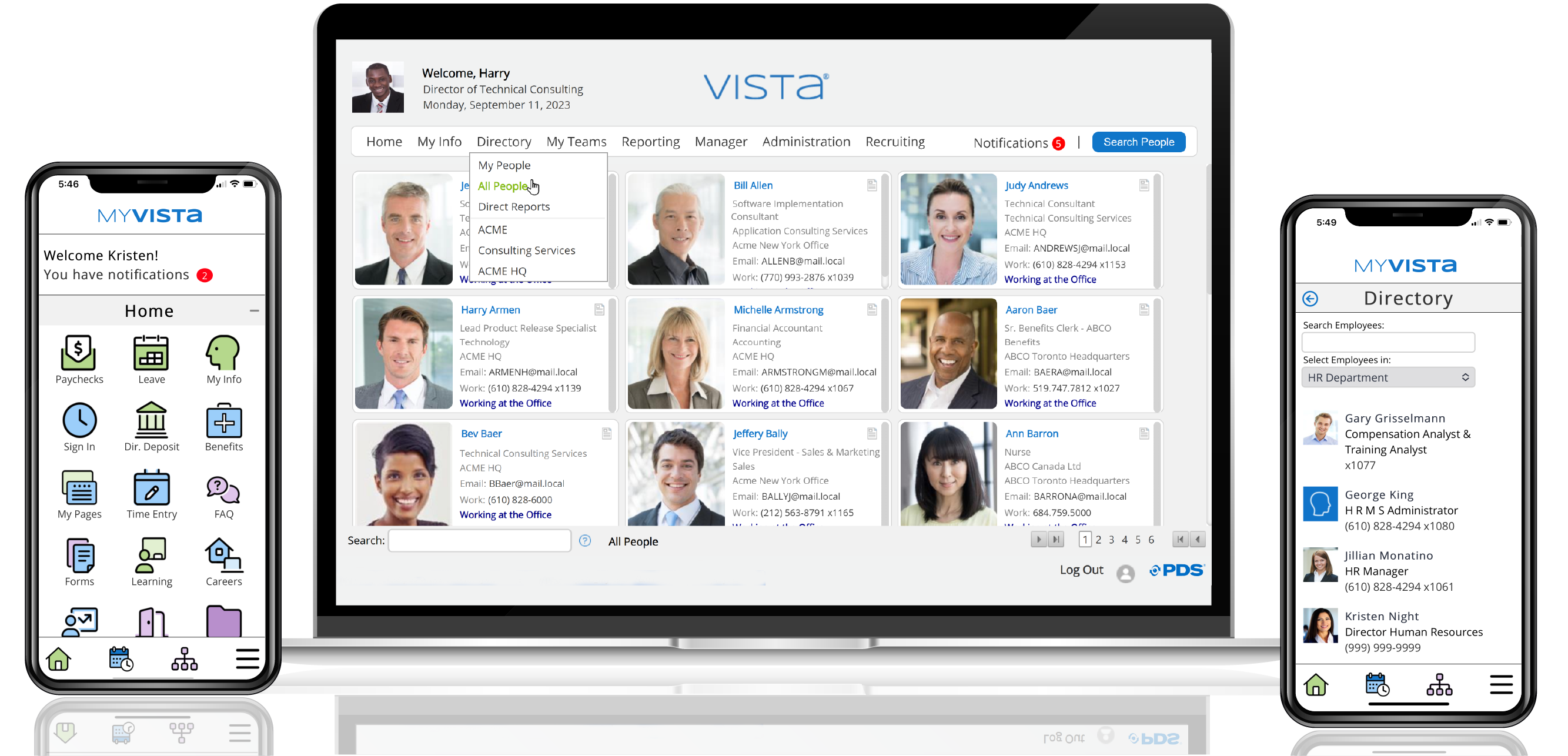
Your employee data is the heart of your corporate knowledge base. Vista Human Resources unleashes the power to make that data strategic. Within Vista, you create and maintain an organized database of employees, applicants, jobs, and positions. The product’s flexibility allows you to structure you...
PDS Vista Demo - PDS Vista Payroll
Vista Payroll strikes the perfect balance between power and simplicity. With its high-performance capabilities and design efficiency, you can process large volumes of data within tight time constraints, whether US, Canadian, or Caribbean. Vista Payroll is focused on its main tasks of calculating...
PDS Vista Demo - PDS Vista Benefits
From eligibility to enrollment to employee benefits statements, Vista Benefits component provides you with automated tools that ensure accurate results. Vista Benefits allows you to maintain detailed information on an unlimited number of benefit plans and coverage levels for each employee and au...
PDS Vista Demo - PDS Vista Self-Service
Vista Self-Service provides your employees – onsite and remote – with immediate access to their information. The built-in, comprehensive data security layers ensure that employees have access to only their own personal information. Providing employees and managers with access to their own HR, be...
PDS Vista Demo - PDS Vista Time
Accessible from anywhere, Vista Time is a cloud-based service, providing flexible time and labor management for your decentralized workforces. A full variety of data collection methods are available within our Vista Time component, including biometric and swipe card devices, mobile devices, ...
PDS Vista Demo - PDS Vista Recruiting
Capturing and effectively tracking recruiting data is vital to the success of your company. Vista Recruiting is easy to use and maintain and presents critical applicant information in an efficient and useful manner for both human resources professionals and hiring managers, alike. Vista Recrui...
Product Avatar Image

Have you used PDS Vista before?

Answer a few questions to help the PDS Vista community

PDS Vista Reviews (22)

Reviews

PDS Vista Reviews (22)

4.3
22 reviews

Review Summary

Generated using AI from real user reviews
Users consistently praise the flexibility and customization of the software, allowing it to adapt to various business needs. The user-friendly interface and strong customer support enhance the overall experience, making it easier for HR teams to manage payroll and reporting. However, some users note that certain modules are not fully developed, which can limit functionality.
Search reviews
Filter Reviews
Clear Results
G2 reviews are authentic and verified.
Leen W.
LW
Mid-Market (51-1000 emp.)
"Reliable HR & Payroll Solution Tailored for Hong Kong"
What do you like best about PDS Vista?

I like how PDS Vista is specifically built for Hong Kong’s HR and payroll compliance. It handles MPF contributions, Hong Kong salaries tax, leave calculations, and deductions exactly according to local laws, so we don't have to manually adjust anything or worry about compliance errors. I also appreciate its focus on being stable and reliable, especially for core HR tasks, which means payroll runs smoothly every month with almost no issues. The strong leave and attendance management is also a plus, as it lets us set up all types of leave in line with Hong Kong labor laws, automating the approval process and syncing with payroll. This really cuts down on manual tracking and messy email threads. Review collected by and hosted on G2.com.

What do you dislike about PDS Vista?

While PDS Vista is solid for compliance and core payroll, there are several areas that feel outdated or create friction for our team: The user interface is very dated and not intuitive. The design looks old, navigation is menu-heavy, and some functions are hard to find. New staff take longer to learn because the workflow isn’t modern or user-friendly. Simple tasks often require too many clicks. Mobile experience is weak. There’s no good mobile app or responsive web design for employees to check payslips, apply for leave, or view leave balances on the go. Managers also can’t easily approve leave remotely, which is inconvenient in a hybrid work environment. Limited automation and workflow flexibility. Basic approval chains work, but more useful automations are either missing or hard to set up. Review collected by and hosted on G2.com.


Verified User in Retail
AR
Mid-Market (51-1000 emp.)
"Easy access to data and customizable to work the way you want"
What do you like best about PDS Vista?

Updates and data integrity are maintained if you make changes through the front end or directly in the database. Review collected by and hosted on G2.com.

What do you dislike about PDS Vista?

Some modules are not fully developed. Mostly the features you would expect to go to an outside product. You can do basic training scheduling and tracking but not a full learning management system. Review collected by and hosted on G2.com.

Verified User in Human Resources
UH
Small-Business (50 or fewer emp.)
"Amazing"
What do you like best about PDS Vista?

Mostly configurable

well organized

Reporting structure is well defined Review collected by and hosted on G2.com.

What do you dislike about PDS Vista?

Limited search feature

Limited flexibility for applying to many jobs

Historical data reporting need modifications Review collected by and hosted on G2.com.

Verified User in Information Technology and Services
UI
Mid-Market (51-1000 emp.)
"Human resource, benefits and payroll provider"
What do you like best about PDS Vista?

Great User interface, well designed and easy to use and train the employees

Provides great Talent Acquisition functionality ,one can assign stages of progress, maintaining referral information.

Great payroll Management capabilities, easy to implement and point and click features greatly simplifies the the issues our HR team was facing earlier as we maintained everything on excels.

Easy to maintain tax brackets and update payroll based on the gross packages, helped us to cutdown on crumb-some manual calculations for the same.

Highly customisable and also supports integration to external systems and applications. Review collected by and hosted on G2.com.

What do you dislike about PDS Vista?

Getting hold of reports can be time consuming but lot of features are there for report generation.

Helps screen not always updated . Review collected by and hosted on G2.com.

Verified User in Restaurants
UR
Mid-Market (51-1000 emp.)
"It had its Ups and Downs"
What do you like best about PDS Vista?

I like how thorough it is. There are many different components to it which was confusing at first to learn but overtime made sense. Review collected by and hosted on G2.com.

What do you dislike about PDS Vista?

I dislike that half of the time we could not access it. We were also using it for a restaurant and it was very slow. Review collected by and hosted on G2.com.

Sanjay N.
SN
Java Software Developer
Small-Business (50 or fewer emp.)
"The best hr automation softwere on market"
What do you like best about PDS Vista?

it is easy to understand and execute contains all required human resource option best part of its support and compatibility provided by the company Review collected by and hosted on G2.com.

What do you dislike about PDS Vista?

must contain a history of employees' pay data and the option to provide additional incentives according to situation and performance base. Review collected by and hosted on G2.com.

Raissa M.
RM
Sr. Director, Human Resources
Mid-Market (51-1000 emp.)
"PDS Vista HR Software that Works"
What do you like best about PDS Vista?

Easy to use. Super flexible and customizable or just use the base system.PDS is constantly working on improvements and upgrades in order to meet customer needs. The PDS Team from Sales to Support are GREAT! Review collected by and hosted on G2.com.

What do you dislike about PDS Vista?

We don't use the entire system which is our issue not an issue of PDS. Review collected by and hosted on G2.com.

Verified User in Computer Software
UC
Mid-Market (51-1000 emp.)
"It's a complete Human resource management software solution"
What do you like best about PDS Vista?

It's a complete Human resource management software solution. All of the pieces - Human resource, recruiting, on-boarding, payroll, time and attendance, self-service, workflow, and extensive reporting –come together to simplify your business practices and processes. Review collected by and hosted on G2.com.

What do you dislike about PDS Vista?

If I try to recall I find nothing which can say that I dislike this software :) Review collected by and hosted on G2.com.

Roger P.
RP
Head of HR
Information Technology and Services
Mid-Market (51-1000 emp.)
"Vista for all HR activities and benefits"
What do you like best about PDS Vista?

Vista is a very user-friendly, easy to learn and flexible, that's why it has been quickly accepted for all the HR team. It allows us to completely manage all the HR, benefits and payroll we need. The reports are done just great and this process can quickly be saved in excel for sorting and analysis. Vista has an excellent customer support! I have solved all my issues by just consulting them. Also, Vista allows us to distribute the types sort and subtotal by type, and finally provide a grand total for the FEIN. Review collected by and hosted on G2.com.

What do you dislike about PDS Vista?

I would like Vista could add a print icon so it can ease this process. Also, Vista does not allow to see a history of all transactions per employee, which would be very helpful. At the end of the calendar year, you may get hit with multiple releases. I think for these specific cases; Vista should have some more extra features. Review collected by and hosted on G2.com.

Joe G.
JG
Human Resources Manager
Information Technology and Services
Mid-Market (51-1000 emp.)
"Payroll is completely covered with Vista"
What do you like best about PDS Vista?

Vista is extremely intuitive. The navigation can be done with almost no technical knowledge about the platform. It’s as simple as reading the instructions it provides. It is not necessary to memorize screen names, labels or numbers to find information. It provides security, efficiency and flexibility to a wide variety of types of users. Also, Visa has the best support team I have worked with. They are always right there when something is not right, especially if you are running payroll (they take the payroll system very seriously and will try to solve it as soon as possible). Review collected by and hosted on G2.com.

What do you dislike about PDS Vista?

The time entry features are not robust enough for our business, so we had to try a different application to handle this. Also, I think it doesn’t provide enough flexibility for applicants when applying for multiple jobs. The process tends to be long and confusing. Review collected by and hosted on G2.com.

Questions about PDS Vista? Ask real users or explore answers from the community

Get practical answers, real workflows, and honest pros and cons from the G2 community or share your insights.

Verified User
G2
Verified User
Last activity almost 6 years ago

How do you set military time by default?

PS
Peter smith
Last activity over 4 years ago

How do I limit employees to enter more accrual time then they have available?

Pricing

Pricing details for this product isn’t currently available. Visit the vendor’s website to learn more.

PDS Vista Comparisons
Product Avatar Image
UKG Pro
Compare Now
Product Avatar Image
Workday HCM
Compare Now
Product Avatar Image
Paylocity
Compare Now
PDS Vista Features
Organization Management
Compliance
Benefits Administration
Reporting and Dashboards
User, Role, and Access Management
Performance and Reliability
Web Portal
Benefits Manager
Payroll Entry
Direct Deposit
Pre-tax Deductions