Onboard

By Onboard Software, Inc

5.0 out of 5 stars
4 star
0%
3 star
0%
2 star
0%
1 star
0%

How would you rate your experience with Onboard?

Compare this with other toolsSave it to your board and evaluate your options side by side.
Save to board

Onboard Reviews & Product Details

Pricing

Pricing provided by Onboard.

Starter

$25.00
1 Seat Per Month

Onboard Media

Onboard Demo - Getting Started
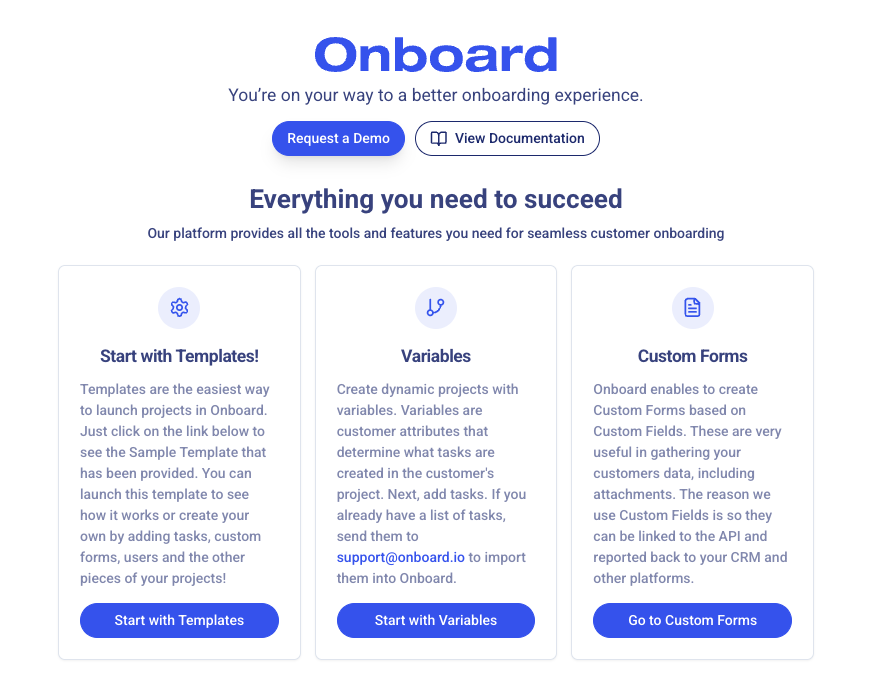
Our product is designed to adapt to your customer onboarding process. If you have a simple, straightforward process you should use our templates. For dynamic, more complicated processes you should use our variables and task repository.
Onboard Demo - Customer Dashboard
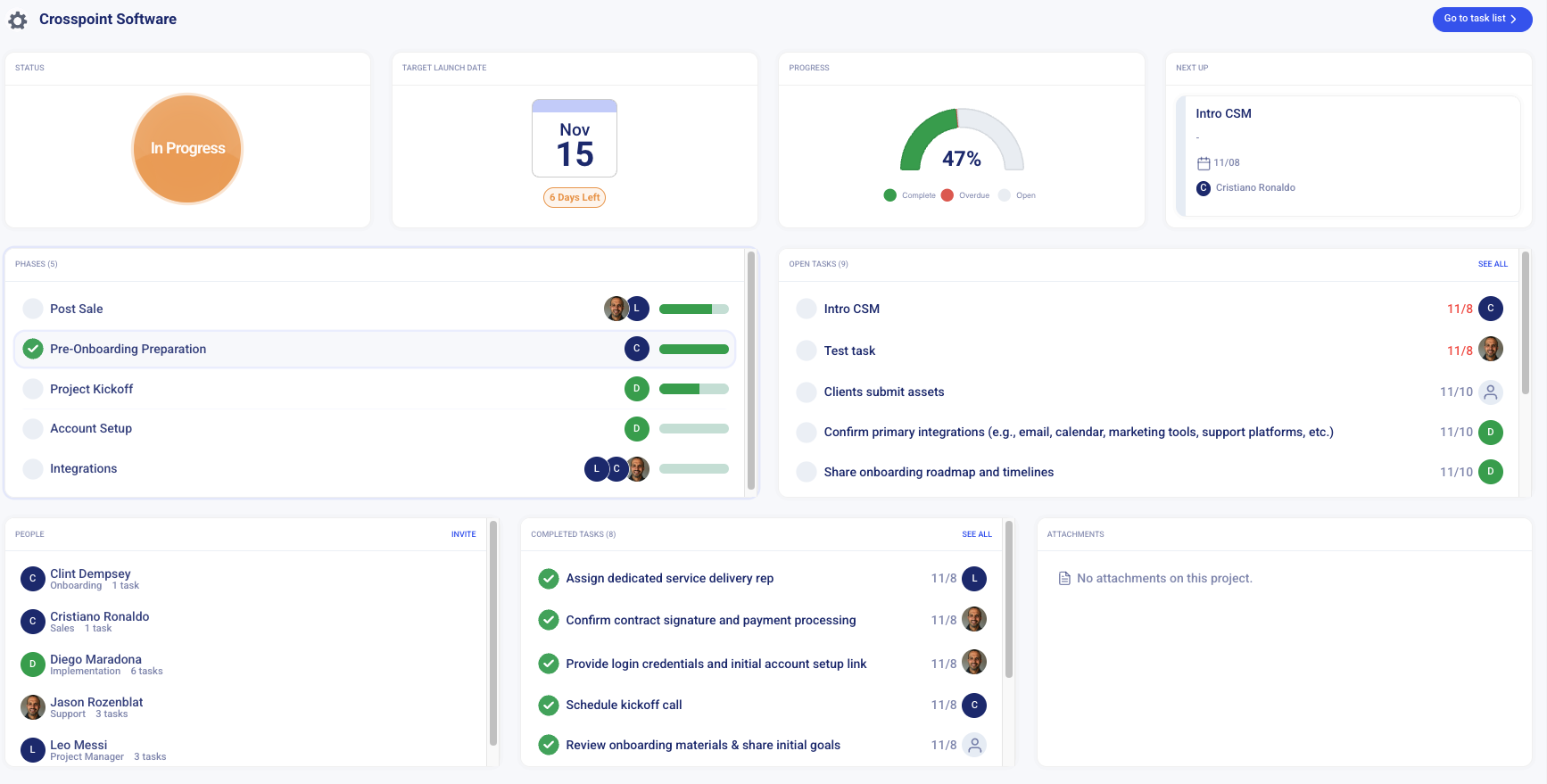
The customer dashboard gives you instant clarity: current status, countdown to go-live, and percent complete. Track phases, task assignments, and upcoming actions in one view to keep teams accountable and timelines on track.
Onboard Demo - Go-Live Board
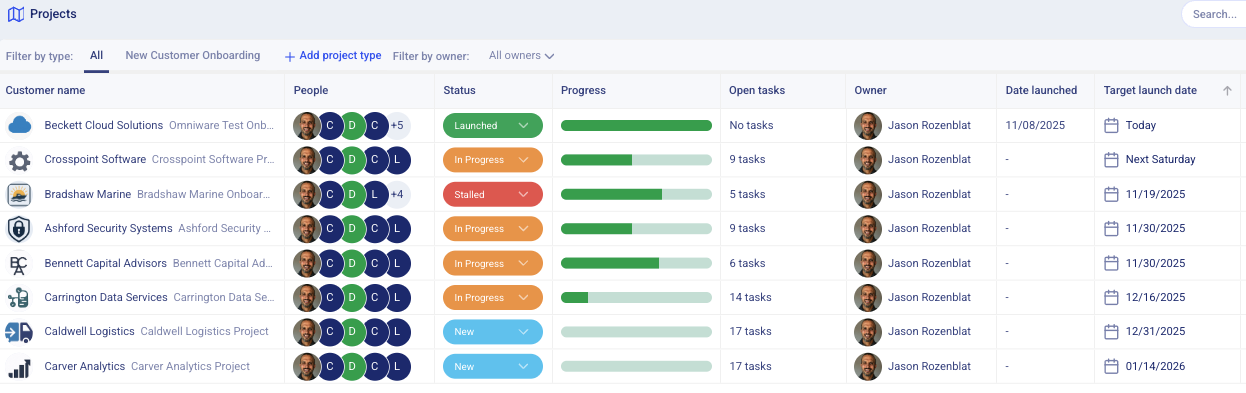
One view to run onboarding operations: customer, team, status, progress, and deadlines side-by-side. Sort and filter to surface bottlenecks fast and keep momentum across all accounts.
Onboard Demo - KPI Dashboard
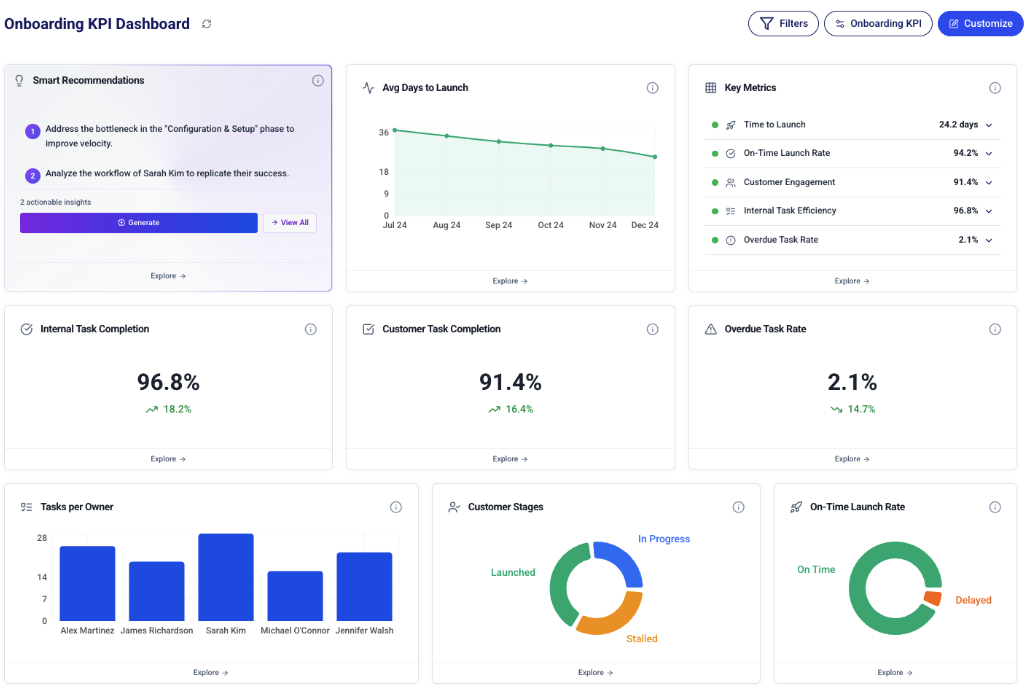
An executive dashboard for onboarding health: key metrics, velocity trends, and stage distribution at a glance. Drill into owners, overdue tasks, and customer engagement, with AI tips to unblock progress and lift on-time launches.
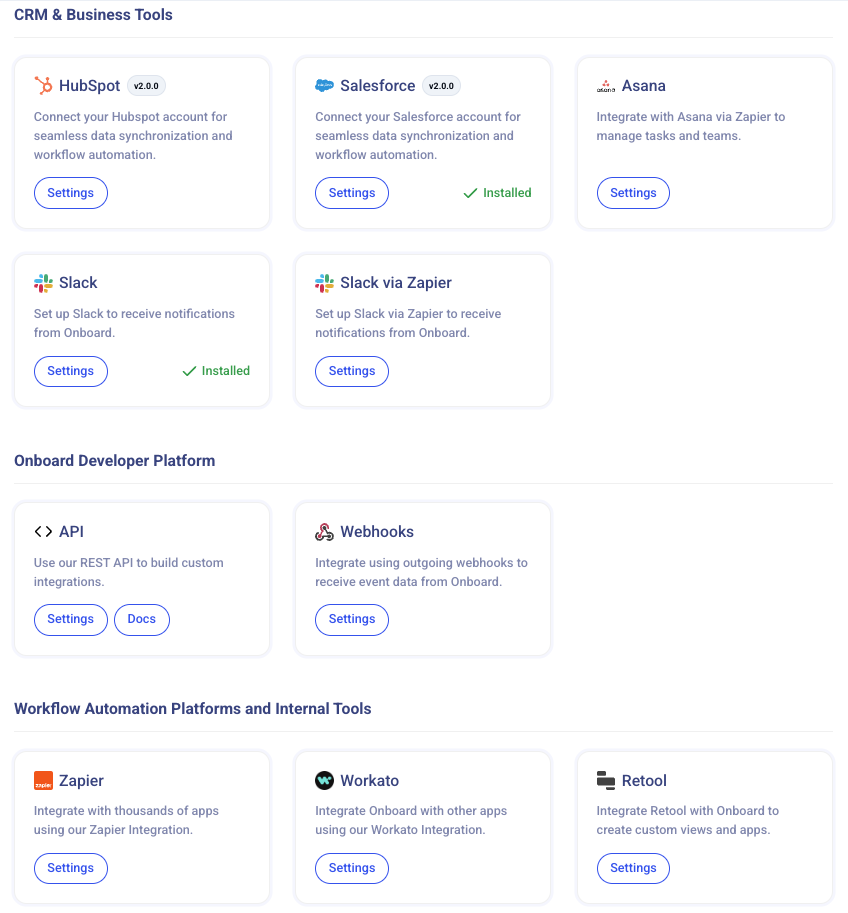
Onboard Demo - Integrations
Onboard snaps into your tech stack in minutes—Salesforce/HubSpot, Slack, plus Zapier and API for everything else. Map data in, launch the right plan automatically, and push progress back to your systems as work gets done.
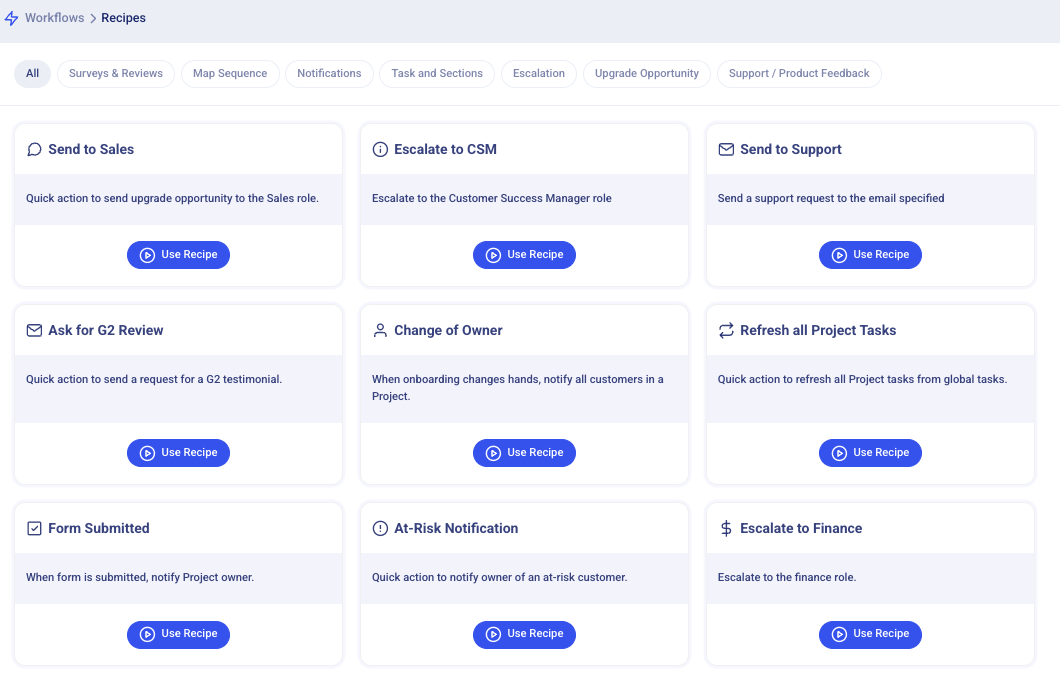
Onboard Demo - Workflows
Turn repetitive onboarding steps into automations. Pick a recipe to trigger notifications, reassign owners, create tasks, or escalate by role—Send to Sales, Change of Owner, At-Risk Notification, Ask for G2 Review—and keep momentum high with less manual lift.
Overview of Onboard
Play Onboard Video
Overview of Onboard
Interactive Demo
Try an interactive demo created by the software seller (right here on G2).
Product Avatar Image

Have you used Onboard before?

Answer a few questions to help the Onboard community

Onboard Reviews (43)

Reviews

Onboard Reviews (43)

5.0
44 reviews

Review Summary

Generated using AI from real user reviews
Users consistently praise the ease of use and intuitive interface of Onboard, which simplifies the client onboarding process and enhances communication. The platform's ability to streamline tasks and provide clear visibility into progress helps teams stay organized and efficient. However, some users note a desire for improved reporting features and more customization options.

Pros & Cons

Generated from real user reviews
View All Pros and Cons
Search reviews
Filter Reviews
Clear Results
G2 reviews are authentic and verified.
Keri T.
KT
CSM, Manager
Mid-Market (51-1000 emp.)
"Tool that supports both Internal and External Experience"
What do you like best about Onboard?

The product itself is clearly made by people who have experience with onboarding and have really thought of different ways to enhance both the internal processes of onboarding, but also the customer-facing experience which takes a lot of additional workload off of us without having to think about how the customer experience will be. Review collected by and hosted on G2.com.

What do you dislike about Onboard?

The inability to "preview" forms and test them before having them go live with them. Review collected by and hosted on G2.com.

Kelli S.
KS
Project Manager
Small-Business (50 or fewer emp.)
"Great Tool for Streamlining Client Onboarding"
What do you like best about Onboard?

We’ve been using Onboard for a few months to help organize and streamline our client onboarding process, and it’s been a big improvement for our team. Not having to deal with long email threads and constant back-and-forth has been great. Everything stays organized by topic, and it’s easy to see what information is still open and what’s already been completed.

The templates have been especially useful. We can reuse the same list of requests each time we onboard a new client, which saves time and keeps things consistent. Our clients have also given us positive feedback, they find the tool easy to use, well organized, and much clearer than email.

It’s also nice to see that the Onboard team keeps improving the product and rolling out updates. Kudos to the Onboard team as well, they’re always on top of any questions we have and very responsive when we need help.

Overall, Onboard has made our onboarding process better for both our internal teams and our clients. Review collected by and hosted on G2.com.

What do you dislike about Onboard?

One small improvement we'd love to see is a larger discussion area within each request, so we can view more messages at once without needing to scroll. Review collected by and hosted on G2.com.

Response from Jason Rozenblat of Onboard

Hey Kelli,

Thanks for the review! We are working on updating discussions for you. Stay tuned.

-Jason

Susan S.
SS
Chief Client Officer
Small-Business (50 or fewer emp.)
"Continuous Improvement with Room for UI Enhancement"
What do you like best about Onboard?

I like that Onboard continuously improves their product based on user feedback. These improvements have enabled me to bring more of my processes into Onboard, making it easier to do more of my work in one platform -- for example I'm migrating some of our client interaction work from PowerPoint slides to onboard tasks. It's great that I can streamline more workflows into a single program. Review collected by and hosted on G2.com.

What do you dislike about Onboard?

I've struggled with getting the scheduling and task dependency features to work as I want them to. The communications tools are ok, but I trust that they are going to continue getting better. Review collected by and hosted on G2.com.

Response from Jason Rozenblat of Onboard

Hey Susan,

Thanks for the feedback. We will be releasing an update to address this very shortly!

-Jason

Laya J.
LJ
Onboarding Manager, Advisory
"Streamlines Customer Onboarding with Ease"
What do you like best about Onboard?

I like the simplicity of Onboard's interface, which is beneficial for both our customers and our team. It's straightforward and intuitive, making it easy to navigate and customize onboarding plans based on various variables like integration type or product type. This flexibility ensures that the onboarding process is adaptive to the needs of each unique scenario. The chat feature within Onboard is particularly impressive as it consolidates all communication, reducing the clutter of emails and ensuring that all relevant information is centralized in one place. The clean and straightforward onboarding checklist offers a clear and organized view for our customers, while the back-end configuration makes sense to me, adding to the appeal. I also appreciate the overall structure that Onboard brings to our onboarding process, enhancing professionalism and organization. Additionally, the inclusion of a discussion chat linked to specific tasks enables quick and organized communication about related articles or content, thus making the process more efficient for both our customers and team. The initial setup of Onboard was very intuitive and relatively quick, which was a significant advantage. The support from Onboard.io team is also amazing, very responsive and understanding the challenges of onboarding. Review collected by and hosted on G2.com.

What do you dislike about Onboard?

For larger enterprise-level onboardings where the customer needs to handle multiple onboarding plans, some of the tasks can be repetitive depending on how you configure your onboarding plans. It would be beneficial to enhance the ease of managing multiple onboarding plans for the end customer (onboardee). However, the team is already making huge enhancements o this topic. Adding more reporting options directly in the app would be greatly appreciated, to understand onboarding timelines and identify where delays occur in different onboarding types. This can be extracted already but having it in app would be great. Review collected by and hosted on G2.com.

Response from Jason Rozenblat of Onboard

Great feedback, Laya! I think you will love the new reporting updates.

Jeff .
J
"Seamless Client Onboarding and Integration Marvel"
What do you like best about Onboard?

I love using Onboard to keep us organized and ensure we stay on track for go-live dates, which is crucial for meeting our deadlines. The ability to import data into our system with ease is an incredible time-saver. The layout is excellent, offering a user-friendly experience that makes it easy to navigate and use the platform effectively. I find the integrations particularly useful, as they simplify the process of creating projects. Once a deal is closed and won in HubSpot, it triggers Onboard to create the project with the client contacts already uploaded, which streamlines our workflow. The initial setup of Onboard was very easy, which made the transition to using this tool smooth and hassle-free. Overall, these features make Onboard a valuable asset for our operations. Review collected by and hosted on G2.com.

What do you dislike about Onboard?

I find the dashboard could be improved to be more user-friendly for C-suite executives. It currently does not meet the ease of use or aesthetic expectations required at that level. Review collected by and hosted on G2.com.

Response from Jason Rozenblat of Onboard

Thanks, Jeff! Great feedback on the dashboard. You will love the new dashboard we are releasing.

Jason H.
JH
"Streamlined Customer Onboarding with Intuitive Dashboard"
What do you like best about Onboard?

I love how the client-facing aspects of Onboard, like the dashboard with a countdown to the target launch date and the interactive task list, provide transparency and keep our onboarding process organized. These features help us visually communicate our progress and enable our customers to see their own timelines and tasks clearly, ensuring everyone stays informed about their roles and responsibilities. The dashboard allows us to quickly assess if we are on schedule and provides a straightforward way for clients to track how much they need to accomplish, which has streamlined our communication significantly. The interactive checklist replaces lengthy email instructions, making the onboarding experience engaging and efficient for both us and our clients. Additionally, the initial setup of Onboard was really intuitive and straightforward, which made integrating the software into our operations a smooth and hassle-free experience. This ease of use, combined with the powerful client engagement tools, makes Onboard an invaluable asset for our team and contributes to our decision to highly recommend Onboard to others. Review collected by and hosted on G2.com.

What do you dislike about Onboard?

I find it challenging that changes to global tasks and content in Onboard need to be individually applied to existing projects. It would be beneficial to have an option that allows global changes to be applied across all projects, preventing the tedious process of updating each project manually. Review collected by and hosted on G2.com.

Response from Jason Rozenblat of Onboard

Hey Jason -- thanks for the review! We really enjoy our partnership with your team.

Good news: you can make changes to global tasks and content that can be applied across all projects without manually updating each project. I will reach out to you to show you how to do that.

Dalton C.
DC
Onboarding Manager
Mid-Market (51-1000 emp.)
"Great product!"
What do you like best about Onboard?

I love the automated reminders internally and externally! Review collected by and hosted on G2.com.

What do you dislike about Onboard?

The overall product is amazing. You may run into slight technical errors here and there, but the OB.io team jumps on them quickly. Review collected by and hosted on G2.com.

Hardik P.
HP
Small-Business (50 or fewer emp.)
"Ease of use. Great support."
What do you like best about Onboard?

Overall, the customer map feature was quite helpful. That helped us onboarding our investors faster Overall the it was easy to use and customer support was great. Review collected by and hosted on G2.com.

What do you dislike about Onboard?

Nothing much. Probably ability to change the theme can be helpful. Review collected by and hosted on G2.com.

ZT
Small-Business (50 or fewer emp.)
"Best investment for customer experience"
What do you like best about Onboard?

Onboard led us through a reimagining of our onboarding process, making key recommendations that are equally beneficial for our business and our clients. We now have a trusted, efficient, and scaleable process that sets us up for continuous, long-term growth with each new client. Review collected by and hosted on G2.com.

What do you dislike about Onboard?

No real downside. Have been suprised at how quickly our team and customers take to using it - and are thankful they get to use it. Review collected by and hosted on G2.com.

Montana H.
MH
Customer Success Engineer
Small-Business (50 or fewer emp.)
"A streamlined implementation management app"
What do you like best about Onboard?

The team at Onboard is very responsive and helpful! The app is easy to use and has really benefitted my team in streamlining our customer implementation projects. It's like a way simpler version of Smartsheet - not every company needs that kind of complexity, and Onboard fits very well for us. I love being able to make some tasks internal-only, and also be able to share the project plan with our customers externally. Review collected by and hosted on G2.com.

What do you dislike about Onboard?

I wish there were internal 'view only' permissions that didn't cost a seat, or were at least priced lower. Sometimes I want to share the project plans with sales, but they have no need to edit and use the map, just view it with all internal and external tasks. Review collected by and hosted on G2.com.

People Icons

Start a Discussion about Onboard

Have a software question? Get answers from real users and experts.

Start a Discussion

Pricing Options

Pricing provided by Onboard.

Starter

$25.00
1 Seat Per Month

Essentials

$300.00
5 Seats Per Month

Pro

$1,000.00
10 Seats Per Month
Onboard Comparisons
Product Avatar Image
Rocketlane
Compare Now
Product Avatar Image
GUIDEcx
Compare Now
Product Avatar Image
ChurnZero
Compare Now
Onboard Features
Workflows
Templates
Checklists
Monitoring
Content
Tasks
Portal
Engagement
Branding
Product Avatar Image
Onboard