Compare this with other toolsSave it to your board and evaluate your options side by side.
Save to board

NX CAM Reviews & Product Details

Pricing

Pricing provided by NX CAM.

NX X Manufacturing Essentials

Starting at $220.00
Per Month

NX CAM Integrations

(7)
Verified by NX CAM

NX CAM Media

NX CAM Demo - NX CAM Chat Co-pilot
The NX CAM Chat Co-Pilot is an intelligent assistant designed to help NC programmers navigate NX software and address domain-specific questions. It streamlines workflows, saving time and enhancing productivity in the shop. Accessible via value-based licensing for NX CAM, the Co-Pilot integrate...
NX CAM Demo - 5 axis roughing
Create precisely controlled 5-axis tool paths to effectively machine complex geometries. Using application-specific capabilities, you can dramatically reduce programming time and create smart, collision-free cutting operations.
NX CAM Demo - Adaptive milling
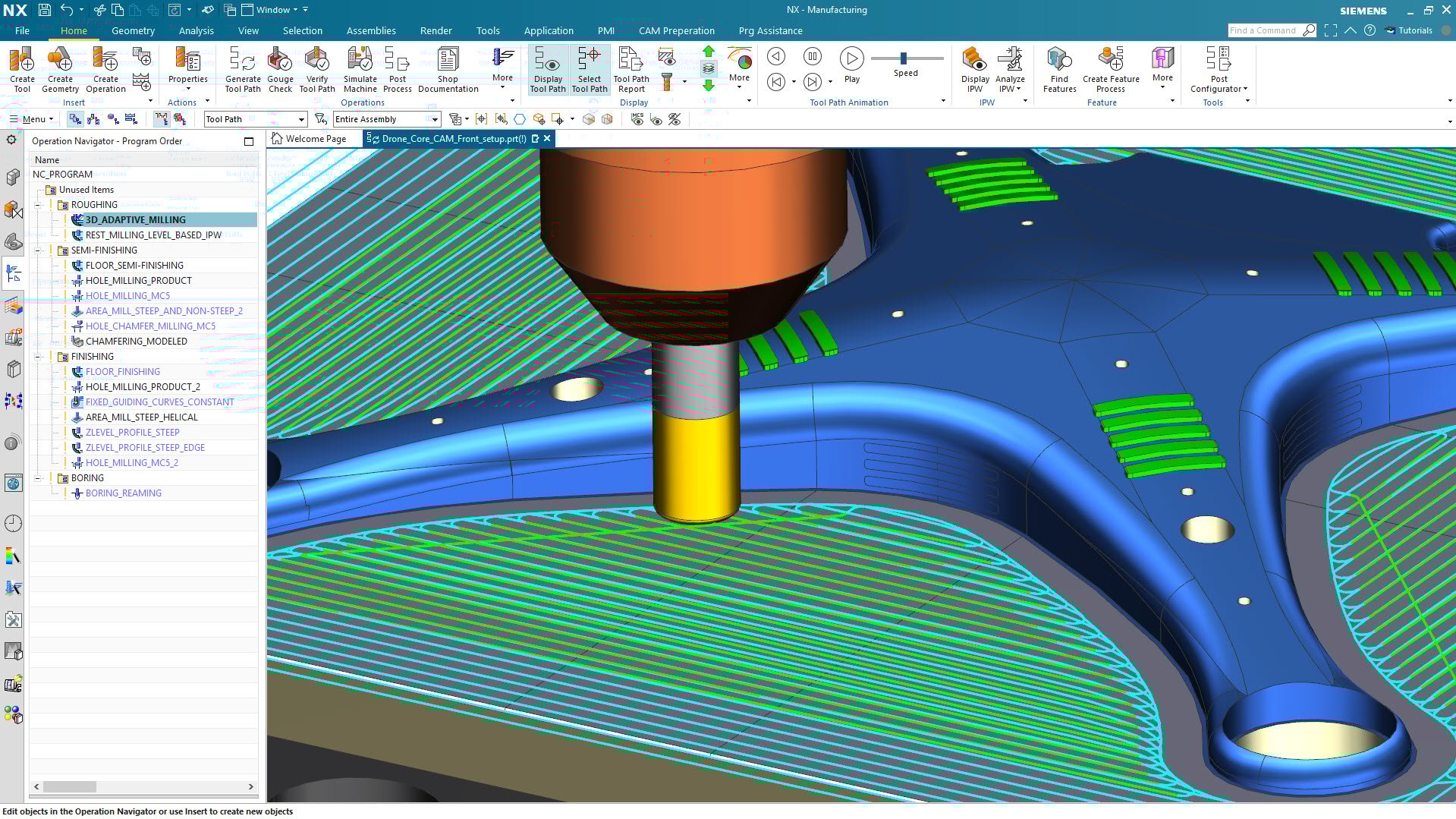
Produce superior quality mold inserts using a complete set of NC programming tools. High-speed roughing strategies help you reduce cycle time by up to 60 percent, while extending tool life. Fully automated rest milling removes uncut material from previous operations and eliminates air-cutting.
NX CAM Demo - Multi-channel turning
Multiple part programming speeds the development of tombstone and fixture configurations, intelligently distributing tool paths to multiple components in assemblies.
NX CAM Demo - PrimeTurning
Siemens partnered with Sandvik Coromant to implement PrimeTurning in NX. PrimeTurning ™ is an innovative machining method that uses high-performance CoroTurn Prime inserts enables higher performance machining.
NX CAM Demo - Prismatic machining
Minimize manual input and create optimized processes to machine precision parts. Advanced technologies, such as volume-based milling and automated feature recognition, can reduce programming time by up to 90 percent.
Play NX CAM Video
Play NX CAM Video
Play NX CAM Video
Play NX CAM Video
Play NX CAM Video
Product Avatar Image

Have you used NX CAM before?

Answer a few questions to help the NX CAM community

NX CAM Reviews (236)

Reviews

NX CAM Reviews (236)

4.4
236 reviews

Review Summary

Generated using AI from real user reviews
Users consistently praise the seamless CAD-CAM integration and powerful toolpath generation of NX CAM, which significantly enhances efficiency and accuracy in machining processes. The software's ability to handle complex geometries and provide reliable simulations is highly valued, although many note a steep learning curve for new users.

Pros & Cons

Generated from real user reviews
View All Pros and Cons
Search reviews
Filter Reviews
Clear Results
G2 reviews are authentic and verified.
Manoj S.
MS
Designer
Small-Business (50 or fewer emp.)
"User-Friendly, Feature-Rich CAD/CAM with Great Performance and Siemens Support"
What do you like best about NX CAM?

The software is very user-friendly and offers an ample range of features that a small- to mid-scale industry would require. Also, the inbuilt libraries of machines and fasteners make it much easier to model items at a fast pace. The cost-efficient CAM license makes it even more attractive and doesn’t bore a hole in a small-scale owner’s pocket. also like the performance, Integrations, intelligent AI based menu and UI optimization in realtime is awesome. also the siemens support is great in the industry. Review collected by and hosted on G2.com.

What do you dislike about NX CAM?

as of now, there is nothing that i dislike about, but the drafting workflow is more customizable. it is also a little bit of an problem for other software users. for example most of the manufacturing designers are well trained in solidworks which drafts just like catia but with some more options. the NX drafting workflow is quiet a burden since all the dimensions once placed are not linked to drafting preferences. hence if we would like to change the text/style of dimensions it is merely an time-consuming process. also it is very much tough to simulate or refine the drafting automation. Review collected by and hosted on G2.com.

EA
Application Engineer
Small-Business (50 or fewer emp.)
Business partner of the seller or seller's competitor, not included in G2 scores.
"High precision search and optimized performance"
What do you like best about NX CAM?

In the more recent versions, the search engine is consistently very accurate, even if I don’t know or fully understand the commands and even when I don’t use the exact name of an operation. Combined with the software’s overall optimization, this helps keep the hardware requirements relatively low, especially considering the tool’s graphical capabilities. Review collected by and hosted on G2.com.

What do you dislike about NX CAM?

When something goes wrong in the application, it can be hard to pinpoint the exact cause. Most of the time the message is generic or just says "check log," but even locating the NX log files can be complicated, and it often depends on the specific error. Review collected by and hosted on G2.com.

Jacob W.
JW
Engineering Manager
Small-Business (50 or fewer emp.)
"The best software hands down!"
What do you like best about NX CAM?

How powerful the software is. You can go off the deep end and get infinitly accurate tool path results. Or you can make simplistic tool paths and do it quickly Review collected by and hosted on G2.com.

What do you dislike about NX CAM?

Pricing, I know the software is power and the best of the best. I just wish there was a user friendly option that wasnt for business use. Something more affordable twards regular people Review collected by and hosted on G2.com.

IB
Application Engineer
Small-Business (50 or fewer emp.)
Business partner of the seller or seller's competitor, not included in G2 scores.
"Intuitive UI and Versatile Machining Capabilities"
What do you like best about NX CAM?

I like NX CAM's easy-to-learn interface, making it straightforward to address user questions and conduct 3-axis and turning training. I appreciate the many options it offers with a high level of control when defining parameters during toolpath generation. Support resources like images, descriptions, and videos are available throughout, maximizing the program's benefits. The extensive machining capabilities cover a wide variety of needs beyond common operations. Visual support is significant for product demonstrations, and NX CAM adds value by allowing me to show the customer's machine operating within the software. The initial setup was so easy, thanks to the helpful templates and numerous configuration options. Review collected by and hosted on G2.com.

What do you dislike about NX CAM?

The installer is big. Additionally, there was a recent change in the machining simulation, and its use has become somewhat confusing. Review collected by and hosted on G2.com.

Joanna B.
JB
Account Manager
Small-Business (50 or fewer emp.)
Business partner of the seller or seller's competitor, not included in G2 scores.
"NX CAM: Solving Key Manufacturing Challenges"
What do you like best about NX CAM?

NX CAM is valuable because it brings design and manufacturing together in a single system, which helps reduce rework and makes it easier to push updates through when designs change. It performs especially well for complex machining, and its automation and simulation tools are strong, helping teams work more efficiently while avoiding costly mistakes. Overall, it’s a solid fit for companies that want to standardize their processes and scale up advanced manufacturing capabilities. Review collected by and hosted on G2.com.

What do you dislike about NX CAM?

The main downsides of NX CAM are its higher cost and steeper learning curve compared to simpler CAM tools. It can also be overkill for shops doing basic machining, where the advanced features aren’t fully utilized. Review collected by and hosted on G2.com.

Ramesh G.
RG
Manufacturing Engineering Manager
Small-Business (50 or fewer emp.)
"Powerful CAM Tool with Interoperability But Challenging for Newcomers"
What do you like best about NX CAM?

I appreciate the interoperability of modules and seamless integration with NX CAM. The templates are really useful for a quick start in programming, especially when creating a tool path by easily attaching the geometry. It's great that no extensive expertise is needed in the organization for this. Also, the machine tool kit is helpful for simulation and crash testing before actual testing on the machine. Review collected by and hosted on G2.com.

What do you dislike about NX CAM?

Certainly on 5-axis programming, it should alert the programmer what methods are not compatible to make a tool path. Variable contour method and sequential milling need to be simplified more. It is also difficult to learn for new users, and NX resellers struggled to show the straight approach. The initial setup was a little harder than Mastercam. Review collected by and hosted on G2.com.

Verified User
G
Small-Business (50 or fewer emp.)
"Streamlined Automation with Reliable Integration"
What do you like best about NX CAM?

I really like that NX CAM reduces the amount of manual work and is part of the full stream design experience. The user interface doesn't change significantly with every version, which makes updates easier since I don't have to learn everything from scratch. There is good documentation available on the Siemens website and forums. The integration with Teamcenter works out of the box without needing third-party solutions or custom code. Additionally, the initial setup is pretty easy, and even though the license server can be tricky on a Linux host, the software itself is easy to manage. Review collected by and hosted on G2.com.

What do you dislike about NX CAM?

I found the requirement of having a physical GPU to be a bit annoying. It makes it difficult to use on a virtual machine, even though it works pretty well for non-complex automations there. Also, the license server can be tricky sometimes, especially on a Linux host. Review collected by and hosted on G2.com.

Marco L.
ML
Solution Specialist - Design Engineer
Small-Business (50 or fewer emp.)
"Robust Tool for CNC Programming, with Room for User-Friendliness"
What do you like best about NX CAM?

I use NX CAM for programming CNC machines, and it helps me create toolpaths, simulate machining processes, and optimize production for precision and efficiency. I appreciate that NX CAM helps me reduce programming time, avoid machining errors through simulation, and improve overall production efficiency. It handles complex geometries easily and ensures consistent, high-quality results. What I like most about NX CAM is its powerful simulation capabilities and seamless integration with CAD. It allows me to work efficiently on complex parts while maintaining high accuracy, and the automation features significantly speed up the programming process. Review collected by and hosted on G2.com.

What do you dislike about NX CAM?

One area that could be improved is the learning curve, which can be quite steep for new users. Some workflows also feel complex or require multiple steps for tasks that could be simplified. Additionally, performance can slow down with very large assemblies or highly detailed toolpaths. The initial setup is also hard, which could be improved with more guided, task-based tutorials and in-context help directly within the interface. Review collected by and hosted on G2.com.

Jakub M.
JM
PLM specialist
Enterprise (> 1000 emp.)
"Seamless CAD Integration and Accurate Simulation That Save Time in NX CAM"
What do you like best about NX CAM?

In NX CAM, what I value most is the seamless CAD integration, which automatically updates toolpaths after design changes and saves a significant amount of time. Once you get used to it, the interface becomes very efficient, and reusable templates make it easy to standardize and speed up programming. It handles complex parts very well, and the simulation is accurate enough to catch errors before they reach the machine. Although it’s expensive, the ROI is clear through faster programming, fewer mistakes, and better machine utilization. Review collected by and hosted on G2.com.

What do you dislike about NX CAM?

What I dislike about NX CAM is the steep learning curve—it takes a lot of time and training to become truly efficient. The interface, while powerful, can feel cluttered and unintuitive for new users, especially compared to more modern CAM systems. It’s also quite expensive, which can be a barrier for smaller shops or individual users. Additionally, some toolpath calculations and updates can be slow on less powerful hardware, which affects productivity. Review collected by and hosted on G2.com.

Amit S.
AS
Senior Design Engineer
Small-Business (50 or fewer emp.)
"Powerful Toolpath Design with Room for AI Enhancements"
What do you like best about NX CAM?

I love using NX CAM for tool path design for surgical robots used in knee replacement surgeries. It really helps in developing complex tool paths that need to traverse tight spaces around surgical tools. The ease of tool path development and the multiple options available make it straightforward to design the optimal path. I also find the 5-axis milling capabilities extremely handy for designing tool paths for robotic end effectors, especially when adaptating to the different geometries of implants in hip replacements. The ease of use and complex tool path design capabilities are what made us switch from PowerMill to NX CAM. Review collected by and hosted on G2.com.

What do you dislike about NX CAM?

NX CAM can be a bit finicky about the cavity being used for toolpath design, and any minor abnormality in the cavity can lead to absurd toolpaths. It should be able to recognize these abnormalities by itself and not let the toolpath design be affected as much. Additionally, there is very limited support for NXOpen toolpath design; any AI assistance for NXOpen coding would greatly help. Review collected by and hosted on G2.com.

People Icons

Start a Discussion about NX CAM

Have a software question? Get answers from real users and experts.

Start a Discussion

Pricing Options

Pricing provided by NX CAM.

NX X Manufacturing Essentials

Starting at $220.00
Per Month

NX X Manufacturing CAM Standard

Starting at $250.00
Per Month

NX X Manufacturing CAM Advanced

Starting at $500.00
Per Month
NX CAM Comparisons
Product Avatar Image
Mastercam
Compare Now
Product Avatar Image
PowerMill
Compare Now
Product Avatar Image
SolidCAM
Compare Now
NX CAM Features
CAD-CAM Import
CAM Data Exchange
CAD/CAM Compatibility
CNC Workflows
CNC Feature Recognition
Programming Control
Job Set-up
Operations
Tooling and Toolpaths
Product Avatar Image
NX CAM