Compare this with other toolsSave it to your board and evaluate your options side by side.
Save to board

Microsoft Word Reviews & Product Details

Profile Status

This profile is currently managed by Microsoft Word but has limited features.

Are you part of the Microsoft Word team? Upgrade your plan to enhance your branding and engage with visitors to your profile!

Value at a Glance

Averages based on real user reviews.

Time to Implement

3 months

Return on Investment

13 months

Microsoft Word Media

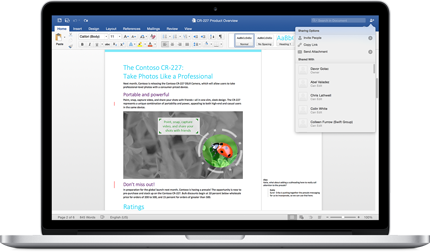
Microsoft Word Demo - Microsoft Word
Microsoft Word
Microsoft Word Demo - Microsoft Word
Microsoft Word
Microsoft Word Demo - Microsoft Word
Microsoft Word
Product Avatar Image

Have you used Microsoft Word before?

Answer a few questions to help the Microsoft Word community

Microsoft Word Reviews (2,047)

View 5 Video Reviews
Reviews

Microsoft Word Reviews (2,047)

View 5 Video Reviews
4.7
2,048 reviews

What do users say?

Generated using AI from real user reviews
Users consistently praise the user-friendly interface and robust formatting tools of Microsoft Word, which simplify document creation and editing. The seamless integration with Microsoft 365 enhances collaboration and efficiency, making it a preferred choice for both personal and professional use. However, some users note that the interface can feel cluttered, which may overwhelm new users.

Pros & Cons

Generated from real user reviews
View All Pros and Cons
Search reviews
Filter Reviews
Clear Results
G2 reviews are authentic and verified.
Parmeshwar P.
PP
Parmeshwar P.
Project Associate I
Chemicals
Small-Business (50 or fewer emp.)
"Reliable and Easy-to-Use Document Software."
4.5/5
What do you like best about Microsoft Word?

One the best easy to use document software. It offline can be used. as per requirement i can edit or print it. auto save option is best . Review collected by and hosted on G2.com.

What do you dislike about Microsoft Word?

For more premium feature it required to purchase subscription. Sometimes login issue. Review collected by and hosted on G2.com.

Verified User in Design
UD
Verified User in Design
Small-Business (50 or fewer emp.)
"The Word Experience: 2026"
5/5
What do you like best about Microsoft Word?

From my POV, it's the best software that you can use to write anything in any language and in any font. Personally, I like the advanced customisation formatting controls. And also, one more thing, it works on any system hardware, you don't need any high end pc or laptop Review collected by and hosted on G2.com.

What do you dislike about Microsoft Word?

It's part of Microsoft 365, which comes with a cost, as you expect. If you don't have the original, then you have to pay for it on a monthly subscription, and I have personally faced the problem like the moving image problem or formatting inconsistency Review collected by and hosted on G2.com.

AS
Alicea S.
Attorney * eDiscovery Professional
Small-Business (50 or fewer emp.)
"Oh, my Word! Fast, Easy, and Seamless Collaboration with Microsoft 365"
4.5/5
What do you like best about Microsoft Word?

What I like most about Microsoft Word is how easy it is to use and how smoothly it connects with other applications. I can draft, edit, and format documents quickly, and its integration with tools like Excel, Outlook, and Teams makes it simple to share files and collaborate without extra hassle. Review collected by and hosted on G2.com.

What do you dislike about Microsoft Word?

I don’t have many complaints about Microsoft Word, but a few tools can be surprisingly tricky to find when I need them quickly. With larger documents, it can start to slow down and formatting can become harder to keep consistent throughout. I’ve also run into occasional compatibility issues between different versions, or when working with non-Microsoft platforms. Review collected by and hosted on G2.com.

SD
Susheel Kumar D.
Account and Finance
Consumer Goods
Mid-Market (51-1000 emp.)
"Reliable Platform for Creating Clear, Accurate Documents"
5/5
What do you like best about Microsoft Word?

What I like most about Microsoft Word is its powerful document creation and formatting capabilities. Features like styles, templates, tables, and references make it easy to create professional reports and documentation. As an Analyst, I use Word to prepare detailed reports, client communications, and presentations-ready documents efficiently. Integration with Outlook and Teams allows me to collaborate and share documents without leaving the workflow. Review collected by and hosted on G2.com.

What do you dislike about Microsoft Word?

Word can feel heavy when working with very large documents or multiple embedded objects. Track Changes and collaboration features sometimes cause confusion if multiple users edit simultaneously. Advanced formatting options can be overwhelming for new users, and occasional performance lag happens with long reports. Review collected by and hosted on G2.com.

niamh o.
NO
niamh o.
Data analyst freelance
Mid-Market (51-1000 emp.)
Guest users or non-business users of the software, not included in G2 scores.
"Best-in-Class Document Writing with Reliable Autosave and Recovery"
5/5
What do you like best about Microsoft Word?

Absolutely the best software available for writing documents, reports, dissertations and being able to integrate and format both text and pictures. Includes professional editing tools and is reliable for saving documents with the autosave function. Even if you forget to save a file, it attempts to auto recover it the next time you open word Review collected by and hosted on G2.com.

What do you dislike about Microsoft Word?

Honestly there is not a lot of downsides to word- there are so many tools available- i think the one issue I have is that sometimes I don't know how to use a tool and it can be tricky trying to figure it out. Review collected by and hosted on G2.com.

Verified User in Computer & Network Security
UC
Verified User in Computer & Network Security
Small-Business (50 or fewer emp.)
"Easy to Use and Integrates Great with Microsoft Products"
4.5/5
What do you like best about Microsoft Word?

I like how easy it is to use, and the editing options are really good. It’s also simple to convert files with Microsoft, and it integrates well with other Microsoft products. Another thing I appreciate is the large selection of free templates for envelopes, letters, and other forms we might need. Review collected by and hosted on G2.com.

What do you dislike about Microsoft Word?

Not much to add, besides that I wish it were a bit cheaper. Also, sometimes the cloud connection randomly doesn’t work and the support can be tough to reach quickly for help. Review collected by and hosted on G2.com.

Ishan S.
IS
Ishan S.
Manager and Dietician at Chaitanya Homoeo Clinic, Medical Store Owner, Content Creator
Hospital & Health Care
Small-Business (50 or fewer emp.)
"Gets Real Work Done When Documentation Actually Matters"
4.5/5
What do you like best about Microsoft Word?

I work as a Dietician and Nutritionist, manage a homeopathy clinic, and also prepare health education and guidance material for patients and students. My daily routine involves a lot of writing and documentation work. This includes creating diet plans, writing patient instructions, preparing educational notes, drafting scripts for explanations, organizing information, and maintaining written records. Because of this, I need a tool that is reliable, easy to use, and suitable for continuous professional work. Microsoft Word fits very naturally into this role.

I use It almost daily. it allows me to focus completely on my work without worrying about the tool itself. I can start writing immediately without setup or confusion. The interface feels familiar, and everything is placed in a logical way. This makes it very comfortable for daily use, especially when I have to work for long hours on documents.

Microsoft Word helps me keep my work structured and clear. When I create diet plans or patient guidance documents, clarity is very important. Word allows me to arrange information using proper spacing, bullet points, tables, and sections. This helps me present information in a way that is easy to read and understand for patients and students.

I also use Microsoft Word regularly for content creation. When I prepare educational material or nutrition-related articles, Word gives me the flexibility to write freely and then refine the content slowly. I can improve wording, adjust sentences, and reorganize paragraphs without losing the overall structure. This makes content creation smoother and less stressful.

Another important use for me is script writing. When I prepare explanations for health topics or educational sessions, I often write scripts or structured notes in Word. It helps me organize my thoughts clearly and make sure the explanation flows well. Editing and revising scripts in Word is very easy, which saves time.

Microsoft Word is also very useful for long and detailed documents. Some of my work requires writing detailed instructions, case-related notes, or educational content that needs regular updates. Word handles long documents smoothly and allows me to continue working without performance issues. This is important for professional documentation that grows over time.

I appreciate how Word supports consistency in my work. When I create multiple documents related to diet plans, nutrition guidance, or educational material, Word helps me maintain a similar format and style. This gives a professional look to my work and makes documents easier to manage.

Another thing I like is how flexible Word is for different types of tasks. Some days I use it mainly for clinic documentation, while on other days I use it for learning notes, planning ideas, or drafting rough content. It adapts well to different needs without feeling complicated.

Microsoft Word also works well with other tools and file formats. I can open documents created by others, edit them easily, and share my work without compatibility issues. This makes collaboration and information sharing smoother.

Word also helps improve productivity over time. Instead of starting from a blank page every time, I can reuse existing documents, update sections, and make quick changes. This reduces repetitive work and allows me to focus more on the actual content and decision making.

I also find Word reliable for regular use. It performs consistently and allows me to work without interruptions. This reliability is important in a professional environment where written work needs accuracy and continuity.

Overall, Microsoft Word plays a very important role in my daily professional life. It supports documentation, content creation, script writing, educational material preparation, and routine writing tasks. It is easy to use, flexible, reliable, and well suited for long-term professional work. For someone managing clinic responsibilities, nutrition guidance, and educational content, Microsoft Word continues to be one of the most practical and dependable tools I use every day. Review collected by and hosted on G2.com.

What do you dislike about Microsoft Word?

One thing I dislike about Microsoft Word is that it can feel a bit heavy at times, especially when working on very long or complex documents. When files become large with many pages, images, or tables, the performance can slow down slightly, which affects the overall flow of work.

Another issue is that Word has many features, but not all of them are easy to find or understand. Some useful options are hidden inside menus or require extra steps to access. For regular users, this can feel confusing and time-consuming when trying to adjust formatting or layout details.

Formatting consistency can also be challenging. Sometimes when editing or copying content from different sources, the formatting changes unexpectedly. Fixing spacing, alignment, or styles can take extra time, especially in professional documents where clean formatting is important.

I also feel that collaboration features can sometimes create confusion. When multiple edits or comments are added, documents can become cluttered, and tracking changes may require careful attention. This adds extra effort when reviewing or finalizing content.

Another limitation is the dependency on licensing and subscriptions. While Word is a powerful tool, full access requires a paid plan, which may not be convenient for everyone. This can be a concern for users who only need basic features.

Word also occasionally updates its interface or layout. While updates are meant to improve functionality, they can disrupt familiarity. Small changes in menus or tools sometimes slow down work until I adjust to the new layout.

Despite these points, these are mostly usability and workflow issues rather than major problems. Microsoft Word remains very useful for daily professional work, but improvements in performance, formatting control, and simplicity would make the experience even better. Review collected by and hosted on G2.com.

Vince D.
VD
Vince D.
Assistant General Manager / Pickleball Operations
Small-Business (50 or fewer emp.)
"So Easy to Use—Everything Is Right Where I Expect It"
5/5
What do you like best about Microsoft Word?

I have used Microsoft word for many years and believe it is a great tool for generating clear and concise documents. I also use the templates for my pickleball job. Review collected by and hosted on G2.com.
What do you dislike about Microsoft Word?

It’s hard for me to find anything I don’t like about Microsoft Word. The changes it has gone through over the years have all been positive in my experience, and each update has generally felt like an improvement. Review collected by and hosted on G2.com.

Verified User in Renewables & Environment
UR
Verified User in Renewables & Environment
Mid-Market (51-1000 emp.)
"Microsoft Word Makes Document Preparation Easy with Seamless Office Integration"
5/5
What do you like best about Microsoft Word?

Official documents, reports specifically checklist for activities at solar power plant, o&m related reports like RCA, proposals preparation is very easier with Microsoft word. It's various features like templates, layouts making it more easier for us to prepare documents. Apart from this it's seamless integration with Microsoft tools makes it better tool for office workflows. Review collected by and hosted on G2.com.

What do you dislike about Microsoft Word?

Nothing to dislike about microsoft word. Review collected by and hosted on G2.com.

Sameer S.
SS
Sameer S.
Student
Small-Business (50 or fewer emp.)
"Versatile Templates and AI Boost Make Microsoft Word Essential"
4.5/5
What do you like best about Microsoft Word?

I like microsoft word because there is a lot of templates available on the microsoft store free as well as on paid basis but all of them are very usefull for me and for evreyone. I love this app more because i can create pdf for my college assignments and presentaions and now we can even enhance our productivity with the use of AI integrated with it.It has become a part of my everyday life. Review collected by and hosted on G2.com.

What do you dislike about Microsoft Word?

The only thing i can dislike about this app is that sometimes few features are hidden deep inside menus and for that we have to find a lot in it . On some low end pcs this can app can be felt a bit heavy and lagging. Aligning the images and texts can be a bit frustrating. Review collected by and hosted on G2.com.

Questions about Microsoft Word? Ask real users or explore answers from the community

Get practical answers, real workflows, and honest pros and cons from the G2 community or share your insights.

GU
Guest User
Last activity 2 months ago

What are 3 new features in Microsoft Word?

Emmanuella A.
EA
Emmanuella Amoah
Last activity 29 days ago

How do Microsoft Word’s tools help you type and edit documents faster?

Pricing Insights

Averages based on real user reviews.

Time to Implement

3 months

Return on Investment

13 months

Average Discount

10%

Microsoft Word Comparisons
Microsoft Word Features
Calendar
Website
Applications
Revision History
Suggestion Mode
Document Editor
Export
Import
Web Publishing
Multi-User Collaboration
Real-Time Communication
Product Avatar Image
Microsoft Word
4.7/5(2,048)