


Leapfrog Geo

By Seequent

4.5 out of 5 stars
3 star
0%
2 star
0%
1 star
0%

How would you rate your experience with Leapfrog Geo?

Compare this with other toolsSave it to your board and evaluate your options side by side.
Save to board

Leapfrog Geo Reviews & Product Details

Leapfrog Geo Media

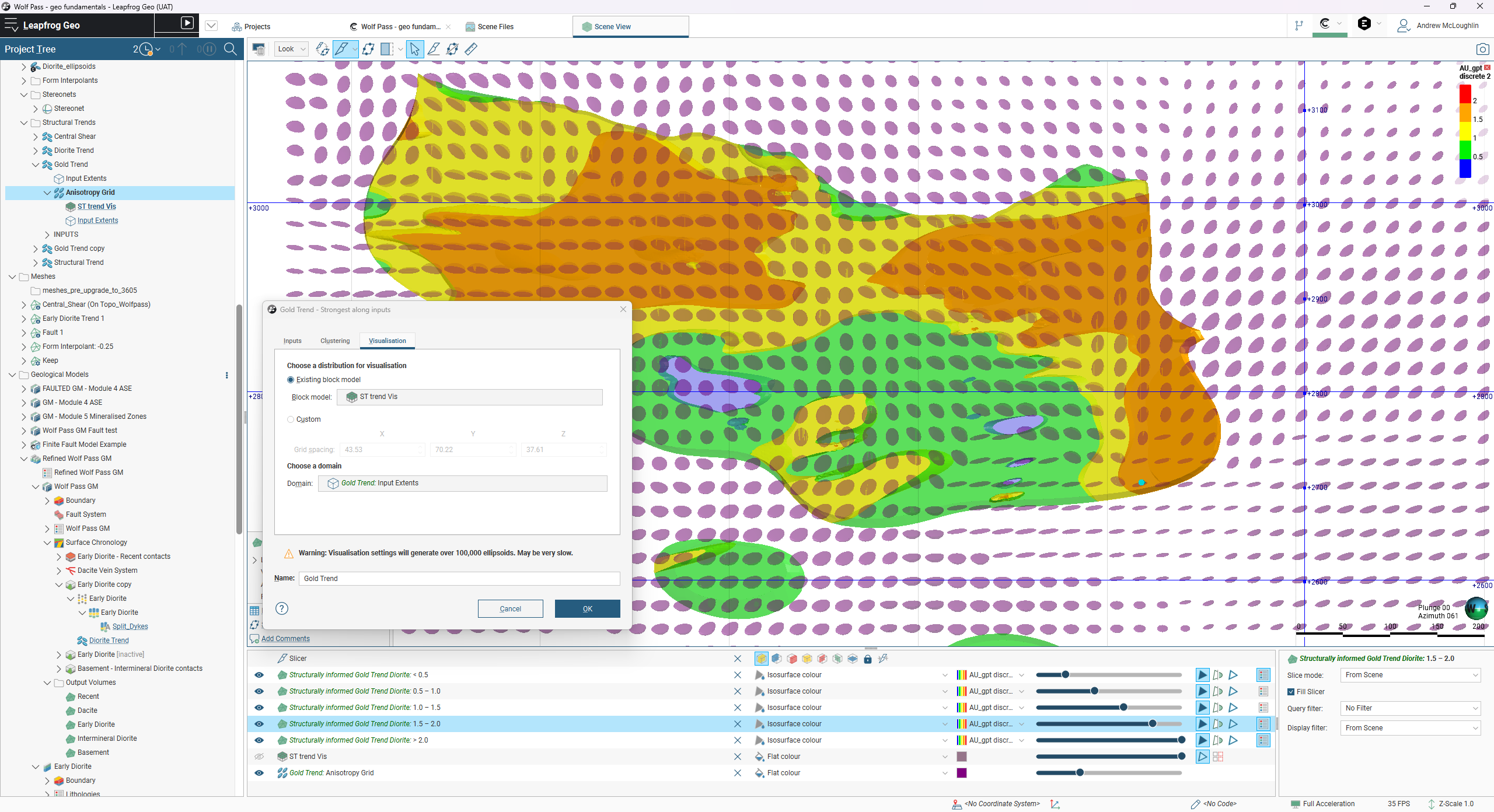
Leapfrog Geo Demo - Structural trend visualisation in Leapfrog Geo
Structural trend visualisation in Leapfrog Geo
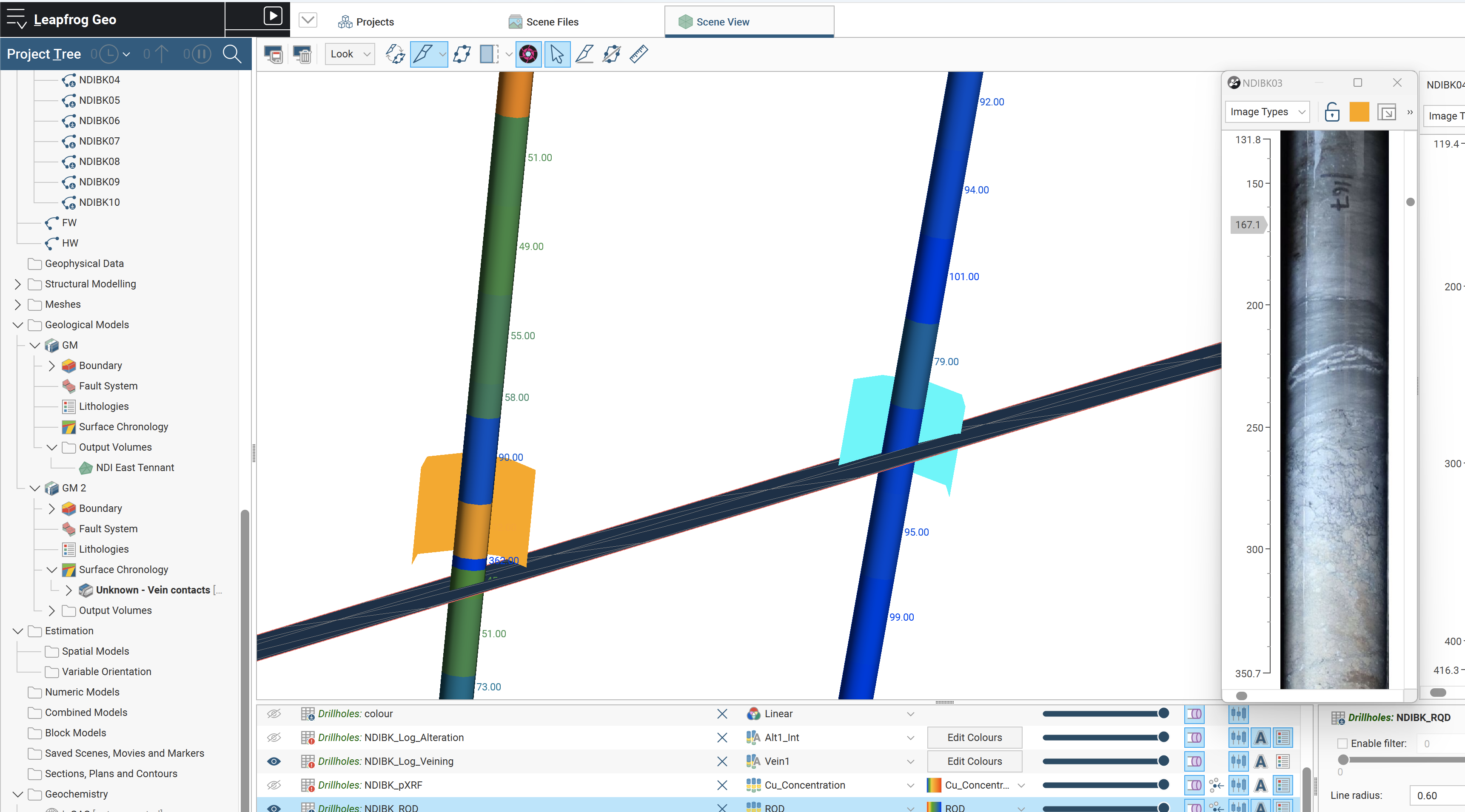
Leapfrog Geo Demo - Multiple holes with different coloured scene highlights
Multiple holes with different coloured scene highlights in Leapfrog Geo
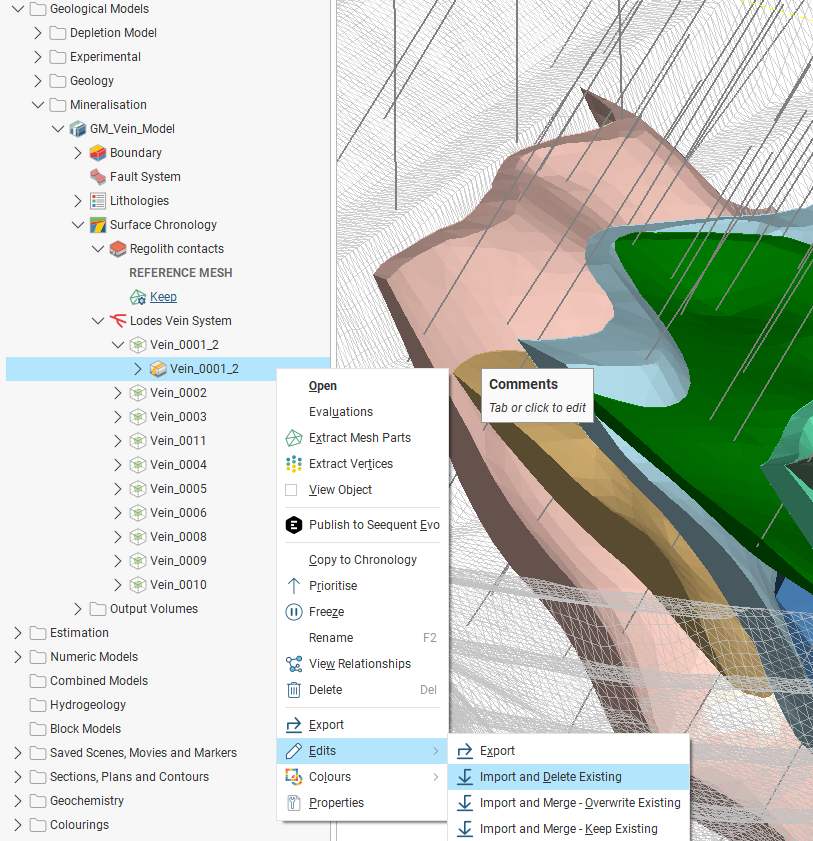
Leapfrog Geo Demo - Vein edit in Leapfrog Geo
Vein edit in Leapfrog Geo
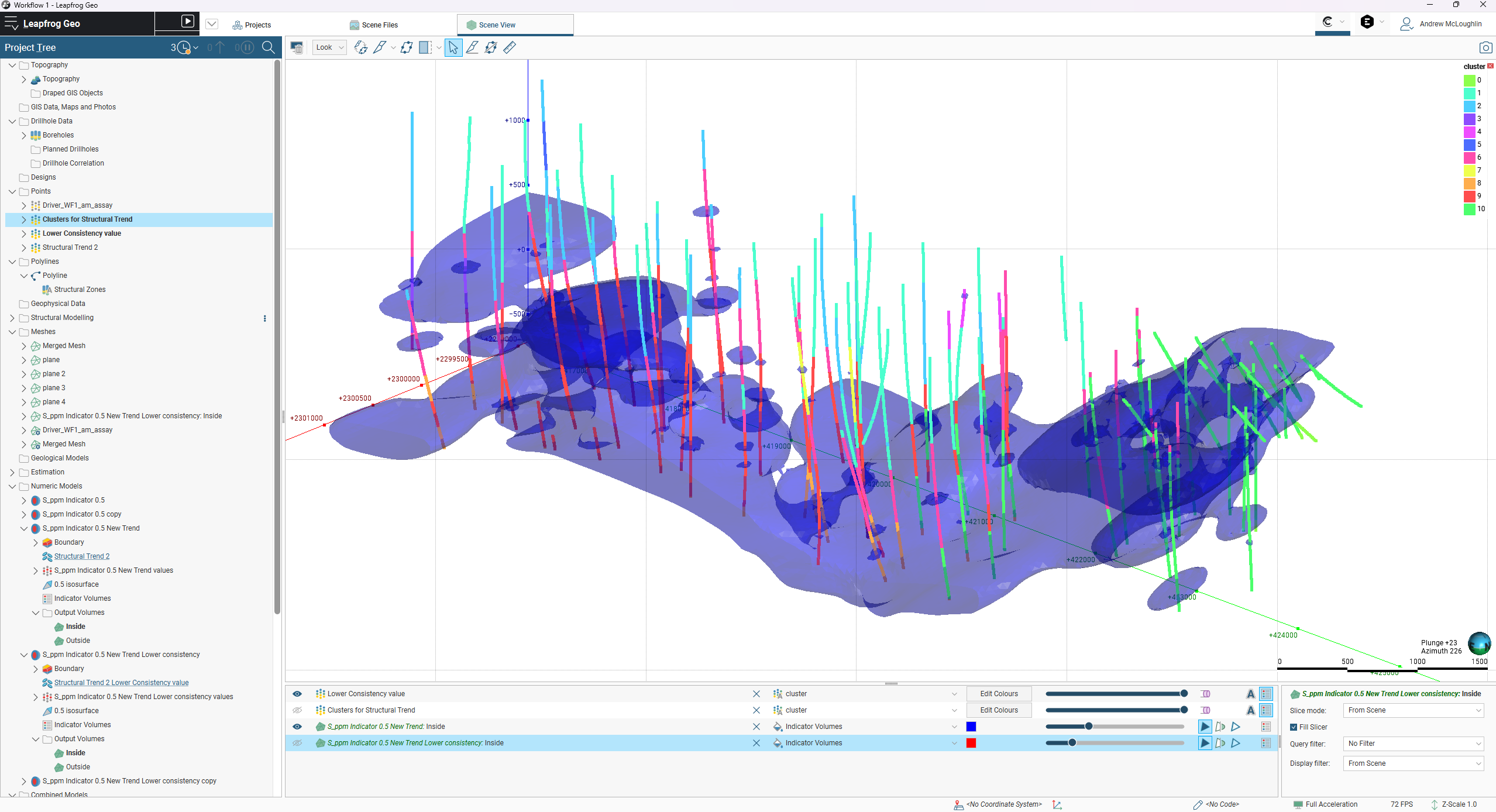
Leapfrog Geo Demo - Structural trends cluster in Leapfrog Geo
Structural trends cluster in Leapfrog Geo
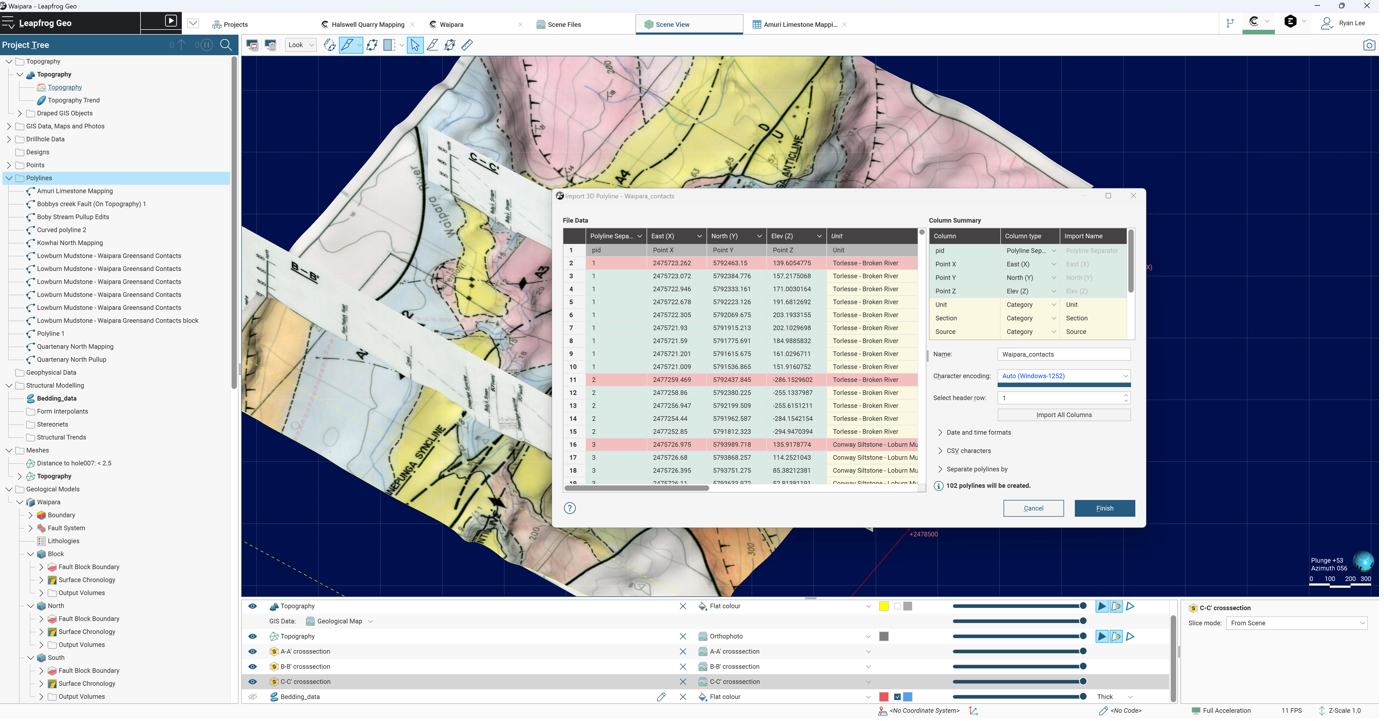
Leapfrog Geo Demo - Polyline import counter in Leapfrog Geo
Polyline import counter in Leapfrog Geo
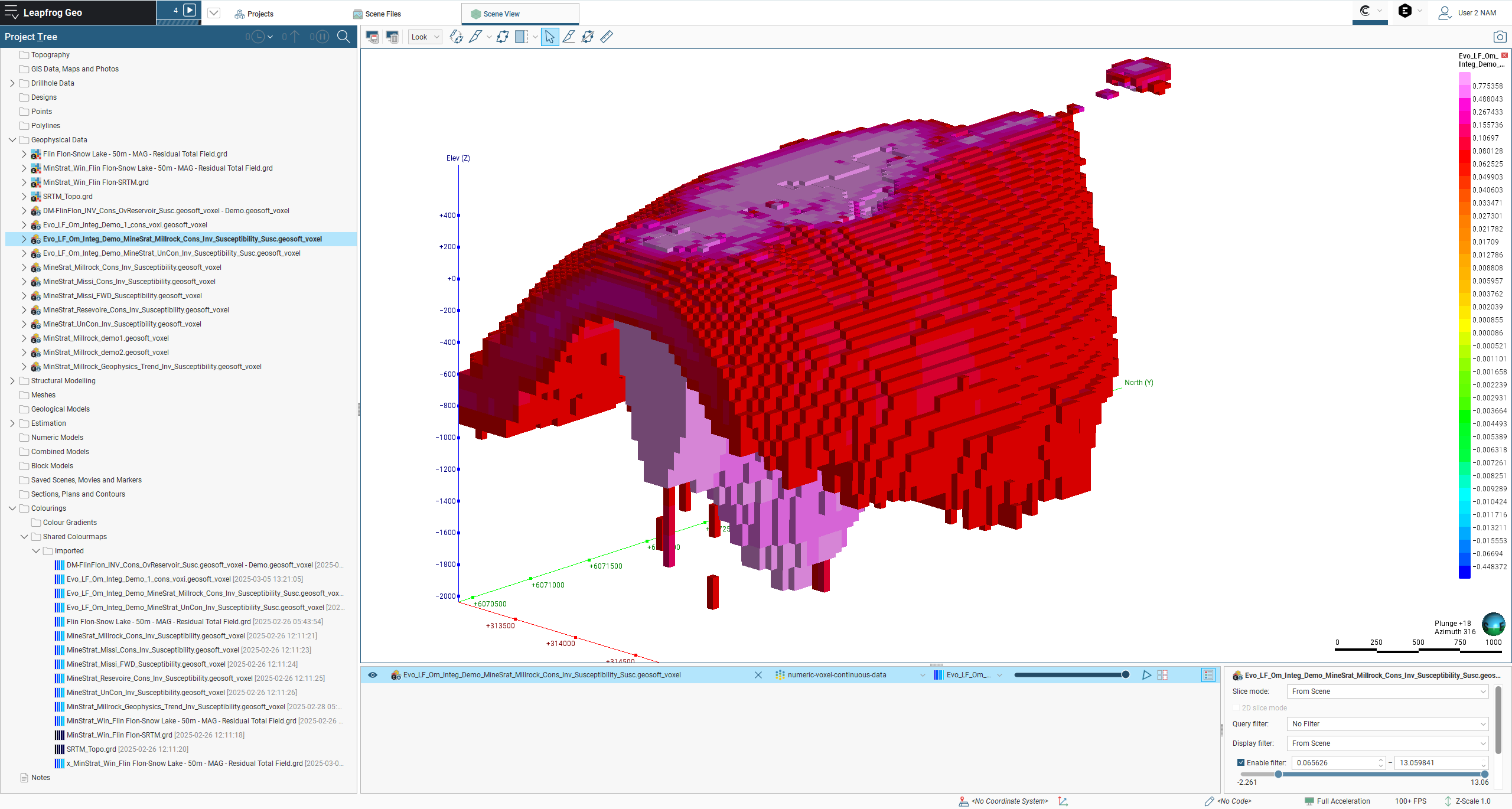
Leapfrog Geo Demo - Geophysics grid with colours applied
Geophysics grid with colours applied
Streamlining structural modelling using Leapfrog 2025.1
Play Leapfrog Geo Video
Streamlining structural modelling using Leapfrog 2025.1
Streamlining your multi-domain set-up and rotation management in Leapfrog 2025.1
Play Leapfrog Geo Video
Streamlining your multi-domain set-up and rotation management in Leapfrog 2025.1
Streamlining cross-section creation in Leapfrog 2025.1
Play Leapfrog Geo Video
Streamlining cross-section creation in Leapfrog 2025.1
Product Avatar Image

Have you used Leapfrog Geo before?

Answer a few questions to help the Leapfrog Geo community

Leapfrog Geo Reviews (51)

Reviews

Leapfrog Geo Reviews (51)

4.5
51 reviews

Review Summary

Generated using AI from real user reviews
Users consistently praise the software for its ease of use and dynamic modeling capabilities, which significantly streamline the process of creating and updating geological models. The intuitive interface and strong visualization tools enhance user experience, making complex data easier to interpret. However, many note a steep learning curve for advanced features, which can hinder new users.
Search reviews
Filter Reviews
Clear Results
G2 reviews are authentic and verified.
orestis d.
OD
Exploration Geologist - MSc candidate
Enterprise (> 1000 emp.)
"Intuitive 3D Modeling and Visualization Made Easy"
What do you like best about Leapfrog Geo?

I really like how the user interface is very easy to use and intuitive. It helps me a lot with doing structural interpretations and visualizing datasets, making it really easy to look at different models. The ease of making cross sections and different interpolations for block models is something I really appreciate. The interface makes it very easy to achieve this without having to read all the documentation. The keyboard shortcuts and everything just make it very easy to use. Review collected by and hosted on G2.com.

What do you dislike about Leapfrog Geo?

I'd like to have a bit more options when making structural trends, like changing the colors and legends. It could be easier for data handling too, instead of having to do everything on Excel and import/export. It'd be nice to change data in the tables directly in Leapfrog Geo. Review collected by and hosted on G2.com.


Castillejo V.
CV
Geology & Site Assessment Manager
Building Materials
Mid-Market (51-1000 emp.)
"Revolutionized Our Geological Modeling and Quarry Planning"
What do you like best about Leapfrog Geo?

I really appreciate Leapfrog Geo's powerful implicit 3D modeling engine and real-time updating capability. It's incredibly valuable for our operations because even with dense borehole data across large deposit sites, it quickly generates accurate, continuous geological models without requiring extensive manual editing. The automatic updates with new field data save us countless hours of reworking and recalculating. I also enjoy the highly detailed, professional 3D visualizations, which simplify the interpretation and sharing of complex subsurface structures. This has greatly improved communication with our quarry managers, sales teams, regulators, and clients, speeding up approvals and aligning decision-making. Review collected by and hosted on G2.com.

What do you dislike about Leapfrog Geo?

One issue is that customizing volume reporting and export formats to match our internal ERP and quarry management systems can be cumbersome. The built-in reporting templates are more mining-focused, so we often have to manually rearrange data to fit our material tracking and invoicing needs, which adds extra administrative time. We also find that when working with irregular, small-scale deposit sites common in urban Hamburg and surrounding areas, some of the automatic interpolation settings can be overly aggressive, requiring extra fine-tuning to reflect real-world geological boundaries accurately. Review collected by and hosted on G2.com.

Merlino A.
MA
Project Development Manager
Renewables & Environment
Mid-Market (51-1000 emp.)
"Dynamic 3D Modeling with Performance Trade-offs"
What do you like best about Leapfrog Geo?

I appreciate Leapfrog Geo's powerful dynamic implicit modeling engine and real‑time 3D updating capability. It's incredibly valuable for our renewable energy and environmental projects in southern Germany. Unlike traditional 2D tools, it automatically refines and rebuilds subsurface models as soon as we import new borehole data, groundwater measurements, geophysical surveys, or contamination test results. This capability saves our team countless hours of manual redrawing and data reprocessing, especially during iterative project phases like wind farm siting, geothermal exploration, and remediation design. Review collected by and hosted on G2.com.

What do you dislike about Leapfrog Geo?

One issue is that its performance can degrade when working with very large, dense datasets common in wind farm and regional groundwater projects. Rotating 3D views, generating cross-sections across wide project areas, or importing dozens of boreholes at once can lead to lag and slower loading times, which disrupts our work during tight planning phases. Review collected by and hosted on G2.com.

Schaich R.
SR
Senior Property & Asset Manager
Commercial Real Estate
Mid-Market (51-1000 emp.)
"Revolutionized Our Real Estate Geotechnical Workflow"
What do you like best about Leapfrog Geo?

I appreciate most about Leapfrog Geo is its dynamic implicit modeling engine and real-time 3D updating capability, which has completely transformed our geotechnical workflow for commercial real estate projects in Berlin. It automatically rebuilds subsurface models as soon as we import new data, saving us countless hours of manual redrawing and ensuring our models always reflect the latest site information. The ability to create clear, professional 3D visualizations and cross-sections is outstanding, making complex geological data accessible to architects, investors, and local building authorities. I also value the quick generation of presentation-ready cross-sections, essential for design and permitting, and the volumetric estimation tools that help accurately quantify soil volumes and excavation needs. Additionally, the support for various field data formats reduces data preparation time, and the integration with AutoCAD Civil 3D, Revit, and ArcGIS aligns geological data with planning maps and building designs smoothly. Review collected by and hosted on G2.com.

What do you dislike about Leapfrog Geo?

One issue is that handling large, dense urban datasets can sometimes slow down the software, especially when rendering detailed 3D subsurface models across multiple city-center development sites. This can create minor delays when we need to quickly adjust views or generate cross-sections for urgent client or regulatory meetings. Simple actions like rotating the model, adjusting a slice, or importing additional survey data can lead to loading delays or temporary unresponsiveness, which disrupts our workflow during tight due-diligence deadlines. The software could offer more streamlined BIM integration for direct use with Revit and other tools widely used in real estate development, reducing file conversion and data loss. More user-friendly template customization for engineering and construction reports would help us comply with Berlin’s local building authority standards without manual reformatting. Enhanced keyboard shortcuts and UI customization would let our team navigate models faster and tailor the workspace to non-geological users. Finally, better performance presets for urban-scale datasets would help maintain speed without sacrificing model detail, making the platform more efficient for day-to-day real estate and civil engineering work. Review collected by and hosted on G2.com.

Roseland D.
RD
Geotechnical Project Manager / Senior Geologist
Mining & Metals
Mid-Market (51-1000 emp.)
"A Game-Changer for Geological Modeling with Room for Customization"
What do you like best about Leapfrog Geo?

I appreciate most about Leapfrog Geo is its dynamic 3D geological modeling engine and real-time data updating capability, which has been a game-changer for our mining and metals operations in Bielefeld. Unlike traditional 2D software that requires rebuilding entire models when new drilling data is added, Leapfrog Geo automatically refreshes the 3D ore body and rock formation models instantly. This saves our technical team countless hours during fast-paced exploration and production phases. Its ability to handle complex mineral deposit structures common in our region is impressive. The software seamlessly integrates geological surveys, borehole logs, and assay data, creating highly accurate visualizations that let us precisely map ore grades and reserve boundaries. This clarity directly improves our resource estimation accuracy. These features also support safety and compliance. Updated geotechnical models help us identify hazards earlier and adjust mine design accordingly. And when reporting to regulators or management, we always present the latest, most reliable data, which speeds up approvals and builds trust. Review collected by and hosted on G2.com.

What do you dislike about Leapfrog Geo?

One key issue is that the software remains heavily focused on hard-rock mining workflows, with limited customization for industrial minerals and bulk raw materials that we handle. Default grading templates, reporting layouts, and resource calculation methods don’t align well with our material specifications, forcing us to manually adjust parameters and rework outputs for internal planning and regulatory submissions. Most reporting and grading layouts in Leapfrog Geo are designed for precious metals and complex hard-rock deposits, not the industrial minerals and bulk materials we focus on. As a result, generated reports often include irrelevant metrics, missing material properties, and formatting that doesn’t meet German mining authority standards. We end up exporting data to spreadsheets and CAD software to rebuild tables, adjust classifications, and rewrite summaries for compliance. This adds 2–4 hours per report and increases the risk of transcription errors. For a mid-sized company with 51–200 employees, this drains time from core geology and planning work. We also face issues with resource estimation templates. Default settings don’t support our typical density and bulk calculation rules, so we must manually reconfigure parameters for every new project. Review collected by and hosted on G2.com.

Leko Z.
LZ
Senior Civil Engineering Project Coordinator
Civil Engineering
Mid-Market (51-1000 emp.)
"Dynamic 3D Modeling Revolutionizes Geotechnical Assessments"
What do you like best about Leapfrog Geo?

I appreciate most about Leapfrog Geo is its powerful dynamic 3D geological modeling engine and real-time data updating capability, which has completely transformed our geotechnical workflows. Unlike traditional 2D software that requires full model reconstruction when new borehole or survey data is added, Leapfrog Geo automatically refreshes the entire subsurface model, saving our engineering team countless hours during fast-paced infrastructure projects. Its intuitive handling of complex geological data—including soil layers, groundwater levels, and bedrock structures in the Ruhr Valley’s varied geology—allows us to create highly accurate visualizations that improve foundation design and risk assessment. The software also excels at generating clear cross-sections, volume estimates, and professional reports for clients and authorities, streamlining communication and approval processes. Review collected by and hosted on G2.com.

What do you dislike about Leapfrog Geo?

One notable issue is its handling of large-scale linear infrastructure projects, such as road and rail alignments in the Ruhr area. The software can become slow and unresponsive when processing long, narrow model zones with dense borehole data, requiring frequent simplification that reduces local accuracy. We also find its automated fault and layer interpretation less reliable in urban, disturbed ground conditions, often leading to unrealistic geological connections that need extensive manual correction. The poor performance with long, linear models — such as roads, utility corridors, and rail lines — forces us to split large projects into smaller sections. This breaks geological continuity, leads to inconsistent interpretations across segments, and requires extra hours of manual reconciliation. When bidding for public-sector projects in the Ruhr region, this slows our ability to quickly evaluate subsurface conditions and submit accurate cost estimates. The weak automatic interpretation in urban, anthropogenically disturbed ground means we cannot fully trust layered outputs. We spend many hours manually correcting layer geometries, especially in filled areas and old industrial zones. This extends site assessment phases and increases the risk of delays if unexpected ground conditions are missed during design. Review collected by and hosted on G2.com.

Jeeva D.
JD
Production & Process Manager
Glass, Ceramics & Concrete
Mid-Market (51-1000 emp.)
"Dynamic 3D Modeling Boosts Raw Material Evaluation"
What do you like best about Leapfrog Geo?

I appreciate Leapfrog Geo's powerful dynamic 3D modeling capability and ease of updating geological models in real time. This feature has transformed how we manage raw material exploration for our glass, ceramics, and concrete production. Unlike traditional 2D software that requires rebuilding entire models from scratch when new drillhole or survey data arrives, Leapfrog Geo automatically updates the subsurface model, saving our team countless hours during critical planning phases. Its ability to generate clear, accurate 3D visualizations of mineral deposits helps us easily interpret deposit structure, quality distribution, and potential geological hazards. The software's intuitive workflow allows our geologists and production planners to collaborate effectively, even without advanced modeling expertise. We can quickly generate cross-sections, volume estimates, and reserve calculations that directly support stable raw material supply. The dynamic, real-time updating features make Leapfrog Geo extremely valuable for ensuring reliable raw material supply, which determines production stability. For our medium-sized business, this combination of speed, accuracy, and usability turns geological data into actionable insights, supporting safer, more efficient, and cost-effective operations while ensuring product quality remains consistent. Review collected by and hosted on G2.com.

What do you dislike about Leapfrog Geo?

One drawback is its learning curve; new team members, especially those without dedicated geological modeling experience, require significant training to use advanced functions confidently. Some workflow customization options feel overly technical and lack simplified presets for industrial raw material projects like limestone, clay or quartz deposits. The workflow customization is still too oriented toward mining and exploration professionals, with limited presets for bulk raw materials like limestone, quartz, feldspar, and clay that we use daily. We’d like to see customizable, industry-specific template workflows for resource estimation, volume calculation, and quality zoning that match typical raw material quarrying, so we don’t have to build repetitive setups from scratch. Simplified, modular automation rules for non-specialist users would also help—allowing us to set up standard modeling sequences without relying on advanced geological scripting or complex parameter tuning. Second, cross-section and volumetric reporting outputs are not fully optimized for manufacturing planning. The exported layouts often require manual reformatting to fit our internal production and ERP systems, which adds administrative work. More flexible export styling options and direct integration profiles for industrial planning tools would streamline data handoff between geology and production. Review collected by and hosted on G2.com.

Sliva B.
SB
Senior Geospatial / BIM Specialist
Architecture & Planning
Small-Business (50 or fewer emp.)
"Efficient 3D Modeling for Urban Planning"
What do you like best about Leapfrog Geo?

I appreciate Leapfrog Geo's implicit 3D modeling engine and real-time dynamic updating capability, which have totally transformed our architecture and planning workflows in Hanover. It automatically builds consistent, accurate subsurface models from drilling data, soil profiles, and groundwater surveys, saving us a lot of time during iterative planning phases. The model updates instantly whenever new site investigation data becomes available, without full reconstruction. Also, the 3D visualization and cross-section tools are really impressive, allowing us to generate clear, professional cutaways, volume calculations, and interactive models, making complex geological conditions understandable for architects, clients, and municipal reviewers. This has improved communication and sped up project approvals. Review collected by and hosted on G2.com.

What do you dislike about Leapfrog Geo?

The interface is overly specialized for mining and geological professionals, not built for architects and urban planners. Many planning-focused functions are buried deep in complex menus, requiring extra training and slowing down our workflow. Basic tasks like adjusting visualization styles for client presentations or exporting clean linework for CAD/BIM feel unintuitive and need repeated tweaks. Review collected by and hosted on G2.com.

Christophe G.
CG
Project Manage
Higher Education
Enterprise (> 1000 emp.)
"Powerful 3D Modeling, Steep Learning Curve"
What do you like best about Leapfrog Geo?

I appreciate Leapfrog Geo's implicit 3D modeling engine and real-time dynamic data updating capabilities. These features transform our geological research and teaching by eliminating the need for tedious manual wireframing and repeated adjustments. Leapfrog Geo generates consistent 3D geological models automatically from drillhole data, field observations, and geochemical samples. This significantly reduces repetitive manual work and minimizes human error. I find it invaluable for ongoing field research projects because the model updates instantly with new survey data or drill results, instead of requiring full reconstruction. Review collected by and hosted on G2.com.

What do you dislike about Leapfrog Geo?

First, the learning curve is extremely steep, especially for undergraduate and graduate students new to 3D modeling. Many basic functions lack intuitive controls, and the interface prioritizes industry professionals over academic users, requiring extensive training time that takes away from research and coursework. Second, localization and regional data support are lacking, particularly for German and European geological standards. Default formatting, coordinate systems, and reporting templates align more with international mining norms than academic or regional environmental research, forcing manual adjustments for compliance with local research protocols. Review collected by and hosted on G2.com.

Vikash L.
VL
Design Application Engineer
Design
Mid-Market (51-1000 emp.)
"Better 3D views and Fast Data Interpolation"
What do you like best about Leapfrog Geo?

I use Leapfrog Geo primarily for working with 3D geological models, and I love its strong 3D visualization capabilities, which makes understanding complex geological structures much easier. I can cut through models in any direction, allowing me to navigate freely in 3D space. This feature is very useful for comprehending basin evolution and visualizing geomodels clearly, especially for interpolating thermal data. The implicit modeling allows quick updates and smooth triangulation, so I can test different geological interpretations without rebuilding the model from scratch. I also appreciate that Leapfrog Geo is user-friendly, making the initial setup easy and quick. Compared to EarthVision, I found that Leapfrog Geo offers better 3D visualization, handles data updates faster, and is easier to use, making our workflows smoother and helping us interpret geological models more quickly and clearly. The software works smoothly and is overall easy to use, which did not slow down our workflow. Review collected by and hosted on G2.com.

What do you dislike about Leapfrog Geo?

One thing could be improved in Leapfrog Geo is the ability to view depth along planned drillholes. Right now this feature is missing and it slows down the process when trying to manipulate and model geological units. If the feature is added, it would make working with drillhole data much quicker and easier. Review collected by and hosted on G2.com.

People Icons

Start a Discussion about Leapfrog Geo

Have a software question? Get answers from real users and experts.

Start a Discussion
Pricing

Pricing details for this product isn’t currently available. Visit the vendor’s website to learn more.

Leapfrog Geo Features
Multi-step Planning
Cross-system Integration
Adaptive Learning
Product Avatar Image
Leapfrog Geo