


Compare this with other toolsSave it to your board and evaluate your options side by side.
Save to board

IntelliJ IDEA Reviews & Product Details

Pricing

Pricing provided by IntelliJ IDEA.

For Individual Use

$19.90
Per Month

IntelliJ IDEA Media

IntelliJ IDEA Demo - IntelliJ IDEA interface
IntelliJ IDEA interface overview: the Project tool window (left) outlines the code structure and the Editor (right) is used to read, write, and explore the source code.
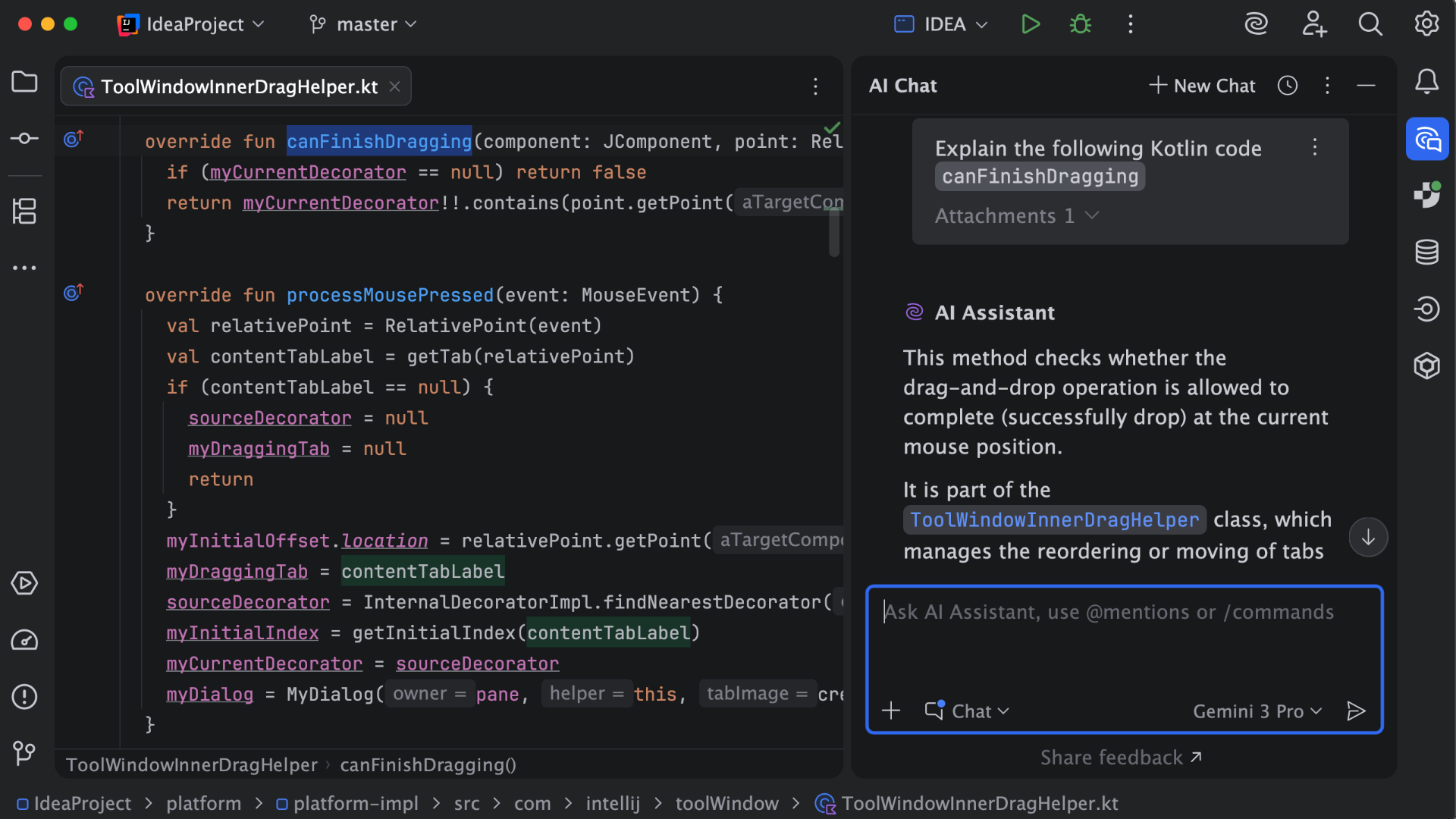
IntelliJ IDEA Demo - AI Assistant
AI Assistant provides AI-powered features for software development. It can explain code, answer questions about code fragments, provide code suggestions, generate documentation, commit messages, and much more.
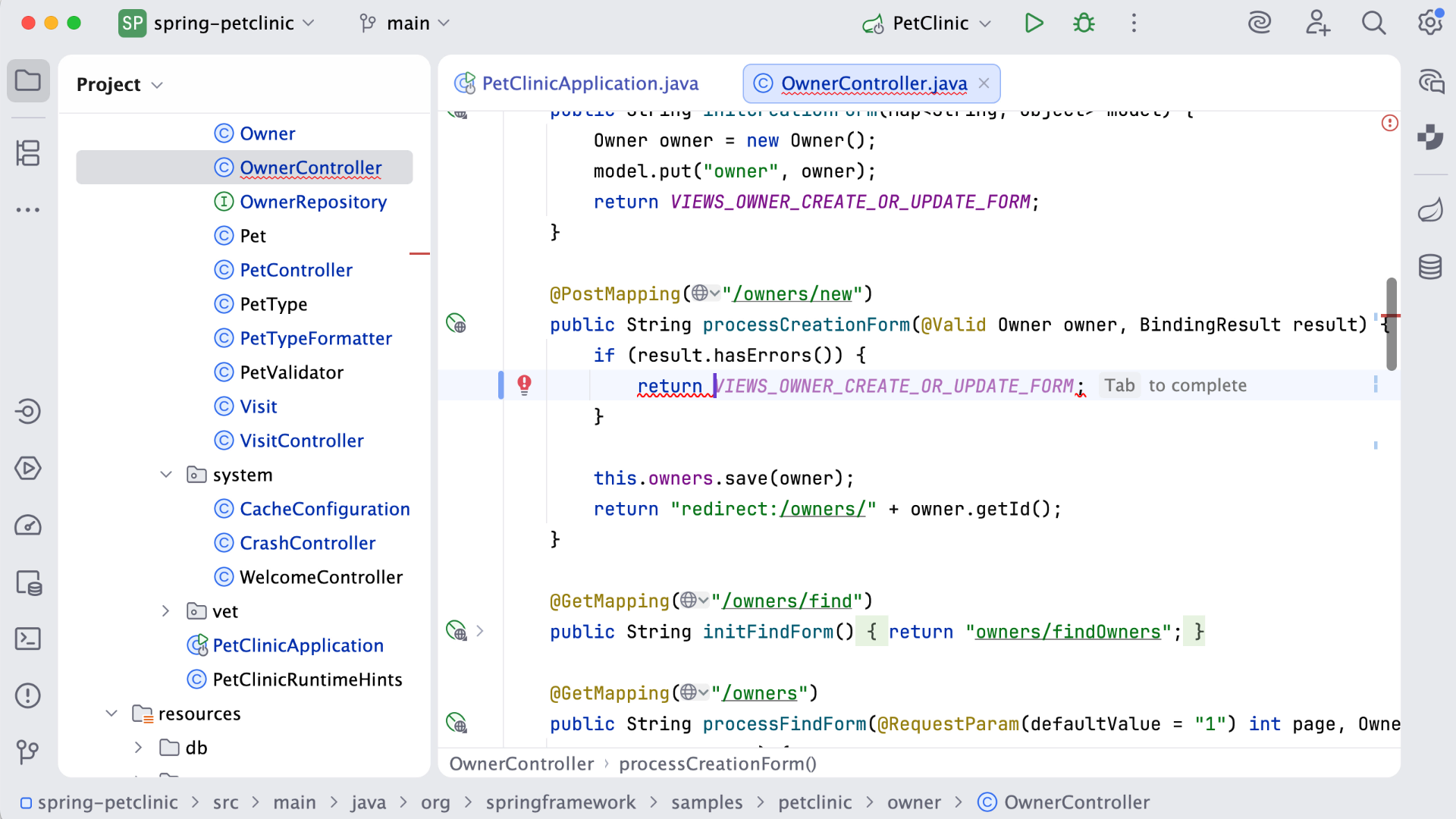
IntelliJ IDEA Demo - Code completion
IntelliJ IDEA analyzes the context and suggests the most applicable and relevant code.
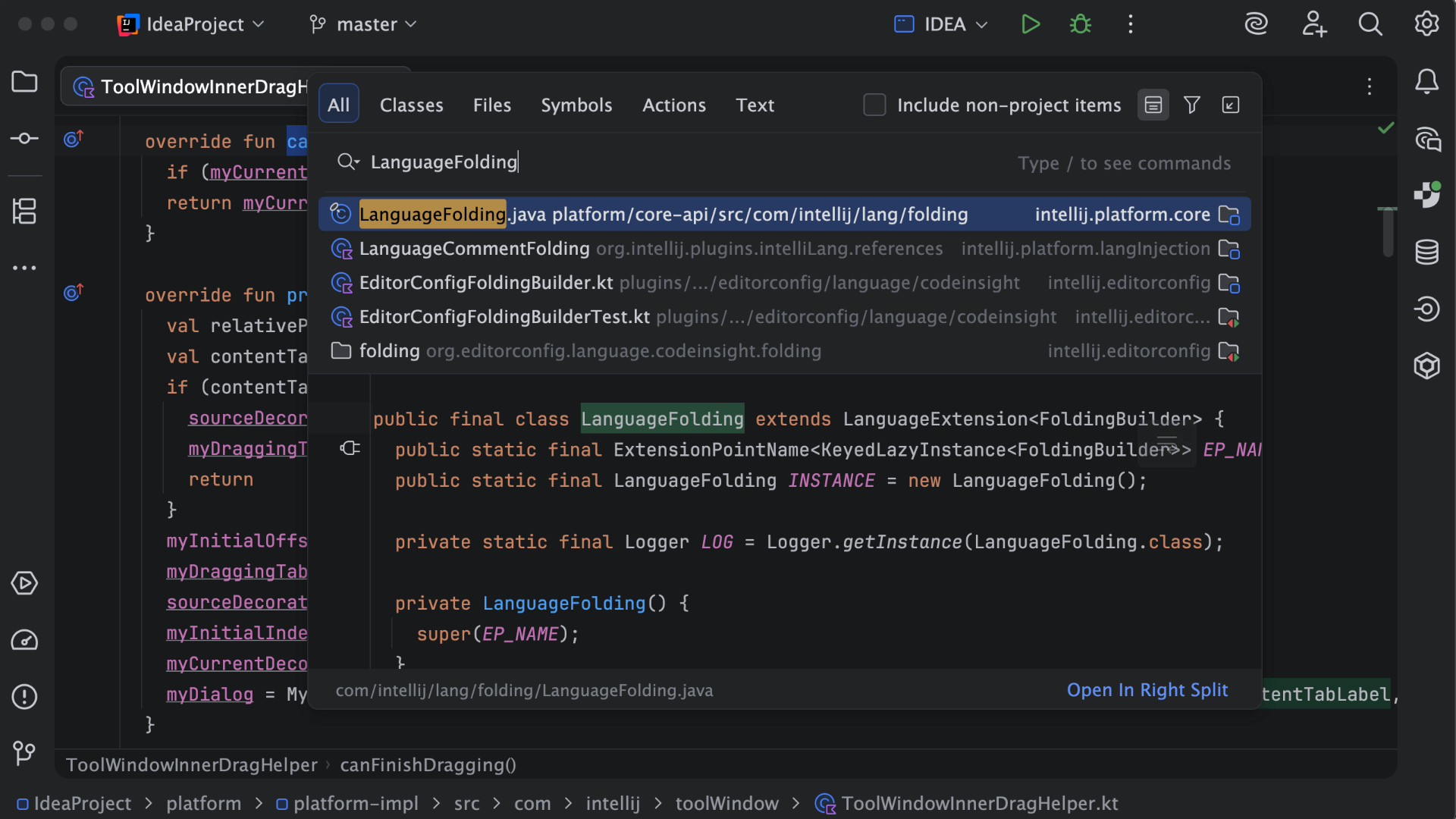
IntelliJ IDEA Demo - Search Everywhere
In the Search Everywhere window, you can search for files, actions, classes, symbols, settings, UI elements, and anything in Git, all from a single entry point.
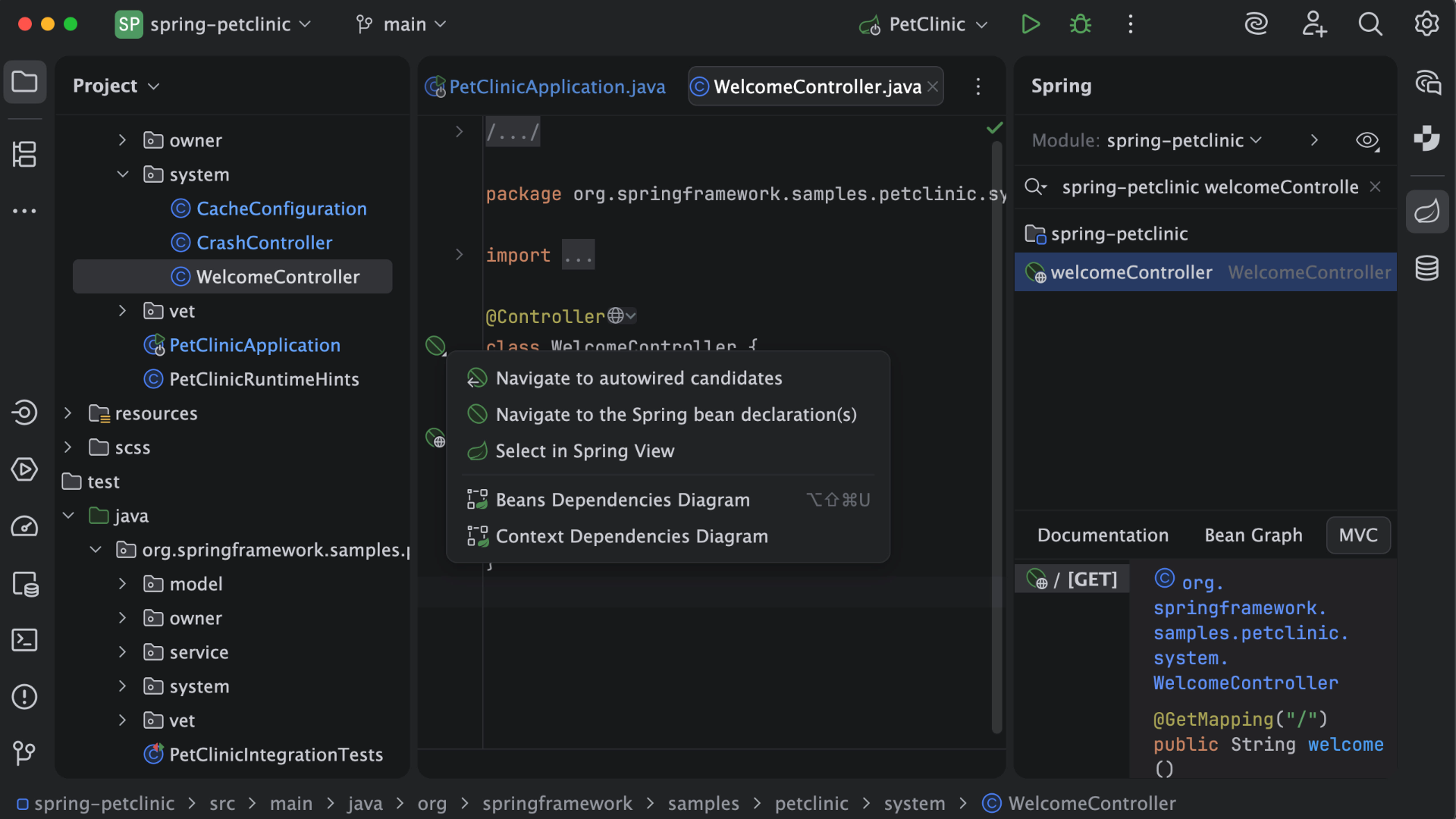
IntelliJ IDEA Demo - Frameworks
IntelliJ IDEA provides first-class support for leading frameworks with dedicated assistance for Spring and Spring Boot, Jakarta EE, JPA, Reactor, and other popular frameworks.
Play IntelliJ IDEA Video
Product Avatar Image

Have you used IntelliJ IDEA before?

Answer a few questions to help the IntelliJ IDEA community

IntelliJ IDEA Reviews (2,324)

View 8 Video Reviews
Reviews

IntelliJ IDEA Reviews (2,324)

View 8 Video Reviews
4.6
2,324 reviews

Review Summary

Generated using AI from real user reviews
Users consistently praise IntelliJ IDEA for its intelligent code assistance and powerful refactoring tools, which significantly enhance coding efficiency and reduce errors. The IDE's seamless integration with various frameworks and built-in debugging features are also highly valued, making it a preferred choice for many developers. However, some users note that it can be resource-intensive, particularly on lower-end machines.

Pros & Cons

Generated from real user reviews
View All Pros and Cons
Search reviews
Filter Reviews
Clear Results
G2 reviews are authentic and verified.
Md Mizanur A.
MA
Software Engineer
Computer Software
Mid-Market (51-1000 emp.)
"All-in-One IDE with Outstanding Code Intelligence and Debugging"
What do you like best about IntelliJ IDEA?

IntelliJ IDEA offers excellent code intelligence, smart auto-completion, and powerful debugging tools that significantly improve development productivity. Its clean interface, deep integration with frameworks, and built-in tools for version control, testing, and database management make it an all-in-one development environment. It also provides strong support for Java and many other languages, which is very helpful for full-stack development. Review collected by and hosted on G2.com.

What do you dislike about IntelliJ IDEA?

IntelliJ IDEA can be resource-intensive, especially on lower-end systems, which may lead to slower performance. Some advanced features are only available in the paid Ultimate version, limiting access for free users. It can also feel overwhelming for beginners due to the large number of features and configuration options. Review collected by and hosted on G2.com.

ROBIN R.
RR
Software Engineer
Computer Software
Mid-Market (51-1000 emp.)
"IntelliJ IDEA: Smart Coding, Powerful Debugging, and SonarQube-Driven Code Quality"
What do you like best about IntelliJ IDEA?

I primarily use IntelliJ IDEA to develop Spring Boot microservices and REST APIs. The biggest advantage for me is its intelligent code completion and its deep understanding of the Spring framework. Features such as auto-wiring suggestions, the built-in HTTP client for testing APIs, and smooth navigation between classes save me a lot of development time.

The debugger is also very capable and makes it easier to trace issues through complex flows. I also rely heavily on the refactoring tools, which remain reliable even in large codebases. Review collected by and hosted on G2.com.

What do you dislike about IntelliJ IDEA?

One issue I frequently run into is high memory usage, especially when I’m running multiple microservices or working on larger projects. On systems with limited RAM, startup time and indexing can also feel slow.

At times, the IDE becomes a bit sluggish during heavier background tasks, such as indexing or plugin updates, which can interrupt the overall workflow. Review collected by and hosted on G2.com.

Jayanth Sai E.
JE
Software Engineer
Information Technology and Services
Enterprise (> 1000 emp.)
"Powerful Code Assistance That Boosts Developer Productivity"
What do you like best about IntelliJ IDEA?

What I like most about IntelliJ IDEA is its powerful code assistance and overall developer productivity features. Intelligent code completion, real-time error detection, and strong refactoring support make development faster and more efficient.

It also offers excellent debugging and navigation capabilities, which help me quickly understand the code and troubleshoot issues. Integration with tools like Git and Maven, as well as frameworks such as Spring Boot, is smooth. Overall, it provides a stable and efficient development environment that helps developers write clean code and stay productive. Review collected by and hosted on G2.com.

What do you dislike about IntelliJ IDEA?

One thing I dislike about IntelliJ IDEA is that it can be a bit heavy on system resources, especially when working on large projects. Sometimes it uses more memory and can feel slow during indexing or while opening multiple modules.

Another point is that some advanced features are available only in the Ultimate edition, so in certain cases the Community edition feels a little limited for enterprise development needs. Review collected by and hosted on G2.com.

SS
Software Developer
Small-Business (50 or fewer emp.)
"IntelliJ IDEA: Smart Refactoring and Quick Fixes That Save Time"
What do you like best about IntelliJ IDEA?

I use IntelliJ IDEA daily for Java and Spring Boot development, along with occasional work on microservices and REST APIs. It’s my primary IDE for writing, debugging, and refactoring code, as well as managing Maven/Gradle projects. I think the best part of using this software is how intelligent and developer-friendly the IDE feels during daily use. The smart suggestions, quick fixes, and refactoring options are extremely accurate and save a lot of manual effort. Review collected by and hosted on G2.com.

What do you dislike about IntelliJ IDEA?

A area that could be improved is the learning curve. With so many powerful features available, new users may feel overwhelmed and may not fully utilize the IDE at first. To improve this, better performance optimization for large projects and low-spec machines would be helpful. Review collected by and hosted on G2.com.

Teboho P.
TP
Backend Engineer
Broadcast Media
Enterprise (> 1000 emp.)
"Takes the Mental Load Off: Smart Completion, Refactoring, and Error Detection"
What do you like best about IntelliJ IDEA?

IntelliJ IDEA’s biggest strength is how much it takes off your mental load. Smart code completion, deep refactoring, and instant error detection let you focus on logic instead of syntax. It understands the codebase, not just the file you’re in, which makes navigating, debugging, and maintaining large projects faster and less error-prone. Review collected by and hosted on G2.com.

What do you dislike about IntelliJ IDEA?

The main downside is how resource-heavy it can be. On large projects it consumes a lot of memory and CPU, which can slow things down on weaker machines. Startup time can also be noticeable, and some advanced features feel overkill when you just want to make a quick, lightweight change. Review collected by and hosted on G2.com.

Siddhant J.
SJ
Software engineer
Enterprise (> 1000 emp.)
"IntelliJ IDEA: Smart Code Completion and Rock-Solid Refactoring for Complex Projects"
What do you like best about IntelliJ IDEA?

IntelliJ IDEA stands out thanks to its smart code completion and deep understanding of code structure. It often anticipates what I’m about to write, flags potential issues in real time, and suggests quick fixes that genuinely save time. The refactoring tools feel extremely reliable, even when working on large, complex projects. On top of that, the built-in integrations for Git, Maven, and Gradle help keep day-to-day development smooth and efficient. Review collected by and hosted on G2.com.

What do you dislike about IntelliJ IDEA?

It can be fairly resource-heavy, especially on systems with limited RAM. The initial startup time can also feel slow, and the Ultimate version is quite costly for individual developers or beginners. Review collected by and hosted on G2.com.

SS
software engineer
Small-Business (50 or fewer emp.)
"IntelliJ IDEA Makes Java Development Smooth with Smart Autocomplete and Debugging"
What do you like best about IntelliJ IDEA?

IntelliJ IDEA is one of the best IDEs on the market for Java development. It’s built to help developers focus on writing code rather than spending time configuring settings in the IDE. I have been using IntelliJ IDEA for the last two years, and I’m really loving it.

Some features, like code suggestions, autocomplete, running servers, and debugging, are amazing and make day-to-day development smoother. Syntax checking is also an important feature in my book. The built-in store for plugins is very helpful as well, since it makes it easy to add new capabilities to IntelliJ IDEA.

Overall, I like the UI: things are placed where they should be, and the color scheme is nice and helps me identify things quickly. Review collected by and hosted on G2.com.

What do you dislike about IntelliJ IDEA?

I feel that IntelliJ IDEA is starting to fall behind in the AI race compared with the competition. At the moment, it doesn’t seem to offer any free AI code assistance, even with usage limits, while other tools do. Review collected by and hosted on G2.com.

Surya Prasad R.
SR
Junior Software Engineer Intern
Enterprise (> 1000 emp.)
"Intelligent Coding Assistant That Supercharges Productivity"
What do you like best about IntelliJ IDEA?

What I like most about IntelliJ IDEA is its intelligent coding assistant and the productivity boost it gives me. It feels like IntelliJ understands what’s happening in the backend of the code and instantly provides suggestions, whether that’s for code completion or JavaDocs to help fill in documentation. This is really helpful in real-life scenarios when I’m building more complex code, and it also makes it easier to organize and structure the code using OOP principles. Review collected by and hosted on G2.com.

What do you dislike about IntelliJ IDEA?

The main thing I dislike about IntelliJ IDEA is its high power consumption, especially for students with less RAM and low-end graphics in their laptops. The startup time, indexing, and background processes can sometimes use a significant amount of memory, particularly during launch. Review collected by and hosted on G2.com.

VM
Senior Software Developer
Small-Business (50 or fewer emp.)
"Smart Autocompletion and Safe Refactoring That Save Me Time"
What do you like best about IntelliJ IDEA?

I like how IntelliJ IDEA seems to understand my code. The smart autocompletion, instant error detection, and refactoring tools actually feel safe to use. It saves me time and helps me focus on thinking through the work, not fighting with the tools. Review collected by and hosted on G2.com.

What do you dislike about IntelliJ IDEA?

On large projects, it can feel heavy and sluggish, especially while indexing, and it tends to use a lot of memory. On top of that, some genuinely useful features are locked behind the paid version, which is pretty frustrating. Review collected by and hosted on G2.com.

Shivam G.
SG
Software Developer
Information Technology and Services
Mid-Market (51-1000 emp.)
"Intelij : An all in one Master IDE"
What do you like best about IntelliJ IDEA?

Its is very useful in terms of coding.

The auto-complete is very useful ,The coding intelligence of inteliij is on next level .

The debugging tools are also very helpful in intellij Idea . they help me in every issue and its very easy to debug. Review collected by and hosted on G2.com.

What do you dislike about IntelliJ IDEA?

It is very very heavy on RAM , It almost consumes around 3gb of my ram which makes my system slow.

It has most features unlocked when we pay for the ultimate version Review collected by and hosted on G2.com.

Questions about IntelliJ IDEA? Ask real users or explore answers from the community

Get practical answers, real workflows, and honest pros and cons from the G2 community or share your insights.

GU
Guest User
Last activity 21 days ago

What is IntelliJ IDEA used for?

Anshika G.
AG
Anshika Gupta
Last activity almost 4 years ago

How can i shift to autorenewable plugins

Pricing Options

Pricing provided by IntelliJ IDEA.

For Individual Use

$19.90
Per Month

All Products Pack for Individuals

$29.90
Per Month

For Organizations

$71.90
1 User Per Month
IntelliJ IDEA Comparisons
Product Avatar Image
Visual Studio
Compare Now
Product Avatar Image
Visual Studio Code
Compare Now
Product Avatar Image
Eclipse
Compare Now
Product Avatar Image
IntelliJ IDEA