Compare this with other toolsSave it to your board and evaluate your options side by side.
Save to board

Hyperglance Reviews & Product Details

Profile Status

This profile is currently managed by Hyperglance but has limited features.

Are you part of the Hyperglance team? Upgrade your plan to enhance your branding and engage with visitors to your profile!

Pricing

Pricing provided by Hyperglance.

Access Every Feature

Starting at $899.00
Per Month

Hyperglance Integrations

(4)
Integration information sourced from real user reviews.

Hyperglance Media

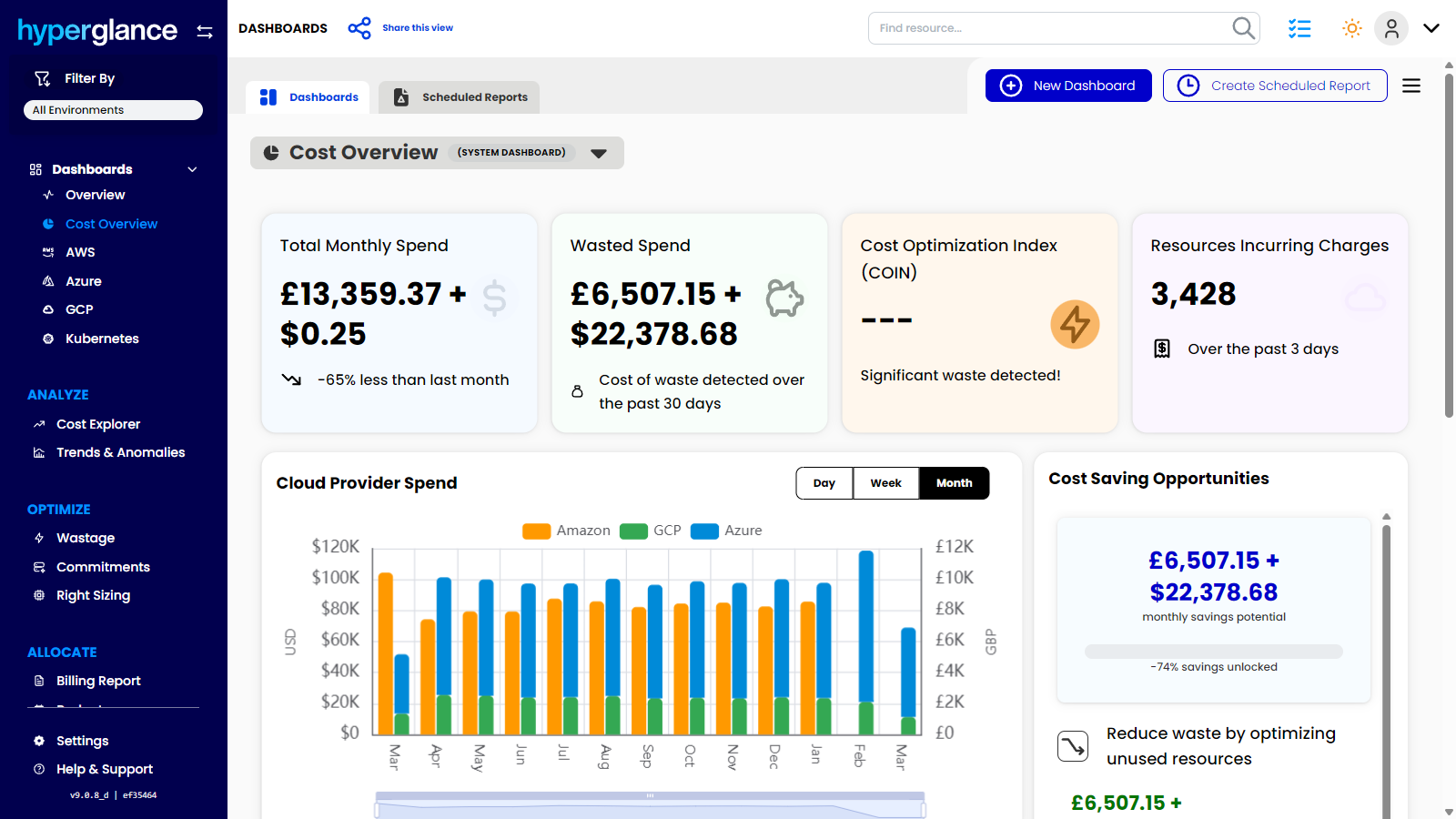
Hyperglance Demo - Cost Overview Across Your Entire Cloud Estate
Get a clear view of total cloud spend, wasted spend, savings opportunities, and provider trends in one place. Hyperglance helps teams spot cost issues faster, prioritize optimization work, and turn cloud visibility into measurable savings.
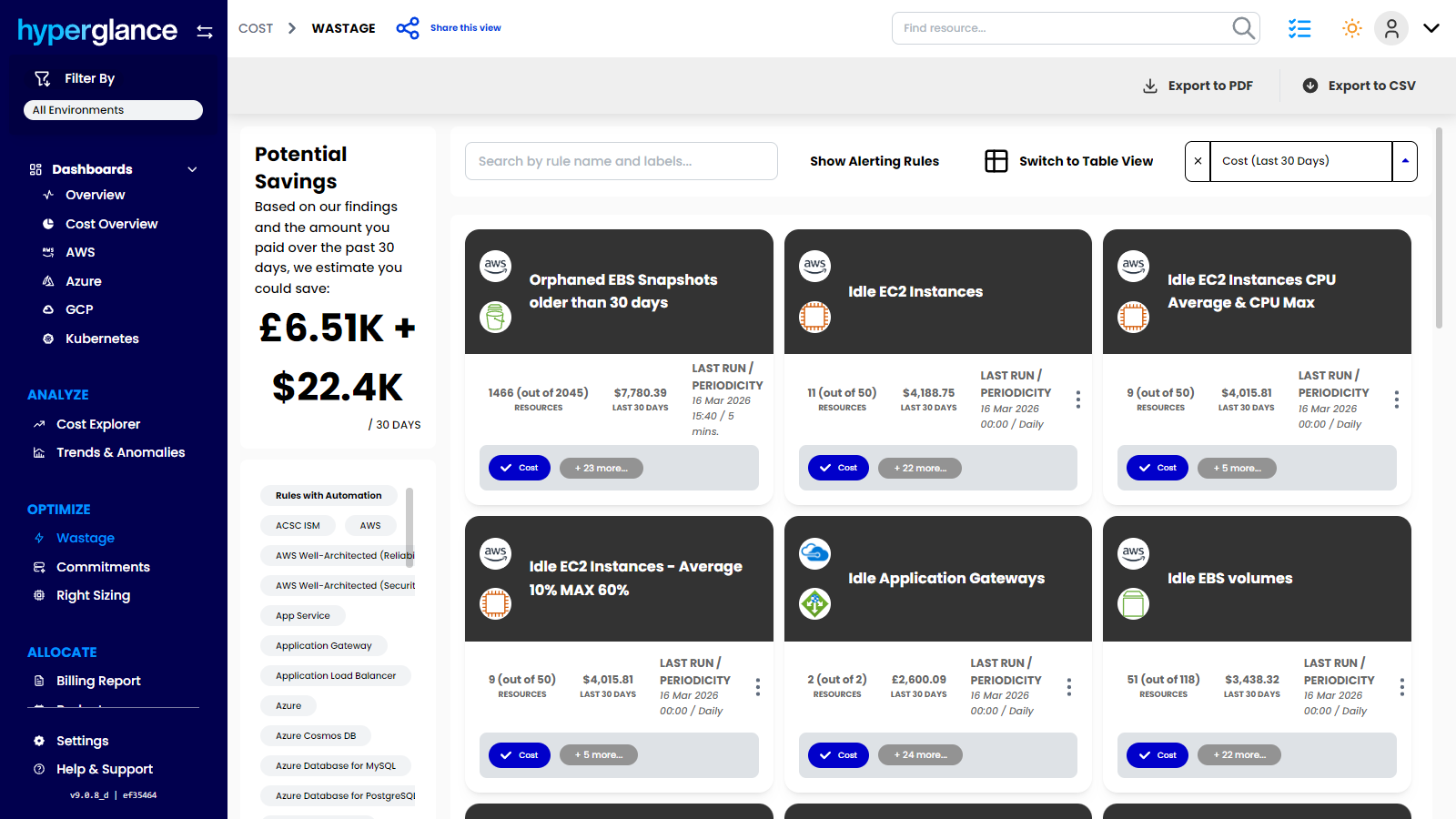
Hyperglance Demo - Find Wasted Cloud Spend Fast
Surface idle, orphaned, and underused resources across AWS, Azure, GCP, and Kubernetes in one view. Hyperglance helps teams uncover waste quickly, quantify savings potential, and focus optimization efforts where they will have the biggest impact.
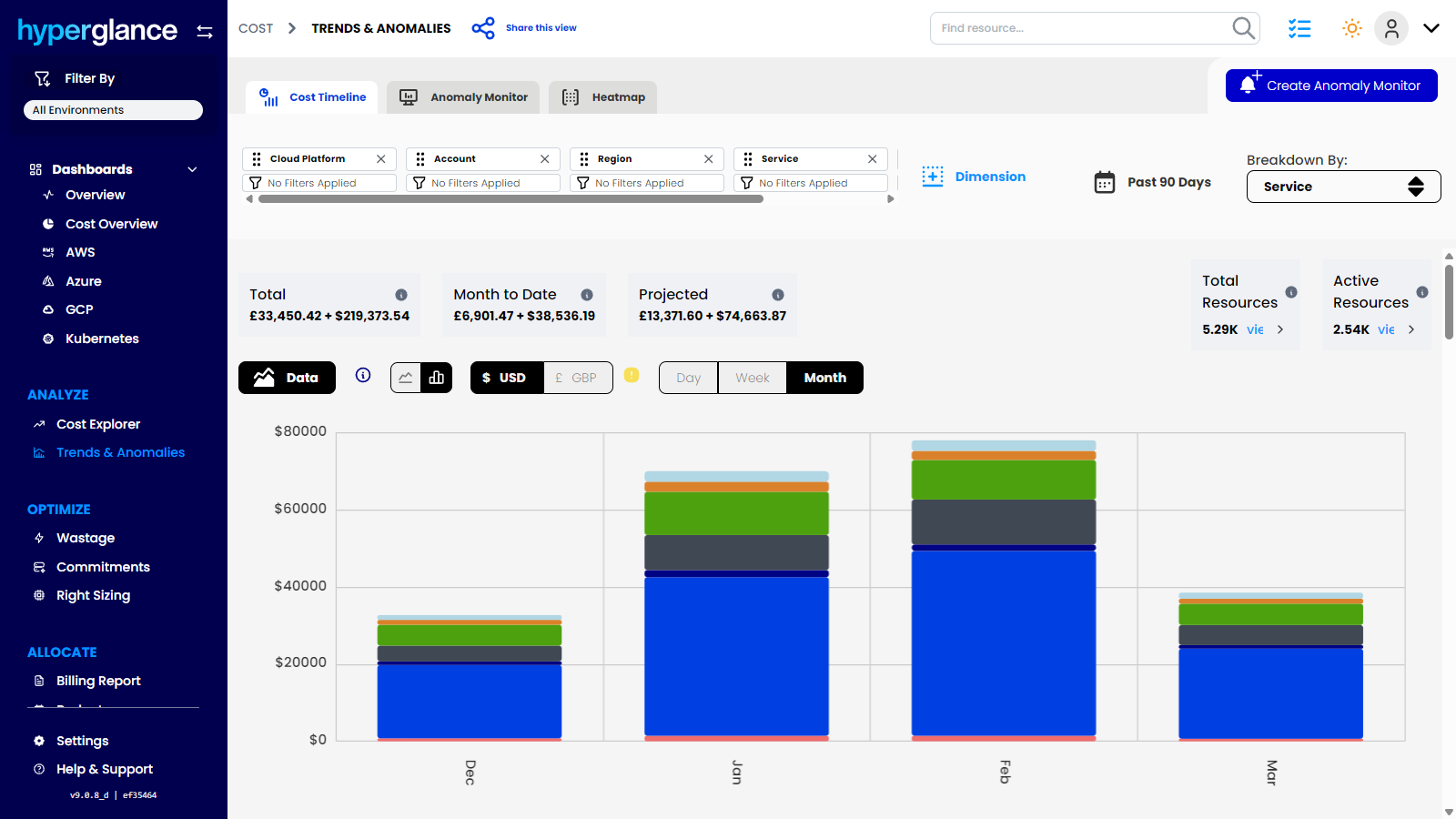
Hyperglance Demo - Track Cost Trends and Spot Anomalies Early
Monitor cloud spend over time, break costs down by service or dimension, and catch unusual changes before they turn into bigger budget problems. Hyperglance helps teams understand spend patterns, improve forecasting, and stay ahead of unexpected cloud costs.
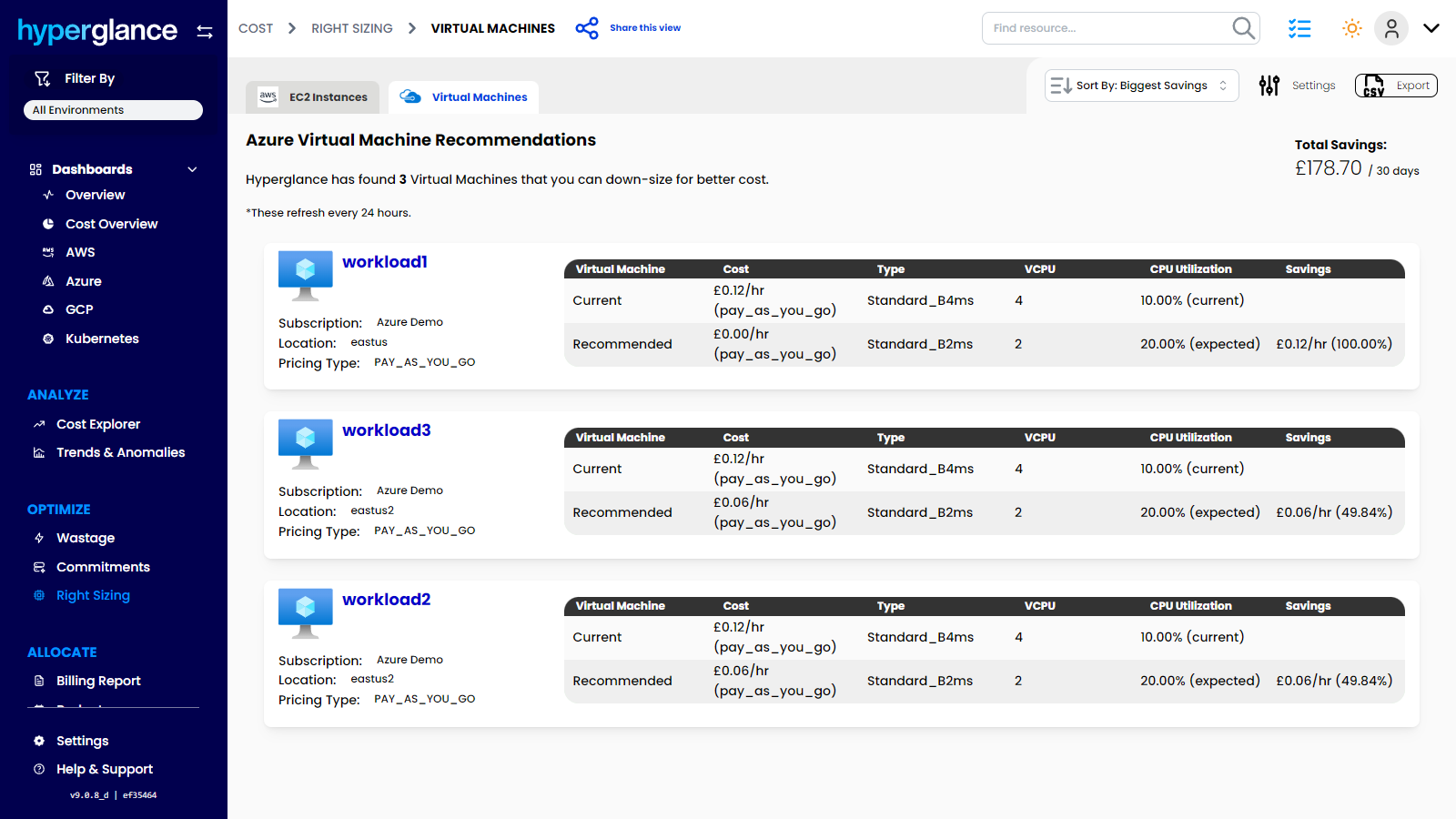
Hyperglance Demo - Right-Size Cloud Resources and Reduce Overspend
Identify oversized cloud resources, compare current and recommended configurations, and uncover savings without guesswork. Hyperglance helps teams make smarter sizing decisions, cut unnecessary spend, and improve cloud efficiency across AWS, Azure & GCP.
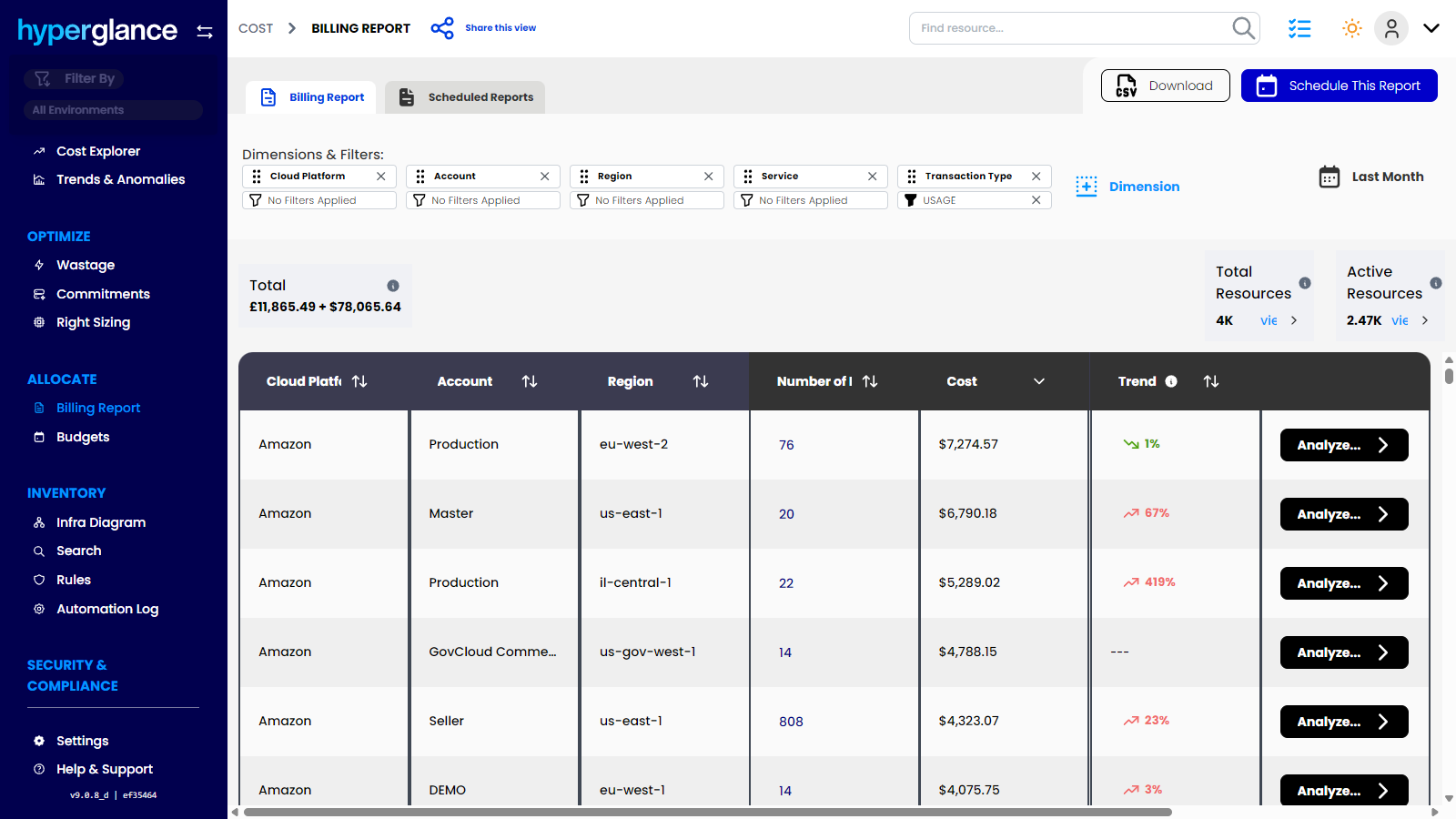
Hyperglance Demo - Analyze Costs in Detail and Keep Budgets on Track
Drill into cloud costs by platform, account, region, service, and resource, then compare actual spend against budget in one place. Hyperglance helps teams understand where money is going, investigate changes faster, and stay in control of cloud budgets before overspend becomes a bigger issue.
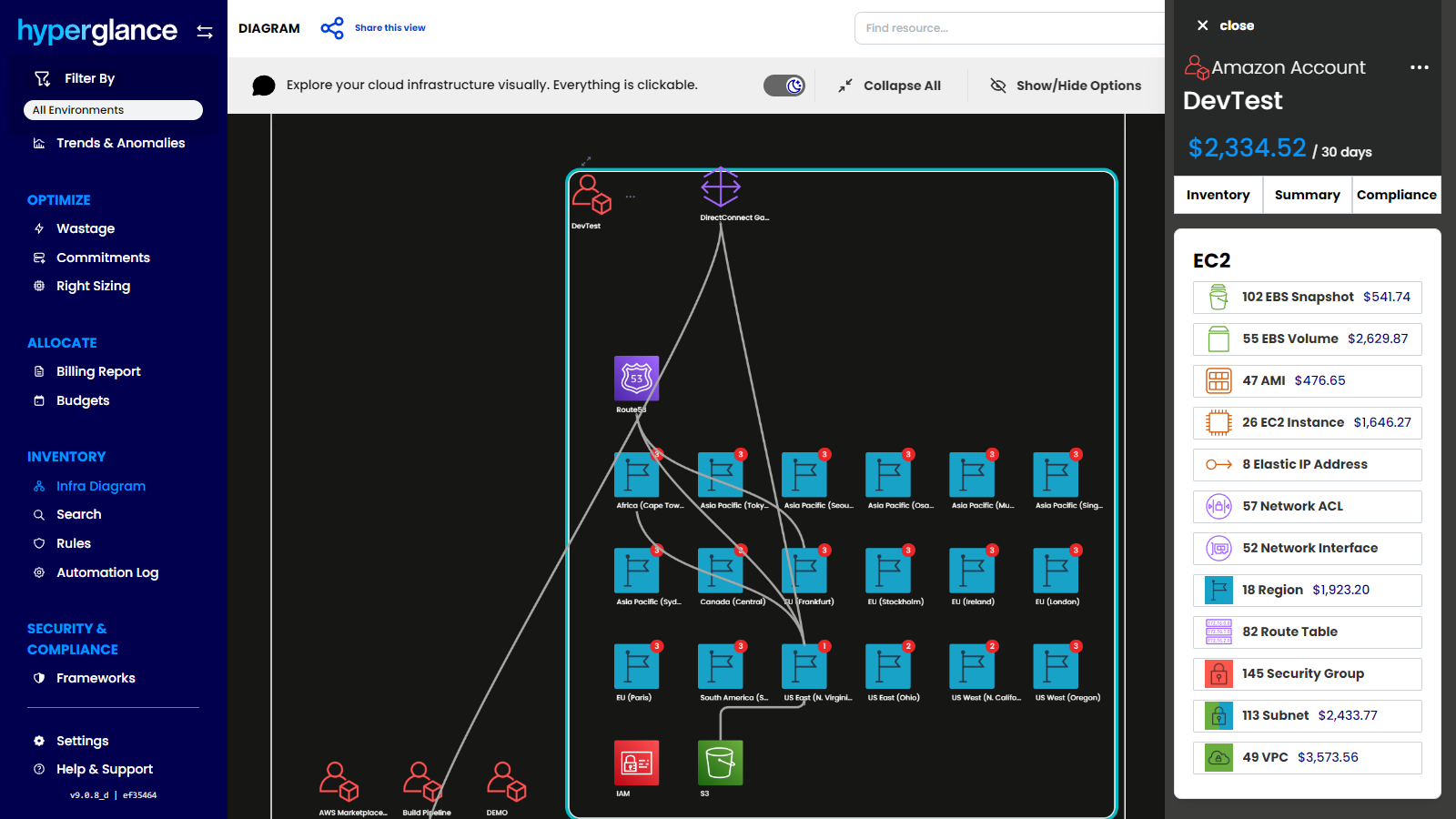
Hyperglance Demo - Visualize Cloud Infrastructure and Cost in One Interactive Diagram
See how your cloud environment is connected, explore resources visually, and understand spend in context. Hyperglance combines interactive infrastructure diagrams with cost and inventory data, helping teams investigate faster, reduce complexity, and spot issues that are easy to miss in static lists.
Product Avatar Image

Have you used Hyperglance before?

Answer a few questions to help the Hyperglance community

Hyperglance Reviews (65)

Reviews

Hyperglance Reviews (65)

4.6
65 reviews

Review Summary

Generated using AI from real user reviews
Users consistently praise the real-time visualizations and ease of use of Hyperglance, which simplify the management of complex cloud environments. The platform's ability to consolidate data into a single dashboard allows for quick identification of issues and cost optimization. However, many note a common limitation in the steep learning curve for new users, particularly during initial setup.

Pros & Cons

Generated from real user reviews
View All Pros and Cons
Search reviews
Filter Reviews
Clear Results
G2 reviews are authentic and verified.
Verified User in Computer Software
AC
Small-Business (50 or fewer emp.)
"Real-Time Infrastructure Cost Insights Made Easy"
What do you like best about Hyperglance?

I like how I can get all the information of the cost of my infrastructure in real time Review collected by and hosted on G2.com.

What do you dislike about Hyperglance?

Not much, it does my work accordingly to what I need Review collected by and hosted on G2.com.

Verified User in Information Technology and Services
AI
Mid-Market (51-1000 emp.)
"Makes Cloud Monitoring and Troubleshooting Much Easier"
What do you like best about Hyperglance?

Hyperglance provides me with a straightforward, real-time overview of my whole cloud environment without adding unnecessary complexity. I find the visual topology particularly useful, as it enables me to quickly identify issues, grasp how resources are connected, and monitor both security and cost risks. Another aspect I appreciate is its ability to operate across multiple clouds without requiring agents, which simplifies both the initial setup and continued use. Review collected by and hosted on G2.com.

What do you dislike about Hyperglance?

At first, the interface can seem a bit overwhelming due to the sheer amount of information displayed on the screen. It takes a while to become familiar with all the features, and the initial learning curve is somewhat steep. I would also appreciate quicker updates to certain integrations, but overall, these are relatively minor concerns. Review collected by and hosted on G2.com.

Dilip Kumar D.
DD
Founder
Small-Business (50 or fewer emp.)
"Visual Clarity & Control Over Cloud Resources"
What do you like best about Hyperglance?

What stands out the most about Hyperglance is its ability to give a clear, visual overview of complex cloud environments. It turns a mess of services and infrastructure into something you can actually understand at a glance. The real-time diagrams are a game-changer. Through it I can quickly spot misconfigurations or unnecessary resources and take action right away. Review collected by and hosted on G2.com.
What do you dislike about Hyperglance?

The interface can feel a bit overwhelming at first, especially if you’re not deeply familiar with your cloud setup. It takes a little time to get used to all the features. Also, I wish the pricing was a bit more flexible for smaller teams or startups. Review collected by and hosted on G2.com.
Sushmita G.
SG
Financial accounting and operations associate
Enterprise (> 1000 emp.)
"Real-Time Dashboards That Make Key Insights Easy to Grasp"
What do you like best about Hyperglance?

Visualize real time dashboards

At one glance, displays all effective information in a simpler manner, automated diagram for easy understanding Review collected by and hosted on G2.com.
What do you dislike about Hyperglance?

Pricing is too high and the security is limited. Not too flexible for operational purposes Review collected by and hosted on G2.com.
Sobhuza Z.
SZ
Founder/CEO
Small-Business (50 or fewer emp.)
"How Hyperglance Automates Cost Optimization and FinOps"
What do you like best about Hyperglance?

the best thing about Hyperglance is its ability to turn complex, multi-cloud chaos into a clear, visual map where cost, security, and operational issues are not just identified, but can be fixed automatically. Review collected by and hosted on G2.com.
What do you dislike about Hyperglance?

initial complexity and cost structure for smaller organizations. Review collected by and hosted on G2.com.
Luca P.
LP
Chief Operations Officer DEQUA Studio | Formerly CTO in MarTech
Marketing and Advertising
Small-Business (50 or fewer emp.)
"Cloud Management and FinOps Platform"
What do you like best about Hyperglance?

What I Like

Hyperglance is a self-hosted, agentless cloud management platform designed for FinOps, DevOps, engineering, and security teams. It provides multi-cloud support for AWS, Azure, Google Cloud (GCP, in progress), and Kubernetes, aggregating all accounts, subscriptions, and clusters into a single, searchable inventory.

The platform excels in cloud cost optimization, using a robust rules engine to identify up to 30% wastage through analytics, right-sizing, orphaned resource detection, anomaly detection, and forecasting.

The visualization capabilities are particularly strong: Hyperglance generates interactive architecture diagrams and dependency models, offering heatmaps, network diagrams, Sankey diagrams, and customizable dashboards for cost and inventory exploration.

The platform also enables automated remediation and policy enforcement via codeless automations, with over 200 built-in customizable rules mapped to frameworks like AWS Well-Architected, CIS, NIST, and HIPAA.

Security and compliance monitoring is continuous and covers key standards, with real-time alerts and integration options for Slack, email, and more. Review collected by and hosted on G2.com.

What do you dislike about Hyperglance?

The pricing model is based on the number of cloud resources ingested and inventoried, which can make cost estimation complex for large or rapidly scaling environments Review collected by and hosted on G2.com.

Verified User in Information Technology and Services
UI
Mid-Market (51-1000 emp.)
"Powerful Visualization Tool for Multi-Cloud Management"
What do you like best about Hyperglance?

1) In our case, Hyperglance provided the ability to visualize the entire multi cloud environment including AWS and Azure cloud

2) The tool also provides actionable insights related to cost optimization and compliance across a muti cloud environment

3) The interactive 3D cloud visualization feature provides exceptional clarity making it easier to identify issues and resources that are over-utilized or under-utilized Review collected by and hosted on G2.com.

What do you dislike about Hyperglance?

The tool experienced occasional lags or performance issues during large scale implementations, where we experienced minor lag in the visualizations generated by the tool.

Significant effort is required in the initial stages of the setup, including support from the technical team of Hyperglance Review collected by and hosted on G2.com.

RC
IT Director
Enterprise (> 1000 emp.)
"Real-Time Cloud Insights, But Pricing may be challenging"
What do you like best about Hyperglance?

The platform offers real-time data visualizations for cloud resources, making it easier to monitor and understand usage as it happens. Review collected by and hosted on G2.com.

What do you dislike about Hyperglance?

The pricing depends on how many cloud resources you use, and at times, you might notice some lag. The interface may be overwhelming in some cases Review collected by and hosted on G2.com.

Verified User in Information Technology and Services
AI
Small-Business (50 or fewer emp.)
"Great Cloud Visibility & Compliance Tool"
What do you like best about Hyperglance?

I really like how Hyperglance provides a real-time visual topology map of all our cloud resources across AWS and Azure. It makes it so much easier to understand complex dependencies and quickly identify misconfigurations. The automated compliance checks against CIS and other standards save a lot of time and effort compared to manual audits. The alerting system is very clear, and integration with existing workflows is straightforward. Review collected by and hosted on G2.com.

What do you dislike about Hyperglance?

The interface, while powerful, can feel slightly overwhelming for new users due to the large number of features and configuration options. Pricing can also be on the higher side for small teams, especially if they are just starting with cloud management. More customization options for dashboards and reports would make it even better. Review collected by and hosted on G2.com.

Sayali  L.
SL
Sales Manager /SEO Executive
Small-Business (50 or fewer emp.)
"Helpful Tool for Cloud Cost and Security Management"
What do you like best about Hyperglance?

The dashboards and reports offer a lot of flexibility, allowing us to create exactly what we need. We can set up alerts, monitor budgets, and observe trends, among other features. Review collected by and hosted on G2.com.

What do you dislike about Hyperglance?

Performance lags sometimes, especially when dealing with very large environments or big visual diagrams. Review collected by and hosted on G2.com.

Questions about Hyperglance? Ask real users or explore answers from the community

Get practical answers, real workflows, and honest pros and cons from the G2 community or share your insights.

GU
Guest User
Last activity about 1 year ago

What is Hyperglance used for?

Pricing Options

Pricing provided by Hyperglance.

Access Every Feature

Starting at $899.00
Per Month
Hyperglance Features
Scheduling
Automation
Multi-Cloud Management
Spend Forecasting and Optimization
Recommendations
Spend Tracking
Reporting
Dashboards and Visualizations
Cloud Consolidation
Cloud Orchestration
Cloud Optimization
Product Avatar Image
Hyperglance