
Compare this with other toolsSave it to your board and evaluate your options side by side.
Save to board

Heyflow Reviews & Product Details

Profile Status

This profile is currently managed by Heyflow but has limited features.

Are you part of the Heyflow team? Upgrade your plan to enhance your branding and engage with visitors to your profile!

Pricing

Pricing provided by Heyflow.

Starter

Starting at $22.00
50 Responses

Growth

Starting at $79.00
250 Responses

Heyflow Media

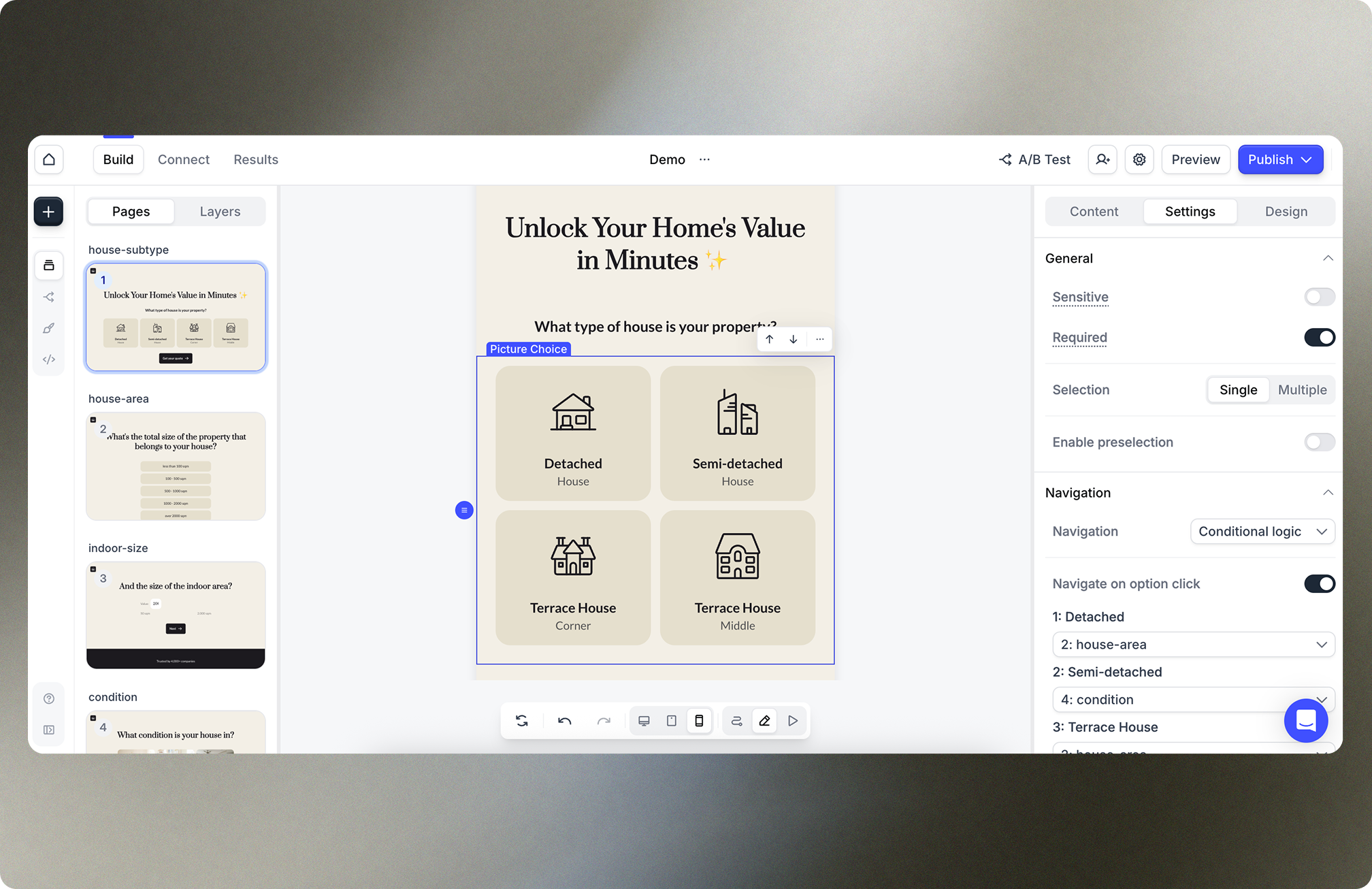
Heyflow Demo - Heyflow Builder
Build a smart, interactive and personalized experience that people love engaging with using our intuitive drag and drop builder. Match your flow to your brand identity by customizing anything and everything.
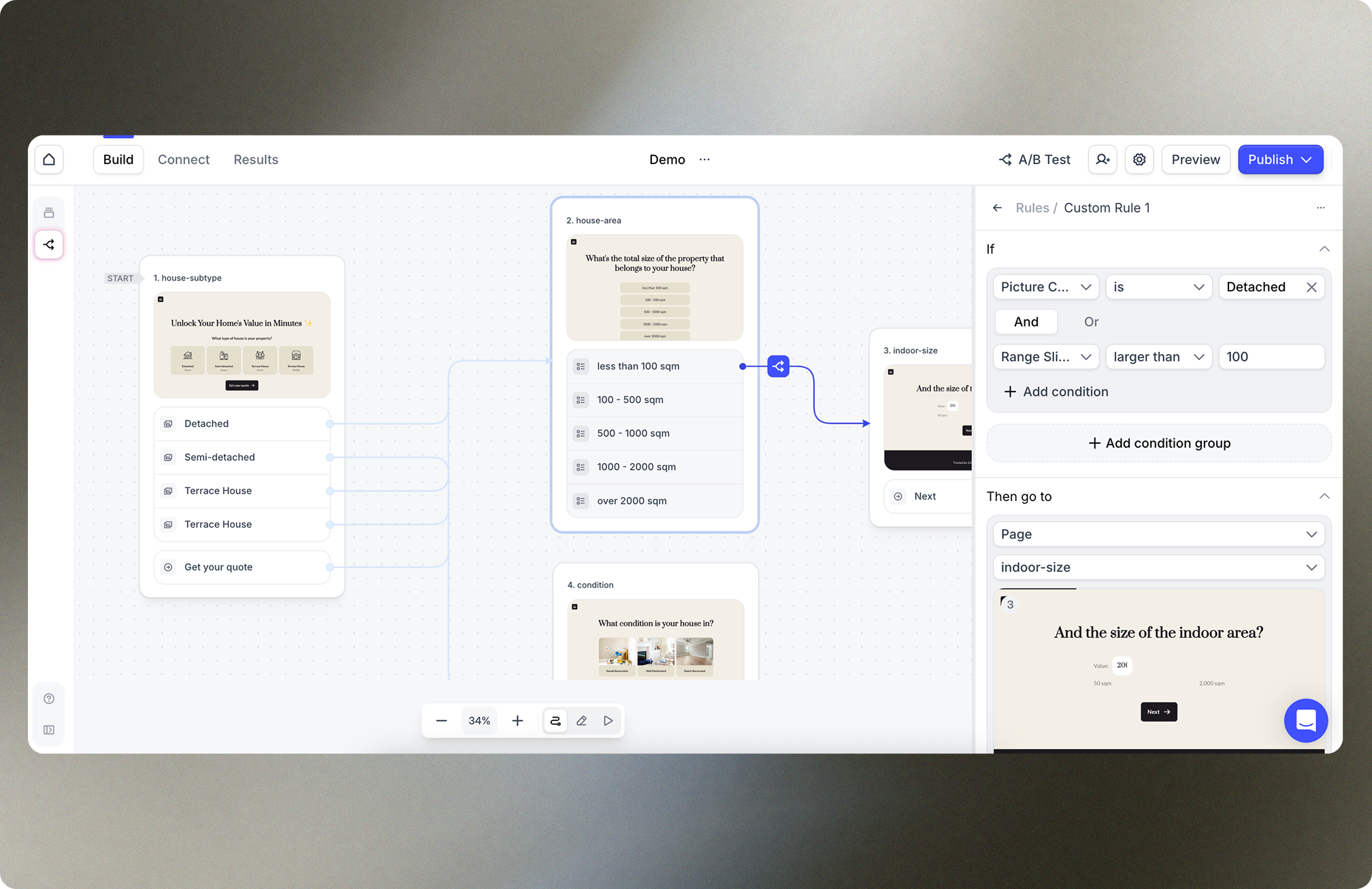
Heyflow Demo - Logic
Provide a personalized funnel experience, segment your audience, or create complex routing logic. Keeping track of your flow logic can be tricky. The logic map will give you a visual overview of your entire funnel to help you save time, avoid mistakes, and confidently build even the most complex ...
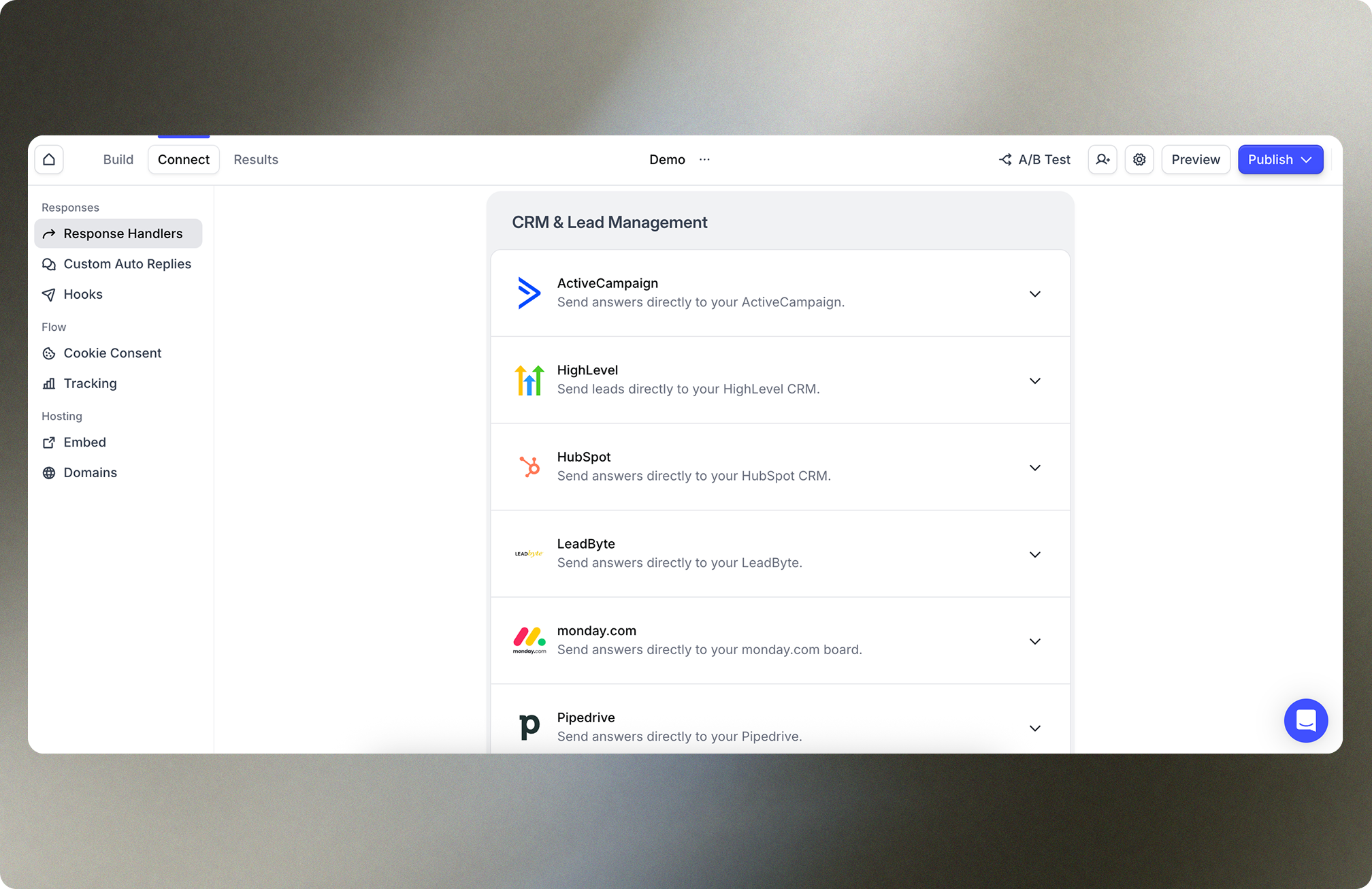
Heyflow Demo - Response Handlers
Send your flow responses to your e-mail inbox, into a spreadsheet or directly into you CRM through native integrations with popular tools like HubSpot, Sheets and Slack.
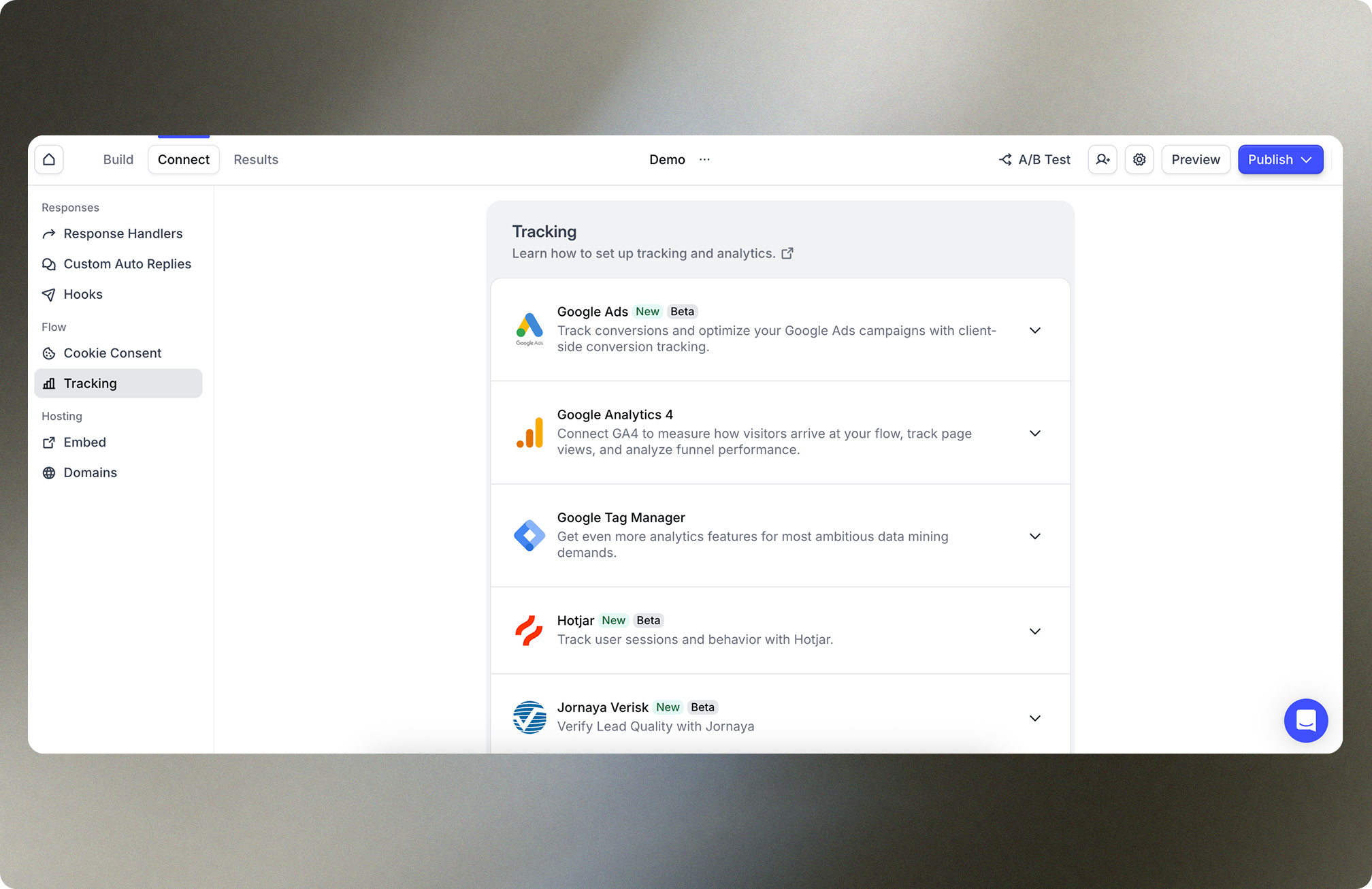
Heyflow Demo - Tracking Integrations
Connect your heyflow with tools like Google Analytics, Google Tag Manager or Meta Conversions API to track the success of your campaigns.
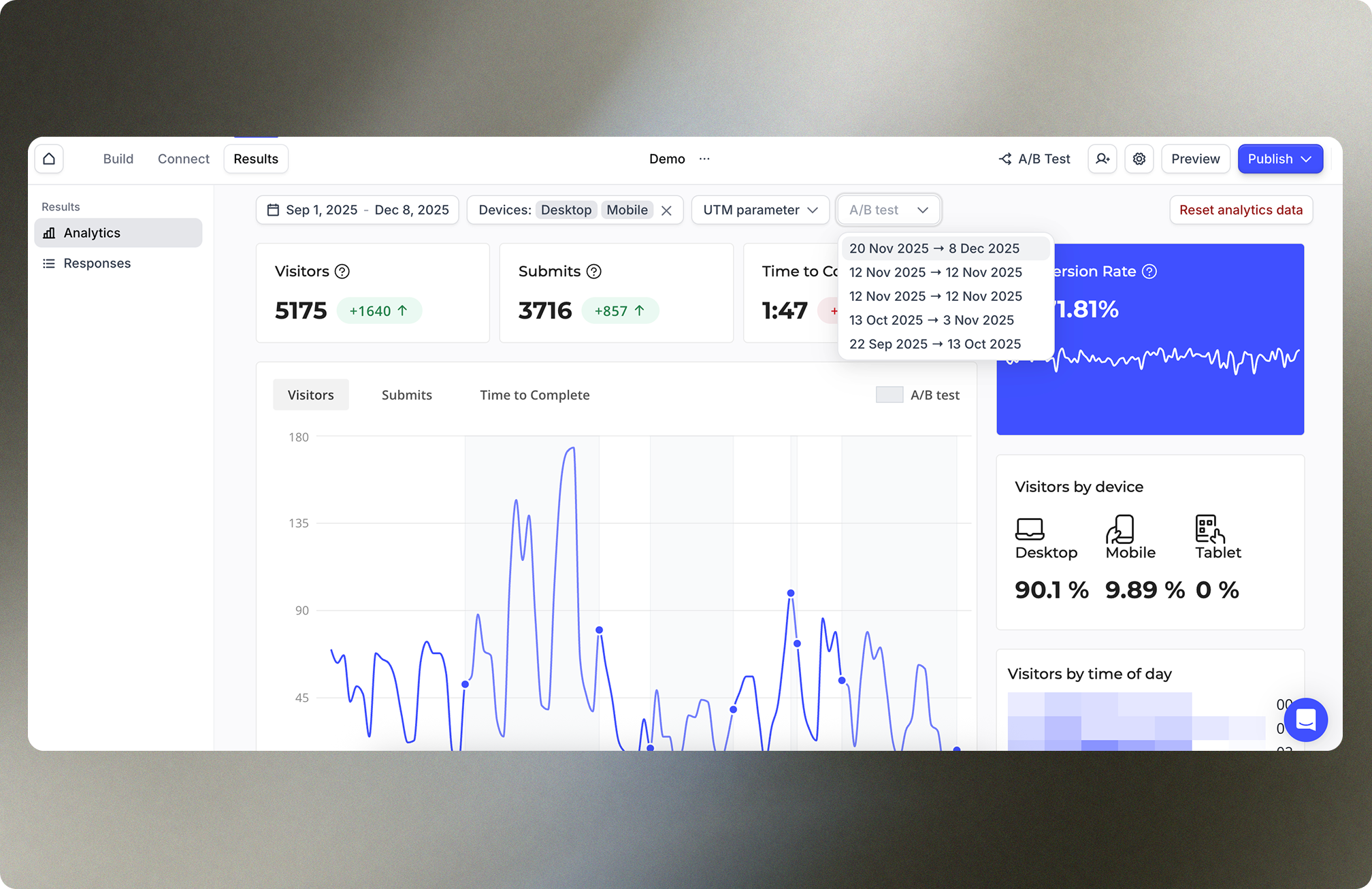
Heyflow Demo - Analytics
Get valuable insights on your respondents’ behavior through the built-in analytics tab. All the data you need to optimize your flow effectively inside of Heyflow — no additional setup or integration needed!
Product Avatar Image

Have you used Heyflow before?

Answer a few questions to help the Heyflow community

Heyflow Reviews (55)

Reviews

Heyflow Reviews (55)

4.4
55 reviews

Review Summary

Generated using AI from real user reviews
Users consistently praise Heyflow for its user-friendly interface and powerful features that simplify lead generation and form creation. The platform's intuitive design allows even those without coding experience to create effective funnels and forms quickly. However, some users note that the initial learning curve can be steep due to its extensive capabilities.

Pros & Cons

Generated from real user reviews
View All Pros and Cons
Search reviews
Filter Reviews
Clear Results
G2 reviews are authentic and verified.
Verified User in Financial Services
UF
Small-Business (50 or fewer emp.)
"HeyFlow Makes Branded Multi-Step Lead Gen Flows Easy"
What do you like best about Heyflow?

HeyFlow has been a core part of my lead generation stack. The multi-step form builder is genuinely easy to use. I can spin up new branded flows and iterate on them without needing a developer, which is exactly what I need when testing Meta ad funnels.

Breaking long qualification forms into step-by-step flows has noticeably improved my completion rates and CPL. The conditional logic is flexible, and the design options are good enough that flows don't look like generic form-builder templates.

Native Meta Pixel and CAPI integration is a big plus for ad optimisation as well. Review collected by and hosted on G2.com.

What do you dislike about Heyflow?

Nothing, everything works good and for what I need, it does everything. Review collected by and hosted on G2.com.


Taylor H.
TH
Owner
Small-Business (50 or fewer emp.)
"Best-in-Class Visual Form Builder for Modern, Interactive Flows"
What do you like best about Heyflow?

Heyflow has the best visual interactive form builder in the market. We use ~30 forms across 20 clients and the quality of the product is exceptional.

We can build easy to use, modern flows for customers at ease. Review collected by and hosted on G2.com.

What do you dislike about Heyflow?

Although it's improving, Heyflow support is typically slower and less helpful than other SaaS products we use.

It's expensive, and the plans are rigid.

Even on the agency plan, we don't have multiple users, which is frustrating given the use case of the system. Review collected by and hosted on G2.com.

Vanessa V.
VV
Social Media Managerin
Small-Business (50 or fewer emp.)
"Simple tool with room for improvement"
What do you like best about Heyflow?

I like that Heyflow quickly and easily enables the creation of individual pages, including the appropriate interfaces to other tools, all without any programming skills. I particularly appreciate the ability to quickly duplicate and adapt the corporate design. The handling of the functions is simple and fast. I find the A/B testing very helpful, and the clear presentation of the insights is also an advantage. Review collected by and hosted on G2.com.

What do you dislike about Heyflow?

As soon as you use a list twice in a flow, the icons must have the same color, which I find very impractical. I sometimes find it a bit cumbersome to have to adjust the headings first and not be able to change fonts individually. Review collected by and hosted on G2.com.

Saba E.
SE
Head of publishing
Mid-Market (51-1000 emp.)
"Flexible Form Options That Spark Ideas"
What do you like best about Heyflow?

The variety of options. This enables flexibility to create any forms, but also gives you ideas to do a lot more than ordinary. Review collected by and hosted on G2.com.

What do you dislike about Heyflow?

The save-in-draft vs. publishing vs versions processes are overcomplicated. Could use a better flow there. Review collected by and hosted on G2.com.

Vincent E.
VE
Inhaber
Small-Business (50 or fewer emp.)
"Flexibility and Lead Generation Rolled into One"
What do you like best about Heyflow?

I really like the flexibility Heyflow offers. You can build anything from scratch, and the templates are great for my workflow. It's really easy to use with a wide range of functions like AB testing and conditional logic, which greatly help in getting more qualified leads. I appreciate that they always introduce new features, which shows they are keen on improving the app. Heyflow also allows me to handle automations and emails without relying on external tools like Zapier, saving me money and streamlining my processes. Review collected by and hosted on G2.com.

What do you dislike about Heyflow?

Honestly, there is not much I'd would change about it Review collected by and hosted on G2.com.

Giulia R.
GR
Small-Business (50 or fewer emp.)
""
Paul J.
PJ
Tech Lead
Small-Business (50 or fewer emp.)
""
Florian G.
FG
Performance Marketing Consultant
Small-Business (50 or fewer emp.)
"Simple Funnel Creation with Heyflow"
What do you like best about Heyflow?

I can quickly and easily create funnels with Heyflow, which is very helpful. What I particularly like is that we can operate it relatively easily as a team, even our junior staff have no difficulties with it. The ease of use was one of the main reasons why we switched from Zapier and our own funnels to Heyflow. Additionally, the setup of Heyflow was made very easy. Review collected by and hosted on G2.com.

What do you dislike about Heyflow?

Perhaps more templates? Simply more templates for different cases. 2-3 templates per niche in recruiting, for leads, etc., depending on the topic. Real estate, insurance, etc. Review collected by and hosted on G2.com.

William R.
WR
"Powerful No-Code Funnel Builder with Deep Capabilities"
What do you like best about Heyflow?

I really appreciate Heyflow's depth, as it's by far the most powerful funnel builder I've used. Its design capabilities allow me to practically design entire websites. The user interface is honestly better than most website builders. I can easily implement technical aspects like hidden variables, conditional logic, and conversion rate optimization (CRO), along with built-in A/B testing functionality. The tech team is really doing a great job. The no-code approach is incredibly valuable because I can avoid using a product internally, and it's extremely helpful in converting visitors into qualified leads, all while seamlessly integrating leads into the CRM without any coding. Review collected by and hosted on G2.com.

What do you dislike about Heyflow?

I think the incredible depth of Heyflow is a double-edged sword. It makes it harder to use at first, and you have to learn how to use it. It requires time and energy. They have some templates to get you started, but it's quite a technical product. The initial setup is not the easiest. Doing 80% of the work is very easy, but the final 20% is quite hard. Review collected by and hosted on G2.com.

Joshua H.
JH
Growth Manager International
Enterprise (> 1000 emp.)
"Fast lead generation and excellent customer service"
What do you like best about Heyflow?

I like Heyflow because it meets all my requirements for a lead funnel tool. Users can quickly enter their data, which allows us to generate high-quality leads and applications promptly. The quick data entry leads to the best possible conversion rate. Setting up Heyflow was very easy, as there are templates you can choose from, or you can simply start from scratch. I am also completely satisfied with the customer service, as the customer care team usually resolves issues quickly. Review collected by and hosted on G2.com.

What do you dislike about Heyflow?

Nothing to complain about. Review collected by and hosted on G2.com.

Questions about Heyflow? Ask real users or explore answers from the community

Get practical answers, real workflows, and honest pros and cons from the G2 community or share your insights.

GU
Guest User
Last activity about 2 years ago

What is Heyflow used for?

Pricing Options

Pricing provided by Heyflow.

Starter

Starting at $22.00
50 Responses

Growth

Starting at $79.00
250 Responses

Scale

Starting at $229.00
1000 Responses
Heyflow Comparisons
Product Avatar Image
Perspective
Compare Now
Product Avatar Image
Typeform
Compare Now
Product Avatar Image
Jotform
Compare Now
Heyflow Features
Drag and Drop
Templates
Advanced Customization
Mobile Responsive
Web Analytics
SEO
Domain Integration
Custom Fields
Conditional Logic
Multi-page Forms
Product Avatar Image
Heyflow