


Foxit PDF Editor

By Foxit

4.6 out of 5 stars

How would you rate your experience with Foxit PDF Editor?

Compare this with other toolsSave it to your board and evaluate your options side by side.
Save to board

Foxit PDF Editor Reviews & Product Details

Pricing

Pricing provided by Foxit PDF Editor.

PDF Editor with Admin Console

Starting at $10.99
1 User Per Month

Foxit PDF Editor Media

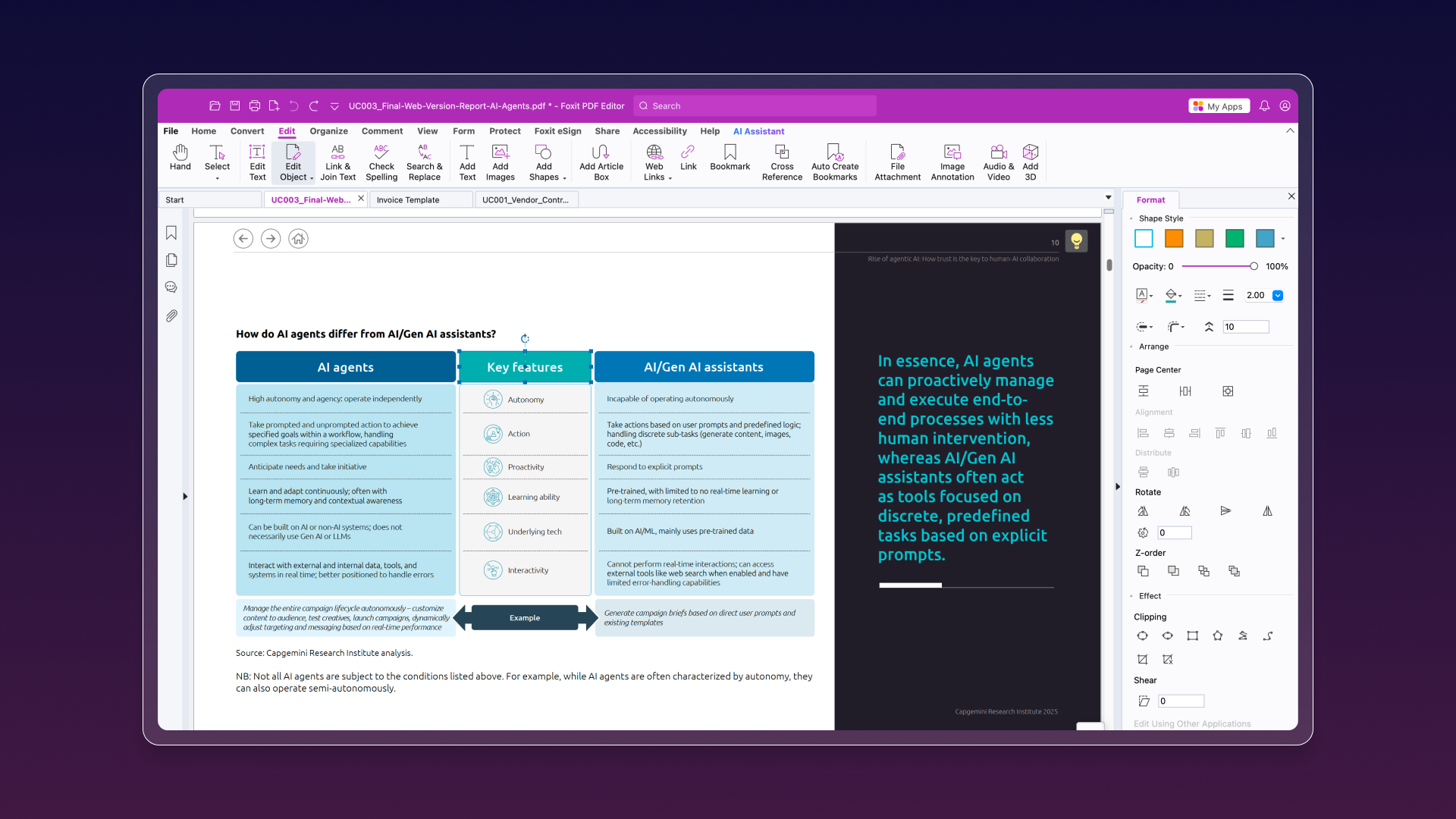
Foxit PDF Editor Demo - Edit PDFs
Edit PDFs as easily as a Word document, update text, adjust formatting, and modify layouts with intuitive tools. Reflow paragraphs across pages, change fonts and spacing, and even add images, videos, or other multimedia in just a few clicks.
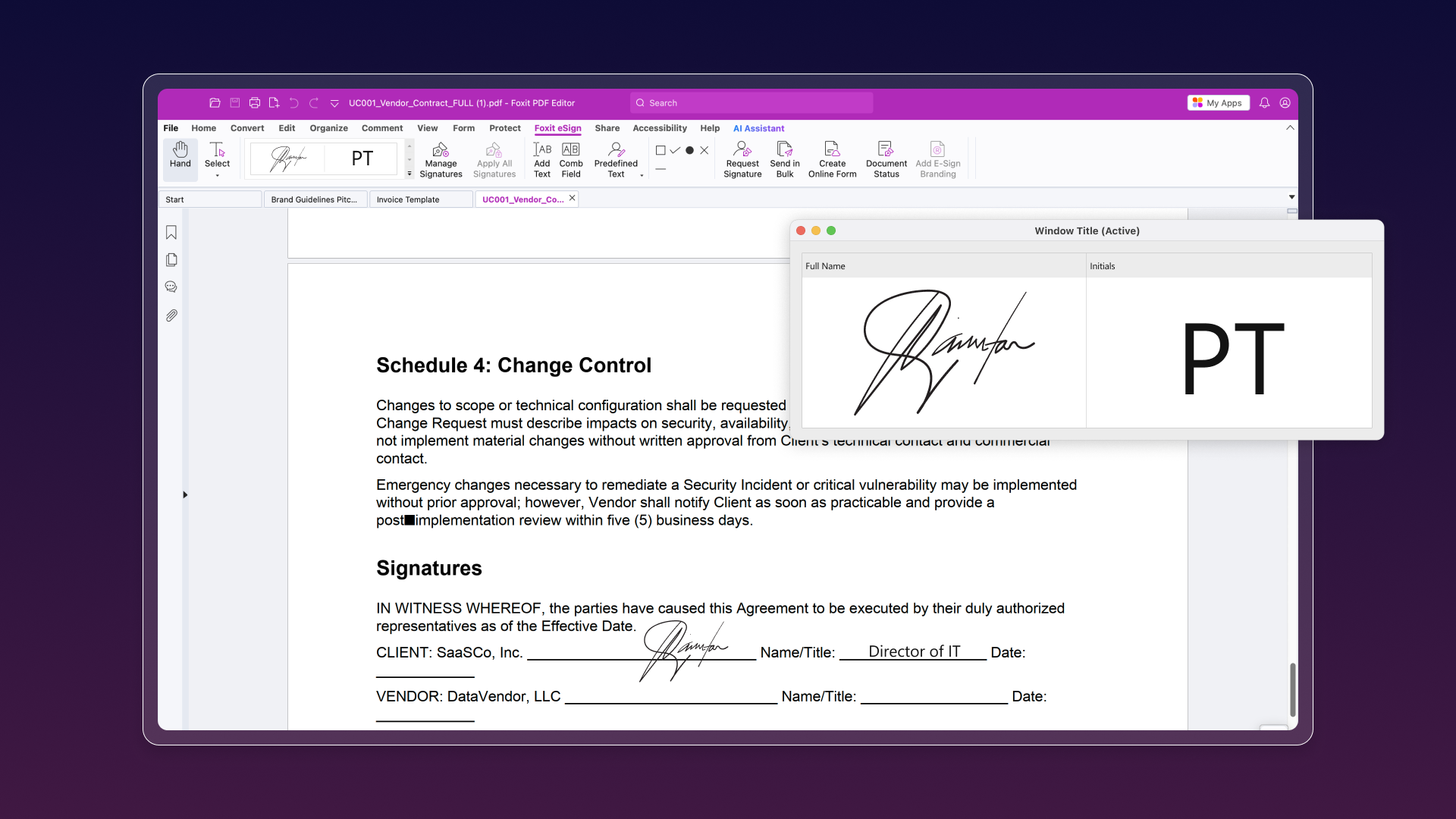
Foxit PDF Editor Demo - Sign
Foxit PDF Editor’s integrated, legally binding eSign features allow you to easily create, sign, and collaborate on documents, both inside and outside your organization, and all within a single, powerful application.
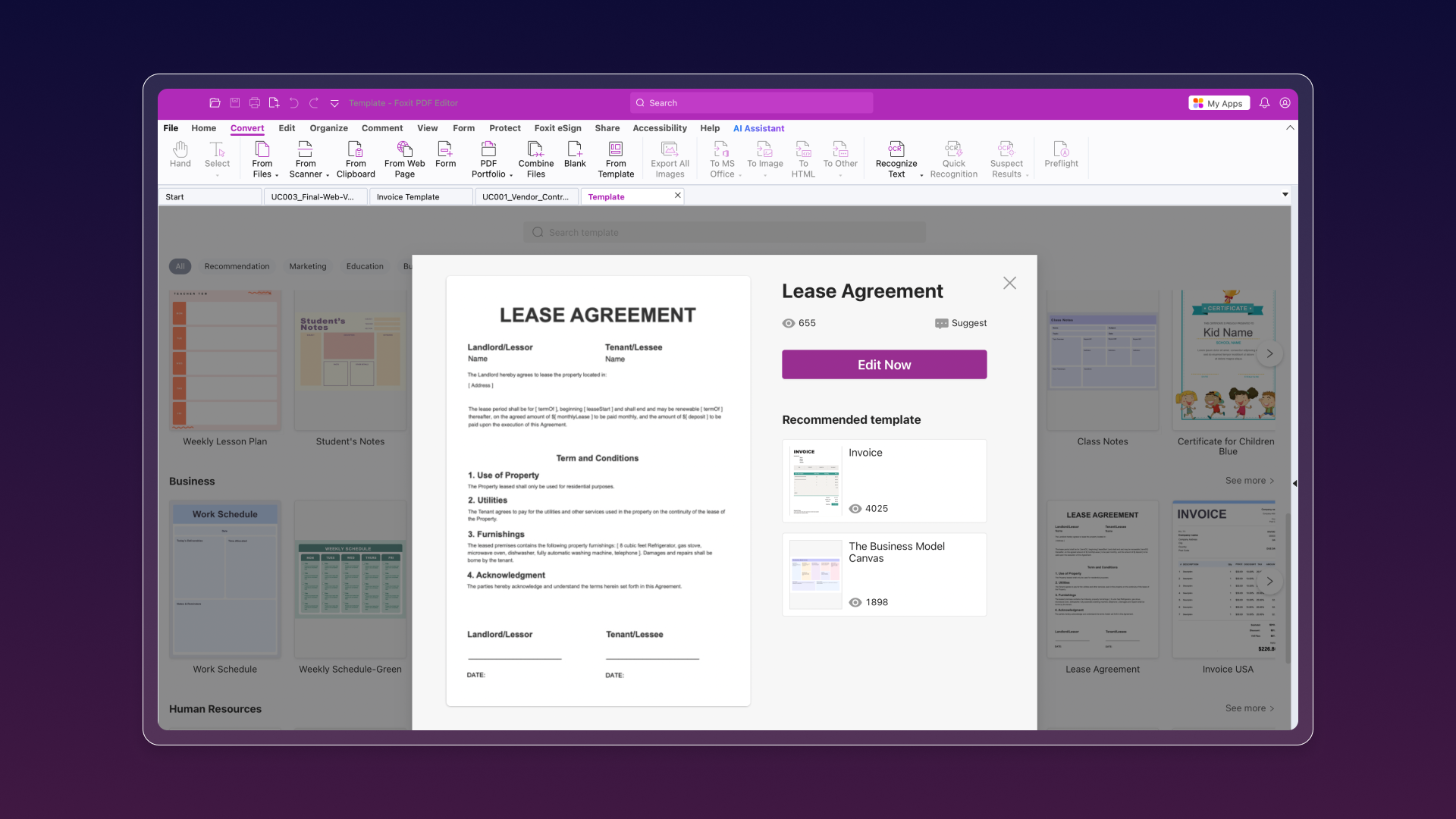
Foxit PDF Editor Demo - Create PDF documents
Create professional PDFs including PDF/A, PDF/X, and PDF/E from virtually any file type or web page. Easily create PDF Portfolios to bundle multiple files, and use automatic Form Field Recognition to build interactive, data-collecting forms. Support for 3D PDFs is built-in, including PRC renderin...
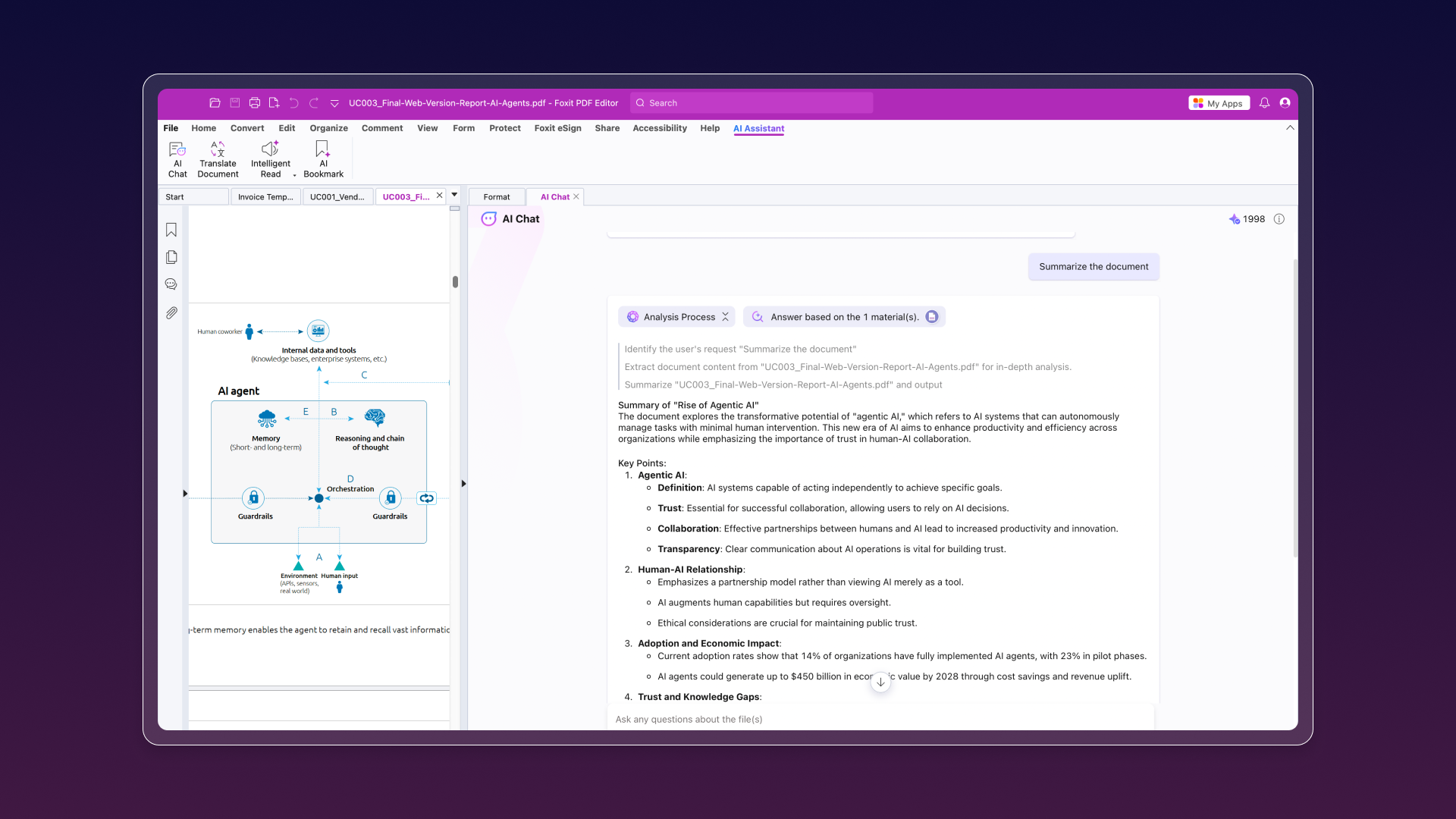
Foxit PDF Editor Demo - AI Assistant
Quickly surface key takeaways from meeting notes, reports, and internal documents. Instantly generate clear, concise summaries from lengthy or complex files, saving time and boosting productivity.
Foxit PDF Editor Demo - Collaborate Live
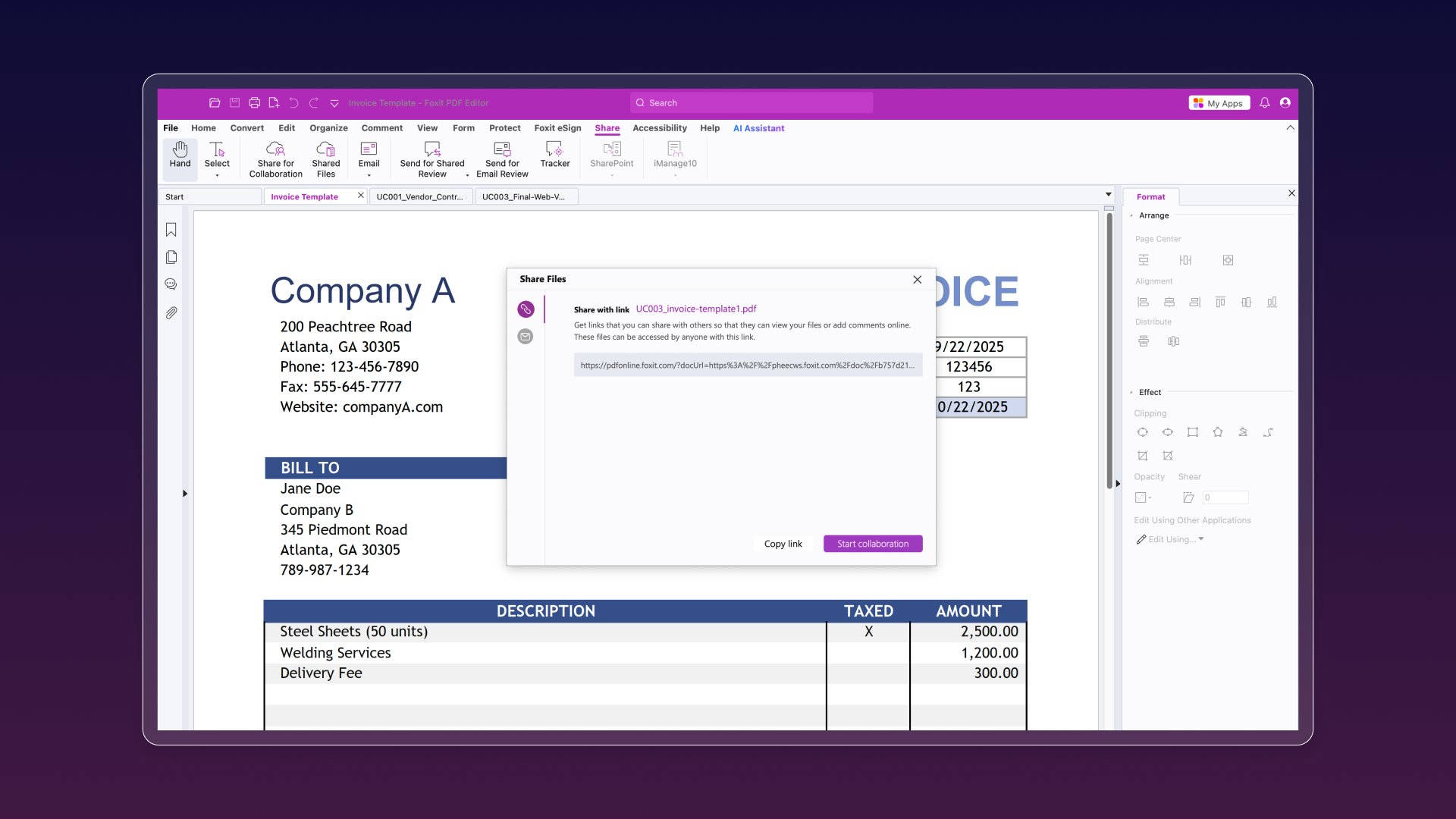
Boost team collaboration with real-time editing and shared reviews, no more endless back-and-forth. Seamlessly integrate with leading Content Management Systems and popular cloud storage platforms, making it easy for teammates to connect, share feedback, and stay in sync.
Foxit PDF Editor Demo - Export
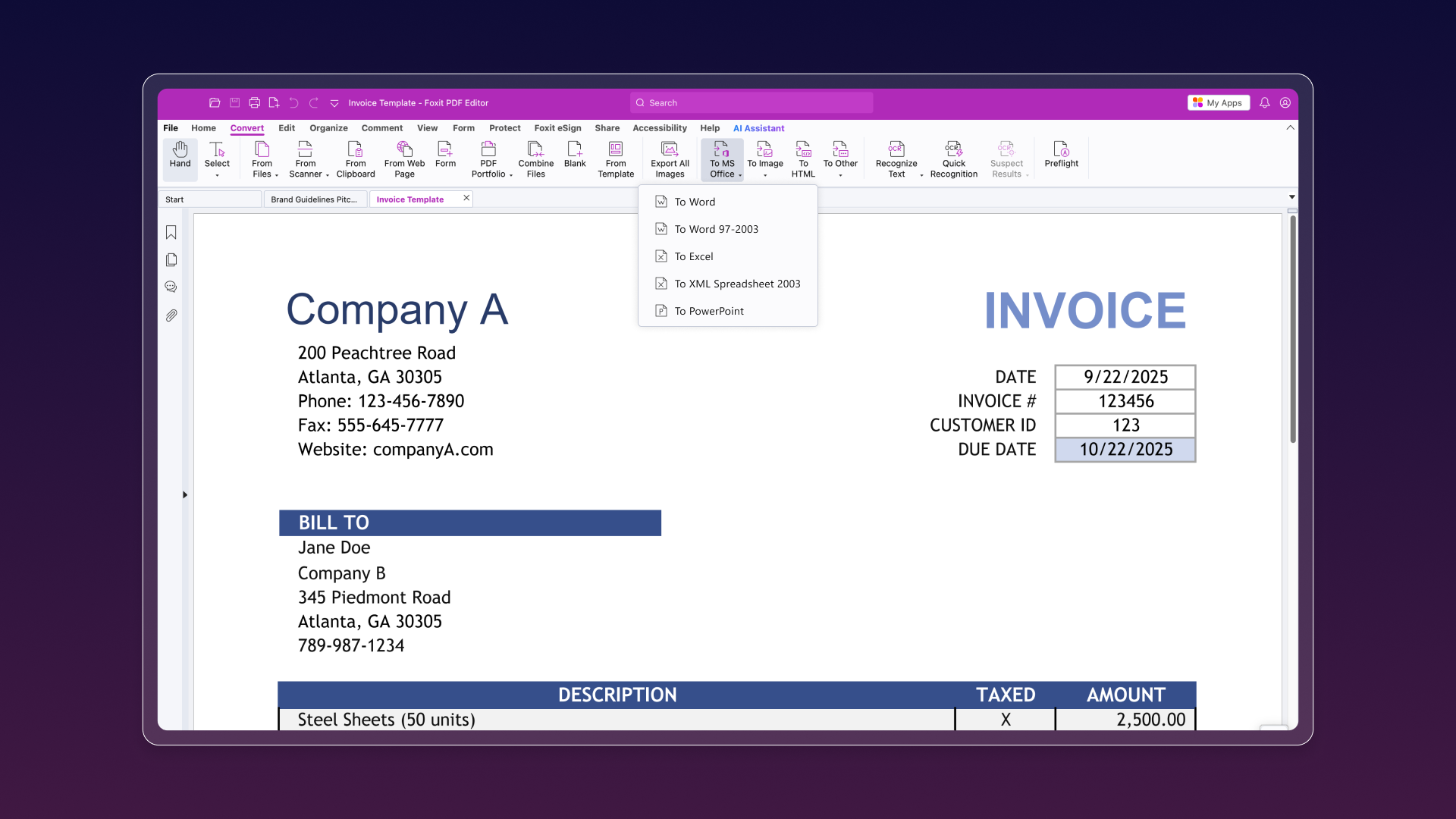
Easily share PDF content by exporting it to Word, PowerPoint, Excel, RTF, HTML, text, or image formats. Choose to export the entire document or just a selected portion, ensuring recipients always get the file in their preferred format.
Introduction to Foxit PDF Editor
Play Foxit PDF Editor Video
Introduction to Foxit PDF Editor
Product Avatar Image

Have you used Foxit PDF Editor before?

Answer a few questions to help the Foxit PDF Editor community

Foxit PDF Editor Reviews (3,611)

View 4 Video Reviews
Reviews

Foxit PDF Editor Reviews (3,611)

View 4 Video Reviews
4.6
3,611 reviews

Review Summary

Generated using AI from real user reviews
Users consistently praise the ease of use and intuitive interface of Foxit PDF Editor, highlighting its ability to streamline document editing and management tasks efficiently. Many appreciate its cost-effectiveness compared to Adobe, making it a preferred choice for both personal and professional use. However, some users note that the interface can feel cluttered at times, which may hinder navigation.

Pros & Cons

Generated from real user reviews
View All Pros and Cons
Search reviews
Filter Reviews
Clear Results
G2 reviews are authentic and verified.
Rakesh J.
RJ
Consultant Gynecologist and Medical Educator
Hospital & Health Care
Small-Business (50 or fewer emp.)
Guest users or non-business users of the software, not included in G2 scores.
"Managing Patient Reports, Prescriptions, and Teaching Documents Made Easier"
What do you like best about Foxit PDF Editor?

I handle many patient documents like lab reports, ultrasound reports, and discharge summaries. I use Foxit PDF Editor to open and review these files quickly. It is easy to use, and I was able to start using it without much training.

I often highlight important findings and add short notes while reviewing reports. It is also useful for writing online prescriptions and making small corrections when needed. The merge option helps me combine multiple reports into one file, which makes patient records easier to manage. As a medical educator, I also use it to prepare medical notes and mark important topics for teaching students. I use it regularly during the day, and it works smoothly with other systems we use, so managing files feels simple. Review collected by and hosted on G2.com.

What do you dislike about Foxit PDF Editor?

One small issue I notice is when working with scanned patient files that have many pages, sometimes the text is not perfectly clear for selection, so highlighting specific lines can take a little extra effort. This usually happens with older scanned reports.

Also, when I open very large combined patient files, the first loading can take a few extra seconds.

Overall, these are minor issues, and they do not affect my regular work in a big way. Review collected by and hosted on G2.com.

SS
Operations Manager
Mid-Market (51-1000 emp.)
"One of the best platform for working with different pdfs"
What do you like best about Foxit PDF Editor?

Recently I have used some of the most advanced feature of Foxit pdf editor and this software has now split, merging and reordering pages feature for complete control documents management. It also helps us in editing scanned documents for extra resources and time saving in our business. Review collected by and hosted on G2.com.

What do you dislike about Foxit PDF Editor?

I have been using Foxit pdf editor from quite a while now and my observation on this software is that the new users face challenges in accessing all the advance features. Also they struggle a lot to find the required tool for themselves so I would recommend their developers to provide training sessions for their new users Review collected by and hosted on G2.com.

KY
System Engineer
Small-Business (50 or fewer emp.)
"Great PDF Editor"
What do you like best about Foxit PDF Editor?

Foxit PDF Editor has introduced several useful improvements recently. One of the standout features is its enhanced AI powered tools, which make summarizing, rewriting, and extracting key information from PDFs much faster and more efficient. The interface also feels more streamlined and responsive, improving overall usability. Additionally, the collaboration features, such as commenting and shared reviews, have become more intuitive, making it easier for teams to work together on documents. The improved performance and faster loading times are also a big plus for day to day use. Review collected by and hosted on G2.com.

What do you dislike about Foxit PDF Editor?

Foxit PDF Editor is a strong tool overall, but there are a few areas for improvement. The interface can feel a bit complex for new users, and some advanced features are limited to higher tier plans. Performance can slow down with large or complex files, and real time collaboration could be more seamless. Improving OCR accuracy and simplifying the overall user experience would make it even better. Review collected by and hosted on G2.com.

RT
IT Director
Airlines/Aviation
Mid-Market (51-1000 emp.)
"Foxit PDF Editor: A Robust Alternative to Adobe with a Learning Curve"
What do you like best about Foxit PDF Editor?

I still like the general ease to use Foxit considering as with any vendor, there are going to be differences, which is not always a bad thing. So for this part, I would say unchanged. Review collected by and hosted on G2.com.

What do you dislike about Foxit PDF Editor?

The only other issue if any and I understand is this concept of when you purchase a perpetual license, that if anything, I know things change and releases change with that. But to get to the point where things don't work so well later, is the thing I'm finding when now with a number of these individual licenses that we prefer to use, that I have some on one version versus another on another version. So not only do I have to note when a user's having an issue where I might need to repair or even uninstall and reinstall the application, there's no clear indication of which version to use until I go back to the original purchase of the license. Other than that, I can deal with that but just wondering if other administrators or users have the same concerns of always having to keep up with another software version and I don't want to end up having to purchase another license for a user that has had a license, to basically make that original license null and void. Other than that, we're good. Review collected by and hosted on G2.com.

Brian W.
BW
Sorry, No Title / Retired and Loving it ////
Small-Business (50 or fewer emp.)
"FOXIT is one of my best decisions / it works like a dream, and is easy too"
What do you like best about Foxit PDF Editor?

Been using Adobe for years but there was an issue with my legacy program (15 yrs old) that they would not help me with ... so I found FOXIT, and IMHO, it is a better user experience than I had with Adobe. Anyone who does not want to pay adobe exorbitant costs WILL be happy with FOXIT ... at least same and I think better set up if you use some of FOXIT's shortcuts and use the task bar effectively. I'm so happy I chose FOXIT. FOXIT is easy to use, even for a newbie beginner on the software Review collected by and hosted on G2.com.

What do you dislike about Foxit PDF Editor?

I know you will hate me saying this, but in the first moth / 6 weeks I've used FOXIT haven't found any weaknesses. I use it for editing pdfs, creating images and so on, and haven't come across any issues, except (maybe) that some of the tools are difficult to find on the menu bar where all the functions live. Probably with continuing use I'll find where they are and it will become second nature. It's a learning curve. Review collected by and hosted on G2.com.

Stacey B.
SB
Drafting/Design Lead & Software Coordinator
Small-Business (50 or fewer emp.)
"HANDS DOWN THE MOST POWERFUL PDF EDITOR!!"
What do you like best about Foxit PDF Editor?

One of the most impressive strengths of Foxit PDF Editor is its highly intuitive design. The interface feels thoughtfully arranged—commands and tools appear exactly where a user would naturally expect them, reducing the learning curve and keeping workflows smooth and efficient.

Foxit also demonstrates a remarkable ability to anticipate user needs. When you’re navigating within a folder or viewing multiple PDFs, the software proactively offers relevant suggestions—such as prompting you to combine files—eliminating unnecessary steps and saving time.

The COMMENT tab is another standout element. It’s streamlined to include only the tools essential for review and markup, free of unnecessary clutter. Everything feels purposeful, direct, and engineered for productivity.

Another major advantage is Foxit's value. Compared to Adobe Acrobat, Foxit offers a far more budget‑friendly pricing structure without sacrificing core functionality. Adobe Acrobat Pro runs at approximately $239.88/year per user, while Foxit PDF Editor comes in at approximately $129.99/year per user—making Foxit a significantly more affordable choice for individuals and businesses alike while still delivering excellent performance and features.

Overall, Foxit PDF Editor provides a smart, intuitive, and cost‑effective solution that “thinks along with you,” minimizes effort, and maximizes productivity—making it an excellent alternative to more expensive PDF editors. Review collected by and hosted on G2.com.

What do you dislike about Foxit PDF Editor?

As the software coordinator for our company, managing Foxit’s licensing and seat assignments can be challenging. The system presents multiple reference numbers, identifiers, and codes that often feel redundant or unclear. This abundance of similar‑looking data makes it easy to get tangled in the details, and even after careful review, it can still be difficult to feel fully confident that you’re interpreting the correct information. A more streamlined and transparent licensing interface—ideally with consolidated identifiers and clearer mapping between licenses and assigned users—would significantly reduce confusion and improve administrative efficiency. Review collected by and hosted on G2.com.

John B.
JB
Writer
Small-Business (50 or fewer emp.)
Guest users or non-business users of the software, not included in G2 scores.
"Fast Loading and Quick File Opening"
What do you like best about Foxit PDF Editor?

It loads quickly and opens files fast. It also makes it easy for me to annotate, edit, and manage my PDF files. Review collected by and hosted on G2.com.

What do you dislike about Foxit PDF Editor?

So far, none. That doesn’t mean it’s perfect, but my needs are basic PDF editing and reading in a way that feels like I’m reading a hard-copy book, along with annotating and highlighting. It has done that job perfectly for me. So, no—there’s nothing I didn’t like. Review collected by and hosted on G2.com.

Francisco J. C.
FC
Desarrollador IT
Small-Business (50 or fewer emp.)
"Quick, light, and fluid: ideal for extensive documents and daily use"
What do you like best about Foxit PDF Editor?

Due to its performance and speed, it does not consume much RAM, handles extensive documents with great fluidity, and is ideal for any environment, whether it be Educational, Commercial, or Governmental, as the learning curve of its environment is very intuitive and comfortable to use. As for integrations, it's as simple as using Word or Excel. Review collected by and hosted on G2.com.

What do you dislike about Foxit PDF Editor?

Suddenly, regarding fonts, I have occasionally had difficulties changing them correctly since they are not embedded in the original document. At times, I have also had a bit of trouble using forms previously created in Adobe. Review collected by and hosted on G2.com.

DM
Project Manager
Mid-Market (51-1000 emp.)
"OK PDF Editor on the market"
What do you like best about Foxit PDF Editor?

Snapshot tool is really nice and convenient feature. Review collected by and hosted on G2.com.

What do you dislike about Foxit PDF Editor?

After several months of use, here are some of the downsides of this software:

Frequent and intrusive update popups that do not work when “Update Now” is selected

The software crashes more often than other well established platforms

The drawing tools could be improved Review collected by and hosted on G2.com.

HB
Full Stack developer
Small-Business (50 or fewer emp.)
"Fast, Lightweight PDF Editing That Just Works"
What do you like best about Foxit PDF Editor?

What I like most about Foxit PDF Editor is how fast and lightweight it feels. It opens PDF files quickly and does not slow down my system, even when the file size is large. Editing text, adding comments, or highlighting content is very easy and straightforward. I don't need much time to understand where things are. The layout feels practical, not confusing. It does the main job well without forcing unnecessary features in front of me. Review collected by and hosted on G2.com.

What do you dislike about Foxit PDF Editor?

One thing I don't like is that some useful features are locked behind paid plans, which can be limiting at times. Also, the interface can feel slightly crowded when many tools are enabled, especially for new users. Sometimes advanced options take a bit of searching to find. It's not a big issue, but the experience could be smoother with better tool organization. Review collected by and hosted on G2.com.

Questions about Foxit PDF Editor? Ask real users or explore answers from the community

Get practical answers, real workflows, and honest pros and cons from the G2 community or share your insights.

Perry R.
PR
Perry Reich
Last activity over 1 year ago

When using the edit text feature is there anyway to enlarge the box so that it contains all text?

GU
Guest User
Last activity about 2 months ago

How does the Foxit PDF Editor Suite stand out in terms of features and usability for professional PDF management?

Pricing Options

Pricing provided by Foxit PDF Editor.

PDF Editor with Admin Console

Starting at $10.99
1 User Per Month

PDF Editor+ with Admin Console

Starting at $13.99
1 User Per Month

G2 Deals

Exclusive savings on Foxit PDF Editor through G2 Deals

Cost-effective, easy-to-use, and integrated PDF and eSign solution. Perfect for knowledge workers who work independently. Sign up now to get 20% off your first year when you purchase 10-30 licenses.

How to claim this offer

Get 20% off your first year when you purchase 10–30 licenses. Click 'Buy Now' on the landing page to receive your discount on bulk license purchases.

Foxit PDF Editor Comparisons
Product Avatar Image
Adobe Acrobat
Compare Now
Product Avatar Image
Nitro PDF
Compare Now
Product Avatar Image
Wondershare PDFelement
Compare Now
Foxit PDF Editor Features
Protect
Document Management
Document Scanning
Size
Edit Fields
New PDF
Convert
Document Editor
Product Avatar Image
Foxit PDF Editor