

2026 Best Software Awards are here!See the list

Float.com Reviews & Product Details

Pricing

Pricing provided by Float.com.

Starter

Starting at $7.00
Per Month

Float.com Media

Float.com Demo - Schedule resources
Easily see who’s working on what and when, with a live schedule to plan and allocate work.
Float.com Demo - Plan capacity
Balance workloads and prevent burnout with a live view of availability, time off, and scheduled work.
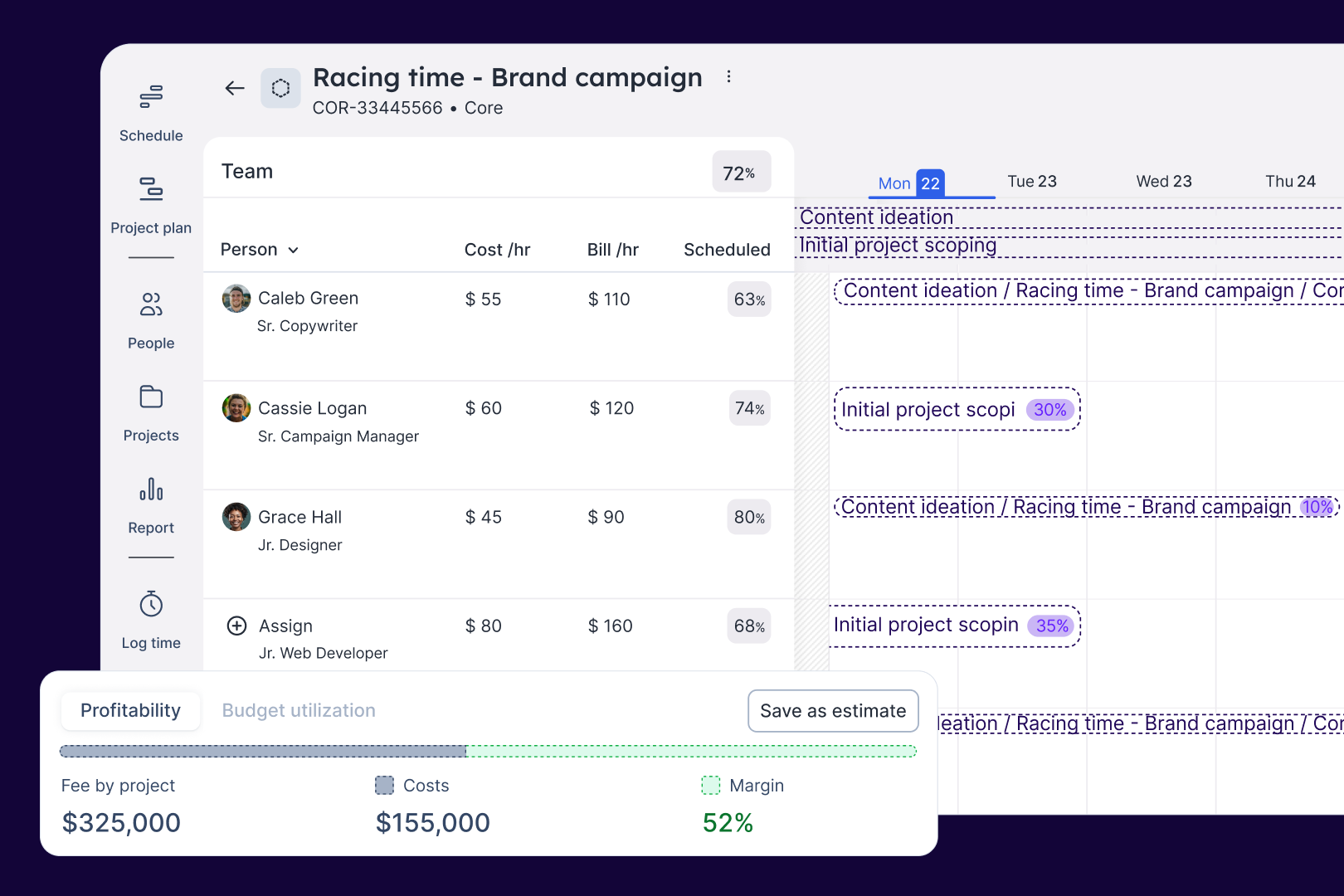
Float.com Demo - Estimate work
Quickly price new projects with confidence. Build budgets, align resourcing, and track scope changes—monitoring estimates against actuals to deliver profitable projects.
Float.com Demo - Scope projects
Align what you need with what you have to create project schedules that keep work on track with the right people, budgets, and timelines.
Float.com Demo - Track time
Simplify timesheets with pre-filled hours so your actuals data is more accurate and always on time!
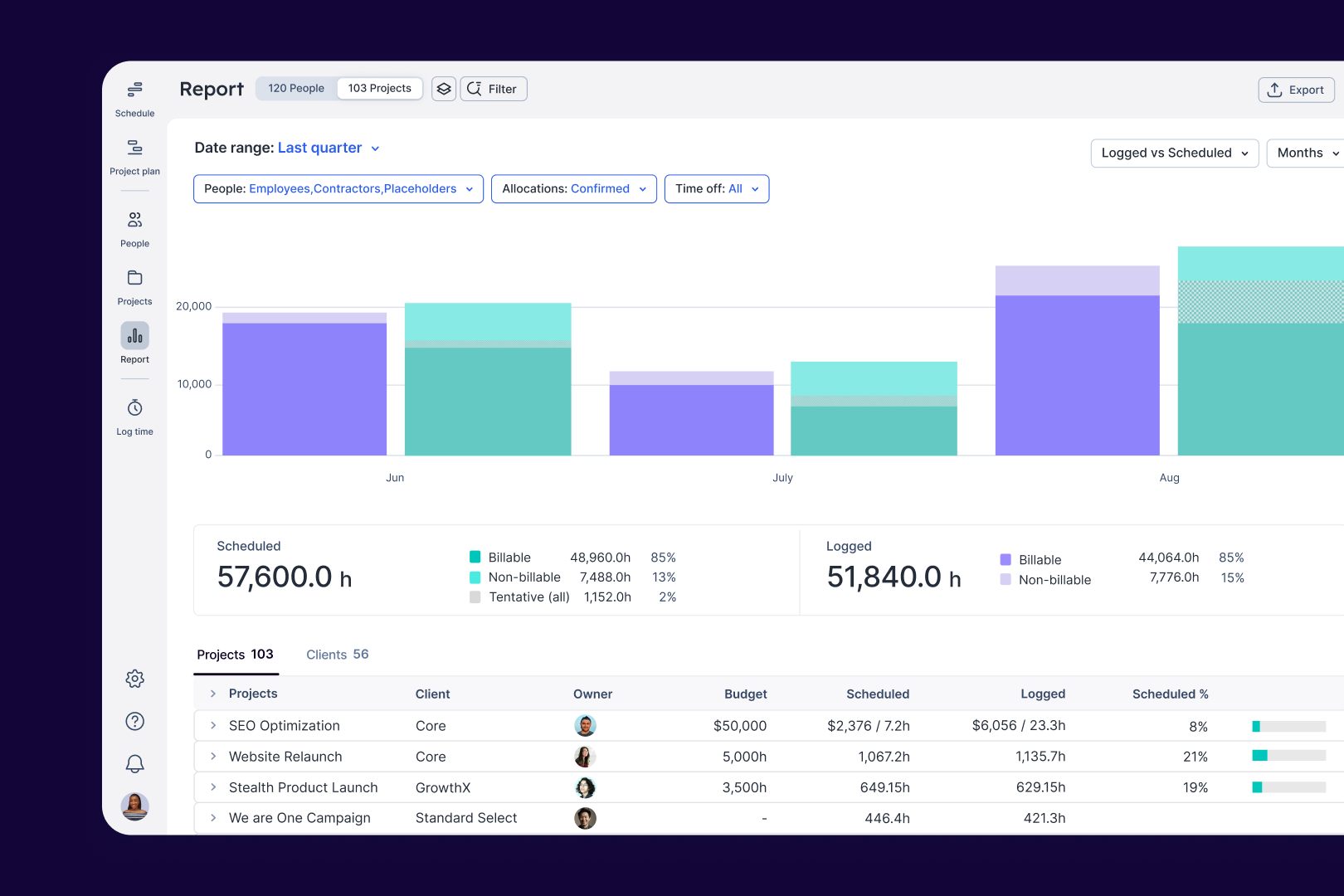
Float.com Demo - Report
Make informed decisions with live insights into team utilization and budget spend to understand how resourcing affects project margins and profitability.
Get to know Float in under 4 mins. 
See how Float connects resourcing decisions to delivery outcomes, keeping your people aligned and your projects profitable.
Play Float.com Video
Get to know Float in under 4 mins. See how Float connects resourcing decisions to delivery outcomes, keeping your people aligned and your projects profitable.
The best teams in the world don’t just wing it. They use Float to get the essential data and context they need when resourcing client work, so they can build winning teams and deliver profitable projects.
Play Float.com Video
The best teams in the world don’t just wing it. They use Float to get the essential data and context they need when resourcing client work, so they can build winning teams and deliver profitable projects.
New: finance & estimations in Float. Stop guessing and start knowing. With Float's finance & estimation features, you can price accurately, protect margins, and deliver profitable projects every time.
Play Float.com Video
New: finance & estimations in Float. Stop guessing and start knowing. With Float's finance & estimation features, you can price accurately, protect margins, and deliver profitable projects every time.
Product Avatar Image

Have you used Float.com before?

Answer a few questions to help the Float.com community

Float.com Reviews (2,038)

View 1 Video Reviews
Reviews

Float.com Reviews (2,038)

View 1 Video Reviews
4.3
2,038 reviews

Review Summary

Generated using AI from real user reviews
Users consistently praise Float.com for its ease of use and intuitive interface, which simplifies scheduling and resource management. The platform's ability to provide a clear overview of team availability and project timelines enhances collaboration and efficiency. However, some users note that the reporting features could be more robust, limiting deeper insights into project performance.

Pros & Cons

Generated from real user reviews
View All Pros and Cons
Search reviews
Filter Reviews
Clear Results
G2 reviews are authentic and verified.
Verified User in Consulting
AC
Small-Business (50 or fewer emp.)
"Beautiful, Functional UI That Delivers"
What do you like best about Float.com?

The UI is very beautiful and functional.

The customer support is great. I've used it several times and I always get an answer. Review collected by and hosted on G2.com.

What do you dislike about Float.com?

I’m not fully satisfied with the way projects are created. I use Templates to create projects, but I feel this workflow could be improved and made more streamlined. I also think the reports section needs improvement, especially in terms of flexibility for working with and analyzing the data. At the moment, I’m exporting the data to Excel so I can analyze it more quickly. Review collected by and hosted on G2.com.

sai m.
SM
Senior Tech Lead
Small-Business (50 or fewer emp.)
"Usability Shines, But Mobile Experience Needs Improvement"
What do you like best about Float.com?

I find Float's usability really good, making it a preferred choice for continuing its use. The ability to schedule and plan team projects gives visibility into future workloads, providing employees a clear understanding of upcoming tasks. Additionally, report generation is seamless compared to our previous vendor, simplifying our processes. Review collected by and hosted on G2.com.

What do you dislike about Float.com?

I find a few features missing in Float that hinder my work efficiency. Notably, the inability to see how much of the budget has been burned and the lack of a comprehensive bird's eye view hamper project progress tracking. Additionally, the restricted access to copying only a week's worth of data, rather than a broader timespan like fifteen days, limits my flexibility in managing project timelines efficiently. Furthermore, the mobile view presents a significant challenge; it is cumbersome to use and not user-friendly for time logging, which forces me to resort to using the desktop version for timesheet entries. Review collected by and hosted on G2.com.

Verified User in Broadcast Media
UB
Small-Business (50 or fewer emp.)
"Effortless Time Tracking, But Beware of Accidental Logging"
What do you like best about Float.com?

Flat is easy to use, and a useful way of tracking hours worked across many different projects, as well as an effortless way to review the years' hours worked come tax return time. It's also pretty good for knowing in advance which times of the year are already overloaded and shouldn't have extra projects added to them. Review collected by and hosted on G2.com.

What do you dislike about Float.com?

The fact that if one accidentally drags a box sideways when clicking on it logging hours, it'll fill in all the rest of everything scheduled on the day even though that stuff hasn't been worked on for those hours at all. Review collected by and hosted on G2.com.

AP
Accessibility & Usability Consultant
Mid-Market (51-1000 emp.)
"Easy to use and understand with a minor pain"
What do you like best about Float.com?

An easy to use and view schedule for your work. The different colours for different types of work/their current status makes it really easy to quickly look at your schedule and determine what you're working on and for how long. The mobile app is amazing and makes it very easy to work out your work schedule on the go. Review collected by and hosted on G2.com.

What do you dislike about Float.com?

It's been a minor missing feature for a while now but the inability to quickly see a particular project's overview to see what other team members are working on it is annoying. It currently requires you to play around with the filter and look around on the schedule.

With some projects that have notes, it would be good to have a preview of what they are on the schedule page, which would also make it clear that the particular project has notes defined. Review collected by and hosted on G2.com.

Verified User in Marketing and Advertising
UM
Small-Business (50 or fewer emp.)
"Effortless Time Tracking—Float Gets Out of the Way and Just Works"
What do you like best about Float.com?

First and foremost, ease of use. It is intuitive to both use and interact with, customizable, and having used other time keeping solutions keeps out of my way for the most part. Time keeping and logging my hours is something I want to spend as little time as possible on, and Float makes that possible by getting out of my way and letting me do what I need to do as fast as possible. Review collected by and hosted on G2.com.

What do you dislike about Float.com?

Honestly, nothing. It's fantastic, easy to use and does exactly what good technology does which is to offer zero friction in doing what I want it to do. Review collected by and hosted on G2.com.

AS
Project Geologist
Mid-Market (51-1000 emp.)
"Streamlined Scheduling, But Needs Better Project Integration"
What do you like best about Float.com?

I find Float incredibly useful for coordinating schedules across departments, allowing me to see active statuses and dynamically change schedules easily. Its integration capabilities with our systems, simplicity in setting up, and quick filtering process for organizing office personnel are impressive. The calendar feature stands out with its user-friendly drag-and-drop functionality, reducing the hassle of manual formatting. These aspects not only streamline scheduling but also save time and resources effectively. Review collected by and hosted on G2.com.

What do you dislike about Float.com?

I don't really like how Float handles project integration, especially since not everything we do is project-based. The need to apply a 'work from home' status as a miscellaneous project feels awkward, and the method of displaying out-of-office statuses is not intuitive or clear. It would be better if these statuses could be visually highlighted more significantly, rather than just having a small marker. Review collected by and hosted on G2.com.

NM
Senior Product Support Specialist
Small-Business (50 or fewer emp.)
"Intuitive, Beautiful, and Reliable—Minor Event Stacking Quirks"
What do you like best about Float.com?

This software is beautiful, straightforward, and user-friendly. The options are thoughtfully organized, making navigation and use feel very intuitive. We rely on it every day, and it genuinely improves our team's organization. Updating our schedules so everyone stays informed has never been simpler. The calendar sync integration is also an excellent feature, and it has been implemented exceptionally well. Review collected by and hosted on G2.com.

What do you dislike about Float.com?

Sometimes, events can stack in odd ways, but I don't consider this a major issue. Review collected by and hosted on G2.com.

Cecilia C.
CC
"Effortless Task Scheduling with Intuitive Interface"
What do you like best about Float.com?

I highly value Float for its ease of use and user-friendly interface, which made the setup process straightforward and pleasant. Its functionality to track my work and deadlines is indispensable, helping me stay organized and on top of my tasks and milestones. The ability to set up new projects, tasks, and reminders is incredibly useful, and I particularly appreciate having a visual timeline for my Gantt chart milestones. Float's capability to send email notifications keeps me informed, which adds another layer of efficiency to the workflow. Overall, I like Float because it meets my need to effectively track tasks and milestones without unnecessary complexity, and I find it good as it is. Review collected by and hosted on G2.com.

What do you dislike about Float.com?

I would like Float to have more complexity in its features. Review collected by and hosted on G2.com.

CD
Creative Director
Mid-Market (51-1000 emp.)
Business partner of the seller or seller's competitor, not included in G2 scores.
"Visually Simple Interface That’s Easy to Use"
What do you like best about Float.com?

I love how visually simple the interface is. Review collected by and hosted on G2.com.

What do you dislike about Float.com?

Maybe when I have to refresh to see updates. It would be awesome if it synced with our timesheet app and auto populated our time for is to edit or adjust accordingly. Review collected by and hosted on G2.com.

Verified User in Information Services
CI
Small-Business (50 or fewer emp.)
"Excellent UX and Interface, but API Integration Could Be Improved"
What do you like best about Float.com?

The user experience is excellent. All elements are easy to see, and navigating between the various pages and menus is straightforward. The overall look and feel of the interface is also impressive. Review collected by and hosted on G2.com.

What do you dislike about Float.com?

While it's great that there is an API available for implementing integrations, we found that it was missing some specific features that would have been very helpful for fully connecting all our systems. This isn't necessarily a negative point, but having more comprehensive API access for integration with other systems would be beneficial. Review collected by and hosted on G2.com.

Pricing Options

Pricing provided by Float.com.

Starter

Starting at $7.00
Per Month

Pro

Starting at $12.00
Per Month

Enterprise

Contact Us
Float.com Comparisons
Product Avatar Image
Resource Guru
Compare Now
Product Avatar Image
Kantata Professional Services Automation (formerly Mavenlink+ Kimble)
Compare Now
Product Avatar Image
Teamwork.com
Compare Now
Float.com Features
Ease of Completing Timesheets
Tracking Time to Project/Task
Billable Time Rate Management
Time Tracking
Business Tool Integration
Automated Reminders
User, Role, and Access Management
Reporting
Performance and Reliability
Product Avatar Image
Float.com