

Compare this with other toolsSave it to your board and evaluate your options side by side.
Save to board

Exalate Reviews & Product Details

Profile Status

This profile is currently managed by Exalate but has limited features.

Are you part of the Exalate team? Upgrade your plan to enhance your branding and engage with visitors to your profile!

Value at a Glance

Averages based on real user reviews.

Time to Implement

2 months

Return on Investment

6 months

Exalate Integrations

(5)
Integration information sourced from real user reviews.

Exalate Media

Exalate Demo - Plan integrations with AI guidance
Describe your sync requirements in plain language. Aida helps you map out what needs to connect, which fields should sync, and how data should flow between systems – before you write a single line of code.
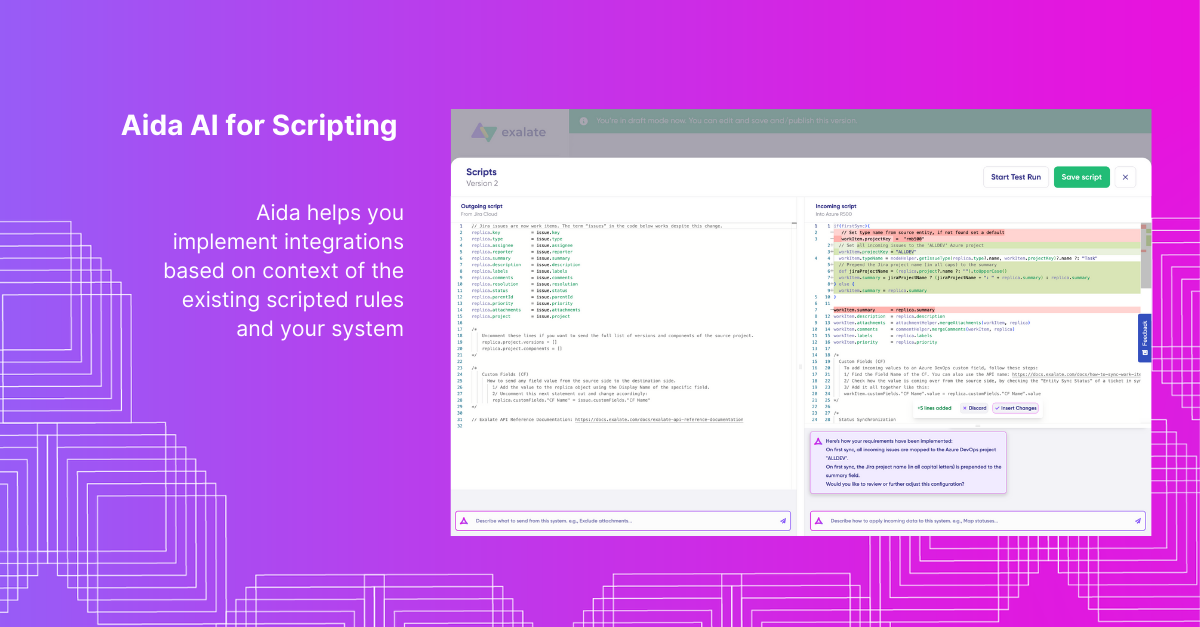
Exalate Demo - Generate sync scripts from natural language
Tell Aida what you want to sync – "Exclude attachments" or "Only sync high-priority items" – and get working Groovy code. Review the changes, insert or discard, and keep full control over your sync logic.
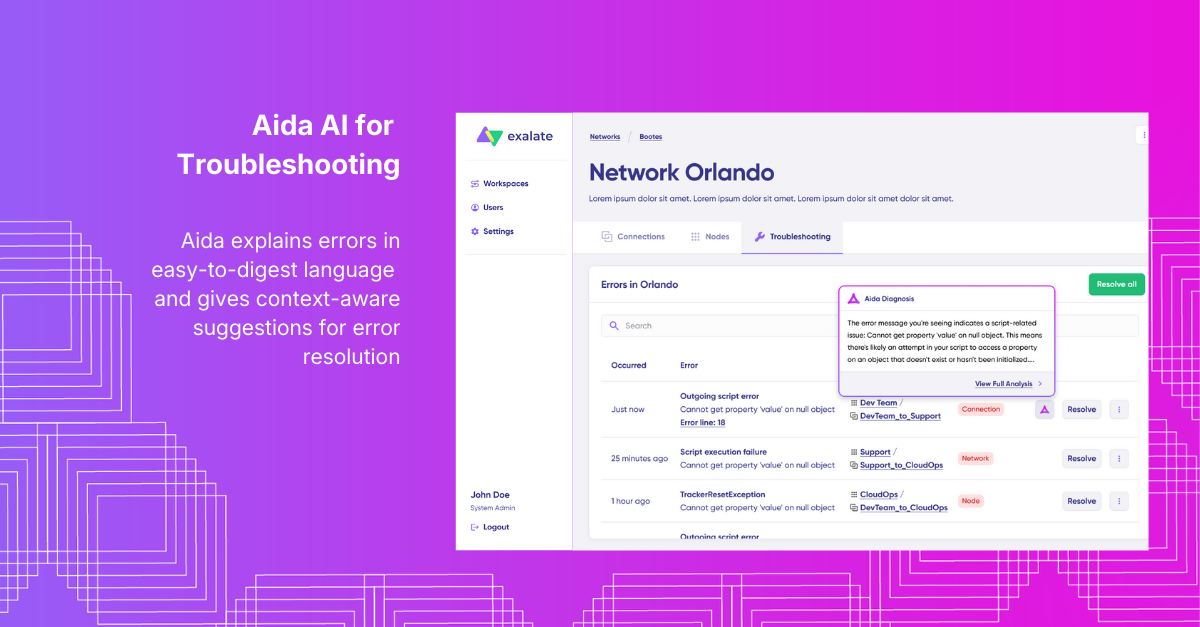
Exalate Demo - Diagnose sync errors with context-aware suggestions
When something breaks, Aida analyzes the error, explains what went wrong in plain language, and proposes a fix. View full analysis, error details, or replicas in JSON – then decide how to resolve it.
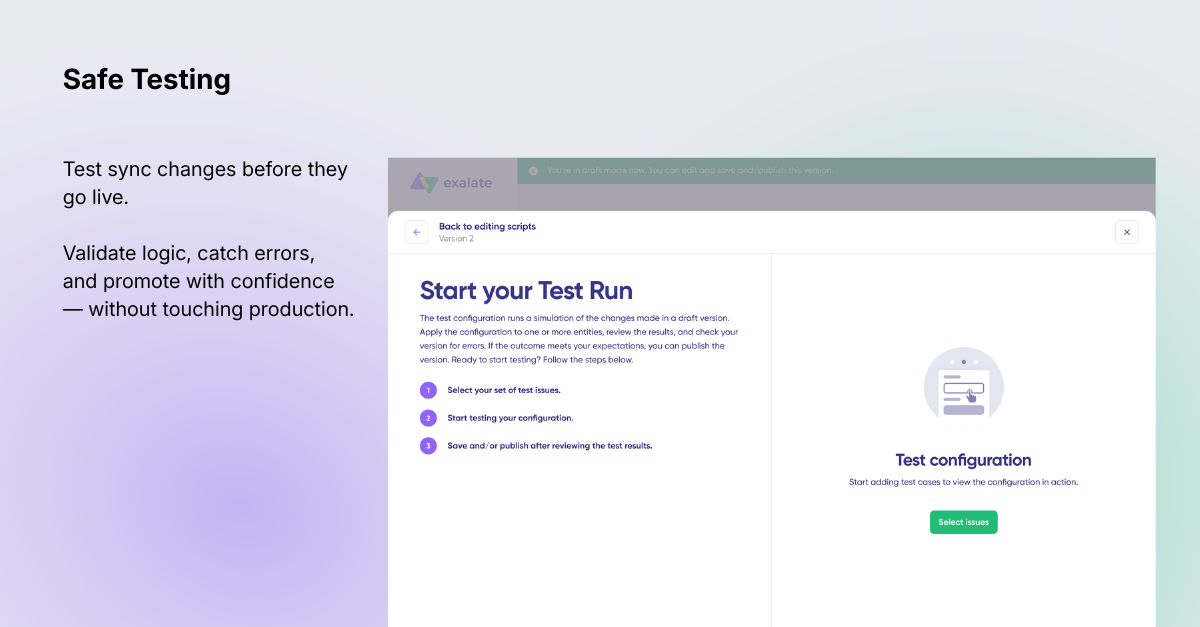
Exalate Demo - Validate changes before they hit production
Test your sync scripts against real data without affecting live items. Preview how field mappings will apply, check incoming and outgoing replicas, then publish only when you're confident everything works.
Exalate Demo - Sync Different Fields
Sync different entities between multiple ITSM tools like Jira, Zendesk, Azure DevOps, Salesforce, GitHub, ServiceNow & more.
Exalate Demo - Sync Anything Across Multiple Projects and Instances
Sync Multiple projects, even if they reside in different tools. Sync anything, from comments and statuses to custom fields and dropdowns.
Product Avatar Image

Have you used Exalate before?

Answer a few questions to help the Exalate community

Exalate Reviews (72)

Reviews

Exalate Reviews (72)

4.7
72 reviews

Review Summary

Generated using AI from real user reviews
Users consistently praise the product for its ease of configuration and flexibility in synchronization between various platforms like Jira and Zendesk. Many appreciate the responsive support team, which enhances the overall experience, although some mention that the initial setup can be a bit challenging for newcomers. Overall, it is regarded as a powerful tool for managing integrations effectively.

Pros & Cons

Generated from real user reviews
View All Pros and Cons
Search reviews
Filter Reviews
Clear Results
G2 reviews are authentic and verified.
BY
DevOps Systems Engineer
Mid-Market (51-1000 emp.)
"Secure, Decentralized Jira Sync Across Organizations"
What do you like best about Exalate?

I really appreciate the decentralized architecture. It allows us and our partner to maintain full control over our own Jira environments. We don't have to give them admin access to our system, and they don't have to give us theirs. It’s the most secure and professional way to sync tasks across different organizations and versions of Jira (Cloud and Server). Review collected by and hosted on G2.com.

What do you dislike about Exalate?

The initial configuration can be time-consuming, especially when bridging different versions of Jira (Cloud vs. On-prem). Because both sides of the connection need to be configured separately to maintain security, it requires a lot of coordination with the partner's admin. This can be challenging when working across different time zones, as any small tweak to the sync logic usually requires verification from both parties Review collected by and hosted on G2.com.


AM
Senior IT Operations Analyst
Mid-Market (51-1000 emp.)
"A long-term partner for our Jira–Salesforce integration"
What do you like best about Exalate?

What we like most about Exalate is its flexibility. The scripting engine allows us to fully control how Jira and Salesforce communicate, even in complex scenarios. It doesn’t feel like a “rigid connector”, it adapts to our processes instead of forcing us to adapt to it.

We also really appreciate its reliability over the years and the quality of the support team, which has always been responsive and knowledgeable when we needed help. Review collected by and hosted on G2.com.

What do you dislike about Exalate?

The main challenge is the learning curve. To fully leverage Exalate’s power, you need some technical knowledge, especially around scripting and sync logic. It’s not a plug-and-play tool if you have advanced requirements. Review collected by and hosted on G2.com.

Jennesa O.
JO
Search Engine Optimization Specialist
Small-Business (50 or fewer emp.)
"Reliable Zendesk and Jira Sync for Support and Dev"
What do you like best about Exalate?

We use Exalate to sync tickets between Zendesk for our support team and Jira for our dev team. The best part is that everything updates automatically, comments, status changes, attachments, all of it just shows up on the other side. Before this we were manually copying information back and forth which honestly was not very efficiant. Now both teams can stay in their own system but still see the same updates in real time. It really helps avoid confusion and saves us alot of time overall. Review collected by and hosted on G2.com.

What do you dislike about Exalate?

There is definetly a learning curve, especially for non technical users who are not used to working with integrations. The setup can feel a bit overwhelming in the begining. but the documentation is pretty detailed and they have step by step guides which makes it easier if you just follow the process. Once everything is configured properly it works consistantly and you do not have to worry about it much. Review collected by and hosted on G2.com.

Verified User in Outsourcing/Offshoring
UO
Small-Business (50 or fewer emp.)
"Real-time bidirectional Jira–ServiceNow integration for ITSM incident escalation"
What do you like best about Exalate?

We use Exalate to integrate Jira and ServiceNow ITSM for incident escalation between our support and engineering teams. The biggest advantage is that we get full control over what we want to share: fields, comments, attachments, etc. From an ITSM perspective, this is important since we want to keep ServiceNow as our system of record for incidents, while Jira manages development work. We also added conditional logic like: mapping ServiceNow assignment groups to Jira components, and synchronizing work notes differently from public comments. This was easy with Exalate's scripting capability. Review collected by and hosted on G2.com.

What do you dislike about Exalate?

Because the tool is so customizable, there is a slight learning curve if you are moving beyond basic syncs into complex scripting. It’s not a plug-and-play tool for complex ITSM workflows, but once configured properly, it’s stable and reliable. Plus, their AI assistant (Aida) can help generate the sync logic and can significantly cut down deployment time. Review collected by and hosted on G2.com.

Verified User in Business Supplies and Equipment
AB
Small-Business (50 or fewer emp.)
"The first integration tool that truly solved our cross-team sync issues"
What do you like best about Exalate?

We've been struggling with syncing Jira and ServiceNow across two different teams for almost a year. Tried a couple of other tools before Exalate and honestly nothing came close to what we needed. the setup took a bit of time to figure out, especially the scripting part, but once it clicked everything just ran smoothly.

What I really liked is that each side of the connection is configured independently. Our partner company doesnt see fields they shouldn't, and we don't get flooded with their internal notes either. That was a big deal for us since we work with external vendors a lot.

The support team was super helpful when we got stuck. they responded within a few hours and actually understood the technical side of things, not just copy/pasting from a FAQ page. Review collected by and hosted on G2.com.

What do you dislike about Exalate?

There is a learning curve to get started, but once you're past it, the flexibility and power are hard to beat. Overall, would definitely recommend it for teams that need serious, flexible integrations. Not a plug-and-play solution, but absolutely worth the effort. (edited) Review collected by and hosted on G2.com.

Verified User in Marketing and Advertising
CM
Small-Business (50 or fewer emp.)
"Efficiently simplifying cross-company jira synchronization"
What do you like best about Exalate?

The two-way sync between Jira instances is what sold us, and it genuinely works as

advertised. We collaborate with two external partners and before exalate we had

someone manually copying updates across projects every single day. Embarrassing to

admit but that was our actual process. Once we set up exlate the synchronization just

runs in the background comments, status changes, attachments everything stays

aligned without anyone having to babysit it. The field mapping configuration is flexible

enough that we could control exactly what gets shared with each partner and what stays

internal, which was a non-negotiable for us from a data privacy standpoint. Setup took a

bit of time upfront but the exalate team was responsive and helped us get the mappings

right. Review collected by and hosted on G2.com.

What do you dislike about Exalate?

Honestly the initial configuration is not something you can figure out in an afternoon,

especially if your Jira setup has a lot of custom fields and workflows. We hit a few edge

cases where certain field types weren't syncing the way we expected and we had to dig

into the mapping rules to troubleshoot. Documentation is decent but could be more

detailed on advanced scenarios. Not a dealbreaker at all, just something to be aware of,

plan for a proper onboarding window rather than assuming you can flip it on in a day. Review collected by and hosted on G2.com.

PP B.
PB
"Syncs Jira and GitHub with Ease, But Needs Better Text Rendering"
What do you like best about Exalate?

I value Exalate for its ability to synchronize Jira issues with GitHub issues seamlessly, which is crucial in maintaining consistency between the private and public project views. This synchronization ensures that my team can focus their daily work within Jira while simultaneously providing visibility to our community and supported customers on GitHub, where they do not have direct access to Jira. Additionally, I admire the basic setup process, which is straightforward and allows for quick implementation, facilitating efficient initial deployment. Furthermore, after evaluating multiple vendors, I concluded that Exalate was the superior choice, confirming its effectiveness in fulfilling our specific needs. Review collected by and hosted on G2.com.

What do you dislike about Exalate?

I find advanced scripting in Exalate challenging, especially when trying to implement more complex functionalities. Despite contacting support, I had issues syncing Jira fixversion with GitHub milestone, which required more than 50 lines of code and stopped working after a few months, leading to frustration and me eventually giving up on it. Additionally, I am not satisfied with the text rendering between Jira and GitHub, which I feel needs improvement. Review collected by and hosted on G2.com.

VM
Developer
Mid-Market (51-1000 emp.)
"Exalate has been a game-changer for our cross-platform integration needs"
What do you like best about Exalate?

We've been using Exalate to synchronize tickets between Zendesk and Jira, and the experience has been smooth and highly effective. What truly stands out is the flexibility and control it provides — from intuitive visual triggers to more advanced scripting options that allow for precise and customized sync logic. Review collected by and hosted on G2.com.

What do you dislike about Exalate?

for someone new to Exalate, the setup can be a little confusing at first. And sometimes, the error messages aren’t very clear, which makes troubleshooting harder than it should be.

But overall, once everything is set up, it works really well. Review collected by and hosted on G2.com.

Jordan P.
JP
Vice President, Customer Support
Mid-Market (51-1000 emp.)
"Easy to get started, partner network is key"
What do you like best about Exalate?

Once you understand the outgoing/incoming sync set up for both programs, it is pretty straight forward in coding the changes. I leverage ChatGPT, Exalate's AI and a third party partner to complete our integration. Review collected by and hosted on G2.com.

What do you dislike about Exalate?

As I chose the 'code your own' option, the one thing that initially hit us was our nuanced set up of Azure DevOps. Some custom fields weren't mapping so we ended up leveraging Bit2Bit to help us get across the finish line. Experience is key. Review collected by and hosted on G2.com.

Brenda  T.
BT
Product Specialist
Mid-Market (51-1000 emp.)
"Seamless Zendesk-Jira Integration for Effortless Ticket Creation"
What do you like best about Exalate?

I like the most in the quick relation between Zendesk and Jira for creating tickets that needs support from the engineering team. Review collected by and hosted on G2.com.

What do you dislike about Exalate?

The configuration is a little tricky but not impossible. Review collected by and hosted on G2.com.

Questions about Exalate? Ask real users or explore answers from the community

Get practical answers, real workflows, and honest pros and cons from the G2 community or share your insights.

GU
Guest User
Last activity over 2 years ago

How do you use Exalate?

GU
Guest User
Last activity over 2 years ago

How do I sync GitHub with Jira?

Pricing Insights

Averages based on real user reviews.

Time to Implement

2 months

Return on Investment

6 months

Perceived Cost

$$$$$
Exalate Comparisons
Product Avatar Image
Unito
Compare Now
Product Avatar Image
ConnectALL
Compare Now
Product Avatar Image
Workato
Compare Now
Exalate Features
Data Mapping
Product Avatar Image
Exalate